Please REGISTER or RENEW your account on RAPiDGATOR.net and support us by doing through all RAPiDGATOR working download links on main posts...
Aug 3

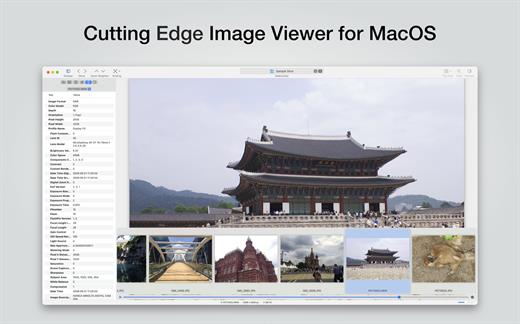
EdgeView 5.9.4

EdgeView 5 is fast image viewer has elegant user interface. EdgeView 5 is developed and designed for modern MacOS. It can open various image files such as JPEG, PNG, TIFF, BMP, and RAW file of DSLR, EPS and PDF, AI(Adobe Illustrator). Can open image files in archive directly without extraction.

User can open files, rename files, delete files from EdgeView’s file browser. Also can access to SMB/AFP/FTP network volume.

User can navigate images quickly by using keyboard shorcut, mouse wheel, trackpad gesture. EdgeVew show EXIF information, play animation GIF/PNG/WebP smoothly. Save last status to history, and restore when reopen file.

EdgeView 5 will be the best choice when viewing and managing image files.

What’s New

Version 5.9.4:


  • Release notes were unavailable when this listing was updated.
Compatibility

macOS 11.1 or later
Apple Silicon or Intel Core processor


Release Name: EdgeView 5.9.4
Size: 146.6 MB
Links: HOMEPAGE – NFO – Torrent Search

Download: RAPiDGATOR

4 Comments
Aug 3

Looq 1.7.2

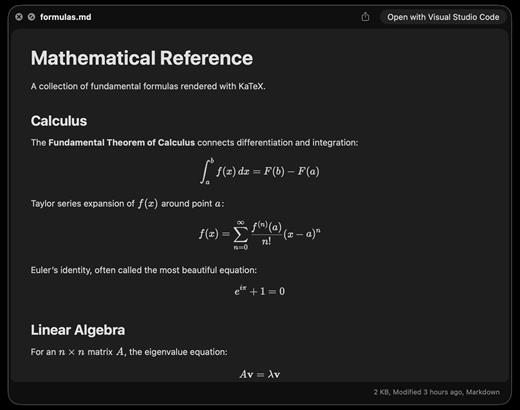
A better look at your files. Preview Markdown with KaTeX and Mermaid, highlight 190+ languages, view CSV and SQLite tables, browse archives and folders. All from Quick Look.
macOS 14 (Sonoma) or later

Markdown
Full GFM rendering with rich formatting support.


  • Live rendering on file save
  • KaTeX math (inline and block)
  • BeautifulMermaid diagrams
  • Syntax-highlighted code blocks
  • GitHub Alerts and emoji shortcodes
  • Auto table of contents sidebar
  • Remote image caching
  • Scroll position memory

Source Code
Syntax highlighting for 190+ languages.


  • Progressive rendering
  • Auto-format JSON, CSS, XML, SVG, plist
  • Configurable line numbers
  • Custom fonts, size, and weight
  • Tab width and word wrap
  • Independent light and dark themes
  • Shebang detection

Data Files
Native table views for structured data.


  • Resizable CSV and TSV columns
  • Alternating row colors
  • SQLite multi-table preview
  • Column type and constraint tooltips
  • Color-coded diff/patch
  • Multi-file tab switching
  • Large file truncation

Archives and Folders
Browse compressed files and directories.


  • ZIP and TAR directory tree
  • Pure Swift binary parsing
  • File size, date, and type columns
  • Sortable column headers
  • Folder preview with Spotlight metadata
  • Configurable display columns
  • Finder tag support
What’s New

Version 1.7.2:


  • Release notes were unavailable when this listing was updated.
Compatibility

macOS 14 (Sonoma) or later


Release Name: Looq 1.7.2
Size: 17.4 MB
Links: HOMEPAGE – NFO – Torrent Search

Download: RAPiDGATOR

4 Comments
Aug 3

Mellel 6.7.1

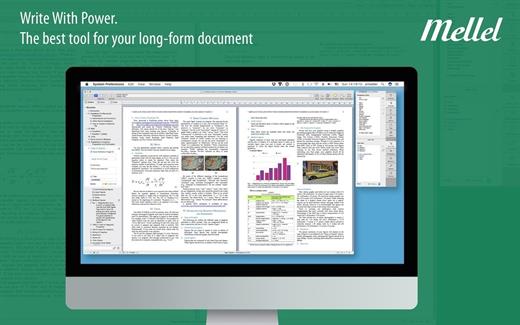
Mellel is the leading word processor for OS X and has been widely considered the industry standard for long form documents since its inception. Mellel focuses on writers and scholars for technical writing and multilingual word processing. It offers special tools to help you write and organize long documents easily. If you need multilingual support or are writing bi-directional text, Mellel is just the thing for you: Arabic, Persian, Hebrew, and Syriac never looked better on a Mac. Even if you don’t need all the bells and whistles, Mellel is still the right choice for you: clean, stable, and easy to use.

What’s New

Version 6.7.1:


  • Release notes were unavailable when this listing was updated.
Compatibility

macOS 10.10 or later


Release Name: Mellel 6.7.1
Size: 109 MB
Links: HOMEPAGE – NFO – Torrent Search

Download: RAPiDGATOR

4 Comments
Aug 3

OmniOutliner Pro 6.2.1

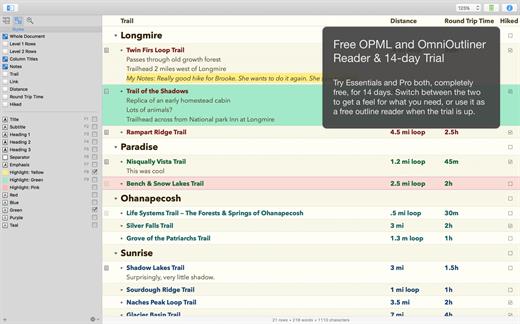
OmniOutliner Pro is a flexible program for creating, collecting, and organizing information. Give your creativity a kick start by using an application that’s actually designed to help you think. It’s like having an extra brain – one that doesn’t keep losing the car keys.

You can use OmniOutliner’s document structure to create hierarchies of main headings and subpoints that can be expanded and collapsed, which are immensely useful when it comes to brainstorming new ideas, drilling out specifics, and lining up steps needed to get everything done. But you aren’t limited to outlines – you’ve got multiple columns, smart checkboxes, customizable popup lists, and an über-innovative styles system at your disposal.

OmniOutliner Professional includes in-depth outlining features like folded editing, clipping service support, audio recording, a new sections drawer, and saved templates. With OmniOutliner Professional, you can actively hide and display the information in your outlines – or quickly jump from one place to another – so you can save time and be more productive by focusing on exactly what you want to see. The new Names Styles feature in OmniOutliner Professional gives you even more options for fast and powerful editing. Download the Pro version today and try it for yourself!

What’s New

Version 6.2.1:


  • Release notes were unavailable when this listing was updated.
Compatibility

macOS 15.0 or later.


Release Name: OmniOutliner Pro 6.2.1
Size: 60.2 MB
Links: HOMEPAGE – NFO – Torrent Search

Download: RAPiDGATOR

4 Comments
Aug 3

RAR Extractor Max – Unzip File 13.9.5

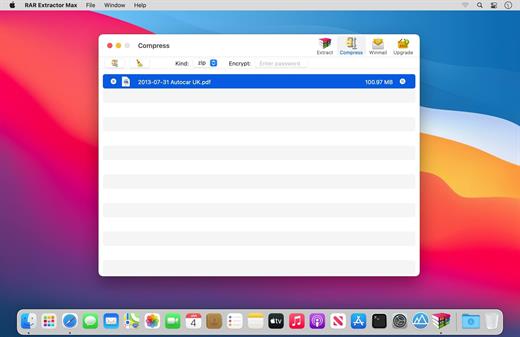
“RAR Extractor Max” inherited the advantages of “RAR Extractor Pro”, we redesigned the UI and added more powerful functionalities.


  • Support unarchive RAR, winmail.dat, ZIP, 7z, tbz, sti, tar, xar, lha, lzh, hqx, bin, bz2, bzip2, bz, xz, iso, cid, nrg, mdf, taz, lzma, exe, msi, cpio, lzx, jar, swf, xip, ace, arj, pak, pkg, apk, lbr, lqr, cab, rpm, cpt, sea, pdf, nsa, dcs, now, spk…
  • Support archive files and folder to encrypted zip&7z
  • Quicklook files in archive before extraction.
MAIN FEATURES

  • Extract extract compressed files in all most formats(over 50 formats).
  • Unzip, unrar encrypted archives.
  • Preview and open the file in winmail.dat sent from Microsoft Outlook
  • Easy view of an archive’s file list.
  • Quicklook files in archive before extraction.
  • Unarchive & unrar the selected individual file or folder in the archive.
  • Double click to display or extract directly after setting this APP as default archiver.
  • Drag archives to the dock icon to extract or display directly.
  • Batch decompress many archives
  • Create password-protected ZIP & 7Z archives.
  • AES256 encryption algorithm to create ZIP & 7Z archives.
  • Drag the file in archive to the desktop to extract directly
What’s New

Version 13.9.5:


  • Release notes were unavailable when this listing was updated.
Compatibility

macOS 11.5 or later


Release Name: RAR Extractor Max – Unzip File 13.9.5
Size: 14.4 MB
Links: HOMEPAGE – NFO – Torrent Search

Download: RAPiDGATOR

4 Comments
Aug 3

LookAway 2.3.0

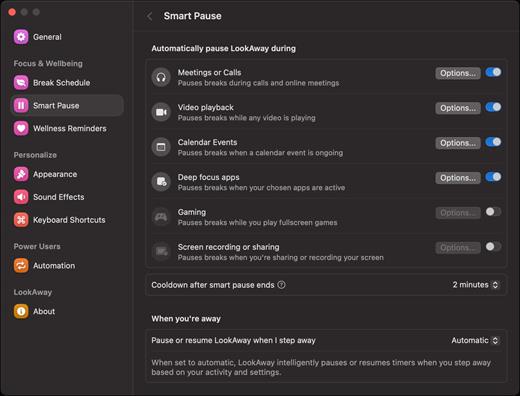
LookAway puts your mac in rest mode at regular intervals to help you rest your eyes. It’s gentle, smart, and fully customizable.

Features:


  • Regular eye breaks
  • Pre-Break Alert
  • At your fingertips
  • Fully customizable
  • Intelligent Pausing
  • Delightful Design
What’s New

Version 2.3.0:


  • Release notes were unavailable when this listing was updated.
Compatibility

macOS 12 or later


Release Name: LookAway 2.3.0
Size: 27.6 MB
Links: HOMEPAGE – NFO – Torrent Search

Download: RAPiDGATOR

4 Comments
Aug 3

FL Studio v26.1.3.5336

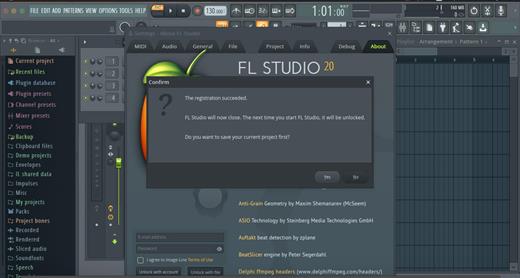
FL Studio is a complete software music production environment or Digital Audio Workstation (DAW). Representing more than 20 years of innovative development it has everything you need in one package to compose, arrange, record, edit, mix and master professional quality music.
Advanced Audio

Multi-track audio recording Time-stretching and pitch shifting pristine audio editing.

Sequencing

Industry leading Piano roll editor MIDI recording and control Pattern or Linear workflow.

Mixing & Effects

Multi-track mixer Automation control VST plugin support.

The Mixer

Mix and master music to the highest professional standards. All the features you need to create today’s most complex productions including, effects chains, audio sends, sidechain control, advanced automation, plugin delay compensation and more…

Piano Roll

FL Studio’s Piano roll has the well deserved reputation as the best Piano roll in the business. The Piano roll is used to send note and automation data to plugin instruments (sequencing). It includes a wide range of tools to aid complex score editing and manipulation.

Browser and Playlist

No other DAW matches the flexibility of FL Studio’s Playlist. Sequence all elements of the project to make the final song. Tracks can hold notes, audio and automation. Place any data type anywhere and even overlay them. Use the Browser to organize all the data in your project. Free your workflow and your mind!

Instruments & FX

If the huge array of native instruments and effects are not enough for you, FL Studio supports all VST standards 1, 2 and 3. VST gives you access to the wisest range of 3rd party plugins currently available. You can even use FL Studio itself as a VST plugin in another VST host.

And Much More:

Vectorial Interface

Resize and rearrange the user interface.

Automation Recording & Editing

Record live control movements and edit.

VST & ReWire Support

Use FL Studio as a VST plugin or with ReWire.

Multi-touch

Designed for touch control.

Live DJ Control

Powerful live performance, clip-triggering.

Advanced Help System

Context aware manual (press F1).

MIDI Learn

Powerful MIDI controller linking options.

Visualizer effects Plugin

Render 4K videos straight from FL Studio.

What’s New

Version 26.1.3.5336:


  • Release notes were unavailable when this listing was updated.
Compatibility

macOS 10.13.6 or later


Release Name: FL Studio v26.1.3.5336
Size: 1.1 GB
Links: HOMEPAGE – NFO – Torrent Search

Download: RAPiDGATOR

5 Comments
Aug 3

Tab Launcher 3.1.1

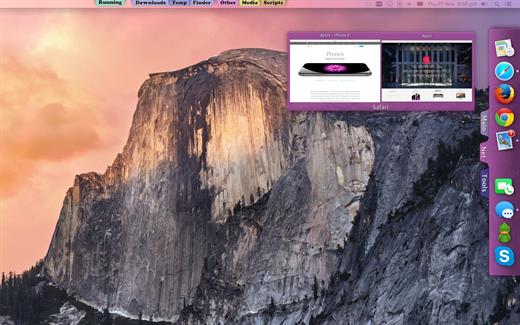
The idea of TabLauncher is not to replace the system’s dock, but to help keep it clean, with only the applications that are currently running.

By removing all the application from the dock and organizing them on tabs, you can quickly find and run any application you want.

Apart from that, you can create as many tabs as you like, and personalize them by setting the background color, title color, and font. Just drag your favorite applications to your tabs and it’s done! You can also rearrange the tabs by dragging them. And even rearrange the whole TabLauncher. Just drag it where ever you like along the sides or the bottom of the screen.

Now it takes less than 2 seconds to find and launch any app. (It’s true, according to our statistics)

What’s New

Version 3.1.1:


  • Release notes were unavailable when this listing was updated.
Compatibility

macOS 10.13 or later


Release Name: Tab Launcher 3.1.1
Size: 9.3 MB
Links: HOMEPAGE – NFO – Torrent Search

Download: RAPiDGATOR

4 Comments
Aug 3

Structured 4.5.3

A visual daily planner to organize tasks, routines, and habits. Stay focused, reduce overwhelm, and plan your day in one clear timeline.

Finally take control of your day.
Plan with a clear visual timeline that brings your calendar, to-dos, routines, and habits together.

Join over 1.5 million active planners who feel calmer, focus faster, and get more done — every single day.

Perfect for work, study, travel, and busy ADHD minds. Plan in minutes and stay focused all day.


  • Organize your day and week in an intuitive timeline
  • Capture ideas instantly in Inbox and sort them later
  • Sync across iPhone, iPad, Apple Watch and Mac
  • Break big projects down with notes & sub-tasks
  • Stay on track with a Pomodoro focus timer, Live Activities, and interactive widgets
  • Personalize your planner with color-coding and hundreds of icons
  • Benefit from accessibility features like VoiceOver, Voice Control, a dyslexia-friendly font, and multiple languages
  • Get a complete overview by connecting your calendars and Reminders
  • Build recurring tasks & routines that actually stick
  • Powered by AI, draft your day in seconds
  • Replan, automatically reschedules missed or forgotten tasks
  • Customize notifications to match your workflow
What’s New

Version 4.5.1:


  • Release notes were unavailable when this listing was updated.
Compatibility

macOS 14.0 or later.


Release Name: Structured 4.5.3
Size: 80.2 MB
Links: HOMEPAGE – NFO – Torrent Search

Download: RAPiDGATOR

3 Comments
Aug 3

Octavo 1.2.1

Ever tried to print a booklet but don’t know what order to put the pages in? Or spent an afternoon fighting with your printer only to waste half a ream of paper? We’ve been there. That’s why we built Octavo.

Octavo: Imposition & Booklet Printing for Mac

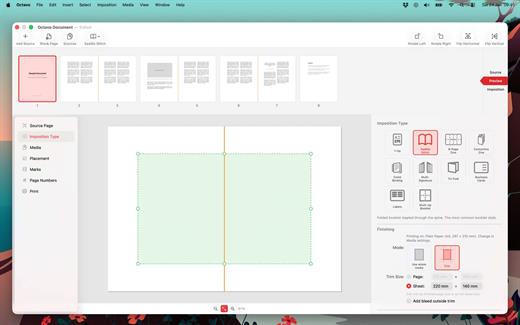
Octavo takes your PDF and arranges the pages so they come out right when you fold, staple, or bind them. It handles the fiddly maths so you don’t have to.

What Can Octavo Do?

Drop in a PDF or some images and Octavo gives you a complete workflow:


  • Print booklets: Octavo calculates the page order for duplex printing, adds fold and staple marks, and exports printer-ready sheets.
  • Clean up messy PDFs: Rotate, flip, straighten, adjust perspective, and crop — all with visual on-canvas editors.
  • Manage your margins: Position content with inside/outside margins so nothing gets clipped by binding. Multiple scaling modes with per-page fine-tuning.

Imposition Styles


  • Saddle-Stitch Booklet: The classic folded-and-stapled booklet.
  • Multi-Signature: For thicker books — divide pages into folded, gathered signatures.
  • Comb / Hole Punch Binding: Hole patterns, binding edge, and margins for punched or bound documents.
  • Tri-Fold Brochure: C-fold and Z-fold layouts for leaflets and pamphlets.
  • 1-Up: Single or double-sided output with full placement control.
  • Business Cards and Labels: Grid layout with configurable rows, columns, and gaps.
  • 8-Page Mini Zine: Fold and cut a single sheet into an eight-page booklet. Great for zine fairs or just for fun.
  • Concertina Zine: An accordion-fold strip from a single sheet.

Clean Up Your Source PDF


  • Rotate in 90° increments, flip horizontal or vertical.
  • Straighten crooked scans with the angle slider.
  • Correct perspective distortion with draggable corner handles.
  • Set your crop margins with a visual editor.
  • Adjust image filters: threshold, levels, and more.
  • Set bleed on source pages for edge-to-edge printing.

Placement & Margins


  • Set top, bottom, inside, and outside margins with draggable handles.
  • Scale to fit (per page or consistent), or set a manual scale.
  • Position content towards an edge or corner, accounting for facing pages.
  • Per-page overrides — link or unlink pages for individual adjustments.
  • Bleed settings for content extending beyond the margins.
  • Preview in both reader spreads and imposed sheets.

Marks & Page Numbers


  • Fold marks, staple guides, crop marks, and cut lines.
  • Hole punch guides for comb binding.
  • Customise mark weight, colour, and style.
  • Page numbers: Arabic, Roman, or alphabetic, with prefix/suffix, font, colour, and background shape.
  • Skip covers and blanks, or exclude individual pages.

Media & Paper Management


  • Create named media types with paper size, weight, and stock type.
  • Assign a printer and tray to each media type.
  • Assign media to individual pages — card stock for covers, lightweight paper for interiors.
  • Automatic blank sheet insertion to keep media aligned.

Print & Export


  • Export to PDF: a reader preview, or the fully imposed output.
  • Print directly with per-media printer and tray selection.
  • Automatic duplex detection and enforcement.
  • Manual duplex workflow for printers without auto-duplex.
  • Full access to printer-specific options.

Built for Mac


  • Full undo/redo. Save projects as documents, no ‘cloud lock-in’.
  • Drag-and-drop page reordering. Import PDFs and images.
  • Supports Dark Mode.
  • Makes Liquid Glass look good.

Ready to make something? Download Octavo and start folding.

What’s New

Version 1.2.1:


  • Release notes were unavailable when this listing was updated.
Compatibility

macOS 15.6 or later.


Release Name: Octavo 1.2.1
Size: 10.9 MB
Links: HOMEPAGE – NFO – Torrent Search

Download: RAPiDGATOR
3 Comments