Please REGISTER or RENEW your account on RAPiDGATOR.net and support us by doing through all RAPiDGATOR working download links on main posts...
Aug 4

Final Draft 13.3.4

Final Draft allows you to use your creative energy to focus on the content; let Final Draft take care of the style. Final Draft is the number-one selling application specifically designed for writing movie scripts, television episodics, and stage plays. It combines powerful word processing with professional script formatting in one self-contained, easy-to-use package. There is no need to learn about script formatting rules – Final Draft automatically paginates and formats your script to industry standards as you write.

What’s New

Version 13.3.4:


  • Release notes were unavailable when this listing was updated.
Compatibility

macOS 10.14.0 or later


Release Name: Final Draft 13.3.4
Size: 115.8 MB
Links: HOMEPAGE – NFO – Torrent Search

Download: RAPiDGATOR

4 Comments
Aug 4

ProFind 1.40

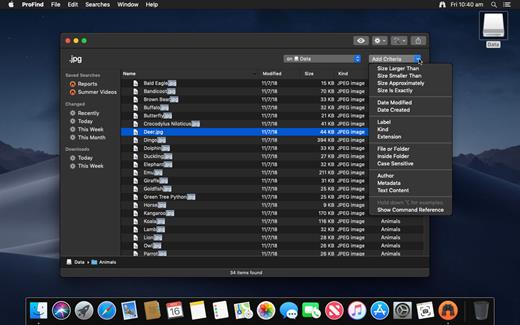
ProFind is advanced file search app for macOS.

With powerful features and great performance, ProFind delivers advanced file search for macOS. And with support for natural language queries, application launching, hidden location searches, scripting and more.
Search inside invisible folders and packages. Searches any disk type.
Uses kernel based searching (searchfs) when available. Uses metadata indexes (as used by Spotlight) when available to improve performance. Autocompletion for application names. Large icon view for one or two search results.
Under it’s elegant user interface, ProFind combines the power of macOS’s different search capabilities to make sure it finds all the files your looking for. And it’s been carefully tuned for performance and responsiveness.

What’s New

Version 1.40:


  • Release notes were unavailable when this listing was updated.
Compatibility

macOS 10.13.0 or later
Apple Silicon or Intel Core processor


Release Name: ProFind 1.40
Size: 14 MB
Links: HOMEPAGE – NFO – Torrent Search

Download: RAPiDGATOR

4 Comments
Aug 4

Rectangle Pro 3.82

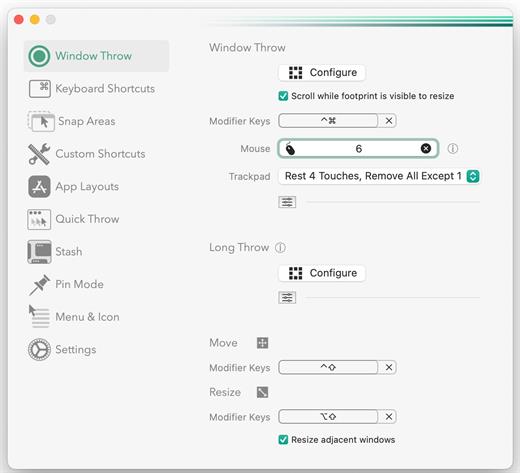
Snap windows faster in this featureful Rectangle superset. Toss windows in the right places with cursor movement, move multiple windows with one command, create custom shortcuts, and more.

One simple key combo
• 16 window sizes & positions
• No need to remember a ton of keyboard shortcuts, but those are all here, too

A Supercharged Rectangle Superset
• Keyboard shortcuts
• Drag windows to screen edges to snap

PRO
• Move and resize by holding a key and moving your cursor
• Snap windows under your cursor, even if not in focus
• Custom shortcuts for any size & position
• Sync your settings over iCloud

The Lightweight Gesture Champ
• Unlike touch gesture based window managers, Rectangle Pro only consumes CPU when configured modifier keys are pressed. Even then it’s minimal
• Rectangle Pro is a breeze to learn, and doesn’t conflict with any built-in macOS behavior
• Use it with any device that moves the cursor

Unmatched Customization and Actions
• Create keyboard shortcuts with any window size and location, and specify what happens on each repeated execution
• Fill left and right actions make it simple to maximize screen usage without overlap
• Match the keyboard shortcut window management of that other OS

Multiple Windows at Once
• Cascade windows
• Move all windows for an app to another display or screen half
• Tile top windows in a 2×2 or 2×3 grid

Additional Efficiency and Speed
• Each window action can be configured with a quick, simple cursor movement and modifier key combination
• Just press and release modifier keys while you move your cursor over the window you want to snap

What’s New

Version 3.82:


  • Release notes were unavailable when this listing was updated.
Compatibility

macOS 10.12 or later
Apple Silicon or Intel Core processor


Release Name: Rectangle Pro 3.82
Size: 11.1 MB
Links: HOMEPAGE – NFO – Torrent Search

Download: RAPiDGATOR

4 Comments
Aug 4

Adobe Acrobat Pro DC 2026.001.21779

Description: Adobe Acrobat Pro DC is the leading PDF converter and much more. Adobe Acrobat Pro DC software lets you deliver professional PDF communications. It's packed with smart tools that give you even more power to communicate. Create and edit PDF files with rich media included, share information more securely, and gather feedback more efficiently.

Adobe Acrobat Pro DC software is the advanced way for business professionals to create, combine, control, and deliver more secure, high-quality Adobe PDF documents for easy, more secure distribution, collaboration, and data collection.

Assemble electronic or paper files into reliable PDF documents that are easy to share with others using free Adobe Reader. You can assemble even Web sites, engineering drawings, and e-mail.

With Adobe Acrobat Pro DC you can manage document reviews, synthesizing feedback from multiple reviewers while preserving document format and integrity. Extend commenting capabilities to anyone using Adobe Reader. Windows users can design intelligent Adobe PDF forms that include business logic, such as calculations and data validations, to help increase the accuracy of data collection while reducing the costs of manual data entry.

Use Adobe Acrobat Pro DC to create high-impact PDF communications, collaborate more easily, and streamline reviews. Adobe Acrobat Dynamic PDF helps you get more done - easier, faster, better.

Edit PDF files
With Adobe Acrobat Pro DC, you can make minor edits to text and images right in your PDF file without requiring the original document or graphic. Edit text in a PDF. Fix a typo, change a font, or add a paragraph to your PDF as easily as you do in other applications using a new point-and-click interface. Edit images in a PDF. Resize, replace, and adjust images in your PDF with no need to track down the original file or graphic.

Export from PDF files
Reduce the time you spend retyping information stuck in PDF files. Convert PDF files to editable Microsoft Office documents. And save fonts, formatting, and effort.
Convert PDF files to Word. Save your PDF as a Microsoft Word document and take your fonts, formatting, and layouts with you. Convert PDF files to Excel. Turn your PDF or just part of it into an editable Excel spreadsheet you can use for data analysis right away. Convert PDF files to PowerPoint. Get a head start on new projects by saving a PDF file as a fully editable PowerPoint presentation.

Create PDF files
Stop worrying about whether the files you send will look right on other people's screens. Turn documents into PDF files anyone can reliably view with free Adobe Reader.
Convert Word, Excel, or PowerPoint to PDF. Right from your Office application in Windows, you can create PDFs, start a shared review, restrict PDF edits, and more. Print to PDF. Convert files to PDF from virtually any application that prints simply by selecting Adobe PDF as your printer. Scan to PDF. When you need to turn a paper document or form into a digital file, just scan it to create a searchable PDF file you can edit. Convert HTML pages to PDF. Save web pages as PDF files to archive web content, review the pages offline, or print them more reliably.

Create and analyze forms
Cut the time you spend creating forms, rekeying data, and correcting errors. Distribute forms online, and then collect responses and analyze results in real time.
Create new PDF and web forms. Customize professional templates or design from scratch with the Adobe FormsCentral desktop app included in Adobe Acrobat Pro DC. Collect form responses with FormsCentral. Easily collect responses by moving your PDF or web forms online with the Adobe FormsCentral online service. Convert existing forms to fillable PDFs. Type less, gather more. Quickly convert your paper, Word, or Excel forms to fillable PDF forms. Collect form responses using Adobe Acrobat tools. Compile returned forms into one PDF, or host forms using a network folder or Microsoft SharePoint server.

System Requirements:
Intel® or AMD processor; 1.5GHz or faster processor
Windows 11 (64 bit), Windows 10 (64 bit) version 1809 or later, Windows Server 2016 (64 bit), or Windows Server 2019 (64 bit)
2GB of RAM
4.5GB of available hard-disk space.
1024x768 screen resolution
Video hardware acceleration (optional)

Release Name: Adobe Acrobat Pro DC 2026.001.21779
Size: 1.6 GB
Links: HOMEPAGE – NFO – Torrent Search

Download: RAPiDGATOR

5 Comments
Aug 4

GoldWave 7.07

Description: GoldWave is a highly rated, professional digital audio editor that turns your computer or mobile device into a recording studio at your finger tips. Do everything from the simplest recording, editing, and mixing to the most sophisticated audio processing, restoration, enhancements, and conversions. With millions of downloads over 30 years, GoldWave is a widely used, trusted and dependable editor. It is easy to learn and use and is very accessible.
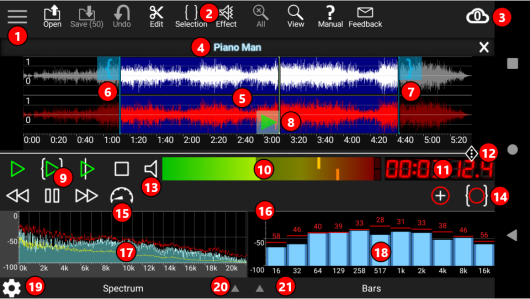
Many languages are supported including English, German (Deutsch), Spanish (Español), French (Français), Chinese, and more!

Start your career
GoldWave includes all the tools for creating great sounding recordings. Record instruments and vocals. Mix them together. Add echoes, reverb, fades, crossfade, and much more.

Podcast studio
Record and edit podcasts, interviews, or audio books. Cut and paste segments together. Add background music and other sounds. Remove background noise. Create voice prompts for automated systems.

Karaoke and fun
Remove vocals from music. Record and mix in your own vocals. Use the many effects to change your voice. Create new sounds for any project, such as video games, model trains, and ring tones.

Play all your favourite songs
Change the playback speed to hear your music in a whole new way, or to learn a song by ear. Listen to the audio while fast-forwarding or rewinding. Watch real-time visuals to see frequency content and spot potential quality issues. Connect a foot pedal to control playback for transcriptions.

Record any source
Create clean voice or instrument recordings. Select the microphone, line-in, streaming audio or what you hear (loopback) built-in inputs. Connect a turntable to record LPs, a cassette deck to record tapes, a receiver to record radio, or a high-end USB microphone to record your own music, speeches, or reports. Set a timer to start recording at a certain day and time. Use level activated recording to continue and pause recording automatically whenever the signal is above or below a given level.

Edit audio with all the familiar commands
Includes Cut, Copy, Paste, Trim, Replace, and Overwrite. GoldWave's fast virtual editing means you can slice, dice, and merge large audio files in seconds. Mix and Crossfade songs together with just a few clicks. Combine audio for podcasts, radio spots, PowerPoint presentations, or music for dance programs, figure skating, gymnastics, and aerobics.

Apply over 40 different audio effects
Adjust bass or treble with the Equalizer. Even out volume levels with Auto Gain. Easily fade in and out background music with Voice Over. Replace profanity with beeps or other sounds with Censor. Add echoes, reverbs, flangers, and much more. Change the pitch of your voice or make it sound mechanical for unique video game expansions. Preview effects real-time before processing them. Most effects include presets for commonly used settings so you don't have to be an audio expert.

Remaster old vinyl or tape recordings
Use Noise Reduction and Pop/Click filters to clean up the audio and take out the buzz, hiss, crackle, and clicks. Use the Spectrum Filter for precise control over frequency and tone. Remove offsets and long silences.

Analyze audio with real-time visuals
View spectrograms, bar graphs, waveforms, level meters, and other useful graphs. Instantly see any audio problems during recording and playback. Isolate that high pitch whine or low rumble by sight, making filtering much easier. Demonstrate engineering and mathematical concepts, such as filters, Fourier transforms, and signal processing. Analyze human speech, bird song, whale song, engine noise, and other interesting sounds.

Includes a collection of powerful tools
Copy audio directly from an audio CD with the CD Reader tool. Join many files together with the File Merger tool. Generate your own sounds and effects using the Expression Evaluator tool. Chain together effects for faster processing or create new effects using the Effect Chain Editor tool. Bookmark places within the file using the Cue Points tool, or split a long file into pieces defined by cue points. Create audio versions of websites, books, and other text documents with the Speech Converter tool so you can listen to them while doing other things. Dictate into a microphone to transcribe the text. Proofread your writing.

Process hundreds of files in a few clicks
Use Batch Processing to process and convert your complete library of songs: match volume levels of different songs, boost the bass, trim leading and trailing silences, convert to MP3, and much more. Supports iTunes, m4a, wav, wma, mp3, ogg, aiff, au, vox, FLAC, and even raw binary data. Entire folders and subfolders can be processed with just a few clicks and the entire hierarchy preserved. Advanced users can take advantage of the power and flexibility of command line processing.

Very configurable
Assign your own keystrokes for almost any function in the program. Perfect for anyone with fast fingers or visual impairments. Arrange the windows, tool bars, effect bars, and controls the way you want. Change colours of the waveform and some of the visuals. Create your own presets for effects. Add plug-ins for more functionality.

Release Name: GoldWave 7.07
Size: 16.2 MB
Links: HOMEPAGE – NFO – Torrent Search

Download: RAPiDGATOR

5 Comments
Aug 4

Advanced Renamer 4.24

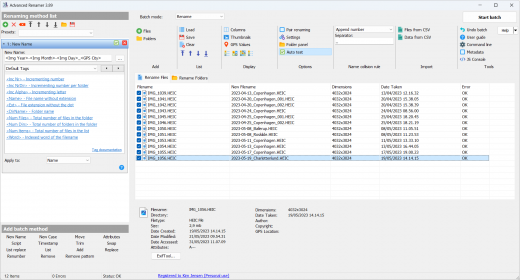
Description: Advanced Renamer is a program for renaming multiple files and folders at once. By configuring renaming methods the names can be manipulated in various ways. It is easy to set up a batch job using multiple methods on a large amount of files. The 14 different methods enables you to change the names, attributes, and timestamps of files in one go. The files can also be copied or moved to new locations based on information in the files.

With Advanced Renamer you can construct new file names by adding, removing, replacing, changing case, or giving the file a brand new name based on known information about the file.

Before performing the operations on the files you can verify that the output will be correct and if you perform the rename and regret it, you can undo the complete batch.

Image files
This mass file renamer is a great utility for organising digital pictures for both professionals and beginners. The thumbnail mode lets you display thumbnails directly in the file list giving you maximum control of the renaming process. With this program you can rename all your photos in a snap.

GPS data
If your image files contain GPS data you can add the name of the city and the country where the picture was taken. Coordinates are used to lookup city, country, and state names from a database containing more than 100,000 cities around the globe.

Music files
MP3 and other music files often have messed up names and contain weird characters. With Advanced Renamer you can change the names of your favourite music files to more suitable names using the built-in ID3 functions.

Video files
Ever wanted to add the codec or the resolution of a video to the filename? With the video tags you can add various information about video and audio content to the names.

Release Name: Advanced Renamer 4.24
Size: 12.7 MB
Links: HOMEPAGE – NFO – Torrent Search

Download: RAPiDGATOR

4 Comments
Aug 3

Adobe Acrobat Pro DC 2026 26.1.21771

Description: Adobe Acrobat Pro DC is the leading PDF converter and much more. Adobe Acrobat Pro DC software lets you deliver professional PDF communications. It's packed with smart tools that give you even more power to communicate. Create and edit PDF files with rich media included, share information more securely, and gather feedback more efficiently.

Adobe Acrobat Pro DC software is the advanced way for business professionals to create, combine, control, and deliver more secure, high-quality Adobe PDF documents for easy, more secure distribution, collaboration, and data collection.

Assemble electronic or paper files into reliable PDF documents that are easy to share with others using free Adobe Reader. You can assemble even Web sites, engineering drawings, and e-mail.

With Adobe Acrobat Pro DC you can manage document reviews, synthesizing feedback from multiple reviewers while preserving document format and integrity. Extend commenting capabilities to anyone using Adobe Reader. Windows users can design intelligent Adobe PDF forms that include business logic, such as calculations and data validations, to help increase the accuracy of data collection while reducing the costs of manual data entry.

Use Adobe Acrobat Pro DC to create high-impact PDF communications, collaborate more easily, and streamline reviews. Adobe Acrobat Dynamic PDF helps you get more done - easier, faster, better.

Edit PDF files
With Adobe Acrobat Pro DC, you can make minor edits to text and images right in your PDF file without requiring the original document or graphic. Edit text in a PDF. Fix a typo, change a font, or add a paragraph to your PDF as easily as you do in other applications using a new point-and-click interface. Edit images in a PDF. Resize, replace, and adjust images in your PDF with no need to track down the original file or graphic.

Export from PDF files
Reduce the time you spend retyping information stuck in PDF files. Convert PDF files to editable Microsoft Office documents. And save fonts, formatting, and effort.
Convert PDF files to Word. Save your PDF as a Microsoft Word document and take your fonts, formatting, and layouts with you. Convert PDF files to Excel. Turn your PDF or just part of it into an editable Excel spreadsheet you can use for data analysis right away. Convert PDF files to PowerPoint. Get a head start on new projects by saving a PDF file as a fully editable PowerPoint presentation.

Create PDF files
Stop worrying about whether the files you send will look right on other people's screens. Turn documents into PDF files anyone can reliably view with free Adobe Reader.
Convert Word, Excel, or PowerPoint to PDF. Right from your Office application in Windows, you can create PDFs, start a shared review, restrict PDF edits, and more. Print to PDF. Convert files to PDF from virtually any application that prints simply by selecting Adobe PDF as your printer. Scan to PDF. When you need to turn a paper document or form into a digital file, just scan it to create a searchable PDF file you can edit. Convert HTML pages to PDF. Save web pages as PDF files to archive web content, review the pages offline, or print them more reliably.

Create and analyze forms
Cut the time you spend creating forms, rekeying data, and correcting errors. Distribute forms online, and then collect responses and analyze results in real time.
Create new PDF and web forms. Customize professional templates or design from scratch with the Adobe FormsCentral desktop app included in Adobe Acrobat Pro DC. Collect form responses with FormsCentral. Easily collect responses by moving your PDF or web forms online with the Adobe FormsCentral online service. Convert existing forms to fillable PDFs. Type less, gather more. Quickly convert your paper, Word, or Excel forms to fillable PDF forms. Collect form responses using Adobe Acrobat tools. Compile returned forms into one PDF, or host forms using a network folder or Microsoft SharePoint server.

System Requirements:
Intel® or AMD processor; 1.5GHz or faster processor
Windows 11 (64 bit), Windows 10 (64 bit) version 1809 or later, Windows Server 2016 (64 bit), or Windows Server 2019 (64 bit)
2GB of RAM
4.5GB of available hard-disk space.
1024x768 screen resolution
Video hardware acceleration (optional)

Release Name: Adobe Acrobat Pro DC 2026 26.1.21771
Size: 1.6 GB
Links: HOMEPAGE – NFO – Torrent Search

Download: RAPiDGATOR

3 Comments
Aug 3

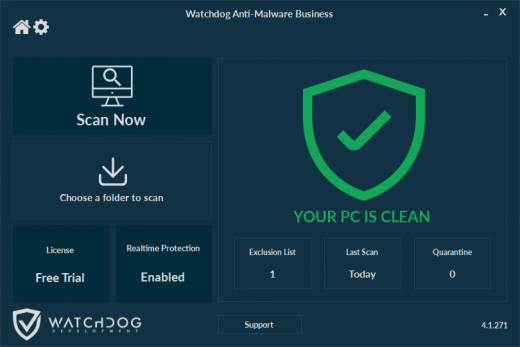
Watchdog Anti-Malware Premium / Business 4.4.15

Description: Our highly acclaimed multi-engine anti-malware software helps keep your computer secure. Advanced Malware Detection and Removal, Browser Hijacker Removal, Effective Rootkit and Bootkit Detection and Removal, Real Time Protection, Anti Ransomware Protection Modules.

Features


  • Our highly acclaimed multi-engine anti-malware software helps keep your computer secure.

    • Advanced Malware Detection and Removal
    • Browser Hijacker Removal
    • Effective Rootkit and Bootkit Detection and Removal
    • Real Time Protection
    • Anti Ransomware Protection Modules
  • Real Time Protection
    Watchdog Anti-Malware uses our Cloud Scanning Platform, a highly optimized cluster of servers running several anti-virus engines with the latest updates. This provides you with the power of multi-engine scanning any downsides such as drains on system resources or conflicts between programs.
  • Multi-Engine Malware Scanner
    It’s simply not practical to install dozens of different anti-virus programs on your computer because they’ll conflict with each other and slow your system down, but even if you could it would be prohibitively expensive. We’ve come up with a way to provide you with several anti-virus scanners to catch malware that your primary anti-virus program misses — all at a fraction of the price. And it is point-and-click easy to use. Watchdog Anti-Malware is designed to neutralize viruses, trojans, rootkits, worms, spyware and adware.
System Requirements

RAM: 2 GB

Operating System: Windows 8, 8.1, 10, or 11

Release Name: Watchdog Anti-Malware Premium / Business 4.4.15
Size: 26 MB
Links: HOMEPAGE – NFO – Torrent Search

Download: RAPiDGATOR

4 Comments
Aug 3

Unite Pro 1.6

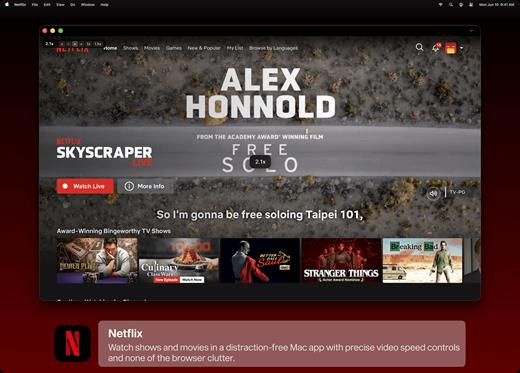
Unite for macOS lets you turn any website into a fully native Mac app with deep customization, fast performance, and macOS integration. Instead of opening sites in a browser with many tabs, Unite creates standalone apps that live in your Dock, support native window controls, and behave like real macOS software.

With Unite you can create an app in seconds by entering a URL, choosing an icon, and tailoring appearance and behavior to your preferences. Each app runs in its own isolated, lightweight WebKit‑based environment that feels more integrated and efficient than browser web apps or Electron alternatives. 

Unite apps offer extensive customization. You can hide or show title bars, adjust colors to match site branding, control window appearance, manage multiple tabs with advanced options like pinning and locking, and choose how links open within or outside the app. Notifications and macOS Focus Modes work per app, helping reduce distractions. 

Unite also includes flexible app modes, such as standard Mac windows, sidebar views, floating windows, compact views, and menu bar utilities. A built‑in ad blocker and customizable keyboard shortcuts streamline everyday use and navigation. 

What’s New

Version 1.6:


  • Release notes were unavailable when this listing was updated.
Compatibility

macOS 15 or later


Release Name: Unite Pro 1.6
Size: 29.4 MB
Links: HOMEPAGE – NFO – Torrent Search

Download: RAPiDGATOR
4 Comments
Aug 3

Permute 4.0.6

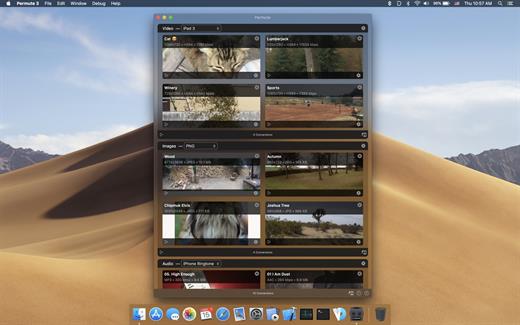
Permute offers easy-to-use drag-and-drop video conversion.

Features:


  • Easy to Use – built from the ground up, Permute is a perfect example of what a Mac app should be. With a gorgeous interface and drag & drop simplicity no need for complicated options.
  • Insanely Fast – Permute was engineered to be incredibly fast. Let us take care of the hard stuff. Just select the video format you want and it’ll be done faster than you can say “hardware acceleration” – MP4 and HEVC presets now take advantage of your machine’s hardware acceleration capabitlities, speeding up HEVC conversions more than 3 times over previous versions of Permute!
  • PDF Support – Permute 3 now includes support for stitching multiple images into a single PDF.
  • Everything Included – It doesn’t matter if you’re converting home movies or processing images. Permute can do it all. We support nearly every format and have plenty of device presets to choose from.
  • Looks Amazing – Whether you use dark mode or not, Permute will look amazing. Taking advantage of the modern technologies, Permute will even change its icon in dark mode.
  • Keep the Schedule – Video re-encoding is quite demanding on computer resources. This is why you can now schedule Permute to convert videos e.g. at night when you’re not using your computer.
  • And so much more! – There are so many other great features in Permute – adjust volume of an audio file or an audio track in a video. Batch-resize, rotate and flip images and videos. And more!
What’s New

Version 4.0.6:


  • Release notes were unavailable when this listing was updated.
Compatibility

macOS 10.12.0 or later


Release Name: Permute 4.0.6
Size: 51.2 MB
Links: HOMEPAGE – NFO – Torrent Search

Download: RAPiDGATOR
3 Comments