Please REGISTER or RENEW your account on RAPiDGATOR.net and support us by doing through all RAPiDGATOR working download links on main posts...
Aug 7

Mp3tag 1.13.4

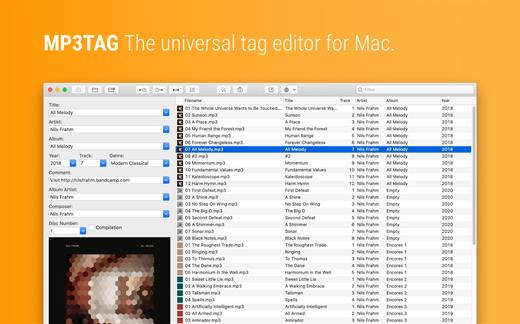
Mp3tag is a powerful and easy-to-use tool to edit metadata of audio files. Musicians, DJs, podcasters, and audio-enthusiasts use it for many different aspects of handling audio files.

It supports batch tag-editing for multiple files at once, covering many audio formats from MP3, over MP4, and M4V (yes, that’s video!) to FLAC, OGG, OPUS, AIF, DSF, MPC, and WAV.

Furthermore, it supports online database lookups from Discogs and MusicBrainz, allowing to gather proper tags and download cover art for music libraries.

It offers renaming files based on the tag information, replacing characters or words in tags and filenames, importing tag information, and adjusting the size and image format of embedded cover art.

Since some of the tasks in managing a digital library are repetitive, Mp3tag allows for combining tasks into action groups, which serve as workflows for keeping consistency and order. Examples are formatting tag fields, performing case conversion, removing unwanted fields, or adjusting embedded cover art to match required sizes.

Key Features

  • Bulk-Editing of Tags for multiple files at once.
  • Editing of cover-art.
  • Renaming files based on tags.
  • Importing metadata from filenames.
  • Assign track and disc numbers via the auto-numbering wizard.
  • Importing metadata from online Tag Sources.
  • Support for Flexible Tagging, allowing for user-defined tag fields in a standardized way.
  • Applying action groups with many tasks combined into reusable workflows.
  • Support for many file types under a universal user interface.
Supported File Formats

  • MP3 (ID3v1, ID3v2.3, ID3v2.4 with UTF-8)
  • MP4/M4A/M4B/M4V (iTunes and Nero)
  • FLAC (Vorbis Comments)
  • OGG (Vorbis Comments)
  • OPUS (Vorbis Comments)
  • AIF (RIFF INFO and RIFF ID3)
  • DSF (ID3v2)
  • MPC (APEv2)
  • WAV (RIFF INFO and RIFF ID3
What’s New

Version 1.13.4:


  • Release notes were unavailable when this listing was updated.
Compatibility

macOS 10.14 or later.


Release Name: Mp3tag 1.13.4
Size: 13.1 MB
Links: HOMEPAGE – NFO – Torrent Search

Download: RAPiDGATOR

5 Comments
Aug 5

SnapNDrag Pro 4.5.4

SnapNDrag Pro is screen capture made ridiculously easy.

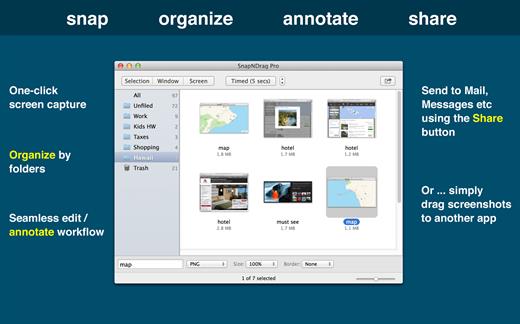
SnapNDrag started off as a simple app that lets you snap a screenshot with one click and then drag the result off to Mail, Finder, or any other app that accepts an image. It has since matured into a powerful screenshot tool that helps you annotate, organize, and share your screenshots.

As we added features over time, we have made it a top priority to keep the app easy to use. And we think the extra thought we put into this speaks for itself. This powerful app is still as easy to use as the day it was born as a simple one-trick pony.

Features

  • One-click capture (by window, selection or timed)
  • Organize with Folders
  • Annotate without losing the original screenshot
  • Share to Mail, Messages, Twitter, Facebook, etc.
  • Output in PNG, JPEG, or TIFF

And for advanced users:


  • Batch rename
  • Run as a background app (no Dock icon)
  • Customizable Hot Keys
What’s New

Version 4.5.4:


  • Bug Fixes: Previous version asks for permission to access folder for system screenshots each time it is run. This issue is fixed.
Compatibility

macOS 10.15 or later


Release Name: SnapNDrag Pro 4.5.4
Size: 7.2 MB
Links: HOMEPAGE – NFO – Torrent Search

Download: RAPiDGATOR

3 Comments
Aug 5

PDF Squeezer 4.8.0

PDF Squeezer is an easy-to-use PDF compression tool.

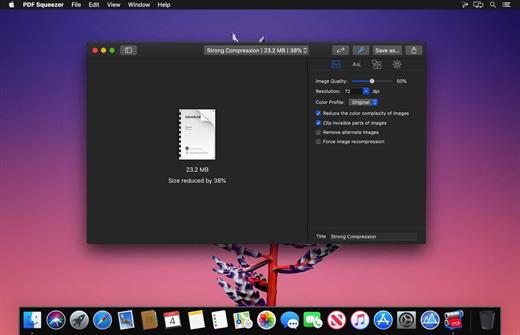
It reduces the size of large PDF documents by compressing images and removing irrelevant information. This will help you obtain important savings in bandwidth costs, digital storage costs and network transmission times.

Features

  • Simply drag and drop your file into the application window
  • Choose from predefined compression filters or create your own
  • Compress all files in a folder and its subfolders
  • Batch compress multiple files
  • Finder, Safari and Preview ad-on available via the share menu
  • Support for password protected PDFs
  • Automatic compression and save with ‘One-Click-Compression’
What’s New

Version 4.8.0:


  • Release notes were unavailable when this listing was updated.
Compatibility

macOS 10.13.0 or later


Release Name: PDF Squeezer 4.8.0
Size: 42.2 MB
Links: HOMEPAGE – NFO – Torrent Search

Download: RAPiDGATOR

4 Comments
Aug 5

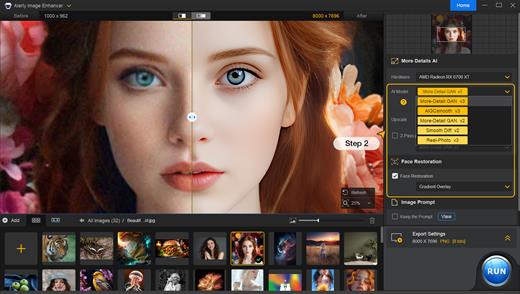
Aiarty Image Enhancer 3.13

A generative AI-powered image enhancement software that deblurs, denoises, restores, and upscales images, generating realistic details for superior clarity and sharpness using new and advanced AI models. Enhance Your Images for Better Perceptual Quality

Deblur
- Make Blurry Images Clearer
Enhance blurry, grainy, pixelated, or soft images intelligently, while AI works its magic to generate crisp and lifelike details – idea for restoring clarity to AI-generated images and heavily compressed photos.

Denoise – Remove Noise from Photos
Employ deep learning algorithms to denoise and reconstruct photos. Tackle various noise types obtained during acquisition or post production. Effectively improve clarity, sharpness, and overall visual quality

Upscale – Enlarge Images to 4K/8K/32K without Losing Quality
Upscale AI-generated images and real photos by 2x, 4x, or 8x to achieve stunning 4K, 8K, or 32K resolution

More Details – 
Not Only Preserve But Also Generate
A specially trained AI model for preserving and generating image details. Adept at generating details for skin, hair, textures, lines, and the like. The lower the quality of the image is, the greater the potential for improvement.

Supported Input & Output Formats
Supported Input Formats
.jpg, .jpeg .jp2, .j2k, .jpf, .jpm, .jpg2, .j2c, .jpc, .jpx, .mj2, .png, .tif, .tiff, .webp, .bmp, .avif, and RAW formats (.dng, .cr3, .cr2, .crw, .nef, .nrw, .arq, .arw, .sr2, .srf, .raf, .rw2, .orf, .ori, .pef, .ptx, .3fr, .fff, .iiq, .cap, .eip, .rwl, .srw, .erf, .mos, .mef, .mrw, .mdc, .dcr, .kdc, .dcs, .drf, .k25, .bay, .pxn, .r3d, and .rwz)

Supported Output Formats
.jpg, .png (8-bit, 16-bit)

Supported Output DPIs

What’s New

Version 3.13:


  • Release notes were unavailable when this listing was updated.
Compatibility

macOS 10.15 or later


Release Name: Aiarty Image Enhancer 3.13
Size: 128.8 MB
Links: HOMEPAGE – NFO – Torrent Search

Download: RAPiDGATOR

5 Comments
Aug 5

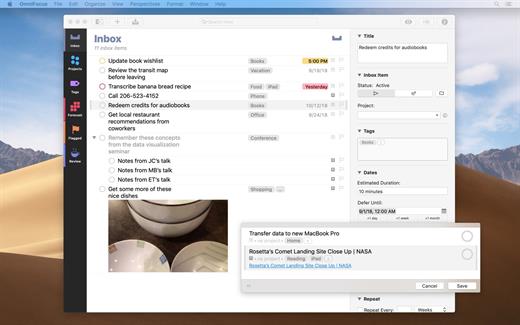
OmniFocus Pro 4.8.13

OmniFocus is an organizer app. It uses projects to organize tasks naturally, and then add tags to organize across projects. Easily enter tasks when you’re on the go, and process them when you have time. Tap the Forecast view – which shows both tasks and calendar events – to get a handle on your day. Use the Review perspective to keep your projects and tasks on track.

Use OmniFocus to accomplish more every day. Create projects and tasks, organize them with tags, focus on what you can do right now – and get stuff done. Then let our free syncing system make sure you data is the same on every Mac. (And on OmniFocus for iOS, available separately.) Because your data is encrypted, it’s safe in the cloud.

What’s New

Version 4.8.13:


  • Release notes were unavailable when this listing was updated.
Compatibility

macOS 11.0.0 or later
Apple Silicon or Intel Core processor


Release Name: OmniFocus Pro 4.8.13
Size: 49.7 MB
Links: HOMEPAGE – NFO – Torrent Search

Download: RAPiDGATOR

4 Comments
Aug 5

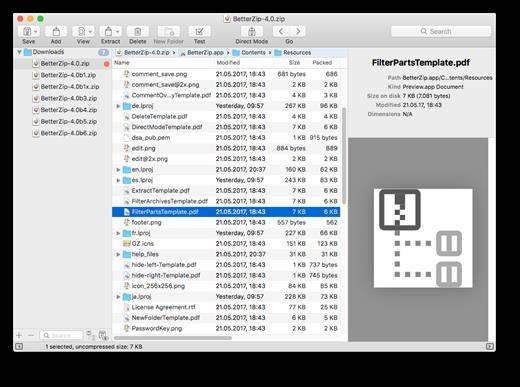
BetterZip 6.0.4

BetterZip lets you quickly inspect archives without first extracting their contents.


  • Extract Only Files You Really Need: If you only need a few files or folders from a larger archive, you don’t have to extract the whole thing. Simply drag the files you need from the BetterZip window to any Finder window or the desktop.
  • Open Archives Without Extracting: Not only can BetterZip open archives without first extracting them but you can also search for a file using the iTunes-like interface. BetterZip can open and extract archives with the most common formats: ZIP, SIT, TAR, XAR, XZ, GZip, BZip2, RAR, 7-Zip, CPIO, ARJ, LZH/LHA, JAR, WAR, CAB, ISO, CHM, RPM, DEB, NSIS, BIN, HQX, DMG, EPUB, and Winmail.dat.
  • Create Archives: Simply drag files and folders from your hard drives, disks, or network places into your new zip file. You no longer have to copy all the files into a temporary folder first. The supported formats are ZIP, TAR, GZip and BZip2 compressed TAR, XAR, 7-ZIP, and RAR (using the external RAR commandline tool). Large archives can also be split.
  • Protect Your Data: BetterZip can protect your data with a password and create AES-256 encrypted archives. 7-zip and rar archives can also be protected.
  • Update Archives: Add new or updated files to existing archives. Remove any file or folder from an archive, or even move files around inside the archive as if it were a normal folder.
  • Make Archives Compatible: Strip Mac-specific files and resource forks from archives for best compatibility with systems like Windows or Linux.
What’s New

Version 6.0.4:


  • Release notes were unavailable when this listing was updated.
Compatibility

macOS 10.13.0 or later


Release Name: BetterZip 6.0.4
Size: 27.5 MB
Links: HOMEPAGE – NFO – Torrent Search

Download: RAPiDGATOR

4 Comments
Aug 4

Things 3.22.13

Things is a task management solution that helps to organize your tasks in an elegant and intuitive way. Things combines powerful features with simplicity through the use of tags and its intelligent filter bar.

Features:


  • Collect Your Thoughts – Get things off your mind quickly: no matter what app you’re in, a keyboard shortcut instantly reveals Quick Entry. Type your thoughts and save them to the Inbox. Or just talk to Siri on any device (“Remind me to…”) and import from Reminders.
  • Get Organized – Create a project for each of your goals, then add the steps to reach them. For clarity, add structure with headings. Then group your projects by areas of responsibility, such as “Family”, “Work”, or “Health”. Review these regularly to stay on top of things.
  • Plan Your Time – See your calendar events alongside your to-dos and plan your time effectively. Create repeating to-dos for things you do every few days, weeks, or months – Things will remind you on the right day.
  • Make the Most of Your Day – Every morning, grab a coffee and prepare your list for “Today”: review previously planned to-dos and make quick decisions on what to tackle. Pick some more steps from your projects and then get going. The Today list is the only place you’ll need to look for the rest of the day.
  • Customize Your Workflow – Use tags to categorize your to-dos or add context. For example, tag places like “Office” or “Home”, or tag all your “Errands”, or everything you’re working on with “Kate”. You can easily find everything you’ve tagged via filtering or search.
What’s New

Version 3.22.13:


  • Release notes were unavailable when this listing was updated.
Compatibility

macOS 10.15 or later
Apple Silicon or Intel Core processor


Release Name: Things 3.22.13
Size: 38 MB
Links: HOMEPAGE – NFO – Torrent Search

Download: RAPiDGATOR

4 Comments
Aug 4

AlDente Pro 1.38.1

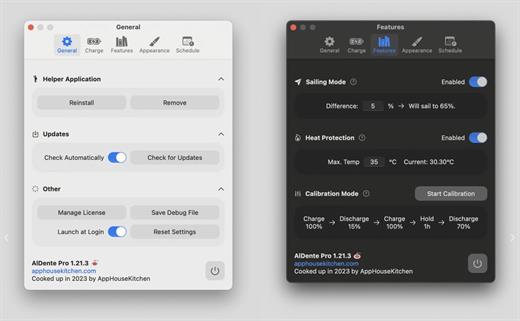
AlDente allows you to limit your MacBook from charging above a certain percentage. This will not only decrease Battery wear but also increase longevity of your Battery.

Features:


  • Charge Limiter allows you to set your maximum charging percentage between 20 and 100 percent. You can either set it by using the slide bar or by typing in the desired percentage in the field above and pressing enter afterwards.
  • Discharge – This feature allows your MacBook to run completely on Battery even if it is plugged in. Therefore, you can actively discharge your MacBook to a more healthy percentage. Unfortunately, while Discharge is activated, clamshell mode is not supported due to technical limitations.
What’s New

Version 1.38.1:


  • Release notes were unavailable when this listing was updated.
Compatibility

macOS 11 or later
Apple Silicon or Intel Core processor


Release Name: AlDente Pro 1.38.1
Size: 10.9 MB
Links: HOMEPAGE – NFO – Torrent Search

Download: RAPiDGATOR

4 Comments
Aug 4

ArchiCAD 29.2.1

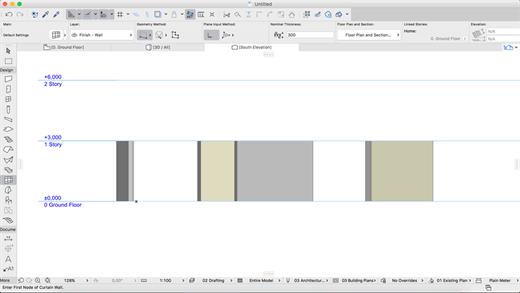
ARCHICAD enables architects to model faster and create accurate construction details and quantity estimations for reinforced concrete, complex steel, timber, and composite beams and columns. Complex columns, curved and haunched beams can now be modeled and documented to meet graphic and representation standards. Beams and columns can be displayed using various projected and symbolic views and cover fills.
Building Together

Archicad connects architects and engineers in a shared BIMcloud environment — powered by advanced collaboration and communication workflows — to deliver integrated design. Seamless and transparent information exchange builds trust among team members, eliminates model duplication, and redundant work between architects and engineers.

Model anything. Model everything.

Create the BIM model of the entire building with Archicad 24’s powerful toolkit. Integrate the structural model and the architectural model in one shared design hub, resulting in a powerful, collaborative environment. Archicad tools now integrate the Structural Analytical Model.

Built-in MEP modeler

Built-in MEP design tools further extend the integrated design approach of Archicad 24. As of this version, MEP Modeler is a core part of the software. Access intelligent MEP equipment inside the architectural model. Integrate MEP systems correctly in the BIM model without the need for a federated approach.

Share and explore your ideas

Explore ideas and design alternatives, leaving no stone unturned. Model and submit ideas for review by your team. When accepted, they’ll immediately become part of the project.

Object creation made easy

Create your own objects with the node-based visual PARAM-O tool without the need for GDL programming knowledge. Model anything from interior details to urban landscapes with parametric capabilities. Create parametric BIM elements with ease — the possibilities are endless!

Build better buildings

Archicad puts architects and structural engineers on the same page with an integrated structural analytical model in the BIM model. Keep architects and engineers in sync, save time and costs with a collision-free, one model strategy and a bi-directional workflow.

Built-in physical and analytical model checking

Increase the reliability and accuracy of your model with the help of built-in physical and analytical model checking and a seamless, bi-directional workflow between Archicad 24 and the analysis application — saving you time and money on the job site.

One shared model

Save time, avoid mistakes, and minimize the risk of data loss thanks to efficient project management between architects and engineers based on a shared model and design hub — built to OPEN BIM standards. Strengthen team performance and design better buildings through solutions powered by streamlined data management processes.

Stay in the loop

Detect and visualize the changes between models and revisions in a more intuitive way thanks to smart change monitoring and real-time notifications.

Change management made easy

With multiple stakeholders on each project, the job of following, understanding, and adapting ongoing design changes is a significant task. Archicad introduces Model Compare. Compare two 3D models or versions, and visualize and filter the differences between them. Keep track of design changes accurately and even evaluate design variants to get to the best possible design.

Track and change

Resolve issues faster and reduce the risk of unsolved issues thanks to clear organization and real-time notifications of BIM model changes. Integrate issues from third parties based on compatibility with industry standard issue management solutions.

Always in sync

Upload and refresh content in the model regardless of each team members’ location thanks to our fast and simple publishing workflow and BIMcloud. Save time, avoid mistakes and share files with confidence, knowing everything’s up-to-date. Real-time access to the shared model throughout the design process means all team members are in sync at all times.

Direct information exchange with Revit

Exchange information with Revit directly “out-of-the-box.” Import and export elements with their precise geometry and parameters (as non-editable content) from Revit (RVT) files for coordination and model referencing purposes. Access RVT files locally or via BIMcloud, using Hotlink or Publish functions.

Simple project submission

Publish projects from Archicad to shared online locations with ease thanks to a streamlined submission process. There’s no need to stay glued to the screen to watch for the publishing to finish, or additional manual uploads. Archicad takes care of it all.

Connect to industry-leading CDE solutions such as Aconex via buildingSMART-defined “open” protocols.

Automate your workflows

Using higher-level programming languages like Python, create automation scripts in Archicad, and complete command chains from outside. Access general element, property information and element listing information, and modify these and other Archicad element classifications as necessary.

Smarter information exchange

Exchange data with consultants outside of the model environment in a smart, efficient way: option set properties are now exported to Excel, guaranteeing accurate and high-quality information input into your BIM model.

New and updated surface materials

Is it real or is it rendered? Create high-end visualizations quickly and easily with new and updated surfaces in the Additional Surface Catalog. 500+ surface materials, including new wallpaper and realistic metal surfaces, result in stunning photo-realistic renderings.

Bring your interiors to life

Add life to your 2D and 3D views for a more contemporary look and feel. Furnish your scenes with brand-new objects from the updated library quickly and easily, thanks to an improved design workflow.

What’s New

Version 29.2.1:


  • Release notes were unavailable when this listing was updated.
Compatibility

macOS 10.14 or later


Release Name: ArchiCAD 29.2.1
Size: 6.6 GB
Links: HOMEPAGE – NFO – Torrent Search

Download: RAPiDGATOR

2 Comments
Aug 4

Final Draft 13.3.4

Final Draft allows you to use your creative energy to focus on the content; let Final Draft take care of the style. Final Draft is the number-one selling application specifically designed for writing movie scripts, television episodics, and stage plays. It combines powerful word processing with professional script formatting in one self-contained, easy-to-use package. There is no need to learn about script formatting rules – Final Draft automatically paginates and formats your script to industry standards as you write.

What’s New

Version 13.3.4:


  • Release notes were unavailable when this listing was updated.
Compatibility

macOS 10.14.0 or later


Release Name: Final Draft 13.3.4
Size: 115.8 MB
Links: HOMEPAGE – NFO – Torrent Search

Download: RAPiDGATOR

4 Comments