Please REGISTER or RENEW your account on RAPiDGATOR.net and support us by doing through all RAPiDGATOR working download links on main posts...
Aug 7

Minimal 1.25.2

Write with focus. Open your mind with Minimal, a meditation-inspired notes and writing app.

Minimal combines thoughtful, modern design with powerful features to deliver a spacious, beautiful writing environment.


  • Note Lifetime
  • Collaborative writing
  • Publish notes as websites
  • Add Todos to the Calendar app
  • Beautiful formatting
  • Sync everywhere: Mac, iPhone, iPad, and Apple Watch

Minimal is a simple yet powerful notes app. Inspired by meditation, nature, and architectural design, Minimal provides a beautiful space to think, write, and organize projects.

NOTE LIFETIME
The Note Lifetime keeps your notebook fresh and reflective of the present moment. When a note goes unedited for a duration you choose in settings, you’ll be gently notified. This is an opportunity to review the note, act on it, or let it go.

COLLABORATIVE WRITING
Share notes with friends, family, and teammates. With a gentle design, writing remains focused and tranquil, even as thoughts merge and ideas multiply. Everyone receives changes as notes evolve, and multiple people can make edits at the same time without conflict.

FOCUSED + SPACIOUS DESIGN
Minimal is designed so only one element is ever in focus. We love the beauty of a blank page – abundant empty space allows for an ease of creative expression.

PUBLISH AS WEBSITE
Transform notes into beautifully-formatted websites in microseconds.

TODO LISTS
Todo lists are an effective way to organize projects and complete tasks. Sync with the Calendar app, get things done, and check everything off.

BEAUTIFUL FORMATTING
Minimal combines Markdown-style formatting with elegant typography. The result is simple, expressive notes that make it easy to think and write.

SYNC EVERYWHERE
Bring focus to your favorite devices. Minimal is designed for Mac, iPhone, iPad, and Apple Watch. Cloud Sync is fast, reliable, and invisible.

SHARE, EXPORT, IMPORT
You’re in control of your notes. Share directly in iMessage, export as PDF or HTML, and use the system share mechanism to take notes anywhere. Importing links + prose into Minimal is just as easy.

CUSTOMIZE EVERYTHING
The best notebook is personal. We made everything in Minimal customizable, from fonts + themes to sorting notes + note actions. You can also build custom workflows using the Shortcuts app.

A LITTLE GIFT
Wow, thanks for reading. As a little gift for tuning in, these are our favorite musicians -> Somi, Snarky Puppy, and London Grammar. They’re jazzy and introspective, just how we like it. Enjoy.

What’s New

Version 1.25.2:


  • Release notes were unavailable when this listing was updated.
Compatibility

macOS 14.0 or later.


Release Name: Minimal 1.25.2
Size: 18.6 MB
Links: HOMEPAGE – NFO – Torrent Search

Download: RAPiDGATOR

4 Comments
Aug 7

Carbon Copy Cloner 7.1.6 (8368)

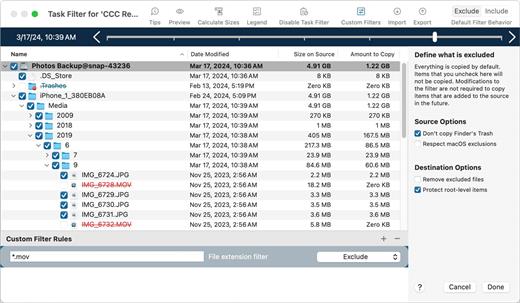
Carbon Copy Cloner backups are better than ordinary backups. Suppose the unthinkable happens while you’re under deadline to finish a project: your Mac is unresponsive and all you hear is an ominous, repetitive clicking noise coming from its hard drive. With ordinary backups, you’d spend your day rushing out to a store to buy a new hard drive and then sit in front of your computer reinstalling the operating system and restoring data.

With Carbon Copy Cloner, your data and the operating system’s data are all preserved on a bootable volume, ready for production at a moment’s notice. When disaster strikes, simply boot from your backup and get back to using your Mac. At your convenience, replace the failed hard drive and then let CCC restore the OS, your data and your settings directly from the backup in one easy step.

What’s New

Version 7.1.6:


  • Release notes were unavailable when this listing was updated.
Compatibility

macOS 11.0 or later


Release Name: Carbon Copy Cloner 7.1.6 (8368)
Size: 31.5 MB
Links: HOMEPAGE – NFO – Torrent Search

Download: RAPiDGATOR
4 Comments
Aug 7

Numbers 15.3.1

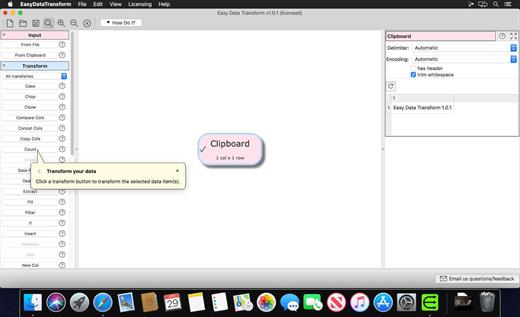
Create gorgeous spreadsheets with Numbers on iPhone, iPad and Mac. Get started with Apple-designed templates for everything from a home budget to an invoice. Add tables, charts, text, and images anywhere on the flexible canvas. Animate your data with interactive charts, find patterns with pivot tables, and use hundreds of powerful functions.

Get Started Quickly


  • Work from iPhone, iPad, Mac, or even a PC with iCloud.com
  • Select from a wide variety of Apple-designed templates
  • Add from a library of shapes, tables, and charts with pre-defined styles
  • Import and edit Microsoft Excel and CSV files

Create Beautiful Spreadsheets


  • Place tables, charts, text, and images anywhere on the flexible canvas
  • Create a form on iPhone or iPad to quickly enter data on the go
  • Draw or write with Apple Pencil on iPad

Formulas for Everyone


  • Choose from hundreds of powerful functions, including XLOOKUP and RegEx
  • Search the integrated function browser for built-in help and sample formulas
  • Easily add stock information to spreadsheets
  • See results from a single formula across multiple cells using spilling arrays

Everything Adds Up Beautifully


  • Use pivot tables and categories to see your data in a whole new way
  • Quickly organize and summarize tables to gain new insights
  • Insert gorgeous 2D and 3D charts, including bar, column, line, area, pie, donut, and radar charts
  • Animate data with interactive column, bar, scatter, and bubble charts
  • Easily filter through large tables for specific values, text, or duplicate entries
  • Change values in cells using sliders, steppers, checkboxes, pop-ups, and star ratings

Share with Anyone


  • Share your spreadsheet publicly or collaborate with specific people using iCloud or Box
  • Make changes from any device and see a list of changes from others in real-time
  • Export your spreadsheet in CSV, TSV, PDF, and Microsoft Excel

Apple Intelligence


  • Use Writing Tools to proofread, rewrite, summarize, and compose text
  • Create your own fun images with Image Playground based on a description
What’s New

Version 15.3.1:


  • Release notes were unavailable when this listing was updated.
Compatibility

macOS 15.6 or later.


Release Name: Numbers 15.3.1
Size: 305 MB
Links: HOMEPAGE – NFO – Torrent Search

Download: RAPiDGATOR

5 Comments
Aug 7

Easy Data Transform 2.14.1

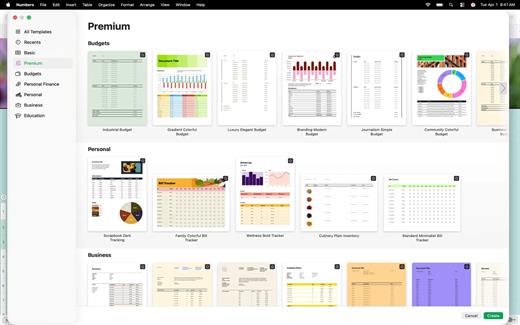
Transform your Excel and CSV files without programming with Easy Data Transform.

Features:


  • Clean, re-format, merge, dedupe, filter and analyze table and list data on your Mac.
  • Transform your data interactively, step by step using 36 built-in transforms.
  • Transforms thousands of rows in the blink of an eye.
  • No need to upload your sensitive data to a third party server.
What’s New

Version 2.14.1:


  • Release notes were unavailable when this listing was updated.
Compatibility

macOS 10.10 or later


Release Name: Easy Data Transform 2.14.1
Size: 99.7 MB
Links: HOMEPAGE – NFO – Torrent Search

Download: RAPiDGATOR
5 Comments
Aug 7

Keynote 15.3.1

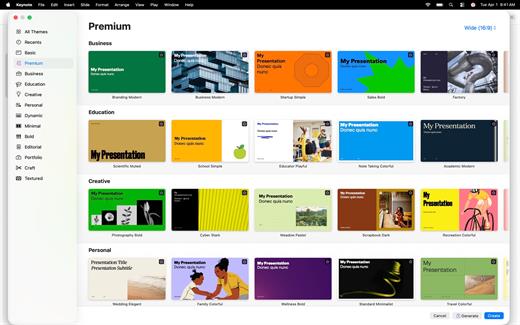
Create memorable presentations on iPhone, iPad, Mac, and Apple Vision Pro. Start with an Apple-designed theme and add text, images, charts, and shapes. Bring it all to life with cinematic animations and transitions. Confidently present from anywhere, in person or virtually, and take turns controlling a presentation in multi-presenter slideshows.

Get Started Quickly


  • Work from iPhone, iPad, Mac, Apple Vision Pro, or even a PC with iCloud.com
  • Select from a wide variety of Apple-designed themes
  • Import and edit Microsoft PowerPoint presentations

Create Stunning Presentations


  • Easily change slide layouts and backgrounds
  • Add recorded audio, live video, and image galleries
  • Use powerful graphics tools including background removal and masking
  • Draw or write with Apple Pencil on iPad

Cinema-Quality Animations


  • Beautiful cinematic slide transitions and impressive animations
  • Emphasis builds and Magic Move let you effortlessly add impact
  • See live on-canvas previews as you animate your slides
  • Draw a motion path with Apple Pencil on iPad

Present to Your Audience


  • Rehearse with a customizable presenter display
  • Practice in an immersive Conference Room or Theater environment on Apple Vision Pro
  • Highlight with Apple Pencil or with your finger while presenting on iPad
  • Control your slideshow from an iPhone, iPad, or Apple Watch

Share with Anyone


  • Share your presentation publicly or collaborate with specific people using iCloud or Box
  • Make changes from any device and see a list of changes from others in real-time
  • Export presentations to Microsoft PowerPoint, PDF, HTML, movies, and image files

Apple Intelligence


  • Use Writing Tools to proofread, rewrite, summarize, and compose text
  • Create your own fun images with Image Playground based on a description
What’s New

Version 15.3.1:


  • Release notes were unavailable when this listing was updated.
Compatibility

macOS 15.6 or later.


Release Name: Keynote 15.3.1
Size: 428.7 MB
Links: HOMEPAGE – NFO – Torrent Search

Download: RAPiDGATOR

4 Comments
Aug 7

PowerPhotos 3.4.3

PowerPhotos allows you to break up your Photos.app images among multiple Photos libraries, rather than having to store all of them in one giant library. You can easily switch between libraries, or just browse the photos in your libraries directly from PowerPhotos, without having to open each library in Photos.

PowerPhotos also supports searching across all your libraries at once to help track down a particular photo. If you use iCloud Photo Library to sync photos with your other devices, splitting up your library can help save on iCloud storage costs. Use a single library to hold a smaller collection that you sync with iCloud, while keeping the bulk of your photos in separate libraries so they don’t take up space on iCloud. PowerPhotos can analyze your libraries for duplicate photos, showing them to you side-by-side and letting you get rid of extra copies of photos that you no longer need.

What’s New

Version 3.4.3:


  • Release notes were unavailable when this listing was updated.
Compatibility

macOS 11.0 or later


Release Name: PowerPhotos 3.4.3
Size: 41.5 MB
Links: HOMEPAGE – NFO – Torrent Search

Download: RAPiDGATOR
4 Comments
Aug 7

Nova 14.1

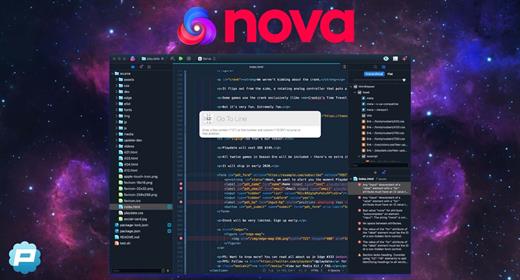
Nova is hyper-fast and flexible code editor with all the features you want: smart autocomplete, multiple cursors, a Minimap, editor overscroll, tag pairs and brackets, and way, way more.

Features:


  • The Editor. It all starts with our first-class text-editor. It’s new, hyper-fast, and flexible, with all the features you want: smart autocomplete, multiple cursors, a Minimap, editor overscroll, tag pairs and brackets, and way, way more.
  • It’s beautiful. And clean. And fun. You can make Nova look exactly the way you want, while still feeling Mac-like. Bright, dark, cyberpunk, it’s all you. Plus, themes are CSS-like and easy to write. Nova can even automatically change your theme when your Mac switches from light to dark mode.
  • Nova doesn’t just help you code. It helps your code run. You can easily create build and run tasks for your projects. We didn’t have them in Coda, but boy do we have them now. They’re custom scripts that can be triggered at any time by toolbar buttons or keyboard shortcuts.
  • Now, this is important. Editing text is just part of what Nova does. We’ve bundled in extremely useful tools to help you get your work done quickly and efficiently. They’re all fast and native too, of course.
  • Nova has a robust extensions API. A Nova extension can do lots of things, like add support for new languages, extend the sidebar, draw beautiful new themes and syntax colors, validate different code, and much more.
  • People have strong editor opinions. And we’re here to help. Nova has a whole host of settings. We have easily customizable key bindings. We have custom, quickly-switchable workspace layouts. And we have loads of editor tweaks, from matching brackets to overscroll.
What’s New

Version 14.1:


  • Release notes were unavailable when this listing was updated.
Compatibility

macOS 11.6 or later


Release Name: Nova 14.1
Size: 70.2 MB
Links: HOMEPAGE – NFO – Torrent Search

Download: RAPiDGATOR

4 Comments
Aug 7

MouseBoost Pro 5.2.6

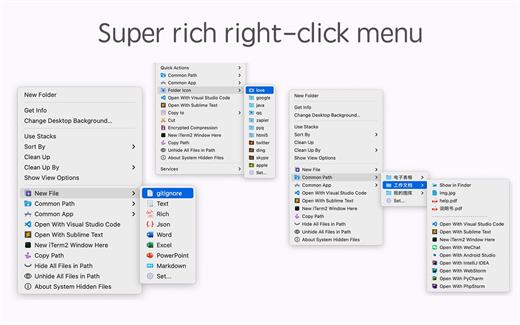
MouseBoost Pro integrates more than 30 kinds of small tools, and the operation way is very simple, as long as you click the right mouse button, you can activate all kinds of functions you want, so that your work efficiency is greatly improved.

You can create any file type you want, open any APP you want, self-sorting, fully customized!

*** Main Features ***
– All menus support custom sorting.
– Quickly create all kinds of commonly used files, and supports custom creation of various file types you want.
– Quickly open your terminal, iTerm2, and go to the directory you want.
– Quickly open VSCode, Sublime Text and Emacs, and customize the various apps you want to open.
– Quickly copy the current path power.
– Complete files deletion is supported.
– Supports files moving, copying and cutting.
– Supports files encrypted compression.
– Quickly open your favorite directory.
– Quickly get file MD5,SHA1,SHA256 and other information.
– Supports hiding and displaying of specified files.
– Supports modify folder icon.

What’s New

Version 5.2.6:


  • Release notes were unavailable when this listing was updated.
Compatibility

macOS 10.11 or later


Release Name: MouseBoost Pro 5.2.6
Size: 21.9 MB
Links: HOMEPAGE – NFO – Torrent Search

Download: RAPiDGATOR
5 Comments
Aug 7

PhotoMill X 3.4.1

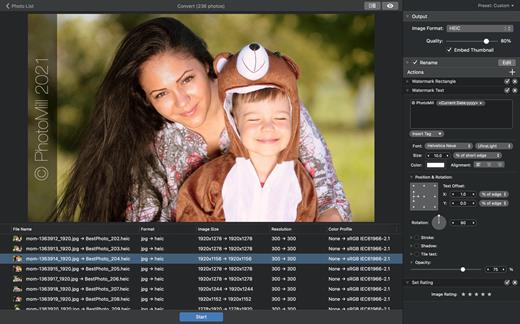
PhotoMill helps you convert a bulk of images into the most popular image formats, give your files meaningful names, watermark with text and image, adjust photos (brightness/saturation/exposure/grayscale/etc.), fit geometry (scale/crop/trim/etc.), remove private metadata, add your own copyrights etc. Also, PhotoMill is a great batch metadata editor, renamer and photo browser.

Features


  • Convert

    • Conversion to: BMP, GIF, JPEG, JPEG 2000, PDF, PNG, TIFF
  • Color models: RGB, Gray, CMYK Color depth: 8/16/32 bits; with or without alpha channel
  • Metadata editor

    • Correct EXIF/IPTC metadata tags in your photos: place GPS coordinates, remove private information from your photos, correct or set capture dates, add your own copyright, keywords or rating.
  • Photo browser

    • The app has a bunch of features for comfortable browsing and multi-criteria search of photos in the Browser. The Browser has 3 panels: Image Info – displays detailed information about a selected photo; Groups – splits photos into groups/subgroups based on a chosen criteria, for instance, by capture dates; Search – gives you an opportunity to search photos by different criteria.
  • Rename

    • You can give meaningful names to converted photos constructing file names in the “pro” way – using text and tags: index, capture date, original name, image width, “find & replace” etc. Also, you can rename photos without any conversion.
  • Resize

    • Fit image size with a bunch of geometry actions: scale, crop, add border, trim, trim color, rotate & flip, auto rotate (by EXIF orientation), change resolution.
  • Watermark

    • Text – you can use photo metadata information – tags: capture date, keywords, camera maker etc., as well as entered text. Font size can be either fixed or relative to an image width, height, long or short edge. Multiline text, stroke, shadow, rotation, tiling and other features.
    • Image – image size can be either fixed or relative to main image size. Image tiling is also available.
    • Rectangle – background for text; square or rounded. Fill and stroke color can be half-transparent.
  • Adjust colors

    • Available filters: auto contrast, auto white balance, gamma, contrast, exposure, sharpness, grayscale, sepia, colorize, temperature, HSL channels (Hue/Saturation/Lightness), HSV channels (Hue/Saturation/Value,Brightness), RGB channels, curves.
  • Working with transparency: alpha mask, color to alpha, alpha to color. Color matching: assign profile, convert to profile, proof with profile.
What’s New

Version 3.4.1:


  • Release notes were unavailable when this listing was updated.
Compatibility

macOS 10.12.2 or later
Apple Silicon or Intel Core processor


Release Name: PhotoMill X 3.4.1
Size: 87.2 MB
Links: HOMEPAGE – NFO – Torrent Search

Download: RAPiDGATOR
4 Comments
Aug 7

EzyCal: Time & Date 2.7

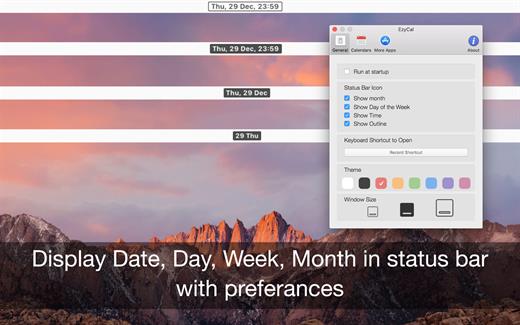
EzyCal is the status bar calendar for the new year 2017, you should have it to be productive then previous to achieve bigger goals. It is a system of organising days for social, religious, commercial or administrative purposes. It is gregorian calendar with natural language event and reminder creation, beautiful calendar views, and reminders app you’ll ever use.

Features


  • Add events, reminders, todo list
  • Count down to keep you on track
  • Sync with system calendar events
  • Different colours themes
  • Different sizes for various screen sizes
  • Customise keyboard shortcuts as needed
  • Sync with all available calendars on your pc
  • Get list of events in single display for next 7 days
  • Simple User interface to interact with calendar
What’s New

Version 2.7:


  • Release notes were unavailable when this listing was updated.
Compatibility

macOS 10.10 or later


Release Name: EzyCal: Time & Date 2.7
Size: 6.8 MB
Links: HOMEPAGE – NFO – Torrent Search

Download: RAPiDGATOR
4 Comments