Please REGISTER or RENEW your account on RAPiDGATOR.net and support us by doing through all RAPiDGATOR working download links on main posts...

SnapNDrag Pro is screen capture made ridiculously easy.
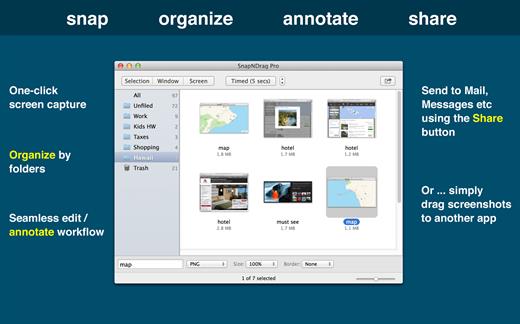
SnapNDrag started off as a simple app that lets you snap a screenshot with one click and then drag the result off to Mail, Finder, or any other app that accepts an image. It has since matured into a powerful screenshot tool that helps you annotate, organize, and share your screenshots.
As we added features over time, we have made it a top priority to keep the app easy to use. And we think the extra thought we put into this speaks for itself. This powerful app is still as easy to use as the day it was born as a simple one-trick pony.
Features
- One-click capture (by window, selection or timed)
- Organize with Folders
- Annotate without losing the original screenshot
- Share to Mail, Messages, Twitter, Facebook, etc.
- Output in PNG, JPEG, or TIFF
And for advanced users:
- Batch rename
- Run as a background app (no Dock icon)
- Customizable Hot Keys
What’s New Version 4.5.6:
- Bug Fixes: Previous version asks for permission to access folder for system screenshots each time it is run. This issue is fixed.
Compatibility macOS 10.15 or later
Release Name: SnapNDrag Pro 4.5.6
Size: 6.3 MB
Links: HOMEPAGE – NFO – Torrent Search
Download: RAPiDGATOR
SnapNDrag Pro is screen capture made ridiculously easy.
SnapNDrag started off as a simple app that lets you snap a screenshot with one click and then drag the result off to Mail, Finder, or any other app that accepts an image. It has since matured into a powerful screenshot tool that helps you annotate, organize, and share your screenshots.
As we added features over time, we have made it a top priority to keep the app easy to use. And we think the extra thought we put into this speaks for itself. This powerful app is still as easy to use as the day it was born as a simple one-trick pony.
Features
- One-click capture (by window, selection or timed)
- Organize with Folders
- Annotate without losing the original screenshot
- Share to Mail, Messages, Twitter, Facebook, etc.
- Output in PNG, JPEG, or TIFF
And for advanced users:
- Batch rename
- Run as a background app (no Dock icon)
- Customizable Hot Keys
What’s New Version 4.5.4:
- Bug Fixes: Previous version asks for permission to access folder for system screenshots each time it is run. This issue is fixed.
Compatibility macOS 10.15 or later
Release Name: SnapNDrag Pro 4.5.4
Size: 7.2 MB
Links: HOMEPAGE – NFO – Torrent Search
Download: RAPiDGATOR

SnapNDrag Pro is screen capture made ridiculously easy.
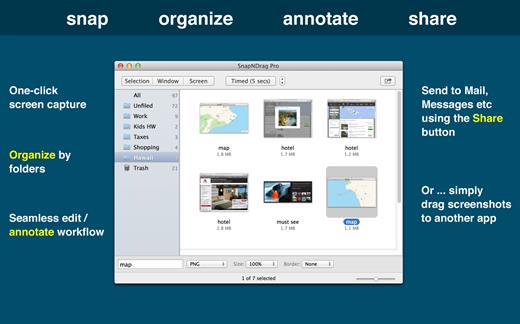
SnapNDrag started off as a simple app that lets you snap a screenshot with one click and then drag the result off to Mail, Finder, or any other app that accepts an image. It has since matured into a powerful screenshot tool that helps you annotate, organize, and share your screenshots.
As we added features over time, we have made it a top priority to keep the app easy to use. And we think the extra thought we put into this speaks for itself. This powerful app is still as easy to use as the day it was born as a simple one-trick pony.
Features
- One-click capture (by window, selection or timed)
- Organize with Folders
- Annotate without losing the original screenshot
- Share to Mail, Messages, Twitter, Facebook, etc.
- Output in PNG, JPEG, or TIFF
And for advanced users:
- Batch rename
- Run as a background app (no Dock icon)
- Customizable Hot Keys
What’s New Version 4.5.3:
- Bug Fixes: Previous version asks for permission to access folder for system screenshots each time it is run. This issue is fixed.
Compatibility macOS 10.15 or later
Release Name: SnapNDrag Pro 4.5.3
Size: 9.1 MB
Links: HOMEPAGE – NFO – Torrent Search
Download: UPLOADGiG – NiTROFLARE – RAPiDGATOR

Description:
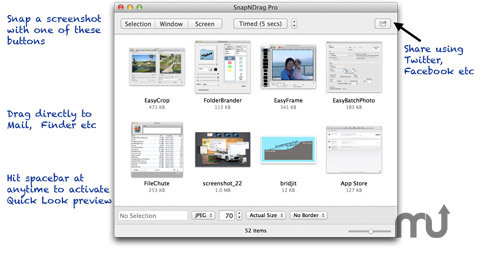
SnapNDrag lets you take a screenshot by just clicking a button and dragging the resulting screenshot off. For example, to email a screenshot, you would drag the screenshot from SnapNDrag to the Mail application. It is that simple. No hard-to-remember key combinations, no file conversion to deal with, no file dialog boxes to navigate, no temporary files to erase later on. Supports PNG and TIFF for times when image quality cannot be compromised. Or use JPEG with adjustable quality for smaller file sizes.
Version 3.0.3:
- Fixed: Added a few missing menu items to menubar menu
- Fixed: Bring-to-front hot key now works correctly for minimized window
- Added Quick Look to File menu and Toolbar
- Added Delete button to Toolbar
- Added contextual menu
Release Name: SnapNDrag.Pro.v3.0.3.MacOSX.Cracked-CORE
Size: 2MB in 1F
Links:
Homepage –
NFO –
Torrent Search Download: UPLOADED – RAPiDGATOR



