Please REGISTER or RENEW your account on RAPiDGATOR.net and support us by doing through all RAPiDGATOR working download links on main posts...
July 27

Adobe Bridge 2026 v16.0.6
Description: Bridge gives you centralized access to all the files and assets you need for your creative projects. Organize personal and team assets, batch edit with ease, add watermarks, set centralized color preferences, and even upload your photos to Adobe Stock. Bridge simplifies your workflow and keeps you organized and now with CC Libraries.
Features
- Bulk import, export and preview CC Libraries assets
- Edit photo capture time
- Export/ Import network cache
- Native PDF Output Module
- Easy upload of images to Adobe Stock so you can get royalties for your work
- Support for Retina and HiDPI displays with the ability to scale
- Automated cache management
- Publishing to Adobe Portfolio to build your personalized website
- Quick organization and stacking of panoramic and HDR images
- On-demand thumbnail and metadata generation
- Option to import photos and videos from your mobile device or digital camera on macOS
- Support for CEP HTML5
- Flexible batch processing
- Drag-and-drop file flexibility
- Centralized color settings

Consistent user experience
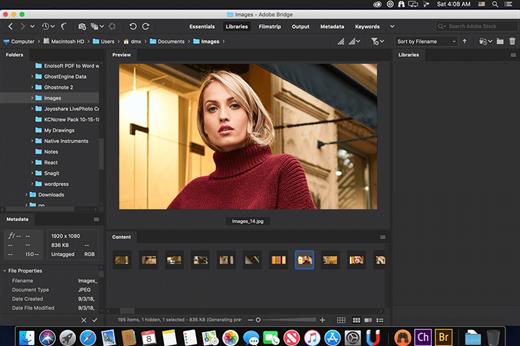
Adobe Bridge now has an enhanced user interface to provide you a similar experience like other Creative Cloud applications. You can also change the default user interface appearance, text size, and scaling by setting the User Interface preferences in the Edit > Preferences > Interface dialog.

Enhanced Creative Cloud Libraries
The Libraries workspace in Bridge now displays a high-quality preview of library items. You can select multiple items to see their previews together.

Centralized cache management
You can now share a cache with other Bridge users and let them use the shared cache instead of creating a cache. Any Adobe Bridge user can export a cache to a shared folder, and other users can import a copy of the shared cache to their local systems. Given that the systems are in synchronization, managing the cache at a centralized location lets you reuse the exported cache, without the need to rebuild the cache on different user machines. You can create and manage the shared cache by using the Manage Cache dialog (Tools > Manage Cache), which has now been enhanced to provide options for building, importing, and purging cache. In addition, the cache preferences have been enhanced (Edit > Preferences > Cache and Edit > Preferences > Cache Management).

Edit capture time
Adobe Bridge now lets you change the capture time of the JPEG and RAW image files, just like the way it is done in Adobe Lightroom. This feature is helpful if you travel to a different time zone and do not change the date or time setting of your camera before you start photographing. With this feature, you can edit the capture time after capturing the image.

Support for XD file formats
Bridge now supports preview, thumbnail generation, metadata tagging, and keyword generation for Adobe XD files.

Media cache preferences
Bridge now processes and maintains a cache of all audio and video playback files. This capability improves the performance of playback files because the files are available for ready access whenever you want to view them later. It is recommended that you regularly clean the old and unused media cache files to optimize the performance. The preferences for media cache can be set by choosing Edit > Preferences > Media Cache.

Cut, copy, or move files and folders across Bridge and File Explorer or Finder

Bridge now lets you perform the following operations
- Cut, copy, or move files and folders from File Explorer (Windows) or Finder (macOS) and paste them in Bridge
- Cut, copy, or move files and folders from the Bridge workspace and paste them in File Explorer (Windows) or Finder (macOS)

Release Name: Adobe Bridge 2026 v16.0.6
Size: 2.8 GB
Links: HOMEPAGE – NFO – Torrent Search

Download: RAPiDGATOR

2 Comments
July 27

SonarQube DataCenter 2026.4.0.125744 MultiOS

Description: Unlock the power of AI coding assistants without the risk of bad, insecure code. SonarQube is your Clean Code solution that deploys anywhere, on-prem, or in your cloud environment.

SonarQube Server Data Center Edition Features

30 languages covered
Analyze the quality of the code in your preferred language. Patch bugs, close vulnerabilities, and follow best practices with a single source of truth.

Integration with top DevOps platforms
Easily onboard projects. Integrate with GitHub Actions, GitLab CI/CD, Azure Pipelines, Bitbucket Pipelines, and Jenkins to auto-trigger analysis and show code health status where you work.

configurable SAST analysis engine
Declare custom frameworks you use to capture user input and/or persist it. The injection flaw detection engine tracks the non-sanitized user input.

guided developer experience
The UI is crafted for clarity so developers easily understand the problem flow from the vulnerability source to the code location (‘sink’) where the compromise occurs

branch and pull request analysis
Super-fast analysis helps you quickly assess where the code stands in pull requests and branches so you can remediate issues while your code is still fresh in mind.

Critical security rules for vital languages
Coding issues are found at the right time and in the right place seamlessly in your dev workflow. Benefit from 6,000+ rules and industry-leading taint analysis of Java, C#, PHP, Python, and more.

Shared, unified configurations
Set your specific coding standards to align your team on code health and achieve your code quality goals. Plus Learn as You Code elevates your developer's skills to the same high level.

SonarQube for IDE
Add the SonarQube for IDE extension and connect it to SonarQube Server to find coding issues on the fly as you code and ensure your team follows a single governed coding standard.

Release Name: SonarQube DataCenter 2026.4.0.125744 MultiOS
Size: 1.3 GB
Links: HOMEPAGE – NFO – Torrent Search

Download: RAPiDGATOR
4 Comments
July 27

Key Metric FolderSizes 10.2.57 Enterprise

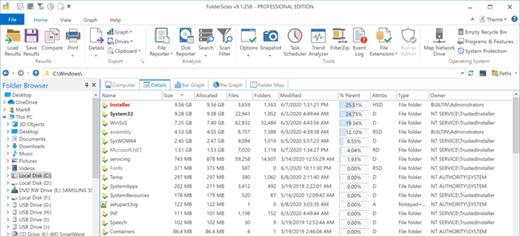
Description: Fast, powerful, pro disk space analysis software for Windows. Desktop PCs, laptops and servers can quickly end up accumulating large quantities of unused, temporary, and duplicate files. Before you know it, you're out of disk space, backups are taking far too long to run, users can’t find what they need, and you're struggling to plan for the future.

You need a visual, interactive software tool to help you manage disk space. You need FolderSizes - the award-winning, network-enabled disk space analyzer for Windows. It can quickly isolate large, old, temporary, and duplicate files, or even show file distribution by type, size, attributes, age, depth, or owner. All with multiple export formats, command-line support, report scheduling, and much more.

Scheduling and email integration
Robust, built-in report scheduling with email delivery support

Folder and disk trends
Trend analysis features show disk usage and folder sizes over time

File system snapshots
Unique and powerful file system snapshot capability

Disk space bar, pie, and treemap
Stunning disk space visualizations – bar, pie, and treemap views

Fast disk space reporting
Performance & scalability – analyze any file system with confidence

Analyze network disk space
Network share discovery for servers, storage devices, and domains

FolderSizes goes far beyond the capabilities of existing disk space analysis tools with superior features and performance. Try it and see why so many customers depend on FolderSizes.

File system search
Search for files and folders by age, name, attributes, size, owner, & more

Largest, oldest, newest, duplicate, and temp files
Quickly isolate largest files, oldest files, duplicate files, and temp files

Report files by type, age, owner, depth, attributes
Reports for file types, attributes, owners, sizes, names, ages, & depths

Export file system analysis data
Export reports to MS Excel, PDF, HTML, CSV, and TXT file formats

Re-load and compare file system analysis reports
Save, re-load, and compare folder size report data

Windows software
Built by trusted leaders in secure Windows software

Release Name: Key Metric FolderSizes 10.2.57 Enterprise
Size: 24 MB
Links: HOMEPAGE – NFO – Torrent Search

Download: RAPiDGATOR
4 Comments
July 27

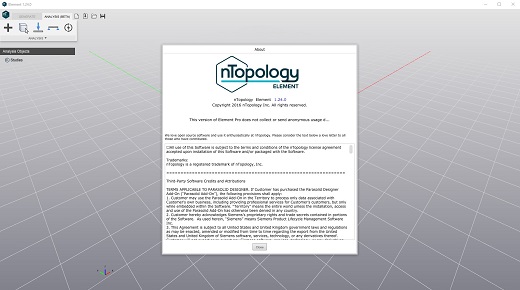
nTopology 5.51.3

Description: Innovate. Iterate. Create. Unlock faster innovation and better performance with advanced computational design software.

Lightweighting
Decrease weight while meeting your structural requirements to improve performance.

Thermal management
Improve heat transfer efficiency with more compact and reliable designs.

Fluid management
Generate designs with improved fluid or aerodynamic performance.

Architected materials
Develop highly engineered structures with a targeted response to enhance product performance.

Mass customization
Automate design to reduce cost and time to market for personalized products.

Release Name: nTopology 5.51.3
Size: 1.5 GB
Links: HOMEPAGE – NFO – Torrent Search

Download: RAPiDGATOR
3 Comments
July 27

StartAllBack 3.9.24.5377

Description: Introducing StartAllBack: Windows 11 from better timeline, Embrace, enhance, unsweep classic UI from under the rug.

Restore and improve taskbar
Show labels on task icons
Adjust icon size and margins
Move taskbar to top, left or right edges
Drag and drop stuff onto taskbar
Center task icons but keep Start button on the left
Split into segments, use dynamic translucency
Separate corner icons with Windows 7/10 UI

Restore and improve File Explorer UI
Ribbon and Command Bar revamped with translucent effects
Details pane on bottom
Old search box (the one which works)
Dark mode support for more dialogs

Restore and improve context menus
All new look with rounded acrylic menus
Fast and responsive taskbar menus
New fonts, better touch support

Restore and improve start menu
Launch apps and go to system places in one click
Navigate dropdown menus like a boss
Enjoy fast and reliable search

Finally, lightweight styling and UI consistency
Enjoy Windows 7, Windows 10 and third-party taskbar and start menu styles
Fix UI inconsistencies in Win32 apps
Don't be blue: recolor UI in all windows apps
Negative resource usage: fewer RAM used, fewer processes started

Release Name: StartAllBack 3.9.24.5377
Size: 2.1 MB
Links: HOMEPAGE – NFO – Torrent Search

Download: RAPiDGATOR

5 Comments
July 27

Syncovery Premium 12.4.0.55

Description: Create your first sync or backup job step by step, with explanations of the main settings you need to make. Each job (or profile) works with two paths – source and destination, or just the left and right path (since profiles can be 2-way copy tasks also).

Extremely Fast Scanning
Syncovery’s multi-threaded folder listing algorithm provides an unparalleled speed, and easily handles millions of files and huge numbers of folders. Even more speed can be gained with our Destination File List Cache and Remote Service features.

Block Level Copying
This will help you save bandwidth as well as backup space. Syncovery can detect changed blocks in large files, and copy only these. The detection works by keeping checksums in a database, or with the help of the Syncovery Remote Service, or by using our revolutionary File System Monitoring Service (the File Sytem Monitoring Service is Windows only).

Real-Time Synchronization
Real-Time Synchronization will make sure that changes are synced quickly. Syncovery listens to file system events and quickly performs the appropriate actions. For cloud servers, it can use polling to detect changes. These features are available on Windows and macOS only.

SmartTracking
The SmartTracking sync mode is frequently used in two-way sync jobs. It can detect moved files, deleted files, and conflicts (files changed on both sides).

Versioning
Syncovery allows you to keep multiple versions of modified files, allowing you to restore your files from an earlier date. The restore date can be chosen for individual files or multiple files, in our Restore Wizard.

File Server Migration
Syncovery’s advanced NTFS copying features, high speed, and scaleability enable you to perform large-scale migrations. Read our new, comprehensive Server Migration Guide.

Advanced Mode
Keep Everything Under Control
Advanced Mode allows you to unleash Syncovery’s full potential. The Profile Overview shows your jobs (or profiles), their last and next run times, and the last result or current progress. You can easily create, edit, and run profiles. Syncovery offers various ways to start profiles. These are available when right-clicking a profile:

Attended Mode
This mode has detailed progress dialogs, and shows the Sync Preview for you to confirm before proceding to the copying phase. It may also show additional confirmation dialogs according to your settings.

Unattended Mode
Unattended Mode also shows detailed progress dialogs, but does not show a Sync Preview and won’t ask any further questions. Some confirmations must be given beforehand, in the profile settings (for example, to delete files).

Run in Background
Running a job in the background is the most unobtrusive way to run a profile. You will see basic progress information in the Profile Overview, but no extra dialogs. This is how the scheduler runs profiles. You can still see detailed progress info by right-clicking the job that’s already running and choosing “Show Detailed Progress”.

Background With Preview
This new feature in Syncovery 9 has proven to be extremely useful. You won’t see detailed progress dialog, and the job doesn’t block the Syncovery GUI. You can run multiple jobs simultaneously, and check the Sync Preview for each profile when it’s ready. After confirming the preview dialog, the job goes into the background again.

System Requirements:
All versions of Windows since Windows Vista and Windows Server 2008 are fully supported, including Windows 10/11 and Server 2019-2025 and all other versions and editions of Windows that have a graphical user interface.

Release Name: Syncovery Premium 12.4.0.55
Size: 91.1 MB
Links: HOMEPAGE – NFO – Torrent Search

Download: RAPiDGATOR
4 Comments
July 27

AI Text To Image Generator Pro 1.2.5

Description: Unleash your creativity with AI Text to Image Generator, the ultimate desktop app for turning your words into stunning, high-quality art. Whether you're a digital artist, designer, or hobbyist, our powerful AI image generator gives you direct access to state-of-the-art models like Flux, Stable Diffusion, Juggernaut XL, and more right on your PC. Create photorealistic portraits, anime characters, breathtaking landscapes, and abstract art with a simple text prompt.

Our application is a complete AI art studio, designed for both beginners and experts. It operates locally on your computer, ensuring your creations and prompts remain private. Experience the power of generative AI without needing complex setups or online subscriptions. Just type what you imagine, and watch it come to life.

Access Top-Tier AI Models
Generate images with world-class models including Flux, Stable Diffusion, Juggernaut XL for photorealism, and Animagine XL for anime styles.

Complete Creative Control
Fine-tune your creations with advanced settings for Image Size, Guidance Scale (CFG), Inference Steps, and Seed for reproducible results.

Custom Model Support
Add any Diffusers-compatible model from the Hugging Face Hub to expand your creative toolkit.

Offline Capable & Private
After the initial model download, the app works completely offline. Your prompts and generated images never leave your computer.

User-Friendly Interface
A clean, intuitive layout makes it easy to manage your prompts, select models, and organize your generated art.

No Subscriptions, No Limits
Generate as many images as you want. Once you own the app, the creative power is yours forever.

State-of-the-Art AI Models
Generate incredible images with built-in models like Flux, Stable Diffusion, and Juggernaut XL.

Total Creative Control
Adjust advanced settings like inference steps, guidance scale, and seed to perfect your artwork.

Generate Any Style
Create photorealistic photos, vibrant anime characters, stunning landscapes, abstract art, and more.

Add Your Own Models
Easily import and manage any diffusers-compatible model from the Hugging Face Hub for endless variety.

100% Private & Offline
All processing is done locally on your PC. Your prompts and images are never uploaded to the cloud.

Simple & Powerful UI
An intuitive interface makes it easy for beginners to start creating, with powerful tools for professionals.

One-Click Recommended Settings
Instantly apply the optimal settings for any selected model to get the best quality results.

System Requirements
- OS: Windows 10 version 17763.0 or higher
- Memory: 8 GB (Minimum), 16 GB (Recommended)
- Video Memory: 4 GB (Minimum), 6 GB (Recommended)

* Internet connection is required only for launching the program.

Microsoft Store - Full Version

Release Name: AI Text To Image Generator Pro 1.2.5
Size: 1.6 GB
Links: HOMEPAGE – NFO – Torrent Search

Download: RAPiDGATOR
3 Comments
July 26

Coolutils Total PDF Converter 6.5.0.189

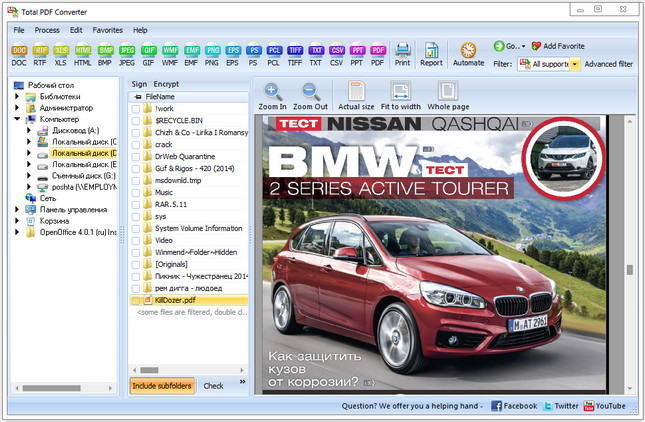
Description: Total PDF Converter Software changes PDF files to DOC, RTF, TIFF, XLS, HTML, EPS, PS, TXT, CSV, PDF/A and images in batch. Unlike other batch PDF converters, the Total PDF Converter is extremely user-friendly thanks to a well-planned interface. Additionally, registered users gain direct access to command line support for quiet automatic functioning on the back end.

Download the full desktop version that does not require Internet connection or sharing your files online.
Convert PDF files in batches, whole folders in one go.
Add page numbers to your output files.
Convert several PDF files into one Doc or DocX. More unique options.

With support for over 25 different formats Total PDF Converter is neither complex nor difficult to use. If you need a server version without any GUI or interrupting messages check out the Total PDF Converter X with ActiveX. Buy your license today and convert PDF files with the full registered version in 5 minutes.

Why download our PDF Converter Software
pdfTotal PDF Converter supports PDF, PCL, PS, EPS, PRN, XPS, OXPS files. It's not a simple PRN converter, it's the all-in-one solution. New formats are constantly being added.
javaTell Total PDF Converter if you want to omit images from the source files. You can also get the new file with images only without text if you like.
javaConvert PDF to PDF/A in batch. Update thousands of multiple files in one process.
split pdfTotal PDF Converter can act as a PDF splitting utility and extract selected pages from a multi-page PDF. It can also split PDF by bookmarks or by blank pages.
time stampsTotal PDF Converter will change the date of the file or keep the original time stamps. Just check the appropriate checkbox.
sign pdfSign PDF documents with your digital signature during the file conversion process.
combine pdfCombine several PDF files into one multi-page document with out powerful batch PDF converter.
rotateTotal PDF Converter can automatically rotate your documents.
pdf to wordPDF to Word converter supports both Doc and DOCX for your convenience.
pdf to jpegConvert PDF to JPG? Customize the final image to your needs. Set the desired quality of the JPEG image to compromize the file size. The app also extracts selected pages and converts them to JPEG.
interfaceConvert PDF/PS/EPS/PRN files via our clear interface with lots of hints for beginners.
formatsThe widest list of output file types: DOC, DOCX, RTF, XLS, HTML, BMP, JPEG, GIF, WMF, EMF, PNG, EPS, PS, TIFF, TXT, CSV, PDF/A and PDF!
pdf converterTotal PDF Converter can combine several PDF files into one TIFF image. Or place every page of a multi-page PDF into a new TIFF files.
javaTune the output: set new margins in inches to your standards (ready for printing).
previewEach PDF file is displayed in Preview panel. You can zoom it in/out or view the document full-sized. Preview option makes it easy to find the necessary PDF file.
pdf watermarkAdd text or image watermarks to the header or the footer of the output file. It's perfect for stamping bates too!
pageWant more order? Add pagination (sequential numbering of folders is available).
pdf load imagesTotal PDF Converter can extract odd or even pages for you.
pdf converterUnlike free PDF converter software, our app processes thousands of documents keeping the folder structure.
pdf to docNo matter what MS Office you have, our app can convert PDF to DOC and DocX.
serverWe also offer PDF Converter SDK for Web\SQL server\ASP\.NET\C#. With ActiveX you can easily implement our PDF converter into your application and redistribute it to the end users.
cmdTotal PDF Converter has full command line support (get the ready-to-use command line from GUI).

Release Name: Coolutils Total PDF Converter 6.5.0.189
Size: 217.1 MB
Links: HOMEPAGE – NFO – Torrent Search

Download: RAPiDGATOR
6 Comments
July 26

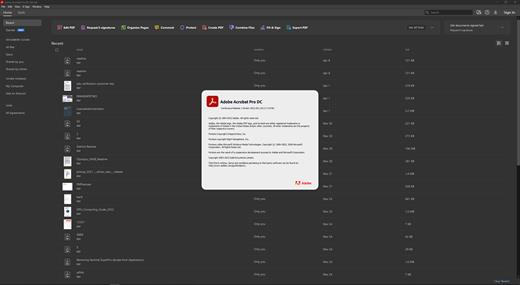
Adobe Acrobat Pro DC 2026.001.21745

REPACK by monkrus

Description: Adobe Acrobat Pro DC is the leading PDF converter and much more. Adobe Acrobat Pro DC software lets you deliver professional PDF communications. It's packed with smart tools that give you even more power to communicate. Create and edit PDF files with rich media included, share information more securely, and gather feedback more efficiently.

Adobe Acrobat Pro DC software is the advanced way for business professionals to create, combine, control, and deliver more secure, high-quality Adobe PDF documents for easy, more secure distribution, collaboration, and data collection.

Assemble electronic or paper files into reliable PDF documents that are easy to share with others using free Adobe Reader. You can assemble even Web sites, engineering drawings, and e-mail.

With Adobe Acrobat Pro DC you can manage document reviews, synthesizing feedback from multiple reviewers while preserving document format and integrity. Extend commenting capabilities to anyone using Adobe Reader. Windows users can design intelligent Adobe PDF forms that include business logic, such as calculations and data validations, to help increase the accuracy of data collection while reducing the costs of manual data entry.

Use Adobe Acrobat Pro DC to create high-impact PDF communications, collaborate more easily, and streamline reviews. Adobe Acrobat Dynamic PDF helps you get more done - easier, faster, better.

Edit PDF files
With Adobe Acrobat Pro DC, you can make minor edits to text and images right in your PDF file without requiring the original document or graphic. Edit text in a PDF. Fix a typo, change a font, or add a paragraph to your PDF as easily as you do in other applications using a new point-and-click interface. Edit images in a PDF. Resize, replace, and adjust images in your PDF with no need to track down the original file or graphic.

Export from PDF files
Reduce the time you spend retyping information stuck in PDF files. Convert PDF files to editable Microsoft Office documents. And save fonts, formatting, and effort.
Convert PDF files to Word. Save your PDF as a Microsoft Word document and take your fonts, formatting, and layouts with you. Convert PDF files to Excel. Turn your PDF or just part of it into an editable Excel spreadsheet you can use for data analysis right away. Convert PDF files to PowerPoint. Get a head start on new projects by saving a PDF file as a fully editable PowerPoint presentation.

Create PDF files
Stop worrying about whether the files you send will look right on other people's screens. Turn documents into PDF files anyone can reliably view with free Adobe Reader.
Convert Word, Excel, or PowerPoint to PDF. Right from your Office application in Windows, you can create PDFs, start a shared review, restrict PDF edits, and more. Print to PDF. Convert files to PDF from virtually any application that prints simply by selecting Adobe PDF as your printer. Scan to PDF. When you need to turn a paper document or form into a digital file, just scan it to create a searchable PDF file you can edit. Convert HTML pages to PDF. Save web pages as PDF files to archive web content, review the pages offline, or print them more reliably.

Create and analyze forms
Cut the time you spend creating forms, rekeying data, and correcting errors. Distribute forms online, and then collect responses and analyze results in real time.
Create new PDF and web forms. Customize professional templates or design from scratch with the Adobe FormsCentral desktop app included in Adobe Acrobat Pro DC. Collect form responses with FormsCentral. Easily collect responses by moving your PDF or web forms online with the Adobe FormsCentral online service. Convert existing forms to fillable PDFs. Type less, gather more. Quickly convert your paper, Word, or Excel forms to fillable PDF forms. Collect form responses using Adobe Acrobat tools. Compile returned forms into one PDF, or host forms using a network folder or Microsoft SharePoint server.

System Requirements:
Intel® or AMD processor; 1.5GHz or faster processor
Windows 11 (64 bit), Windows 10 (64 bit) version 1809 or later, Windows Server 2016 (64 bit), or Windows Server 2019 (64 bit)
2GB of RAM
4.5GB of available hard-disk space.
1024x768 screen resolution
Video hardware acceleration (optional)

Release Name: Adobe Acrobat Pro DC 2026.001.21745
Size: 3.1 GB
Links: HOMEPAGE – NFO – Torrent Search

Download: RAPiDGATOR

4 Comments
July 26

R-Wipe & Clean 20.0.2571

Description: R-Wipe & Clean is a complete R-Tools solution to remove useless files, free up your disk space, and clean various privacy-compromising information on your online and offline activity. This includes internet history and cookies, lists of downloaded files and opened documents, various data caches, temporary files, and many more items, created by the operating system, most contemporary internet browsers and communication programs, and by hundreds of third-party applications.

It is also possible to create specific lists of traces to be cleaned for unsupported applications. All small computer cleaning and file erasing jobs can be combined into large computer cleaning tasks that can be started immediately, or at scheduled time/events.

In addition to new traces to clean, the latest version offers its users several brand new features:
Touch interface: A new graphical interface designed for devices with touch screens: tablets, laptops with touch screens, etc.. Users with non-touch screen devices may use it too, to enjoy its original stylish appearance.
Traces Selection helper: a tool to quickly select some of the most common traces to clean.
Support for SSD devices: the program correctly recognizes SSD devices and treats them accordingly to avoid their additional wear and tear.
R-Wipe & Clean Smart: an advanced tool to create and manage very complex wipe lists.
R-Wipe & Clean Lite: a free version that cleans most essential computer traces.

Computer Cleaning
Traces Selection helper: a tool to quickly select some of the most common traces to clean.
Cleaning Internet activity: removing traces from most contemporary browsers and communication programs.
Cleaning personal traces: removing various lists, logs, caches, temporary files, and other traces of your activity.
Cleaning system traces: removing registry traces, temp files, system history, and various log files.
Cleaning traces from various third-party programs: removing various caches, logs, temporary files, recent file lists, and other traces left by applications.
Cleaning can be performed as a background task and computer can be turn off upon its completion.

Wiping
Support for SSD devices: R-Wipe & Clean correctly recognizes SSD devices and by default wipes only necessary data on the disk preventing them from additional wear.
Strong or fast erase algorithms, including DoD-approved, for wiping files and free disk space.
Support for FAT/exFAT and NTFS file systems.
Wiping files' alternate data streams and cluster "tips", or free parts of file clusters.
Wiping files directly from File Explorer.
Wiping free space on a single disk directly from its shortcut menu.
Wiping unused space of several disks through one single wipe task.
Wipe records of small files stored directly in the NTFS Master File Table.
Predefined wipe lists of files, folders, and Registry keys to be wiped through a single task. Files or folders can be added to a current wipe list directly from File Explorer.

Touch Interface
A new graphical interface designed for devices with touch screens with various resolutions: tablets, laptops with touch screens, etc.. In addition to its modern look and animation, Touch Interface is adapted to the way the users control their touch screen devices: by swiping and tapping. It provides access to all controls and settings of R-Wipe & Clean, so users with non-touch screen devices may use it too, to enjoy its original stylish appearance.

Advanced Features
All separate cleaning and wiping actions can be combined into large wipe and clean tasks to launch them manually or at scheduled times or events (user log-on/log-off, system start-up/shutdown, closing any or all browsers, etc.)
Detailed representation of all trace items on your computer.
Detailed logging of all wipe and clean operations.
Customization: R-Wipe & Clean can hide those items you will never want to clean.
Full system integration: Most wipe and clean operations can be performed directly from Windows.
Password protection.
R-Wipe & Clean Smart: an advanced tool to create and manage very complex wipe lists.
Cleaning and wiping task can be started from a command line.
Boss Key to close a web-browser in emergency.
Stealth mode to hide computer cleaning.
Standby/hibernate control: Your computer will not hibernate until R-Wipe & Clean finishes its long job.
Startup Renaming for files/folders locked by Windows and other programs. They will be renamed and cleaned during the next start-up.

Release Name: R-Wipe & Clean 20.0.2571
Size: 36.1 MB
Links: HOMEPAGE – NFO – Torrent Search

Download: RAPiDGATOR
5 Comments