Please REGISTER or RENEW your account on RAPiDGATOR.net and support us by doing through all RAPiDGATOR working download links on main posts...
Apr 8

Coolutils Total PDF Converter 6.5.0.156

Description: Total PDF Converter Software changes PDF files to DOC, RTF, TIFF, XLS, HTML, EPS, PS, TXT, CSV, PDF/A and images in batch. Unlike other batch PDF converters, the Total PDF Converter is extremely user-friendly thanks to a well-planned interface. Additionally, registered users gain direct access to command line support for quiet automatic functioning on the back end.
Download the full desktop version that does not require Internet connection or sharing your files online.
Convert PDF files in batches, whole folders in one go.
Add page numbers to your output files.
Convert several PDF files into one Doc or DocX. More unique options.

With support for over 25 different formats Total PDF Converter is neither complex nor difficult to use. If you need a server version without any GUI or interrupting messages check out the Total PDF Converter X with ActiveX. Buy your license today and convert PDF files with the full registered version in 5 minutes.

Why download our PDF Converter Software
pdfTotal PDF Converter supports PDF, PCL, PS, EPS, PRN, XPS, OXPS files. It's not a simple PRN converter, it's the all-in-one solution. New formats are constantly being added.
javaTell Total PDF Converter if you want to omit images from the source files. You can also get the new file with images only without text if you like.
javaConvert PDF to PDF/A in batch. Update thousands of multiple files in one process.
split pdfTotal PDF Converter can act as a PDF splitting utility and extract selected pages from a multi-page PDF. It can also split PDF by bookmarks or by blank pages.
time stampsTotal PDF Converter will change the date of the file or keep the original time stamps. Just check the appropriate checkbox.
sign pdfSign PDF documents with your digital signature during the file conversion process.
combine pdfCombine several PDF files into one multi-page document with out powerful batch PDF converter.
rotateTotal PDF Converter can automatically rotate your documents.
pdf to wordPDF to Word converter supports both Doc and DOCX for your convenience.
pdf to jpegConvert PDF to JPG? Customize the final image to your needs. Set the desired quality of the JPEG image to compromize the file size. The app also extracts selected pages and converts them to JPEG.
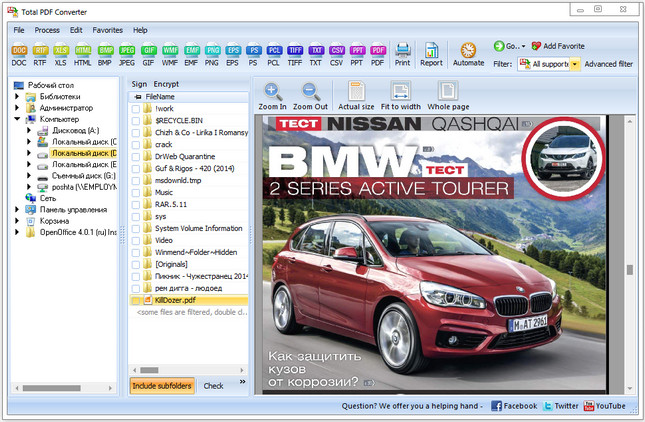
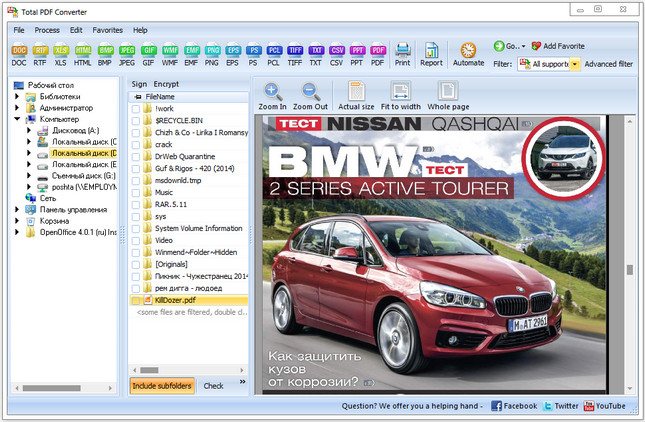
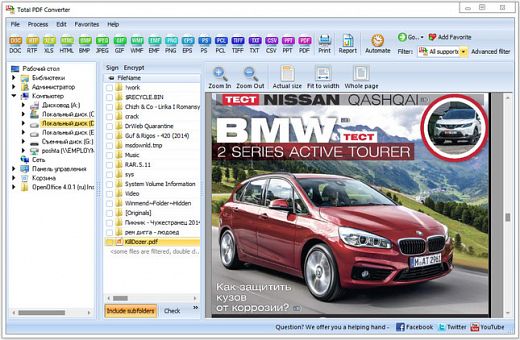
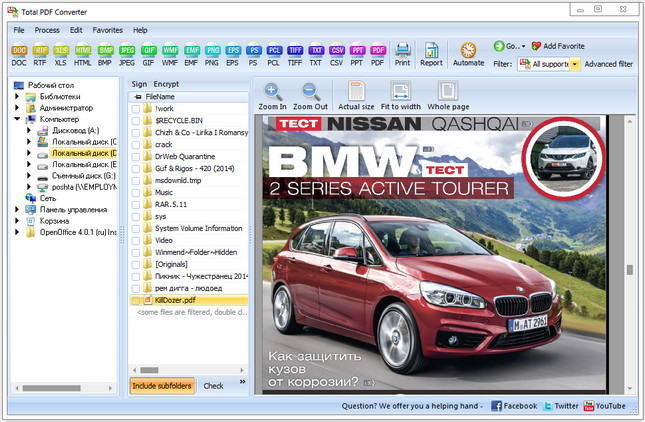
interfaceConvert PDF/PS/EPS/PRN files via our clear interface with lots of hints for beginners.
formatsThe widest list of output file types: DOC, DOCX, RTF, XLS, HTML, BMP, JPEG, GIF, WMF, EMF, PNG, EPS, PS, TIFF, TXT, CSV, PDF/A and PDF!
pdf converterTotal PDF Converter can combine several PDF files into one TIFF image. Or place every page of a multi-page PDF into a new TIFF files.
javaTune the output: set new margins in inches to your standards (ready for printing).
previewEach PDF file is displayed in Preview panel. You can zoom it in/out or view the document full-sized. Preview option makes it easy to find the necessary PDF file.
pdf watermarkAdd text or image watermarks to the header or the footer of the output file. It's perfect for stamping bates too!
pageWant more order? Add pagination (sequential numbering of folders is available).
pdf load imagesTotal PDF Converter can extract odd or even pages for you.
pdf converterUnlike free PDF converter software, our app processes thousands of documents keeping the folder structure.
pdf to docNo matter what MS Office you have, our app can convert PDF to DOC and DocX.
serverWe also offer PDF Converter SDK for Web\SQL server\ASP\.NET\C#. With ActiveX you can easily implement our PDF converter into your application and redistribute it to the end users.
cmdTotal PDF Converter has full command line support (get the ready-to-use command line from GUI).

Release Name: Coolutils Total PDF Converter 6.5.0.156
Size: 228.5 MB
Links: HOMEPAGE – NFO – Torrent Search

Download: RAPiDGATOR
4 Comments
June 7

Coolutils Total PDF Converter v6.1.0.23 Multilingual-P2P

Description: Total PDF Converter converts PDF files to HTML, DOC (Word), text, Excel, PostScript, CSV or image files (e.g. TIFF). When you need to convert PDF files to other formats or PS to PDF, Total PDF Converter is the ultimate choice. Why? Because, it’s fast, easy-to-handle, accurate, doesn’t require Adobe Acrobat, supports many target formats and has a batch option (can convert hundreds of PDF files as well as single files). In addition to this, registered users get command line support to manage the utility with maximum efficiency.

Features:

  • PDF Converter can save Adobe files as images (in JPEG format) and position several of them on one screen. This is especially useful for users of Sony PSP. Have your PDF files displayed on your TV in the way that suits you most. The pages can be displayed vertically, horizontally, even diagonally, with one, two, three or more pages on the screen.
  • Total PDF Converter can also save conversion preferences. This means, for example, that you do not have to re-check “Change each page to a separate file” every time you convert PDF to TIFF.
  • The tool will also give you the option of tsrating page numbering in the outout file from any numbers (e.g. “6,7,8,9?, not just “1,2,3,4?).
  • Total PDF Converter also supports DPI and paper size for TIFF. This means that now you can select the quality and size of the output TIFF image. Choose from 75, 150 or 300 DPI or set your own. The page size can be A3, A4, A5, B4, B5 or Letter. As well as this, you can rename .tiff to .tif via the GUI and command line in the \PDF to TIFF conversion process.
  • Total PDF Converter can convert multi-page PDF files to HTML and place each page in a separate HTML file.
Release Name: Coolutils Total PDF Converter v6.1.0.23 Multilingual-P2P
Size: 216.51 MB
Links: HOMEPAGE – NFO – Torrent Search

Download: UPLOADGiG – NiTROFLARE – RAPiDGATOR

13 Comments
May 5

Coolutils Total PDF Converter v6.1.0.19 Multilingual-P2P

Description: Total PDF Converter converts PDF files to HTML, DOC (Word), text, Excel, PostScript, CSV or image files (e.g. TIFF). When you need to convert PDF files to other formats or PS to PDF, Total PDF Converter is the ultimate choice. Why? Because, it’s fast, easy-to-handle, accurate, doesn’t require Adobe Acrobat, supports many target formats and has a batch option (can convert hundreds of PDF files as well as single files). In addition to this, registered users get command line support to manage the utility with maximum efficiency.

Features:

  • PDF Converter can save Adobe files as images (in JPEG format) and position several of them on one screen. This is especially useful for users of Sony PSP. Have your PDF files displayed on your TV in the way that suits you most. The pages can be displayed vertically, horizontally, even diagonally, with one, two, three or more pages on the screen.
  • Total PDF Converter can also save conversion preferences. This means, for example, that you do not have to re-check “Change each page to a separate file” every time you convert PDF to TIFF.
  • The tool will also give you the option of tsrating page numbering in the outout file from any numbers (e.g. “6,7,8,9?, not just “1,2,3,4?).
  • Total PDF Converter also supports DPI and paper size for TIFF. This means that now you can select the quality and size of the output TIFF image. Choose from 75, 150 or 300 DPI or set your own. The page size can be A3, A4, A5, B4, B5 or Letter. As well as this, you can rename .tiff to .tif via the GUI and command line in the \PDF to TIFF conversion process.
  • Total PDF Converter can convert multi-page PDF files to HTML and place each page in a separate HTML file.
Release Name: Coolutils Total PDF Converter v6.1.0.19 Multilingual-P2P
Size: 195.05 MB
Links: HOMEPAGE – NFO – Torrent Search

Download: UPLOADGiG – NiTROFLARE – RAPiDGATOR

13 Comments
Mar 30

Coolutils Total PDF Converter 6.1.0.13 Multilingual-P2P

Description: Total PDF Converter converts PDF files to HTML, DOC (Word), text, Excel, PostScript, CSV or image files (e.g. TIFF). When you need to convert PDF files to other formats or PS to PDF, Total PDF Converter is the ultimate choice. Why? Because, it’s fast, easy-to-handle, accurate, doesn’t require Adobe Acrobat, supports many target formats and has a batch option (can convert hundreds of PDF files as well as single files). In addition to this, registered users get command line support to manage the utility with maximum efficiency.

Features:

  • PDF Converter can save Adobe files as images (in JPEG format) and position several of them on one screen. This is especially useful for users of Sony PSP. Have your PDF files displayed on your TV in the way that suits you most. The pages can be displayed vertically, horizontally, even diagonally, with one, two, three or more pages on the screen.
  • Total PDF Converter can also save conversion preferences. This means, for example, that you do not have to re-check “Change each page to a separate file” every time you convert PDF to TIFF.
  • The tool will also give you the option of tsrating page numbering in the outout file from any numbers (e.g. “6,7,8,9?, not just “1,2,3,4?).
  • Total PDF Converter also supports DPI and paper size for TIFF. This means that now you can select the quality and size of the output TIFF image. Choose from 75, 150 or 300 DPI or set your own. The page size can be A3, A4, A5, B4, B5 or Letter. As well as this, you can rename .tiff to .tif via the GUI and command line in the \PDF to TIFF conversion process.
  • Total PDF Converter can convert multi-page PDF files to HTML and place each page in a separate HTML file.
Release Name: Coolutils Total PDF Converter v6.1.0.12 Multilingual-P2P
Size: 175MB
Links: HOMEPAGE – NFO – Torrent Search

Download: UPLOADGiG – NiTROFLARE – RAPiDGATOR

7 Comments
Mar 7

Coolutils Total PDF Converter v6.1.0.12 Multilingual-P2P

Description: Total PDF Converter converts PDF files to HTML, DOC (Word), text, Excel, PostScript, CSV or image files (e.g. TIFF). When you need to convert PDF files to other formats or PS to PDF, Total PDF Converter is the ultimate choice. Why? Because, it’s fast, easy-to-handle, accurate, doesn’t require Adobe Acrobat, supports many target formats and has a batch option (can convert hundreds of PDF files as well as single files). In addition to this, registered users get command line support to manage the utility with maximum efficiency.

Features:


  • PDF Converter can save Adobe files as images (in JPEG format) and position several of them on one screen. This is especially useful for users of Sony PSP. Have your PDF files displayed on your TV in the way that suits you most. The pages can be displayed vertically, horizontally, even diagonally, with one, two, three or more pages on the screen.
  • Total PDF Converter can also save conversion preferences. This means, for example, that you do not have to re-check “Change each page to a separate file” every time you convert PDF to TIFF.
  • The tool will also give you the option of tsrating page numbering in the outout file from any numbers (e.g. “6,7,8,9?, not just “1,2,3,4?).
  • Total PDF Converter also supports DPI and paper size for TIFF. This means that now you can select the quality and size of the output TIFF image. Choose from 75, 150 or 300 DPI or set your own. The page size can be A3, A4, A5, B4, B5 or Letter. As well as this, you can rename .tiff to .tif via the GUI and command line in the \PDF to TIFF conversion process.
  • Total PDF Converter can convert multi-page PDF files to HTML and place each page in a separate HTML file.
Release Name: Coolutils Total PDF Converter v6.1.0.12 Multilingual-P2P
Size: 191.7 Mb
Links: HOMEPAGE – NFO – Torrent Search

Download: UPLOADGiG – NiTROFLARE – RAPiDGATOR

12 Comments
Mar 5

Coolutils Total PDF Converter v6.1.0.11 Multilingual-P2P

Description: Total PDF Converter converts PDF files to HTML, DOC (Word), text, Excel, PostScript, CSV or image files (e.g. TIFF). When you need to convert PDF files to other formats or PS to PDF, Total PDF Converter is the ultimate choice. Why? Because, it’s fast, easy-to-handle, accurate, doesn’t require Adobe Acrobat, supports many target formats and has a batch option (can convert hundreds of PDF files as well as single files). In addition to this, registered users get command line support to manage the utility with maximum efficiency.

Features:

  • PDF Converter can save Adobe files as images (in JPEG format) and position several of them on one screen. This is especially useful for users of Sony PSP. Have your PDF files displayed on your TV in the way that suits you most. The pages can be displayed vertically, horizontally, even diagonally, with one, two, three or more pages on the screen.
  • Total PDF Converter can also save conversion preferences. This means, for example, that you do not have to re-check “Change each page to a separate file” every time you convert PDF to TIFF.
  • The tool will also give you the option of tsrating page numbering in the outout file from any numbers (e.g. “6,7,8,9″, not just “1,2,3,4″).
  • Total PDF Converter also supports DPI and paper size for TIFF. This means that now you can select the quality and size of the output TIFF image. Choose from 75, 150 or 300 DPI or set your own. The page size can be A3, A4, A5, B4, B5 or Letter. As well as this, you can rename .tiff to .tif via the GUI and command line in the \PDF to TIFF conversion process.
  • Total PDF Converter can convert multi-page PDF files to HTML and place each page in a separate HTML file.
Release Name: Coolutils Total PDF Converter v6.1.0.11 Multilingual-P2P
Size: 189 MB
Links: HOMEPAGE – NFO – Torrent Search

Download: UPLOADGiG – NiTROFLARE – RAPiDGATOR

8 Comments
Feb 29

Coolutils Total PDF Converter v6.1.0.7 Multilingual-P2P

Description: Total PDF Converter converts PDF files to HTML, DOC (Word), text, Excel, PostScript, CSV or image files (e.g. TIFF). When you need to convert PDF files to other formats or PS to PDF, Total PDF Converter is the ultimate choice. Why? Because, it’s fast, easy-to-handle, accurate, doesn’t require Adobe Acrobat, supports many target formats and has a batch option (can convert hundreds of PDF files as well as single files). In addition to this, registered users get command line support to manage the utility with maximum efficiency.

Features:


  • PDF Converter can save Adobe files as images (in JPEG format) and position several of them on one screen. This is especially useful for users of Sony PSP. Have your PDF files displayed on your TV in the way that suits you most. The pages can be displayed vertically, horizontally, even diagonally, with one, two, three or more pages on the screen.
  • Total PDF Converter can also save conversion preferences. This means, for example, that you do not have to re-check “Change each page to a separate file” every time you convert PDF to TIFF.
  • The tool will also give you the option of tsrating page numbering in the outout file from any numbers (e.g. “6,7,8,9?, not just “1,2,3,4?).
  • Total PDF Converter also supports DPI and paper size for TIFF. This means that now you can select the quality and size of the output TIFF image. Choose from 75, 150 or 300 DPI or set your own. The page size can be A3, A4, A5, B4, B5 or Letter. As well as this, you can rename .tiff to .tif via the GUI and command line in the \PDF to TIFF conversion process.
  • Total PDF Converter can convert multi-page PDF files to HTML and place each page in a separate HTML file.
Release Name: Coolutils Total PDF Converter v6.1.0.7 Multilingual-P2P
Size: 255 MB
Links: HOMEPAGE – NFO – Torrent Search

Download: UPLOADGiG – NiTROFLARE – RAPiDGATOR

10 Comments
Dec 10

Coolutils Total PDF Converter v6.1.0.141 Multilingual-P2P

Description: Total PDF Converter converts PDF files to HTML, DOC (Word), text, Excel, PostScript, CSV or image files (e.g. TIFF). When you need to convert PDF files to other formats or PS to PDF, Total PDF Converter is the ultimate choice. Why? Because, it’s fast, easy-to-handle, accurate, doesn’t require Adobe Acrobat, supports many target formats and has a batch option (can convert hundreds of PDF files as well as single files). In addition to this, registered users get command line support to manage the utility with maximum efficiency.

Features:

  • PDF Converter can save Adobe files as images (in JPEG format) and position several of them on one screen. This is especially useful for users of Sony PSP. Have your PDF files displayed on your TV in the way that suits you most. The pages can be displayed vertically, horizontally, even diagonally, with one, two, three or more pages on the screen.
  • Total PDF Converter can also save conversion preferences. This means, for example, that you do not have to re-check “Change each page to a separate file” every time you convert PDF to TIFF.
  • The tool will also give you the option of tsrating page numbering in the outout file from any numbers (e.g. “6,7,8,9″, not just “1,2,3,4″).
  • Total PDF Converter also supports DPI and paper size for TIFF. This means that now you can select the quality and size of the output TIFF image. Choose from 75, 150 or 300 DPI or set your own. The page size can be A3, A4, A5, B4, B5 or Letter. As well as this, you can rename .tiff to .tif via the GUI and command line in the \PDF to TIFF conversion process.
  • Total PDF Converter can convert multi-page PDF files to HTML and place each page in a separate HTML file.
Release Name: Coolutils.Total.PDF.Converter.v6.1.0.141.Multilingual-P2P
Size: 35.4 MB
Links: HOMEPAGENFOTorrent Search

Download: UPLOADGiGNiTROFLARERAPiDGATOR

4 Comments
Oct 2

Coolutils Total PDF Converter v6.1.121 Multilingual-P2P

Description: Total PDF Converter converts PDF files to HTML, DOC (Word), text, Excel, PostScript, CSV or image files (e.g. TIFF). When you need to convert PDF files to other formats or PS to PDF, Total PDF Converter is the ultimate choice. Why? Because, it’s fast, easy-to-handle, accurate, doesn’t require Adobe Acrobat, supports many target formats and has a batch option (can convert hundreds of PDF files as well as single files). In addition to this, registered users get command line support to manage the utility with maximum efficiency.

Features:-


  • PDF Converter can save Adobe files as images (in JPEG format) and position several of them on one screen. This is especially useful for users of Sony PSP. Have your PDF files displayed on your TV in the way that suits you most. The pages can be displayed vertically, horizontally, even diagonally, with one, two, three or more pages on the screen.
  • Total PDF Converter can also save conversion preferences. This means, for example, that you do not have to re-check “Change each page to a separate file” every time you convert PDF to TIFF.
  • The tool will also give you the option of tsrating page numbering in the outout file from any numbers (e.g. “6,7,8,9″, not just “1,2,3,4″).
  • Total PDF Converter also supports DPI and paper size for TIFF. This means that now you can select the quality and size of the output TIFF image. Choose from 75, 150 or 300 DPI or set your own. The page size can be A3, A4, A5, B4, B5 or Letter. As well as this, you can rename .tiff to .tif via the GUI and command line in the \PDF to TIFF conversion process.
  • Total PDF Converter can convert multi-page PDF files to HTML and place each page in a separate HTML file.
Release Name: Coolutils.Total.PDF.Converter.v6.1.121.Multilingual-P2P
Size: 37.5 MB
Links: HOMEPAGE – NFO – Torrent Search

Download: NiTROFLARE – UPLOADED – RAPiDGATOR – UploadRocket

7 Comments
Feb 22

Coolutils Total PDF Converter v5.1.96 Multilingual + Portable

Description: Total PDF Converter converts PDF files to HTML, DOC (Word), text, Excel, PostScript, CSV or image files (e.g. TIFF). When you need to convert PDF files to other formats or PS to PDF, Total PDF Converter is the ultimate choice. Why? Because, it’s fast, easy-to-handle, accurate, doesn’t require Adobe Acrobat, supports many target formats and has a batch option (can convert hundreds of PDF files as well as single files). In addition to this, registered users get command line support to manage the utility with maximum efficiency.

Features:


  • PDF Converter can save Adobe files as images (in JPEG format) and position several of them on one screen. This is especially useful for users of Sony PSP. Have your PDF files displayed on your TV in the way that suits you most. The pages can be displayed vertically, horizontally, even diagonally, with one, two, three or more pages on the screen.
  • Total PDF Converter can also save conversion preferences. This means, for example, that you do not have to re-check “Change each page to a separate file” every time you convert PDF to TIFF.
  • The tool will also give you the option of tsrating page numbering in the outout file from any numbers (e.g. “6,7,8,9″, not just “1,2,3,4″).
  • Total PDF Converter also supports DPI and paper size for TIFF. This means that now you can select the quality and size of the output TIFF image. Choose from 75, 150 or 300 DPI or set your own. The page size can be A3, A4, A5, B4, B5 or Letter. As well as this, you can rename .tiff to .tif via the GUI and command line in the \PDF to TIFF conversion process.
  • Total PDF Converter can convert multi-page PDF files to HTML and place each page in a separate HTML file.
Release Name: Coolutils.Total.PDF.Converter.v5.1.96.Multilingual.+.Portable
Size: 68,47 MB
Links: HOMEPAGE – NFO – Torrent Search

Download: NiTROFLARE – UPLOADED – RAPiDGATOR – ALFAFiLE

1 Comments