Please REGISTER or RENEW your account on RAPiDGATOR.net and support us by doing through all RAPiDGATOR working download links on main posts...
June 24

Video Converter X2 1.3.9

Video Converter X2 is a full-featured format conversion software that supports converting almost all multimedia file formats, including video MP4, AVI, 3GP, WMV, MKV, VOB, MOV, FLV; audio MP3, AC3, FLAC, AAC, M4A, AIFF, WAV, etc.
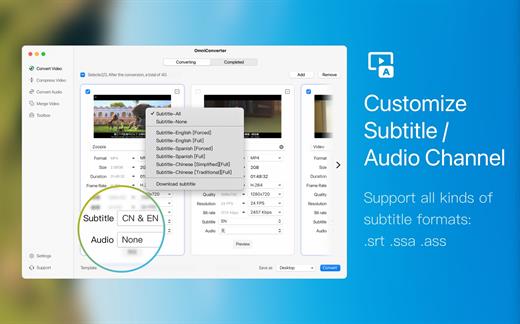
Video Converter X2 has built-in format templates optimized for different devices, such as Mac, iPhone, iPod, Android, Windows, TV, etc., so you don’t need to worry about what formats correspond to different devices, but just select the device type you need from the template list of Video Converter X2, and start converting easily.

Features

  • Support almost all types of multimedia formats and easily convert them to the format you want.
  • Support choose built-in subtitle or load from external SRT, SSA file.
  • Support choose from multiple audio tracks.
  • Video File Compression helps you to reduce your video file size, It saves space on your hard drive.
  • Support templates for Mac, iPhone, iPod, Android, Windows, TV and other devices in specified formats.
  • Support common website and application formats Built-in video format templates optimized for WeChat, Bilibili, Facebook, Instagram, Youtube, so the conversion operation can be done in one click.
  • Fast video merging support merging multiple video files. Even if the original formats are different, they can be perfectly combined into a new file.
What’s New

Version 1.3.9:


  • Release notes were unavailable when this listing was updated.
Compatibility

macOS 10.15 or later
Apple Silicon or Intel Core processor


Release Name: Video Converter X2 1.3.9
Size: 60 MB
Links: HOMEPAGE – NFO – Torrent Search

Download: RAPiDGATOR

4 Comments
June 24

Expenses 4.0.15

Expenses is a clean, intuitive spending tracker designed for speed, clarity, and control. It allows you to effortlessly monitor your money across the entire Apple ecosystem, including Mac, iPhone, iPad, and Apple Vision.

Key Features


  • Quick Input: Easily log your transactions on the go with just a few taps.
  • Complete Privacy: No registration required. The app prioritizes your data privacy and does not collect personal information.
  • Multi-Currency Support: Track your spending in any major currency with customizable exchange rates for seamless international transactions.
  • Stats & Trends: Visualize your spending patterns with actionable insights to help you build better financial habits.
  • Apple Ecosystem Integration: Full support for system features like Widgets and Siri Shortcuts to streamline your tracking.
  • Accessibility Built-In: Features an accessible design crafted to accommodate users with special needs.
What’s New

Version 4.0.11:


  • Release notes were unavailable when this listing was updated.
Compatibility

macOS 13.0 or later


Release Name: Expenses 4.0.15
Size: 10.1 MB
Links: HOMEPAGE – NFO – Torrent Search

Download: RAPiDGATOR

4 Comments
June 22

Wondershare PDFelement Pro 12.1.19 (OCR)

Wondershare PDFelement is a self-explanatory OS X application that makes it easier for your to preview, edit, join, split and convert PDF documents using a Mac.

The Wondershare PDFelement also features a simple, clean and intuitive interface that provide instantaneous access to all the tools and features you might need to complete your daily tasks.

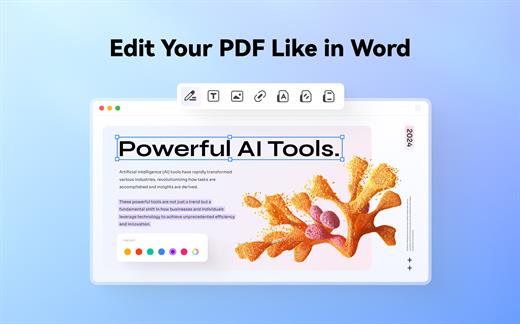
Powerful and user-friendly PDF editor for everyday use

Moreover, with Wondershare PDFelement’s help, you can effortlessly edit PDF documents created using text files, web pages or scanned documents.

Consequently, you can add, remove or edit text, move and rearrange pages, insert or remove images and more.

Wondershare PDFelement’s top toolbar helps you hide, show and customize the sidebar in order to display the items and information you are interested in. In addition, you can browse through the loaded document, zoom in or out, print it or email it with just a couple of mouse clicks.

Advanced OCR capabilities make text editing a breeze

Furthermore, you can choose between the “Hand”, “Select” and “Edit” tool, use the advanced OCR feature and convert your source file into plain text or RTF document, ePUB, HTML, as well as file formats compatible with Microsoft Word, Excel, and PowerPoint.

The context menu also helps you switch between the “Move”, “Select” and “Touchup” tool, change the display mode and open the Inspector window to view detailed information about the loaded document.

As an added bonus, by accessing the Document menu, you have the option to add, update or remove an watermark, extract, insert and delete pages, split, merge or convert your document and crop or rotate a page with ease.

Full-featured tool designed to help you stamp, watermark, encrypt and decrypt PDF documents on a Mac

The complete list of all available editing tools, bookmark features, annotation tools and stamp options can be found under the Tools menu.

From here you can easily insert text boxes, add sticky notes, highlight, strike-through and underline text, insert various shapes and use the handy pencil or erase.

On the whole, Wondershare PDFelement comes with the right set of features to help you edit and annotate PDF documents using a Mac, as well as effortlessly add password protect and convert them other formats for easier sharing with your friends and colleagues.

What’s New

Version 12.1.19:


  • Release notes were unavailable when this listing was updated.
Compatibility

macOS 11.0 or later
Apple Silicon or Intel Core processor


Release Name: Wondershare PDFelement Pro 12.1.19 (OCR)
Size: 914.7 MB
Links: HOMEPAGE – NFO – Torrent Search

Download: RAPiDGATOR

4 Comments
June 22

Mp3tag 1.13.1

Mp3tag is a powerful and easy-to-use tool to edit metadata of audio files. Musicians, DJs, podcasters, and audio-enthusiasts use it for many different aspects of handling audio files.

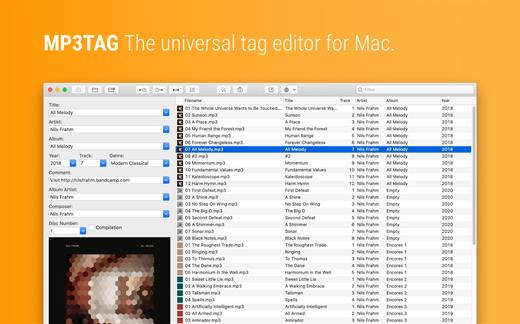
It supports batch tag-editing for multiple files at once, covering many audio formats from MP3, over MP4, and M4V (yes, that’s video!) to FLAC, OGG, OPUS, AIF, DSF, MPC, and WAV.

Furthermore, it supports online database lookups from Discogs and MusicBrainz, allowing to gather proper tags and download cover art for music libraries.

It offers renaming files based on the tag information, replacing characters or words in tags and filenames, importing tag information, and adjusting the size and image format of embedded cover art.

Since some of the tasks in managing a digital library are repetitive, Mp3tag allows for combining tasks into action groups, which serve as workflows for keeping consistency and order. Examples are formatting tag fields, performing case conversion, removing unwanted fields, or adjusting embedded cover art to match required sizes.

Key Features

  • Bulk-Editing of Tags for multiple files at once.
  • Editing of cover-art.
  • Renaming files based on tags.
  • Importing metadata from filenames.
  • Assign track and disc numbers via the auto-numbering wizard.
  • Importing metadata from online Tag Sources.
  • Support for Flexible Tagging, allowing for user-defined tag fields in a standardized way.
  • Applying action groups with many tasks combined into reusable workflows.
  • Support for many file types under a universal user interface.
Supported File Formats

  • MP3 (ID3v1, ID3v2.3, ID3v2.4 with UTF-8)
  • MP4/M4A/M4B/M4V (iTunes and Nero)
  • FLAC (Vorbis Comments)
  • OGG (Vorbis Comments)
  • OPUS (Vorbis Comments)
  • AIF (RIFF INFO and RIFF ID3)
  • DSF (ID3v2)
  • MPC (APEv2)
  • WAV (RIFF INFO and RIFF ID3
What’s New

Version 1.13.1:


  • Release notes were unavailable when this listing was updated.
Compatibility

macOS 10.14 or later.


Release Name: Mp3tag 1.13.1
Size: 13.4 MB
Links: HOMEPAGE – NFO – Torrent Search

Download: RAPiDGATOR

4 Comments
June 22

EdgeView 5.9.3

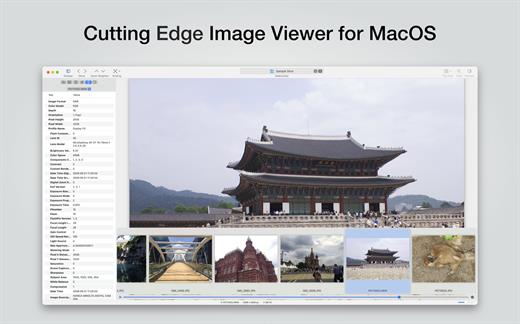
EdgeView 5 is fast image viewer has elegant user interface. EdgeView 5 is developed and designed for modern MacOS. It can open various image files such as JPEG, PNG, TIFF, BMP, and RAW file of DSLR, EPS and PDF, AI(Adobe Illustrator). Can open image files in archive directly without extraction.

User can open files, rename files, delete files from EdgeView’s file browser. Also can access to SMB/AFP/FTP network volume.

User can navigate images quickly by using keyboard shorcut, mouse wheel, trackpad gesture. EdgeVew show EXIF information, play animation GIF/PNG/WebP smoothly. Save last status to history, and restore when reopen file.

EdgeView 5 will be the best choice when viewing and managing image files.

What’s New

Version 5.9.3:


  • Release notes were unavailable when this listing was updated.
Compatibility

macOS 11.1 or later
Apple Silicon or Intel Core processor


Release Name: EdgeView 5.9.3
Size: 146.6 MB
Links: HOMEPAGE – NFO – Torrent Search

Download: RAPiDGATOR
4 Comments
June 22

Print to PDF Pro 6.7.5

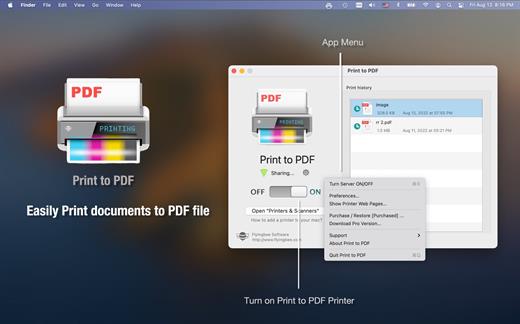
This app runs as a little wireless printer server on the network, so you can add it to our mac in system preferences and print any document directly to pdf.

he process is 100% safe as the conversion is done locally on the Mac.
Your files never leave it and it doesn’t require an internet connection.

Additionally, the app lets you organize PDF documents in different folders and automatically categorize documents to separate emails, web pages, and other printouts.

With a This Printer app, you can print PDFs from
> Email attachments
> iWork and MS Office documents
> Web page
> Photo
> Documents on Dropbox, Google Driver and other online storage.

What’s New

Version 6.7.5:


  • Release notes were unavailable when this listing was updated.
Compatibility

macOS 10.12 or later.
Apple Silicon or Intel Core processor


Release Name: Print to PDF Pro 6.7.5
Size: 46.8 MB
Links: HOMEPAGE – NFO – Torrent Search

Download: RAPiDGATOR

4 Comments
June 22

Flyingbee PDF Converter 10.2.4

PDF Converter for Mac exports PDF files to Microsoft Office (Word, Excel, PowerPoint), Plain text, Rich Text Formats, CSV and other file formats.

Save yourself some time reentering data into word or spreadsheet, manual data entry is tedious, you may spend hundreds of hours, not to mention the risk of error caused by manual typing. With Flyingbee PDF Converter, you can extract data from PDF to Any Microsoft Office (Word, Excel, PowerPoint) with a high-level of accuracy automatically. Tabular data in PDF will be accessible and well formatted with original column structure in an Excel spreadsheet after conversion.

What’s New

Version 10.2.4:


  • Release notes were unavailable when this listing was updated.
Compatibility

macOS 10.13 or later
Apple Silicon or Intel Core processor


Release Name: Flyingbee PDF Converter 10.2.4
Size: 55.4 MB
Links: HOMEPAGE – NFO – Torrent Search

Download: RAPiDGATOR
4 Comments
June 22

Flyingbee PDF to Word 10.2.2

Offline conversion, No Internet Required, No need to Upload, Confidential Document Security.

Compatible with Microsoft Office Word 2022 & macOS Monterey & Apple M2 Mac.

Converting PDF into MS Office formats is recognized as notoriously challenging, it offers unparalleled accuracy in terms of formatting and content preservation!

Offline conversion, No Internet Required, No need to Upload, No Boring Waiting, Privacy-safe, Process 100% on your Mac.

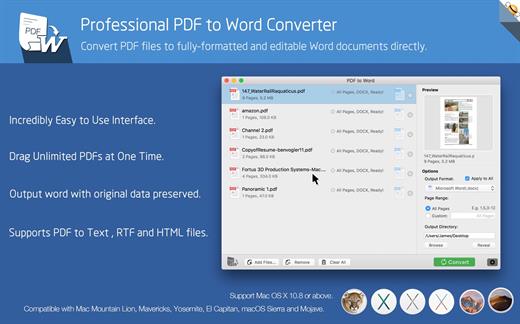
PDF to Word exports PDF files to fully-formatted and editable office word documents with exactly preserved original texts, images, layouts, hyperlinks, tables, and bezier graphics.

> Upgrade to Pro?

You could instantly convert 2-page PDF documents to word for free. If you feel good, you can upgrade it to our pro version to convert documents with more pages directly without ads. That may satisfy you without bringing you expense risks.

Main Features:

  • Incredibly easy-to-use.
  • Professional PDF Converter.
  • Add unlimited PDFs at one time.
  • Convert PDF files to fully-formatted and editable Word (.docx) documents directly.
  • Conversion 100% process locally.
  • Export PDF to Word (.docx), Text (.txt), RTF (.rtf) and HTML (.html) files.
  • Superior accuracy and layout, formatting retention.
Incredibly easy to use

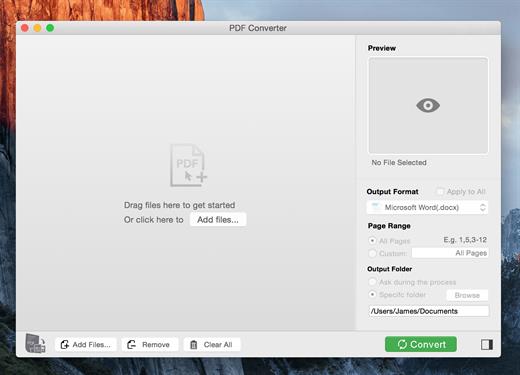
Simple workflow with an extremely neat and clear interface.


  • User-friendly & convenient interface.
  • Convenient import PDFs With drag & drop operation.
  • Preview a batch of PDF files within the app.
  • Batch convert PDFs by one button.
  • Easily edit or reuse the PDF content.
High efficiency and productivity

Import as many PDFs as you like for converting any particular pages flexibly.


  • 3 Ways to add PDFs by browse, drag & drop, and open in.
  • Easily manage PDFs by build-in insert, rearrange, delete and open feature.
  • Configure any particular pages (e.g. 1,2-16,35 or all pages) to meet your needs.
  • 100% fast speed to process PDF file locally.
Perfect accuracy and layout, formatting retention

All the elements including text, image, format and more will be preserved in Word documents.


  • Preserve original texts, images, layouts, hyperlinks, tables, and graphics exactly.
  • Preserve stroking or filing vector graphics, including lines, arrows, rectangles, and pen bezier paths.
  • Convert encrypted PDFs with copying and printing restrictions.
  • Convert Adobe PDF in Multi-languages and Version from 1.0-1.7
  • Output PDF files to Office 2007 Version (.docx), which can be opened by 2007 and the latest Office apps.
What’s New

Version 10.2.2:


  • Release notes were unavailable when this listing was updated.
Compatibility

macOS 10.10 or later
Apple Silicon or Intel Core processor


Release Name: Flyingbee PDF to Word 10.2.2
Size: 55.4 MB
Links: HOMEPAGE – NFO – Torrent Search

Download: RAPiDGATOR
4 Comments
June 22

Flyingbee PDF to PowerPoint 10.2.4

Offline Convert PDF to PowerPoint(.pptx), No Internet Required, Confidential Document Security. Compatible with Microsoft Word 2022. PDF to PowerPoint by Flyingbee is a powerful & productive PPT Converter designed for Mac users.

PDF to PowerPoint Converter exports PDF files to editable and modifiable Office PowerPoint documents quickly and efficiently. It convert PDF file back to PowerPoint Presentation with well-preserved original texts, images, layouts, hyperlinks, tables, and bezier graphics.

> Upgrade to Pro?
You could instantly convert some pages PDF documents to word for free. If you feel good, you can upgrade it to our pro version to convert documents with more pages directly without ads. That may satisfy you without bringing you expense risks.

Main Features
+ Incredibly easy-to-use.
+ Professional PDF Converter.
+ Import multiple PDF files at one time.
+ Convert PDF files to PowerPoint documents directly.
+ Conversion 100% processed locally.
+ Export PDF to PowerPoint (.pptx) files.
+ Superior accuracy and format retention.

> Professional PDF to Powerpoint Converter
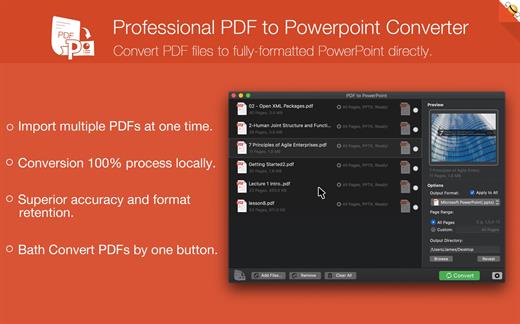
Convert PDF files to fully-formatted PowerPoint directly.
– Import multiple PDFs at one time.
– Conversion 100% process locally.
– Superior accuracy and format retention.
– Bath Convert PDFs by one button.

> Incredibly Easy to Use
Simple workflow with an extremely neat and clear interface.
– User-friendly & simple interface.
– Conveniently import PDFs with drag & drop operation.
– Preview a batch of PDF files within the app.
– Easily edit or reuse the PDF content.

> High Efficiency and Productivity
Import many PDFs as you like for converting any particular pages flexibly.
– Easily manage PDFs by build-in insert, rearrange, delete and open feature.
– Configure any particular pages (e.g. 1, 2-10, 35 or all pages) to meet your needs.
– Process files fast and save the files locally.

What’s New

Version 10.2.4:


  • Release notes were unavailable when this listing was updated.
Compatibility

macOS 10.10 or later


Release Name: Flyingbee PDF to PowerPoint 10.2.4
Size: 56 MB
Links: HOMEPAGE – NFO – Torrent Search

Download: RAPiDGATOR
4 Comments
June 22

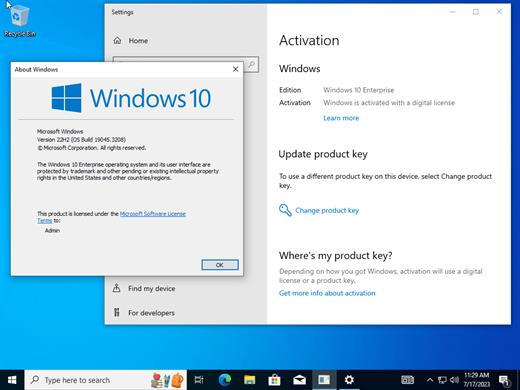
Windows 10 22H2 build 19045.7417 AIO 16in1 With Office 2024 Pro Plus Multilingual Preactivated June 2026

Windows 10 is a series of personal computer operating systems produced by Microsoft as part of its Windows NT family of operating systems. It is the successor to Windows 8.1, and was released to manufacturing on July 15, 2015, and to retail on July 29, 2015. Windows 10 receives new releases on an ongoing basis, which are available at no additional cost to users. Devices in enterprise environments can receive these updates at a slower pace, or use long-term support milestones that only receive critical updates, such as security patches, over their ten-year lifespan of extended support.

One of Windows 10’s most notable features is support for universal apps, an expansion of the Metro-style apps first introduced in Windows 8. Universal apps can be designed to run across multiple Microsoft product families with nearly identical code‍—‌including PCs, tablets,smartphones, embedded systems, Xbox One, Surface Hub and Mixed Reality. The Windows user interface was revised to handle transitions between a mouse-oriented interface and a touchscreen-optimized interface based on available input devices‍—‌particularly on 2-in-1 PCs, both interfaces include an updated Start menu which incorporates elements of Windows 7’s traditional Start menu with the tiles of Windows 8. Windows 10 also introduced the Microsoft Edge web browser, a virtual desktop system,a window and desktop management feature called Task View, support for fingerprint and face recognition login, new security features for enterprise environments, and DirectX 12.

Editions Includes
1. “Windows 10 Home”
2. “Windows 10 Home N”
3. “Windows 10 Pro”
4. “Windows 10 Pro N”
5. “Windows 10 Team”
6. “Windows 10 Enterprise”
7. “Windows 10 IoT Enterprise”
8. “Windows 10 Enterprise multi-session”
9. “Windows 10 Education”
10. “Windows 10 Pro Education”
11. “Windows 10 Pro for Workstations”
12. “Windows 10 Enterprise N”
13. “Windows 10 Education N”
14. “Windows 10 Pro Education N”
15. “Windows 10 Pro N for Workstations”
16. “Windows 10 Home Single Language””

Whats New
– Update Windos To 22H2 build 19045.7417
– Update Office to v2605 Build 20026.20182

Windows x64 | Languages: Arabic,English,German,Greek,French,Spanish,Italian,Portuguese-Portuguese,Portuguese-Brazil,Turkish,Dutch,Czech | File Size: 9.12 GB

What’s New

Version 19045.7417:


  • Update Windos To 22H2 build 19045.7417
  • Update Office to v2605 Build 20026.20182
Compatibility

PC * 1 gigahertz (GHz) dual-core 64-bit processor

Release Name: Windows 10 22H2 build 19045.7417 AIO 16in1 With Office 2024 Pro Plus Multilingual Preactivated June 2026
Size: 9.1 GB
Links: HOMEPAGE – NFO – Torrent Search

Download: RAPiDGATOR
3 Comments