Please REGISTER or RENEW your account on RAPiDGATOR.net and support us by doing through all RAPiDGATOR working download links on main posts...
June 24

PowerPhotos 3.4.0

PowerPhotos allows you to break up your Photos.app images among multiple Photos libraries, rather than having to store all of them in one giant library. You can easily switch between libraries, or just browse the photos in your libraries directly from PowerPhotos, without having to open each library in Photos.
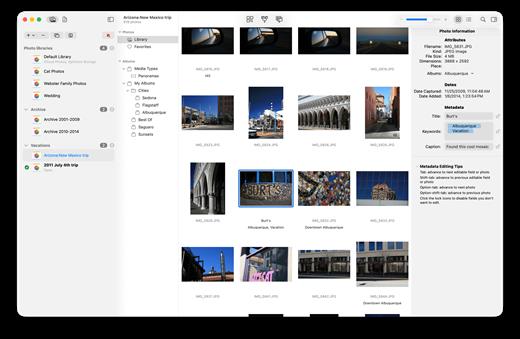
PowerPhotos also supports searching across all your libraries at once to help track down a particular photo. If you use iCloud Photo Library to sync photos with your other devices, splitting up your library can help save on iCloud storage costs. Use a single library to hold a smaller collection that you sync with iCloud, while keeping the bulk of your photos in separate libraries so they don’t take up space on iCloud. PowerPhotos can analyze your libraries for duplicate photos, showing them to you side-by-side and letting you get rid of extra copies of photos that you no longer need.

What’s New

Version 3.4.0:


  • Release notes were unavailable when this listing was updated.
Compatibility

macOS 11.0 or later


Release Name: PowerPhotos 3.4.0
Size: 41 MB
Links: HOMEPAGE – NFO – Torrent Search

Download: RAPiDGATOR

4 Comments
June 24

Glow 2.0.3

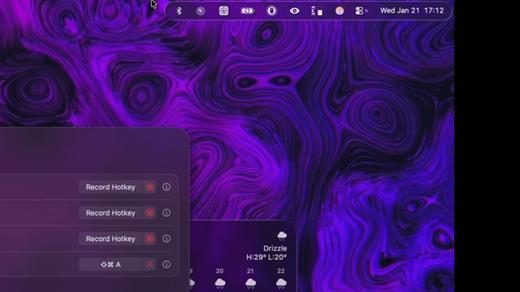
Glow is a beautifully crafted macOS utility designed to transform your static, native menu bar into a dynamic, engaging, and personalized workspace.

Key Features


  • Buttery Smooth Animations: Features fluid motions and delightful micro-interactions that make hiding, showing, and interacting with your menu bar an absolute joy.
  • Modern Aesthetic: A sleek, minimalist design that seamlessly integrates with the modern macOS language, giving your desktop a premium, elevated look.
  • Smart & Fast: Built for speed and exclusivity, offering snappy responsiveness and personalized control over your menu bar’s behavior.
What’s New

Version 2.0.3:


  • Release notes were unavailable when this listing was updated.
Compatibility

macOS 26 or later


Release Name: Glow 2.0.3
Size: 8.5 MB
Links: HOMEPAGE – NFO – Torrent Search

Download: RAPiDGATOR
4 Comments
June 24

Money Pro – Personal Finance 2.11.29

Money Pro is the next generation of Money app (over 2 million downloads worldwide).

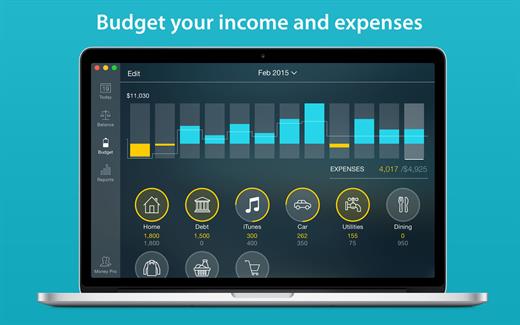
Money Pro is the one place for bill planning, budgeting and keeping track of your accounts. Easy sync with iPhone/iPad versions. Money Pro works great for home budgeting and even for business use.

Features:

  • Calendar
  • Today view
  • Bills due notifications
  • Budgets
  • Budget rollover
  • Checkbook register
  • Account reconciliation
  • Import of bank statements
  • Split transactions
  • Calculator and currency converter
  • Search
  • Detailed reports
  • Lots of options for customization
  • iCloud
  • Multiple profiles
  • Data export
  • Notification Center widget
What’s New

Version 2.11.29:


  • Bug fixes and performance improvements
Compatibility

macOS 10.12.0 or later
Apple Silicon or Intel Core processor


Release Name: Money Pro – Personal Finance 2.11.29
Size: 53.3 MB
Links: HOMEPAGE – NFO – Torrent Search

Download: RAPiDGATOR

4 Comments
June 24

Yate 9.2.2

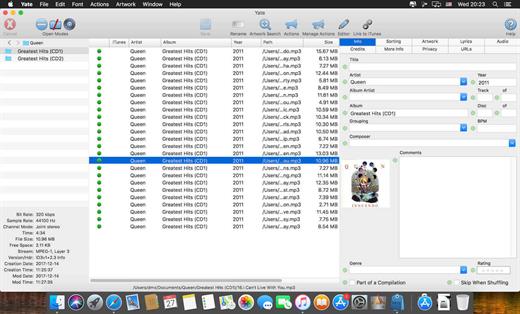
Yate was developed for people who want complete control over their tagging experience. Supports audio in AIFF, APE, DFF, DSF, FLAC, OGG OPUS, OGG VORBIS, M4A, M4B, MP3, MP2, MP4, STEM.MP4, WAV and WV files. Supports video in M4V and MP4.

Yate has a long list of features; most importantly, an innovative scripting system called actions. Actions can be used to update all of an album’s tags with a single operation. Yate also supports integration with AcouticBrainz, AcoustID, Beatport, Discogs, iTunes, MusicBrainz and TMDb. All changes can be easily reverted and individual changes can be undone in any order. Whether you want to automatically or manually tag your files, Yate can do it all!

What’s New

Version 9.2.2:


  • Release notes were unavailable when this listing was updated.
Compatibility

macOS 10.10 or later


Release Name: Yate 9.2.2
Size: 18 MB
Links: HOMEPAGE – NFO – Torrent Search

Download: RAPiDGATOR
5 Comments
June 24

Uplock 3.2.5

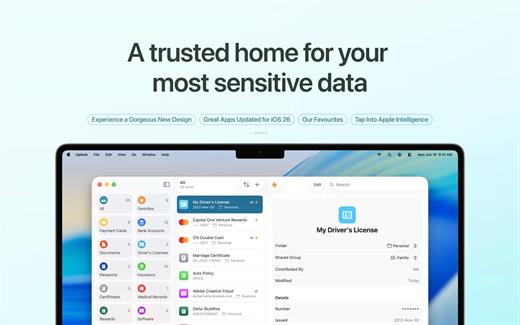
Uplock is a meticulously crafted security app designed to be the ultimate companion to Apple’s native Passwords app. While Apple handles your logins, Uplock securely stores everything else—from digital copies of your passport and driver’s license to medical records and secure notes.

What’s New

Version 3.2.5:


  • Release notes were unavailable when this listing was updated.
Compatibility

macOS 15 or later


Release Name: Uplock 3.2.5
Size: 18.4 MB
Links: HOMEPAGE – NFO – Torrent Search

Download: RAPiDGATOR

4 Comments
June 24

QLab Pro 5.6.2

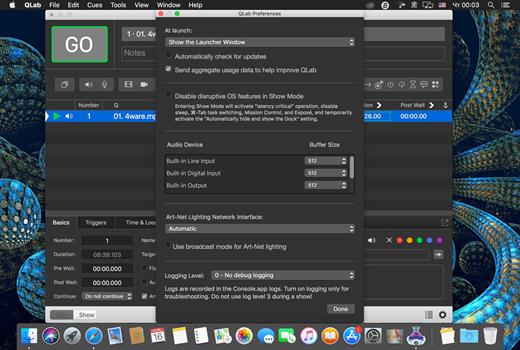
QLab is a streamlined and intuitive Mac OS X application that provides the required tools and features to create complex designs that can bring your audio and video content to life.

Versatile and user-oriented show control

QLab’s user-oriented interface helps you design and handle your multimedia content from within a smooth-running and personalizeable workspace that allows you to manage audio, video, MIDI, OCS and more.

QLab comes with numerous building blocks, also known as “cues”, that can help you design your stunning multimedia performance with just a few mouse clicks. Once you dragged and dropped your files you can start adding commands to fade in and fade out the volume, animate videoclips and apply various video and audio effects.

User-definable scripts and numerous video and audio effects

After getting familiar with the basics, you can step up your game and become a power user by using complex features like scripting, multi-projector edge blending, video corner pinning and audio localization. What is more, you can build multi-computer designs and send commands to multiple QLab systems connected to the same local network.

When you are happy with your Cue List, you can give it a try and hit the “Go” button to preview your show. Thanks to the Warnings panel you can check your list and view all encountered issues.

Support for Blackmagic device input, as well as various types of video surfaces and a host of other similarly powerful tools

QLab comes with support for 48 output and 24 input audio channels, intuitive audio waveform editing, customizable playback rate with pitch adjustment, video and audio faders, animation tools, Matrix mixer, audio and video effects, Syphon integration, keystone correction and corner pinning.

You can also overlay titles, use live video input from various devices, including Blackmagic devices, handle multiple video surfaces, apply fade curves, slice files, use markers and use external video effects.

What’s New

Version 5.6.2:


  • Release notes were unavailable when this listing was updated.
Compatibility

macOS 11.0 or later


Release Name: QLab Pro 5.6.2
Size: 36.8 MB
Links: HOMEPAGE – NFO – Torrent Search

Download: RAPiDGATOR
4 Comments
June 24

Bookshelf – Library 6.4.0

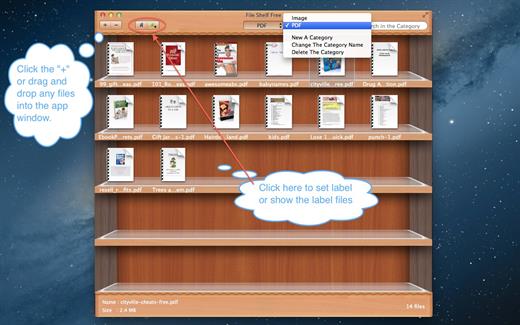
File Shelf Pro is a file index management tool, it can help you manage your files better.

Key Features


  1. You can add any files here, including the folder.
  2. You can create file category in order to manage them conveniently.
  3. You can search for files in current category and all categories.
  4. You can set image file to the desktop image.
  5. You can ascending and descending order files.
  6. You can add file labels, It’s easier to find files.
  7. You can move files from one category to another category.
  8. Move files into the buffer in order to manage your files better, can also let your desktop become cleaner.
  9. Support drag and drop to add files.
  10. Create more categories.

What’s New

Version 6.4.0:


  • Release notes were unavailable when this listing was updated.
Compatibility

macOS 10.13 or later


Release Name: Bookshelf – Library 6.4.0
Size: 8.6 MB
Links: HOMEPAGE – NFO – Torrent Search

Download: RAPiDGATOR

4 Comments
June 24

PullTube 1.8.6.32

Sharing videos via online hosting services, such as YouTube or Vimeo is a common practice, yet streaming the content might not work as expected if you have a slow internet connection.

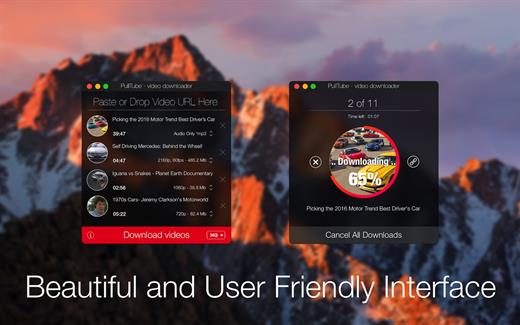
PullTube offers you the possibility to download videos from both sources (YouTube and Vimeo), while other platforms might be added at a later time. The app can handle playlists, allows you to select the output quality, and can even extract only the audio.

Video downloader that can import links with drag and drop and can detect playlists

The PullTube user interface is represented by a small window where you get to quickly paste the video URL. Note that you can also add a video by dropping the link on top of the PullTube window.

Worth mentioning is that, if PullTube detects that the video is part of a playlist, will offer to download the entire collection: will fetch the data for each entry and handle the downloads consecutively.

Download videos hosted on YouTube or Vimeo to different output sizes and formats

PullTube will start fetching the video data right away so you can see the video name, duration, and a small thumbnail. When configuring a download, you get to select the output quality (highest, 4K, HD or regular with different resolutions) or choose to export only the audio to an M4A or MP3 file.

Via the PullTube Settings panel, you can change the default download location and the default MP3 bitrate (320Kbps, 256Kbps, 128Kbps, 64Kbps). You can also add the quality info to the video’s name and choose to quit the app when all downloads are completed.

Get offline access to videos hosted online in just a few steps

PullTube proposes a streamlined workflow for quickly downloading videos from YouTube or Vimeo, provides control over the output quality, and enables you to extract the audio to MP3 or M4A files.

However, during our tests, we have noticed that PullTube has trouble completing the download when handling videos that are longer that 2 minutes. The process stops without any explanation, and you can eventually complete the task, but you need to add the link to download tool multiple times.

What’s New

Version 1.8.6.32:


  • Release notes were unavailable when this listing was updated.
Compatibility

macOS 10.12 or later


Release Name: PullTube 1.8.6.32
Size: 251 MB
Links: HOMEPAGE – NFO – Torrent Search

Download: RAPiDGATOR
5 Comments
June 24

Fig Player 1.3.37

Fig Player, is a media player for Mac that supports a wide variety of media files and allows you to listen to music, watch videos and movies.

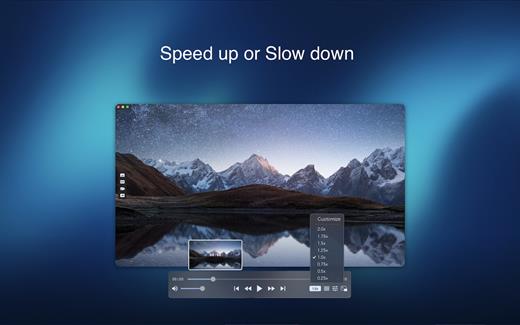
If you have an extensive media library but don’t have a good media player for Mac, here’s a good solution. Fig Player. It’s free to use and comes with a friendly interface. On the screen, you’ll be able to see all of the buttons that give you control over your experience, such as the play and stop button, playback options, volume slider, preview section, screenshot, and recording.

More Advanced Features

  • Smooth, seamless video play, support 4K.
  • Auto deinterlacing.
  • H/W-acceleration.
  • A-B loop.
  • Frame by Frame playback.
  • PIP mode.
  • Support various Subtitle formats(Text subtitles(SRT), Vobsub
    and ASS/SSA, etc.).
  • Choose which one when you have multiple sound output devices.
  • Create the scene poster with snapshots.
  • Playlist with upper-level folder name.
  • Support multiple windows and play multiple videos at the same time.
  • Support Wireless display to DLNA, Chromecast, Roku devices.
  • OCR Text Recognition(macOS 12+)
Supported Formats

Videos: mkv, rmvb, rm, avi, mov, wmv, flv, f4v, f4p, f4a, f4b, swf, mpg, mpeg, mpeg1, mpeg2, m1v, m2v, mpv, mp4, mpeg4, m4v, 3gp, 3gpp, 3g2, 3gp2, m2p, ps, ts, m2ts, mts, mt2s, ogm, ogv, divx, dv, asf, wtv, webm, etc.

Audios: flac, ape, m2a, mp1, mp2, mpa, mp3, mpg3, m4a, m4b, wma, wav, wv, xm, aiff, aif, ac3, a52, aac, opus, ogg, oga, mid, midi, mka, etc.

Subtitles: ASS, SSA, SRT, IDX&SUB

What’s New

Version 1.3.37:


  • Release notes were unavailable when this listing was updated.
Compatibility

macOS 10.13 or later


Release Name: Fig Player 1.3.37
Size: 74.3 MB
Links: HOMEPAGE – NFO – Torrent Search

Download: RAPiDGATOR

4 Comments
June 24

EditReady 26.2

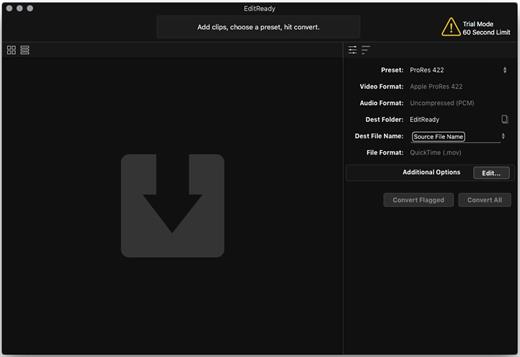
EditReady provides easy, fast and powerful transcoding for video professionals, without an overwhelming interface or outdated format choices. MOV, MP4 and MXF media can all be quickly converted to edit ready quicktime movies in ProRes or DNxHD.

Features


  • More than just transcoding – In addition to transcoding to professional formats like ProRes, DNxHD, and H.264, EditReady makes it easy to prep your footage for screening and editing. You can apply LUTs to your video during conversion to set a specific look or convert your Log footage into Linear. EditReady also allows you to override the framerate on your converted files, for pristine slow-motion with your 60p or 120p footage.
  • Smart Metadata Editing – EditReady provides a rich metadata viewer and editor. Modern cameras store GPS data, lens settings, diagnostic data, and more. Manually add location data if your camera didn’t store it, or set a reel name for all of your files. You can even use metadata to generate filenames for your transcoded files.
  • Modern, Blazing Fast, Ready for the Future – EditReady is designed to take advantage of all of the power available on modern Macs. It leverages hardware accelerated video decoding, OpenCL image processing, and every CPU cycle your system has to spare. And EditReady is designed with the future in mind – it’s ready to adopt new formats and workflows.
What’s New

Version 26.2:


  • Release notes were unavailable when this listing was updated.
Compatibility

macOS 10.15 or later
Apple Silicon or Intel Core processor


Release Name: EditReady 26.2
Size: 162.9 MB
Links: HOMEPAGE – NFO – Torrent Search

Download: RAPiDGATOR
4 Comments