Please REGISTER or RENEW your account on RAPiDGATOR.net and support us by doing through all RAPiDGATOR working download links on main posts...
June 30

calibre 9.10.0

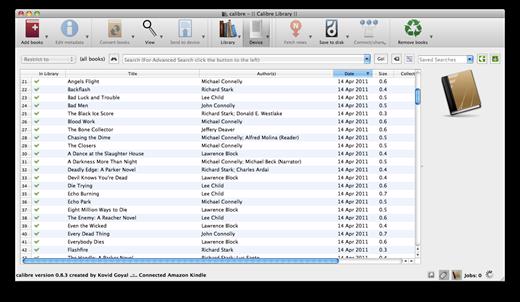
Calibre is a complete e-book library manager. Organize your collection, convert your books to multiple formats, and sync with all of your devices. Let Calibre be your multi-tasking digital librarian.

Manage, convert, sync, and more


  • Library management. Calibre keeps things orderly by creating single entries for books that contains multiple formats. Add tags and comments for better searchability.
  • Format conversion. Calibre’s robust conversion options support
What’s New

Version 9.10.0:


  • Release notes were unavailable when this listing was updated.
Compatibility

macOS 10.14 or later


Release Name: calibre 9.10.0
Size: 327.4 MB
Links: HOMEPAGE – NFO – Torrent Search

Download: RAPiDGATOR

6 Comments
June 30

Vibe Island 1.0.40

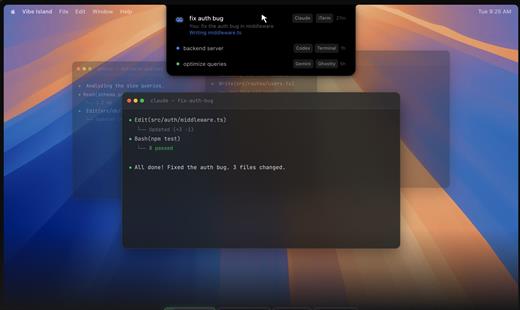
Vibe Island is a specialized productivity tool designed for developers who use terminal-based AI coding agents. It transforms your MacBook’s notch area into an interactive control center, allowing you to monitor, approve, and interact with various AI agents without ever leaving your IDE or breaking your focus. Whether you are using Claude Code, Cursor, or Gemini CLI, Vibe Island ensures you stay in the “flow” by bringing terminal activities to the forefront of your screen in a beautiful, non-intrusive overlay.

Key Features


  • Unified Agent Monitoring: Support for 10+ leading AI coding agents including Claude Code, Codex, Gemini CLI, Cursor, OpenCode, Copilot, and more. All your active sessions appear in one unified, sleek panel.
  • Two-Way Interaction: Go beyond simple monitoring. Approve or deny permission requests, answer “AskUser” questions, and review suggested plans with full Markdown rendering directly from the notch.
  • Precise Terminal Jump: Instantly jump back to the exact terminal tab, split pane, or tmux session where an agent is running with a single click. Compatible with iTerm2, Ghostty, Warp, and native Terminal.app.
  • Zero-Config Setup: On first launch, Vibe Island automatically configures hooks for your CLI tools. No manual editing of config files or API keys required.
  • Privacy-First & Local: Your data never leaves your machine. All communication between Vibe Island and your CLI tools happens locally on your Mac.
  • Native & Lightweight: Built with Pure Swift for Apple Silicon. It is incredibly fast, using under 50MB of RAM and near-zero CPU when idle.
  • Smart Feedback: Enjoy 8-bit synthesized sound alerts for event notifications and visual cues that keep you informed without being distracting.
What’s New

Version 1.0.40:


  • Release notes were unavailable when this listing was updated.
Compatibility

macOS 14.0 or later


Release Name: Vibe Island 1.0.40
Size: 29.8 MB
Links: HOMEPAGE – NFO – Torrent Search

Download: RAPiDGATOR

5 Comments
June 30

Stats 3.0.5

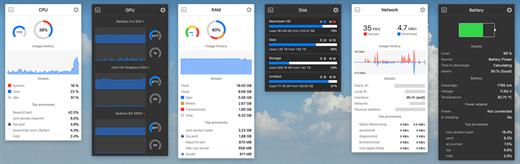
Stats is a application which allows you to monitor your macOS system.


  • CPU Usage
  • Memory Usage
  • Disk utilization
  • Sensors information (Temperature/Voltage/Power)
  • Battery level
  • Network usage
What’s New

Version 3.0.5:


  • Release notes were unavailable when this listing was updated.
Compatibility

macOS 10.14 or later


Release Name: Stats 3.0.5
Size: 7 MB
Links: HOMEPAGE – NFO – Torrent Search

Download: RAPiDGATOR

5 Comments
June 30

Awaken 7.0

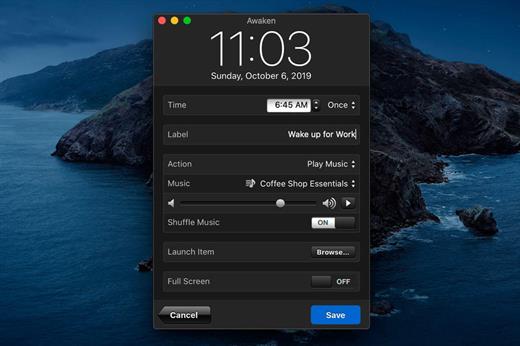
Awaken turns your Mac into the ultimate music alarm clock and sleep timer.

Alarms


  • Wake up to your music or built-in sounds
  • Supports multiple alarms with sorting and labeling
  • Customizable snooze control
  • Create one-time alarms, weekly alarms, or target a specific date
  • Gradually fade in the music volume and screen brightness
  • Launch applications or files at alarm time
  • Controllable via Apple Remote and keyboard shortcuts
  • Auto-stop alarms after a customizable duration

Sleep Mode


  • Fall asleep to your iTunes music
  • Fall asleep to ambient sounds (Beach, Forest, Ocean, Rainfall and White Noise)
  • Gradually fade out the music volume and screen brightness

Timers


  • Supports multiple timers with sorting and labeling
  • Select from over a dozen built-in sou
  • n
  • Launch applications or files

Full-Screen Mode


  • View alarms, sleep mode timer and current time at a distance

Apple Remote


  • Snooze and stop alarms from across the room
  • Adjust the volume and change tracks
  • Toggle full-screen mode on/off
What’s New

Version 7.0:


  • Preferences bug fix for macOS Catalina.
Compatibility

macOS 10.15 or later


Release Name: Awaken 7.0
Size: 33.7 MB
Links: HOMEPAGE – NFO – Torrent Search

Download: RAPiDGATOR

5 Comments
June 30

IINA 1.4.4

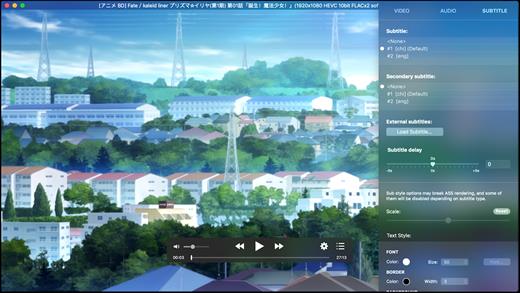
IINA is the modern video player for macOS.

Features


  • For and only for modern macOS – IINA is born to be a modern macOS application, from its framework to its user interface. It adopts the post-Yosemite design language, and keeps up the pace of new technologies such as Force Touch and Touch Bar.
  • Revolutionary user experience – IINA simplifies a lot of user interactions. In addition to traditional cascaded menus, it provides interactive UI components and gestures to give you intuitive, flexible, powerful control of the playback.
  • Powerful functionality – Based on MPV, one of the most powerful media player projects ever, IINA supports almost all common media types (even GIF) and stably outputs high-quality video that is optimized for Retina screen. MPV’s config file and script system are also integrated.
  • You are the target-user – IINA is made by a user like you, who (may be) also having been expected for a powerful and elegant media player on macOS for years. Whether you just got your first Mac or are already a professional MPV user, IINA will satisfy you for its customizability and expandability.
What’s New

Version 1.4.4:


  • Release notes were unavailable when this listing was updated.
Compatibility

macOS 10.15 or later
Apple Silicon or Intel Core processor


Release Name: IINA 1.4.4
Size: 104.2 MB
Links: HOMEPAGE – NFO – Torrent Search

Download: RAPiDGATOR

5 Comments
June 30

Keka 1.6.6

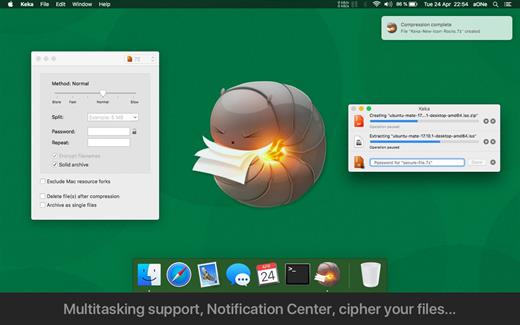
Keka is a file archiver for OS X. It is available for free, but donations are requested to further the project. Similar to making a donation, you can also purchase Keka on the Mac App Store for $1.99 USD.

Supported compression formats:


  • 7z
  • Zip
  • Tar
  • Gzip
  • Bzip2

Supported extraction formats:


  • RAR
  • 7z
  • Lzma
  • Zip
  • Tar
  • Gzip
  • Bzip2
  • ISO
  • EXE
  • CAB,
  • PAX
  • ACE
What’s New

Version 1.6.6:


  • Fixed possible crash when setting as the default uncompressor for macOS 26.4+
Compatibility

macOS 10.10 or later.
Apple Silicon or Intel Core processor

Release Name: Keka 1.6.6
Size: 34.2 MB
Links: HOMEPAGE – NFO – Torrent Search

Download: RAPiDGATOR

5 Comments
June 30

ArchiCAD 29.2.0 (Intel)

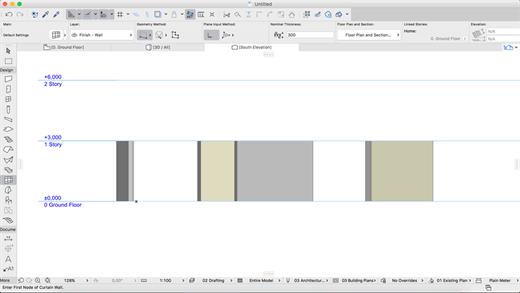
ARCHICAD enables architects to model faster and create accurate construction details and quantity estimations for reinforced concrete, complex steel, timber, and composite beams and columns. Complex columns, curved and haunched beams can now be modeled and documented to meet graphic and representation standards. Beams and columns can be displayed using various projected and symbolic views and cover fills.
Building Together

Archicad connects architects and engineers in a shared BIMcloud environment — powered by advanced collaboration and communication workflows — to deliver integrated design. Seamless and transparent information exchange builds trust among team members, eliminates model duplication, and redundant work between architects and engineers.

Model anything. Model everything.

Create the BIM model of the entire building with Archicad 24’s powerful toolkit. Integrate the structural model and the architectural model in one shared design hub, resulting in a powerful, collaborative environment. Archicad tools now integrate the Structural Analytical Model.

Built-in MEP modeler

Built-in MEP design tools further extend the integrated design approach of Archicad 24. As of this version, MEP Modeler is a core part of the software. Access intelligent MEP equipment inside the architectural model. Integrate MEP systems correctly in the BIM model without the need for a federated approach.

Share and explore your ideas

Explore ideas and design alternatives, leaving no stone unturned. Model and submit ideas for review by your team. When accepted, they’ll immediately become part of the project.

Object creation made easy

Create your own objects with the node-based visual PARAM-O tool without the need for GDL programming knowledge. Model anything from interior details to urban landscapes with parametric capabilities. Create parametric BIM elements with ease — the possibilities are endless!

Build better buildings

Archicad puts architects and structural engineers on the same page with an integrated structural analytical model in the BIM model. Keep architects and engineers in sync, save time and costs with a collision-free, one model strategy and a bi-directional workflow.

Built-in physical and analytical model checking

Increase the reliability and accuracy of your model with the help of built-in physical and analytical model checking and a seamless, bi-directional workflow between Archicad 24 and the analysis application — saving you time and money on the job site.

One shared model

Save time, avoid mistakes, and minimize the risk of data loss thanks to efficient project management between architects and engineers based on a shared model and design hub — built to OPEN BIM standards. Strengthen team performance and design better buildings through solutions powered by streamlined data management processes.

Stay in the loop

Detect and visualize the changes between models and revisions in a more intuitive way thanks to smart change monitoring and real-time notifications.

Change management made easy

With multiple stakeholders on each project, the job of following, understanding, and adapting ongoing design changes is a significant task. Archicad introduces Model Compare. Compare two 3D models or versions, and visualize and filter the differences between them. Keep track of design changes accurately and even evaluate design variants to get to the best possible design.

Track and change

Resolve issues faster and reduce the risk of unsolved issues thanks to clear organization and real-time notifications of BIM model changes. Integrate issues from third parties based on compatibility with industry standard issue management solutions.

Always in sync

Upload and refresh content in the model regardless of each team members’ location thanks to our fast and simple publishing workflow and BIMcloud. Save time, avoid mistakes and share files with confidence, knowing everything’s up-to-date. Real-time access to the shared model throughout the design process means all team members are in sync at all times.

Direct information exchange with Revit

Exchange information with Revit directly “out-of-the-box.” Import and export elements with their precise geometry and parameters (as non-editable content) from Revit (RVT) files for coordination and model referencing purposes. Access RVT files locally or via BIMcloud, using Hotlink or Publish functions.

Simple project submission

Publish projects from Archicad to shared online locations with ease thanks to a streamlined submission process. There’s no need to stay glued to the screen to watch for the publishing to finish, or additional manual uploads. Archicad takes care of it all.

Connect to industry-leading CDE solutions such as Aconex via buildingSMART-defined “open” protocols.

Automate your workflows

Using higher-level programming languages like Python, create automation scripts in Archicad, and complete command chains from outside. Access general element, property information and element listing information, and modify these and other Archicad element classifications as necessary.

Smarter information exchange

Exchange data with consultants outside of the model environment in a smart, efficient way: option set properties are now exported to Excel, guaranteeing accurate and high-quality information input into your BIM model.

New and updated surface materials

Is it real or is it rendered? Create high-end visualizations quickly and easily with new and updated surfaces in the Additional Surface Catalog. 500+ surface materials, including new wallpaper and realistic metal surfaces, result in stunning photo-realistic renderings.

Bring your interiors to life

Add life to your 2D and 3D views for a more contemporary look and feel. Furnish your scenes with brand-new objects from the updated library quickly and easily, thanks to an improved design workflow.

What’s New

Version 29.2.0:


  • Release notes were unavailable when this listing was updated.
Compatibility

macOS 10.14 or later


Release Name: ArchiCAD 29.2.0 (Intel )
Size: 3.2 GB
Links: HOMEPAGE – NFO – Torrent Search

Download: RAPiDGATOR

3 Comments
June 28

Quiver 3.3.1

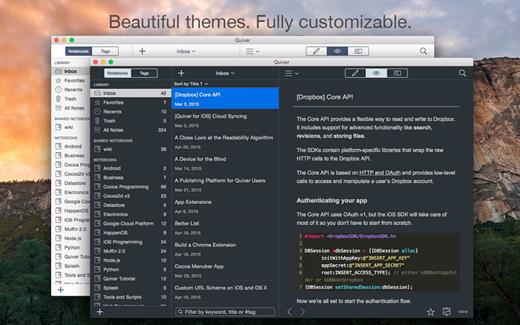
Quiver is a note-taking app built for programmers. Its unique cell-based design lets you easily mix text and code within one note, edit code with an awesome code editor, and find any note instantly via the full-text search.

Features


  • Mix Text With Code – A note in Quiver is comprised of cells — snippets of text or code. You can freely mix text cells with code cells, even setting different language modes for different code cells, all inside one note.
  • Edit In Place – Whether you are writing code or changing text styles, edits are always made in-place. There is no mode switching in Quiver. You just click where you want to edit and start typing.
  • An Awesome Code Editor – The programmer’s notebook should make code editing effortless. Quiver packs the awesome ACE code editor in code cells, which supports syntax highlighting for most languages, over 20 themes, automatic indent and outdent, and much more.
  • Lightning-Fast Full-Text Search – Notes are only useful if you can find them quickly. Quiver’s full-text search is based on Search Kit, the same technology used to power Spotlight on your mac. That’s how Quiver can search through thousands of notes in a blink of an eye.
  • Tags – If organizing notes into notebooks isn’t enough for you, Quiver also lets you assign tags to each note, so you can manage your notes any way you like.
  • Autosave – Quiver automatically saves all your changes as you work, so you never need to worry about losing changes.
  • Plain JSON – Quiver saves your notes in the plain JSON format, so you have full control over your content. You can export a note in the JSON or HTML format, or print it to PDF.
What’s New

Version 3.3.1:


  • Release notes were unavailable when this listing was updated.
Compatibility

macOS 10.14 or later


Release Name: Quiver 3.3.1
Size: 11 MB
Links: HOMEPAGE – NFO – Torrent Search

Download: RAPiDGATOR

4 Comments
June 28

ProFind 1.38

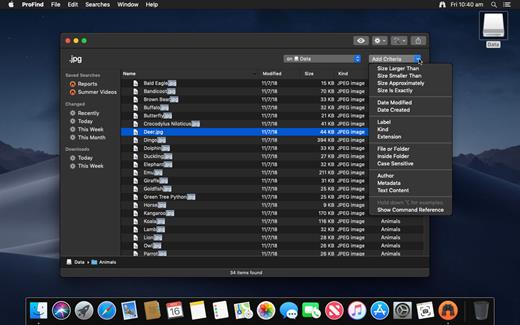
ProFind is advanced file search app for macOS.

With powerful features and great performance, ProFind delivers advanced file search for macOS. And with support for natural language queries, application launching, hidden location searches, scripting and more.
Search inside invisible folders and packages. Searches any disk type.
Uses kernel based searching (searchfs) when available. Uses metadata indexes (as used by Spotlight) when available to improve performance. Autocompletion for application names. Large icon view for one or two search results.
Under it’s elegant user interface, ProFind combines the power of macOS’s different search capabilities to make sure it finds all the files your looking for. And it’s been carefully tuned for performance and responsiveness.

What’s New

Version 1.38:


  • Release notes were unavailable when this listing was updated.
Compatibility

macOS 10.13.0 or later
Apple Silicon or Intel Core processor


Release Name: ProFind 1.38
Size: 13.6 MB
Links: HOMEPAGE – NFO – Torrent Search

Download: RAPiDGATOR

5 Comments
June 28

MouseBoost Pro 5.2.0

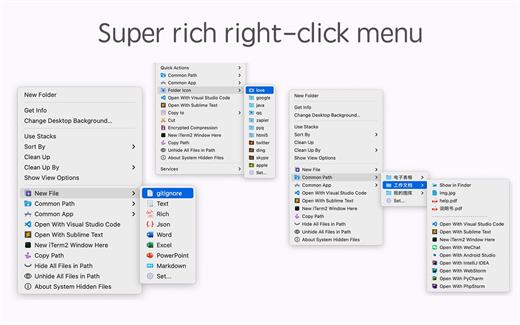
MouseBoost Pro integrates more than 30 kinds of small tools, and the operation way is very simple, as long as you click the right mouse button, you can activate all kinds of functions you want, so that your work efficiency is greatly improved.

You can create any file type you want, open any APP you want, self-sorting, fully customized!

*** Main Features ***
– All menus support custom sorting.
– Quickly create all kinds of commonly used files, and supports custom creation of various file types you want.
– Quickly open your terminal, iTerm2, and go to the directory you want.
– Quickly open VSCode, Sublime Text and Emacs, and customize the various apps you want to open.
– Quickly copy the current path power.
– Complete files deletion is supported.
– Supports files moving, copying and cutting.
– Supports files encrypted compression.
– Quickly open your favorite directory.
– Quickly get file MD5,SHA1,SHA256 and other information.
– Supports hiding and displaying of specified files.
– Supports modify folder icon.

What’s New

Version 5.2.0:


  • Release notes were unavailable when this listing was updated.
Compatibility

macOS 10.11 or later


Release Name: MouseBoost Pro 5.2.0
Size: 20.5 MB
Links: HOMEPAGE – NFO – Torrent Search

Download: RAPiDGATOR
5 Comments