Please REGISTER or RENEW your account on RAPiDGATOR.net and support us by doing through all RAPiDGATOR working download links on main posts...
July 1

Soulver 3.16.3

Soulver 3 is a smart notepad with a built-in calculator. It gives instant answers to any calculations it finds in your text. It’s a better way to work stuff out than with a traditional calculator, and a more lightweight tool for quick calculations than a spreadsheet.

Math Features


  • Instant calculations, no equals required
  • Use words alongside numbers, so calculations make sense
  • Quick totals of all your lines, and subtotals
  • Calendar calculations (June 9 + 3 weeks, 3:35 pm + 6 hours 27 minutes)
  • Easy percentages (“$300 – 10%”, “30 as a % of 200”)
  • Unit conversions (“10 kg in pounds, “25 meters in feet”)
  • 168 live real-world and cryptocurrency rates.
  • Line references to build little calculating documents
  • Variables & variable autocompleting
  • Global variables & custom units
App Features

  • Dark mode
  • Sidebar for organising your sheets and the ability to make folders
  • Headings (#), comments (//) & labels (:)
  • Customize your syntax coloring & font
  • Automatic number formatting, with spaces around operators and thousand separators
  • Number scrubbing (hold shift and hover over a number)
  • Deep macOS system integration: Touch Bar support, Quicklook, Calculate anywhere services
  • Automation tools: a command-line interface, Alfred workflow, Automator action
What’s New

Version 3.16.3:


  • Release notes were unavailable when this listing was updated.
Compatibility

macOS 10.14.4 or later, 64-bit processor


Release Name: Soulver 3.16.3
Size: 23.7 MB
Links: HOMEPAGE – NFO – Torrent Search

Download: RAPiDGATOR

4 Comments
July 1

WiFi Explorer Pro 3.10

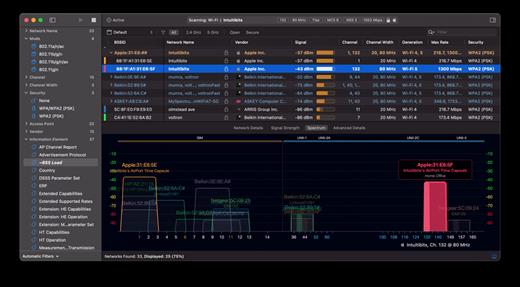
WiFi Explorer Pro takes the code base of WiFi Explorer, and adds a set of features that makes it the right tool for WLAN and IT professionals. You can use WiFi Explorer Pro for preliminary assessments, to help design and validate wireless networks installations, as well as to identify channel conflicts, overlapping, poor signal quality and other issues that may be affecting the connectivity or performance of your home, office or enterprise wireless network.

Features:


  • Passive and directed scan modes
  • Spectrum analysis integration
  • Custom filters
  • Support for remote sensors
  • Support for networks with hidden SSIDs
  • Additional columns with advanced information
  • Additional organization options for scan results
  • Dark and light themes
What’s New

Version 3.10:


  • Release notes were unavailable when this listing was updated.
Compatibility

macOS 10.13.0 or later


Release Name: WiFi Explorer Pro 3.10
Size: 17.4 MB
Links: HOMEPAGE – NFO – Torrent Search

Download: RAPiDGATOR
5 Comments
July 1

Airtool 2.7.6

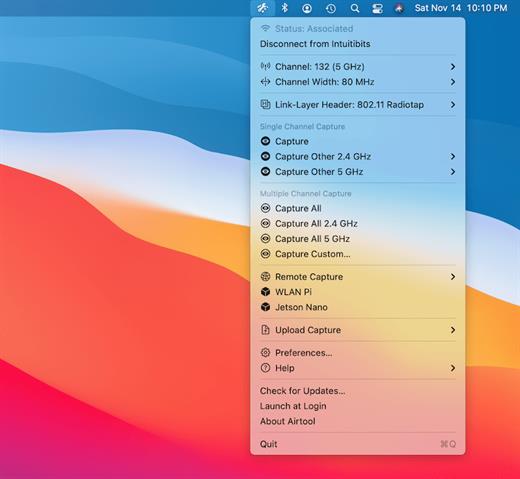
Airtool is a system menu-bar application that provides basic functions to check the state and channel configuration of the built-in Wi-Fi adapter, as well as to perform frame captures on single and multiple channels. It can be used together with Wireshark to let you change channel settings while performing live frame captures. In addition, captures can be automatically uploaded to CloudShark.

Features:


  • See Wi-Fi adapter state (associated, not associated) and channel information
  • Disconnect from network
  • List supported channels and channel widths
  • Perform frame captures on single or multiple channels
  • Change channel settings while performing live frame captures from external tools such as Wireshark or tcpdump
  • Automatically or manually upload captures to CloudShark
What’s New

Version 2.7.6:


  • Release notes were unavailable when this listing was updated.
Compatibility

macOS 13.5 or later


Release Name: Airtool 2.7.6
Size: 18.9 MB
Links: HOMEPAGE – NFO – Torrent Search

Download: RAPiDGATOR

4 Comments
July 1

Principle 6.43

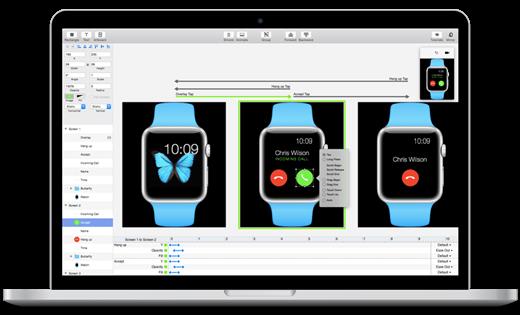
Principle makes it easy to create animated and interactive user interface designs. Whether you’re designing the flow of a multi-screen app, or new interactions and animations, Principle lets you create designs that look and feel amazing.

Built for the Biggest Imaginations
There are a lot of things you might want to design: a short animation, a slick interaction, or an extensive multiple screen app. No matter what you’re doing, you can do it with Principle.

Animation
Principle’s timeline makes it quick work to illustrate the perfect bounce, ease, and pop.

Interaction
Want to design a totally new interaction? Principle gives you the freedom to experiment without limiting you to pre-defined transitions.

Multiple Screens
It’s a breeze to design the flow of a multi-screen app; and when you’re done you’ll have a bird’s-eye view of all your screens.

Totally New, Yet Immediately Familiar
With artboards, magic animations and a timeline, using Principle will give you Déjà vu.

Touch Your Designs
Principle Mirror lets you interact with your design instantly on device or view designs that others have sent you.

Lights. Camera. Interaction.
Showing your designs has never been simpler with the record feature: Export a video or an animated gif that can be shared on Dribbble, Twitter, and wherever else you’d like!

Built for OS X
Principle is powered by Core Animation, the hardware-accelerated animation engine that iOS and OS X are built on. It also includes the Mac features you love: Full-screen mode, a Retina interface, and Auto Save — so you’ll feel right at home.

Design For Any Size
Choose a device preset or enter a custom Artboard size. Whether it’s web, desktop, mobile, or watch — you’re set!

What’s New

Version 6.43:


  • Release notes were unavailable when this listing was updated.
Compatibility

macOS 10.13 or later, 64-bit processor


Release Name: Principle 6.43
Size: 7.1 MB
Links: HOMEPAGE – NFO – Torrent Search

Download: RAPiDGATOR
4 Comments
July 1

MacDroid Pro 2.10

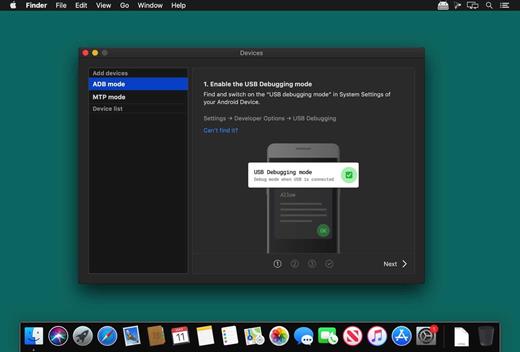
MacDroid app is a very helpful solution for those who use Mac or MacBook, at the same time preferring an Android device to an iPhone. Android and macOS cannot natively work together, hence there is a vital need for an interface that would not only connect the two systems but also allow safe and smooth file transfer between them.

With MacDroid you get the convenience of connecting Mac and an Android phone or tablet and accessing the portable device’s content in the Finder. You will be able to transfer photos, music, videos as well as entire folders. You’ll only need a USB cable to connect your phone to computer, MacDroid will take care of everything else.

Transfer your photos

You can access your Android photos in the Finder app and easily drag them with your mouse cursor to any folder on your Mac.

Transfer music to your phone

You can add your favorite tracks to Android from your Mac or vice versa and enjoy the music on the go.

Watch videos when offline

Got some great new episodes that you want to watch, but not planning to take your computer with you? Not a problem! You can transfer them to your Android and watch on a plane, on a train, or while having an Uber ride.

Edit Android files directly from Mac

When you don’t really feel like moving files around, you can edit your Android files with your favorite Mac app without actually saving them to your computer.

What’s New

Version 2.10:


  • Added: displaying transfer speed in Activity Log.
  • Improved: canceling file uploads.
Compatibility

macOS 10.10 or later


Release Name: MacDroid Pro 2.10
Size: 36 MB
Links: HOMEPAGE – NFO – Torrent Search

Download: RAPiDGATOR

4 Comments
July 1

Scrutiny 12.12.4

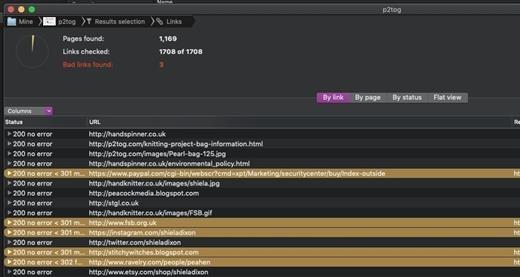
Scrutiny is a suite of web optimization tools. Native cocoa app (i.e., not Java) fast and efficient. 30-days free trial. This is a major update from v5. This is a completely free upgrade for v5 users and there is an upgrade path from v4.

Features


  • Link checker
  • SEO analysis
  • XML Sitemap generation, optionally include images / pdf pages
  • Page load speed test
  • Spelling and grammar checking
  • Scans sites requiring authentication
  • Search your site (source or visible text) obtain a list of pages containing a search term or not containing a search term
  • Website monitoring of as many URL’s as you like with a choice of alerts and logging
  • Scheduling made easy with a few easy clicks (the old method using iCal will still work)
  • On finish, send an email, save a report, open a file or applescript, FTP the sitemap XML, and other actions
  • Opens and scans a list of links in HTML, CSV, plain text format, or XML sitemap
What’s New

Version 12.12.4:


  • Release notes were unavailable when this listing was updated.
Compatibility

macOS 10.14 or later


Release Name: Scrutiny 12.12.4
Size: 6.2 MB
Links: HOMEPAGE – NFO – Torrent Search

Download: RAPiDGATOR
4 Comments
July 1

ForkLift 4.7.1

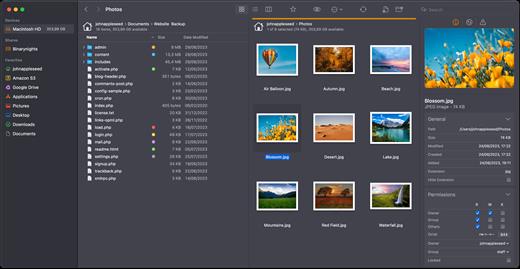
ForkLift is a powerful file manager and ferociously fast FTP client clothed in a clean and versatile UI that offers the combination of absolute simplicity and raw power expected from a well-executed Mac software.

ForkLift will connect to any remote server SFTP, FTP, WebDAV, Amazon S3, Backblaze B2, Google Drive, Rackspace CloudFiles, SMB, AFP and NFS shares on your local network,- pretty much anything you can plug into or hook up to a Mac. ForkLift also carries a complete toolbox for managing your files, including Folder Synchronization, Multi-Rename, Archive handling, Application deleter, editing files over remote connections and many more. All these power features are packaged into a Finder-like, dual-pane interface that delivers superior workflow while remaining absolutely familiar to use, along with Quick Look, Spotlight search and all.

Features

  • Completely rewritten entirely in Swift
  • ForkLift Mini
  • Two-way Sync
  • Preview
  • Quick Open
  • Multi Rename
  • Dark Mode
  • Dual Pane split vertically or horizontally
  • Favorite Sync via Dropbox
  • Dropbox Support
  • Transfer bandwidth throttling
  • Tags Support
  • Disklet
  • Sync Browsing
  • Tabs
  • Search by name, extention, kind, tags, or content
  • Quick Select
  • App Deleter
  • Remote Editing
  • Archive Management
  • Keyboard Control
  • Workspaces
  • FXP Copy
  • Tools
  • Git Support
  • Open in Terminal, iTerm, or Hyper
  • Hidden Files
  • Share
  • Possible to set as default file viewer
  • File Compare with FileMerge, Kaleidoscope, Beyond Compare, and Araxis Merge support
  • Multilingual: English, Chinese Simplified, Czech, French, German, Hungarian, Italian, Polish, Russian, Spanish and Ukrainian
What’s New

Version 4.7.1:


  • Release notes were unavailable when this listing was updated.
Compatibility

macOS 14.6 or later


Release Name: ForkLift 4.7.1
Size: 20.9 MB
Links: HOMEPAGE – NFO – Torrent Search

Download: RAPiDGATOR

4 Comments
June 30

macOS Tahoe 26.5.2

macOS Tahoe 26 is the next major version of the macOS operating system, unveiled by Apple on June 9, 2025 at WWDC.

Named after Lake Tahoe, located on the California-Nevada border, it continues the tradition of naming macOS after iconic California locations.

The focus of macOS Tahoe is on a new design, improved integration with other Apple devices, and enhanced Apple Intelligence capabilities.

Key features of macOS Tahoe:

Liquid Glass design:


  • A completely redesigned interface using the new Liquid Glass visual language inspired by visionOS (Apple’s Vision Pro operating system). Interface elements such as menus, toolbars, and the dock have become translucent, creating the effect of glass reflecting and refracting light.
  • Fully transparent menu bar that visually expands the workspace.
  • Updated app icons unified with iOS and iPadOS, with support for light, dark, and color options, as well as a new transparent style.

Apple Intelligence:


  • Advanced artificial intelligence features, including Live Translation to automatically translate messages and subtitles in FaceTime.
  • Genmoji and Image Playground updates: Users can create new emoji by combining existing ones, and generate images in styles such as oil painting or vector graphics.
  • Improved reminders: Apple Intelligence analyzes emails, notes, and web pages, automatically categorizing tasks.

Improved Continuity integration:


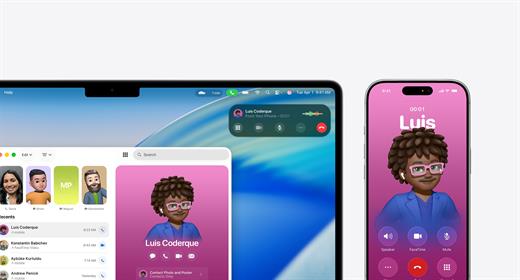
  • The Phone app is now available on Mac, allowing you to take calls, view contacts, view voicemail, and use features like Call Screening and Hold Assist.
  • Live Activities support with iPhone: notifications such as shipping or travel status are displayed in the Mac menu bar.
    iPhone Mirroring lets you launch iPhone apps directly on your Mac via Spotlight.

Updated Spotlight:


  • Significantly improved search engine that now not only searches for files and apps, but also performs actions such as creating events, starting podcasts, or sending messages.
  • Support for customizable quick commands (like “sm” to send a message or “ar” to add a reminder).
    Integration with cloud services and the ability to search PDFs and other documents.

New apps and features:


  • Games app with a catalog of installed games, support for chat, invitations, and an overlay for settings while playing.
  • The Journal app is now available on Mac.
  • Safari improvements: updated tab design and song lyrics translation in Apple Music.
  • Removal of Launchpad, replaced by an “Apps” feature integrated into Spotlight, similar to App Library in iOS.

Accessibility:


  • New features such as Magnifier (using the iPhone camera to zoom in), Braille support, and Vehicle Motion Cues to reduce motion sickness.
  • Accessibility Nutrition Labels in the App Store that display information about supported accessibility features.

New numbering:


  • Apple switched to a unified numbering system where all operating systems (iOS, iPadOS, macOS, etc.) got version 26, which corresponds to the year after the announcement (2025-2026). macOS still retains its unique name, Tahoe.
What’s New

Version 26.5.2:


  • Release notes were unavailable when this listing was updated.
Compatibility

macOS 14.0 or later


Release Name: macOS Tahoe 26.5.2
Size: 17.1 GB
Links: HOMEPAGE – NFO – Torrent Search

Download: RAPiDGATOR
2 Comments
June 30

AirMail Pro 26.0.22

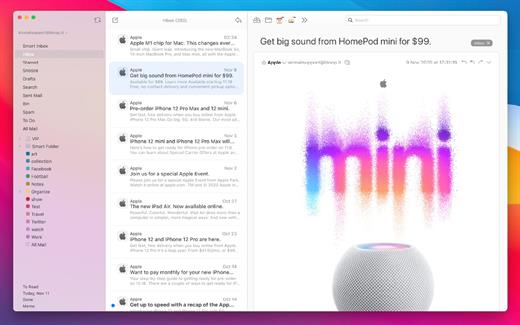
Airmail 4 is a new mail client designed with performance and intuitive interaction in mind optimized for macOS High Sierra! Support for iCloud™, MS Exchange, Gmail™, Google™ Apps, IMAP, POP3, Yahoo!™, AOL™, Outlook.com™, Live.com™

Airmail was designed from the ground UP to retain the same experience with a single or multiple accounts and provide a quick, modern and easy-to-use user experience. Airmail is clean and allows you to get to your emails without interruption – it’s the mail client for the 21st century.

We have taken usability and function to the next level with Airmail and bring a striking-design with support for all major email services. Switch between accounts like a breeze and quick reply to incoming messages within seconds – email has never been so easy and productive.


  • iCloud Account sync
  • iCloud attachment upload and share the link.
  • Handoff support, Composing Draft and folder selection are mirrored on different devices
  • Today Extension, quick access to your inbox.
  • Action Extension, Airmail Compose, Inline create and send messages directly form other apps
  • Action Extension, Airmail Share to quick send messages and attachments.
Accounting:

  • Unified Inbox
  • Alias with custom SMTP
  • Exchange, iCloud™, Gmail™, IMAP, POP3, Google™ Apps, Yahoo!™, AOL™, Outlook.com™, Live.com™
  • Local Accounts
  • Import from Apple Mail, MBOX archive, EML, EMLX, Airmail 1.x
Interactions:

  • Quick Reply
  • Undo History
  • Offline operations
  • Move messages on Different mailboxes
  • Interaction sounds
  • Multi Touch gestures
  • Exchange Meeting Invite
Shortcuts:

  • Gmail Shortcuts
  • Custom global shortcuts
  • Quick Label, Move, Label and Archive
  • Quick folder selection
Attachment:

  • Drag and drop
  • Quick Look preview
  • Google Drive, Dropbox, CloudApp, Box, Onedrive, Droplr, FTP
  • Inline image attachments
  • Winmail.dat preview
  • VCalendar
Conversations:

  • Group by id
  • Group by subject
  • Chronological Reverse
  • Muted CC’d conversation
Visual:

  • Multiple visual themes
  • Minimal and extended Mode
  • Plain Text Rendering
Notifications:

  • Per account notifications
  • Notification center support
  • Notification alerts with custom actions
Address:

  • Gmail, Exchange and OS X contacts
  • Contacts Group
  • Filter by address
  • Open Directory search
Composer:

  • Google App Directory
  • Exchange Global Address List
  • LDAP directory
  • Markdown, Html(Html Source for templates), and text only.
  • Custom settings per single account
  • Bullet and numbered list.
Sending:

  • Auto CC, BCC.
  • Pending operations
  • Send Delay
  • Redirect
  • Send again
  • Bounce
Advanced:

  • Split Screen Support
  • Time Machine friendly
  • Deckles mode
  • EML Import/Export
  • Disable GPU to save battery life
  • Applescript
  • Activity monitor
  • Data Detectors
Signatures:

  • Multiple Account Signatures
  • Markdown, Rich text, Html Source, and text only.
  • Signature above or below the quote
Search & Filtering:

  • Global search for multiple accounts
  • Realtime powerful filters
  • Sort messages, Date, Attachments, Conversations ….
  • Show messages of the same user
  • Flags and filters
Folders, Labels:

  • Nested folders
  • Create, Delete and edit folders
  • Custom colors synced by iCloud
  • Custom folder mappings
  • ToDo, Done, Memo
Send to:

  • Omnifocus
  • Fantastical
  • Evernote
  • Apple Reminder
  • Calendar
  • BusyCal
  • Things
  • 2To
  • Wunderlist
  • Todoist
Privacy:

  • Per user Autoload Remote Images,
  • Disable icon detection
What’s New

Version 26.0.22:


  • Release notes were unavailable when this listing was updated.
Compatibility

macOS 10.12 or later.
Apple Silicon or Intel Core processor


Release Name: AirMail Pro 26.0.22
Size: 48.4 MB
Links: HOMEPAGE – NFO – Torrent Search

Download: RAPiDGATOR

6 Comments
June 30

Tangrid 1.2.4

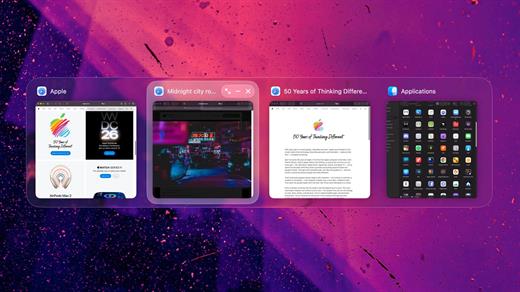
Tangrid is an all-in-one macOS productivity tool designed to bring order to your desktop. Built specifically for multi-display and multi-Space workflows, Tangrid seamlessly combines advanced window tiling, fluid window switching, and an enhanced Dock preview into a single, cohesive experience.

What’s New

Version 1.2.4:


  • Release notes were unavailable when this listing was updated.
Compatibility

macOS 14.0 or later


Release Name: Tangrid 1.2.4
Size: 17.2 MB
Links: HOMEPAGE – NFO – Torrent Search

Download: RAPiDGATOR
5 Comments