Please REGISTER or RENEW your account on RAPiDGATOR.net and support us by doing through all RAPiDGATOR working download links on main posts...
July 3

MainStage 4.3

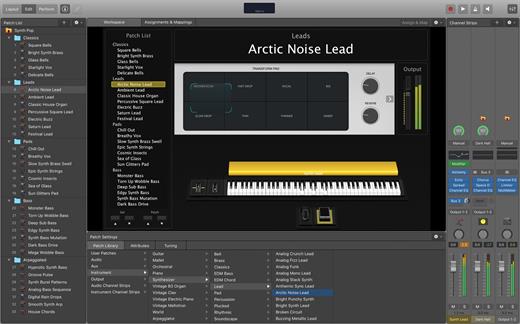
MainStage lets you take your Mac to the stage with a full-screen interface optimized for live performance, flexible hardware control, and a massive collection of plug-ins and sounds that are fully compatible with Logic Pro.
The Ultimate Live Rig


  • Perform live with over 100 instrument, effect, and MIDI plug-ins or your favorite Audio Units plug-ins
  • Add any patches from Logic Pro to bring your studio sound to the stage
  • Combine instruments and live audio, such as keyboards and vocals, in a single Patch
  • Switch between Patches without stopping sound output or cutting off held notes
  • Design rich keyboard Patches using splits and layers
  • Perform with stereo or multitrack backing tracks using Playback

Hardware Control


  • Connect your favorite MIDI hardware and use it to play and control your plug-ins
  • Use USB and MIDI-equipped controllers like keyboards, foot pedals, and drum pads
  • Quickly assign hardware knobs, buttons, and faders to onscreen controls
  • Manage sophisticated rigs using the Assignments & Mapping overview

Designed for the Stage


  • See only what you need during your performance using a customizable, full-screen live interface
  • Screen controls adapt for each Patch using Smart Controls
  • Smart Controls offer dynamic performance controls that change with each Patch
  • Easily view your Mac screen from a distance using a high-contrast, full-screen performance view

Instrument Plug-ins


  • Play or create a wide variety of rich sampled instruments with Sampler and Quick Sampler
  • Turn your favorite hardware synthesizers into sampled instruments using the Auto Sampler plug-in
  • Quickly find sounds or create unique new ones with Alchemy, the ultimate sample manipulation synthesizer
  • Play classic ’70s- and ’80s-style synthesizer sounds using Retro Synth
  • Perform inspired sounds using a collection of synths that provide analog, wavetable, FM, additive, granular, spectral, and modeling synthesis

MIDI Plug-ins


  • Transform simple ideas into elaborate performances using nine MIDI plug-ins
  • Instantly turn a simple chord into a rich performance with the Arpeggiator
  • Play a single note to trigger predefined chords with Chord Trigger
  • Perform a part and conform notes to a specific scale using Transposer

Creative and Production Effects


  • Play your sounds through a variety of realistic acoustic spaces or creative synthesized reverbs
  • Use a range of multi-tap, vintage tape, and stereo delays
  • Add movement to your tracks with a variety of modulation effects
  • Get the perfect mix with a collection of vintage and modern EQs, dynamics, and other mixing tools

System Requirements: 6GB available disk space for minimum install / 44GB or more storage space for full Sound Library installation

What’s New

Version 4.3:


  • Release notes were unavailable when this listing was updated.
Compatibility

macOS 15.6 or later and a Mac with Apple M1 chip or later.


Release Name: MainStage 4.3
Size: 1 GB
Links: HOMEPAGE – NFO – Torrent Search

Download: RAPiDGATOR

4 Comments
July 3

Compressor 5.3

Compressor is now part of Apple Creator Studio, an amazing collection of Apple’s most powerful creative apps designed to help you bring your ideas to life. The suite includes Final Cut Pro, Logic Pro, Pixelmator Pro, Motion, Compressor, and MainStage — plus premium content and intelligence features in Keynote, Pages, Numbers, and Freeform*, all in one simple plan.

New Feature


  • Create files for an Apple Immersive Video package for playback, and HTTP live streaming on Apple Vision Pro

Overview

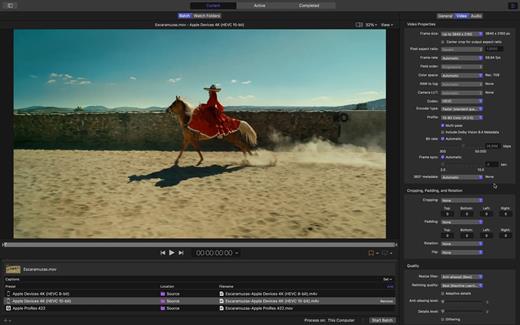
Compressor integrates tightly with Final Cut Pro and Motion to add power and flexibility to your video conversions. Quickly customize output settings, enhance images, and package your movie for sale on the iTunes Store.

Advanced Encoding for Final Cut Pro


  • Customize encoding settings for use in Final Cut Pro and Motion
  • Set up batch processes to streamline the encoding of large numbers of files
  • Create self-contained Droplets to encode on the desktop with drag-and-drop ease
  • Automatically encode videos that are added to selected folders in the file system
  • Encode stereoscopic spatial video and deliver directly to Apple Vision Pro
  • Unrivaled performance with optimizations for the latest generation of Apple silicon

iTunes Store Package Creation


  • Import and organize your movie, trailer, closed captions, audio descriptions, and subtitles into an iTunes Store-compliant package for submission to an Apple-certified iTunes delivery partner
  • Audition video with any audio, caption, or subtitle to verify sync
  • Built-in error detection helps you identify issues with your iTunes Store Package
  • Deliver HDR video as P3 D65 PQ, Rec. 2020 HLG, and Rec. 2020 PQ for HDR10
  • Support in the iTunes Store Package to link a Dolby Vision graded video file to a Dolby Vision XML

Support for Industry Standards


  • Encode to a broad range of industry standard formats including HEVC, MV-HEVC, H.264, MXF, and ProRes
  • Import Targa, DPX, TIFF, PSD, PNG, or OpenEXR image sequences and encode them using any setting
  • Create, view, adjust, and deliver closed captions in CEA-608, SRT, and iTT formats

Pristine Format Conversions


  • Convert any file between formats — such as SD to HD, or progressive to interlaced video
  • Import and manipulate wide color video, then deliver in standard Rec. 601 and Rec. 709 color spaces or in wide Rec. 2020 color space
  • Deliver High Dynamic Range (HDR) video with controls for color space conversions and HDR metadata
  • Deliver HDR video as P3 D65 PQ, Rec. 2020 HLG, and Rec. 2020 PQ
  • Add effects to your content like custom LUTs, a timecode overlay, and watermarks
  • Speed up video, slow it down, or adjust the frame rate to make the duration match a runtime
  • Convert log-encoded video to SDR and HDR color spaces using built-in camera LUTs for Panasonic, Sony, Canon, Blackmagic, Nikon and ARRI or add a custom camera LUT
  • Convert ProRes RAW and ProRes RAW HQ media to other professional file formats

System Requirements: macOS 15.6 or later, 8 GB of memory, 1.2 GB of available disk space. Apple Immersive Video processing requires macOS 15.0 or later, 32 GB memory (64 GB recommended). Storage read speed of 2000 MB/s or faster is recommended. Some features require a Mac with Apple silicon.


  • Premium content and features in Freeform are not currently available and are expected to be included in the Apple Creator Studio subscription later this year.
What’s New

Version 5.3:


  • Release notes were unavailable when this listing was updated.
Compatibility

macOS 15.6 or later.


Release Name: Compressor 5.3
Size: 138.5 MB
Links: HOMEPAGE – NFO – Torrent Search

Download: RAPiDGATOR

4 Comments
July 3

Keynote 15.3

Create memorable presentations on iPhone, iPad, Mac, and Apple Vision Pro. Start with an Apple-designed theme and add text, images, charts, and shapes. Bring it all to life with cinematic animations and transitions. Confidently present from anywhere, in person or virtually, and take turns controlling a presentation in multi-presenter slideshows.

Get Started Quickly


  • Work from iPhone, iPad, Mac, Apple Vision Pro, or even a PC with iCloud.com
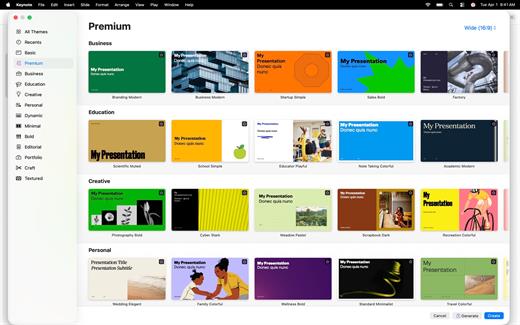
  • Select from a wide variety of Apple-designed themes
  • Import and edit Microsoft PowerPoint presentations

Create Stunning Presentations


  • Easily change slide layouts and backgrounds
  • Add recorded audio, live video, and image galleries
  • Use powerful graphics tools including background removal and masking
  • Draw or write with Apple Pencil on iPad

Cinema-Quality Animations


  • Beautiful cinematic slide transitions and impressive animations
  • Emphasis builds and Magic Move let you effortlessly add impact
  • See live on-canvas previews as you animate your slides
  • Draw a motion path with Apple Pencil on iPad

Present to Your Audience


  • Rehearse with a customizable presenter display
  • Practice in an immersive Conference Room or Theater environment on Apple Vision Pro
  • Highlight with Apple Pencil or with your finger while presenting on iPad
  • Control your slideshow from an iPhone, iPad, or Apple Watch

Share with Anyone


  • Share your presentation publicly or collaborate with specific people using iCloud or Box
  • Make changes from any device and see a list of changes from others in real-time
  • Export presentations to Microsoft PowerPoint, PDF, HTML, movies, and image files

Apple Intelligence


  • Use Writing Tools to proofread, rewrite, summarize, and compose text
  • Create your own fun images with Image Playground based on a description
What’s New

Version 15.3:


  • Release notes were unavailable when this listing was updated.
Compatibility

macOS 15.6 or later.


Release Name: Keynote 15.3
Size: 426.7 MB
Links: HOMEPAGE – NFO – Torrent Search

Download: RAPiDGATOR
4 Comments
July 3

Logic Pro 12.3

Logic Pro for Mac is a complete collection of sophisticated creative tools for songwriting, beat making, editing, and mixing, built around a modern interface that’s designed to get results quickly and also deliver more power whenever it’s needed. Logic Pro includes a massive collection of instruments, effects, loops, and samples, providing a complete toolkit to create amazing-sounding music.

Music Production


  • Use Stem Splitter to separate nearly any mixed audio recording into six distinct parts: Drums, Bass, Vocals, Guitar, Piano, and Other instruments
  • Smart Tempo instantly conforms imported or recorded audio to your project’s tempo
  • Record and edit MIDI or audio using a comprehensive set of editors and tools
  • Use Live Loops to capture inspiration and quickly build arrangements by mixing and matching loops, samples, and your recordings
  • Manipulate the pitch and timing of any recording with Flex Time and Flex Pitch
  • Keep takes organized with take folders and build comps quickly with Quick Swipe Comping
  • Track Alternatives let you create, duplicate, and then switch between different versions of tracks
  • Deliver a release-ready mix using Mastering Assistant

AI Session Players


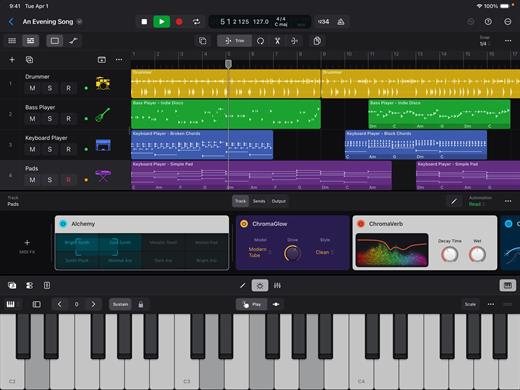
  • Discover six virtual musicians designed to create nuanced performances that respond to your direction
  • Synth Player, Bass Player, Keyboard Player, Acoustic Drummer, Electronic Drummer, and Percussionist offer a wide range of genres and distinct playing styles

Beat Production


  • Reshuffle audio with Beat Breaker, a creative time and pitch effect
  • Build custom drum kits using your favorite samples
  • Create drum beats, bass lines, and melodic parts, and reshape sounds over time using Step Sequencer

Sampling


  • Use Sampler to quickly create and edit sophisticated multi-sampled instruments
  • Use Sample Alchemy to transform audio into entirely new malleable sounds
  • Chop and manipulate samples using Quick Sampler

Professional Instrument and Effects Plug-ins


  • Create music with a massive collection of powerful software instruments
  • Shape your sound using a wide variety of high-quality effects

Compatibility


  • Roundtrip capabilities let you open projects back-and-forth between Logic Pro for Mac or Logic Pro for iPad
  • Import and export XML to support Final Cut Pro workflows

System Requirements: 6GB available storage space for minimum install / 44GB or more storage space for full Sound Library installation

What’s New

Version 12.3:


  • Release notes were unavailable when this listing was updated.
Compatibility

macOS 15.6 or later and a Mac with Apple M1 chip or later.


Release Name: Logic Pro 12.3
Size: 1.5 GB
Links: HOMEPAGE – NFO – Torrent Search

Download: RAPiDGATOR

3 Comments
July 3

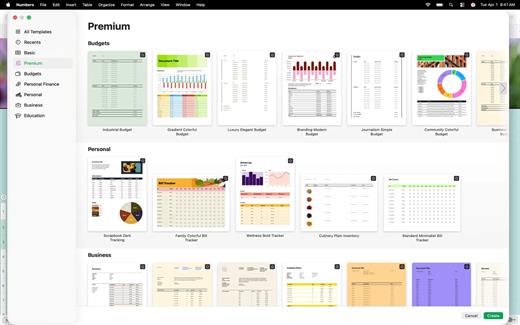
Numbers 15.3

Create gorgeous spreadsheets with Numbers on iPhone, iPad and Mac. Get started with Apple-designed templates for everything from a home budget to an invoice. Add tables, charts, text, and images anywhere on the flexible canvas. Animate your data with interactive charts, find patterns with pivot tables, and use hundreds of powerful functions.

Get Started Quickly


  • Work from iPhone, iPad, Mac, or even a PC with iCloud.com
  • Select from a wide variety of Apple-designed templates
  • Add from a library of shapes, tables, and charts with pre-defined styles
  • Import and edit Microsoft Excel and CSV files

Create Beautiful Spreadsheets


  • Place tables, charts, text, and images anywhere on the flexible canvas
  • Create a form on iPhone or iPad to quickly enter data on the go
  • Draw or write with Apple Pencil on iPad

Formulas for Everyone


  • Choose from hundreds of powerful functions, including XLOOKUP and RegEx
  • Search the integrated function browser for built-in help and sample formulas
  • Easily add stock information to spreadsheets
  • See results from a single formula across multiple cells using spilling arrays

Everything Adds Up Beautifully


  • Use pivot tables and categories to see your data in a whole new way
  • Quickly organize and summarize tables to gain new insights
  • Insert gorgeous 2D and 3D charts, including bar, column, line, area, pie, donut, and radar charts
  • Animate data with interactive column, bar, scatter, and bubble charts
  • Easily filter through large tables for specific values, text, or duplicate entries
  • Change values in cells using sliders, steppers, checkboxes, pop-ups, and star ratings

Share with Anyone


  • Share your spreadsheet publicly or collaborate with specific people using iCloud or Box
  • Make changes from any device and see a list of changes from others in real-time
  • Export your spreadsheet in CSV, TSV, PDF, and Microsoft Excel

Apple Intelligence


  • Use Writing Tools to proofread, rewrite, summarize, and compose text
  • Create your own fun images with Image Playground based on a description
What’s New

Version 15.3:


  • Release notes were unavailable when this listing was updated.
Compatibility

macOS 15.6 or later.


Release Name: Numbers 15.3
Size: 302.8 MB
Links: HOMEPAGE – NFO – Torrent Search

Download: RAPiDGATOR
4 Comments
July 2

Disk Graph 3.2.1

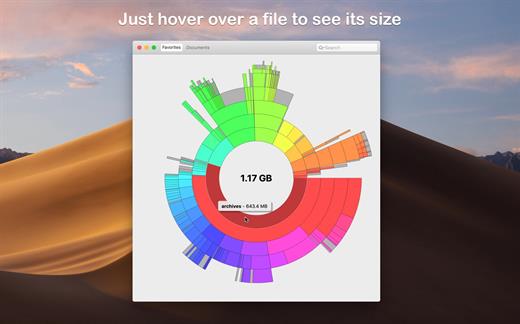
Disk Graph is a tool that allows you to inspect your disk and easily find the files that take away most of your disk space. With its beautiful interface and its pie-like graph, locating big files has never been easier.

Features:


  • Any directory reachable in the Finder (i.e. on your local machine, on an external drive or even on a remote server) can be selected and immediately analyzed
  • Freely navigate inside the subdirectories of an analyzed folder or device
  • Smooth animations manage the transitions between selected directories
  • Move the mouse over a file to see its name and size
  • Use the context menu to trash selected files
  • Quickly search for filenames
  • Save your favorite locations and access them with one click from the main window
  • Choose between two modes: File Size Mode (where section sizes are relative to the respective file size) and File Count Mode (where section sizes represent the number of contained files)
What’s New

Version 3.2.1:


  • Improved compatibility with macOS 26.
  • Improved accessibility: the graph renders with increased contrast, reduced transparency, or reduced motion (by replacing animations with a fade transition) based on the Accessibility options in System Settings.
  • Fixed a rendering issue that could happen when scanning a folder after enabling the option “Show Available Space”.
  • Fixed an issue that caused directories containing search results to be collapsed.
Compatibility

macOS 10.3 or later.
Apple Silicon or Intel Core processor


Release Name: Disk Graph 3.2.1
Size: 9.5 MB
Links: HOMEPAGE – NFO – Torrent Search

Download: RAPiDGATOR

4 Comments
July 2

Storyist 4.4.1

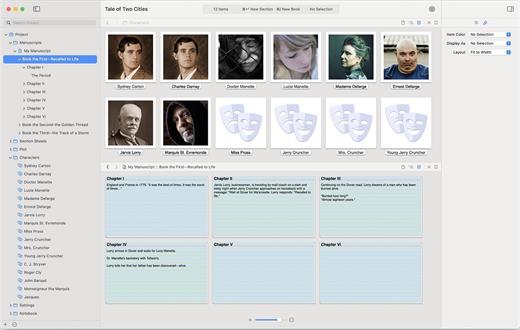
Storyist is a powerful story development tool for novelists and screenwriters. With an intuitive interface that puts you in control, Storyist provides:


  • A word processor with a page layout view and support for headers, footers, and style sheets.
  • A storyboard with customizable story sheets for tracking your plot, characters, and settings.
  • A project manager with fast, project-wide search capabilities to keep your writing organized and accessible.
What’s New

Version 4.4.1:


  • Release notes were unavailable when this listing was updated.
Compatibility

macOS 10.14.0 or later


Release Name: Storyist 4.4.1
Size: 24.3 MB
Links: HOMEPAGE – NFO – Torrent Search

Download: RAPiDGATOR
4 Comments
July 2

Logic Pro 12.3

Logic Pro for Mac is a complete collection of sophisticated creative tools for songwriting, beat making, editing, and mixing, built around a modern interface that’s designed to get results quickly and also deliver more power whenever it’s needed. Logic Pro includes a massive collection of instruments, effects, loops, and samples, providing a complete toolkit to create amazing-sounding music.

Music Production


  • Use Stem Splitter to separate nearly any mixed audio recording into six distinct parts: Drums, Bass, Vocals, Guitar, Piano, and Other instruments
  • Smart Tempo instantly conforms imported or recorded audio to your project’s tempo
  • Record and edit MIDI or audio using a comprehensive set of editors and tools
  • Use Live Loops to capture inspiration and quickly build arrangements by mixing and matching loops, samples, and your recordings
  • Manipulate the pitch and timing of any recording with Flex Time and Flex Pitch
  • Keep takes organized with take folders and build comps quickly with Quick Swipe Comping
  • Track Alternatives let you create, duplicate, and then switch between different versions of tracks
  • Deliver a release-ready mix using Mastering Assistant

AI Session Players


  • Discover six virtual musicians designed to create nuanced performances that respond to your direction
  • Synth Player, Bass Player, Keyboard Player, Acoustic Drummer, Electronic Drummer, and Percussionist offer a wide range of genres and distinct playing styles

Beat Production


  • Reshuffle audio with Beat Breaker, a creative time and pitch effect
  • Build custom drum kits using your favorite samples
  • Create drum beats, bass lines, and melodic parts, and reshape sounds over time using Step Sequencer

Sampling


  • Use Sampler to quickly create and edit sophisticated multi-sampled instruments
  • Use Sample Alchemy to transform audio into entirely new malleable sounds
  • Chop and manipulate samples using Quick Sampler

Professional Instrument and Effects Plug-ins


  • Create music with a massive collection of powerful software instruments
  • Shape your sound using a wide variety of high-quality effects

Compatibility


  • Roundtrip capabilities let you open projects back-and-forth between Logic Pro for Mac or Logic Pro for iPad
  • Import and export XML to support Final Cut Pro workflows

System Requirements: 6GB available storage space for minimum install / 44GB or more storage space for full Sound Library installation

What’s New

Version 12.3:


  • Release notes were unavailable when this listing was updated.
Compatibility

macOS 15.6 or later and a Mac with Apple M1 chip or later.


Release Name: Logic Pro 12.3
Size: 1.6 GB
Links: HOMEPAGE – NFO – Torrent Search

Download: RAPiDGATOR

3 Comments
July 2

DaisyDisk 4.34

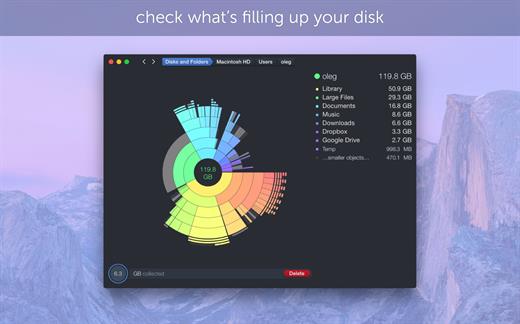
DaisyDisk allows you to visualize your disk usage and free up disk space by quickly finding and deleting big unused files.

The program scans your disk and displays its content as a sector diagram where the biggest files and folders at once become obvious. To drill down to a folder, just click on a segment. To bubble up, click in the center. Move the mouse over the diagram and see the name and path of each file, and enclosed files (if any). Hit Space to quickly preview file content, without launching another application. In this way, walk around your disk and drag-and-drop all unneeded files into the “collector”. Expand the collector to check its contents. When done, clean it up with a single click.

What’s New

Version 4.34:


  • Updated the application icon to match the newest macOS style.
Compatibility

macOS 10.13 or later
Apple Silicon or Intel Core processor


Release Name: DaisyDisk 4.34
Size: 8.9 MB
Links: HOMEPAGE – NFO – Torrent Search

Download: RAPiDGATOR
4 Comments
July 2

VueScan Professional 9.8.56

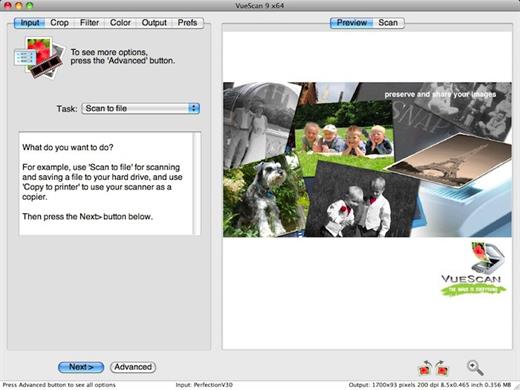
VueScan is a scanning program that works with most high-quality flatbed and film scanners to produce scans that have excellent color fidelity and color balance. VueScan is easy to use, and has advanced features for restoring faded colors, batch scanning and other features used by professional photographers.

Why should you use VueScan?


  • Easy to use – just run VueScan, press Preview, adjust the cropping, then press Scan.
  • Accurate colors – uses ICC profiles and IT8 calibration.
  • Powerful – dozens of advanced options.
  • Faster workflow – can edit one image while the next image is being scanned (most scanner software won’t let you work with one image while another is being scanned).
  • Simple to install – installing VueScan changes nothing on your system, installs nothing in your operating system and all other scanner software will continue to function.
What’s New

Version 9.8.56:


  • Release notes were unavailable when this listing was updated.
Compatibility

macOS 10.11 or later


Release Name: VueScan Professional 9.8.56
Size: 337 MB
Links: HOMEPAGE – NFO – Torrent Search

Download: RAPiDGATOR
5 Comments