Please REGISTER or RENEW your account on RAPiDGATOR.net and support us by doing through all RAPiDGATOR working download links on main posts...
July 3

Mimestream 1.10.3

Mimestream combines your favorite Gmail features with the power of a native macOS app so you can move through your email effortlessly
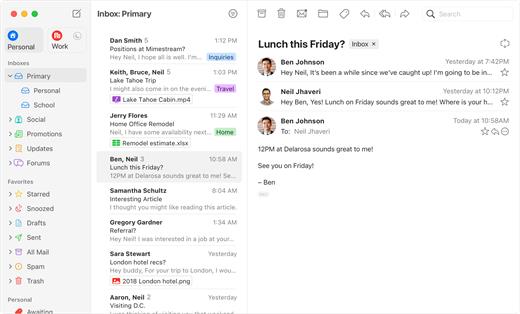
Made for Mac, optimized for Gmail

As a native app written in Swift, Mimestream leverages the full power of macOS to deliver a lightning-fast and instantly familiar experience. Instead of using the IMAP protocol, Mimestream utilizes the Gmail API to enable an enhanced set of features that let you work with ease.

Work smarter, email faster

  • Rise above the noise and focus on the work that matters most. Mimestream makes it easy to keep your inbox organized with confidence.

  • Categorized Inbox – with support for Gmail’s categories, focus on what matters most and triage the rest at your leisure.
  • Multiple Accounts
  • Label Management
Committed to Privacy

Your data and credentials are stored only on your device, and the app only makes direct connections to Gmail. There are no intermediary servers, and Mimestream does not collect or sell your email.

Key Features

  • Lightweight and Fast – Mimestream is built for speed, and only uses a minimal amount of disk space to cache recent messages
  • Offline Access – Fully functional when offline and on the slowest connections-perfect for business travelers and whenever you’re on the go
  • System Notifications – Receive macOS system notifications when you receive new messages, so you never fall behind on important threads
  • Aliases – Your email aliases are automatically synced from Gmail without any setup and are used for replies when appropriate
  • Signatures – Signatures set up in Gmail are automatically synced with Mimestream
  • Robust Search – Enter any Gmail search query into Mimestream and get consistent results. Search while offline, too
  • Swipe Gestures – Use familiar macOS swipe gestures to quickly triage and archive your email
  • Tracking Prevention – Read your email privately – Mimestream blocks tracking pixels from 50+ of the most common tracking services
  • Keyboard Shortcuts – Triage your email quickly using keyboard shortcuts, including the option to use familiar Gmail or Apple Mail shortcut sets
What’s New

✨ Improved


  • Improved throughput of Gmail API queries
? Fixed

  • Inbox unread counts sometimes get stuck and stop updating
  • Sharing videos to Mimestream sometimes fails
  • Order of attachments in quicklook preview panel doesn't match message
  • Some names aren't parsed correctly for the message list recipient list
  • When sending to an Apple Contacts Group, preferred address isn't respected
? Cleanup

  • Automatic recovery from certain licensing error situations
  • Reduce memory high water mark when sharing large files
  • Avoid unnecessary post-selection syncs when it's known that nothing can be synced
Compatibility

macOS 10.15.0 or later


Release Name: Mimestream 1.10.3
Size: 11.6 MB
Links: HOMEPAGE – NFO – Torrent Search

Download: RAPiDGATOR

4 Comments
July 3

Motion 6.3

Motion is now part of Apple Creator Studio, an amazing collection of Apple’s most powerful creative apps designed to help you bring your ideas to life. The suite includes Final Cut Pro, Logic Pro, Pixelmator Pro, Motion, Compressor, and MainStage — plus premium content and intelligence features in Keynote, Pages, Numbers, and Freeform*, all in one simple plan.

New Features
AI-powered Magnetic Mask automatically tracks and isolates people, objects, and shapes in any footage
3D text is now dramatically faster on Apple silicon, with Metal-powered improvements to playback and rendering

Overview

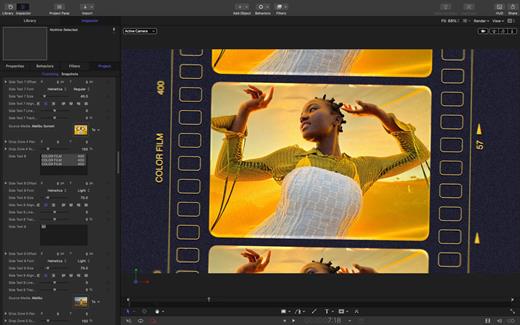
Designed for video editors, Motion is a powerful motion graphics tool that makes it easy to create cinematic 2D and 3D titles, fluid transitions, and realistic effects in real time.

2D and 3D Titles


  • Import 360° media and design 360° titles, generators, and effects
  • Build 3D titles from scratch, design them with easy-to-use templates, or instantly convert any existing 2D title to 3D
  • Easily create beautiful titles that you can animate using more than 100 drag-and-drop behaviors and intuitive text animation tools
  • Customize 3D titles to create endless looks with over 90 Apple-designed 3D materials including metal, wood, and stone surfaces

Motion Graphics for Final Cut Pro


  • Save any title, effect, transition, or generator and access it directly in Final Cut Pro
  • Customize Final Cut Pro titles, effects, and transitions by opening them in Motion
  • Create Motion Templates with any combination of single parameters and rigs that let you control a group of parameters with a slider, pop-up menu, or checkbox in Final Cut Pro
  • Use Display Aspect Ratio snapshots to create templates that support multiple aspect ratios

Stunning Effects


  • Choose from more than 230 behaviors for natural animation without keyframes
  • Change focus points or the depth effect for video shot in Cinematic mode on iPhone
  • Design your own particle emitters or choose from 200 presets for real-world effects like smoke and sparkles
  • Use professional masking tools to quickly draw and adjust control points for rotoscoping
  • Automatically detect, track, and match the movement of faces or objects using machine learning
  • Choose between different tracking analysis types
  • Add the Neon filter to easily add a neon glow to text, shapes, video, stills, and more
  • Harness an ecosystem of third-party FxPlug plug-ins for tasks like advanced tracking, advanced motion graphics, and more

Effortless 3D


  • Transition from 2D to 3D space by adding cameras
  • Create 3D scenes within a 360° project for ultra-realistic 360° environments
  • Set up realistic shadows that animate dynamically with the movement of cameras and lights
  • Turn any shape, video plane, or paint stroke into a reflective surface in 3D space
  • Import third-party USDZ objects or use one of 60 premade objects in the Motion Library

Breakthrough Speed, Quality, and Output


  • Import wide color HDR images, view them on supported Mac computers, and export in standard Rec. 709 or wide Rec. 2020 color space
  • Unrivaled speed and efficiency with optimizations for the latest generation of Apple silicon

System Requirements: macOS 15.6 or later, 8 GB of memory (16 GB recommended), Metal-capable graphics card (Intel-based Mac computers only), 4.7 GB of available disk space. Some features require internet access; fees may apply.


  • Premium content and features in Freeform are not currently available and are expected to be included in the Apple Creator Studio subscription later this year.
What’s New

Version 6.3:


  • Motion is now part of Apple Creator Studio.
Compatibility

macOS 15.6 or later.


Release Name: Motion 6.3
Size: 2.9 GB
Links: HOMEPAGE – NFO – Torrent Search

Download: RAPiDGATOR

2 Comments
July 3

Capture One Pro 16.8.3

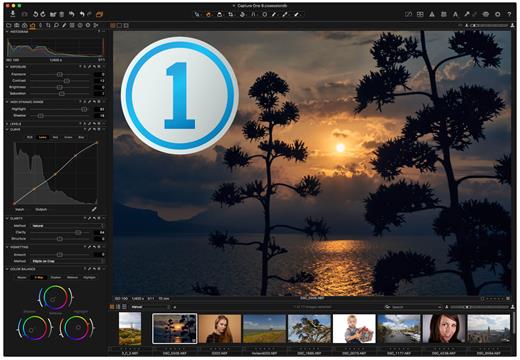
Capture One is a professional RAW converter offering you ultimate image quality with accurate colors and incredible detail from more than 400 high-end cameras – straight out of the box. It offers state-of-the-art tethered capture, powerful digital asset management, extensive adjustment tools, and a flexible workflow.

With an updated processing engine, market-leading performance, and powerful new features, Capture One is the professional choice in imaging software. You get the highly responsive precision tools you need to create stunning images from your camera’s RAW files in a time-saving workflow that can be customized to fit your needs.

What’s New

Version 16.8.3:


  • Release notes were unavailable when this listing was updated.
Compatibility

macOS 14.0 or later


Release Name: Capture One Pro 16.8.3
Size: 1.9 GB
Links: HOMEPAGE – NFO – Torrent Search

Download: RAPiDGATOR
2 Comments
July 3

NanoClip 1.4.3

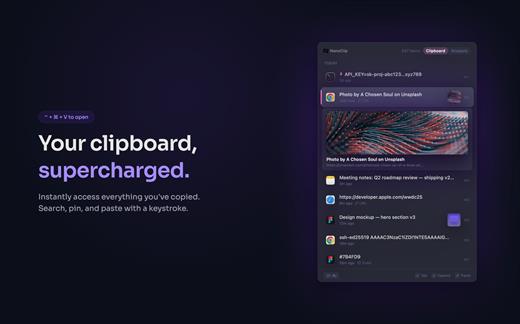
NanoClip is a lightweight macOS menu bar clipboard manager that saves every copy and keeps snippets instantly accessible with a global shortcut. It supports clipboard history, smart text snippets, iCloud sync across Macs, inline previews for images, GIFs, files, colors, and code, plus multiple themes in a fast, privacy-focused design.

What’s New

Version 1.4.3:


  • Release notes were unavailable when this listing was updated.
Compatibility

macOS 15 or later


Release Name: NanoClip 1.4.3
Size: 10.7 MB
Links: HOMEPAGE – NFO – Torrent Search

Download: RAPiDGATOR

4 Comments
July 3

Zenteek 1.6.2

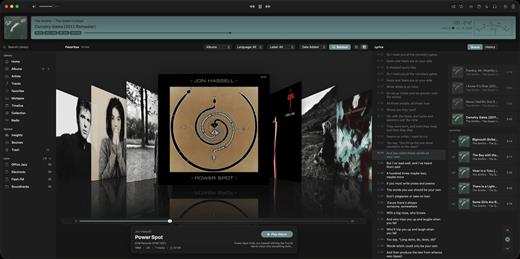
ZENTEEK is a library-first, privacy-focused audio player built from the ground up for macOS and Apple Silicon. Designed specifically for music enthusiasts and audiophiles who demand pristine sound quality, ZENTEEK delivers a premium, bit-perfect listening experience without the burden of monthly subscriptions.

Key Features


  • Audiophile-Grade Engineering: Experience true bit-perfect playback with native support for high-resolution formats including FLAC, ALAC, WAV, and DSD. It also features advanced Hi-Res DSP, gapless playback, LUFS normalization, and 5.1 / 7.1 surround sound capabilities.
  • Local & Privacy-First Philosophy: Your music library stays yours. ZENTEEK requires no account creation, operates entirely locally, and relies on secure, EU-based infrastructure to respect your data privacy.
  • Seamless Server & Streaming Integrations: Effortlessly connect to your personal media servers. ZENTEEK features native compatibility with Plex, Jellyfin, Navidrome, and Subsonic, alongside support for AirPlay, DLNA, Last.fm scrobbling, and MusicBrainz metadata.
  • Built Natively for Apple Silicon: Fully optimized for macOS 14 (Sonoma) or later, ensuring blazing-fast library scanning, smooth UI transitions, and maximum energy efficiency.
What’s New

Version 1.6.2:


  • Release notes were unavailable when this listing was updated.
Compatibility

macOS 14 (Sonoma) or later


Release Name: Zenteek 1.6.2
Size: 29.1 MB
Links: HOMEPAGE – NFO – Torrent Search

Download: RAPiDGATOR
4 Comments
July 3

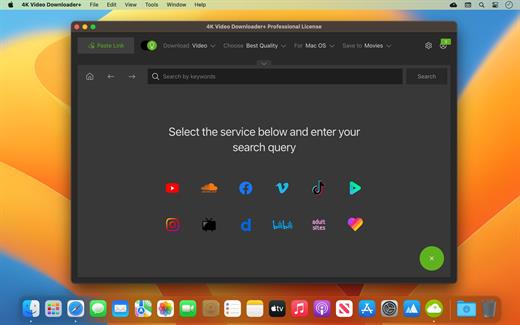
4K Video Downloader Plus Pro 26.2.0

4K Video Downloader allows to download video, audio and subtitles from YouTube in high-quality and as fast as your computer and connection will allow. If you want that video on your iPad, iPhone or other device we’ve got you covered. Downloading is simple and straightforward: just copy the video link from your browser and click ‘Paste Url’. Done!

Proxy Connection for Unrestricted Access


  • Bypass restrictions set by your Internet service provider and get around your school or workplace firewall. Connect through an in-app proxy to access and download from YouTube and other sites.

All Popular Sites Support


  • Save video and audio from YouTube, Vimeo, TikTok, SoundCloud, Bilibili, Niconico, Flickr, Facebook, Instagram, DailyMotion, Naver TV, Likee and Tumblr. Download recorded streams from Twitch and YouTube Gaming.

New YouTube Video Auto-Download


  • Subscribe to the download of your favorite YouTube playlists and creators. Save whole channels and playlists in one go. Get new videos downloaded automatically as soon as they are uploaded to YouTube.

3D Video Download


  • Get a one of a kind experience by watching stereoscopic 3D videos on your computer or TV. Download 3D Youtube videos in MP4, MKV, FLV, 3GP and other formats

360° Video Download


  • Feel the action all around you with virtual reality videos. Download 360° videos to relive the mind-blowing VR experience as many times as you want.

Easy Downloads Management


  • Sort and filter downloads by type, name and date. Import and export all files as a single JSON file. Easily track and control the progress of both individual downloads and entire groups of downloading files.
What’s New

Version 26.2.0:


  • Release notes were unavailable when this listing was updated.
Compatibility

macOS 10.13 or later


Release Name: 4K Video Downloader Plus Pro 26.2.0
Size: 276.8 MB
Links: HOMEPAGE – NFO – Torrent Search

Download: RAPiDGATOR

5 Comments
July 3

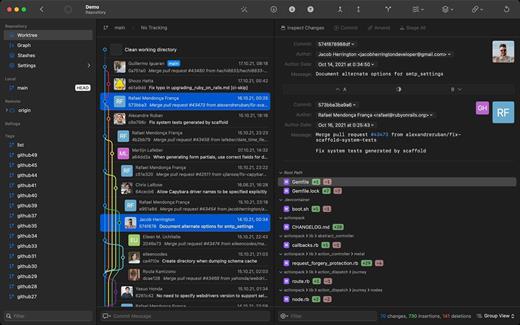
GitFox 4.5.2

Gitfox is a light, fast and powerful Git client built exclusively for Mac. With its unique set of features like Image Diff, Multiple Identities, Automatic Project Linking, Quick Navigation and Advanced Search, it is perfect for web developers and teams that are involved in design work, while also not breaking the bank.

What’s New

Version 4.5.2:


  • Release notes were unavailable when this listing was updated.
Compatibility

macOS 26 or later


Release Name: GitFox 4.5.2
Size: 41.7 MB
Links: HOMEPAGE – NFO – Torrent Search

Download: RAPiDGATOR
4 Comments
July 3

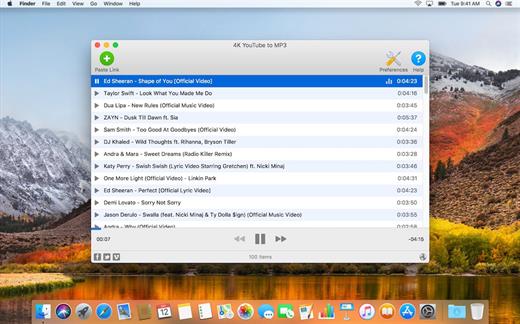
4K YouTube to MP3 Pro 26.2.0

4K YouTube to MP3 was specifically created to extract audio from YouTube, Vimeo or Facebook and save it in MP3, M4A, OGG. No annoying and complicated settings to deal with, just a clean, friendly and functional interface. Downloading is simple and straightforward: just copy the link from your browser and click ‘Paste Url’. Done!

Features


  • Extract audio from YouTube videos and save it in MP3, M4A or OGG in high quality.
  • Download full YouTube playlists or channels and generate m3u files.
  • Transfer downloaded tracks automatically into iTunes and upload them on your iPhone or iPod.
  • Listen music via native built-in music player.
  • Download and extract audio tracks from SoundCloud, Vimeo, Flickr and DailyMotion videos.
  • Download audio books from YouTube.
  • Extract audio tracks even from embedded in HTML page videos.
  • Use 4K YouTube to MP3 on your PC, Mac or Linux, doesn’t matter what OS you prefer.
What’s New

Version 26.2.0:


  • Release notes were unavailable when this listing was updated.
Compatibility

macOS 10.10 or later


Release Name: 4K YouTube to MP3 Pro 26.2.0
Size: 247.1 MB
Links: HOMEPAGE – NFO – Torrent Search

Download: RAPiDGATOR

6 Comments
July 3

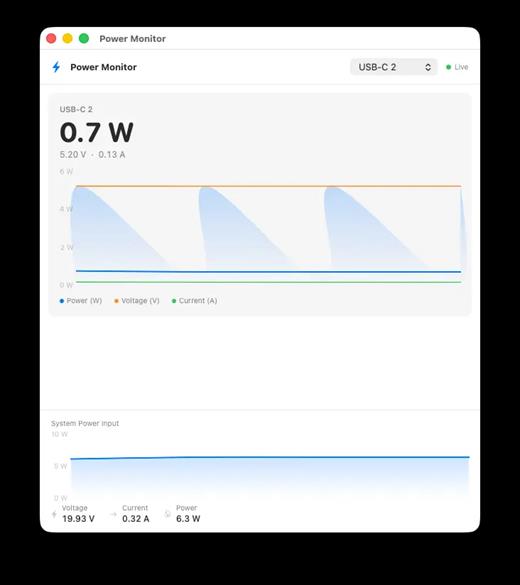
WhatCable Pro 1.1.7

WhatCable Pro is a deep USB-C diagnostics tool designed specifically for Apple Silicon Macs running macOS 14+. While the free version identifies basic cable capabilities, the Pro tier offers advanced, real-time troubleshooting directly from IOKit data—requiring no extra software or root access.

Key Features


  • Negotiation Diagnostics: Easily spot bottlenecks by comparing what your Mac port, cable, and connected device support side-by-side.
  • Live Power Metering: Displays real-time wattage, voltage, and amperage per port, updating every 2 seconds.
  • Hardware & Port Health: Tracks lifetime port errors, resets, and monitors liquid detection (LDCM) sensors.
  • Advanced Insights: Offers Power Delivery (PD) contract inspection, cable resistance estimation, and DisplayPort Alt Mode lane mapping.
  • Developer Friendly: Includes a CLI monitor mode (whatcable –monitor) and desktop widgets for quick tracking.
What’s New

Version 1.1.7:


  • Release notes were unavailable when this listing was updated.
Compatibility

macOS 14.0 or later


Release Name: WhatCable Pro 1.1.7
Size: 12.8 MB
Links: HOMEPAGE – NFO – Torrent Search

Download: RAPiDGATOR
3 Comments
July 3

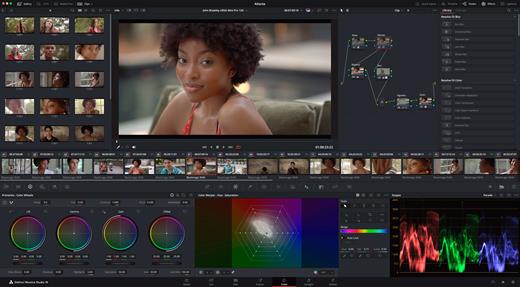
Davinci Resolve Studio 21.0.2

DaVinci Resolve Studio is the world’s only solution that combines professional 8K editing, color correction, visual effects and audio post production all in one software tool! You can instantly move between editing, color, effects, and audio with a single click. DaVinci Resolve Studio is also the only solution designed for multi user collaboration so editors, assistants, colorists, VFX artists and sound designers can all work live on the same project at the same time! Whether you’re an individual artist, or part of a large collaborative team, it’s easy to see why DaVinci Resolve is the standard for high end post production and finishing on more Hollywood feature films, television shows and commercials than any other software.

DaVinci Resolve 20 features powerful new DaVinci Neural Engine AI tools and over 100 feature upgrades! New AI tools include text based timeline editing, music remixing, dialogue separation and UltraNR noise reduction. IntelliTrack AI lets you use video to track the Fairlight audio panner. ColorSlice vector grading and film look creator offer richer grading vibrance and color density. Plus there are new features for live TV production and broadcast. DaVinci Resolve now supports realtime selection of live camera recordings for instant replay to air with slow motion and stingers. Multi Source is the fastest way to see your cameras and edit to the timeline while the cameras are still recording!

What’s New

Version 21.0.2:


  • Release notes were unavailable when this listing was updated.
Compatibility

macOS 13.0 or later


Release Name: Davinci Resolve Studio 21.0.2
Size: 8.5 GB
Links: HOMEPAGE – NFO – Torrent Search

Download: RAPiDGATOR

2 Comments