Please REGISTER or RENEW your account on RAPiDGATOR.net and support us by doing through all RAPiDGATOR working download links on main posts...
July 5

Colori 1.9.0

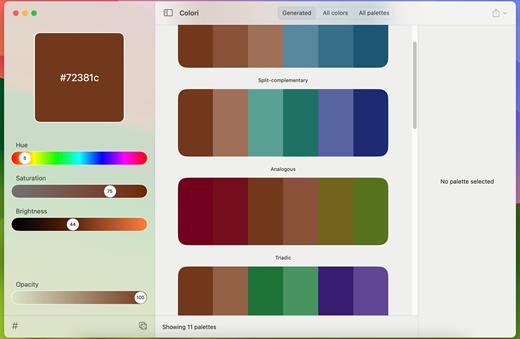
Generate a color palette from one color, organize your palettes, preview, and export

Beautiful color schemesright at your fingertips.

Features

  • Easy to use: Simple, practical and ultra-easy to use: Pick a color as a starting point and start experimenting: it had never been that easy!
  • Colors everywhere!: Lots and lots of colors + 100’s generated or ready-made palettes to choose from and make your next design project stand out!
  • Lots of options: Work elegantly and lightning-fast from your Mac. Do you want to export your palettes for use e.g. with web design and CSS/LESS/SASS? Done!
What’s New

Version 1.9.0:


  • Release notes were unavailable when this listing was updated.
Compatibility

macOS 12.0 or later


Release Name: Colori 1.9.0
Size: 5.5 MB
Links: HOMEPAGE – NFO – Torrent Search

Download: RAPiDGATOR

4 Comments
July 5

AppKiller 4.3.0

AppKiller lets you close all your open apps, with the fuss of going through them one-by-one. Do you want to be able to do with a single click? Or – even better – with a single… keyboard shortcut? Look no further!

Features


  • Easy-to-use: App Killer sleeps unobtrusively in your status bar and waiting for… orders
  • Ultra-fast: Killing all your open application will take no more than… milliseconds
  • Cmd+Shift+K: And that’s all it takes to instantaneously kill all your open apps–really!
What’s New

Version 4.3.0:


  • Release notes were unavailable when this listing was updated.
Compatibility

macOS 10.7 or later, 64-bit processor


Release Name: AppKiller 4.3.0
Size: 6.5 MB
Links: HOMEPAGE – NFO – Torrent Search

Download: RAPiDGATOR

4 Comments
July 5

AltTab Pro 11.4.2

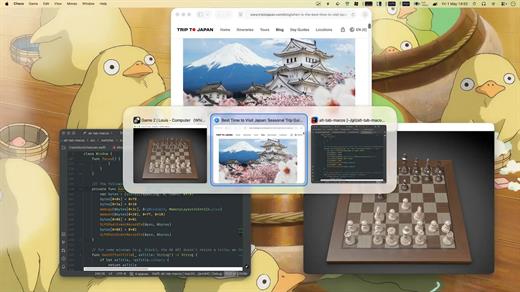
AltTab Pro brings the powerful, intuitive window-switching functionality of Windows to the Mac ecosystem, complete with an elegant look and highly customizable upgrades.

While the core app remains a free and open-source tool providing lightning-fast window switching with high-quality thumbnails, the Pro version elevates the experience for power users with four major upgrades:


  • App Icons & Window Titles Styles: Switch seamlessly between three appearance modes—live window thumbnails, a clean dock-like icon view, or a compact text-only list.
  • Instant Search: Find any window immediately just by typing its title or application name.
  • Auto-Sizing Switcher: Thumbnails automatically scale based on your workspace clutter—expanding when you have fewer windows and shrinking to fit when you have many.
  • Multiple Shortcuts: Configure up to 9 independent keyboard shortcuts, each with custom keys and specific window filters.
What’s New

Version 11.4.2:


  • Release notes were unavailable when this listing was updated.
Compatibility

macOS 13.0 or later


Release Name: AltTab Pro 11.4.2
Size: 9.5 MB
Links: HOMEPAGE – NFO – Torrent Search

Download: RAPiDGATOR

4 Comments
July 5

Ulysses 40.1

Ulysses lets you focus when you need to concentrate. It keeps all your texts neatly stuffed in its intuitive library. With a few clicks, Ulysses can create beautiful documents from your manuscripts: PDFs, web pages, even iBooks-ready ePubs. With its simple, clutter-free interface, it will turn work hours into fun time. And mere thoughts into powerful stories. If you love to write, and write a lot, Ulysses is made for you.

What’s New

Version 40.1:


  • Release notes were unavailable when this listing was updated.
Compatibility

macOS 14.0 or later.


Release Name: Ulysses 40.1
Size: 73.8 MB
Links: HOMEPAGE – NFO – Torrent Search

Download: RAPiDGATOR

4 Comments
July 5

Mimestream 1.10.4

Mimestream combines your favorite Gmail features with the power of a native macOS app so you can move through your email effortlessly

Made for Mac, optimized for Gmail

As a native app written in Swift, Mimestream leverages the full power of macOS to deliver a lightning-fast and instantly familiar experience. Instead of using the IMAP protocol, Mimestream utilizes the Gmail API to enable an enhanced set of features that let you work with ease.

Work smarter, email faster

  • Rise above the noise and focus on the work that matters most. Mimestream makes it easy to keep your inbox organized with confidence.

  • Categorized Inbox – with support for Gmail’s categories, focus on what matters most and triage the rest at your leisure.
  • Multiple Accounts
  • Label Management
Committed to Privacy

Your data and credentials are stored only on your device, and the app only makes direct connections to Gmail. There are no intermediary servers, and Mimestream does not collect or sell your email.

Key Features

  • Lightweight and Fast – Mimestream is built for speed, and only uses a minimal amount of disk space to cache recent messages
  • Offline Access – Fully functional when offline and on the slowest connections-perfect for business travelers and whenever you’re on the go
  • System Notifications – Receive macOS system notifications when you receive new messages, so you never fall behind on important threads
  • Aliases – Your email aliases are automatically synced from Gmail without any setup and are used for replies when appropriate
  • Signatures – Signatures set up in Gmail are automatically synced with Mimestream
  • Robust Search – Enter any Gmail search query into Mimestream and get consistent results. Search while offline, too
  • Swipe Gestures – Use familiar macOS swipe gestures to quickly triage and archive your email
  • Tracking Prevention – Read your email privately – Mimestream blocks tracking pixels from 50+ of the most common tracking services
  • Keyboard Shortcuts – Triage your email quickly using keyboard shortcuts, including the option to use familiar Gmail or Apple Mail shortcut sets
What’s New

✨ Improved


  • Improved throughput of Gmail API queries
? Fixed

  • Inbox unread counts sometimes get stuck and stop updating
  • Sharing videos to Mimestream sometimes fails
  • Order of attachments in quicklook preview panel doesn't match message
  • Some names aren't parsed correctly for the message list recipient list
  • When sending to an Apple Contacts Group, preferred address isn't respected
? Cleanup

  • Automatic recovery from certain licensing error situations
  • Reduce memory high water mark when sharing large files
  • Avoid unnecessary post-selection syncs when it's known that nothing can be synced
Compatibility

macOS 10.15.0 or later


Release Name: Mimestream 1.10.4
Size: 11.7 MB
Links: HOMEPAGE – NFO – Torrent Search

Download: RAPiDGATOR

4 Comments
July 5

PullTube 1.8.6.33

Sharing videos via online hosting services, such as YouTube or Vimeo is a common practice, yet streaming the content might not work as expected if you have a slow internet connection.
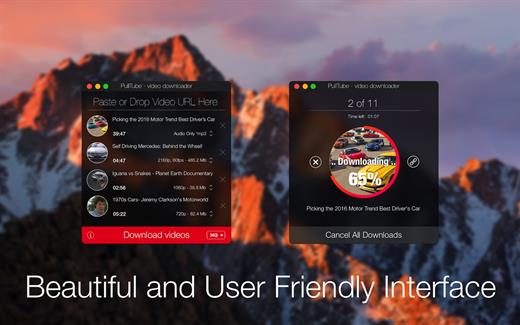
PullTube offers you the possibility to download videos from both sources (YouTube and Vimeo), while other platforms might be added at a later time. The app can handle playlists, allows you to select the output quality, and can even extract only the audio.

Video downloader that can import links with drag and drop and can detect playlists

The PullTube user interface is represented by a small window where you get to quickly paste the video URL. Note that you can also add a video by dropping the link on top of the PullTube window.

Worth mentioning is that, if PullTube detects that the video is part of a playlist, will offer to download the entire collection: will fetch the data for each entry and handle the downloads consecutively.

Download videos hosted on YouTube or Vimeo to different output sizes and formats

PullTube will start fetching the video data right away so you can see the video name, duration, and a small thumbnail. When configuring a download, you get to select the output quality (highest, 4K, HD or regular with different resolutions) or choose to export only the audio to an M4A or MP3 file.

Via the PullTube Settings panel, you can change the default download location and the default MP3 bitrate (320Kbps, 256Kbps, 128Kbps, 64Kbps). You can also add the quality info to the video’s name and choose to quit the app when all downloads are completed.

Get offline access to videos hosted online in just a few steps

PullTube proposes a streamlined workflow for quickly downloading videos from YouTube or Vimeo, provides control over the output quality, and enables you to extract the audio to MP3 or M4A files.

However, during our tests, we have noticed that PullTube has trouble completing the download when handling videos that are longer that 2 minutes. The process stops without any explanation, and you can eventually complete the task, but you need to add the link to download tool multiple times.

What’s New

Version 1.8.6.33:


  • Release notes were unavailable when this listing was updated.
Compatibility

macOS 10.12 or later


Release Name: PullTube 1.8.6.33
Size: 251.1 MB
Links: HOMEPAGE – NFO – Torrent Search

Download: RAPiDGATOR

5 Comments
July 5

Acorn 8.6.1

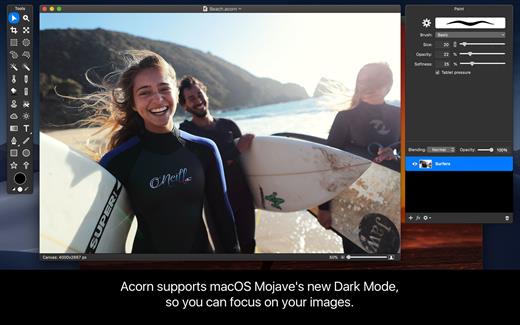
Acorn is a new image editor built with one goal in mind – simplicity. Fast, easy, and fluid, Acorn provides the options you’ll need without any overhead. Acorn feels right, and won’t drain your bank account.


  • Take screenshots using Acorn and edit them right away.
  • Chain together image filters to create stunning effects.
  • Layer based image editing, an industry standard.
  • Make new images and layers using your built-in iSight.
  • Easy image and canvas resizing, just by changing the size of your window.
  • Take advantage of every pixel of your monitor with full screen image editing.
  • Tablet sensitive for pressure strokes and using the tablet’s eraser.
  • Vector shape and text layers.
  • Freeform, elliptical, rectangular, and magic wand selections.
  • Gradients.
  • Create and apply custom text styles.
  • Control opacity and blending modes for each layer.
  • Write plugins using the Python scripting language, as well as in Objective-C.
  • GPU powered. The same graphics card that makes your gaming experience smooth, helps Acorn fly through the toughest of graphics operations.
What’s New

Version 8.6.1:


  • Release notes were unavailable when this listing was updated.
Compatibility

macOS 10.14.0 or later
Apple Silicon or Intel Core processor


Release Name: Acorn 8.6.1
Size: 29.4 MB
Links: HOMEPAGE – NFO – Torrent Search

Download: RAPiDGATOR

4 Comments
July 5

Qbserve 1.9.1

Qbserve is an automatic private time tracker that helps improve your productivity. It gives you instant answers about the way you spend your time by intelligently observing active apps. All the tracked information is stored privately on your machine.

Qbserve knows productivity rates for thousands of sites and apps and has a unique ability to differentiate between chats in Skype, Slack, and Telegram, YouTube videos, and subreddits. You can also set alerts to notify you when you are reaching your goals or spending too much time on distractions.

Feature Highlights

  • automatic recognition of apps and popular websites opened in Chrome, Safari, and Opera browsers
  • separate productivity of Slack teams, chats in Skype, Telegram; YouTube videos, Reddit.com subreddits; different windows inside one application
  • show application windows as standalone activities
  • view all logged windows for each application record
  • ignore any application, website, window, etc.
  • enable dynamic dock icon and/or menu bar item status
  • search activities with filters by name, productivity, category, application or time period
  • edit uncategorized activities that weren’t recognized by Qbserve
  • set idle time limit and turn it off for some categories like “Videos”
  • view detailed chart with productivity meters for any period within a year
  • get feedback on how productivity changes compared to previous days, weeks, months
  • pause and resume tracking
  • track only selected weekdays or time periods
  • shift the day starting time in case you are a night owl
What’s New

Version 1.9.1:


  • Release notes were unavailable when this listing was updated.
Compatibility

OS X 10.10 or later, 64-bit processor


Release Name: Qbserve 1.9.1
Size: 6.1 MB
Links: HOMEPAGE – NFO – Torrent Search

Download: RAPiDGATOR
4 Comments
July 4

Textual 7.2.7

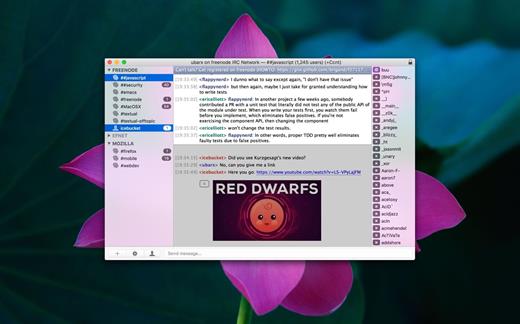
Textual is the world’s most popular application for interacting with Internet Relay Chat (IRC) chatrooms on OS X.

First appearing in 2010, Textual has since evolved and matured into the top IRC client for OS X; relied on and trusted by thousands of people.

Beautiful Interface

Textual includes two elegantly designed dark and light variants of the user interface which have been refined all the way down to the very last pixel.

Powerful, yet lightweight

Textual supports very powerful modern technologies such as native IPv6, the latest IRCv3 specifications, client-side certificate authentication, and much, much more in an easy to navigate, clutter free environment.

Privacy is valued

Textual protects your privacy by leveraging widely accepted, proven technologies such as Off-the-Record Messaging (OTR) to ensure that the only people reading your conversations are those that you intend to.

Customizable

Textual takes customization to the next level with styles created using well documented, open web standards in addition to addons built using a multitude of programming languages such as AppleScript, Objective-C, PHP, Python, Perl, Ruby, Shell, and Swift.

Textual also includes…

  • Multi-channel selection
  • Quick navigation using fuzzy searching
  • Inline nickname colorization
  • Rich array of keyboard shortcuts
  • iCloud support for syncing connections and preferences
  • Address Book for tracking when friends are online & offline
  • Powerful, customizable, rule-based ignore matching
  • Inline media embedding (Show images inline with chat)
  • Auto-Completion for nicknames, commands, and channels
  • Growl and native Notification Center support
  • Bold, color, italic, and underline text formatting
  • Built in support for converting text emoticons to emojis
  • Powerful ZNC integration for power users
  • Simple Authentication and Security Layer (SASL)
  • SOCKS4, SOCKS5, and HTTP proxy support (with or without SSL)
  • Support for sending self-signed certificates for authentication
  • Support for validating and specifying trust for untrusted certificates
What’s New

Version 7.2.7:


  • Release notes were unavailable when this listing was updated.
Compatibility

macOS 11.0 or later


Release Name: Textual 7.2.7
Size: 10.2 MB
Links: HOMEPAGE – NFO – Torrent Search

Download: RAPiDGATOR

5 Comments
July 4

Oka Unarchiver Pro 2.1.13

Oka Unarchiver is upgraded to version 2.0. New interface, optimized operation experience.

Compression formats supported:


  • ZIP
Extraction formats supported:

  • 7Z, ZIP, RAR, TAR, GZIP, BZIP2, XZ, LZIP, ACE, ISO, CAB, PAX, JAR, AR, CPIO, and more

The Oka Unarchiver is a small and easy-to-use program that can archive or unarchive many different kinds of archive files.
With Oka Unarchiver you can compress as many files as you want. Also, you can protect them with a password.

Also, Oka Unarchiver can extract lots of compressed files, from ZIP to 7Z archives, even parted ones. Just drop files in the icon, or into the main window, and they will be extracted using Oka Unarchiver

You can add any file into the list to archive or extract. If you click the archive button, Oka Unarchiver can archive all the files in the list at one time. If you click the extract button, Oka Unarchiver will automatically detect which files can be extracted.

The latest support for Finder extension, right-click on the file directly in the Finder, you can compress/uncompress or preview the file through the menu, greatly simplifying the operation steps.

So easy to use:

  • Support Finder extension, right-click the file in Finder to compress or extract files directly, even preview files inside the archive
  • Support Quick look preview zip files
  • Batch decompression of archives
  • Supports password-protected archives
  • Click one button to extract & archive;
  • Drag archives and drop to extract;
  • Open in finder to extract;
  • Support archive into multi-part zip files.
  • Supports new Mac computers with Apple M1 chip.
What’s New

Version 2.1.13:


  • Fixed issue
Compatibility

macOS 10.13 or later.


Release Name: Oka Unarchiver Pro 2.1.13
Size: 27.7 MB
Links: HOMEPAGE – NFO – Torrent Search

Download: RAPiDGATOR

5 Comments