Please REGISTER or RENEW your account on RAPiDGATOR.net and support us by doing through all RAPiDGATOR working download links on main posts...
July 7

Sound Grinder Pro 3.6

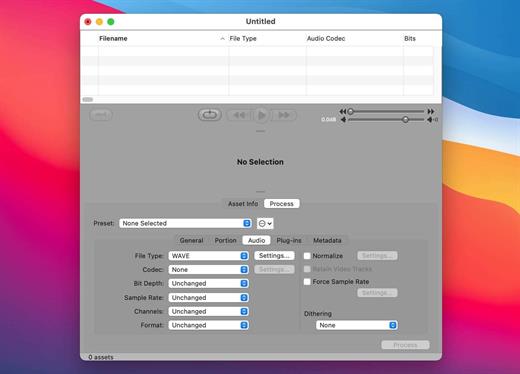
Sound Grinder Pro provides a powerful set of waveform editing and batch-processing features. Edit audio files in the new waveform editor complete with multi-channel file support, enhanced waveform overview, audio actions, support for loops, markers, and regions, auto-regioning, and more.

Process your files with your favorite AU and VST plug-ins. Batch-process files with enhanced metadata features. Create MP3 and MP3 surround files using the FhG codec, or create MP3’s based on the LAME codec as well. Drag-n-drop into your favorite DAW workstation or application.

Whatever the editing or batch processing need, Sound Grinder Pro was designed to meet those needs in a fast, efficient and rock solid manner.

What’s New

Version 3.6:


  • Release notes were unavailable when this listing was updated.
Compatibility

macOS 10.15 or later


Release Name: Sound Grinder Pro 3.6
Size: 19.7 MB
Links: HOMEPAGE – NFO – Torrent Search

Download: RAPiDGATOR

5 Comments
July 7

Tinderbox 11.8.0

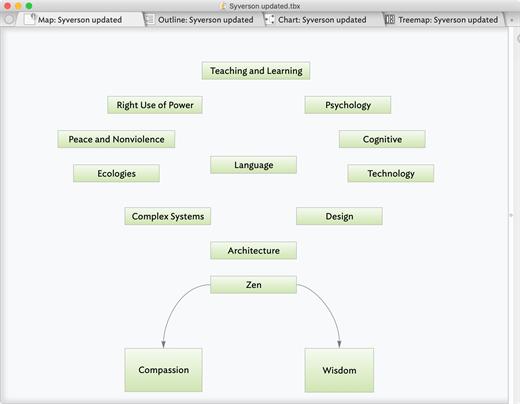
Tinderbox is a personal content management assistant. It stores your notes, ideas, and plans. It can help you organize and understand them. And Tinderbox helps you share ideas through Web journals and Web logs.

Tinderbox’s agents automatically scan your notes, looking for patterns and building relationships. Agents help discover relationships and help make sure important things don’t get lost. Agents are easy to make and easy to modify. They’re flexible and powerful. And Tinderbox can even gather and update changing information and breaking news from the Internet.

When it’s time to share your notes, Tinderbox can assemble multiple notes into one page. Updates are a breeze — even if you update several times a day. Private notes, timestamps, permanent links, archives: everything you want, just the way you want it.

What’s New

Version 11.8.0:


  • Release notes were unavailable when this listing was updated.
Compatibility

macOS 10.13 or later


Release Name: Tinderbox 11.8.0
Size: 38.9 MB
Links: HOMEPAGE – NFO – Torrent Search

Download: RAPiDGATOR

4 Comments
July 6

Path Finder 26.1.6

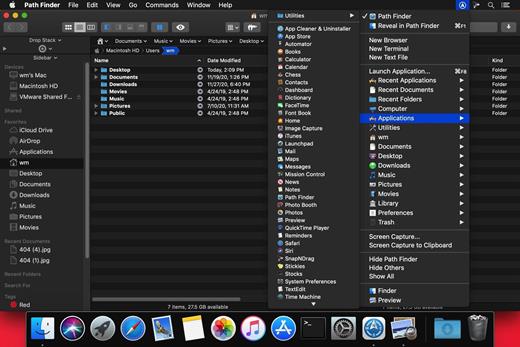
Path Finder makes you a master of file management. Take full control over your file system. Save your time: compare and synchronize folders, view hidden files, use Dual Pane and full keyboard navigation to browse your file system. Work how you want: extreme customization allows you to access most tools in many different ways to suit your workflow. Work seamlessly with other platforms: don’t leave any hidden .DS_Store files on non-Mac volumes, delete files securely and completely with the powerful delete feature from any volume type, search any network volume.

Features


  • View and manipulate hidden files
  • Dual Pane View
  • Full keyboard navigation
  • Folder comparison and synchronization
  • Folder merging
  • Batch renaming
  • Powerful file filtering
  • One-click dual-pane copy
  • Bookmarks and Tab Presets
  • ACL editor
  • File tagging
  • Editable Path Navigator
  • Powerful low-level search
  • Smart sorting
  • Advanced selection
  • Integrated terminal
  • Integrated text and image editors
What’s New

Version 26.1.6:


  • Release notes were unavailable when this listing was updated.
Compatibility

macOS 10.12 or later
Apple Silicon or Intel Core processor


Release Name: Path Finder 26.1.6
Size: 27.5 MB
Links: HOMEPAGE – NFO – Torrent Search

Download: RAPiDGATOR

4 Comments
July 6

Screens 5.8.10

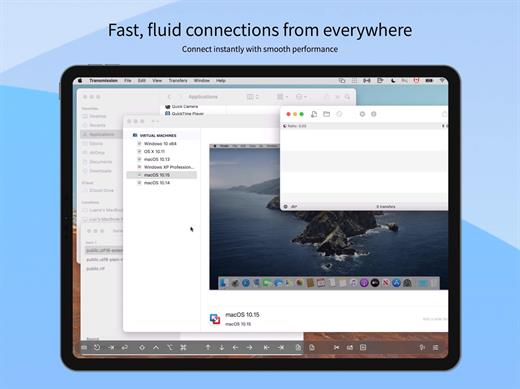
Streamlined and powerful VNC utility designed to provide you with all the tools you need to remotely connect to your devices from your Mac

Accessing your devices from anywhere in the world is surely great, especially if you need to perform some last minute modifications to a project or copy a certain file. This can be done from any computer that can access your device’s network using the VNC desktop sharing system.

Features

  • iCloud – Synchronize all your stored screens on all your iOS devices, including your Mac.
  • Use Screens in fullscreen mode to make it feel your remote computer is right there in front of you.
  • Easy to Use: Screens is an easy, user-friendly VNC client for Mac.
  • Secure: Screens can connect to your computer through an SSH tunnel so your session is encrypted and safe.
  • Multi-Touch: Screens supports many of the multi-touch features – such as pinch and navigation – you’re already used to on your trackpad.
  • Screens Connect: Make your computer available from anywhere with this optional helper app. Easy as flicking a switch. No messy router setup.
  • Works Anywhere: Through Wi-Fi or a 3G network.
What’s New

Version 5.8.10:


  • Release notes were unavailable when this listing was updated.
Compatibility

macOS 14.0 or later.

Release Name: Screens 5.8.10
Size: 39.8 MB
Links: HOMEPAGE – NFO – Torrent Search

Download: RAPiDGATOR

5 Comments
July 5

Apple Creator Studio 2026.07

The Pro Apps Bundle is a collection of five industry-leading apps from Apple that deliver powerful creative tools for video editors and musicians. The bundle includes the following software, all optimized for macOS and the latest Mac hardware:

Final Cut Pro

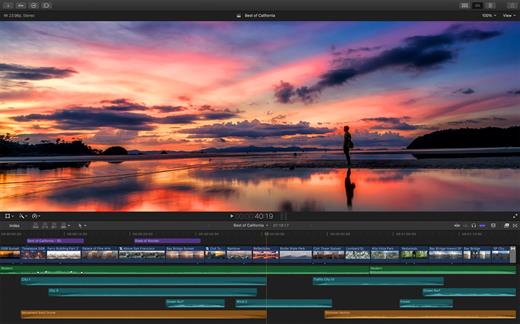
Final Cut Pro is a huge leap forward for professional video editing. Powerful media organization features let you quickly browse, tag, and filter your files. The Magnetic Timeline offers customizable layouts and innovative editing tools that are designed for today’s all-digital workflows. And Final Cut Pro is optimized for macOS and the latest Mac hardware, so you can enjoy incredible performance on portable and desktop systems.

Logic Pro

Logic Pro is an advanced music production application that gives you everything you need to create amazing music. Offering a massive library of sounds and innovative features like Drummer, Flex Pitch, Smart Controls, and MIDI plug-ins, Logic Pro makes it easy to compose, record, edit, and mix professional-quality tracks.

Motion

Use this powerful motion graphics tool to create stunning animated 3D titles, fluid transitions, and realistic effects for Final Cut Pro.

Compressor

This advanced encoding companion to Final Cut Pro lets you customize output settings, speed up your work with distributed encoding, and easily package your creations for the iTunes Store.

MainStage

MainStage is a live performance app that lets you take any sound from Logic Pro to the concert stage. Build your set list using keyboard, guitar, and vocal effects that you can easily switch between. And perform with a huge variety of sounds using your favorite hardware controller.

What’s New

Version 2026.07:


  • Release notes were unavailable when this listing was updated.
Compatibility

macOS 14.6 or later


Release Name: Apple Creator Studio 2026.07
Size: 13.8 GB
Links: HOMEPAGE – NFO – Torrent Search

Download: RAPiDGATOR

2 Comments
July 5

SpectraLayers Pro 13.0.0

SpectraLayers is a new approach to audio editing, with new concepts to transform the way you work. For the first time you can directly edit spectral data, opening advanced sonic worlds, and use innovative enhancements to traditional techniques. Visualize audio in astonishing new ways, including 3D. Work with mixes like they were tracks. Integrate these abilities into your DAW and other tools. And all in a familiar interface that you didn’t realize you already knew.
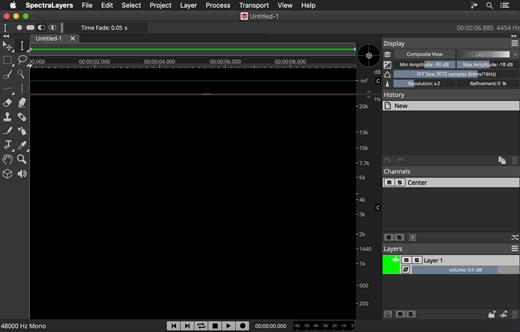
The Advanced Tool You Already Know

SpectraLayers is the first completely visual editing system for audio. It extends the traditional visualization of spectral editors to every aspect of editing sounds, including how they mix together. To make this approach intuitive, SpectraLayers employs the model of high-end image editors – not just the interface, but what you can do with sound and how you do it. So, despite its advanced technology, SpectraLayers is immediately familiar and instantly powerful.

Features

Retouch Audio

The most natural, powerful and precise editing is made directly in the medium. Paint and brushes, retouching and photographs, video and frames. SpectraLayers introduces this way of editing to audio. Start with the spectral domain, where time, frequency and amplitude are all visible. Use the power of 22 advanced tools – modification, drawing, selection, measurement, marking and listening with your mouse, or a pressure-sensitive stylus.

Advanced Selection Engine

Transcend traditional audio editing with the industry’s most advanced selection engine. Create any selection shape – drawn freehand, with geometry-based tools or automatically based on audio features. Add fully visualized crossfade masks and real-time previews. Use selections for spectral playback, selection-based effects, and our Visual Transformation Engine. Alternatively, use selections to protect audio from modification, extract selections to other Layers, and compose 2D soundscapes. Even save and recall them.

Selection-Based Effects: Re-Imagined

SpectraLayers re-imagines selection-based processing, the editing technique most common in other spectral tools. It starts with our Advanced Selection Engine (ASE). Apply SpectraLayers’ industry-standard restoration effects, such as spectral noise reduction and audio healing. In another industry first, you can also use External Editor Processing to use the effects in your other audio tools, such as WaveLab, iZotope RX® and Melodyne® with full ASE compatibility. Undo and redo these edits like any other – instantly.

Transpose the Way You Transform

SpectraLayers employs the industry’s only visual transformation system for sound. And it’s real-time, with full-resolution previewing. Move, scale and stretch audio as you drag your mouse (or stylus) to align musical features while you transform, and measure your changes with markers and timelines. Of course, you can also do it how everyone else does, using numbers. Either way, all transformations are powered by the Advanced Selection Engine.

Tracks and Regions, Evolved

Layers are at the heart of SpectraLayers. They’re compatible with regions and tracks, but more powerful. Seeing them shows you how they sound – both individually and mixed with other Layers. You can edit them while seeing how your changes affect other tracks – in real-time. Using any editing method, instantly previewed with every tool.

What’s New

Version 13.0.0:


  • Release notes were unavailable when this listing was updated.
Compatibility

macOS 10.12 or later, 64-bit processor


Release Name: SpectraLayers Pro 13.0.0
Size: 4 GB
Links: HOMEPAGE – NFO – Torrent Search

Download: RAPiDGATOR

1 Comments
July 5

PowerPhotos 3.4.1

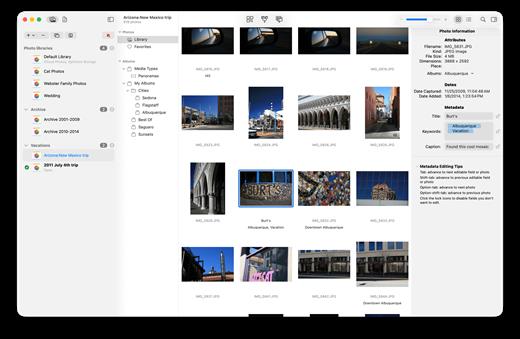
PowerPhotos allows you to break up your Photos.app images among multiple Photos libraries, rather than having to store all of them in one giant library. You can easily switch between libraries, or just browse the photos in your libraries directly from PowerPhotos, without having to open each library in Photos.

PowerPhotos also supports searching across all your libraries at once to help track down a particular photo. If you use iCloud Photo Library to sync photos with your other devices, splitting up your library can help save on iCloud storage costs. Use a single library to hold a smaller collection that you sync with iCloud, while keeping the bulk of your photos in separate libraries so they don’t take up space on iCloud. PowerPhotos can analyze your libraries for duplicate photos, showing them to you side-by-side and letting you get rid of extra copies of photos that you no longer need.

What’s New

Version 3.4.1:


  • Release notes were unavailable when this listing was updated.
Compatibility

macOS 11.0 or later


Release Name: PowerPhotos 3.4.1
Size: 41.1 MB
Links: HOMEPAGE – NFO – Torrent Search

Download: RAPiDGATOR

4 Comments
July 5

DxO PhotoLab 9.8.0 Build 46

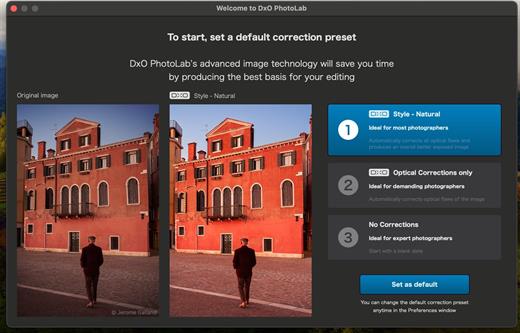
DxO PhotoLab provides a complete set of smart assisted corrections that you can manually fine-tune at any time. Take control on every aspect of your photos: effectively remove noise, get rid of light constraints, recover color details, apply sophisticated optical corrections, and enhance details.

Reducing digital noise in RAW images is an ongoing challenge for most photo-editing software. But with DxO DeepPRIME we are breaking new ground. The first artificial intelligence-based (AI) technology of its kind, DeepPRIME enables you to demosaic and denoise images simultaneously. Try it out – the results speak for themselves.

What’s New

Version 9.8.0:


  • Release notes were unavailable when this listing was updated.
Compatibility

macOS 13.6 or later


Release Name: DxO PhotoLab 9.8.0 Build 46
Size: 2.3 GB
Links: HOMEPAGE – NFO – Torrent Search

Download: RAPiDGATOR

2 Comments
July 5

DaisyDisk 4.34.1

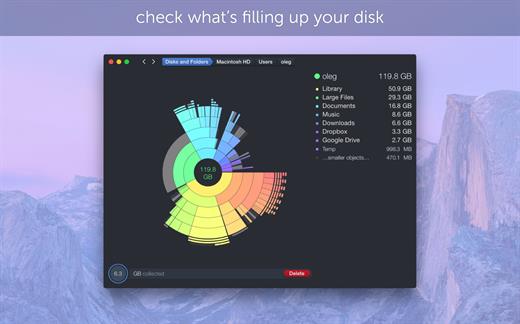
DaisyDisk allows you to visualize your disk usage and free up disk space by quickly finding and deleting big unused files.

The program scans your disk and displays its content as a sector diagram where the biggest files and folders at once become obvious. To drill down to a folder, just click on a segment. To bubble up, click in the center. Move the mouse over the diagram and see the name and path of each file, and enclosed files (if any). Hit Space to quickly preview file content, without launching another application. In this way, walk around your disk and drag-and-drop all unneeded files into the “collector”. Expand the collector to check its contents. When done, clean it up with a single click.

What’s New

Version 4.34.1:


  • Updated the application icon to match the newest macOS style.
Compatibility

macOS 10.13 or later
Apple Silicon or Intel Core processor


Release Name: DaisyDisk 4.34.1
Size: 8.9 MB
Links: HOMEPAGE – NFO – Torrent Search

Download: RAPiDGATOR
4 Comments
July 5

WhyFi 1.4.3

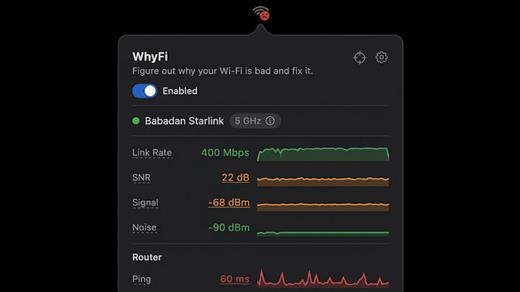
WhyFi is a lightweight macOS utility designed to diagnose and explain Wi-Fi performance issues in real time. Instead of guessing why your connection is slow, WhyFi continuously monitors your network and breaks down problems into clear categories such as Wi-Fi signal, router performance, ISP issues, and DNS delays.

By analyzing each layer of your connection, WhyFi helps you identify the exact cause of slow speeds, high latency, or unstable connections — and provides actionable insights to resolve them quickly.

Built as a menu bar app, it runs quietly in the background and gives you instant visibility into your network health without interrupting your workflow.

What’s New

Version 1.4.3:


  • Release notes were unavailable when this listing was updated.
Compatibility

macOS 13.0 or later


Release Name: WhyFi 1.4.3
Size: 5.7 MB
Links: HOMEPAGE – NFO – Torrent Search

Download: RAPiDGATOR

4 Comments