Please REGISTER or RENEW your account on RAPiDGATOR.net and support us by doing through all RAPiDGATOR working download links on main posts...
July 20

NotchFlow 1.2.2

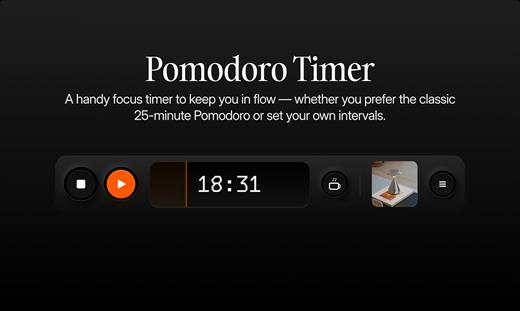
NotchFlow is a minimalist macOS productivity app that turns your Mac’s notch into an interactive control center for focus and workflow. Instead of switching between apps, you can manage focus sessions, control music, and take breaks directly from the top of your screen.

Built around the idea of reducing distractions, NotchFlow combines a Pomodoro timer, music integration, and subtle visual cues into a single, always-available interface. It helps you stay in the zone without interrupting your workflow.

Designed to be lightweight and non-intrusive, NotchFlow runs quietly in the background while keeping essential controls within reach — right where your attention already is.

What’s New

Version 1.2.2:


  • Release notes were unavailable when this listing was updated.
Compatibility

macOS 13.0 or later


Release Name: NotchFlow 1.2.2
Size: 121.4 MB
Links: HOMEPAGE – NFO – Torrent Search

Download: RAPiDGATOR

4 Comments
July 20

Mp3tag 1.13.3

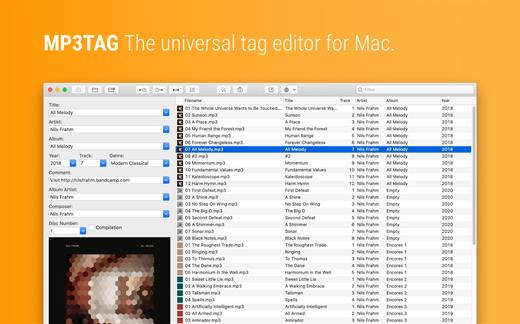
Mp3tag is a powerful and easy-to-use tool to edit metadata of audio files. Musicians, DJs, podcasters, and audio-enthusiasts use it for many different aspects of handling audio files.

It supports batch tag-editing for multiple files at once, covering many audio formats from MP3, over MP4, and M4V (yes, that’s video!) to FLAC, OGG, OPUS, AIF, DSF, MPC, and WAV.

Furthermore, it supports online database lookups from Discogs and MusicBrainz, allowing to gather proper tags and download cover art for music libraries.

It offers renaming files based on the tag information, replacing characters or words in tags and filenames, importing tag information, and adjusting the size and image format of embedded cover art.

Since some of the tasks in managing a digital library are repetitive, Mp3tag allows for combining tasks into action groups, which serve as workflows for keeping consistency and order. Examples are formatting tag fields, performing case conversion, removing unwanted fields, or adjusting embedded cover art to match required sizes.

Key Features

  • Bulk-Editing of Tags for multiple files at once.
  • Editing of cover-art.
  • Renaming files based on tags.
  • Importing metadata from filenames.
  • Assign track and disc numbers via the auto-numbering wizard.
  • Importing metadata from online Tag Sources.
  • Support for Flexible Tagging, allowing for user-defined tag fields in a standardized way.
  • Applying action groups with many tasks combined into reusable workflows.
  • Support for many file types under a universal user interface.
Supported File Formats

  • MP3 (ID3v1, ID3v2.3, ID3v2.4 with UTF-8)
  • MP4/M4A/M4B/M4V (iTunes and Nero)
  • FLAC (Vorbis Comments)
  • OGG (Vorbis Comments)
  • OPUS (Vorbis Comments)
  • AIF (RIFF INFO and RIFF ID3)
  • DSF (ID3v2)
  • MPC (APEv2)
  • WAV (RIFF INFO and RIFF ID3
What’s New

Version 1.13.3:


  • Release notes were unavailable when this listing was updated.
Compatibility

macOS 10.14 or later.


Release Name: Mp3tag 1.13.3
Size: 13.8 MB
Links: HOMEPAGE – NFO – Torrent Search

Download: RAPiDGATOR

4 Comments
July 20

Hand Mirror 4.0.5

Hand Mirror is a super simple app that lives in your Menu Bar (little cozy top right corner of your Mac) and gives you a one-click access camera check!

‣ Need to jump on a video call? Quick camera check.
‣ Need to quickly check your surroundings? Quick camera check.
‣ Need a view of your camera for when you’re streaming or recording your screen? Quick camera check and drag the window around.
‣ Need to check your face because you’re gorgeous? Quick camera check.

Want more? Good thing for Hand Mirror Plus:
It’s a one-time purchase that will unlock all past, present, and future features added to the app, like:
‣ Snaps: Save the moment with a cute Polaroid-style picture, complete with a marker for drawing over it.
‣ Mic Check: You already know you look good, but can people hear you? Check your microphone levels directly from Hand Mirror
‣ Reactions Playground: Custom triggers for all of the new macOS Sonoma Reactions for some fun screenshots
‣ Smart Window: Fully customizable, resizable, positioned window
‣ Window Masks: Zoom, crop, tweak border radius, make your camera view just like you like it
‣ Custom position: Want to trigger the window right below your camera, pick where the window appears
‣ Notch Trigger: If you’re on a compatible device, you can click right on the camera housing area to trigger Hand Mirror
‣ Custom App Icons and Menu Bar Icons: Make the Menu Bar icon match your camera and or your taste

What’s New

Version 4.0.5:


  • Fixed an issue where the Smart Window could appear on the wrong display after restarting the app
  • Fixed an issue where the Snaps setting would turn itself back on after restarting the app
  • Fixed an issue where the annotation tools and color picker could be hidden or appear empty when taking a snap
  • Stability and performance improvements
Compatibility

macOS 14.4 or later.


Release Name: Hand Mirror 4.0.5
Size: 28.3 MB
Links: HOMEPAGE – NFO – Torrent Search

Download: RAPiDGATOR

4 Comments
July 18

Topaz Gigapixel 1.3.2

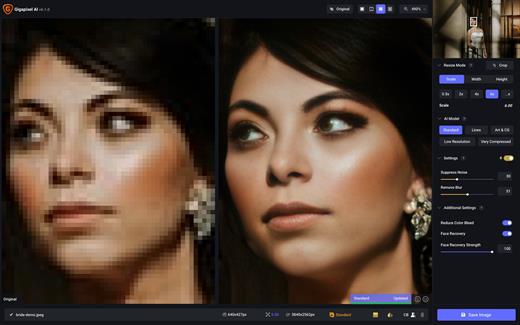
Topaz Gigapixel knocks traditional upscaling tools off their pedestals.

Enlarging your image without losing detail has always been impossible… until now. Upscale your photos by up to 600% while perfectly preserving image quality.

Breathtakingly sharp prints. High-resolution cropping in post-production. iPhone photos that look like they came out of a DSLR.

No matter why you’re enlarging your photos, you always want the best possible quality for your results. Gigapixel AI is currently the only photo enlargement product available that can actually add detail back to your upscaled photo.

What’s New

Version 1.3.2:


  • Release notes were unavailable when this listing was updated.
Compatibility

macOS 12 Monterrey,ARM only.


Release Name: Topaz Gigapixel 1.3.2
Size: 854.3 MB
Links: HOMEPAGE – NFO – Torrent Search

Download: RAPiDGATOR

5 Comments
July 18

iMazing 3.5.5

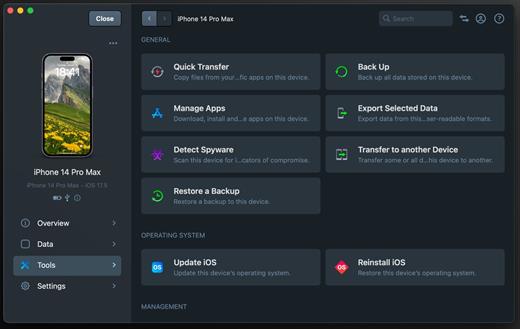
iMazing is the world’s favourite iOS device manager for Mac and PC. Millions of users every year leverage its powerful capabilities to make the most of their personal or business iPhone and iPad.

Often called ‘The Swiss Army Knife of iPhone Management’, iMazing offers a wide variety of features:


  • Time-Machine style local backups, on your schedule, via USB or Wi-Fi and to the storage location of your choice.
  • Live browsing of the iPhone’s photo library. Preview and save hidden assets (originals of edited items, frames of bursts, videos of Live Photos).
  • Accurate PDF or Excel exports of Messages and WhatsApp chats, including attachments.
  • Other exports: music, files, contacts, calendars, notes, voicemail, call logs, voice memos, safari data, books.
  • Transfer to device: music, videos, photo albums, books, files.
  • Device to device data migration.
  • Advanced admin tools: supervision, single app mode, configuration profiles, OS restore, console, battery diagnostics.
  • And other amazing things you never thought possible!
Instructions:

  • – Removed obfuscation
  • – Packed a single U2B dmg

Note: Activate it with this code or any string you like

What’s New

Version 3.5.5:


  • Release notes were unavailable when this listing was updated.
Compatibility

macOS 10.11.0 or later

Apple Silicon or Intel Core processor


Release Name: iMazing 3.5.5
Size: 268.6 MB
Links: HOMEPAGE – NFO – Torrent Search

Download: RAPiDGATOR

6 Comments
July 18

macOS Golden Gate 27.0 Public Beta 1

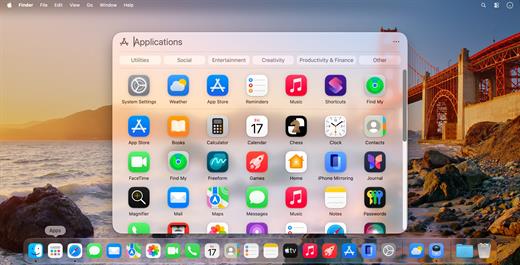
macOS 27 Golden Gate ushers in a new era for the Mac. It’s Apple’s biggest Apple Intelligence update to date, combining the power of artificial intelligence, the performance of Apple Silicon, and a refined design that feels even more natural and vibrant.

Golden Gate helps you focus on what matters most, find the information you need faster, automate routine tasks, and interact with your Mac in ways you’ve never experienced before.

Siri AI. A next-generation assistant.


  • The all-new Siri AI understands the context of your work, takes document content into account, helps you analyze information on the screen, and supports natural conversation.
  • Ask complex questions, create projects, edit text, compare documents, and get results faster thanks to system-wide integration with Apple Intelligence.

Spotlight. Now it’s your knowledge hub.


  • The new Spotlight doesn’t just find files, apps, and messages. It helps you get answers, perform actions, and run smart workflows without switching between apps.
  • Just start typing a query, and Spotlight will suggest the most relevant action, document, or answer.

Liquid Glass. Even more beautiful.


  • The updated Liquid Glass interface is now more expressive and easier on the eyes.
  • Improved readability and contrast.
  • New interface transparency control.
  • Unified toolbars.

Edge-to-edge side panels.


  • More harmonious designs for windows and controls.
  • Everything looks modern while remaining familiar at first glance.

Apple Intelligence is everywhere.


  • Intelligent features are built right into macOS.
  • Text generation and editing.

Smart organization of Safari tabs.


  • Automate tasks using the “Commands” app.
  • Quickly find the information you need in documents.

Intelligent image handling


  • Help with learning, work, and creativity.
  • Your Mac becomes an active participant in your workflow.

Performance you can feel every day.


  • Golden Gate is optimized specifically for Apple Silicon.
  • Apps launch faster, searches are instant, and the system responds even more smoothly. These improvements extend to virtually every part of macOS, from networking to message syncing and data indexing.

Next-generation security.


  • New security features help protect your privacy and provide additional control for family accounts.
  • Apple Intelligence is built with privacy as a priority, combining on-device processing with Apple’s secure cloud technologies.

macOS 27 Golden Gate.


  • Faster. Smarter. More Beautiful.
  • A new era for the Mac begins here.
What’s New

Version 27.0 Public Beta 1:


  • Release notes were unavailable when this listing was updated.
Compatibility

macOS 15.0 or later


Release Name: macOS Golden Gate 27.0 Public Beta 1
Size: 15.9 GB
Links: HOMEPAGE – NFO – Torrent Search

Download: RAPiDGATOR

2 Comments
July 18

Things 3.22.12

Things is a task management solution that helps to organize your tasks in an elegant and intuitive way. Things combines powerful features with simplicity through the use of tags and its intelligent filter bar.

Features:


  • Collect Your Thoughts – Get things off your mind quickly: no matter what app you’re in, a keyboard shortcut instantly reveals Quick Entry. Type your thoughts and save them to the Inbox. Or just talk to Siri on any device (“Remind me to…”) and import from Reminders.
  • Get Organized – Create a project for each of your goals, then add the steps to reach them. For clarity, add structure with headings. Then group your projects by areas of responsibility, such as “Family”, “Work”, or “Health”. Review these regularly to stay on top of things.
  • Plan Your Time – See your calendar events alongside your to-dos and plan your time effectively. Create repeating to-dos for things you do every few days, weeks, or months – Things will remind you on the right day.
  • Make the Most of Your Day – Every morning, grab a coffee and prepare your list for “Today”: review previously planned to-dos and make quick decisions on what to tackle. Pick some more steps from your projects and then get going. The Today list is the only place you’ll need to look for the rest of the day.
  • Customize Your Workflow – Use tags to categorize your to-dos or add context. For example, tag places like “Office” or “Home”, or tag all your “Errands”, or everything you’re working on with “Kate”. You can easily find everything you’ve tagged via filtering or search.
What’s New

Version 3.22.12:


  • Release notes were unavailable when this listing was updated.
Compatibility

macOS 10.15 or later
Apple Silicon or Intel Core processor


Release Name: Things 3.22.12
Size: 38 MB
Links: HOMEPAGE – NFO – Torrent Search

Download: RAPiDGATOR

5 Comments
July 18

Wondershare PDFelement Pro 12.1.22 (OCR)

Wondershare PDFelement is a self-explanatory OS X application that makes it easier for your to preview, edit, join, split and convert PDF documents using a Mac.
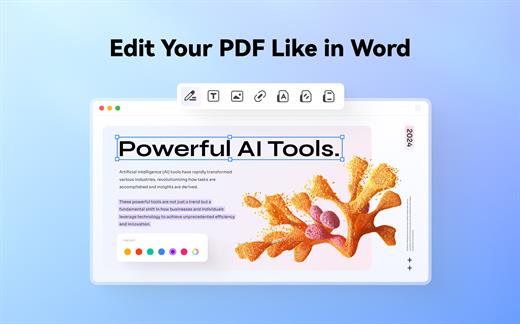
The Wondershare PDFelement also features a simple, clean and intuitive interface that provide instantaneous access to all the tools and features you might need to complete your daily tasks.

Powerful and user-friendly PDF editor for everyday use

Moreover, with Wondershare PDFelement’s help, you can effortlessly edit PDF documents created using text files, web pages or scanned documents.

Consequently, you can add, remove or edit text, move and rearrange pages, insert or remove images and more.

Wondershare PDFelement’s top toolbar helps you hide, show and customize the sidebar in order to display the items and information you are interested in. In addition, you can browse through the loaded document, zoom in or out, print it or email it with just a couple of mouse clicks.

Advanced OCR capabilities make text editing a breeze

Furthermore, you can choose between the “Hand”, “Select” and “Edit” tool, use the advanced OCR feature and convert your source file into plain text or RTF document, ePUB, HTML, as well as file formats compatible with Microsoft Word, Excel, and PowerPoint.

The context menu also helps you switch between the “Move”, “Select” and “Touchup” tool, change the display mode and open the Inspector window to view detailed information about the loaded document.

As an added bonus, by accessing the Document menu, you have the option to add, update or remove an watermark, extract, insert and delete pages, split, merge or convert your document and crop or rotate a page with ease.

Full-featured tool designed to help you stamp, watermark, encrypt and decrypt PDF documents on a Mac

The complete list of all available editing tools, bookmark features, annotation tools and stamp options can be found under the Tools menu.

From here you can easily insert text boxes, add sticky notes, highlight, strike-through and underline text, insert various shapes and use the handy pencil or erase.

On the whole, Wondershare PDFelement comes with the right set of features to help you edit and annotate PDF documents using a Mac, as well as effortlessly add password protect and convert them other formats for easier sharing with your friends and colleagues.

What’s New

Version 12.1.22:


  • Release notes were unavailable when this listing was updated.
Compatibility

macOS 11.0 or later
Apple Silicon or Intel Core processor


Release Name: Wondershare PDFelement Pro 12.1.22 (OCR)
Size: 917.7 MB
Links: HOMEPAGE – NFO – Torrent Search

Download: RAPiDGATOR

6 Comments
July 18

Art Text 4.5.10

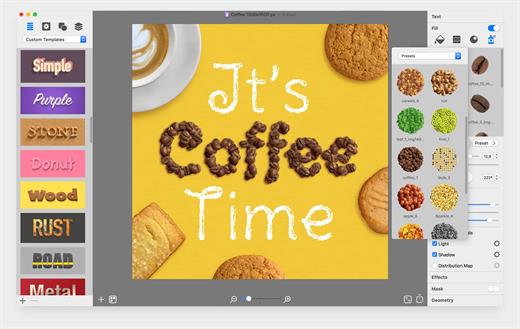
Art Text is graphic design software specifically tuned for lettering, typography, text mockups and various artistic text effects. Supplied with a great variety of ready to use styles and materials, selection of textures, icons, fonts and backgrounds, special designed effects and shape transformations, Art Text guarantees striking appearance of your badges, logos, cards, flyers and presentations.

Both professional designers and amateurs will be amazed by the exceptional ease of creating sophisticated effects such as realistic 3D text with any natural material on it – wood, rust, shatter glass, or even chocolate, soft shadow and glow, graphics painted by oil or watercolors, aged and grunge style, and many more.


  • Customizable Templates – Ready-made templates will help with logo design, produce beautiful word art, web elements and picture captions.
  • Fill Tools – Gradient presets, textures, and shading materials.
  • 2D Effects – Adjustable shadow and glow effects, over 30 masks.
  • Graphic Content – Vector icons, symbols and shapes; flash, flare, sparkle, and light trace objects; and backgrounds and textures.
  • 3D Materials – Customize 3D materials using textures, bump map surfaces, and environment map textures.
  • 3D Effects – Apply soft-edged shadow or glow to 3D objects. Use optical effect tools to make background objects out of focus.
  • Geometry Transformations – Apply transformation shapes to 2D or 3D texts to bend, warp, or give the text a wavy shape.
  • Sharing the Result – Share the art on Facebook, Twitter and Instagram with just one click, or export to an image file to use virtually anywhere.
What’s New

Version 4.5.10:


  • Release notes were unavailable when this listing was updated.
Compatibility

macOS 10.14 or later


Release Name: Art Text 4.5.10
Size: 757 MB
Links: HOMEPAGE – NFO – Torrent Search

Download: RAPiDGATOR

5 Comments
July 18

4K Video Downloader Plus Pro 26.2.1

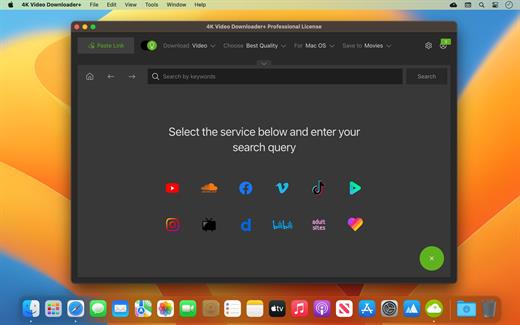
4K Video Downloader allows to download video, audio and subtitles from YouTube in high-quality and as fast as your computer and connection will allow. If you want that video on your iPad, iPhone or other device we’ve got you covered. Downloading is simple and straightforward: just copy the video link from your browser and click ‘Paste Url’. Done!

Proxy Connection for Unrestricted Access


  • Bypass restrictions set by your Internet service provider and get around your school or workplace firewall. Connect through an in-app proxy to access and download from YouTube and other sites.

All Popular Sites Support


  • Save video and audio from YouTube, Vimeo, TikTok, SoundCloud, Bilibili, Niconico, Flickr, Facebook, Instagram, DailyMotion, Naver TV, Likee and Tumblr. Download recorded streams from Twitch and YouTube Gaming.

New YouTube Video Auto-Download


  • Subscribe to the download of your favorite YouTube playlists and creators. Save whole channels and playlists in one go. Get new videos downloaded automatically as soon as they are uploaded to YouTube.

3D Video Download


  • Get a one of a kind experience by watching stereoscopic 3D videos on your computer or TV. Download 3D Youtube videos in MP4, MKV, FLV, 3GP and other formats

360° Video Download


  • Feel the action all around you with virtual reality videos. Download 360° videos to relive the mind-blowing VR experience as many times as you want.

Easy Downloads Management


  • Sort and filter downloads by type, name and date. Import and export all files as a single JSON file. Easily track and control the progress of both individual downloads and entire groups of downloading files.
What’s New

Version 26.2.1:


  • Release notes were unavailable when this listing was updated.
Compatibility

macOS 10.13 or later


Release Name: 4K Video Downloader Plus Pro 26.2.1
Size: 276.9 MB
Links: HOMEPAGE – NFO – Torrent Search

Download: RAPiDGATOR

5 Comments