Please REGISTER or RENEW your account on RAPiDGATOR.net and support us by doing through all RAPiDGATOR working download links on main posts...
July 21

Typora 1.14.6

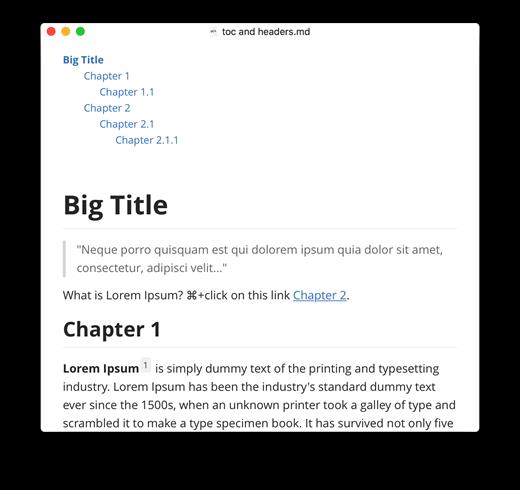
Typora gives you a seamless experience as both a reader and a writer. It removes the preview window, mode switcher, syntax symbols of markdown source code, and all other unnecessary distractions, replacing them with a real-time preview to help you concentrate on the content itself.

Features:


  • Markdown support including tables, code fences with syntax highlight, LaTeX, table of contents
  • Cross-platform
  • The real-time preview and WYSIWYG features
  • Beautiful interface and custom CSS theme support
  • Easy export
What’s New

Version 1.14.6:


  • Release notes were unavailable when this listing was updated.
Compatibility

macOS 10.13.0 or later, 64-bit processor


Release Name: Typora 1.14.6
Size: 19.1 MB
Links: HOMEPAGE – NFO – Torrent Search

Download: RAPiDGATOR

5 Comments
July 21

Nova 14.0

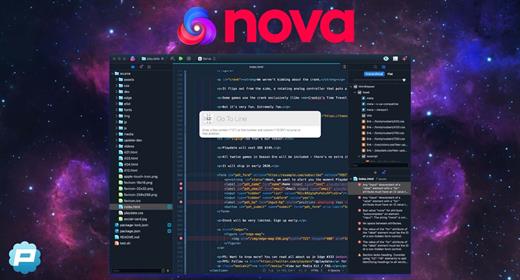
Nova is hyper-fast and flexible code editor with all the features you want: smart autocomplete, multiple cursors, a Minimap, editor overscroll, tag pairs and brackets, and way, way more.

Features:


  • The Editor. It all starts with our first-class text-editor. It’s new, hyper-fast, and flexible, with all the features you want: smart autocomplete, multiple cursors, a Minimap, editor overscroll, tag pairs and brackets, and way, way more.
  • It’s beautiful. And clean. And fun. You can make Nova look exactly the way you want, while still feeling Mac-like. Bright, dark, cyberpunk, it’s all you. Plus, themes are CSS-like and easy to write. Nova can even automatically change your theme when your Mac switches from light to dark mode.
  • Nova doesn’t just help you code. It helps your code run. You can easily create build and run tasks for your projects. We didn’t have them in Coda, but boy do we have them now. They’re custom scripts that can be triggered at any time by toolbar buttons or keyboard shortcuts.
  • Now, this is important. Editing text is just part of what Nova does. We’ve bundled in extremely useful tools to help you get your work done quickly and efficiently. They’re all fast and native too, of course.
  • Nova has a robust extensions API. A Nova extension can do lots of things, like add support for new languages, extend the sidebar, draw beautiful new themes and syntax colors, validate different code, and much more.
  • People have strong editor opinions. And we’re here to help. Nova has a whole host of settings. We have easily customizable key bindings. We have custom, quickly-switchable workspace layouts. And we have loads of editor tweaks, from matching brackets to overscroll.
What’s New

Version 14.0:


  • Release notes were unavailable when this listing was updated.
Compatibility

macOS 11.6 or later


Release Name: Nova 14.0
Size: 68.8 MB
Links: HOMEPAGE – NFO – Torrent Search

Download: RAPiDGATOR

5 Comments
July 21

Looq 1.6.2

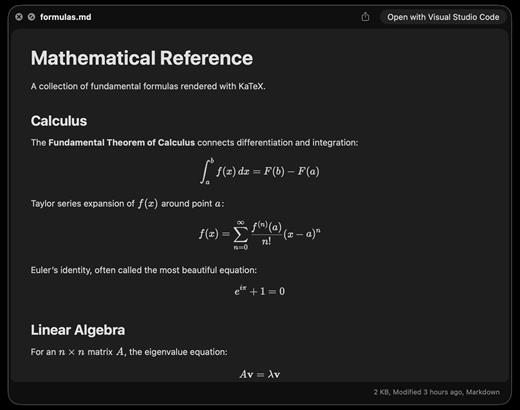
A better look at your files. Preview Markdown with KaTeX and Mermaid, highlight 190+ languages, view CSV and SQLite tables, browse archives and folders. All from Quick Look.
macOS 14 (Sonoma) or later

Markdown
Full GFM rendering with rich formatting support.


  • Live rendering on file save
  • KaTeX math (inline and block)
  • BeautifulMermaid diagrams
  • Syntax-highlighted code blocks
  • GitHub Alerts and emoji shortcodes
  • Auto table of contents sidebar
  • Remote image caching
  • Scroll position memory

Source Code
Syntax highlighting for 190+ languages.


  • Progressive rendering
  • Auto-format JSON, CSS, XML, SVG, plist
  • Configurable line numbers
  • Custom fonts, size, and weight
  • Tab width and word wrap
  • Independent light and dark themes
  • Shebang detection

Data Files
Native table views for structured data.


  • Resizable CSV and TSV columns
  • Alternating row colors
  • SQLite multi-table preview
  • Column type and constraint tooltips
  • Color-coded diff/patch
  • Multi-file tab switching
  • Large file truncation

Archives and Folders
Browse compressed files and directories.


  • ZIP and TAR directory tree
  • Pure Swift binary parsing
  • File size, date, and type columns
  • Sortable column headers
  • Folder preview with Spotlight metadata
  • Configurable display columns
  • Finder tag support
What’s New

Version 1.6.2:


  • Release notes were unavailable when this listing was updated.
Compatibility

macOS 14 (Sonoma) or later


Release Name: Looq 1.6.2
Size: 17.4 MB
Links: HOMEPAGE – NFO – Torrent Search

Download: RAPiDGATOR

6 Comments
July 21

OCRKit Enterprise 26.5

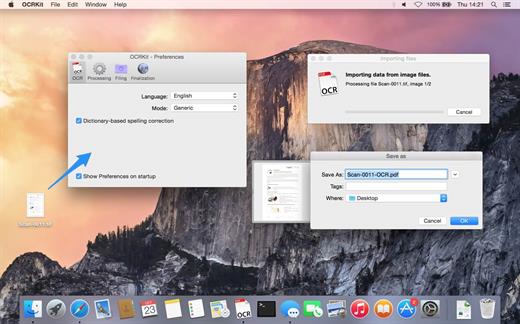
OCRKit uses OCR (optical character recognition) technology to recognize the text in the graphic, which is particularly useful for PDFs received via e-mail, created by DTP, office applications, or with a scanner or copier. Create searchable PDFs, RTF, HTML, or Unicode plain text simply by dragging a document on the OCRKit application or Dock icon.

OCR Engine


  • Text recognition accuracy
  • Instant content search ability
  • PDF compression
  • High-speed conversion
  • Stability and performance

The OCR engine recognizes the following languages: Bulgarian, Croatian, Czech, Danish, Dutch, English, Estonian, Finnish, French, German, Hungarian, Italian, Latvian, Lithuanian, Polish, Portuguese, Rumanian, Russian, Serbian, Slovenian, Spanish, Swedish, Turkish, Ukrainian, and Norwegian.

Pro Features

  • Automatic Language Detection – You often find yourself switching OCR settings between documents in another languages? OCRKit Pro comes with an new “Automatic” languages choice. It transparently detects the langauge and switches to the apropriate alphabet and dictionary for each page of the document independently.
  • Higher Multi-Threading Performance – OCRKit Pro further optimizes the use of the many cores available today. Allowing the Pro version to archive even higher performance compared to the already blazing fast standard version of OCRKit.
  • Imprinter – The Imprinter allows OCRKit Pro to print text onto the page’s image. For example the scanned date, or watermarks such as “APPROVED”, “VOID”, “PRELIMINARY”, “CONFIDENTIAL” or anything else you may need.
What’s New

Version 26.5:


  • Release notes were unavailable when this listing was updated.
Compatibility

macOS 10.13 or later


Release Name: OCRKit Enterprise 26.5
Size: 19.6 MB
Links: HOMEPAGE – NFO – Torrent Search

Download: RAPiDGATOR

5 Comments
July 21

Jouno – Preset Manager 2.9.1

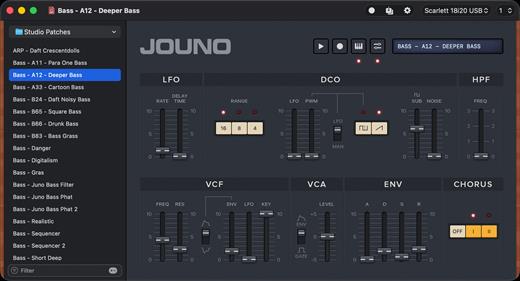
Record, recall, and organise presets, via MIDI. Manage your Roland Juno-106 & MKS7 synthesizer. Jouno lets you retrieve presets from your Juno-106 / MKS’s internal memory. Backing them up as files with meaningful names, and organizing them the way you want simply makes the whole experience clearer, smoother, and far more enjoyable…

Features


  • Presets as Files: Perfect for sharing or backup !
  • Keyboard Playback
  • Undo Support
  • Quick Search
  • Retina Display Ready Interface
  • MIDI Out and Channel are directly customizable in the main window
  • Compatible with the Roland
What’s New

Version 2.9.1:


  • Release notes were unavailable when this listing was updated.
Compatibility

macOS 11.00 or later


Release Name: Jouno – Preset Manager 2.9.1
Size: 9.8 MB
Links: HOMEPAGE – NFO – Torrent Search

Download: RAPiDGATOR

5 Comments
July 21

WhatCable Pro 1.2.1

WhatCable Pro is a deep USB-C diagnostics tool designed specifically for Apple Silicon Macs running macOS 14+. While the free version identifies basic cable capabilities, the Pro tier offers advanced, real-time troubleshooting directly from IOKit data—requiring no extra software or root access.

Key Features


  • Negotiation Diagnostics: Easily spot bottlenecks by comparing what your Mac port, cable, and connected device support side-by-side.
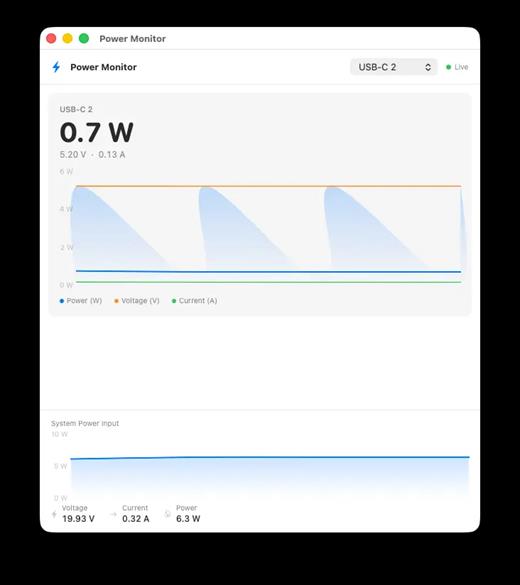
  • Live Power Metering: Displays real-time wattage, voltage, and amperage per port, updating every 2 seconds.
  • Hardware & Port Health: Tracks lifetime port errors, resets, and monitors liquid detection (LDCM) sensors.
  • Advanced Insights: Offers Power Delivery (PD) contract inspection, cable resistance estimation, and DisplayPort Alt Mode lane mapping.
  • Developer Friendly: Includes a CLI monitor mode (whatcable –monitor) and desktop widgets for quick tracking.
What’s New

Version 1.2.1:


  • Release notes were unavailable when this listing was updated.
Compatibility

macOS 14.0 or later


Release Name: WhatCable Pro 1.2.1
Size: 13.1 MB
Links: HOMEPAGE – NFO – Torrent Search

Download: RAPiDGATOR

3 Comments
July 21

Mole 1.11.0

Mole is a powerful, native macOS utility designed to streamline your digital workspace. Instead of cluttering your system with multiple single-purpose applications, Mole consolidates disk cleanup, app management, maintenance, disk analysis, and live system monitoring into one single, lightweight binary.

Built with a conservative, privacy-first mindset, Mole ensures your Mac runs smoothly without ever compromising your data.

Key Features

  • Clean: Safely scans and removes caches, Xcode builds, device leftovers, large active logs, and browser temporary files. You review every file before it gets deleted.
  • Software Manager: Effortlessly handles app updates (supporting Sparkle, Electron, Homebrew, and the Mac App Store) and ensures clean uninstalls by scrubbing leftover preferences and support files.
  • Optimize: Runs essential maintenance tasks with a single tap—rebuilding Quick Look, repairing caches, and auditing login items behind a secure prompt.
  • Analyze: Visualizes your entire disk using an intuitive treemap, allowing you to instantly spot and drill down into the largest space-hogging files.
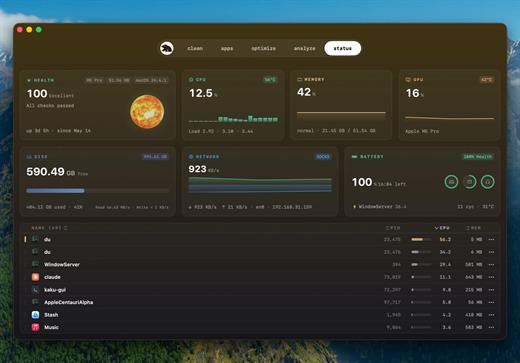
  • Status Dashboard: Features a live HUD tracking CPU, memory, GPU, network, battery, and thermals with 60-second sparklines, alongside native fan speed controls for supported Macs.
What’s New

Version 1.11.0:


  • Release notes were unavailable when this listing was updated.
Compatibility

macOS 14.0 or later


Release Name: Mole 1.11.0
Size: 19.1 MB
Links: HOMEPAGE – NFO – Torrent Search

Download: RAPiDGATOR

5 Comments
July 20

UPDF 2.5.5

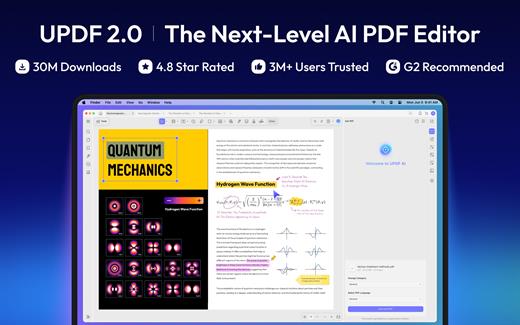
UPDF is an all-in-one AI-integrated PDF editor software that you can use to AI chat with PDF, edit, annotate, convert PDFs, and more. One UPDF license allows you to use it across all platforms, including macOS/iOS/iPadOS (universal purchase).

FEATURES

AI Assistant


  • Powered by GPT-5 and Full DeepSeek (R1).
  • AI chat with your PDF to summarize, translate full PDFs without losing format, and get answers related to the PDFs.
  • Convert PDFs to mind maps.
  • Chat with images and ask any questions about the images.
  • Ask any prompts and get answers from AI.
Edit PDFs

  • Edit text in PDF to change the properties of the text, such as the color, font, size, etc.
  • Edit images in PDF to change the size, crop, rotate, extract, replace, delete, etc.
  • Add or remove links to the web or a page.
Annotate PDFs

  • Highlight, underline, strikethrough, or squiggly the text in PDFs.
  • Add sticky notes, text boxes, text comments, text callouts, or shapes to PDFs.
  • Free-hand drawing within a PDF.
  • Add stamps, stickers, and signatures to PDFs.
  • Measure PDF.
UPDF Cloud

  • Sync files across different devices and platforms.
OCR (This feature is NOT AVAILABLE on the Mac App Store. To use OCR, you can download from https://updf.com.)

  • Convert scanned PDFs or images into searchable and editable PDFs or vice versa.
  • Can recognize text in 38 languages.
Convert PDFs

  • Convert PDFs to: DOCX, XLSX, and PPTX.
  • Convert PDFs to image: PNG, JPEG, BMP, TIFF, and GIF.
  • Convert PDFs to TXT, RTF, CSV, HTML, and XML.
Organize PDF Pages

  • Insert, replace, extract, split, rotate, remove, and reorder the pages in PDFs
  • Crop or extend page margins.
  • Split a long single page into multiple pages.
Protect PDFs

  • Add an open or permission password to protect PDFs from opening, copying, editing, and printing.
Prepare Form

  • Create fillable PDF forms by adding interactive form fields.
  • Fill PDF forms and add an e-signature.
  • Add digital signatures to prove the sender’s identity.
Batch Process PDFs

  • Support batch process to convert, merge, OCR, compress, print, create, insert, and encrypt PDFS
  • Support batch process to add or remove backgrounds, watermarks, header & footer, and Bates numbering in multiple PDFs
  • Batch Remove text markup, measurements, stamps, form fields, and signatures.
Read and Print PDFs

  • View PDF single page or two-page view/scrolling.
  • Text-to-speech.
  • Search and find text.
  • Slideshow PDF.
  • Support light and dark mode.
  • Add and manage bookmarks.
  • Print PDFs.
Create PDFs

  • Create a blank PDF with different backgrounds or from Word/Excel/PPT/image/CAJ/Paperwork/selection capture/window capture/screen capture/clipboard/scanner.
MORE

  • Share PDF via link, QR code, or email.
  • Compare PDFs.
  • Redact sensitive information in PDF.
  • Add, edit, or remove watermarks from PDFs.
  • Edit the background for PDFs.
  • Edit the header and footer from PDFs.
  • Save as PDF/A.
  • Flatten PDFs.

Note: AI features won’t work

What’s New

Version 2.5.5:


  • Release notes were unavailable when this listing was updated.
Compatibility

macOS 11.0 or later.


Release Name: UPDF 2.5.5
Size: 129.2 MB
Links: HOMEPAGE – NFO – Torrent Search

Download: RAPiDGATOR

4 Comments
July 20

CleanShot X 4.8.9

CleanShot is the ultimate screen recording app made for macOS. With its rich toolkit, CleanShot actually feels like 6 apps in one. You can use it to swiftly capture Mac’s screen without desktop icons, record and trim video, annotate, save screenshots to dedicated cloud, and more.
Features:

CleanShot Cloud

You can instantly save your screen captures to CleanShot Cloud, dedicated screenshots hosting integrated with the app. Right from the quick menu, upload your screenshot to the cloud, and get a link to it in a click.

Hide desktop icons

CleanShot hides desktop icons, so that you can capture your Mac’s screen on the spot, without wasting time on a cleanup. If you need a quick capture, toggle the icons and bring them back once you’re finished. You can even set a custom wallpaper like an image or plain color for your screenshots.

Record screen

CleanShots lets you choose between recording a video or a GIF, whether you capture a specific window, part of the screen, or fullscreen. Even set your custom dimensions before hitting the Record button. You can also disable desktop notifications for when you’re recording.

Quick Access Overlay

Right after taking a screenshot, you’ll see a small pop-up window appear on the screen. It’s the shortcut to viewing, annotating, or sharing whatever you’ve just captured. Essentially, Quick Access Overlay gives you an instant editing toolkit, plus saves you from searching and reopening screenshots.

Simple yet powerful

CleanShot teaches you to use simple actions while capturing the screen — yet provides tons of options to do it. You can grab the area, fullscreen, window, or even a scrolling window. Set a timer if you need a few seconds to capture the right moment. In your hands, it caters for your needs.

Annotate, highlight or blur

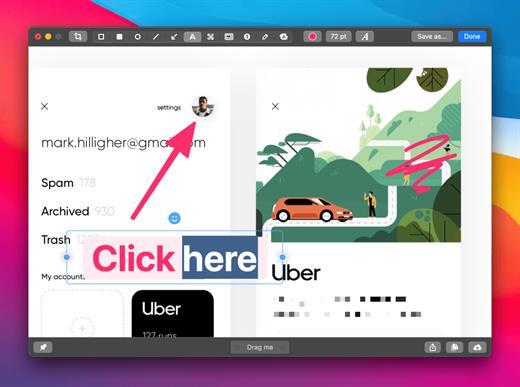
No screenshot is perfect. Using CleanShot’s built-in editor, you can highlight or hide specific parts of your screenshots as well as add annotations flexibly. Just click on the pencil icon in the Quick Access Overlay to edit screen captures in a flash.

What’s New

Version 4.8.9:


  • Fixed an issue that caused CleanShot to crash during screen recording
Compatibility

macOS 10.14.4 or later
Apple Silicon or Intel Core processor


Release Name: CleanShot X 4.8.9
Size: 43.4 MB
Links: HOMEPAGE – NFO – Torrent Search

Download: RAPiDGATOR

4 Comments
July 20

Octavo 1.2

Ever tried to print a booklet but don’t know what order to put the pages in? Or spent an afternoon fighting with your printer only to waste half a ream of paper? We’ve been there. That’s why we built Octavo.

Octavo: Imposition & Booklet Printing for Mac

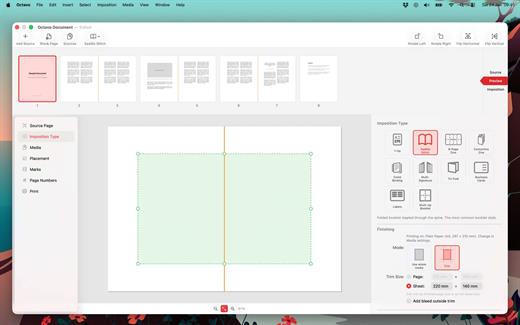
Octavo takes your PDF and arranges the pages so they come out right when you fold, staple, or bind them. It handles the fiddly maths so you don’t have to.

What Can Octavo Do?

Drop in a PDF or some images and Octavo gives you a complete workflow:


  • Print booklets: Octavo calculates the page order for duplex printing, adds fold and staple marks, and exports printer-ready sheets.
  • Clean up messy PDFs: Rotate, flip, straighten, adjust perspective, and crop — all with visual on-canvas editors.
  • Manage your margins: Position content with inside/outside margins so nothing gets clipped by binding. Multiple scaling modes with per-page fine-tuning.

Imposition Styles


  • Saddle-Stitch Booklet: The classic folded-and-stapled booklet.
  • Multi-Signature: For thicker books — divide pages into folded, gathered signatures.
  • Comb / Hole Punch Binding: Hole patterns, binding edge, and margins for punched or bound documents.
  • Tri-Fold Brochure: C-fold and Z-fold layouts for leaflets and pamphlets.
  • 1-Up: Single or double-sided output with full placement control.
  • Business Cards and Labels: Grid layout with configurable rows, columns, and gaps.
  • 8-Page Mini Zine: Fold and cut a single sheet into an eight-page booklet. Great for zine fairs or just for fun.
  • Concertina Zine: An accordion-fold strip from a single sheet.

Clean Up Your Source PDF


  • Rotate in 90° increments, flip horizontal or vertical.
  • Straighten crooked scans with the angle slider.
  • Correct perspective distortion with draggable corner handles.
  • Set your crop margins with a visual editor.
  • Adjust image filters: threshold, levels, and more.
  • Set bleed on source pages for edge-to-edge printing.

Placement & Margins


  • Set top, bottom, inside, and outside margins with draggable handles.
  • Scale to fit (per page or consistent), or set a manual scale.
  • Position content towards an edge or corner, accounting for facing pages.
  • Per-page overrides — link or unlink pages for individual adjustments.
  • Bleed settings for content extending beyond the margins.
  • Preview in both reader spreads and imposed sheets.

Marks & Page Numbers


  • Fold marks, staple guides, crop marks, and cut lines.
  • Hole punch guides for comb binding.
  • Customise mark weight, colour, and style.
  • Page numbers: Arabic, Roman, or alphabetic, with prefix/suffix, font, colour, and background shape.
  • Skip covers and blanks, or exclude individual pages.

Media & Paper Management


  • Create named media types with paper size, weight, and stock type.
  • Assign a printer and tray to each media type.
  • Assign media to individual pages — card stock for covers, lightweight paper for interiors.
  • Automatic blank sheet insertion to keep media aligned.

Print & Export


  • Export to PDF: a reader preview, or the fully imposed output.
  • Print directly with per-media printer and tray selection.
  • Automatic duplex detection and enforcement.
  • Manual duplex workflow for printers without auto-duplex.
  • Full access to printer-specific options.

Built for Mac


  • Full undo/redo. Save projects as documents, no ‘cloud lock-in’.
  • Drag-and-drop page reordering. Import PDFs and images.
  • Supports Dark Mode.
  • Makes Liquid Glass look good.

Ready to make something? Download Octavo and start folding.

What’s New

Version 1.2:


  • Release notes were unavailable when this listing was updated.
Compatibility

macOS 15.6 or later.


Release Name: Octavo 1.2
Size: 10.9 MB
Links: HOMEPAGE – NFO – Torrent Search

Download: RAPiDGATOR

4 Comments