Please REGISTER or RENEW your account on RAPiDGATOR.net and support us by doing through all RAPiDGATOR working download links on main posts...
July 27

Syncovery Premium 11.16

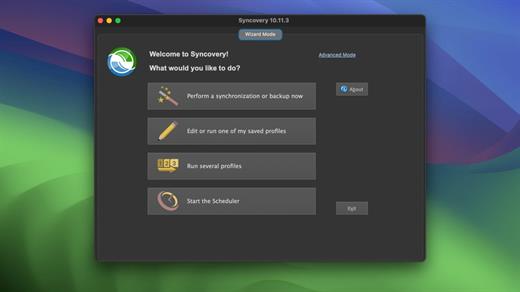
Syncovery is used to back-up your data and synchronize Macs, servers, notebooks, and online storage space.

You can set up as many different jobs as you need and run them manually or using the scheduler. The software comes with support for FTP, WebDAV, Amazon S3, and AES file encryption, as well as SSH and ZIP compression. There are powerful synchronization modes, including Standard Copying, Exact Mirror, and SmartTracking.

Numerous improvements to make an extremely versatile synchronizing and back-up tool. The wealth of features fulfills all requirements that users typically have, while still being easy to use.

What’s New

Version 11.16:


  • Release notes were unavailable when this listing was updated.
Compatibility

macOS 10.13.0 or later

Apple Silicon or Intel Core processor


Release Name: Syncovery Premium 11.16
Size: 126.8 MB
Links: HOMEPAGE – NFO – Torrent Search

Download: RAPiDGATOR

4 Comments
July 27

Tower 17.0

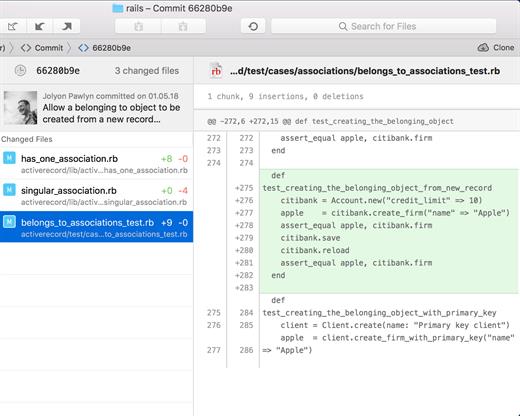
Tower is a Git client for OS X that makes using Git easy and more efficient. Users benefit from its elegant and comprehensive interface and a feature set that lets them enjoy the full power of Git.

Tower abstracts Git’s complexity in an easy-to-use interface. For example, lots of actions can be performed simply via drag-and-drop, and mistakes can be undone easily. Advanced users can increase their productivity with features like single line staging, submodule support, or the file history.

Features

  • git-svn support
  • File history
  • git-flow support
  • Submodule support
  • git-lfs support
  • Blame view
  • Single-line staging (per-line committing)
  • Cherry-picking
  • Discard chunks/lines
  • Direct Github, Bitbucket, Gitlab, GitSwarm, Beanstalk, Visual Studio Team Services, Team Foundation Server and Rhodecode integration
  • Support for Bitbucket team accounts
  • Support for full-screen and Retina displays
  • Many powerful drag-and-drop features include merge, rebase, push /pull to/from remote, apply stash, create new branch, etc.
What’s New

Version 17.0:


  • Release notes were unavailable when this listing was updated.
Compatibility

macOS 10.15.0 or later
Apple Silicon or Intel Core processor


Release Name: Tower 17.0
Size: 83.1 MB
Links: HOMEPAGE – NFO – Torrent Search

Download: RAPiDGATOR

4 Comments
July 27

Magic Disk Cleaner 5.0.2

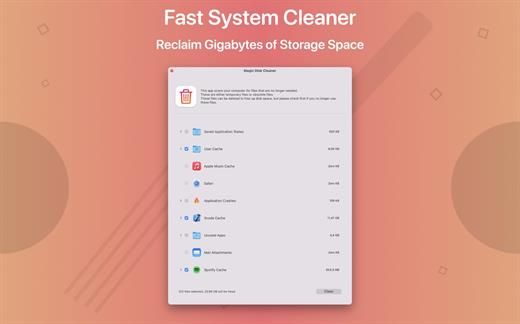
Magic Disk Cleaner finds and deletes files temporary files that waste lots of space. The app is lightning fast and frees disk space in no time.

Magic Disk Cleaner searches your computer for temporary files and can also delete them directly if you wish.

Magic Disk Cleaner offers the following features:

Fast Search

Magic Disk Cleaner quickly scans your computer for temporary data that can be removed. You can have them deleted with one click.

Extremely easy handling

Magic Disk Cleaner couldn’t be simpler. The search is started immediately after the app is started. You can now delete files with just one click.

No automatic deletion

Magic Disk Cleaner does not delete any data without your consent. Choose for yourself which data is deleted and which you want to keep.

What’s New

Version 5.0.2:


  • Release notes were unavailable when this listing was updated.
Compatibility

macOS 11.5 or later
Apple Silicon or Intel Core processor


Release Name: Magic Disk Cleaner 5.0.2
Size: 7.2 MB
Links: HOMEPAGE – NFO – Torrent Search

Download: RAPiDGATOR

4 Comments
July 26

AnyGo 8.3.5

With AnyGo you can do the following:


  • Spoof to anywhere in LBS(Location Based Service) games without actually moving or walking
  • Easily access any videos, music, movies and services that may be restricted to you based on your location
  • Share a virtual location on social media to trick your friends
  • Easily test LBS and games
  • Easily hide your location from apps and services
  • Set your real location if GPS are unable to find it
What’s New

Version 8.3.5:


  • Release notes were unavailable when this listing was updated.
Compatibility

macOS 10.12 or later 64-bit


Release Name: AnyGo 8.3.5
Size: 162.4 MB
Links: HOMEPAGE – NFO – Torrent Search

Download: RAPiDGATOR

5 Comments
July 26

MouseBoost Pro 5.2.5

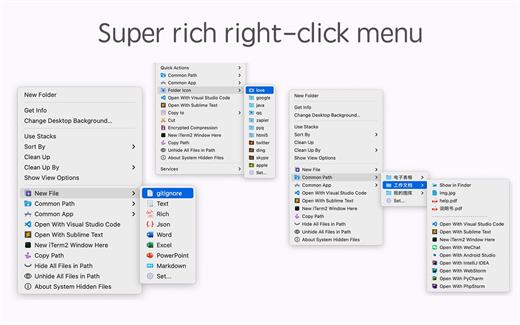
MouseBoost Pro integrates more than 30 kinds of small tools, and the operation way is very simple, as long as you click the right mouse button, you can activate all kinds of functions you want, so that your work efficiency is greatly improved.

You can create any file type you want, open any APP you want, self-sorting, fully customized!

*** Main Features ***
– All menus support custom sorting.
– Quickly create all kinds of commonly used files, and supports custom creation of various file types you want.
– Quickly open your terminal, iTerm2, and go to the directory you want.
– Quickly open VSCode, Sublime Text and Emacs, and customize the various apps you want to open.
– Quickly copy the current path power.
– Complete files deletion is supported.
– Supports files moving, copying and cutting.
– Supports files encrypted compression.
– Quickly open your favorite directory.
– Quickly get file MD5,SHA1,SHA256 and other information.
– Supports hiding and displaying of specified files.
– Supports modify folder icon.

What’s New

Version 5.2.5:


  • Release notes were unavailable when this listing was updated.
Compatibility

macOS 10.11 or later


Release Name: MouseBoost Pro 5.2.5
Size: 21.5 MB
Links: HOMEPAGE – NFO – Torrent Search

Download: RAPiDGATOR

5 Comments
July 26

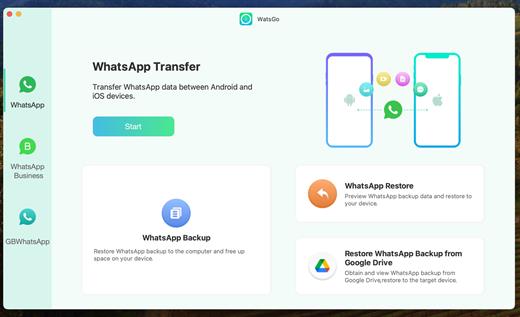
WatsGo 9.0.1

WatsGo Transfer between Android and iPhone. One-click to Transfer WhatsApp/WhatsApp Business between Android and iOS. A wide range of data type including WhatsApp messages, images, videos, contacts, etc. Backup WhatsApp on Android & iOS to computer and fully free up device space.

Preview and Restore WhatsApp backup or iTunes backup anytime you want. Back up WhatsApp (Business) data without Google Drive, iTunes or iCloud.

Features

  • One-click to Transfer WhatsApp/WhatsApp Business between Android and iOS.
  • Transfer GBWhatsApp to WhatsApp or GBWhatsApp in a simple way.
  • A wide range of data type including WhatsApp messages, images, videos, contacts, etc.
  • Download and Restore WhatsApp Backup from Google Drive to iPhone & Android.
  • Backup WhatsApp on Android & iOS to computer without Google Drive, iTunes or iCloud.
  • Preview and Restore WhatsApp backup or iTunes backup anytime you want.
  • Fully compatible with Android 14 and iOS 17.
What’s New

Version 9.0.1:


  • Release notes were unavailable when this listing was updated.
Compatibility

macOS 10.12 or later


Release Name: WatsGo 9.0.1
Size: 234.4 MB
Links: HOMEPAGE – NFO – Torrent Search

Download: RAPiDGATOR

6 Comments
July 25

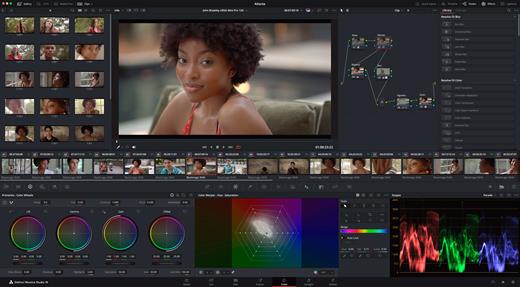
Davinci Resolve Studio 21.0.3

DaVinci Resolve Studio is the world’s only solution that combines professional 8K editing, color correction, visual effects and audio post production all in one software tool! You can instantly move between editing, color, effects, and audio with a single click. DaVinci Resolve Studio is also the only solution designed for multi user collaboration so editors, assistants, colorists, VFX artists and sound designers can all work live on the same project at the same time! Whether you’re an individual artist, or part of a large collaborative team, it’s easy to see why DaVinci Resolve is the standard for high end post production and finishing on more Hollywood feature films, television shows and commercials than any other software.

DaVinci Resolve 20 features powerful new DaVinci Neural Engine AI tools and over 100 feature upgrades! New AI tools include text based timeline editing, music remixing, dialogue separation and UltraNR noise reduction. IntelliTrack AI lets you use video to track the Fairlight audio panner. ColorSlice vector grading and film look creator offer richer grading vibrance and color density. Plus there are new features for live TV production and broadcast. DaVinci Resolve now supports realtime selection of live camera recordings for instant replay to air with slow motion and stingers. Multi Source is the fastest way to see your cameras and edit to the timeline while the cameras are still recording!

What’s New

Version 21.0.3:


  • Release notes were unavailable when this listing was updated.
Compatibility

macOS 13.0 or later


Release Name: Davinci Resolve Studio 21.0.3
Size: 8.9 GB
Links: HOMEPAGE – NFO – Torrent Search

Download: RAPiDGATOR

2 Comments
July 25

Myary 2.7.1

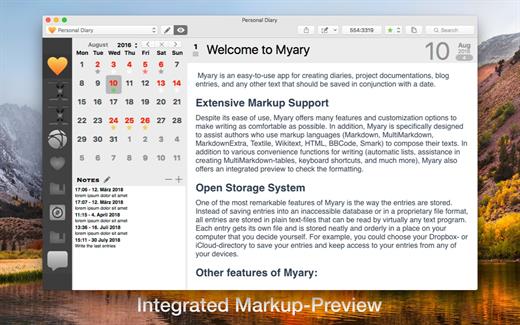
Myary is an easy-to-use app for creating diaries, project documentation, blog entries, and any other text that should be saved in conjunction with a date.
Extensive Markup Support

Despite its ease of use, Myary offers many features and customization options to make writing as comfortable as possible. In addition, Myary is specifically designed to assist authors who use markup languages ​​(Markdown, MultiMarkdown, MarkdownExtra, Textile, Wikitext, HTML, BBCode, Smark) to compose their texts. In addition to various convenience functions for writing (automatic lists, assistance in creating MultiMarkdown-tables, keyboard shortcuts, and much more), Myary also offers an integrated preview to check the formatting.

Open Storage System

One of the most remarkable features of Myary is the way the entries are stored. Instead of saving entries into an inaccessible database or in a proprietary file format, all entries are stored in plain text-files that can be read by virtually any text program. Each entry gets its own file and is stored neatly and orderly in a place on your computer that you decide yourself. For example, you could choose your Dropbox- or iCloud-directory to save your entries and keep access to your entries from any of your devices.

Other features of Myary:

  • You can add any kind of files as attachments to each of your entries
  • Extensive export manager (exports into the following formats are possible: TXT, RTF, RTFD, DOC, ODT, HTML, PDF, epub eBook, Textbundle, Textpack)
  • Tab-actions: Define keywords that use the Tab-key as a trigger to insert self-defined text-snippets
  • Edit entries in external text-apps or send them to other apps
  • Comfortable distraction-free mode, hide everything in order to be able to concentrate completely on the text
  • Automatic saving of entries: If you take a short break while typing, Myary automatically saves the written text
  • Textbundle-Format: instead of saving your texts in normal text-files, you can also save your texts in the Textbundle-format (more information on Textbundle can be found on www.textbundle.org)
  • In addition to the actual entries, you can also write or collect small notes, ideas, things to keep in mind
  • Extensive settings for the text editor: In addition to font, size and color, you can also customize the background color, line spacing, indents for new paragraphs and much more to your personal needs
  • Color labels: you can assign to each of your entries a color label, which appears as a small star in the calendar sheet. In this case, the standard color labels of the file system are used. Using the standard system color labels makes those labels visible in other apps like the Finder
  • Integrated search: if you want to search for a specific entry or search for a specific term within entries, the integrated search function will help you by listing all entries in chronological order which contain the search-term
  • Myary natively supports Mojave’s Dark Mode and also provides a dark mode for earlier macOS versions that can be easily turned on at any time. Simply select “Dark User Interface” under View from the menu bar and Myary will change its appearance.

Of course, Myary also offer the known features full-screen mode, send menu, in-text search / replace, spell check and text replacement.

What’s New

Version 2.7.1:


  • Release notes were unavailable when this listing was updated.
Compatibility

macOS 10.13 or later
Apple Silicon or Intel Core processor


Release Name: Myary 2.7.1
Size: 7.7 MB
Links: HOMEPAGE – NFO – Torrent Search

Download: RAPiDGATOR

4 Comments
July 25

Tab Launcher 3.0.1

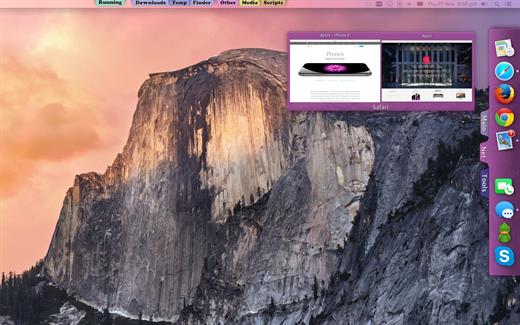
The idea of TabLauncher is not to replace the system’s dock, but to help keep it clean, with only the applications that are currently running.

By removing all the application from the dock and organizing them on tabs, you can quickly find and run any application you want.

Apart from that, you can create as many tabs as you like, and personalize them by setting the background color, title color, and font. Just drag your favorite applications to your tabs and it’s done! You can also rearrange the tabs by dragging them. And even rearrange the whole TabLauncher. Just drag it where ever you like along the sides or the bottom of the screen.

Now it takes less than 2 seconds to find and launch any app. (It’s true, according to our statistics)

What’s New

Version 3.0.1:


  • Release notes were unavailable when this listing was updated.
Compatibility

macOS 10.13 or later


Release Name: Tab Launcher 3.0.1
Size: 9.3 MB
Links: HOMEPAGE – NFO – Torrent Search

Download: RAPiDGATOR

5 Comments
July 25

Ghost Buster Pro 6.0.0

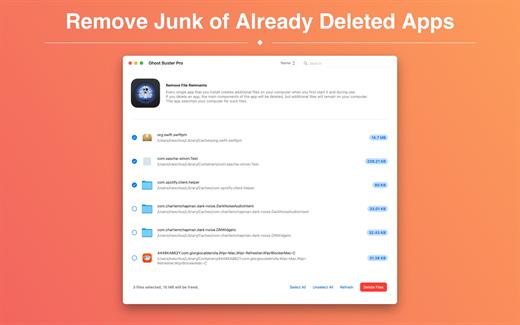
Ghost Buster Pro finds and deletes files from apps you’ve already uninstalled. The app is lightning fast and frees memory in no time.

Many apps are installed on a computer, but they usually only stay on your computer for a short time. Each app creates files, but deleting the app does not remove them.
This leads to a large number of files accumulating over time, which take up valuable storage space.
Ghost Buster Pro searches your computer for exactly such files and can also delete them directly if you wish.

Ghost Buster Pro offers the following features:

Fast Search

Ghost Buster Pro quickly scans your computer for data from previously deleted apps. You can have them deleted with one click.

Extremely easy handling

Ghost Buster Pro couldn’t be simpler. The search is started immediately after the app is started. You can now delete files with just one click.

No automatic deletion

Ghost Buster Pro does not delete any data without your consent. Choose for yourself which data is deleted and which you want to keep.

What’s New

Version 6.0.0:


  • Release notes were unavailable when this listing was updated.
Compatibility

macOS 11.5 or later
Apple Silicon or Intel Core processor

Release Name: Ghost Buster Pro 6.0.0
Size: 7.4 MB
Links: HOMEPAGE – NFO – Torrent Search

Download: RAPiDGATOR

5 Comments