Please REGISTER or RENEW your account on RAPiDGATOR.net and support us by doing through all RAPiDGATOR working download links on main posts...
Jan 1

Support US

If the main Rapidgator link is deleted or no longer active, you can use the backup link labeled 'Single File RAR: RAPiDGATOR Backup' right below the main one.

To all Nitroflare users, please switch to Rapidgator and purchase a Rapidgator account from now on.

If you are purchasing an account from Rapidgator's Resellers, please be sure to read this guide before purchasing.

Our downloads are only accessable via VPN Connection. If you do not have one, please sign up! All downloads are up and running on a main post. If that link is broken, please try a newer RAPIDGATOR download link.

⚠️Please pay attention : downloads are only accessable via VPN Connection. If you need one, please sign up!⚠️

1- Never use the add fund option and pay your purchase directly 2- Always make sure to buy from the last healthy and active link in the main post and never buy from a deleted file 3- Use PC or mobile to buy account and have fun! 4- Do not use auto paying or auto renew option for your subscription because it doesn't give us any commission. Cancel auto pay and let the subscription expire then purchase via a link on main page links

================

You can not access the downloads?? Can't access RLSBB? Get NordVPN. It's very very cheap and the setup only takes 1min. Sign up

Unblock RLSBB with NordVPN: A secure VPN for mobile and computer. No add-ons. See more

Use Light Search to get post title only as result.

UK users use .in domain or use VPN

0 Comments
Feb 27

JSON Wizard 2.6.3

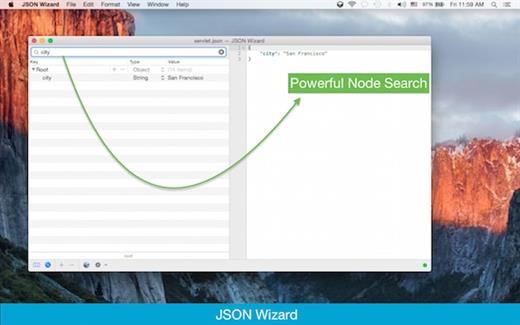
JSON Wizard is the perfect tool for you if you simply want to view and edit your JSON files. Or perhaps you want to be able to import XML/YAML/PLIST/CSV files. Perhaps you even want to be able to export to all those formats as well. JSON Wizard provides both easy visual editing and direct access to the source code with live syntax checking.

Features


  • Import pure JSON, XML, property lists (XML or binary), YAML, and even CSV
  • Edit and view JSON (via the Source-code or the Data-tree view) and observe changes live
  • Advanced live syntax checking/linter, with error checking and live notifications
  • Source beautifier
  • Powerful search feature (to browse through all tree nodes)
  • Search-by-path feature (to access specific nodes)
  • Export/save to JSON, XML, YAML, property list (XML-based or binary)
  • Live HTTP request tool (GET/POST + with additional headers support)
What’s New

Version 2.6.3:


  • Release notes were unavailable when this listing was updated.
Compatibility

macOS 11.0 or later


Release Name: JSON Wizard 2.6.3
Size: 8.7 MB
Links: HOMEPAGE – NFO – Torrent Search

Download: RAPiDGATOR

7 Comments
Feb 27

Kaleidoscope 6.6

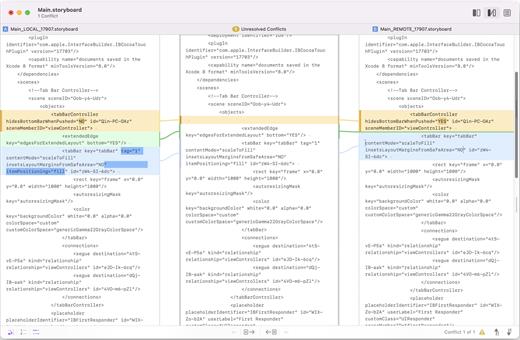
Kaleidoscope spots differences in text and image files.

Kaleidoscope Features


  • General

    • Single window workflow: One tab per comparison
    • Compare two+ files: Add any number of files per tab
    • Always up to date: Auto-refreshes when files change
    • File Shelf: Quickly go from file to file
    • Path Bar: See where your files are
    • Keyboard shortcuts: Every action has a shortcut
  • Text Scope

    • Supports any text file: Plain text, source code, HTML, etc.
    • Clear comparisons
    • Three layouts: Blocks, Fluid, and Unified
    • Compare documents: Imports text from .doc and .rtf files
    • Instant search
    • Change Stepper: Quickly jump from change to change
    • Highlights: Added, deleted and changed text
  • Image Scope

    • All popular image file formats: JPEG, TIFF, PNG, PSD and more.
    • Four connected layouts: Two-Up, One-Up, Split, and Difference
    • Comprehensive image support: RGB/CMYK/LAB, alpha, any size.
    • Multi-touch support: Smooth scrolling and pinch to zoom
    • Customizable environment: Change background color, difference mask and checkerboard settings
    • Two difference mask modes: Spot absolute or relative changes
  • Integration

    • Git, Mercurial, SVN, and Bazaar: Integrate with a couple of clicks
    • Versions
    • TextMate SVN
    • Cornerstone
    • ksdiff Command-line tool: Integrate with practically anything
What’s New

Version 6.6:


  • Release notes were unavailable when this listing was updated.
Compatibility

macOS 11.1.0 or later
Apple Silicon or Intel Core processor


Release Name: Kaleidoscope 6.6
Size: 46.2 MB
Links: HOMEPAGE – NFO – Torrent Search

Download: RAPiDGATOR

5 Comments
Feb 27

DaisyDisk 4.33.3

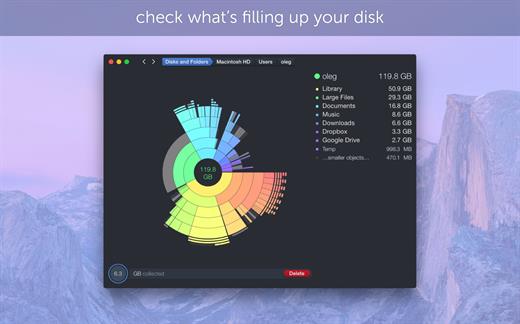
DaisyDisk allows you to visualize your disk usage and free up disk space by quickly finding and deleting big unused files.

The program scans your disk and displays its content as a sector diagram where the biggest files and folders at once become obvious. To drill down to a folder, just click on a segment. To bubble up, click in the center. Move the mouse over the diagram and see the name and path of each file, and enclosed files (if any). Hit Space to quickly preview file content, without launching another application. In this way, walk around your disk and drag-and-drop all unneeded files into the “collector”. Expand the collector to check its contents. When done, clean it up with a single click.

What’s New

Version 4.33.3:


  • Updated the application icon to match the newest macOS style.
Compatibility

macOS 10.13 or later
Apple Silicon or Intel Core processor


Release Name: DaisyDisk 4.33.3
Size: 8.6 MB
Links: HOMEPAGE – NFO – Torrent Search

Download: RAPiDGATOR

5 Comments
Feb 27

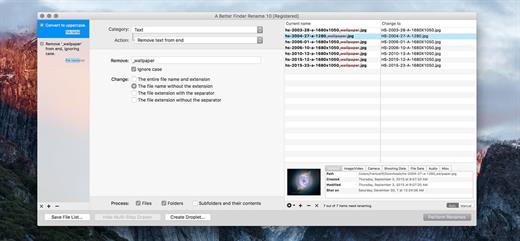
A Better Finder Rename 12.26

A Better Finder Rename is the most complete renaming solution available on the market today. That’s why, since 1996, tens of thousands of hobbyists, professionals and businesses depend on A Better Finder Rename to organize and maintain files.

The Instant Preview feature eliminates guesswork and costly errors and helps you find the right settings quickly and accurately by providing as-you-type feedback.

A Better Finder Rename offers a complete set of renaming options that are organized into 15 categories covering all the text, character, position, conversion and truncation features that you would expect from a file renamer, but it does not stop there. The multi-step renaming feature allows multiple renaming steps to be combined to deal with complex renaming jobs in a single operation. Unlike other tools, A Better Finder Rename allows any number of renaming actions to be combined, re-ordered, copied and deleted.

What’s New

Version 12.26:


  • Release notes were unavailable when this listing was updated.
Compatibility

macOS 10.13 or later
Apple Silicon or Intel Core processor


Release Name: A Better Finder Rename 12.26
Size: 15.3 MB
Links: HOMEPAGE – NFO – Torrent Search

Download: RAPiDGATOR

6 Comments
Feb 27

AppKiller 4.2.4

AppKiller lets you close all your open apps, with the fuss of going through them one-by-one. Do you want to be able to do with a single click? Or – even better – with a single… keyboard shortcut? Look no further!

Features


  • Easy-to-use: App Killer sleeps unobtrusively in your status bar and waiting for… orders
  • Ultra-fast: Killing all your open application will take no more than… milliseconds
  • Cmd+Shift+K: And that’s all it takes to instantaneously kill all your open apps–really!
What’s New

Version 4.2.4:


  • Release notes were unavailable when this listing was updated.
Compatibility

macOS 10.7 or later, 64-bit processor


Release Name: AppKiller 4.2.4
Size: 6.1 MB
Links: HOMEPAGE – NFO – Torrent Search

Download: RAPiDGATOR

5 Comments
Feb 27

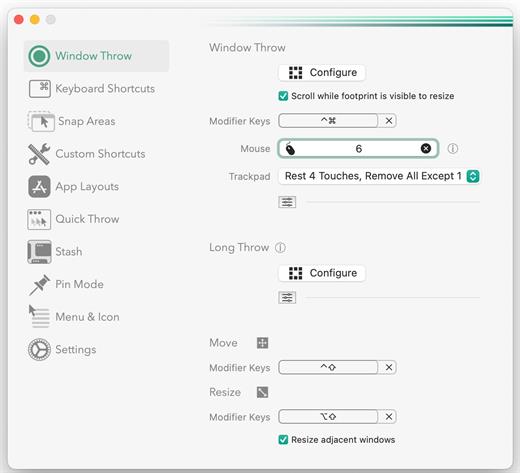
Rectangle Pro 3.70

Additional Efficiency and Speed
• Each window action can be configured with a quick, simple cursor movement and modifier key combination
• Just press and release modifier keys while you move your cursor over the window you want to snap

What’s New

Version 3.70:


  • Release notes were unavailable when this listing was updated.
Compatibility

macOS 10.12 or later
Apple Silicon or Intel Core processor


Release Name: Rectangle Pro 3.70
Size: 10.5 MB
Links: HOMEPAGE – NFO – Torrent Search

Download: RAPiDGATOR

6 Comments
Feb 27

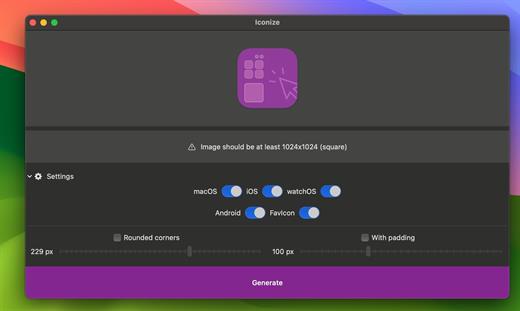
Iconize 1.8.6

All your app icons. With one click. Customizeable icons? Mac? iOS? Android? Perhaps, a “favicon” for your website? Iconize has got you covered.

Easy-to-use

Just drag’n’drop your icon image and Iconize will take care of the rest. You may use any image format your Mac recognizes!

Configurable

Your icon is not yet “ready” and decided you want to add rounded corners and/or padding to conform to the guidelines? Awesome!

Fast

All the speed of the Mac at your fingertips. The whole process will be complete before you even begin to notice!

What’s New

Version 1.8.6:


  • Release notes were unavailable when this listing was updated.
Compatibility

macOS 11.0 or later.
Apple Silicon or Intel Core processor


Release Name: Iconize 1.8.6
Size: 4.8 MB
Links: HOMEPAGE – NFO – Torrent Search

Download: RAPiDGATOR

5 Comments
Feb 24

Arturia FX Collection 6 Pro v2026.2

Include
★ Bus EXCITER-104 v1.0.1
★ Bus FORCE v1.4.1
★ Bus PEAK v1.0.1
★ Bus TRANSIENT v1.0.1 NEW
★ Chorus DIMENSION-D v1.5.1
★ Chorus JUN-6 v1.5.1
★ Comp DIODE-609 v1.4.1
★ Comp FET-76 v1.7.1
★ Comp TUBE-STA v1.7.1
★ Comp VCA-65 v1.7.1
★ Delay ETERNITY v1.7.1
★ Delay MEMORY-BRIGADE v1.7.1
★ Delay TAPE-201 v1.7.1
★ Dist COLDFIRE v1.2.1
★ Dist OPAMP-21 v1.2.1
★ Dist TUBE-CULTURE v1.2.1
★ Efx AMBIENT v1.0.0 NEW
★ Efx FRAGMENTS v1.3.1
★ Efx MOTIONS v1.1.1
★ Efx REFRACT v1.1.1
★ EQ SITRAL-295 v1.4.1
★ Filter M12 v1.8.1
★ Filter MINI v1.9.1
★ Filter MS-20 v1.2.1
★ Filter SEM v1.8.1
★ Flanger BL-20 v1.5.1
★ Mix DRUMS v1.0.1 NEW
★ Phaser BI-TRON v1.5.1
★ Pitch SHIFTER-910 v1.0.0 NEW
★ Pre 1973 v1.9.1
★ Pre TridA v1.8.1
★ Pre V76 v1.8.1
★ Rev INTENSITY v1.6.1
★ Rev LX-24 v1.2.1
★ Rev PLATE-140 v1.7.1
★ Rev SPRING-636 v1.6.1
★ Rotary CLS-222 v1.2.1
★ Tape J-37 v1.1.0
★ Tape MELLO-Fi v1.4.1

What’s New

Version 2026.2:


  • Release notes were unavailable when this listing was updated.
Compatibility

macOS 11.0 or later


Release Name: Arturia FX Collection 6 Pro v2026.2
Size: 16.6 GB
Links: HOMEPAGE – NFO – Torrent Search

Download: RAPiDGATOR

1 Comments
Feb 24

iCalamus 2.29

iCalamus is a desktop publishing solution that allows you to create documents with text, photos, and other visual elements.

The unregistered version of iCalamus already offers a cool feature: You can create professional photo books and calendars like in the full version and order high-quality prints at the Photographerbook company. The Photographerbook document service in iCalamus even supports iPhoto calendars (and iPhoto books coming soon) which can be printed at Photographerbook at a lower price.

iCalamus has been developed completely new for Apple’s operating system. iCalamus is an excellent choice for all layout purposes from simple posters and business letters over complex layouted magazines up to books and scientific works. Complete Unicode support and the smart PDF import offer easy access to creating and layout work. The reasoned user interface with its low learning curve guarantees for fast success. iCalamus doesn’t limit your layout freedom by offering prepared layouts. Its practical tools offer all options for your own creative and productive layout work.

iCalamus is a modular program which will grow in future by external modules, even from third-party developers. Therefore invers Software will create an Open Development Area (ODA) and publish the plug-in interface. iCalamus has been developed in Objective C with intensive usage of Apple’s Cocoa library.

You can import all image and text formats which are supported by Mac OS X into iCalamus documents. Images from digital cameras scanners or iPhoto libraries can be imported as well as whole Web page content and PDF documents. Grab text content from large PDF documents easily for further text processing. Elaborated masking options and many predefined, partly dynamically changeable frame shapes offer freedom for creativity. Working in precise measurement units is the other side of the iCalamus world. Use virtual copies for multiple document elements and change them afterwards with a few mouse clicks.

Print output uses all printers which are supported by OS X. Optionally output documents in various PDF formats (e.g., PDF-X, encrypted PDF, PDF Fax).

What’s New

Version 2.29:


  • Release notes were unavailable when this listing was updated.
Compatibility

macOS 10.11 or later
Apple Silicon or Intel Core processor


Release Name: iCalamus 2.29
Size: 25.4 MB
Links: HOMEPAGE – NFO – Torrent Search

Download: RAPiDGATOR

10 Comments
Feb 24

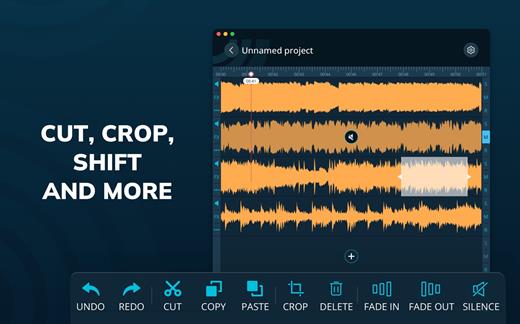
Multitrack Editor 1.0.9

Features
– Multitrack editing
– Various audio file formats
– File sharing

Change the duration, crop and cut the selected areas with only a few taps. Save your files or entire projects on your device. Even if you don’t save, the app will back up any unsaved progress (can be activated/deactivated in the settings).

What’s New

Version 1.0.9:


  • Release notes were unavailable when this listing was updated.
Compatibility

macOS 10.15 or later


Release Name: Multitrack Editor 1.0.9
Size: 30.3 MB
Links: HOMEPAGE – NFO – Torrent Search

Download: RAPiDGATOR
11 Comments