Please REGISTER or RENEW your account on RAPiDGATOR.net and support us by doing through all RAPiDGATOR working download links on main posts...
Feb 28

Mp3tag 1.11.0

Mp3tag is a powerful and easy-to-use tool to edit metadata of audio files. Musicians, DJs, podcasters, and audio-enthusiasts use it for many different aspects of handling audio files.
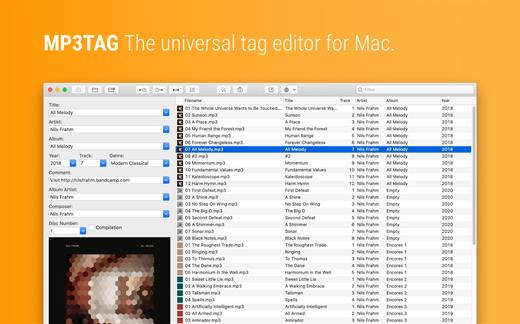
It supports batch tag-editing for multiple files at once, covering many audio formats from MP3, over MP4, and M4V (yes, that’s video!) to FLAC, OGG, OPUS, AIF, DSF, MPC, and WAV.

Furthermore, it supports online database lookups from Discogs and MusicBrainz, allowing to gather proper tags and download cover art for music libraries.

It offers renaming files based on the tag information, replacing characters or words in tags and filenames, importing tag information, and adjusting the size and image format of embedded cover art.

Since some of the tasks in managing a digital library are repetitive, Mp3tag allows for combining tasks into action groups, which serve as workflows for keeping consistency and order. Examples are formatting tag fields, performing case conversion, removing unwanted fields, or adjusting embedded cover art to match required sizes.

Key Features


  • Bulk-Editing of Tags for multiple files at once.
  • Editing of cover-art.
  • Renaming files based on tags.
  • Importing metadata from filenames.
  • Assign track and disc numbers via the auto-numbering wizard.
  • Importing metadata from online Tag Sources.
  • Support for Flexible Tagging, allowing for user-defined tag fields in a standardized way.
  • Applying action groups with many tasks combined into reusable workflows.
  • Support for many file types under a universal user interface.
Supported File Formats

  • MP3 (ID3v1, ID3v2.3, ID3v2.4 with UTF-8)
  • MP4/M4A/M4B/M4V (iTunes and Nero)
  • FLAC (Vorbis Comments)
  • OGG (Vorbis Comments)
  • OPUS (Vorbis Comments)
  • AIF (RIFF INFO and RIFF ID3)
  • DSF (ID3v2)
  • MPC (APEv2)
  • WAV (RIFF INFO and RIFF ID3
What’s New

Version 1.11.0:


  • Release notes were unavailable when this listing was updated.
Compatibility

macOS 10.14 or later.


Release Name: Mp3tag 1.11.0
Size: 12.5 MB
Links: HOMEPAGE – NFO – Torrent Search

Download: RAPiDGATOR

6 Comments
Feb 28

Squeezer 2.9.6

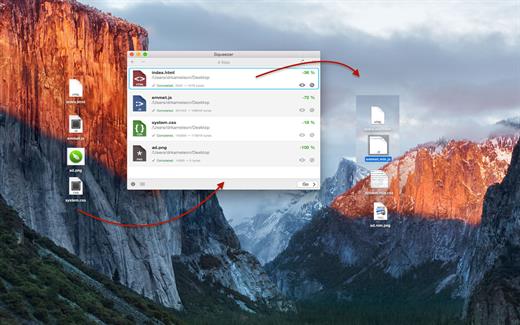
Squeezer is the Web developer’s pal. It can compile your scripts, optimize your images, and shave unnecessary file bulk to speed site load times. Just drag-and-drop your files, and Squeezer will take care of the rest!


  • Easy-to-use, intuitive UI
  • Batteries-included: You don’t need to install anything; it just works
  • Add or drag-and-drop your files/folders
  • Works with a single click
  • Watch your files for changes and have them processed automatically, in the background
  • Two view options: mini or extended
  • Tons of custom preferences, to make Squeezer suit your particular needs
  • Minify sources: HTML, CSS, Javascript
  • Optimize/Compress images: PNG, JPG, SVG
  • Compile (and minify): LESS, Stylus, SCSS, Sass, CoffeeScript, Literate CoffeeScript, TypeScript, Babel/ES6
  • Option to .gzip final output
  • Get useful info on each converted document
  • Open or view (in Finder) all of your converted documents
  • Smart background notifications so as not to disturb your workflow
  • Files supported:

    • HTML
    • CSS
    • LESS
    • Stylus
    • Sass
    • SCSS
    • JavaScript
    • CoffeeScript
    • Literate CoffeeScript
    • TypeScript
    • Babel/ES6
    • PNG
    • JPG
    • SVG
What’s New

Version 2.9.6:


  • Release notes were unavailable when this listing was updated.
Compatibility

macOS 10.10 or later
Apple Silicon or Intel Core processor


Release Name: Squeezer 2.9.6
Size: 29.4 MB
Links: HOMEPAGE – NFO – Torrent Search

Download: RAPiDGATOR
7 Comments
Feb 28

PhotoFoundry 1.3.0

Professional batch photo-editing. Filters, photo effects, resizing, watermarks, …anything you’ve been looking for in a photo-editing app.

Features

Easy-to-use

Just open or drag’n’drop your photos and PhotoFoundry will take care of the rest.

Fast

All the speed of the Mac at your fingertips. With highly-optimized algorithms for image processing, our topmost goal has been performance.

Versatile

Reads pretty much all the image formats you’ll need. Want to export? Great! PhotoFoundry currently supports PNG, JPEG, BMP, TIFF and GIF.

Extremely configurable

With close to 200 available – and parametrizable – actions, we’ve got you covered: Blends? Color adjustments? Ready-to-use photo effects? Everything at your fingertips!

Live preview

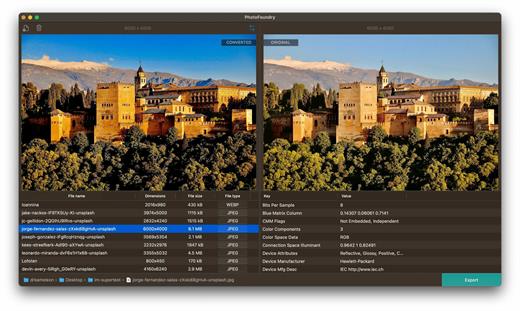
Preview your changes live, as-you-make-them, or side-by-side – so that you’re always sure what the resulting images are going to look like!

Smart Export

Ready to export? Awesome! Just click the Export button and PhotoFoundry will take care of the rest for you.

What’s New

Version 1.3.0:


  • Release notes were unavailable when this listing was updated.
Compatibility

macOS 11.0 or later.
Apple Silicon or Intel Core processor


Release Name: PhotoFoundry 1.3.0
Size: 44.6 MB
Links: HOMEPAGE – NFO – Torrent Search

Download: RAPiDGATOR

7 Comments
Feb 28

OmniPlan Pro 4.10.2

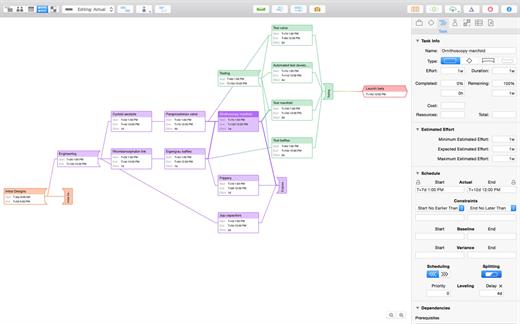
With OmniPlan Pro, you can create logical, manageable project plans with Gantt charts, schedules, summaries, milestones, and critical paths. Break down the tasks needed to make your project a success, optimize resources, and streamline budgets. It’s project management made painless.

How to get your project done on time and under budget:


  • Translate strategy into tactics everyone can understand
  • Create summaries of work broken into lists of activities
  • Distribute workloads fairly and efficiently
  • Manage costs as you go
OmniPlan Pro adds the following features to OmniPlan’s robust management abilities:

  • Publish and subscribe
  • Change tracking
  • Monte Carlo simulation
  • AppleScript support
  • Earned-value analysis
  • Multi-project dashboard
  • Beautiful reports
  • Microsoft Project support
  • Auto-effort estimation
What’s New

Version 4.10.2:


  • Release notes were unavailable when this listing was updated.
Compatibility

macOS 11.0 or later.
Apple Silicon or Intel Core processor


Release Name: OmniPlan Pro 4.10.2
Size: 99.7 MB
Links: HOMEPAGE – NFO – Torrent Search

Download: RAPiDGATOR
6 Comments
Feb 28

Tinderbox 11.6.0

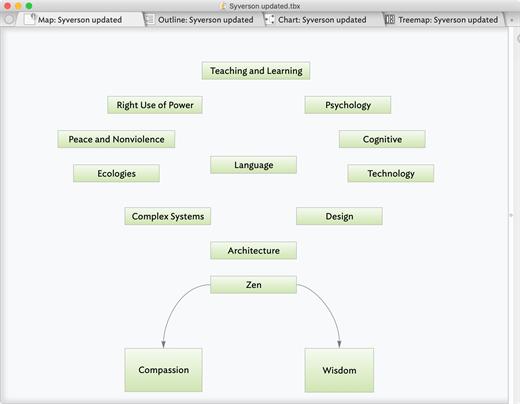
Tinderbox is a personal content management assistant. It stores your notes, ideas, and plans. It can help you organize and understand them. And Tinderbox helps you share ideas through Web journals and Web logs.

Tinderbox’s agents automatically scan your notes, looking for patterns and building relationships. Agents help discover relationships and help make sure important things don’t get lost. Agents are easy to make and easy to modify. They’re flexible and powerful. And Tinderbox can even gather and update changing information and breaking news from the Internet.

When it’s time to share your notes, Tinderbox can assemble multiple notes into one page. Updates are a breeze — even if you update several times a day. Private notes, timestamps, permanent links, archives: everything you want, just the way you want it.

What’s New

Version 11.6.0:


  • Release notes were unavailable when this listing was updated.
Compatibility

macOS 10.13 or later


Release Name: Tinderbox 11.6.0
Size: 38.8 MB
Links: HOMEPAGE – NFO – Torrent Search

Download: RAPiDGATOR

7 Comments
Feb 28

SpeakMe 3.4.3

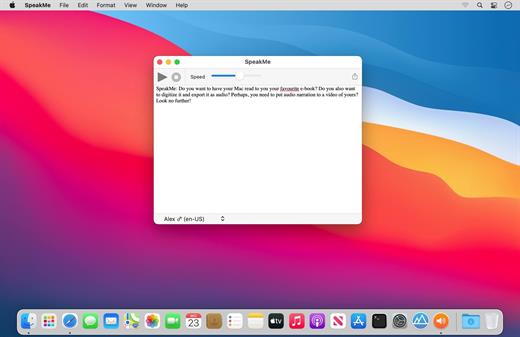
SpeakMe: Do you want to have your Mac read to you your favourite e-book? Do you also want to digitize it and export it as audio? Perhaps, you need to put audio narration to a video of yours? Look no further!


  • Easy-to-use, intuitive UI
  • Speak any plain text
  • Export to audio (.aiff)
  • Speak/Export Whole document or just the selection
  • Ultra-fast processing
  • Change speaking speed (slower/faster)
  • Option to open an existing document
  • Drag’n’drop onto the Dock icon and start processing!
  • Highlight current word as text is being spoken
  • Easily switch between different speakers
  • Lots of languages/genders to choose from: English, Arabic, Chinese, Czech, Danish, Dutch, Finish, French, German, Greek, Hindi, Hungarian, Indonesian, Italian, Japanese, Korean,
What’s New

Version 3.4.3:


  • Release notes were unavailable when this listing was updated.
Compatibility

macOS 10.10 or later 64-bit


Release Name: SpeakMe 3.4.3
Size: 4.5 MB
Links: HOMEPAGE – NFO – Torrent Search

Download: RAPiDGATOR
6 Comments
Feb 28

WiFiRadar Pro 5.4.1

WiFi Radar Pro lets you monitor your area networks; identify and troubleshoot issues with your home, small office, or enterprise network; and gather useful information about your network performance. Are you simply in search of an elegant replacement of the default OS X wireless utility? You’ve just found your ideal tool!


  • Easy-to-use, intuitive UI
  • Suitable for home, small office, or enterprise networks
  • Live monitoring for all networks
  • Graphical charts for better visualization
  • Automatic signal/noise tracking
  • Status-item tool to replace the default OS X wireless tool
  • Option to export current networks report to CSV
  • Easily connect to any network (Open, WEP, or WPA/WPA2)
  • Ultra-secure password storage
  • Works with 802.11a/b/g/n/ac networks
  • Lots of useful information at your fingertips: SSID, BSSID, RSSI, noise, channel, AP mode, security, rates, channel flags, country
What’s New

Version 5.4.1:


  • Release notes were unavailable when this listing was updated.
Compatibility

macOS 10.10 or later


Release Name: WiFiRadar Pro 5.4.1
Size: 5.4 MB
Links: HOMEPAGE – NFO – Torrent Search

Download: RAPiDGATOR

7 Comments
Feb 27

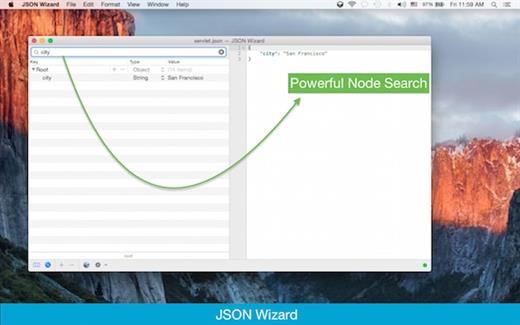
JSON Wizard 2.6.3

JSON Wizard is the perfect tool for you if you simply want to view and edit your JSON files. Or perhaps you want to be able to import XML/YAML/PLIST/CSV files. Perhaps you even want to be able to export to all those formats as well. JSON Wizard provides both easy visual editing and direct access to the source code with live syntax checking.

Features


  • Import pure JSON, XML, property lists (XML or binary), YAML, and even CSV
  • Edit and view JSON (via the Source-code or the Data-tree view) and observe changes live
  • Advanced live syntax checking/linter, with error checking and live notifications
  • Source beautifier
  • Powerful search feature (to browse through all tree nodes)
  • Search-by-path feature (to access specific nodes)
  • Export/save to JSON, XML, YAML, property list (XML-based or binary)
  • Live HTTP request tool (GET/POST + with additional headers support)
What’s New

Version 2.6.3:


  • Release notes were unavailable when this listing was updated.
Compatibility

macOS 11.0 or later


Release Name: JSON Wizard 2.6.3
Size: 8.7 MB
Links: HOMEPAGE – NFO – Torrent Search

Download: RAPiDGATOR
7 Comments
Feb 27

Kaleidoscope 6.6

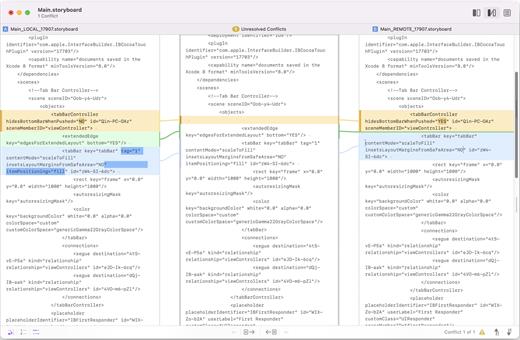
Kaleidoscope spots differences in text and image files.

Kaleidoscope Features


  • General

    • Single window workflow: One tab per comparison
    • Compare two+ files: Add any number of files per tab
    • Always up to date: Auto-refreshes when files change
    • File Shelf: Quickly go from file to file
    • Path Bar: See where your files are
    • Keyboard shortcuts: Every action has a shortcut
  • Text Scope

    • Supports any text file: Plain text, source code, HTML, etc.
    • Clear comparisons
    • Three layouts: Blocks, Fluid, and Unified
    • Compare documents: Imports text from .doc and .rtf files
    • Instant search
    • Change Stepper: Quickly jump from change to change
    • Highlights: Added, deleted and changed text
  • Image Scope

    • All popular image file formats: JPEG, TIFF, PNG, PSD and more.
    • Four connected layouts: Two-Up, One-Up, Split, and Difference
    • Comprehensive image support: RGB/CMYK/LAB, alpha, any size.
    • Multi-touch support: Smooth scrolling and pinch to zoom
    • Customizable environment: Change background color, difference mask and checkerboard settings
    • Two difference mask modes: Spot absolute or relative changes
  • Integration

    • Git, Mercurial, SVN, and Bazaar: Integrate with a couple of clicks
    • Versions
    • TextMate SVN
    • Cornerstone
    • ksdiff Command-line tool: Integrate with practically anything
What’s New

Version 6.6:


  • Release notes were unavailable when this listing was updated.
Compatibility

macOS 11.1.0 or later
Apple Silicon or Intel Core processor


Release Name: Kaleidoscope 6.6
Size: 46.2 MB
Links: HOMEPAGE – NFO – Torrent Search

Download: RAPiDGATOR

5 Comments
Feb 27

DaisyDisk 4.33.3

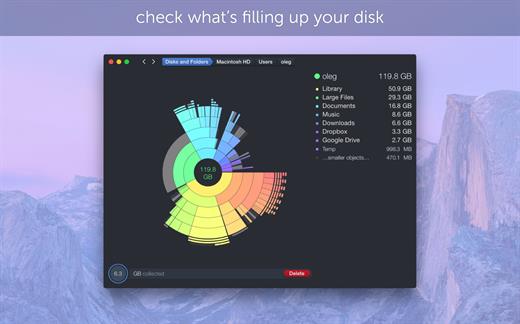
DaisyDisk allows you to visualize your disk usage and free up disk space by quickly finding and deleting big unused files.

The program scans your disk and displays its content as a sector diagram where the biggest files and folders at once become obvious. To drill down to a folder, just click on a segment. To bubble up, click in the center. Move the mouse over the diagram and see the name and path of each file, and enclosed files (if any). Hit Space to quickly preview file content, without launching another application. In this way, walk around your disk and drag-and-drop all unneeded files into the “collector”. Expand the collector to check its contents. When done, clean it up with a single click.

What’s New

Version 4.33.3:


  • Updated the application icon to match the newest macOS style.
Compatibility

macOS 10.13 or later
Apple Silicon or Intel Core processor


Release Name: DaisyDisk 4.33.3
Size: 8.6 MB
Links: HOMEPAGE – NFO – Torrent Search

Download: RAPiDGATOR
5 Comments