Please REGISTER or RENEW your account on RAPiDGATOR.net and support us by doing through all RAPiDGATOR working download links on main posts...
Aug 28

Macxvideo AI 3.15.0 (260827)

Macxvideo AI is an ultimate AI-powered video suite for Mac, combining next-gen video/image enhancement with advanced tools for conversion, compression, screen recording, and editing. With full GPU acceleration, it offers a smooth, efficient workflow for both casual creators and professionals.

AI Super Resolution technology significantly enhances video quality by intelligently upscaling footage up to 4X its original size, with support for resolutions as high as 4K. Its advanced AI models preserve fine details while eliminating noise and blur, resulting in clearer, sharper visuals for a truly immersive viewing experience.

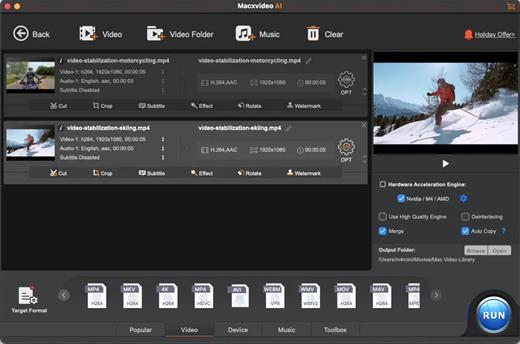
Supporting 370+ inputs & 420+ outputs, Macxvideo AI converts MP4, HEVC, AV1, MOV, multi-track MKV, or AAC, making it playable on any device. It utilizes full GPU-acceleration to swiftly convert 4K/8K/3D videos in bulk, delivering 47X faster speed and keeping CPU ussage under 2%. You can adjust codec, resolution, VBR, etc.

From iPhone, GoPro, DJI, Cannon, and DVD/blu-ray rips, Macxvideo AI adeptly converts videos like 4K MOV, MP4 with ease. It downscales 4K/8k, transcodes legacy or modern codecs, and preps your footage for smooth playback across all devices and players.

What’s New

Version 3.15.0:


  • Release notes were unavailable when this listing was updated.
Compatibility

macOS 10.15 or later


Release Name: Macxvideo AI 3.15.0 (260827)
Size: 248 MB
Links: HOMEPAGE – NFO – Torrent Search

Download: RAPiDGATOR

5 Comments
Aug 28

Juicy 1.5.6

Juicy is a native macOS utility designed to give you total control over your MacBook’s battery life and health through highly customizable alerts and sleek monitoring tools.

Key Features


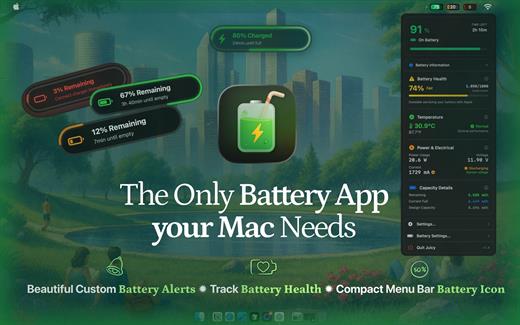
  • Custom Battery Alerts: Break free from the standard 10% notification. Set beautiful, native-style alerts at any percentage (e.g., 20%, 80%, or even 3%).
  • Health & Lifecycle Tracking: Monitor real-time health percentage, cycle counts, and temperature. Get notified when your battery hits 80% to help prolong its total lifespan.
  • All-in-One Dashboard: View battery levels for all connected devices—including AirPods, iPhones, iPads, and Magic Mice—in one organized list.
  • Sleek Menu Bar Icons: Replace the default battery icon with a compact, iPhone-style display that shows the percentage inside the icon to save space.
  • Smart Automation: Automatically dismisses annoying system battery pop-ups and provides “screen glow” effects to ensure you never miss a critical low-battery warning.
What’s New

Version 1.5.6:


  • Release notes were unavailable when this listing was updated.
Compatibility

macOS 15.6 or later.


Release Name: Juicy 1.5.6
Size: 21 MB
Links: HOMEPAGE – NFO – Torrent Search

Download: RAPiDGATOR

5 Comments
Aug 28

Topaz Photo 1.7.0

AI-powered photo editing tool that improves photos pixel by pixel.
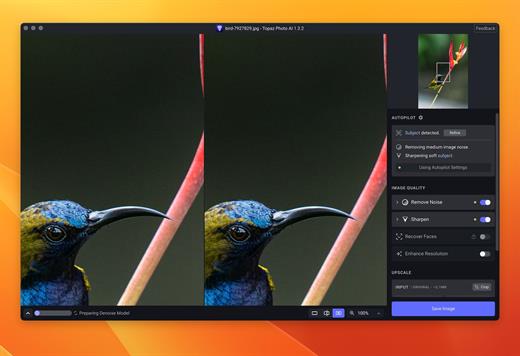
What is Topaz Photo AI? It is a new-generation photo editing tool that uses AI technology to perfect and denoise pictures pixel by pixel. Topaz Photo AI simplifies the editing process for photographers and designers. Its groundbreaking suite offers multiple tools to satisfy both amateurs and confident pros.

Topaz Photo AI allows editors to denoise, sharpen, upscale, preserve text, recover faces, remove objects, correct lighting, and balance color. Professional photo editors will be amazed at how much power Topaz Photo AI gives, and beginners will appreciate how easy and intuitive this tool is.

Topaz Photo AI helps you Sharpen, remove noise, and increase the resolution of your photos with tomorrow’s technology.

Maximize the potential of your photos.

Magically enhance image quality and resolution based on a deep understanding of the contents of your photo.

Enhance Quality

Maximize the visual quality of your images with best-in-the-world noise and blur reduction. Particularly useful in difficult settings with fast-moving subjects, low light, or atypical environments.

Crisp, clear, and noise-free.

It’s a magical feeling to see noise evaporate while sharp detail remains. Topaz Photo AI understands the contents of your image and accurately determines the difference between image detail and noise.

Tack-sharp subjects.

Unlike traditional sharpening, Topaz Photo AI’s Sharpen module naturally reverses root causes of blurriness (camera shake, motion blur, missed focus) to create more natural results. In the absence of blur, sharpness remains – crisp, clear detail that’s free of edge haloes or other artifacts.

Increase Resolution

Join hundreds of thousands of photographers and designers who use Topaz technology to generate real image detail for better printing, cropping, restoration, and more.

Magically add real detail.

Topaz Photo AI “remembers” real detail from millions of similar images, then fills in missing pixels based on that understanding. (It’s like how you can picture a friend’s face without being physically in front of them.) Add real image resolution to your photos for tighter crops or better prints.

Recover faces naturally.

Introduced in 2023, the breakthrough Face Recovery AI offers remarkable detail enhancement for low-resolution or blurry faces.

Intelligently improve lighting.

It’s a magical feeling to see noise evaporate while sharp detail remains. Topaz Photo AI understands the contents of your image and accurately determines the difference between image detail and noise.

Improve efficiency with Autopilot

Specify adjustments based on detected image attributes like subject, faces, noise, and blur levels. Autopilot allows you to mold Photo AI to your workflow and unique photographic style.

Easy workflow

Topaz Photo AI works directly on your Mac or PC. Use the standalone to batch process thousands of images in sequence, or use it as a Photoshop plugin for tight workflow integration. We’ve also partnered with major hardware manufacturers like Nvidia, AMD, and Intel to make Photo AI run as fast as possible for your computer.

What’s New

Version 1.7.0:


  • Release notes were unavailable when this listing was updated.
Compatibility

macOS 10.12 or later


Release Name: Topaz Photo 1.7.0
Size: 1.8 GB
Links: HOMEPAGE – NFO – Torrent Search

Download: RAPiDGATOR

4 Comments
Aug 28

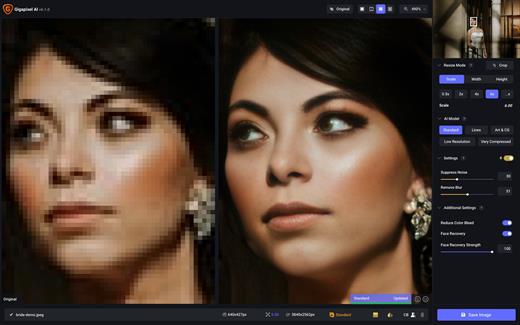
Topaz Gigapixel 1.3.5

Topaz Gigapixel knocks traditional upscaling tools off their pedestals.

Enlarging your image without losing detail has always been impossible… until now. Upscale your photos by up to 600% while perfectly preserving image quality.

Breathtakingly sharp prints. High-resolution cropping in post-production. iPhone photos that look like they came out of a DSLR.

No matter why you’re enlarging your photos, you always want the best possible quality for your results. Gigapixel AI is currently the only photo enlargement product available that can actually add detail back to your upscaled photo.

What’s New

Version 1.3.5:


  • Release notes were unavailable when this listing was updated.
Compatibility

macOS 12 Monterrey,ARM only.


Release Name: Topaz Gigapixel 1.3.5
Size: 859.8 MB
Links: HOMEPAGE – NFO – Torrent Search

Download: RAPiDGATOR

5 Comments
Aug 28

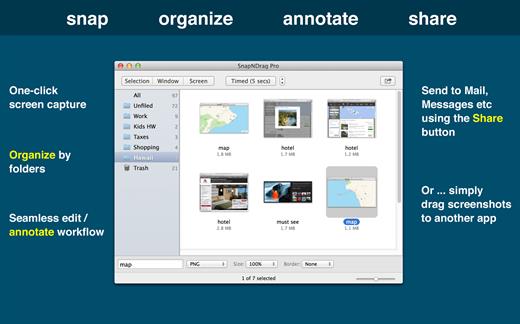
SnapNDrag Pro 4.5.6

SnapNDrag Pro is screen capture made ridiculously easy.

SnapNDrag started off as a simple app that lets you snap a screenshot with one click and then drag the result off to Mail, Finder, or any other app that accepts an image. It has since matured into a powerful screenshot tool that helps you annotate, organize, and share your screenshots.

As we added features over time, we have made it a top priority to keep the app easy to use. And we think the extra thought we put into this speaks for itself. This powerful app is still as easy to use as the day it was born as a simple one-trick pony.

Features

  • One-click capture (by window, selection or timed)
  • Organize with Folders
  • Annotate without losing the original screenshot
  • Share to Mail, Messages, Twitter, Facebook, etc.
  • Output in PNG, JPEG, or TIFF

And for advanced users:


  • Batch rename
  • Run as a background app (no Dock icon)
  • Customizable Hot Keys
What’s New

Version 4.5.6:


  • Bug Fixes: Previous version asks for permission to access folder for system screenshots each time it is run. This issue is fixed.
Compatibility

macOS 10.15 or later


Release Name: SnapNDrag Pro 4.5.6
Size: 6.3 MB
Links: HOMEPAGE – NFO – Torrent Search

Download: RAPiDGATOR

5 Comments
Aug 28

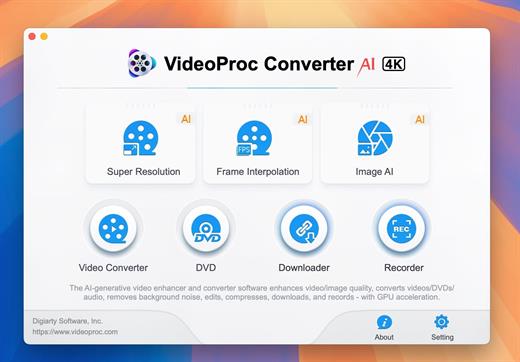
VideoProc Converter AI 8.11 (2026082701)

Built with AI tools for video/image/audio enhancement. Remaster, upscale, restore, colorize, convert, edit, compress, download, and record with GPU acceleration. The best video converter works with videos shot with GoPro, DJI, iPhone, Android, DSLR, mirrorless, camcorders, or other 4K cameras.

VideoProc peaks Level-3 Hardware Acceleration fully powered by Intel®, AMD®, NVIDIA® GPUs, and Apple M1/M2/M3/M4 (Pro/Max/Ultra), delivering buttery smooth (4K/8K) video processing and transcoding without compromising quality.

What’s New

Version 8.11:


  • Release notes were unavailable when this listing was updated.
Compatibility

macOS 10.15 or later


Release Name: VideoProc Converter AI 8.11 (2026082701)
Size: 256.5 MB
Links: HOMEPAGE – NFO – Torrent Search

Download: RAPiDGATOR
6 Comments
Aug 28

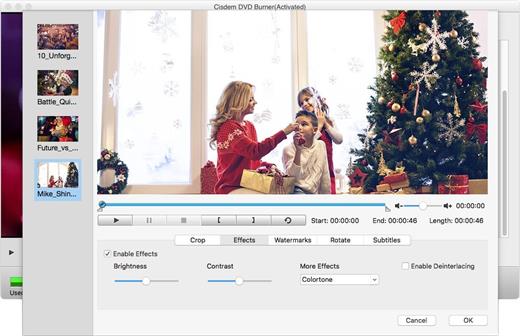
Cisdem DVD Burner 8.3.0

Cisdem DVD Burner is great DVD-burning software with more functionality but fewer steps to master than iDVD. It can burn any videos to DVD with subtitles/menu and background music and also provides an array of DVD menu templates to suite all your occasions. With its editing functions, you can crop, rotate, trim, remove letterboxing, and add special effects or watermarks, and then easily burn your high-quality personal DVD.

Features


  • Much Better than iDVD – Burn Virtually any Video to DVD

    • It burns all sorts of videos to DVD , be it internet downloaded, camcorder recorded or iPhone, iPad and many other devices created and also supports an array of formats, like MTS, AVI, HD MKV, MOV, MP4 and so on.
  • Powerful video Editor – Customize DVD

    • Provide different menu patterns for different occasions. Select one from to fit the subject of your DVD and customize it with your favorite thumbnails, buttons, frames, and text.
    • To drag and drop to add audio tracks or subtitles into it, You are easily to add background music and subtitles to better tell your story.
    • With the ability to crop, trim, deinterlace and add watermarks, and special effects to videos, you are easily to customize your DVD.
  • Real – time Preview and Burn DVD 16X Faster

    • With menu navigation and chapter switching over, you can play created DVD video in the Preview window just like on a DVD player.
    • With multi-threading, multi-core processing and multi-tasking DVD burning technology applied it is 10-20x faster than any competitor!
  • A High Quality DVD Experience Any Where

    • You can easily burn video into DVDs, ISO File, and DVD Folder and set to burn DVD based on disc volume (DVD5 or DVD9), TV system (NTSC or PAL), display ratio (16:9 or 4:3), etc. The output DVDs are playable on any DVD/BD player like Sony DVP serials and Panasonic DMP serials, etc.
What’s New

Version 8.3.0:


  • Release notes were unavailable when this listing was updated.
Compatibility

macOS 10.12 or later


Release Name: Cisdem DVD Burner 8.3.0
Size: 115.1 MB
Links: HOMEPAGE – NFO – Torrent Search

Download: RAPiDGATOR

5 Comments
Aug 28

Mia for Gmail 2.8.2

Mia for Gmail (was Notifier Pro for Gmail) is a desktop Gmail client which sits politely in your menu bar.


  • Multiple Gmail accounts – Add as many as Gmail accounts as you want. A pleasant notification sound will let you know if you’ve got a new email. It’s up to you to choose any notification sound (from the system sound list).
  • Check, read, compose* – Quickly read and compose your emails. You can also mark as spam, archive, or delete an email. Mia for Gmail can be your default email handler. It can manage your attachment files as well. (* The native compose window works for OS X 10.10 Yosemite or later.)
  • 100% Secure – We rely on Gmail’s Auth 2.0 user authentication, passwords are not stored on your Mac. All connections use IMAP/SSL. This application is available in English, French, German, and Russian.
What’s New

Version 2.8.2:


  • Release notes were unavailable when this listing was updated.
Compatibility

macOS 10.13 or later


Release Name: Mia for Gmail 2.8.2
Size: 6.6 MB
Links: HOMEPAGE – NFO – Torrent Search

Download: RAPiDGATOR
5 Comments
Aug 28

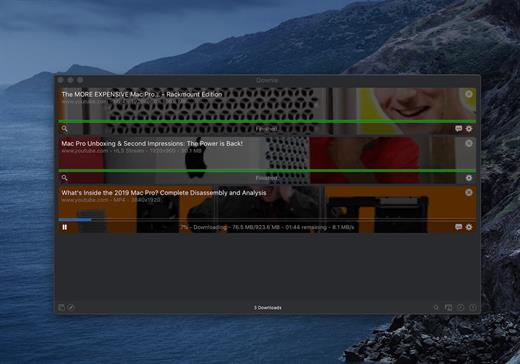
Downie 4.12.14

A simple download manager that offers you the possibility to quickly save videos from different websites to your own disk drive.

If you are using a poor internet connection, trying to visualize videos streamlined online might not work properly since the content is loaded too slowly. Downie is a simple Mac app that can help you download those videos to your computer, and then watch them by using your default media player.

User friendly video downloader featuring support for drag and drop actions

Working with Downie is extremely straightforward: simply drop the video URL on top of the app’s main window or on the Dock icon. Downie adds the video to your downloads list, so all you have to do next is start the process by pressing the appropriate button. Of course, you can also remove items from the list.

By default, Downie downloads MP4 files and places them in your default Downloads folder, but you can easily change this via the Preferences window. The same area allows you to setup notifications, or post processing actions (convert to MP4 if necessary, or extract audio only).

Effortlessly download videos from a wide collection of hosting websites

Downie provides support for more than 400 different websites that host video content, among which there are the most popular choices, such as YouTube, Apple, LiveLeak, Vimeo, BBC, and so on. If a certain website is not included, within the app you can send a request email to the Downie developers.
Moreover, Downie also provides matching extensions for various popular web browsers, such as Firefox, Safari, Google Chrome or Chromium. The add-ons are not installed by default: open the Preferences window and install only the ones you plan to use.

Straightforward solution for downloading video content hosted online

Downie is a great tool for saving videos posted on various websites to your Mac for offline playback. The application is extremely useful especially if you have a slow internet connection.

What’s New

Downie 4.12.14:


  • Improved: ceskatelevize.cz, itv.com, kick.com, mediadelivery.net, youtube.com
Compatibility

macOS 10.12 or later
Apple Silicon or Intel Core processor


Release Name: Downie 4.12.14
Size: 42.6 MB
Links: HOMEPAGE – NFO – Torrent Search

Download: RAPiDGATOR

5 Comments
Aug 28

LookAway 2.4.3

LookAway puts your mac in rest mode at regular intervals to help you rest your eyes. It’s gentle, smart, and fully customizable.

Features:


  • Regular eye breaks
  • Pre-Break Alert
  • At your fingertips
  • Fully customizable
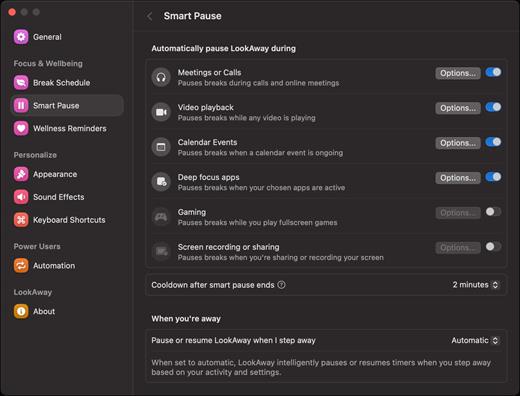
  • Intelligent Pausing
  • Delightful Design
What’s New

Version 2.4.3:


  • Release notes were unavailable when this listing was updated.
Compatibility

macOS 12 or later


Release Name: LookAway 2.4.3
Size: 29.5 MB
Links: HOMEPAGE – NFO – Torrent Search

Download: RAPiDGATOR
5 Comments