Please REGISTER or RENEW your account on RAPiDGATOR.net and support us by doing through all RAPiDGATOR working download links on main posts...

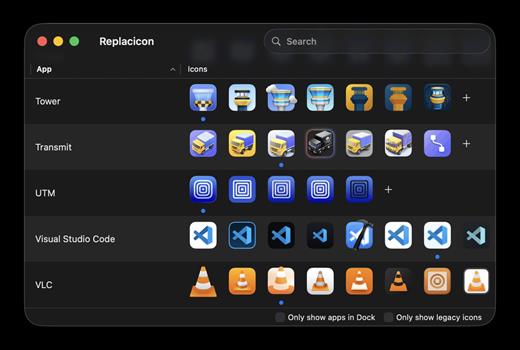
Replacicon helps customize macOS app icons by scanning installed apps and showing alternative icons from online sources in one place. It supports one-click replacement, original icon restoration, Dock-focused filtering, hidden app cleanup, custom icon imports, automatic preservation across app updates, and Apple Intelligence/Image Playground icon generation on supported systems.
Features
- Explore thousands of alternative icons for hundreds of Mac apps from sources like macosicons.com.
- Search all installed apps to find the one you want to fix up. Use filters to focus on apps in your Dock.
- Restore original icons if you change your mind.
- Keep your alternate icons across app updates entirely automatically.
- Hide apps and icons you do not want to see to narrow down the list.
- Import your own icons from disk and manage them with all the rest.
- Replacicon is a native app built just for macOS, and it works great with Intel and Apple Silicon Macs.
- Run Replacicon on macOS 13 “Ventura” or newer. macOS 26 “Tahoe” is fully supported.
- Replacicon speaks your language, and you can help translate the app on CrowdTranslate.
What’s New Version 2.1.1:
- Release notes were unavailable when this listing was updated.
Compatibility macOS 13 or later
Release Name: Replacicon 2.1.1
Size: 5.7 MB
Links: HOMEPAGE – NFO – Torrent Search
Download: RAPiDGATOR
Replacicon helps customize macOS app icons by scanning installed apps and showing alternative icons from online sources in one place. It supports one-click replacement, original icon restoration, Dock-focused filtering, hidden app cleanup, custom icon imports, automatic preservation across app updates, and Apple Intelligence/Image Playground icon generation on supported systems.
Features
- Explore thousands of alternative icons for hundreds of Mac apps from sources like macosicons.com.
- Search all installed apps to find the one you want to fix up. Use filters to focus on apps in your Dock.
- Restore original icons if you change your mind.
- Keep your alternate icons across app updates entirely automatically.
- Hide apps and icons you do not want to see to narrow down the list.
- Import your own icons from disk and manage them with all the rest.
- Replacicon is a native app built just for macOS, and it works great with Intel and Apple Silicon Macs.
- Run Replacicon on macOS 13 “Ventura” or newer. macOS 26 “Tahoe” is fully supported.
- Replacicon speaks your language, and you can help translate the app on CrowdTranslate.
What’s New Version 11.1.2:
- Release notes were unavailable when this listing was updated.
Compatibility macOS 13 or later
Release Name: Replacicon 2.1
Size: 5.6 MB
Links: HOMEPAGE – NFO – Torrent Search
Download: RAPiDGATOR



