Please REGISTER or RENEW your account on RAPiDGATOR.net and support us by doing through all RAPiDGATOR working download links on main posts...
Description: Macrium Reflect – backup and recovery for individual PCs and servers. Reflect Workstation – Designed for endpoint backup of business-critical PCs and workstations. Peace of mind for organisations when backing up Windows PCs.
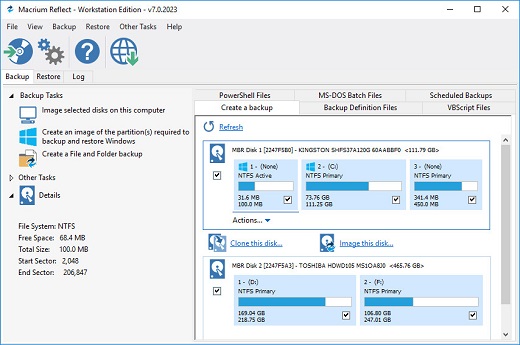
Solution highlights:
- New Backup Engine: Incremental and differential images up to 60 times faster
- Instant virtual booting of backup images: instantly create, start and manage Microsoft Hyper-V virtual machines
- Ultra-fast Live imaging of windows systems, physical and virtual
- Restore images to dissimilar hardware using Macrium ReDeploy
- Greatly simplified administration including pre-defined Backup Plans for popular backup strategies
- Fully featured file and folder level backup and recovery
- Updated support for all the latest Windows Operating Systems and disk formats
Macrium Reflect 7 Features:
- Backup your entire PC to a single compressed image file.
- Backup files and folders to a single compressed archive file.
- Recover partitions and entire disk images with just a few clicks of your mouse
- Dynamic disk support
- MBR and GPT disk support
- Restore images to dissimilar hardware using Macrium ReDeploy
How To Install?
- Install the program from the given setup. (Select your preffered version)
- Don’t run the application yet and close from system tray or task manager if running.
- Extract the “Patch Fix.zip” to installed directory location.
- Run the Patch as admin and apply it.
- Boom! Now you can use the program without any interruptions.
- That’s it, Enjoy now
Release Name: Macrium Reflect v8.0.6392 Server Plus WinPE ISO (x64)
Size: 490 MB
Links: HOMEPAGE – NFO –
Torrent Search Download: UPLOADGiG – NiTROFLARE – RAPiDGATOR
Description: Macrium Reflect – backup and recovery for individual PCs and servers. Reflect Workstation – Designed for endpoint backup of business-critical PCs and workstations. Peace of mind for organisations when backing up Windows PCs.
Solution highlights:
- New Backup Engine: Incremental and differential images up to 60 times faster
- Instant virtual booting of backup images: instantly create, start and manage Microsoft Hyper-V virtual machines
- Ultra-fast Live imaging of windows systems, physical and virtual
- Restore images to dissimilar hardware using Macrium ReDeploy
- Greatly simplified administration including pre-defined Backup Plans for popular backup strategies
- Fully featured file and folder level backup and recovery
- Updated support for all the latest Windows Operating Systems and disk formats
Macrium Reflect 7 Features:
- Backup your entire PC to a single compressed image file.
- Backup files and folders to a single compressed archive file.
- Recover partitions and entire disk images with just a few clicks of your mouse
- Dynamic disk support
- MBR and GPT disk support
- Restore images to dissimilar hardware using Macrium ReDeploy
How To Install?
- Install the program from the given setup. (Select your preffered version)
- Don’t run the application yet and close from system tray or task manager if running.
- Extract the “Patch Fix.zip” to installed directory location.
- Run the Patch as admin and apply it.
- Boom! Now you can use the program without any interruptions.
- That’s it, Enjoy now
Release Name: Macrium Reflect v8.0.6392 (All Editions) (x64) + Fix
Size: 500 MB
Links: HOMEPAGE – NFO –
Torrent Search Download: UPLOADGiG – NiTROFLARE – RAPiDGATOR
Description: Macrium Reflect – backup and recovery for individual PCs and servers. Reflect Workstation – Designed for endpoint backup of business-critical PCs and workstations. Peace of mind for organisations when backing up Windows PCs.
Solution highlights:
- New Backup Engine: Incremental and differential images up to 60 times faster
- Instant virtual booting of backup images: instantly create, start and manage Microsoft Hyper-V virtual machines
- Ultra-fast Live imaging of windows systems, physical and virtual
- Restore images to dissimilar hardware using Macrium ReDeploy
- Greatly simplified administration including pre-defined Backup Plans for popular backup strategies
- Fully featured file and folder level backup and recovery
- Updated support for all the latest Windows Operating Systems and disk formats
Macrium Reflect 7 Features:
- Backup your entire PC to a single compressed image file.
- Backup files and folders to a single compressed archive file.
- Recover partitions and entire disk images with just a few clicks of your mouse
- Dynamic disk support
- MBR and GPT disk support
- Restore images to dissimilar hardware using Macrium ReDeploy
How To Install?
- Install the program from the given setup. (Select your preffered version)
- Don’t run the application yet and close from system tray or task manager if running.
- Extract the “Patch Fix.zip” to installed directory location.
- Run the Patch as admin and apply it.
- Boom! Now you can use the program without any interruptions.
- That’s it, Enjoy now
Release Name: Macrium Reflect v8.0.6350 Server Plus WinPE ISO (x64)
Size: 490 MB
Links: HOMEPAGE – NFO –
Torrent Search Download: UPLOADGiG – NiTROFLARE – RAPiDGATOR
Description: Macrium Reflect – backup and recovery for individual PCs and servers. Reflect Workstation – Designed for endpoint backup of business-critical PCs and workstations. Peace of mind for organisations when backing up Windows PCs.
Solution highlights:
- New Backup Engine: Incremental and differential images up to 60 times faster
- Instant virtual booting of backup images: instantly create, start and manage Microsoft Hyper-V virtual machines
- Ultra-fast Live imaging of windows systems, physical and virtual
- Restore images to dissimilar hardware using Macrium ReDeploy
- Greatly simplified administration including pre-defined Backup Plans for popular backup strategies
- Fully featured file and folder level backup and recovery
- Updated support for all the latest Windows Operating Systems and disk formats
Macrium Reflect 7 Features:
- Backup your entire PC to a single compressed image file.
- Backup files and folders to a single compressed archive file.
- Recover partitions and entire disk images with just a few clicks of your mouse
- Dynamic disk support
- MBR and GPT disk support
- Restore images to dissimilar hardware using Macrium ReDeploy
How To Install?
- Install the program from the given setup. (Select your preffered version)
- Don’t run the application yet and close from system tray or task manager if running.
- Extract the “Patch Fix.zip” to installed directory location.
- Run the Patch as admin and apply it.
- Boom! Now you can use the program without any interruptions.
- That’s it, Enjoy now
Release Name: Macrium Reflect v8.0.6350 (All Editions) (x64) + Fix
Size: 500 MB
Links: HOMEPAGE – NFO –
Torrent Search Download: UPLOADGiG – NiTROFLARE – RAPiDGATOR
Description: Macrium Reflect – backup and recovery for individual PCs and servers. Reflect Workstation – Designed for endpoint backup of business-critical PCs and workstations. Peace of mind for organisations when backing up Windows PCs.
Solution highlights:
- New Backup Engine: Incremental and differential images up to 60 times faster
- Instant virtual booting of backup images: instantly create, start and manage Microsoft Hyper-V virtual machines
- Ultra-fast Live imaging of windows systems, physical and virtual
- Restore images to dissimilar hardware using Macrium ReDeploy
- Greatly simplified administration including pre-defined Backup Plans for popular backup strategies
- Fully featured file and folder level backup and recovery
- Updated support for all the latest Windows Operating Systems and disk formats
Macrium Reflect 7 Features:
- Backup your entire PC to a single compressed image file.
- Backup files and folders to a single compressed archive file.
- Recover partitions and entire disk images with just a few clicks of your mouse
- Dynamic disk support
- MBR and GPT disk support
- Restore images to dissimilar hardware using Macrium ReDeploy
How To Install?
- Install the program from the given setup. (Select your preffered version)
- Don’t run the application yet and close from system tray or task manager if running.
- Extract the “Patch Fix.zip” to installed directory location.
- Run the Patch as admin and apply it.
- Boom! Now you can use the program without any interruptions.
- That’s it, Enjoy now
Release Name: Macrium Reflect v8.0.6161 (All Editions) (x64) + Fix
Size: 528.29 MB
Links: HOMEPAGE – NFO –
Torrent Search Download: UPLOADGiG – NiTROFLARE – RAPiDGATOR
Description: Macrium Reflect – backup and recovery for individual PCs and servers. Reflect Workstation – Designed for endpoint backup of business-critical PCs and workstations. Peace of mind for organisations when backing up Windows PCs.
Solution highlights:
- New Backup Engine: Incremental and differential images up to 60 times faster
- Instant virtual booting of backup images: instantly create, start and manage Microsoft Hyper-V virtual machines
- Ultra-fast Live imaging of windows systems, physical and virtual
- Restore images to dissimilar hardware using Macrium ReDeploy
- Greatly simplified administration including pre-defined Backup Plans for popular backup strategies
- Fully featured file and folder level backup and recovery
- Updated support for all the latest Windows Operating Systems and disk formats
Macrium Reflect 7 Features:
- Backup your entire PC to a single compressed image file.
- Backup files and folders to a single compressed archive file.
- Recover partitions and entire disk images with just a few clicks of your mouse
- Dynamic disk support
- MBR and GPT disk support
- Restore images to dissimilar hardware using Macrium ReDeploy
Release Name: Macrium Reflect 8.0.6161 (x64)-P2P
Size: 529.53 MB
Links: HOMEPAGE – NFO –
Torrent Search Download: UPLOADGiG – NiTROFLARE – RAPiDGATOR
Description: Macrium Reflect – backup and recovery for individual PCs and servers. Reflect Workstation – Designed for endpoint backup of business-critical PCs and workstations. Peace of mind for organisations when backing up Windows PCs.
Solution highlights:
- New Backup Engine: Incremental and differential images up to 60 times faster
- Instant virtual booting of backup images: instantly create, start and manage Microsoft Hyper-V virtual machines
- Ultra-fast Live imaging of windows systems, physical and virtual
- Restore images to dissimilar hardware using Macrium ReDeploy
- Greatly simplified administration including pre-defined Backup Plans for popular backup strategies
- Fully featured file and folder level backup and recovery
- Updated support for all the latest Windows Operating Systems and disk formats
Macrium Reflect 7 Features:
- Backup your entire PC to a single compressed image file.
- Backup files and folders to a single compressed archive file.
- Recover partitions and entire disk images with just a few clicks of your mouse
- Dynamic disk support
- MBR and GPT disk support
- Restore images to dissimilar hardware using Macrium ReDeploy
Release Name: Macrium Reflect 8.0.6036 (x64)-P2P
Size: 519.43 MB
Links: HOMEPAGE – NFO –
Torrent Search Download: UPLOADGiG – NiTROFLARE – RAPiDGATOR
Description: Macrium Reflect – backup and recovery for individual PCs and servers. Reflect Workstation – Designed for endpoint backup of business-critical PCs and workstations. Peace of mind for organisations when backing up Windows PCs.
Solution highlights:
- New Backup Engine: Incremental and differential images up to 60 times faster
- Instant virtual booting of backup images: instantly create, start and manage Microsoft Hyper-V virtual machines
- Ultra-fast Live imaging of windows systems, physical and virtual
- Restore images to dissimilar hardware using Macrium ReDeploy
- Greatly simplified administration including pre-defined Backup Plans for popular backup strategies
- Fully featured file and folder level backup and recovery
- Updated support for all the latest Windows Operating Systems and disk formats
Macrium Reflect 7 Features:
- Backup your entire PC to a single compressed image file.
- Backup files and folders to a single compressed archive file.
- Recover partitions and entire disk images with just a few clicks of your mouse
- Dynamic disk support
- MBR and GPT disk support
- Restore images to dissimilar hardware using Macrium ReDeploy
Release Name: Macrium Reflect 8.0.6034 (x64) All Editions-P2P
Size: 519.30 MB
Links: HOMEPAGE – NFO –
Torrent Search Download: UPLOADGiG – NiTROFLARE – RAPiDGATOR
Description: Macrium Reflect – backup and recovery for individual PCs and servers. Reflect Workstation – Designed for endpoint backup of business-critical PCs and workstations. Peace of mind for organisations when backing up Windows PCs.
Solution highlights:
- New Backup Engine: Incremental and differential images up to 60 times faster
- Instant virtual booting of backup images: instantly create, start and manage Microsoft Hyper-V virtual machines
- Ultra-fast Live imaging of windows systems, physical and virtual
- Restore images to dissimilar hardware using Macrium ReDeploy
- Greatly simplified administration including pre-defined Backup Plans for popular backup strategies
- Fully featured file and folder level backup and recovery
- Updated support for all the latest Windows Operating Systems and disk formats
Macrium Reflect 7 Features:
- Backup your entire PC to a single compressed image file.
- Backup files and folders to a single compressed archive file.
- Recover partitions and entire disk images with just a few clicks of your mouse
- Dynamic disk support
- MBR and GPT disk support
- Restore images to dissimilar hardware using Macrium ReDeploy
Release Name: Macrium Reflect 8.0.5994 (x64) All Editions-P2P
Size: 519.30 MB
Links: HOMEPAGE – NFO –
Torrent Search Download: UPLOADGiG – NiTROFLARE – RAPiDGATOR
Description: Macrium Reflect – backup and recovery for individual PCs and servers. Reflect Workstation – Designed for endpoint backup of business-critical PCs and workstations. Peace of mind for organisations when backing up Windows PCs.
Solution highlights:
- New Backup Engine: Incremental and differential images up to 60 times faster
- Instant virtual booting of backup images: instantly create, start and manage Microsoft Hyper-V virtual machines
- Ultra-fast Live imaging of windows systems, physical and virtual
- Restore images to dissimilar hardware using Macrium ReDeploy
- Greatly simplified administration including pre-defined Backup Plans for popular backup strategies
- Fully featured file and folder level backup and recovery
- Updated support for all the latest Windows Operating Systems and disk formats
Macrium Reflect 7 Features:
- Backup your entire PC to a single compressed image file.
- Backup files and folders to a single compressed archive file.
- Recover partitions and entire disk images with just a few clicks of your mouse
- Dynamic disk support
- MBR and GPT disk support
- Restore images to dissimilar hardware using Macrium ReDeploy
Release Name: Macrium Reflect 8.0.5963 (x64)-P2P
Size: 518.30 MB
Links: HOMEPAGE – NFO –
Torrent Search Download: UPLOADGiG – NiTROFLARE – RAPiDGATOR



