Description: FinePrint is a multifunctional driver for printers that significantly expands the capabilities of any printer when printing documents: preview, printing multiple pages on one sheet, printing brochures, automatic insertion of header and footer, creation of letterheads, substrates, frames and much more. FinePrint works with all printer models, being, in fact, a multifunctional universal printer driver with a convenient graphical shell for managing it. Another useful feature is the ability to use several pre-configured virtual printers.
For example, one will automatically print brochures, and the other will print text on a letterhead. Using FinePrint significantly
Printing costs are reduced while the overall performance of the printer is improved.
FinePrint Pro Features
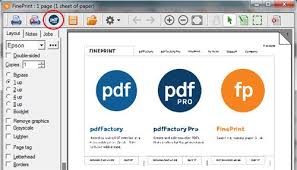
Preview of printed pages with the ability to delete and insert new ones, change their order:
· Ink saving modes: convert color text to black and white, remove graphics
· Print multiple pages (2/4/8) on one sheet of paper
· Print watermarks and headers and footers with the ability to specify the date, time, system variables or custom text
· Create forms and printed forms
· Ability to combine different print jobs into one document to make it easier to work with complex composite documents
· Save pages and jobs in TIFF, JPEG, BMP, TXT and FP files, copy them to the clipboard as text, image or metafile
· Double-sided printing (also saves ink) and create booklets
· Scaling large pages to standard paper sizes
· Display the amount of paper saved using FinePrint
· Adjust print borders, create indents for binding
· Ability to create multiple virtual FinePrint printers with different presets for quick printing in typical modes
· Ability to use as a network printer
· Save paper and ink
· Print booklets
· Double-sided printing
· Print multiple pages on one sheet
· Delete unwanted pages
· Create electronic letterheads
· Add watermarks, headings, footnotes
· Save in JPEG, TIF, BMP formats
pdfFactory Pro Features
Installing the program is simple and straightforward. After installation, a new printer named FinePrint pdfFactory appears on your system. By default, it’s configured for A4 format. If you want to change any of the settings, access the printer properties via Start > Settings > Printers > FinePrint pdfFactory. Here, you can change the page size, orientation, and print metrics. “Print” refers to the PDF file—that’s where the program prints, not to paper. You can manually set margins and print resolution, or emulate one from any other printer installed on your system. You can also use the “Show dialog” option to choose whether to display a special dialog for editing printed sheets or to bypass the dialog or some of its features.
One option allows for a print preview, while another allows you to email the resulting file, for example, to your boss. Furthermore, the “Downsample bitmaps to” option lets you control the quality of the “printed” images to avoid needlessly inflating the final file size. The higher the DPI in this option, the larger the file size. The Advanced button lets you define a list of fonts to be embedded in any printout. With FinePrint pdfFactory, you can print from any Windows application that supports printing. To do this, simply select File > Print (or File > Print in English-language versions of the program) and specify FinePrint pdfFactory as the printer. Once the printing process begins, all information output to the printer will actually be sent to a PDF file located in the “My Documents/PDF files” folder. The program makes it easy to convert anything to PDF.
· PDF viewer
· PDF editor
· Create PDF files on letterhead
· Add page numbers, headers, footers, and watermarks
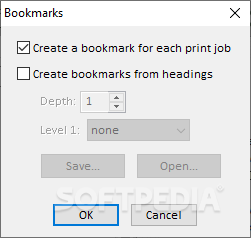
· Automatically bookmark each task
· Automatically create a table of contents
· Convert to grayscale
· PDF/A archiving
· Fill out forms
· Crop pages
· Edit text
· Save as a single-page PDF series
· Add multiple signatures and initials using Notes
· Combine documents into a single PDF and rearrange their order
· Customize settings for specific tasks
· Select text, copy, and edit
· Graphic copy, delete, and save
· Convert text to links
· Add PDF files
System Requirements
FinePrint – Windows 11, 10, 8, 7, Vista, ARM Windows Server 2022, 2019, 2016, 2012, 2012 R2, Citrix
PDFFactory – Windows 11, 10, 8, 7, Vista, ARM Windows Server 2022, 2019, 2016, 2012, 2012 R2, Citrix
Release Name: FinePrint & PDFFactory Pro 12.20 & 9.20
Size: 55 MB
Links: HOMEPAGE – NFO – Torrent Search
Download: RAPiDGATOR