Please REGISTER or RENEW your account on RAPiDGATOR.net and support us by doing through all RAPiDGATOR working download links on main posts...
Mar 5

Print Conductor 11.0.2603.4160

Description: Print Multiple Files at Once. Automatically print documents with Print Conductor! Print files in different formats at the same time, all without opening each one. Over 90 document types are supported. Works with all types of printers.
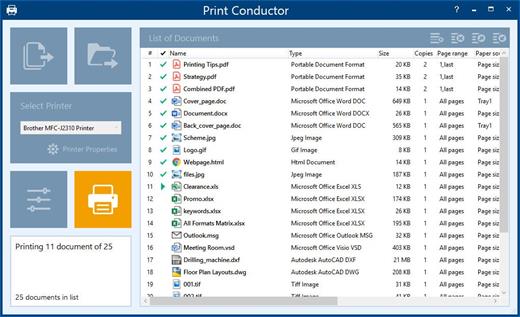
With Print Conductor, printing large volumes of files is as easy as 1-2-3. You no longer need to manually open each file, select a printer, make print settings, click "Print" and repeat. Instead, simply drag & drop your documents into the list, select a printer and let our software do the work for you.

No More Opening File After File for Printing
Save time by printing multiple PDFs or other documents in batch mode. Now you don't have to open them individually. Imagine how long it would take to print out hundreds of files within multiple folders! With Print Conductor, you don't need to open a PDF-viewer, text editor, or other application every time you need to print a document. Simply add each file to the program's list, select a printing device, and hit the "Start Printing" button.

Print All Documents in a Folder or from an Archive
With Print Conductor, you can easily print entire folders of documents or files from RAR / ZIP / 7ZIP archives. Print Conductor offers a simple interface to add and arrange files before a print session. Add files using drag & drop, the "Open file" dialog, import a list of files saved as a TXT, Excel or FLIST file, or select specific types of documents from a folder and its subfolders. You can sort documents by file name or type, arrange files to be printed in a certain order or print a subset of the documents within a list.

Smart Approach to Document Processing
Print Conductor selects the most effective way to process your files. Let's say you want to print several Word DOCX files "as is". In this case, Print Conductor will use Microsoft Word API because this is the fastest and the most straightforward way to process DOC and DOCX files.
However, if you need to print DOCX files in grayscale mode and add pagination, Print Conductor will export your DOCX files to PDF first. Then our PDF processing engine will be used since Microsoft Word cannot batch print files in grayscale mode. This way, processing may take longer, but the outcome will be just as required. Thus, the program switches to printing via PDF if a specific task cannot be solved the "direct way".

PDF documents: PDF, PDF/A, PDF/X
Print Conductor has a fast and reliable PDF printing engine. Batch print PDF files of any standard with or without attachments. You can also print PDF Portfolio files and searchable, image-only, and password-protected PDF files.

Word documents: DOC, DOCX
Print Microsoft Word documents in batches. You can print macro-enabled Word files, enable/disable revisions and comments, select Markup Mode, and update dynamic fields before printing Word files. You can also print TXT, RTF, WPD, and other text files in bulk.

Images: JPG, PNG, TIFF, BMP, PSD
Set up image DPI and paper size for image files. Batch print JPEG, PNG, TIFF, PSD, SVG, RAW images, CorelDraw CDR, CGM, and other image types. Images and photos can also be printed in different scale modes.

Technical drawings & CAD files
Batch print Autodesk AutoCAD DWG and DXF drawings, Visio VSD drawings, SLDDRW, IDW, IPN (Autodesk, SolidWorks, Visio files), KOMPAS-3D,and more. Print Conductor is compatible with eDrawings Viewer and Autodesk Inventor Viewer.

Zebra ZPL labels, barcodes & QR-codes
With Print Conductor, printing Zebra ZPL industrial barcodes, QR-codes, or labels in batch mode is easy. You can print any Zebra ZPL files created with ZPL programming code in bulk.

Excel & PowerPoint: XLS, XLSX, CSV, PPT, PPTX
Print Excel spreadsheets (XLS, XLSX) including macro-enabled files and Comma Separated Values (CSV), Microsoft Project MPP, XPS, and a wide range of other office documents with Print Conductor.

Release Name: Print Conductor 11.0.2603.4160
Size: 170.3 MB
Links: HOMEPAGE – NFO – Torrent Search

Download: RAPiDGATOR

9 Comments
Mar 5

WYSIWYG Web Builder 21.0

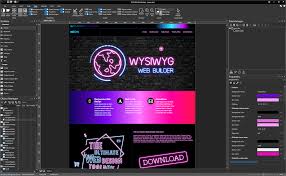
Description: The ultimate toolbox for creating amazing websites! WYSIWYG Web Builder has a huge set of tools for both beginners and professional designers/developers.

Responsive Web Design
Unlike most other web design applications, you can create both flexible and absolute page layouts. With support for layout grid, flexbox, css grid and fixed layouts with breakpoints.

Web Fonts
Easily add Google Fonts and other Web Fonts to your website.

Animations
Add amazing pre made animations and transitions or create your own animations. More than 150 pre-defined animations are included.

Pre-made Blocks
Use pre-made blocks to quickly get started. More than 250 blocks are available!

Forms Tools
Send Emails, Upload Files, Store Data in MySQL or CSV, Auto Responder, Form Validation, Conditons/Calculations

Images & Media
Image filters, shapes, galleries, carousels, lightboxes, rollover animations, YouTube, Vimeo, TikTok, MP4 and audio

Icon Libraries
Support for Font Awesome, Material Icons and many other icon libraries

Navigation
Navigation buttons, drop down menus, fullscreen menu, mega menu, panel menu, breadcrumb, pagination and much more!

Extensions
Hundreds of extensions to add extra functionality to the software. Including slideshows, navigation, audio/video, webshops, data viewers etc.

One Click Publishing
No external FTP program needed. No special hosting required, use with any Hosting Service!
Supports Secure FTP, FTPS and standard FTP

Drag and Drop
Visually design your website (What-You-See-Is-What-You-Get). Just drag & drop the objects to your web pages. The HTML code will be automatically generated for you!

SEO Tools
Google compatible sitemap and robots.txt generator. The built-in SEO Assistant helps you to make your web pages more search engine friendly.

Password Protect Pages
Multi-user login tools. Sign Up, Password Recovery, Online User Administrator, User Roles etc..

CMS
Built-in (PHP based) Content Management System to allow you or your customers to manage content online. There is also more basic 'Editable Content' functionality available.

Ecommerce
Integrated support for third party ecommerce solutions like PayPal, Ecwid, Stripe, Snipcart, Paddle, Gumroad, WebMoney and Vibracart Pro

Release Name: WYSIWYG Web Builder 21.0
Size: 46.7 MB
Links: HOMEPAGE – NFO – Torrent Search

Download: RAPiDGATOR
9 Comments
Mar 5

Free YouTube To MP3 Converter 4.5.7.305 Premium

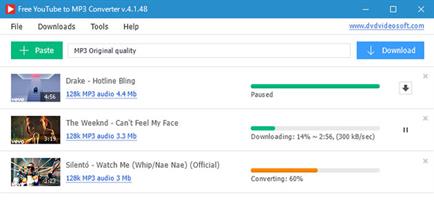
Description: Free YouTube to MP3 Converter Premium - Convert YouTube to MP3, extract audio from YouTube playlists, show lists, charts, video responses, channels, user favorites… The number of available options and formats is infinite, despite the fact that most of them are available in free version. You may download and convert playlists, channels, original streams, TV series and get them to iTunes at once.

Features:
Convert YouTube to MP3 and get Insane and Extreme 320kbps MP3 hi-fi files!
Also convert to AAC, OGG, M4A, FLAC and WAV lossless audio.
Get original audio files without conversion.
Enjoy entire YouTube playlists and channels.
Convert any YouTube playlist to MP3.
Download and convert audio files in bulk.
No limits for batch downloads per day!
Merge several audio files into one.
Transfer music directly to iTunes.

Release Name: Free YouTube To MP3 Converter 4.5.7.305 Premium
Size: 131.6 MB
Links: HOMEPAGE – NFO – Torrent Search

Download: RAPiDGATOR

10 Comments
Mar 5

Robin YouTube Video Downloader Pro 7.2.1

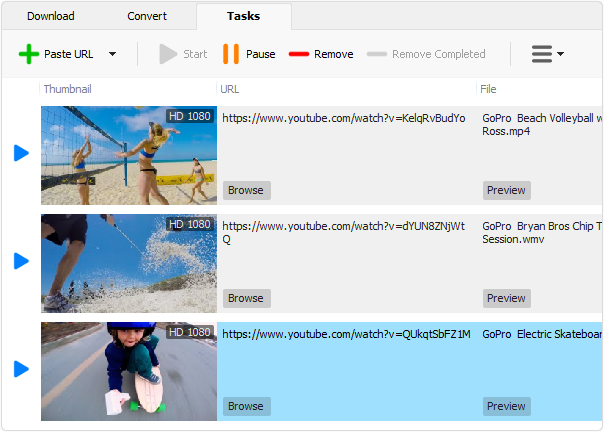
Description: The fastest way to download and convert videos from YouTube. YouTube Video Downloader Pro is a professional Windows app for downloading and converting videos from YouTube, Facebook, TikTok, and thousands of other video sharing sites. It accelerates your downloads by up to 5 times. YouTube Video Downloader Pro allows you to download multiple videos at a time. It also allows you to pause, resume, and cancel downloads at anytime.

Speed up your downloads 
YouTube Video Downloader Pro features an advanced download acceleration engine that lets you download videos up to 5 times faster than normal speed.
YouTube Video Downloader Pro allows you to download multiple videos at a time. It also allows you to pause, resume, and cancel downloads at anytime.
While downloading, you can click "Preview" button to play incomplete video and make sure it is really the video of your choice.

Convert to any format for any device
YouTube Video Downloader Pro can automatically convert downloaded file to any format for any device. It supports MP4, FLV, WMV, MOV, AVI, MPG, VOB, WEBM, DVD, VCD, and many other formats.
YouTube Video Downloader Pro can also extract audio stream from video file, and save it in WAV, WMA, AC3, AAC, OGG, FLAC, MP2, or any other audio format.

iTunes compatible
Optionally, YouTube Video Downloader Pro can automatically add downloaded video files to your iTunes library, so you can easily synchronize your videos to your iPhone, iPad, iPod, etc.

Release Name: Robin YouTube Video Downloader Pro 7.2.1
Size: 73.8 MB
Links: HOMEPAGE – NFO – Torrent Search

Download: RAPiDGATOR
8 Comments
Mar 5

Free YouTube Download 4.5.7.305 Premium

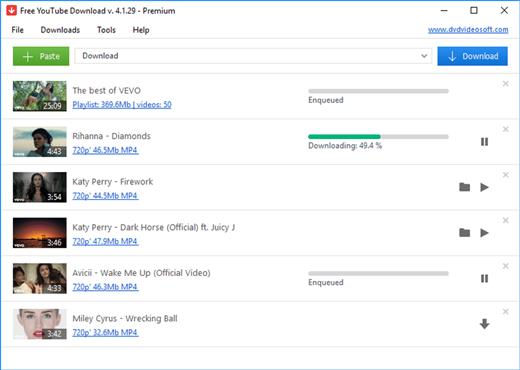
Description: Free YouTube Download is the most popular YouTube downloader application now, released in 2006 and updated on a regular basis. It lets you download and convert YouTube videos, so you can watch them whenever you want.

Features:
Download YouTube at high speed without conversion.
Convert video files to MP4, AVI or MOV.
Get videos in Full HD, 4K, or even 8K resolution!
Search for most liked YouTube Shorts, save them in bulk!
Convert YouTube to MP3 and get 320kbps MP3 hi-fi files.
Enjoy entire YouTube playlists and channels.
Merge several files into one.
Save videos with subtitles.
Transfer downloaded files directly to iTunes.

Release Name: Free YouTube Download 4.5.7.305 Premium
Size: 127.2 MB
Links: HOMEPAGE – NFO – Torrent Search

Download: RAPiDGATOR

7 Comments
Mar 5

Awesome Miner Ultimate 11.5.0

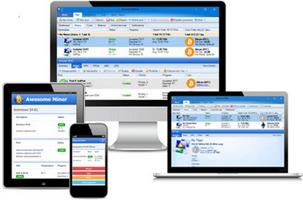
Description: Complete solution to manage and monitor mining operations. Powerful for large scale mining. Scalable up to 200,000 ASIC miners and 25,000 GPU/CPU miners. Feature rich and flexible to serve high demanding operations.

Maximize profit - Minimize downtime
Profit switching based on real time revenue and power consumption
Detection of mining issues with automatic recovery

Optimized Antminer firmware
Significant performance increase for Antminer S17, S19 and S21
Improved power efficiency and more features

Easy to get started
Start mining within a minute
Automatic setup of all popular mining pools with just a click

ASIC support
Manage and monitor all popular ASIC devices without installing any software on the device. A total of more than 200 ASIC miner models are supported. Supported ASIC miners includes, but are not limited to: Bitmain Antminer, Baikal, Canaan Avalon, Goldshell, Innosilicon, Obelisk and Whatsminer.

Bitmain Antminer
Bitmain Antminer is a popular ASIC miner. Awesome Miner fully supports all Antminer models, including features like reboot, pool configuration, pause and resume mining, firmware upgrades, LED flash and more.

Optimized Antminer firmware
Use the optimized Antminer firmware to get significant hashrate improvements and more features. The firmware supports display of power usage, LED flash, sleep mode, and multiple predefined hashrate modes. All these features are integrated in Awesome Miner. Supports Antminer S9, S9i, S9j, T9+, L3+, L3++, S17, S17+, T17, T17+, S19, T19, S21, T21, L7.
A hashrate increase of 10% can be expected for Antminer S9, 40% for Antminer S17 and at least 15% for Antminer S19 and S21. The power efficiency is improved by tuning of each individual ASIC chip.
For the majority of the Antminer firmware editions, Awesome Miner is included at no additional cost with all features and for any number of miners.

Automation and curtailment
Automate the mining operations by defining triggers and actions where the ASIC miner can be instructed to perform operations like reboot, pause or change of mining pools. The automation can be used to detect a wide range of issues related to the ASIC miners and automatically resolve them by performing a reboot.
More than 30 different trigger conditions and more than 40 different actions are available to allow for flexible and powerful automation of the mining operations.
Use Power Curtailment to let Awesome Miner automatically power up and power down the miners. The conditions can be based on the current electricity price, a signal from a power management service or a custom set of triggers.

Release Name: Awesome Miner Ultimate 11.5.0
Size: 103.4 MB
Links: HOMEPAGE – NFO – Torrent Search

Download: RAPiDGATOR
8 Comments
Mar 5

Prevent Restore Professional 2026 v119

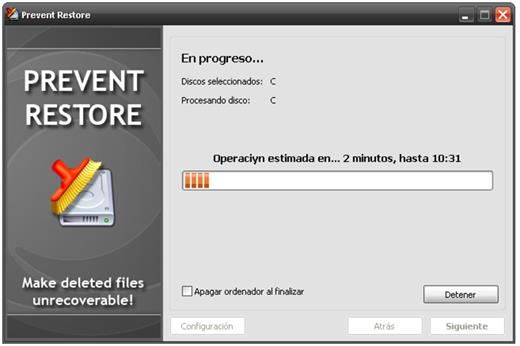
Description: When you delete a file or folder (or empty the Recycle Bin) it's just marked as deleted and disappears from the list in Windows Explorer. But contents of deleted files still exist on the disk and can be easily restored for many years.

You may have thousands of already deleted files on your PC, whose contents still reside on your disk. Think of how many files that had been "deleted" were still on all those external hard drives that you gave to someone?

There is just one (and, luckily, simple) solution to prevent recovery of already deleted files - by overwriting all free disk space where the content of deleted files is located with random data. Thus, the content of old files will be replaced by new information and the old stuff will go away forever.

Release Name: Prevent Restore Professional 2026 v119
Size: 4.3 MB
Links: HOMEPAGE – NFO – Torrent Search

Download: RAPiDGATOR

7 Comments
Mar 5

CHROMiX ColorThink 4.1.0

Description: ColorThink 4 - the Best now Better. Version 4 adds tons of features and thoroughly modernizes the industry's best color graphing and analytics tool while retaining its familiar interface.

Gamut Comparison
Also highly anticipated is the ability to analyze and compare two gamuts. ColorThink 4 uses gamut subtraction and/or addition to create an entirely new kind of graph. For example: When sRGB and a press profile are compared, ColorThink 4 subtracts the portion of the press profile that is left outside of sRGB. This is a very clear illustration of the colors on press that are unavailable if sRGB is your working space. The compare function can reverse the subtraction, so the press profile is subtracted from the sRGB gamut. You can also select the shared gamut to be shown in addition to the fully combined gamut. The Plot Item inspector shows the gamut volumes of each of the two original gamuts as well as the comparison volume. The gamut comparison index or GCI is also an easy number to relate to and is calculated in accordance to the ISO standard.

Image Animation
ColorThink 4 has an exciting new way of displaying images in the grapher. Images load in their normal form and smoothly animate between the normal display form and the Lab values of the image colors in the grapher. The embedded profile is easily selected to show in wireframe form, illustrating how the image colors all fit within the gamut of its embedded profile. This feature alone will wow your audience and help get their head into color faster than any previous visualization!

Color Assets
This is a huge benefit for many color folks that have a zillion profiles and related files in various places. ColorThink 4 organizes all Color Assets, including profiles that are installed in your system plus other assets that are located wherever you store them. Filter them by the kind of asset, the color space of the asset or even arbitrary text. ColorThink harvests tons of meta-data about each asset type, including primary colors, asset type, color space, gamut volume and various size parameters and even the max density value Dmax. Then you can sort by these values to find the largest gamut profile or the paper with the lowest Dmax. There is so much power in the organizational benefits of the new Color Assets that you'll just have to see for yourself. This feature will save literally hours of search time.

White Point Editor
One new tool in ColorThink 4 is the White Point Editor. Modifying the white point in an ICC profile is a handy way to alter the appearance of proofs as well as other functions. The new White Point Editor is very flexible, where you can enter XYZ, Lab or correlated color temperature values. You can also drag and drop a list of colors or another ICC profile into the editor and the white point of those will be used to modify the original profile's white point. It's a simple click and direct measurement from your color instrument to sample a real world paper color and change your profile's white point to that color. Very powerful.

LCH Mode
Another effective coordinate space which unfolds profiles and other data sets is LCH. Color hue, which normally goes around the color wheel like hands of a clock is stretched out into a straight line. ColorThink 4 graphs in LCH allowing you to evaluate your color from a very different perspective. With this view the relative saturation or chroma of each of the colors is now easily compared because they're viewed across a straight line. Alternate color spaces like Jab and OKLab can also be used in this mode so you can see how they affect the saturation to become a lot more regular.

Delta-E blobs
The color difference calculations we know as delta E can be difficult to explain. ColorThink 4 can illustrate the idea of Delta E as a blobs or spheres around colors. The Delta E 76 and Delta E 2000 have very different perspectives and shapes relating to closeness distance of color aims. ColorThink 4 will help with this understanding. You can change the plotting coordinates from Lab to Jab or other modes to see how it affects these color differencing shapes.

Release Name: CHROMiX ColorThink 4.1.0
Size: 528.2 MB
Links: HOMEPAGE – NFO – Torrent Search

Download: RAPiDGATOR
9 Comments
Mar 5

Inside The Pendragon Cycle Rise Of The Merlin S01E02-E07 1080p WEB-DL H264-ARCHIVED


Inside The Pendragon Cycle: Rise of the Merlin is a companion series hosted by Megan Basham, breaking down what you saw, what you missed, and what it all means, revealing layers of symbolism and ideas that make every episode worth a second watch.

Links: HOMEPAGE – TVM

Inside.The.Pendragon.Cycle.Rise.Of.The.Merlin.S01E02-E07.720p.WEB.H264-JFF
MKV | AAC | 6EP [1.3 GB]
NFO - Subtitles – TorrentNiTROFLARERAPiDGATOR
Single Link: RAPiDGATOR Backup

Inside.The.Pendragon.Cycle.Rise.Of.The.Merlin.S01E02-E07.1080p.DLWP.WEB-DL.AAC.2.0.H264-ARCHIVED
MKV | AAC | 6EP [2.4 GB]
NFO – Subtitles – TorrentNiTROFLARERAPiDGATOR
Single Link: RAPiDGATOR Backup

Inside.The.Pendragon.Cycle.Rise.Of.The.Merlin.S01E02-E07.WEB.H264-RBB [P2P]
MP4 | AAC | 6EP [745 MB]
NFO – Subtitles – TorrentNiTROFLARERAPiDGATOR
Single Link: RAPiDGATOR Backup

19 Comments
Mar 5

DocuFreezer 7.0.2603.2170

Description: Batch File Converter for Windows. DocuFreezer is a desktop application that converts your documents and images to PDF, TXT, JPG, TIFF, or PNG formats, “freezing” the look of the input documents and protecting them from any amendments. No matter which device the document will be displayed on, it will look exactly the same as the original.

Why DocuFreezer?
DocuFreezer advantages Converting an Adobe PDF document, Word document, Excel spreadsheet, Outlook e-mail, PowerPoint presentation, HTML page, Photoshop image file, XPS file, text file, or JPEG image to another format is usually not a problem. But what if you need to batch convert many files and don't want to repeat the same operations over and over again? Free file converter DocuFreezer can save your time every day.

Simple & easy-to-use interface
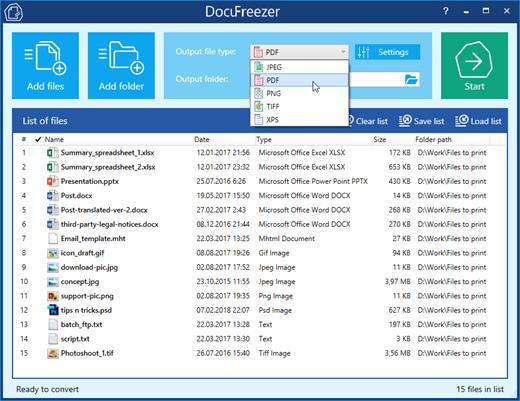
The program interface is intuitive: drag-and-drop your files, select the output format, and click Start. You can add several files, entire folders, RAR, ZIP, and 7ZIP archives with documents directly on the main window. DocuFreezer keeps it simple - you can use the default settings to get great results. However, you can adjust many things by yourself with numerous settings and options.

Keeping original file contents
DocuFreezer helps you easily convert your files and protect them from being modified. After conversion, the output files will keep the original files’ structure, page layout, text formatting, fonts, and hyperlinks. DocuFreezer can also preserve the original file names, metadata, folder structure, attachments, and color attributes of source files.

Saving your files to PDF or images
If you need to archive documents, save them as a backup, or if you want to provide a non-editable copy to someone, DocuFreezer will help you convert almost any document to PDF, JPG, TXT, TIFF. This will let you have your files accessible on any modern device, keep them safe and open several years later.

Conversion of multiple files at once
DocuFreezer software is designed to batch process documents and images quickly and automatically via a drag-and-drop interface. Add dozens or even hundreds of documents to the list and have them converted in one go without any user attention. You no longer need to open each file and convert it by yourself! Besides, you can configure page rotation, page range, filter mask, and post-processing actions for faster workflows.

80+ supported input file formats
DocuFreezer supports over 80 input file types (and the number is growing!), including all popular types of documents and images such as Adobe PDF files (.PDF), Microsoft Word documents (.DOC, .DOCX), Microsoft Excel worksheets (.XLS, .XLSX), Microsoft PowerPoint presentations (.PPT, .PPTX), plain and rich text files (.TXT, .RTF), XPS files (.XPS, .OXPS), AutoCAD files (.DWG, .DXF), and more.

Merge, combine & split options for PDF
With DocuFreezer, you can add several PDFs to combine and merge them into one multi-page document. Or create a merged PDF from various files like JPG, XPS, HTML, DOCX, TIF. Or split a large PDF – extract all pages into many single-page files. Moreover, you can add new pages to an existing PDF, e.g., add a cover page to the beginning or an additional page to the end of the document. Merge and split options are available for PDF and TIFF.

Convert multiple files at once: PDF to JPG, Word to PDF, TIFF to JPG, HTML to PDF, etc.
Most programs, such as Microsoft Word, OpenOffice, Excel, PowerPoint, and Adobe Acrobat, make it possible to export documents to PDF format without installing any third-party applications. This is convenient when there are just a few documents to process. Still, when there are dozens of them to be converted, the task becomes pretty tedious: you will need to handle each document individually. Opening each file, saving it as a PDF file, closing the document, and then repeating the same steps with the next file can be very time-consuming.

DocuFreezer is designed specifically for processing a large number of documents or images that need to be changed to other formats. Try our software and see how much time you can save!

With DocuFreezer you can convert
- MS Word DOC to JPG / TIFF
- HTML to JPG / PNG
- JPEG to TIFF / TIFF to JPEG
- PDF to JPG / TIFF / TXT
- Publisher PUB files to JPG
- MS Word to TIFF
- TIFF to JPEG / PNG
- ODF / ODT to JPG
- PPTX / PPSX to PDF
- TXT to JPG

You can also
- Convert any number of files to PDF or raster images
- Convert e-mail files with attachments in different ways
- Merge, split, and combine PDF / TIFF files
- Add text or image watermark to document pages
- Convert CAD files into a multipage PDF or separate pages
- Set color space (color scheme), DPI, and image quality
- Set filename of output multipage PDF / TIFF
- Save and load file lists for regular use
- OCR scans, images into TXT or searchable PDF
- Set page rotation or auto rotation (Portrait/Landscape)

System Requirements
- Microsoft Windows 11 / 10 / 8 / 7 / XP Service Pack 3 (32-bit or 64-bit system) or Microsoft Windows Server 2003 / 2008 / 2012 / 2016 / 2019 or newer versions
- Intel Core i3 or AMD Athlon II X2 processor or faster processor
- 8 GB RAM or more
- Free space on hard drive: 412 MB
- Required software: Microsoft NET Framework 4.0

Release Name: DocuFreezer 7.0.2603.2170
Size: 181 MB
Links: HOMEPAGE – NFO – Torrent Search

Download: RAPiDGATOR
9 Comments