Please REGISTER or RENEW your account on RAPiDGATOR.net and support us by doing through all RAPiDGATOR working download links on main posts...
Sept 10

The Librarians The Next Chapter S02E12 HDTV x264-NGP

Season 2, Episode 12 – “And the Camelot Conundrum”
The Librarians face their deadliest mission yet when a power-hungry Merlin returns to Camelot, determined to rewrite both the past and the future. Now, the team must stop the formidable wizard and prevent the collapse of time itself — or die trying.

Links: HOMEPAGE – TVM

The.Librarians.The.Next.Chapter.S02E12.HDTV.x264-NGP
MP4 | AAC | 456MB
NFO – Subtitles – Screenshot – Torrent – UPLOADY – NiTROFLARE – RAPiDGATOR
Single File RAR: RAPiDGATOR Backup

The.Librarians.The.Next.Chapter.S02E12.720p.WEB.H264-JFF
MKV | AAC | 1.10GB
NFO – Subtitles – Screenshot – Torrent – UPLOADY – NiTROFLARE – RAPiDGATOR
Single File RAR: RAPiDGATOR Backup

The.Librarians.The.Next.Chapter.S02E12.1080p.ENOW.WEB-DL.H.264-SUNSTONE
MKV | AAC | 2.19GB
NFO – Subtitles – Screenshot – Torrent – UPLOADY – NiTROFLARE – RAPiDGATOR
Single File RAR: RAPiDGATOR Backup

The.Librarians.The.Next.Chapter.S02E12.1080p.FAH.WEB-DL.DDP5.1.H.264-NTb
MKV | AC3 / dolby digital plus | 2.73GB
NFO – Subtitles – Screenshot – Torrent – UPLOADY – NiTROFLARE – RAPiDGATOR
Single File RAR: RAPiDGATOR Backup

The.Librarians.The.Next.Chapter.S02E12.480p.WEB.x264-RMT [P2P]
MKV | AAC | 220MB
NFO – Subtitles – Screenshot – Torrent – UPLOADY – NiTROFLARE – RAPiDGATOR
Single File RAR: RAPiDGATOR Backup

The.Librarians.The.Next.Chapter.S02E12.And.The.Camelot.Conundrum.AAC.MP4-Mobile [P2P]
MP4 | AAC | 232MB
NFO – Subtitles – Screenshot – Torrent – UPLOADY – NiTROFLARE – RAPiDGATOR
Single File RAR: RAPiDGATOR Backup

The.Librarians.The.Next.Chapter.S02E12.WEB.H264-RBB [P2P]
MP4 | AAC | 354MB
NFO – Subtitles – Screenshot – Torrent – UPLOADY – NiTROFLARE – RAPiDGATOR
Single File RAR: RAPiDGATOR Backup

The.Librarians.The.Next.Chapter.S02E12.XviD-AFG [P2P]
AVI | MP3 | 591MB
NFO – Subtitles – Screenshot – Torrent – UPLOADY – NiTROFLARE – RAPiDGATOR
Single File RAR: RAPiDGATOR Backup

The.Librarians.The.Next.Chapter.S02E12.720p.HEVC.X265-MeGusta
MKV | AC3 / dolby digital plus | 375MB
NFO – Subtitles – Torrent – UPLOADY – NiTROFLARE – RAPiDGATOR
Single File RAR: RAPiDGATOR Backup


The.Librarians.The.Next.Chapter.S02E12.1080p.HEVC.X265-MeGusta
MKV | AC3 / dolby digital plus | 588MB
NFO – Subtitles – Torrent – UPLOADY – NiTROFLARE – RAPiDGATOR
Single File RAR: RAPiDGATOR Backup

The.Librarians.The.Next.Chapter.S02E12.1080p.X265-ELiTE
MKV | AC3 / dolby digital | 971MB
NFO – Subtitles – Torrent – UPLOADY – NiTROFLARE – RAPiDGATOR
Single File RAR: RAPiDGATOR Backup

75 Comments
Sept 10

Nothing But The Best 1964 1080p BluRay H264-VALUE

Nominated for 1 BAFTA Award 1 win & 3 nominations total See more awards »

Plot: A young and ambitious businessman hires an unemployed upper-class man to tutor him in the life skills which he thinks are necessary to succeed. When he succeeds, disaster threatens.

Genre: Comedy
IMDB Rating Live: Nothing But the Best on IMDb
IMDB Rating: 6.5/10 From 606 Users
TMDB Rating: N/A
Rotten Rating: N/A
Metacritic Rating: N/A
Directed by: Clive Donner
Starring: Alan Bates , Denholm Elliott , Harry Andrews

Release Name: Nothing.But.The.Best.1964.1080p.BluRay.x264-RUSTED
Size: 16.8GB
Video: MKV | 1792x1080 | 23.3 Mb/s | 24.000 FPS
Audio: English | FLAC | 709 kb/s
Runtime: 1 h 39 min
Subtitles: English [Selectable]
Samples: Video @ Screenshot – #1 – #2 – #3

Links: iMDB | Trailer | NFO | Torrent Search

Download 1080p: UPLOADY – NiTROFLARE – RAPiDGATOR

Download Single File RAR: RAPiDGATOR Backup

Release Name: Nothing.But.The.Best.1964.1080p.BluRay.H264-VALUE
Size: 28.7GB
Video: MKV | 1920x1080 | 39.0 Mb/s | 24.000 FPS
Audio: English | 2 304 kb/s
Runtime: 1 h 39 min
Subtitles: English [Selectable]
Samples: Video @ Screenshot – #1 – #2 – #3

Links: iMDB | Trailer | NFO | Torrent Search

Download 1080p: UPLOADY – NiTROFLARE – RAPiDGATOR

Download Single File RAR: RAPiDGATOR Backup

3 Comments
Sept 10

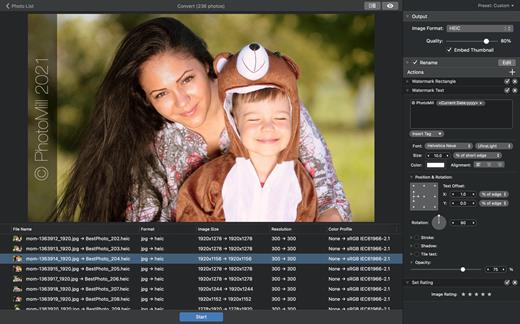
PhotoMill X 3.5.0

PhotoMill helps you convert a bulk of images into the most popular image formats, give your files meaningful names, watermark with text and image, adjust photos (brightness/saturation/exposure/grayscale/etc.), fit geometry (scale/crop/trim/etc.), remove private metadata, add your own copyrights etc. Also, PhotoMill is a great batch metadata editor, renamer and photo browser.

Features


  • Convert

    • Conversion to: BMP, GIF, JPEG, JPEG 2000, PDF, PNG, TIFF
  • Color models: RGB, Gray, CMYK Color depth: 8/16/32 bits; with or without alpha channel
  • Metadata editor

    • Correct EXIF/IPTC metadata tags in your photos: place GPS coordinates, remove private information from your photos, correct or set capture dates, add your own copyright, keywords or rating.
  • Photo browser

    • The app has a bunch of features for comfortable browsing and multi-criteria search of photos in the Browser. The Browser has 3 panels: Image Info – displays detailed information about a selected photo; Groups – splits photos into groups/subgroups based on a chosen criteria, for instance, by capture dates; Search – gives you an opportunity to search photos by different criteria.

  • Rename

    • You can give meaningful names to converted photos constructing file names in the “pro” way – using text and tags: index, capture date, original name, image width, “find & replace” etc. Also, you can rename photos without any conversion.
  • Resize

    • Fit image size with a bunch of geometry actions: scale, crop, add border, trim, trim color, rotate & flip, auto rotate (by EXIF orientation), change resolution.
  • Watermark

    • Text – you can use photo metadata information – tags: capture date, keywords, camera maker etc., as well as entered text. Font size can be either fixed or relative to an image width, height, long or short edge. Multiline text, stroke, shadow, rotation, tiling and other features.
    • Image – image size can be either fixed or relative to main image size. Image tiling is also available.
    • Rectangle – background for text; square or rounded. Fill and stroke color can be half-transparent.
  • Adjust colors

    • Available filters: auto contrast, auto white balance, gamma, contrast, exposure, sharpness, grayscale, sepia, colorize, temperature, HSL channels (Hue/Saturation/Lightness), HSV channels (Hue/Saturation/Value,Brightness), RGB channels, curves.
  • Working with transparency: alpha mask, color to alpha, alpha to color. Color matching: assign profile, convert to profile, proof with profile.
What’s New

Version 3.5.0:


  • Release notes were unavailable when this listing was updated.
Compatibility

macOS 10.12.2 or later
Apple Silicon or Intel Core processor


Release Name: PhotoMill X 3.5.0
Size: 93.7 MB
Links: HOMEPAGE – NFO – Torrent Search

Download: UPLOADY – RAPiDGATOR

6 Comments
Sept 10

Bloom 1.5.40

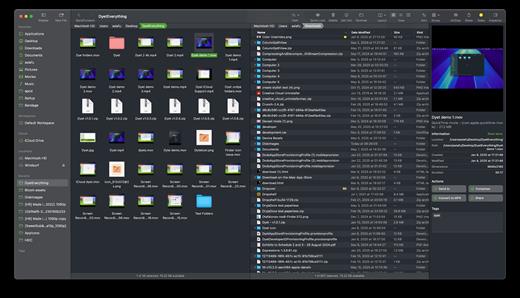
Bloom is a refined file management tool designed to enhance your search and navigation experience on macOS, offering a more intuitive and feature-rich alternative to Finder. With Bloom, you can instantly navigate to any location system-wide using the shortcut ⌘⇧⏎, making file access seamless and efficient .

Key Features


  • Enhanced Search Capabilities: Bloom allows you to search files by keyword within predefined locations, scanning tens of thousands of files in seconds for lightning-fast results. You can also search directly in any folder with ⌘F and refresh results with ⌘R .
  • Portal Mode: A compact window without sidebar or preview, Portal retains core functionalities and can be pinned on top of other windows or collapsed into the screen edge for convenience .
  • Archive Viewing: Browse contents of compressed files without extraction and preview text, images, or PDFs under 10MB by pressing Space or double-clicking .
  • Advanced File Management: Features like auto-resizing columns, advanced rename with regex support, workspace customization, iCloud Drive integration, and tag management elevate your file-browsing experience .
  • Media and Productivity Tools: Convert and optimize images, create various file types easily, paste images from the web, and organize files by kind or date. Additionally, Bloom records every operation for easy reversion and supports starting a terminal directly from a folder .
  • Disk Analysis and Task Management: Use Folder Scan to visualize disk usage through a treemap and manage file operations with a Task Scheduler to track progress .
What’s New

Version 1.5.40:


  • Release notes were unavailable when this listing was updated.
Compatibility

macOS 14.0 or later
Apple Silicon or Intel Core processor


Release Name: Bloom 1.5.40
Size: 15.3 MB
Links: HOMEPAGE – NFO – Torrent Search

Download: UPLOADY – RAPiDGATOR

6 Comments
Sept 10

PodCenter 1.3.4

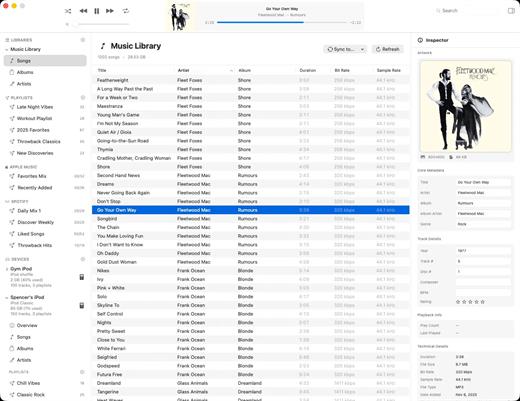
PodCenter is a native Mac app designed to help you manage, organize, and sync your music library to your iPod or other portable music players—without needing iTunes.

Key Features


  • No iTunes Needed: Syncs your music library directly on modern macOS with full control.
  • Automatic Format Conversion: Automatically converts unsupported file formats (like FLAC and OGG) into compatible audio files while transferring.
  • Metadata & Artwork Editor: Fix song titles, artist names, album details, and artwork individually or in bulk.
  • Playlist Management: Easily build and manage custom playlists that sync reliably every time.
  • Full Sync Transparency: Preview exactly which songs will be transferred, converted, or skipped before you start syncing.
What’s New

Version 1.3.4:


  • Release notes were unavailable when this listing was updated.
Compatibility

macOS 15 Sequoia or later


Release Name: PodCenter 1.3.4
Size: 50.2 MB
Links: HOMEPAGE – NFO – Torrent Search

Download: UPLOADY – RAPiDGATOR

6 Comments
Sept 10

Expenses 4.0.29

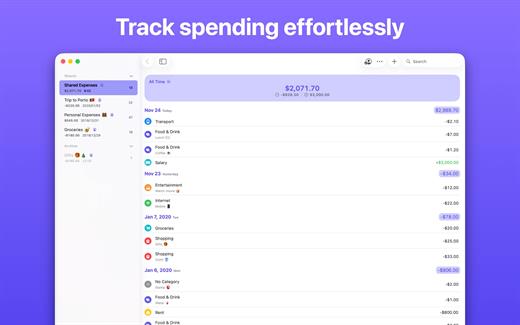
Expenses is a clean, intuitive spending tracker designed for speed, clarity, and control. It allows you to effortlessly monitor your money across the entire Apple ecosystem, including Mac, iPhone, iPad, and Apple Vision.

Key Features


  • Quick Input: Easily log your transactions on the go with just a few taps.
  • Complete Privacy: No registration required. The app prioritizes your data privacy and does not collect personal information.
  • Multi-Currency Support: Track your spending in any major currency with customizable exchange rates for seamless international transactions.
  • Stats & Trends: Visualize your spending patterns with actionable insights to help you build better financial habits.
  • Apple Ecosystem Integration: Full support for system features like Widgets and Siri Shortcuts to streamline your tracking.
  • Accessibility Built-In: Features an accessible design crafted to accommodate users with special needs.
What’s New

Version 4.0.29:


  • Release notes were unavailable when this listing was updated.
Compatibility

macOS 13.0 or later


Release Name: Expenses 4.0.29
Size: 11.3 MB
Links: HOMEPAGE – NFO – Torrent Search

Download: UPLOADY – RAPiDGATOR

6 Comments
Sept 10

Airtool 2.7.9

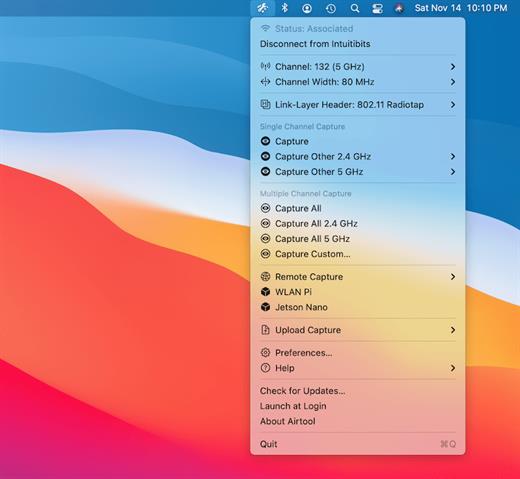
Airtool is a system menu-bar application that provides basic functions to check the state and channel configuration of the built-in Wi-Fi adapter, as well as to perform frame captures on single and multiple channels. It can be used together with Wireshark to let you change channel settings while performing live frame captures. In addition, captures can be automatically uploaded to CloudShark.

Features:


  • See Wi-Fi adapter state (associated, not associated) and channel information
  • Disconnect from network
  • List supported channels and channel widths
  • Perform frame captures on single or multiple channels
  • Change channel settings while performing live frame captures from external tools such as Wireshark or tcpdump
  • Automatically or manually upload captures to CloudShark
What’s New

Version 2.7.9:


  • Release notes were unavailable when this listing was updated.
Compatibility

macOS 13.5 or later


Release Name: Airtool 2.7.9
Size: 18.4 MB
Links: HOMEPAGE – NFO – Torrent Search

Download: UPLOADY – RAPiDGATOR

6 Comments
Sept 10

PDF Squeezer 4.8.4

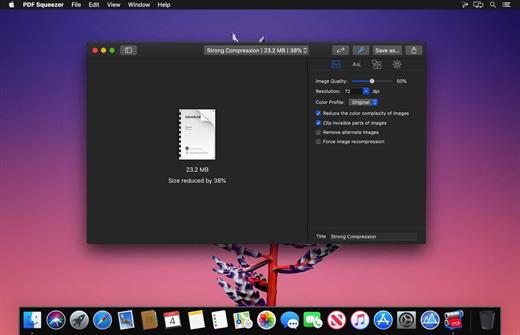
PDF Squeezer is an easy-to-use PDF compression tool.

It reduces the size of large PDF documents by compressing images and removing irrelevant information. This will help you obtain important savings in bandwidth costs, digital storage costs and network transmission times.

Features

  • Simply drag and drop your file into the application window
  • Choose from predefined compression filters or create your own
  • Compress all files in a folder and its subfolders
  • Batch compress multiple files
  • Finder, Safari and Preview ad-on available via the share menu
  • Support for password protected PDFs
  • Automatic compression and save with ‘One-Click-Compression’
What’s New

Version 4.8.4:


  • Release notes were unavailable when this listing was updated.
Compatibility

macOS 10.13.0 or later


Release Name: PDF Squeezer 4.8.4
Size: 42.4 MB
Links: HOMEPAGE – NFO – Torrent Search

Download: UPLOADY – RAPiDGATOR

5 Comments
Sept 10

VectorView 4.2.2

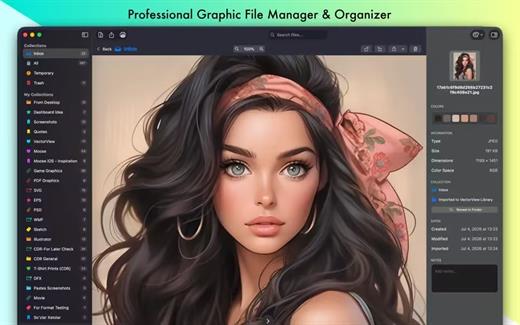
VectorView: The Professional Graphic File Manager for Mac

Open and preview CorelDRAW, EPS, SVG, DXF and other professional vector and raster files natively on your Mac. Organize your design library with smart collections and work seamlessly with formats macOS doesn’t support out of the box.

Open What Others Can’t

  • CorelDRAW (CDR) – Full native support for industry-standard print and signage files
  • EPS – Accurate rendering from Adobe Illustrator and other tools
  • AI – Preview Illustrator files without Creative Cloud
  • PS – Handle PostScript files from professional workflows
  • DXF – Import Autodesk Drawing Exchange Format files
  • PSD – View layered Photoshop documents
  • WMF/EMF – Open Windows vector graphics seamlessly
  • Plus – PDF, SVG, PNG, JPEG, TIFF and other standard formats
Designed for Professionals

Built for designers, print shops, and creative professionals working with files from multiple sources. Whether you’re receiving CDR files from clients or managing large design libraries, VectorView handles it all efficiently.

Smart Organization

  • Smart Collections – Organize files by project, client, or custom categories
  • Color-Coded Organization – Use custom icons and colors for visual clarity
  • Quick Preview – Instantly preview files without heavy apps
  • Batch Operations – Process multiple files at once
  • Search & Filter – Find files instantly across your library
Professional Export (Pro Version)

  • High-Quality Export – Export to SVG, PNG, JPG, PDF, or TIFF
  • Custom DPI – Set exact resolution for print or web
  • Custom Sizing – Define precise dimensions
  • Production Ready – Professional-grade output quality

7-day free trial available

Native Performance

  • Native Mac Design – Built with SwiftUI following macOS guidelines
  • Fast Performance – Optimized for Apple Silicon and Intel Macs
  • Low Memory Usage – Efficient resource consumption
  • macOS Integration – Works with Finder, Spotlight, and Quick Look
Why VectorView?

  • No Conversion Needed – View files instantly without extra steps
  • Flexible Pricing – One-time purchase or subscription
  • Professional Quality – Trusted by studios and print shops
  • Regular Updates – Continuous improvements and new features
  • Privacy First – All processing happens locally on your Mac
Perfect For

  • Graphic designers managing client assets
  • Print shops working with diverse formats
  • Creative professionals in cross-platform workflows
  • Anyone needing to open CDR, EPS, PS, or large PSD files on Mac
  • Teams organizing design libraries
What’s New

version 4.2.2:


  • Fixed changing Library location.
Compatibility

macOS 14.6 or later


Release Name: VectorView 4.2.2
Size: 47.9 MB
Links: HOMEPAGE – NFO – Torrent Search

Download: UPLOADY – RAPiDGATOR

6 Comments
Sept 10

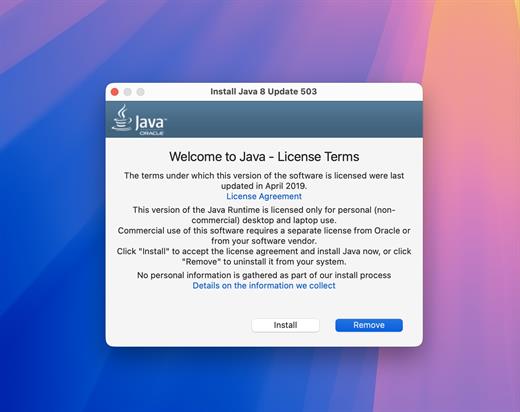
Java (JRE) v8.0 Update 503

Java allows you to play online games, chat with people around the world, calculate your mortgage interest, and view images in 3D, just to name a few. It’s also integral to the intranet applications and other e-business solutions that are the foundation of corporate computing.

JRE is the software layer that allows Java applications to run on your computer. It provides everything needed.

JRE is the runtime engine that makes Java programs work on your computer.
It sits between the Java application and your operating system, providing all necessary resources and ensuring the same Java program runs identically on any OS.

What’s New

Version 8.0:


  • Release notes were unavailable when this listing was updated.
Compatibility

macOS 12.0 or later
Apple Silicon or Intel Core processor


Release Name: Java (JRE) v8.0 Update 503
Size: 188.9 MB
Links: HOMEPAGE – NFO – Torrent Search

Download: UPLOADY – RAPiDGATOR

7 Comments