Please REGISTER or RENEW your account on RAPiDGATOR.net and support us by doing through all RAPiDGATOR working download links on main posts...
July 1

Sony Catalyst Browse / Prepare Suite 2026.1.1

Description: Catalyst Browse, a cross-platform viewing and logging tool for all Sony Pro formats, offers streamlined media management that simplifies your workflow and secures your content. Catalyst Prepare - The fast, simple, reliable path from camera to post.
Catalyst Prepare takes care of all of your media prep needs:
- View your media directly from a camera, deck, or card reader
- Make a full-volume backup with checksum verification
- Organize clips into bins
- Batch copy clips
- Batch transcode clips
- Make color adjustments and apply looks
- Set in/out points
- Establish multichannel audio assignments
- Batch upload clips Ci, the Sony video cloud service
- Assemble a rough cut with the Storyboard feature

Catalyst Browse
The complex world of media production requires powerful media management. Catalyst Browse, a cross-platform viewing and logging tool for all Sony Pro formats, offers streamlined media management that simplifies your workflow and secures your content.

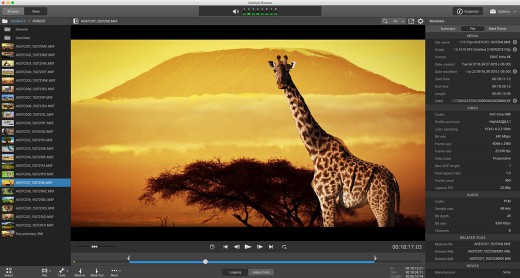
Catalyst Browse is a media assistant that lets you browse files from your Sony camera, deck, or card reader with detailed views of individual clips; see and edit media metadata; accurately view video using source colour space, and apply colour correction and colour looks. Once you've selected the clips you need, you can copy them to a local hard drive or connected NAS, upload to Sony Media Cloud Services Ci, transcode to a variety of formats, as well as create, ingest, and export Sony Professional Disc clip lists.

Browse
Quickly browse files on your device using a visual thumbnail view or detailed list.

View
See the details of each clip, check focus, mark in and out points, adjust colours, and edit metadata.

Fast Copy
Copy all clips on the media, a subset, or only the desired portion of a clip to save time and space.

Ultra Wide Colour Gamut
Review with confidence the full range of colour captured by your S-Log and RAW Sony cameras. Apply colour correction, and import/export standard ASC-CDL files with other workflow tools to save time.

Clip Lists
Create, import, and export Sony Professional Disc clip lists for quick play-out needs.

Transcode and Cloud
Transcode clips to a variety of video production formats. Upload clips directly to the Sony Ci Media Cloud Services for collaborative team review.

System Requirements:
- A 64-bit operating system: Microsoft® Windows 7, Windows 8.1, or Windows 10
- 2 GHz processor (multicore or multiprocessor CPU recommended for HD; 8 cores recommended for 4K)
- 500 MB hard-disk space for program installation
- Solid-state disk (SSD) or high-speed RAID for 4K media
- 4 GB RAM (8 GB recommended; 16 GB recommended for 4K)
- NVIDIA, AMD/ATI, or Intel GPU with support for OpenCL 1.1 or later with at least 512 MB of memory (2 GB recommended for 4K) or a CPU with SSE 4.2 or higher. OpenGL 2.1 is recommended for optimum performance.

Release Name: Sony Catalyst Browse / Prepare Suite 2026.1.1
Size: 677.4 MB
Links: HOMEPAGE – NFO – Torrent Search

Download: RAPiDGATOR

4 Comments
July 1

SoftMaker FlexiPDF Professional 2025.420.0626

Description: The best GDPR-compliant alternative to Adobe Acrobat. The PDF editor that makes editing PDFs as easy as working with a word processor. With automatic DeepL translation, AI-based document summarization and excellent language tools.

The PDF editor FlexiPDF makes it all possible!
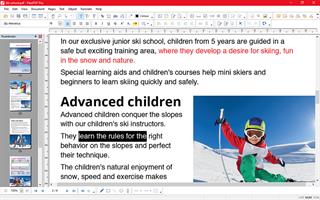
FlexiPDF allows you to edit text, pictures and drawings with the convenience of a word processor.
FlexiPDF exports PDFs to TextMaker, Microsoft Word, HTML and even as EPUB-based e-books in a flash.
FlexiPDF NX translates entire documents with DeepL into 30 languages while preserving the formatting.
The automatic character recognition (OCR) converts pages from the scanner into editable and searchable PDFs.

Privacy made in Germany
Secure. Trustworthy. GDPR compliant.
The PDF editor FlexiPDF adheres strictly to European data protection standards.
Developed with a clear focus on GDPR requirements, FlexiPDF protects your personal data and respects your privacy.

Intelligently summarize PDFs at the touch of a button
FlexiPDF NX with integrated ChatGPT
With the help of ChatGPT's artificial intelligence, FlexiPDF NX summarizes large PDF documents to show the most important key messages with just one click, giving you a quick and comprehensive overview of the content of your PDFs. Experience the future of PDF editing!

Professional language tools
Automatic translation, spell check and hyphenation
The spell checker in the PDF editor FlexiPDF finds spelling errors in 85 languages, and the automatic hyphenation separates words in 60 languages.
FlexiPDF NX translates entire pages quickly into one of 30 languages while preserving all formatting. FlexiPDF NX uses DeepL, the best translation software on the market, to provide these translations.

Show documents in tabs
The new version of FlexiPDF opens several documents at the same time and displays them in tabs – just like you know it from SoftMaker Office or your web browser.
This keeps you on top of your documents.

Create summaries with ChatGPT
Got no time to read through a large PDF file?
FlexiPDF NX does this work for you and summarizes large PDFs briefly and concisely to show the most important statements. This is done using ChatGPT’s artificial intelligence.

Compare PDF documents
Comparing PDF files has never been easier.
If you want to examine different versions of a document for differences, you can use FlexiPDF’s practical comparison feature to view two PDFs side by side and scroll through them synchronously. FlexiPDF automatically highlights the differences between the PDFs.

Flexible forms
FlexiPDF not only lets you fill out interactive forms, but also the much more common static forms that have been saved as PDF files. Since organizations often only provide such static forms, FlexiPDF saves you a lot of time that you would otherwise spend on printing the forms and filling them out manually.
FlexiPDF also lets you create your own interactive forms – including checkboxes, selection lists, input fields, etc.

Release Name: SoftMaker FlexiPDF Professional 2025.420.0626
Size: 631.3 MB
Links: HOMEPAGE – NFO – Torrent Search

Download: RAPiDGATOR
6 Comments
July 1

JP Software Take Command 36.50.68

Description: Replace Your Windows Console and CMD Command Prompt Windows. The Windows Command Prompt shortcut is a Windows console (command line, or character mode) session that runs the default Windows command shell CMD.EXE.

The command line is essential for developers, systems administrators and advanced users. Unfortunately, CMD Windows commands and the Windows console UI have always been woefully lacking in ability compared to what is available in most other operating systems. Because of the limitations in CMD and the Windows console, users have been forced to use the GUI for inappropriate tasks, or even to write custom programs to perform simple tasks that CMD should have been able to handle.

Take Command is a comprehensive interactive GUI and Windows command line toolkit that makes your command prompt windows easier to use and far more powerful. Take Command includes optional Windows Explorer integration, tabbed console windows, and major enhancements to standard Windows CMD commands such as COPY, DEL, DIR, FOR, MOVE, REN, SET, and START And it and adds more than 235 new commands, command dialogs, command line syntax coloring, vastly improved command line editing, programmable filename and directory tab completion, and thousands of other features.

Take Command is also a powerful batch file programming tool, including an integrated IDE with a sophisticated editor and batch debugger. Take Command offers extensions such as DO loops, SWITCH statements, error and exception handling, system monitoring and event triggers, and more than 780 built-in variables and functions. And you can extend that with 3rd-party plugins and user-defined functions.

12 Reasons Why You Should Replace Your Windows Console
The Windows console is responsible for running character-mode applications, including CMD, PowerShell, WSL bash, etc. It was introduced in Windows NT 3.1 in 1993, and some major internal architectural improvements were made in Windows 10 and 11.

Unfortunately, the improvements to the user interface were relatively minor, and though some efforts were made to improve the CMD console UI in Windows Terminal, they fall far short of what Take Command has been providing for years.

So why replace it with Take Command?

The Windows console is slow, and even slower when using Windows Terminal. Take Command's tab windows typically display output between 20% and 300% faster.
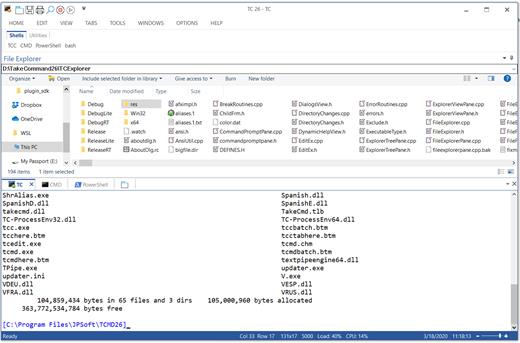
Take Command (like Windows Terminal) offers tabbed windows to run your character-mode applications. But Take Command takes it to another level by including vertical or horizontal tab groups and splitter windows.
Tabbed windows can be reordered, detached, or torn off, and existing console windows can be attached as new Take Command tab windows.
Take Command provides an optional embedded Windows File Explorer window that displays a tree view of the folders on your system and the contents of the selected folder (List View) on the right. You can drag folders and files from the Explorer window and drop them in a command prompt window.
Take Command can be easily configured for your preferences with its configuration dialogs.
Take Command has an optional tabbed tool bar that you can use to execute internal or external commands, aliases, or batch files with the click of a mouse (or an accelerator key). You can define up to 20 tabs, each with up to 50 toolbar buttons.
Take Command provides a configurable Status Bar that can display quick help for the current command, tooltips, and system information, including tab window size, CPU usage, memory usage, date & time, character values at the cursor location, and a slider control for window transparency.
Cut and Paste options are limited in the default CMD console or Windows Terminal. Take Command adds both line and column selection, double-click or triple-click selections, overwriting or appending to the Windows clipboard, and a variety of paste options.
Take Command windows can be styled with a choice of 18 themes.
Take Command and TCC offer a wide variety of colorization options, not just foreground and background colors.
Take Command includes invaluable tools, including a batch file debugging IDE, a regular expression creator / analyzer, search and replace in files, and a macro recorder / playback.
Extensive help (quick help, context sensitive help, and general help) is available in English, French, German, and Spanish at the touch of a button.

Release Name: JP Software Take Command 36.50.68
Size: 59.7 MB
Links: HOMEPAGE – NFO – Torrent Search

Download: RAPiDGATOR

4 Comments
July 1

ExamDiff 17.0.1.5

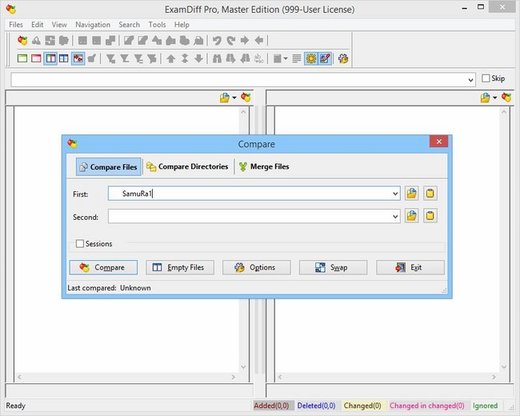
Description: ExamDiff Pro is a powerful yet intuitive and easy to use visual file and directory comparison tool for Windows. It features unique functionality that distinguishes ExamDiff Pro from other comparison programs. If you’ve been frustrated with other comparison utilities, you will find that ExamDiff Pro offers a much more efficient and user-friendly way to compare files and folders.

Features: 


  • Compares text files, binary files, and directories.
  • Performs two-way and three-way diff and merge.
  • Highlights differences down to the level of lines, words or characters.
  • Highlights document syntax.
  • Fuzzy line matching.
  • Ability to recognize moved text blocks.
  • Automated directory synchronization.
  • Line Inspector panel for easy recognition of differences within lines.
  • Can perform full file comparison in a background task in directory comparison.
  • Ability to add manual synchronization points to text file comparison.
  • Compares directly from Windows Explorer.
  • Allows file editing within file comparison panes.
  • Allows copying, renaming, and deleting files or directories.
  • Saves the file differences in a standard UNIX DIFF file or to a dynamic HTML web page.
  • Prints and print previews diff reports.
  • Easy navigation through the differences.
  • Advanced Search features.
  • Drag and drop support.
  • Advanced Ignore options, for ignoring capitalization, white space, programming-language comments, and more.
  • Word wrapping.
  • Plug-in support.
  • Drag and drop support.
  • Can create directory snapshots for later comparison.
  • Includes full Unicode support.
  • Fully customizable.
Release Name: ExamDiff 17.0.1.5
Size: 46.6 MB
Links: HOMEPAGE – NFO – Torrent Search

Download: RAPiDGATOR
4 Comments
July 1

Valentina Studio Pro 17.5.1

Description: Create, administer, query and explore DuckDB, ValentinaDB, MongoDB, MySQL, MariaDB, PostgreSQL, MS SQL Server & SQLite databases for free.

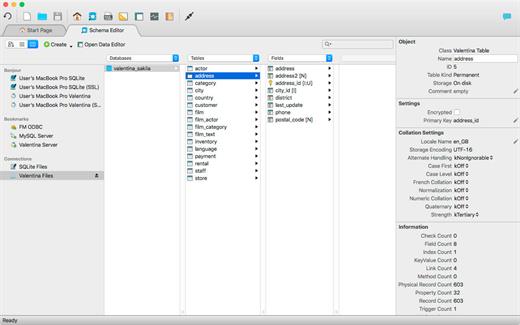
Valentina Studio is your universal database management tool for working with DuckDB, MariaDB, MySQL, MongoDB, SQL Server, PostgreSQL, SQLite and Valentina DB databases. Valentina Studio lets you connect with all major databases, run queries and generate diagrams to better understand your mission critical business data - and that is the free version of Valentina Studio.

Schema Editor
Work with databases using diagrams, tree or column view.

Database Management
Universal database management tool for all major databases.

Virtual Links
Create virtual links where you need the functionality of foreign keys without creating foreign keys.

Database Query Builder
Build, test and execute SQL queries visually, drag-drop with Query Builder.

Data Editor
Clean data editor with high productivity tools for working with tables, records and fields.

Data Transfer
Specify mapping of source/target tables and fields and load records from db1 to db2.

Workspaces
Organize your tools, preferences, lists of recent datasources and more for individual projects.

SQL DIFF
Compare schemas of two databases and  transform the first schema into the second.

Valentina Forms
Create and add forms visually, and then your users can work with them in free Valentina Studio.

Report Designer
Transforms queries into visually stunning enterprise reports with full suite of design elements.

Continuous Integration
Continuous Integration (CI) tools for better software practices for databases.

SQL Editor
Full featured SQL Editor for writing, testing and executing queries with all supported databases.

Release Name: Valentina Studio Pro 17.5.1
Size: 148.2 MB
Links: HOMEPAGE – NFO – Torrent Search

Download: RAPiDGATOR
4 Comments
July 1

Syncovery Premium 12.2.2.42

Description: The ultimate sync, backup, copy and migration tool. Syncovery will copy your data the way you need it - and fast!

Multiple Platforms
Syncovery will easily fulfill your requirements: on Windows, macOS, Linux, FreeBSD, and NAS systems. Copy between local drives, network shares, mobile devices via MTP, or using FTP, SFTP, or WebDAV and many others.

Cloud Support
Includes support for many different cloud storages, such as Google Drive, Box, Amazon S3, Azure, DropBox, OneDrive, Rackspace, Sharepoint, Backblaze B2, Citrix Sharefile, and many others.

Create multiple Jobs
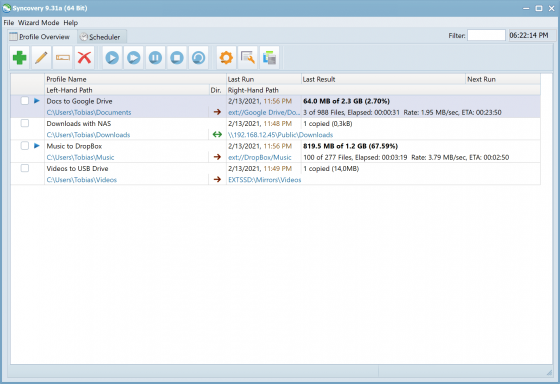
Create as many different jobs as you need. Run them manually (with Sync Preview), or let the scheduler run them automatically.

Handle complex Tasks
Syncovery is rich in features, including real-time sync, compression, encryption, email notifications, and much more. It can be extended via PascalScript.

Wizard Mode makes it easy to create your first profile.
Create your first sync or backup job step by step, with explanations of the main settings you need to make. Each job (or profile) works with two paths – source and destination, or just the left and right path (since profiles can be 2-way copy tasks also).

Extremely Fast Scanning
Syncovery’s multi-threaded folder listing algorithm provides an unparalleled speed, and easily handles millions of files and huge numbers of folders. Even more speed can be gained with our Destination File List Cache and Remote Service features.

Block Level Copying
This will help you save bandwidth as well as backup space. Syncovery can detect changed blocks in large files, and copy only these. The detection works by keeping checksums in a database, or with the help of the Syncovery Remote Service, or by using our revolutionary File System Monitoring Service (the File Sytem Monitoring Service is Windows only).

Real-Time Synchronization
Real-Time Synchronization will make sure that changes are synced quickly. Syncovery listens to file system events and quickly performs the appropriate actions. For cloud servers, it can use polling to detect changes. These features are available on Windows and macOS only.

SmartTracking
The SmartTracking sync mode is frequently used in two-way sync jobs. It can detect moved files, deleted files, and conflicts (files changed on both sides).

Versioning
Syncovery allows you to keep multiple versions of modified files, allowing you to restore your files from an earlier date. The restore date can be chosen for individual files or multiple files, in our Restore Wizard.

File Server Migration
Syncovery’s advanced NTFS copying features, high speed, and scaleability enable you to perform large-scale migrations. Read our new, comprehensive Server Migration Guide.

Release Name: Syncovery Premium 12.2.2.42
Size: 101.4 MB
Links: HOMEPAGE – NFO – Torrent Search

Download: RAPiDGATOR
4 Comments
July 1

PixelForge AI 1.0.0

Description: PixelForge is your powerful, all-in-one image enhancement tool designed for creators, professionals, and everyday users. Experience studio-quality editing with zero learning curve—no subscriptions, no internet, and total privacy.

What You Can Do with PixelForge
Enhance & Enlarge: Upscale images up to 8x with crystal-clear AI detail. Turn blurry old photos or small web images into high-res masterpieces. One-Click Background Erase: Extract people, products, or objects instantly with flawless edges. Flawless Object Removal: Easily erase unwanted objects, text, or people from your photos, and watch the background magically rebuild itself. Just drag, drop, and let the local AI work its magic. Perfect for restoring memories, creating e-commerce listings, or refining presentations in a unified, lightning-fast workflow.

Upscale Images
Increase resolution by 2×, 4×, or 8× using advanced AI models. Enlarged images retain crisp details and natural textures — no blurry results. Handles small web graphics and massive pr

Remove Backgrounds
One click removes the background and replaces it with transparency. Works on portraits, product photos, and complex subjects. The result is ready to place on any backdrop.

Inpaint & Repair
Select unwanted objects, scratches, or blemishes and let AI fill the area with natural-looking content. Perfect for restoring old photos, removing distractions, and cleaning up imag

Batch Processing
Process hundreds of images at once. Drag in an entire folder, set your settings once, and let PixelForge work through them all. Real-time progress shows status for every file.

Before & After Preview
Compare results side by side. See exactly what changed before saving.

Smart Pipeline
Chain multiple operations together: upscale → remove background → repair. Each step shows its own progress. Save custom workflows as presets for one-click reuse.

Full Privacy
Everything runs on your machine. No data is uploaded, no account is needed, and no internet connection is required after initial download.

Supported formats
PNG, JPEG, BMP, WebP, GIF (including animated)

System Requirements
- OS: Windows 10 version 17763.0 or higher
- Memory: 8 GB (Minimum), 16 GB (Recommended)
- Processor: Quad-core 2.0 GHz (Intel i5-8400 / AMD Ryzen 5 2600) (Minimum), 8-core 3.0 GHz (Intel i7-12700 / AMD Ryzen 7 5700X) (Recommended)

Release Name: PixelForge AI 1.0.0
Size: 566.5 MB
Links: HOMEPAGE – NFO – Torrent Search

Download: RAPiDGATOR

4 Comments
July 1

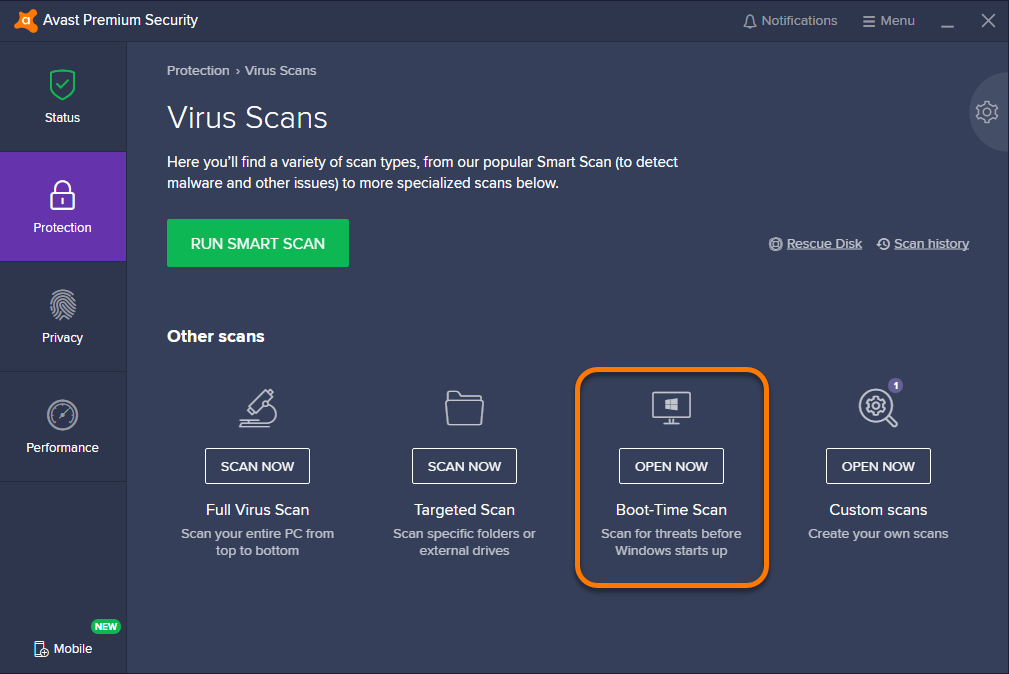
Avast Premium Security 26.6.11052

Description: Avast Premium Security is an Avast product that offers antivirus protection and advanced security for your PC against online threats. It allows users to safely shop and bank online, avoid fake websites and phishing scams, block web spies, and more. Avast Premium Security also includes key features from Avast Internet Security and Avast Premier products, both of which no longer exist.

Avast Premium Security protects against all online threats, including spoofed websites and ransomware. Complemented by SafeZone technology, it creates an isolated virtual desktop, invisible to any possible attacker, where you can do your online shopping and banking securely.

The Avast award-winning and certified antivirus engine and shields stop even previously unknown threats – for peace of mind when you chat or spend time on Facebook, Twitter, or other websites.

The silent firewall stops hackers and other unauthorized entry attempts to your PC, to keep your data where it belongs – safe and sound. The antispam feature blocks both spam and sophisticated “phishing” attempts, to keep you from clicking “harmless” links that really can cause damage.

Safely shop and bank online
Spoofed (fake) websites are one of the oldest hacking tricks in the book. Avast Premium Security scans websites for security risks on both your computer and mobile phone, so you can finally shop and bank online safely on any device.

Avoid becoming the victim of digital extortion
Ransomware is quickly becoming one of the most common – and dangerous – types of malware out there. Avast Premium Security protects your devices against havoc-wreaking ransomware so you don’t become the victim of digital extortion.

Features
- Blocks viruses, spyware, and other threats in real-time
- Enjoy peace of mind with advanced ransomware protection
- Avoid fake websites for safer online shopping and banking
- Keep hackers off your computer with our advanced firewall
- Prevent strangers from watching you via your webcam

With Avast Premium Security for Windows, you also get
- Advanced antivirus. Blocks viruses, spyware, and other malware in real-time.
- Web Shield. Blocks dangerous downloads and websites.
- Wi-Fi Inspector. Detects weaknesses in both your home Wi-Fi network and public networks.
- Real Site. Prevents you from visiting fake sites designed to steal passwords and money.
- Sandbox. Lets you open suspicious files in a safe environment to protect your PC.
- Advanced Firewall. Monitors and controls what goes in and out of your computer.
- Ransomware Shield. Prevents ransomware from harming any files in your protected folders.
- Sensitive Data Shield. Stops spyware from accessing sensitive documents on your computer.
- Webcam Shield. Blocks untrusted apps from accessing your webcam.
- Data Shredder. Helps you permanently delete sensitive files so they can’t be recovered.
- Automatic Software Updater. Updates the most popular apps on your PC to help plug security holes.
- Passive Mode. Lets you safely use another antivirus on your PC alongside Avast Premium Security.
- Do Not Disturb Mode. Silences notifications from Windows, other apps, and even our own Avast apps.
- Real-time updates. Pushes security updates to you so you always have our best protection

Release Name: Avast Premium Security 26.6.11052
Size: 862.1 MB
Links: HOMEPAGE – NFO – Torrent Search

Download: RAPiDGATOR
4 Comments
July 1

Valentina Server 17.5.1

Description: Valentina Server combines a world class Enterprise Reports Server and two Database Servers into a single, powerful solution.

Valentina Server includes Valentina Reports Server, Valentina Forms Server, and two database servers: ValentinaDB Server and Valentina SQLite Server. Reports Server and Forms Server can use the internal database servers as well as most popular data sources. Valentina Server includes a RESTful architecture and native CLIENT runtimes support for every major development on Windows, Linux and MacOS (over 69) at no additional cost. Build Valentina Server solutions with PHP, C# / .net, Java, and many more.

Stored Procedures
Stored procedures with SQL, JavasScript and Python.

Valentina Client ADK for iOS
Build iOS apps with a free VCLIENT to Valentina Server.

Fast Web Applications
Build high performance server-side web applications.

Valentina Forms Server
Register Forms to Valentina Server to share with colleagues and clients.

REST & JSON Access Anywhere
Build solutions using these lightweight protocols.

Notifications
Push notifications through a notification channel to spread among subscribing applications asynchronously.

Hot Back Up Your Data
Back up to any directory on your network without having to shut down your server.

Valentina SQLite Server
Full featured, standards compliant multi-user access SQLite based database server.

Event Scheduler
Automate business, data management processes with support for triggers and event scheduling.

Valentina Reports Server
Serve reports, charts, graphs, barcodes, export to PDF, HTML, email for major databases and servers.

Auto Discover on Network
Optionally make Valentina Server securely discoverable on your network.

ValentinaDB Server
Blazingly fast object-relational database server based on the Valentina DB core model.

Release Name: Valentina Server 17.5.1
Size: 70.9 MB
Links: HOMEPAGE – NFO – Torrent Search

Download: RAPiDGATOR
4 Comments
July 1

Dragonrise Games YoloX 1.11

Description: Use YoloX to change your game crosshair. Includes inverted colors, audio sensor, motion sensor, anticheat safety, and other features never seen before. Evolve your aim with the next revolution in crosshair technology!

Effects: Inverted color and other effects.
Animations: Separate animations for main fire, alt fire, and jump.
Audio Sensor: Animated reactions to game audio. Now you can listen to your own music without missing key sounds.
Motion Sensor: Animated reactions to motion such as mouse movement.
Fullscreen: Just works in dedicated fullscreen and other modes.
Easy: No other apps or plugins, like gamebar, required.
Fast: Highly optimized using latest tech. No lag. No FPS drops.
Profiles: Crosshair, size, and offset assigned per game.
Crosshairs: Includes many crosshairs and more by community users, pros, and streamers.
Create: Create and publish your crosshairs to the community.
Autohide: Crosshairs show only when needed.
Scaling: Lossless scaling (sizing) between 200% and 25%.
Hotkeys: Hotkeys to change crosshair, scale, offset, and toggle.
Settings: Settings to autostart, autohide, limit FPS, Steam desync, and more.
Anticheat Compliant: Overlay Only. No dangerous hooks. Code Signed. Whitelisted.

Release Name: Dragonrise Games YoloX 1.11
Size: 7.8 MB
Links: HOMEPAGE – NFO – Torrent Search

Download: RAPiDGATOR
4 Comments