Please REGISTER or RENEW your account on RAPiDGATOR.net and support us by doing through all RAPiDGATOR working download links on main posts...
July 17

Syncovery Premium 12.3.4.49
Description: The ultimate sync, backup, copy and migration tool. Syncovery will copy your data the way you need it - and fast!
Multiple Platforms
Syncovery will easily fulfill your requirements: on Windows, macOS, Linux, FreeBSD, and NAS systems. Copy between local drives, network shares, mobile devices via MTP, or using FTP, SFTP, or WebDAV and many others.

Cloud Support
Includes support for many different cloud storages, such as Google Drive, Box, Amazon S3, Azure, DropBox, OneDrive, Rackspace, Sharepoint, Backblaze B2, Citrix Sharefile, and many others.

Create multiple Jobs
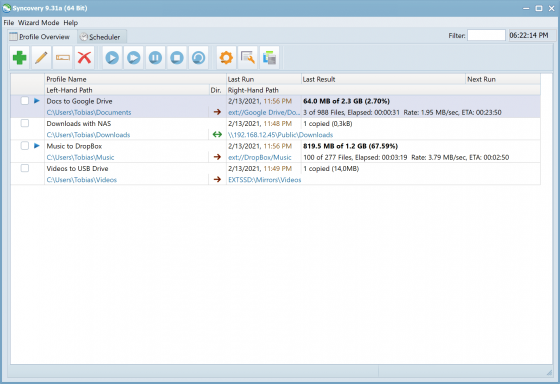
Create as many different jobs as you need. Run them manually (with Sync Preview), or let the scheduler run them automatically.

Handle complex Tasks
Syncovery is rich in features, including real-time sync, compression, encryption, email notifications, and much more. It can be extended via PascalScript.

Wizard Mode makes it easy to create your first profile.
Create your first sync or backup job step by step, with explanations of the main settings you need to make. Each job (or profile) works with two paths – source and destination, or just the left and right path (since profiles can be 2-way copy tasks also).

Extremely Fast Scanning
Syncovery’s multi-threaded folder listing algorithm provides an unparalleled speed, and easily handles millions of files and huge numbers of folders. Even more speed can be gained with our Destination File List Cache and Remote Service features.

Block Level Copying
This will help you save bandwidth as well as backup space. Syncovery can detect changed blocks in large files, and copy only these. The detection works by keeping checksums in a database, or with the help of the Syncovery Remote Service, or by using our revolutionary File System Monitoring Service (the File Sytem Monitoring Service is Windows only).

Real-Time Synchronization
Real-Time Synchronization will make sure that changes are synced quickly. Syncovery listens to file system events and quickly performs the appropriate actions. For cloud servers, it can use polling to detect changes. These features are available on Windows and macOS only.

SmartTracking
The SmartTracking sync mode is frequently used in two-way sync jobs. It can detect moved files, deleted files, and conflicts (files changed on both sides).

Versioning
Syncovery allows you to keep multiple versions of modified files, allowing you to restore your files from an earlier date. The restore date can be chosen for individual files or multiple files, in our Restore Wizard.

File Server Migration
Syncovery’s advanced NTFS copying features, high speed, and scaleability enable you to perform large-scale migrations. Read our new, comprehensive Server Migration Guide.

Release Name: Syncovery Premium 12.3.4.49
Size: 91 MB
Links: HOMEPAGE – NFO – Torrent Search

Download: RAPiDGATOR

4 Comments
July 17

Directory Opus 13.24.3 Beta

Description: Are you frustrated by the limitations of Windows Explorer? Directory Opus is a complete replacement for Explorer, with far more functionality than any other file manager available today.

You're in control.
Not just a simple file manager; Directory Opus lets you make your computer yours.
With a flexible user interface and unbelievable configurability, you can tailor Opus to streamline your workflow.
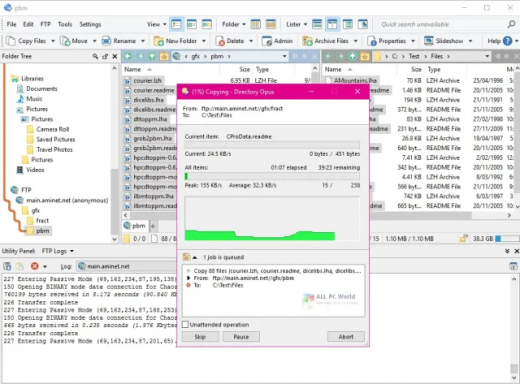
Dual panes, dual trees, multiple tabs.
Filter, sort, group your folders. Label and rate your files.
Queued file copies. Powerful batch renaming. Full archive support.
Find your files. Locate duplicates. Synchronize backups.
Assign tags and descriptions. Convert images. Edit metadata.
Fully multi-threaded, native 64 bit high performance code.
Whatever you want to do - Opus can probably do it. And if it's not built-in, you can take advantage of the unrivalled configurability to extend Opus using external tools.

What makes Opus unique?

Built for speed
Opus is written in native C++ multi-threaded code; compiled for the latest 64 bit CPUs, with high performance our number one design principle.

Fully configurable
Change the colors. Change the fonts. Change the toolbars and menus. Set up hotkeys. Opus adapts to how you want to use it.

Makes file management a breeze
Powerful searching, sorting, grouping, labelling and tagging features let you take control of your files like never before.

Endlessly extensible
Work with third-party tools as easily as with the built-in features. A full scripting interface, including scriptable dialogs, means your imagination is really the only limit.

Replace Windows Explorer and don't look back
Our unique Explorer Replacement mode provides a full replacement for Windows Explorer.
Single or dual pane file display and folder trees
Tabbed interface let you keep multiple folders open and switch quickly between them
Integrated viewer, metadata editor and utility panel
Built-in tools including synchronize and duplicate file finder
Leverage indexed search engines like Windows Search and Everything

High performance file management features
Copy, move, rename, duplicate, archive, view, backup and delete your files with ease
Queue multiple file copies for improved performance
Batch renaming including easy-to-use keyboard macros
Support for FTP and archive formats like Zip, 7Zip and RAR
Quickly filter, sort, group and search your folders
Color-code your files, assign status icons, star ratings, tags and descriptions
View images, documents and more. Image marking lets you sort your photos quickly and easily
Calculate folder sizes and print or export folder listings

Unrivalled configurability
Why let the programmers decide for you? You can tailor Opus to look how you want it to look, and to work how you want it to work.
Choose from light mode, dark mode, or design your own theme
Over 600 configurable colors and fonts
All toolbars and menus can be edited, plus you can add your own
Floating toolbars can act as program launchers
Configure your own hotkeys that work everywhere or just in Opus
Full scripting interface lets you design your own dialogs and add your own commands

Release Name: Directory Opus 13.24.3 Beta
Size: 29.7 MB
Links: HOMEPAGE – NFO – Torrent Search

Download: RAPiDGATOR
4 Comments
July 17

Emurasoft EmEditor Professional 26.2.1

Description: EmEditor is a fast, lightweight, yet extensible, easy-to-use text editor, code editor, CSV editor, and large file viewer for Windows. Both native 64-bit and 32-bit builds are available, and moreover, the 64-bit includes separate builds for SSE2 (128-bit), AVX-2 (256-bit), and AVX-512 (512-bit) instruction sets.

The text editor supports powerful macros, Unicode, CSV, and very large files. Emurasoft’s timeless mission is to achieve our clients’ needs and wants by listening to them with empathy and expertise. We value timely customer support, and are honored to have distinguished users, including major corporations, educational institutions, institutions of the European Union, ministries of Japan, and governments from all over the world.

Release Name: Emurasoft EmEditor Professional 26.2.1
Size: 109.2 MB
Links: HOMEPAGE – NFO – Torrent Search

Download: RAPiDGATOR
4 Comments
July 17

Valentina Server 17.5.2

Description: Valentina Server combines a world class Enterprise Reports Server and two Database Servers into a single, powerful solution.

Valentina Server includes Valentina Reports Server, Valentina Forms Server, and two database servers: ValentinaDB Server and Valentina SQLite Server. Reports Server and Forms Server can use the internal database servers as well as most popular data sources. Valentina Server includes a RESTful architecture and native CLIENT runtimes support for every major development on Windows, Linux and MacOS (over 69) at no additional cost. Build Valentina Server solutions with PHP, C# / .net, Java, and many more.

Stored Procedures
Stored procedures with SQL, JavasScript and Python.

Valentina Client ADK for iOS
Build iOS apps with a free VCLIENT to Valentina Server.

Fast Web Applications
Build high performance server-side web applications.

Valentina Forms Server
Register Forms to Valentina Server to share with colleagues and clients.

REST & JSON Access Anywhere
Build solutions using these lightweight protocols.

Notifications
Push notifications through a notification channel to spread among subscribing applications asynchronously.

Hot Back Up Your Data
Back up to any directory on your network without having to shut down your server.

Valentina SQLite Server
Full featured, standards compliant multi-user access SQLite based database server.

Event Scheduler
Automate business, data management processes with support for triggers and event scheduling.

Valentina Reports Server
Serve reports, charts, graphs, barcodes, export to PDF, HTML, email for major databases and servers.

Auto Discover on Network
Optionally make Valentina Server securely discoverable on your network.

ValentinaDB Server
Blazingly fast object-relational database server based on the Valentina DB core model.

Release Name: Valentina Server 17.5.2
Size: 70.9 MB
Links: HOMEPAGE – NFO – Torrent Search

Download: RAPiDGATOR
4 Comments
July 16

TechSmith Camtasia 2026 26.1.4.18353

Description: Start Creating Amazing Videos Today. Make professional-quality videos quickly and easily with Camtasia. Record your screen or upload an existing video, then bring the “Wow!” with effects, music, and much more.

Video software that works for you
Whether you make videos for marketing and sales, internal training, customer success, virtual or in-person learning, demonstrations, social media, or pretty much anything else, Camtasia helps make your vision a reality.

Inspire, educate, and excite your audience
We know that creating videos may seem like a daunting task, especially if you don’t have any experience. That’s why we created Camtasia – your all-in-one screen recorder and video editing solution. In virtually no time, you can create awesome videos that truly connect with your audience.

Educate
Sharing your knowledge has never been easier! Start by uploading a presentation or existing footage, then capture your screen, camera, and microphone to craft a pro-quality video that makes complex ideas simple, demonstrates a new process, trains people on a new skill, and much more.

Inspire
Ready to “WOW!” your audiences? Camtasia has everything you need to create incredible videos in record time. Easily add pop and pizazz to your videos with effects, transitions, music, and more. Best of all, they’re incredibly easy to find, use, and customize, leaving you more time to create.

Excite
Keep your audience focused on the action with text, shapes, animations, and more. Zoom in to highlight details. Draw attention with a customized cursor. Add effects to transition ideas or just add some extra flair. The options are as limitless as your imagination!

Complete video projects up to 40% faster
A great video starts with great audio — and great audio starts with Audiate. Edit your voice over just like text and generate captions automatically. Plus, instantly remove hesitations and all those “ums” and “uhs.” You can even edit your video as you edit your audio.

You can with Camtasia
Your video, your way. Camtasia’s intuitive interface and drag-and-drop features help anyone create professional-quality video.

The world's most powerful screen recorder
Leave boring screen recordings behind. In addition to high-resolution screen capture, Camtasia records your microphone, system audio, camera, and cursor so you can edit them separately or all at once. Your editing will be faster and easier and the results will be incredible.

Camera
Capture your camera as you record to add personality to your videos. Position your camera video anywhere on the canvas.

Microphone
Great audio is an essential element to your video. Camtasia makes it easy to capture your microphone for crystal-clear voice over.

System Audio
Need to share the sounds generated by your software or computer? Now your viewers can hear what you hear.

Cursor Data
Your mouse cursor can help highlight important features or UX elements. Capture this data to make it easier to edit later.

Make your creative spark a wildfire
Sometimes, getting started on a new video can be intimidating. Fortunately, Camtasia offers hundreds of templates, assets, and text effects to help kindle your creative spark. Making professional looking videos has never been easier!

Release Name: TechSmith Camtasia 2026 26.1.4.18353
Size: 310 MB
Links: HOMEPAGE – NFO – Torrent Search

Download: RAPiDGATOR

5 Comments
July 16

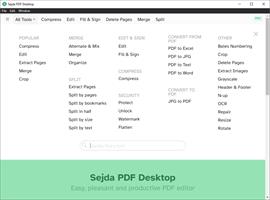
Sejda PDF Desktop Pro 7.9.7

Description: Sejda PDF Desktop - pleasant and productive PDF software that you'll love to use. Full-featured to help you with your PDF tasks. Sejda PDF Desktop is free to use within daily limits. Upgrade for premium features and unlimited use.

Merge files into one PDF.
Visually combine and reorder pages, merge multiple PDF files. Alternate and mix odd and even page files.

Split PDF files.
Split documents by pages. Extract separate documents. Split by size, bookmarks or text occurrences. Divide two page layout scans.

Convert PDF files to Office and image formats.
Convert PDF files to Word, Excel and to image. Convert images to PDF file.

Compress PDF.
Reduce the size of PDF files. Optimize images and resources.

Edit PDF files.
Add, edit or move text in your PDF. Change the font type, size and style. Insert, reorder, move or delete pages.

Apply PDF passwords and permissions.
Add copy and edit protection to a PDF. Include a password to protect your PDF from unapproved access.

Watermark PDF.
Add image or text watermark to PDF documents.

Grayscale PDF.
Convert PDF text and images to grayscale.

Crop PDF.
Trim PDF margins, adjust visible page area, change PDF page size.

System Requirements
Windows 8.1, 10, 11 (64-bit)

Release Name: Sejda PDF Desktop Pro 7.9.7
Size: 340 MB
Links: HOMEPAGE – NFO – Torrent Search

Download: RAPiDGATOR
4 Comments
July 16

IObit Driver Booster Pro 13.5.1.400

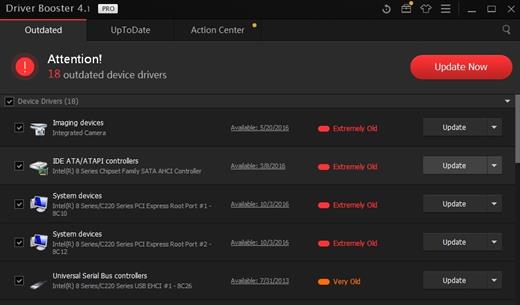
Description: Updating drivers is usually an initial step to avoid hardware failure, system instability and hidden security vulnerabilities. To update drivers regularly is also an effective way to enhance your overall PC performance, and maximize your gaming experience. While this process could be risky and frustrating if done manually.

Driver Booster PRO is introduced to download and update drivers for you automatically with just one click. Based on cloud library, Driver Booster PRO can always be the first to identify outdated drivers, and download and update driver at an unrivaled speed. With the backup feature, it is an easy, effective and risk free solution to keep your drivers up-to-date.

Update Outdated Drivers Safely and Rapidly
- Support More Hardware Devices & Improve PC Performance
- Update Drivers 300% Faster with Just One Click
- Specialized Driver Tweaking for Top Gaming Experience
- Backup Drivers for Safe Restore

Driver Booster Pro Features:
- Download and Update Outdated Drivers with One Click
- Enhance Hardware Functionality for Top Performance
- Specialized Driver Tweaking for Top Gaming Experience
- Automatically Identify Outdated Drivers
- Support More Comprehensive Hardware Devices
- Enjoy Priority to Update Outdated Drivers Promptly
- Backup Drivers for Safe Restore
- Download and Update Drivers up to 300% Faster
- Automatically Update to the Latest Version

Release Name: IObit Driver Booster Pro 13.5.1.400
Size: 37 MB
Links: HOMEPAGE – NFO – Torrent Search

Download: RAPiDGATOR

5 Comments
July 16

PhraseExpress 18.0.76

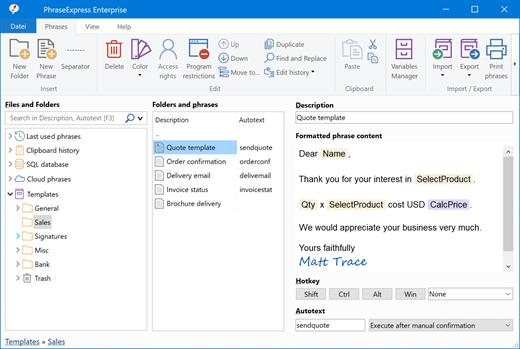
Description: No More Typing the Same Phrase Again. The text expander software PhraseExpress manages frequently used text templates for use in any program. Phrases can be shared in the cloud, on a NAS, or via Microsoft SQL Server.

Universal Text Snippet Manager
Speed up your typing in any program, such text editors, email programs, web browsers, database applications, EMR, etc.
Organize text snippets in customizable categories for instant access.
PhraseExpress can save hours of typing in help desk, call center, law offices, expert appraisers and medical transcription.

Text Expander Benefits
PhraseExpress offers a variety of benefits in the enterprise:
Time savings: Employees save time by not having to write repetitive texts repeatedly.
Consistent quality: A text template management system helps maintain consistency in style, tone, and language.
Cost savings: Communication becomes not only more consistent but also quicker. Pre-defined text snippets help prevent errors.
Customer Satisfaction: Clients or customers benefit from receiving consistent and prompt information.

AI Integration
Process your phrases with Artificial Intelligence
AI can summarize or rewrite your phrases in different styles (formal/informal). PhraseExpress stores the processed phrases, so you only need to AI-process the text once. PhraseExpress also allows you to use AI in any application on your computer at the touch of a button.

Privacy First
Your data remains on your computer!
PhraseExpress is locally installed, eliminating the need for external cloud services. No need to "log-in" into anything.
this includes AI language models, which run locally on your computer.
No data must be sent or stored off-site. You retain complete ownership of your data and maintain total control over the application.
For added security, phrases can be encrypted using AES and safeguarded with a password.

Share Phrases with your Team
Share phrases with other users in the local network or in the cloud – On-premise or over the internet.
Each phrase can be set private or made public to selected users.
The client-/server architecture prevents edit collisions.
PhraseExpress supports Microsoft SQL server and Citrix/TerminalServer.

Cloud Support
Optional cloud synchronisation allows you to share phrases with other users.
PhraseExpress supports any popular cloud service, such as Dropbox, Microsoft OneDrive, Google Drive and on-premise cloud solutions like OwnCloud and Synology CloudStation.
You can alternatively use any NAS or network-shared folder to sync your phrases between multiple Windows and Mac computers.

Cross-Platform Support. Work faster everywhere!
PhraseExpress is available for Windows and the TextExpander alternative saves typing on your Mac, too. The Free Text Expander App for iPhone and iPad provides the productivity benefits on tablet or smartphone devices.
* Features advertised on our website refer to the Windows version, unless specified otherwise.

Multi Language Phrases
Take your templates to the next level - Literally!
PhraseExpress can organize phrases not only in a tree structure but also in multiple dimensions.
The same phrase library can be switched instantly into different languages, making it an ideal solution for multi-lingual call centers!
PhraseExpress can even translate your phrases into another language.

Macro Automation
Takes out the tedious from your tasks
PhraseExpress integrates a powerful Macro Recorder to record and playback repetitive tasks.
Macro Recorder records your actions like a tape recorder for infinite playback.

Document Generator
The Document Generator can generate an entire document based on a custom selection of your text templates:
Lawyers create custom contracts in no time: Just select the terms to be included and PhraseExpress saves the custom contract as a Microsoft Word document on your desktop.
Technical writers can re-use common parts of a documentation to quickly create a variation of existing user manuals.
Medical doctors can select applicable items from the list of common procedures to create a customized medical report.

Release Name: PhraseExpress 18.0.76
Size: 57.5 MB
Links: HOMEPAGE – NFO – Torrent Search

Download: RAPiDGATOR
5 Comments
July 16

COAA PlanePlotter 6.7.7.1

Description: PlanePlotter receives and decodes live digital position reports from aircraft and plots them on a chart. Using PlanePlotter, you can see a radar-like display of all those aircraft around you that are transmitting the appropriate digital messages including ACARS, ADS-B and HFDL.

PlanePlotter - Features
The animated screen grab from PlanePlotter (left) was kindly provided by John Locker.

Message display
PlanePlotter shows a table display of messages received and decoded from live aircraft transmissions.

Data saving
PlanePlotter archives all the digital data that it receives and decodes to a log file.

Chart display
PlanePlotter plots aircraft positions, altitudes and times decoded from the message traffic that it receives. These include embedded position reports, AMDAR reports and ADS reports contained in ACARS messages, ADS-B position reports received by the Kinetic SBS1(tm) or AirNav System RadarBox(tm) Mode-S receivers, and position reports on HF using Charles Brain's PC-HFDL software. The plot can be superimposed on a suitable aeronatical chart that you have prepared, or PlanePlotter can download satellite imagery and plot the aircraft symbols on that. Where altitude information is available (eg Mode-S messages), you can select the data by altitude band to distinguish low level and high level traffic.

Google Earth server
If you are receiving Mode-S ADS-B position reports, PlanePlotter can interface to Google Earth to display aircraft positions over the Google Earth base map. It can even give you a dynamic real-time view from the flight deck of an aircraft that you designate.

Direction finding
PlanePlotter can determine and display the direction of any transmission using a simple passive antenna switch. This allows aircraft to be located even if they are not equipped with ACARS or Mode-S/ADS-B.

Input signals
PlanePlotter can decode ACARS messages, display the message content and plot any positions on a chart.
PlanePlotter can process and display Mode-S/ADS-B position reports captured by the Kinetic SBS1(tm), the AirNav Systems RadarBox(tm), the RxControl Mode-S receiver, the PlaneGadget Radar, the miniADSB, the microADBS and the FPGA Beast.
PlanePlotter can also work in conjunction with Charles Brain's PC-HFDL software (http://www.chbrain.dircon.co.uk/pchfdl.html) by automatically extracting position reports from the log file and plotting them in real time on the same chart display. PlanePlotter adds value by calculating course and heading from successive reports from the same aircraft and plotting the predicted position between reports (right).
PlanePlotter can drive a passive antenna switch and display the direction (QDM) of any aircraft voice transmission.

GPX overlays
PlanePlotter can display waypoints, tracks or routes over the current chart using data from a user-defined GPX format file.

Alerts
PlanePlotter can generate visible and audible alerts on detection of a specified registration, flight number or ADS identifier, on detection of any new aircraft, or on detection of an aircraft whose position is inside a user-defined Alert zone polygon.

Memory-Map Navigator support
PlanePlotter can direct the Memory-Map Navigator program (www.memory-map.com) to display dynamic aircraft position symbols over its proprietary maps using data from either ACARS or Mode-S ADS-B (in conjunction with the SBS1 receiver).

OLE/COM interface
You can access the position and other data for each aircraft known to PlanePlotter using a simple VB script or other OLE/COM capable program. You can use the same interface to update data held by PlanePlotter and to control the user interface.

Release Name: COAA PlanePlotter 6.7.7.1
Size: 7.6 MB
Links: HOMEPAGE – NFO – Torrent Search

Download: RAPiDGATOR

5 Comments
July 16

Benthic GoldSqall 2.4.244

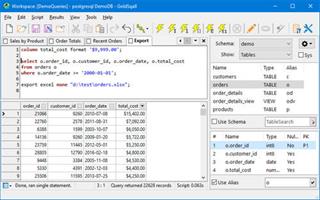
Description: GoldSqall is an SQL query, editing and exporting tool. GoldSqall can natively connect to Oracle, PostgreSQL, MySQL, Firebird and SQL Server. GoldSqall also allows connecting to any database with OLEDB or ODBC drivers. GoldSqall has an advanced syntax highlighting SQL Editor and formatter, a lightning fast datagrid with sorting, filtering, data formatting and a transposed view mode.

Features:
Native driver support for Oracle, MySQL, PostgreSQL, Firebird and SQLServer.
OLEDB and ODBC support for any database
SQL query and script running including database specific commands, stored procedures, etc.
Bind variable (:bindvar) and prompt variable (&AskMe) support.
Language copy & paste feature for integration with programming tools. C++, PHP, Object Pascal and more.
Support for viewing tables, columns, stored procedures, schemas, etc.
Incredibly fast data grid with support for transposed mode, sorting, custom formatting, filtering and more.
Cell detail window for multi-line or formatted Text.
Image viewer cell detail window with support for Jpg, Gif, Png, Bmp, Tif, MultiPage Tif, etc.
Export data directly to Excel, Calc, CSV, XML, insert statement scripts, and more.
Export directly to Excel files even if Excel is not installed.
Script autorun support and full command-line options

Release Name: Benthic GoldSqall 2.4.244
Size: 28.6 MB
Links: HOMEPAGE – NFO – Torrent Search

Download: RAPiDGATOR
5 Comments