Please REGISTER or RENEW your account on RAPiDGATOR.net and support us by doing through all RAPiDGATOR working download links on main posts...
Apr 8

JMP Statistical Discovery JMP Pro 19.1.0

Description: JMP is powerful statistical software designed with scientists and engineers in mind, but ideal for anyone solving problems with data. Packed with tools for data preparation, analysis, graphing, and so much more, JMP has everything you and your organization need to be truly unstoppable with data.

Features of JMP Pro


  • Statistics made visual, powerful, and approachable.
    JMP makes it easy to take on the most complex data challenges. Its simple, interactive interface lets you take your productivity further, and with no code required, there are no obstacles between you and any analysis or graph you want to create.
  • Get insights faster. Get home earlier.
    Your time matters. With JMP’s extensive suite of capabilities and code-free automation, you can quickly go from raw data to actionable insight—all within one streamlined, self-service platform.
  • Unlock efficiency gains to accelerate innovation.
    Industries with high product and process innovation have complex problems to solve and often require statistics to solve them. With JMP, scientists and engineers in these industries can seamlessly apply statistical techniques that support engineering efficiency and help propel their organizations to the forefront of the market.
  • Maximize your potential.
    Realizing potential requires the right support. With JMP, no matter where you are in your analytic journey, you have a partner in life-long learning. Our user community, support experts and learning resources are purpose-built to empower anyone looking to start, build, advance, or apply their skills with data.
System Requirements for JMP Pro

RAM: 4 GB

Processor: 64-bit; x64 processor only

Operating System: Windows 10 and 11

Space Required: 2 GB

Release Name: JMP Statistical Discovery JMP Pro 19.1.0
Size: 1015.3 MB
Links: HOMEPAGE – NFO – Torrent Search

Download: RAPiDGATOR

7 Comments
Apr 8

Runtime RAID Reconstructor 5.17

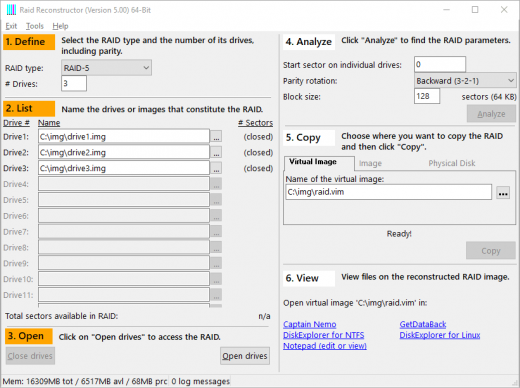
Description: Recover data from a broken RAID Level 5 or RAID Level 0 Array. Even if you do not know the RAID parameters, such as drive order and block size, RAID Reconstructor will analyze your drives and determine the correct values. You will then be able to create a copy of the reconstructed RAID in a virtual image, an image file, or a physical drive. This image can be mounted with Captain Nemo or GetDataBack Pro.

Highlights
Recover data from a broken RAID Array
Recovers both, hardware and software RAIDs
Automatically finds RAID parameters
Recover RAID-5 consisting of 3 to 16 drives
Recover RAID-0 (striping) consisting of 2 to 16 drives
Support for GetDataBack and Captain Nemo
Virtual images allows try-and-error cycles of few seconds
RaidProbe support
De-striper and analyzer
Safe, read-only design
Run from the Runtime Live CD or a WinPE Boot Medium
Free lifetime updates with purchase
Native 64-bit application under 64-bit Windows
Graphical representations of XOR status and drive entropies
Report of on-disk file system structures

Recovery of Broken RAIDs
RAID Reconstructor de-stripes broken RAID-0 and RAID-5 arrays, consisting of 2 to 16, or 3 to 16 drives, respectively. RAID-5 arrays are allowed to have one drive missing.

Even if you do not know the RAID parameters, such as start sector, drive order, block size, and direction of rotation, RAID Reconstructor will analyze your drives and determine the correct values. You will then be able to create a copy of the reconstructed RAID in a virtual image (.vim), an image file (.img), or a physical drive.

Unlike other products that require knowledge of the RAID parameters, RAID Reconstructor is not only a "de-striper" but an "analyzer" as well. It finds the unknown parameters for you.

Once you created an image, you can either mount it with Captain Nemo or use it for further data recovery processing with GetDataBack Pro. If you create the image on another physical drive, you might even be able to boot from it.

Release Name: Runtime RAID Reconstructor 5.17
Size: 20.9 MB
Links: HOMEPAGE – NFO – Torrent Search

Download: RAPiDGATOR

7 Comments
Apr 8

AI Audio To Text Generator Pro 1.0.2

Description: Transform your audio and video files into highly accurate text and subtitles using the power of advanced AI—all running 100% locally on your PC. AI Audio To Text Generator Pro utilizes state-of-the-art AI models (including OpenAI’s Whisper and Distil-Whisper) to deliver professional-grade speech recognition without the need for expensive cloud subscriptions or internet connectivity. Because everything processes on your own hardware, your audio files remain completely private and secure.

Absolute Privacy
100% offline processing. Your files never leave your computer.

High Accuracy AI
Powered by the industry-leading Whisper AI architecture.

Multiple Export Formats
Save transcripts as Plain Text, JSON, TSV, or Subtitles (SRT & VTT).

Multilingual
Supports transcription for over 99 languages.

Translation
Automatically detect foreign languages and translate them to English.

Hardware Accelerated
Automatically utilizes your NVIDIA GPU (CUDA) for lightning-fast speeds, or falls back to optimized CPU processing.

System Requirements
- OS: Windows 10 version 17763.0 or higher
- Memory: 4 GB (Minimum), 16 GB (Recommended)

Release Name: AI Audio To Text Generator Pro 1.0.2
Size: 1.8 GB
Links: HOMEPAGE – NFO – Torrent Search

Download: RAPiDGATOR

3 Comments
Apr 8

My Music Collection 3.4.16.170

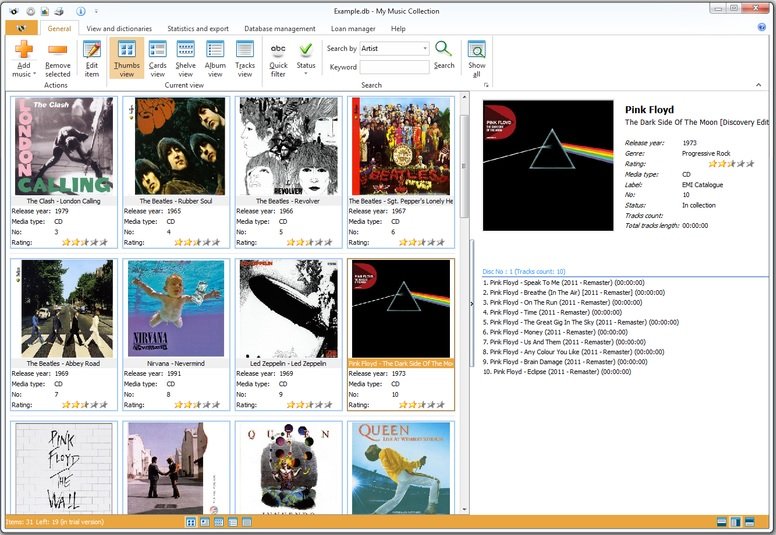
Description: My Music Collection is the most comprehensive music catalog software designed for organizing and managing music collections of any kind, including CD discs, MP3 files or vinyl records. This music organizer allows you to create an ordered CD database and view its contents, even if the disk is lying on a shelf or is being borrowed by a friend of yours. Now you can forget about creating music database on a paper, in Excel or text files.

Simply insert a disc, scan barcode or type the title and My Music Collection will fetch all album information from the Internet, including artist, title, release year, country, track titles and cover image, etc.

Furthermore, this music organizer does not only allow you to create comprehensive music collection with a great amount of options, but it is also a great loan manager allowing you to keep track of albums borrowed to your friends.

Familiar and intuitive interface allows you to easily and quickly search and browse your music collection. You can sort albums by artist, release year or even by media type. Checking statistics is also easy - My Music Collection allows you to view statistics in a table view or use a variety of diagrams. With music database software you can export your list into almost all popular file formats, including HTML, Excel, PDF, Text file or XML.

Release Name: My Music Collection 3.4.16.170
Size: 76.4 MB
Links: HOMEPAGE – NFO – Torrent Search

Download: RAPiDGATOR

7 Comments
Apr 8

Sequence Generator Pro 4.5.0.1631

Description: Sequence Generator Pro is best in class automation software for astrophotography. With it, you can sequence and coordinate all of your gear in order to make the most of your time under dark skies. Those nights are rare enough as it is.
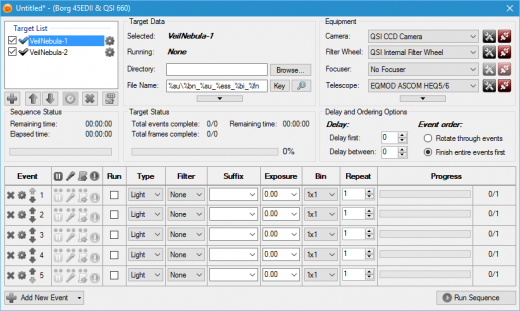
No need to waste precious time fighting with gear. SGPro will control your camera (CCD, CMOS, Canon, Nikon), filter wheel, focuser, mount, camera rotator, flatbox, dome or roll-off roof observatory, weather stations and more. It is perfect for beginners and it has enough power to suit even the most demanding photographers. If you are just starting out, don’t be intimidated by that list of gear! All you need to start using SGPro is a camera.

For the rest of it, SGPro will grow right alongside your new gear and skill level over time. You can be rest assured that you won’t need to purchase new software once you become an intermediate or expert level photographer. Even better, if you decide to just dabble in astrophotography, the free version of Sequence Generator (Lite) will likely meet all of your needs.

Sequence Generator Lite, despite being free, is still more powerful than even some other paid versions of software. Over the years it has become increasingly difficult to effectively convey what SGPro does for you, but here is a list of the highlights. Take your night back! Look at the stars, watch TV, even sleep… let SGPro take care of your rig and relax.

Complex Mosaic Sequences in Just Minutes
With this tool you can plan complex mosaics in mere minutes and get to imaging quickly. Simply download the image that has your intended target (via the provided interface), rotate to find your camera angle, draw a square around the area of interest and start imaging (the tool will create a sequence for you). It’s really that easy… You can also use this tool for single frame images just to ensure that your camera angle is in the ideal position.

Powerful Sequencing Engine
Take advantage of Sequence Generator Pro’s powerful sequencing engine. With it, you can coordinate a wide variety of equipment including cameras (CCD and Canon DSLRs), color filters, focus controllers and telescopes. If it’s made for astronomy, we can probably control it.  String together any combination of targets and events you can imagine in order to capture “light”, “dark”, “bias” or “flat” frames.

Auto Focus
Stay in focus even when the temperature and gear are working against you! Fast temperature drops, different filters, and gravity are now an afterthought.  Our powerful focus routines will be able to determine proper focus for almost any deep space target. No need to slew off target to find suitable focus stars… No need to wake up and pull out a focus mask… Simply start your sequence near good focus and auto focus will take care of the rest!

Equipment & User Profiles
Use our profile manager to make your life easier. Have multiple mounts or scopes? Have multiple sets of filters? Multiple locations you like to use? Do they require different settings when you create sequences? The profile manager can record these settings and allow you create new sequences from existing profiles. This can be a huge time saver and will get you imaging faster every time!  Even better, profiles are portable files and can be backed up or easily transferred between machines.

Know When Something Goes Wrong
Night sky imaging can be hard.  When you combine a complex rig with unpredictable weather you create an environment where things can go wrong.  Clouds cause auto guider gone off the rails?  Normal, user requested, sequence pauses?  Equipment malfunction? While SGPro can automatically recover from many issues, it will also make sure you know when something needs your attention and get the sequence back on  track as soon as possible.

Automatic Target Centering & Meridian Flips
Use our powerful auto centering routines to find your target fast and start imaging! Ideal for multi-night imaging or even after meridian flips, we can get you back on track fast. As long as your sequence targets have a location defined, SGPro will automate the process of getting you where you need to be to start capturing data. When one target is done for the night and the next starts, automatic centering will move you to the next target automatically and continue with the sequence. In addition, this feature also supports automatic meridian flips. This, of course, means that you don’t need to set an alarm clock and walk out to your rig in a daze to perform a manual flip.

Center Using an Existing Image
Using any image that has an obtainable location, simply point the mouse at the area of the image on which you want to center and click. That’s it! This process will use the same cenerting process outlined above and get you within pixels of the chosen location. No more continually nudging and checking to get where you want to be.

Release Name: Sequence Generator Pro 4.5.0.1631
Size: 132.8 MB
Links: HOMEPAGE – NFO – Torrent Search

Download: RAPiDGATOR

6 Comments
Apr 8

Milestone XProtect Corporate 2025 R3

Description: Protect what matters, without limitations. With XProtect as the backbone of your security systems, you can tailor, scale and simplify your video surveillance — all from one centralized platform.

Your security, your way
XProtect video management software’s open-platform flexibility means organizations of any size can build and customize more future-proof security systems. Choose from the market’s widest choice of cameras, sensors, and IoT devices; and protect your investment with greater cybersecurity and compliance.

Customize your solution
Choose a VMS that grows with your business. No walls, no hardware lock-in. Just the market’s widest choice of devices and applications.

Centralize your operations
Simplify security operations with a single interface that connects all your cameras, sensors, analytics and sites.

Secure your business
Stay protected and resilient with continual updates, robust cybersecurity and compliance.

Trusted in 500,000+ customer sites worldwide
Future-proof your security systems with the market’s most open and scalable video management software platform. Watch the video to see the possibilities.

Extensions, apps, and advanced analytics
Enhance and update your security capabilities with a broad range of integrations that are fully compatible with XProtect.
1,000+ third-party applications let you customize your security system for your specific needs
Access Control integration ensures secure and efficient management of entry points
License Plate Recognition aids in quick and accurate vehicle identification and tracking

Deployments
Combine the storage, processing power and security advantages of on-premises XProtect with the added flexibility of the cloud.
Expand your surveillance to remote sites by combining XProtect with Arcules VSaaS
Scale without hardware with cloud-hosted XProtect together with AWS, Google Cloud and Microsoft Azure
Extend storage into the cloud as and when needed with cloud-based XProtect

XProtect Interconnect
Gain direct live viewing and playback capabilities from remote site cameras to your central site, enhancing control and simplifying operations.
Watch live and review recorded footage from any location within your network of servers with XProtect
Scale your security with central management of local servers and cameras
Lower cost of ownership by minimizing on-site visits, eliminating local system maintenance, and reducing the need for local personnel training

Federated Architecture
Bring together various systems into one central hub ensuring connectivity for larger domains using XProtect Corporate/Expert. Connect and control video and audio across multiple sites, regardless of the remote systems in use.
Bring together different sites better visibility and control
Access security systems outside of your network under one domain, regardless of location
Scale effectively, ensuring clarity and connectivity for larger sites using different VMS systems

Release Name: Milestone XProtect Corporate 2025 R3
Size: 4.3 GB
Links: HOMEPAGE – NFO – Torrent Search

Download: RAPiDGATOR

5 Comments
Apr 8

AlbusBit NTFS Permissions Auditor Pro 26.4.7

Description: Audit directory permissions in your Windows systems quickly and easily.

Quick and Simple Setup
Get Going in 3 Steps: Choose directories to audit, tweak settings if you want (or stick with the defaults), and hit ‘Audit’. It’s that easy to start scanning folder permissions.
One-Time Install: No fuss setup. Install once and you’re good to go—no extra configurations needed.

Powerful and Efficient Auditing
Speed and Precision: Fast scans deliver detailed insights into folder permissions accurately, helping you secure your data.
Flexible Filters: Customize audits with versatile filters. Whether it’s by department, job title, or access type, get exactly the info you need. Plus, our advanced caching speeds up the process, outperforming similar tools.

In-Depth Insights and Control
Comprehensive Visibility: The account view shows you everything - which users and groups have what rights in each directory.
Detailed Filters for Any Scenario: Whether during or after audits, use a wide array of filters (from basic to advanced permissions, account details, and more) to pinpoint specific data, enhancing security and compliance effortlessly.

Key features

Export
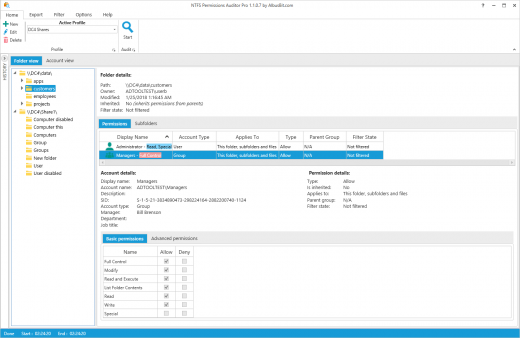
You can export audit results to a range of file formats including Excel (XLSX), CSV, XML, HTML and PDF. Exports can be performed in two ways – folder view export (categorized by folders) and principal view export (categorized by accounts).

Folder tree view
Hierarchical folder view providing all folder details such as path, owner, permissions, etc.

Account view
See all users, groups and computers, and all directories to which they have access.

Account data
See the main information about the account – display name, security identifier (SID), description and additional data such as department, manager, job title, etc. For group accounts, you can display information about direct and nested group members.

Powerful and diverse filters
The filter manager offers a wide range of options to filter audit results and can be applied in two ways – audit time filtering and post audit filtering, which enables you to filter data and change filter conditions without needing to redo the audit.

Exclude directories and accounts
Exclude unnecessary directories by specifying the exact path or just the directory name. You can also exclude system directories and reparse points from your audit results, limit audit depth by specifying directory depth limit and exclude disabled accounts and specific accounts from audit results.

Data storage
All data can be stored in the local, secure database. No additional setup is needed – it’s all included in the installation. You can access historical audit data at any time.

Don’t overload Your system
Fast and efficient, it uses RAM and CPU efficiently to generate results as quickly as possible without overloading PC resources. It uses various caching mechanisms to reduce Active Directory request counts to the minimum.

Change reports
You can compare two audit results and see what has changed. Change reports will show you which directories, directory permissions and group members have been removed, added or modified.

Release Name: AlbusBit NTFS Permissions Auditor Pro 26.4.7
Size: 14.9 MB
Links: HOMEPAGE – NFO – Torrent Search

Download: RAPiDGATOR
6 Comments
Apr 8

Burp Suite Professional 2026.3.2

Description: Test like a pro. Hands-on security testers need the best tools for the job. Tools you have faith in, and enjoy using all day long. The tools that other professionals trust.

Find vulnerabilities others can't
Be at the forefront of web security testing with the only toolkit powered by cutting-edge PortSwigger Research.

Be more productive
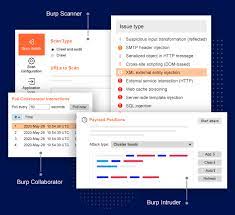
Burp Suite Professional has all the tools required for modern pentesting. Utilize advanced features to eliminate noise.

Share your findings more easily
Simplify your documentation and remediation process, and produce reports that end users will appreciate.

Discovery: Map the complex attack surfaces of modern web apps
Use Burp Suite Professional to gather intelligence, comprehensively map your target application, and identify initial weaknesses.

Attack: Leverage best-in-class manual and automated tools to identity vulnerabilities
Balance powerful automation with granular control in Burp. Decide what you want to test manually, and what can be delegated to the scanner.

Reporting: Automatic logging provides centralized data source
Work with the knowledge that your actions are logged, allowing you to easily summarise your findings into succinct, but valuable reports.

Benefit from 10+ years' worth of extensibility
Leverage Burp Suite's thriving BApp store, with user-created extensions, adding custom functionality to the most complete tool on the market.

Create your own functionality
Build your own extensions and integrate with existing tooling so you have what you need, when you need it.

Customize the way you work
Burp Suite Professional is made to be customized. Utilize Bambdas and BChecks to work the way you want.

Release Name: Burp Suite Professional 2026.3.2
Size: 659.4 MB
Links: HOMEPAGE – NFO – Torrent Search

Download: RAPiDGATOR

8 Comments
Apr 8

MusConv Lifetime 4.10.463

Description: More than 125+ music services supported. MusConv - the easiest way to transfer your music data! MusConv transfers playlists, albums, followed artists and liked songs across various services – Spotify, Apple Music, Amazon Music, YouTube, YouTube Music, iTunes, Deezer, Tidal, SoundCloud, Pandora and 125+ music services! Continuously working to bring you new updates and features.

MusConv Features
MusConv transfers playlists, albums, followed artists and liked songs across various services – Spotify, Apple Music, Amazon Music, YouTube, YouTube Music, iTunes, Deezer, Tidal, SoundCloud, Pandora and 125+ music services!
Manage playlists, albums, and artists across more than 125 popular music services
See your most-played songs, artists and albums on Spotify, Apple Music, YouTube Music and other
Browse the most popular songs, artists, and albums on your favorite services
Automatically synchronize playlists and albums between your platforms
Rematch incorrect and failed song matches
Syncing song order

Release Name: MusConv Lifetime 4.10.463
Size: 97.3 MB
Links: HOMEPAGE – NFO – Torrent Search

Download: RAPiDGATOR
6 Comments
Apr 8

Syncovery Premium 11.14.3.184

Description: The ultimate sync, backup, copy and migration tool. Syncovery will copy your data the way you need it - and fast!

Multiple Platforms
Syncovery will easily fulfill your requirements: on Windows, macOS, Linux, FreeBSD, and NAS systems. Copy between local drives, network shares, mobile devices via MTP, or using FTP, SFTP, or WebDAV and many others.

Cloud Support
Includes support for many different cloud storages, such as Google Drive, Box, Amazon S3, Azure, DropBox, OneDrive, Rackspace, Sharepoint, Backblaze B2, Citrix Sharefile, and many others.

Create multiple Jobs
Create as many different jobs as you need. Run them manually (with Sync Preview), or let the scheduler run them automatically.

Handle complex Tasks
Syncovery is rich in features, including real-time sync, compression, encryption, email notifications, and much more. It can be extended via PascalScript.

Wizard Mode makes it easy to create your first profile.
Create your first sync or backup job step by step, with explanations of the main settings you need to make. Each job (or profile) works with two paths – source and destination, or just the left and right path (since profiles can be 2-way copy tasks also).

Extremely Fast Scanning
Syncovery’s multi-threaded folder listing algorithm provides an unparalleled speed, and easily handles millions of files and huge numbers of folders. Even more speed can be gained with our Destination File List Cache and Remote Service features.

Block Level Copying
This will help you save bandwidth as well as backup space. Syncovery can detect changed blocks in large files, and copy only these. The detection works by keeping checksums in a database, or with the help of the Syncovery Remote Service, or by using our revolutionary File System Monitoring Service (the File Sytem Monitoring Service is Windows only).

Real-Time Synchronization
Real-Time Synchronization will make sure that changes are synced quickly. Syncovery listens to file system events and quickly performs the appropriate actions. For cloud servers, it can use polling to detect changes. These features are available on Windows and macOS only.

SmartTracking
The SmartTracking sync mode is frequently used in two-way sync jobs. It can detect moved files, deleted files, and conflicts (files changed on both sides).

Versioning
Syncovery allows you to keep multiple versions of modified files, allowing you to restore your files from an earlier date. The restore date can be chosen for individual files or multiple files, in our Restore Wizard.

File Server Migration
Syncovery’s advanced NTFS copying features, high speed, and scaleability enable you to perform large-scale migrations. Read our new, comprehensive Server Migration Guide.

Release Name: Syncovery Premium 11.14.3.184
Size: 69 MB
Links: HOMEPAGE – NFO – Torrent Search

Download: RAPiDGATOR
7 Comments