Please REGISTER or RENEW your account on RAPiDGATOR.net and support us by doing through all RAPiDGATOR working download links on main posts...
July 18

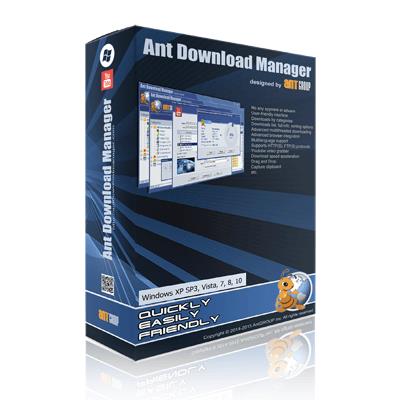
Ant Download Manager Pro 2.17.6.96447

Description: Ant Download Manager (AntDM) is a quick download manager for any Internet file, that fully integrates with all popular browsers. AntDM allows to download free streaming video and audio from numerous web sites, supports P2P peer-to-peer protocol. AntDM supports downloading files from the most popular Premium Link Generators (Debrids).
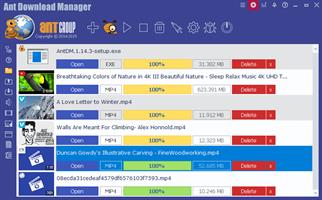
Ant Download Manager (AntDM) - is a tool that allows you to repeatedly increase the speed of file downloads due to multiple download streams, resume, schedule downloads, capture and download audio and video streams.

Automatically processes download errors, recovers from temporary network errors, reconnects in case of server response delays, has the ability to resume interrupted downloads due to loss of connection, network problems, computer shutdown, or unexpected power outages.

The standard GUI for softwares of this class makes AntDM friendly and easy to use. It has two screens - the first is more common for regular downloads and the second is using video preview for easy tracking of video downloads.

Has download queues, which allows you to accumulate download links at a convenient or scheduled time for the user.

Supports proxy-servers, HTTP and FTP file protocols and their protected versions of HTTPS and FTPS, as well as the main streaming protocols for audio and video content M3U8, MPEG-DASH, VIMEO-STREAM, firewalls, redirects, cookies, authorization, processing of audio and video content.

Supports BitTottrent a P2P (peer-to-peer) file sharing protocol.

Can be easily integrated into the main popular browsers Microsoft EDGE (Chromium-based), Google Chrome, Mozilla Firefox and their numerous clones: 360Chrome, Brave, CCleaner, Chedot, CocCoc, Comodo Dragon, Comodo IceDragon, Maxthon6, Opera, Slimjet, SRWare Iron, Torch, UC Browser, Vivaldi, Yandex, Waterfox, etc. The integration of extension into browsers is used to automatically capture file or media links and download them. Also you can not integrate AntDM extensions into your browsers, but use AntDM autonomously. For example, drag and drop download links from a browser into AntDM, download any single links manually, in a list or in batch mode from a file.

Allows not only downloading audio files, but also extracting audio tracks from video files, converting them to the popular MP3 format and adding basic accompanying information to them.

Supports most popular Generators Premium Links (Debrids): alldebrid.com, cocoleech.com, debrid-link.fr, ffdownloader.com, linksnappy.com, mega-debrid.eu, real-debrid.com, premium.rpnet.biz, simply-debrid.com, premiumize.me, etc.

Other features include multilingual support, download categories, download log, priorities and changes of download speed, task scheduler, sounds of various events, CHM User Guide, virus protection when download completion and many more.

Release Name: Ant Download Manager Pro 2.17.6.96447
Size: 61.8 MB
Links: HOMEPAGE – NFO – Torrent Search

Download: RAPiDGATOR

7 Comments
July 18

Rons WebLynx Pro 2026.7.17.1223

Description: Rons WebLynx is a Windows desktop application, for organizing and managing bookmarks. Bookmarks are stored in WebLynx documents on the local computer, so are not 'shared' in the cloud and do not rely on third party storage.

Ideal for research, marketing, or just organizing a lot (1000's) of links. Nowadays, almost everyone can do with a good bookmark manager as the internet has become part of our daily lives - you typically don’t realize you need a bookmark manager until you start using one.

WebLynx combines power, elegance and ease of use, and is full of features like automatic link checking to make it a great tool for anyone who uses the Internet.

Clear and Easy to Manage
Links are organized using well known folder and tag concepts, and have additional Views to quickly check new, broken and duplicate links (and more). Searches can be done in folders, or across tabs, or both, and folders and tags can be collected into Groups to create custom views. The built-in browsing/reading panels add convenience when checking links, and all of this is clearly presented in a logical way.

Loads of Ways to get Links IN
Getting links into WebLynx could not be simpler:
Import your browser bookmarks.
Drag and drop anything - selected text from you browser or a file or directory from your computer.
Use the import to find links from pretty much anywhere including Outlook, Word documents, 'Outertech Linkman' or even entire websites.
Paste, or finally, just enter by hand.

Loads of Ways to get Links OUT
Export links with their tags and folders, or export the link Content (reading view).
Export to File or Clipboard, in the following formats HTML, XML, Linker Exchange or Content.

Power and Automation
WebLynx is about automation power.
Aside from the automatic checks that are done on all links periodically, any number of selected links can be re-checked, cleaned and organized. Folders and tags have options like 'Merge' or 'Remove Empty'.
Groups show collections of folders and tags, and Automatic filing performs movement or removal of links based on configurable rules.

RSS Reader Included
RSS feeds are automatically extracted from linked web pages, and listed in the Link Information panel. To make things even easier the 'Page with Feed' View shows all pages that contain feeds.
Feeds can be added to any folder as an Active Folder, then merged into one or more feed 'In-boxes' using Groups.

Browser Integration
Use the Web Browser integration available for Google Chrome, Edge, Brave and Firefox to send links directly into WebLynx so your browsing is not disturbed by switching to another application.
Links come into WebLynx in a place called the 'Landing Zone', which is a side panel shared between all open WebLynx windows, so that links can be filed appropriately.

Release Name: Rons WebLynx Pro 2026.7.17.1223
Size: 15.9 MB
Links: HOMEPAGE – NFO – Torrent Search

Download: RAPiDGATOR

6 Comments
July 17

JP Software Take Command 36.51.76

Description: Replace Your Windows Console and CMD Command Prompt Windows. The Windows Command Prompt shortcut is a Windows console (command line, or character mode) session that runs the default Windows command shell CMD.EXE.

The command line is essential for developers, systems administrators and advanced users. Unfortunately, CMD Windows commands and the Windows console UI have always been woefully lacking in ability compared to what is available in most other operating systems. Because of the limitations in CMD and the Windows console, users have been forced to use the GUI for inappropriate tasks, or even to write custom programs to perform simple tasks that CMD should have been able to handle.

Take Command is a comprehensive interactive GUI and Windows command line toolkit that makes your command prompt windows easier to use and far more powerful. Take Command includes optional Windows Explorer integration, tabbed console windows, and major enhancements to standard Windows CMD commands such as COPY, DEL, DIR, FOR, MOVE, REN, SET, and START And it and adds more than 235 new commands, command dialogs, command line syntax coloring, vastly improved command line editing, programmable filename and directory tab completion, and thousands of other features.

Take Command is also a powerful batch file programming tool, including an integrated IDE with a sophisticated editor and batch debugger. Take Command offers extensions such as DO loops, SWITCH statements, error and exception handling, system monitoring and event triggers, and more than 780 built-in variables and functions. And you can extend that with 3rd-party plugins and user-defined functions.

12 Reasons Why You Should Replace Your Windows Console
The Windows console is responsible for running character-mode applications, including CMD, PowerShell, WSL bash, etc. It was introduced in Windows NT 3.1 in 1993, and some major internal architectural improvements were made in Windows 10 and 11.

Unfortunately, the improvements to the user interface were relatively minor, and though some efforts were made to improve the CMD console UI in Windows Terminal, they fall far short of what Take Command has been providing for years.

So why replace it with Take Command?

The Windows console is slow, and even slower when using Windows Terminal. Take Command's tab windows typically display output between 20% and 300% faster.
Take Command (like Windows Terminal) offers tabbed windows to run your character-mode applications. But Take Command takes it to another level by including vertical or horizontal tab groups and splitter windows.
Tabbed windows can be reordered, detached, or torn off, and existing console windows can be attached as new Take Command tab windows.
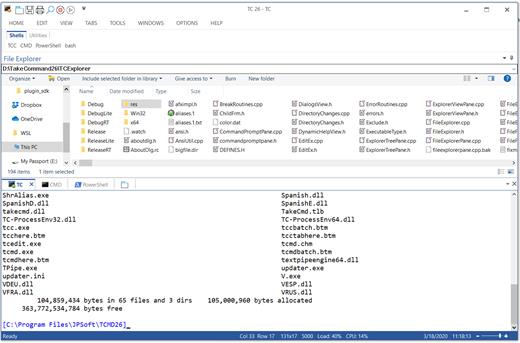
Take Command provides an optional embedded Windows File Explorer window that displays a tree view of the folders on your system and the contents of the selected folder (List View) on the right. You can drag folders and files from the Explorer window and drop them in a command prompt window.
Take Command can be easily configured for your preferences with its configuration dialogs.
Take Command has an optional tabbed tool bar that you can use to execute internal or external commands, aliases, or batch files with the click of a mouse (or an accelerator key). You can define up to 20 tabs, each with up to 50 toolbar buttons.
Take Command provides a configurable Status Bar that can display quick help for the current command, tooltips, and system information, including tab window size, CPU usage, memory usage, date & time, character values at the cursor location, and a slider control for window transparency.
Cut and Paste options are limited in the default CMD console or Windows Terminal. Take Command adds both line and column selection, double-click or triple-click selections, overwriting or appending to the Windows clipboard, and a variety of paste options.
Take Command windows can be styled with a choice of 18 themes.
Take Command and TCC offer a wide variety of colorization options, not just foreground and background colors.
Take Command includes invaluable tools, including a batch file debugging IDE, a regular expression creator / analyzer, search and replace in files, and a macro recorder / playback.
Extensive help (quick help, context sensitive help, and general help) is available in English, French, German, and Spanish at the touch of a button.

Release Name: JP Software Take Command 36.51.76
Size: 59.8 MB
Links: HOMEPAGE – NFO – Torrent Search

Download: RAPiDGATOR
4 Comments
July 17

DP Animation Maker 3.5.52

Description: Smart 2D animation software that lets you turn still images into live moving scenes. Create living, breathing worlds from your still image with minimum effort. DP Animation Maker lets you make natural scenes burst with vibrancy and give motion to people and objects.

Ever wonder how your friends and colleagues get those neat animations in their photos, slideshows, and videos?
Adding lively effects to images is a lot easier than you think. The secret is DP Animation Maker. It's a super simple way to transform any image into a vibrant animation.

Fun software, with a wide variety of uses
DP Animation Maker helps you make animated videos for lots of stuff. Whether for business or personal use, some of the most popular items people create with the software include:

Animated videos
Web banners
YouTube videos
Digital greeting cards
Mobile phone backgrounds
PowerPoint presentations
Music videos
Video footage
And more!

Sky's the limit! So why settle for boring, static photos or slideshows? With DP Animation Maker you can bring your images to life by making waves crash at the ocean, snow fall on mountains, and flames flicker on candle wicks.

It's fast and easy-to-use
The good news is, you don't have to be a tech guru to use this software. Thanks to our easy-to-understand interface, no special skills are required. Anyone can use it.

But tech savvy graphic artists benefit, too. That's because DP Animation Maker takes the guesswork out of the time-consuming programming aspect of the animation process. Artists can concentrate on image design and artwork instead.

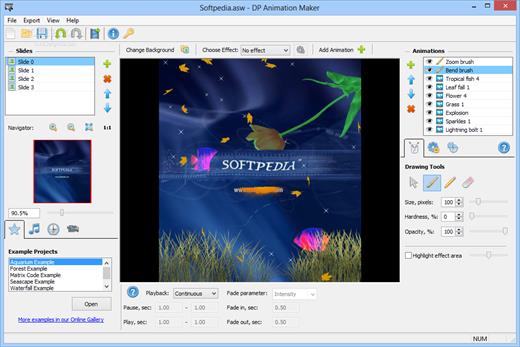
No matter your level of tech sophistication, our process is painless. Simply open an image, select an effect, add moving objects, export to your preferred format, and voilà — you're ready to share your animation with the world. It's that fast. With the press of a button, you can adjust motion, speed, and other key elements of any moving object. Ready-to-use, animated images are available within minutes.

Plenty of features to choose from
Our prebuilt animations are designed to give you a lot of options. Whether you have a single image or need to create a long slideshow, DP Animation Maker has the rich set of tools you need to put all the pieces together.

Once you select your images, it’s easy to go from ‘static’ to ‘alive’ with our wide range of effects, stationary objects, moving objects, brushes, music, timing, and camera adjustment features. You can also import your own animated GIF files if you want to add more effects to them as well.

Effects
Give images the appearance of being underwater, of having a reflection, or of being on fire. After you select a desired effect, you can fine-tune the height of your flames or the speed of your waves by tweaking the adjustment settings.

Release Name: DP Animation Maker 3.5.52
Size: 26.9 MB
Links: HOMEPAGE – NFO – Torrent Search

Download: RAPiDGATOR
4 Comments
July 17

Luxion KeyShot Studio Enterprise 2026.2.1 v15.1.1.5

Description: Take your design to the next level. Discover KeyShot Studio, formerly known as KeyShot. The cutting-edge 3D rendering tool that brings your designs to life with photorealistic accuracy.

Create visuals faster with KeyShot Studio
Experience state-of-the-art rendering and bring your brilliant ideas to life with the fastest, most precise studio available for your product visualization.

Experience unparalleled 3D visualization every time you create.
KeyShot Studio is the culmination of decades of innovation and collaboration with product industry leaders. Designed for those who demand ultimate accuracy and instant results in 3D rendering, it integrates cutting-edge technology into a sleek, easy-to-use solution.

User-friendly
Intuitive design
You don’t have to be a rendering expert to create photorealistic images of your 3D models. Simply import your data, assign materials by dragging and dropping them onto the model, adjust the lighting, and move the camera. Done.

Render speed
Lightning-fast rendering
KeyShot Studio excels in fast 3D rendering, producing stunning visuals quickly. As a comprehensive solution, it ensures efficiency for tight deadlines and rapid design changes. Focus on creativity, not waiting.

Render quality
Photorealistic every time
For over 20 years, KeyShot Studio has set the standard for photorealistic images, enhancing design and marketing with high-quality renders. Trust KeyShot Studio to bring your ideas to life swiftly and accurately.

Extensive 3D format support
KeyShot Studio supports 34 different 3D formats, including popular CAD files like SOLIDWORKS, AutoCAD, CATIA, and Rhino. This wide compatibility ensures you can easily import and work with your models, focusing on creativity and innovation without file compatibility concerns. KeyShot ensures that you can work with virtually any file format

Upload your model for
instant visualization
Accelerate your design process by creating photorealistic prototypes with KeyShot Studio. Simply upload your CAD files and let our intuitive tools help you visualize your ideas with precision, enhancing collaboration and decision-making.

Release Name: Luxion KeyShot Studio Enterprise 2026.2.1 v15.1.1.5
Size: 2.1 GB
Links: HOMEPAGE – NFO – Torrent Search

Download: RAPiDGATOR

2 Comments
July 17

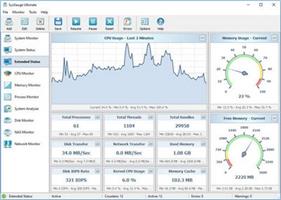
SysGauge 13.1.24

Description: SysGauge is a system and performance monitoring utility allowing one to monitor the CPU usage, memory usage, network transfer rate, operating system performance, the status and resource usage of running processes, file system performance, USB performance, disk space usage, disk read activity, disk write activity, disk read transfer rate, disk write transfer rate, disk read IOPS and disk write IOPS for individual logical disks or all physical disks installed in the computer.

SysGauge Main GUI Application
The main SysGauge GUI application allows one to configure a number of system and performance monitoring counters, display system monitoring charts, analyze the current system status, save various types of system monitoring reports and configure sound and E-Mail notifications.

SysGauge System Monitor
The 'System Monitor' GUI module allows one to perform various types of system monitoring operations using one or more pre-defined or user-custom system monitoring profiles. The system monitor provides the ability to add, edit or delete system monitoring counters, save various types of system monitoring reports, configure monitoring rules, actions and error E-Mail notifications.

Add Counter Dialog
The 'Add Counter' dialog provides the ability to add the CPU usage counters, memory usage counters, disk activity counters, network activity counters, USB activity counters, operating system status counters, file system counters and running processes counters.

SysGauge CPU Monitor
The 'CPU Monitor' GUI module is a dedicated CPU monitoring GUI module showing the total CPU usage, user CPU usage, kernel CPU usage, CPU interrupt time, CPU interrupt rate, the current CPU frequency, the C1 low-power state, C2 low-power state and C3 low-power state.

SysGauge Memory Monitor
The 'Memory Monitor' GUI module is a dedicated memory monitoring module showing the memory usage, the amount of free memory, the amount of used memory, the size of the memory cache, the cache peak size, the cache fault rate, the page file usage, the page file peak usage and the page fault rate.

SysGauge Process Monitor
The 'Process Monitor' GUI module is a dedicated process monitoring module showing the list of currently running processes and displaying for each process the process CPU usage, the memory usage, the number of threads, the number of handles, the number of process instances, the process data transfer rate, the process read transfer rate, the process write transfer rate, the process page fault rate and the amount of non-paged memory allocated by each running process.

Release Name: SysGauge 13.1.24
Size: 41.6 MB
Links: HOMEPAGE – NFO – Torrent Search

Download: RAPiDGATOR
4 Comments
July 17

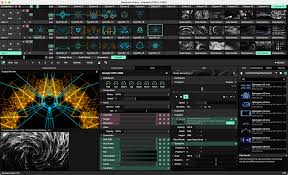
Resolume Arena 7.27.1 rev 15990

Description: Resolume is the industry-leading software for VJ’s around the world. Arena & Avenue’s intuitive workflow will have you mixing, matching and playing your content in no time. Synchronise to the BPM, animate your playback parameters and create complex effect routings in the blink of an eye.

Live Video Mixing
Resolume puts you in charge. You can play your videos when you want, how you want. Forwards, backwards, scratch and adjust tempo to the beat. Mix and match your visuals quickly and easily and play Resolume like an instrument.

Intuitive Interface
Whatever your style is, Resolume offers you an easy interface to rock it. Use as little or as many videos and effects as you like. The only limit is your computer’s raw power and your imagination.

Audio Visual Playback
Use generators to create visuals on the fly or use external cameras and/or streams – all done in a simple to use drag & drop interface. Resolume supports NewTek NDI®, Syphon and Spout as external streaming sources. With native support for Blackmagic, AJA and Datapath capture cards you can input and output almost any video source.

Visual Finesse
Work with both audio and video in Resolume to create exciting audiovisual performances, animate pixels, drop beats and get the crowd roaring. Alongside Resolume’s suite of audio and video effects it can also support your own VST-effects.

Audio Analysis
As the cherry on our sonic cake we also support audio analysis through FFT – use FFT to make your clips and effects bounce to the incoming sound source.

All Hands on Deck
Throw your mouse out of the window and use Resolume’s powerful MIDI and OSC mapping tools instead. Get physical with a MIDI-controller or create your own OSC controller.

Take control over Resolume Arena from your lighting desk using DMX and operate both light and video with the flick of a fader, or go the extra mile and use the Resolume API to control Resolume over a network.

Local Club to Main Stage
Allow Resolume to grow with your skillset as you move from VJ’ing club shows to headlining main stages. Whether you are working with a single screen setup or a complicated multi-screen rig, Resolume’s got you covered.

Projection Mapping
Project video on any surface with Resolume Arena. Get your content mapped onto geometrical structures, small stages or entire buildings.
Arena does all the hard work, so you can concentrate on the important part: being creative. Use edge blending to seamlessly project your widescreen content using two or more projectors or wrap around for a full 360 experience.

LED There Be Light
Take your shows beyond video and use Resolume Arena to control lighting fixtures. Resolume Arena allows you to send colors to DMX fixtures, the ultimate solution for getting your visuals and lightning in sync.

Expand Your Toolset
Resolume supports third party plugins, allowing you to add additional functionality to Arena and Avenue. Create your own plugins using Resolume Wire or visit the Juice Bar for some real powerhouse plugins.

Release Name: Resolume Arena 7.27.1 rev 15990
Size: 1005.2 MB
Links: HOMEPAGE – NFO – Torrent Search

Download: RAPiDGATOR
5 Comments
July 17

Power-user Premium 1.7.86.414

Description: Power-user, your smart tool to supercharge Microsoft 365. Build clear, convincing and on-brand documents at lightning speed. Save time to create value for your business.

WORK 50% FASTER
Assemble, format and clean documents in minutes on PowerPoint, Excel & Word. Save time to focus on what matters.

BE CRYSTAL CLEAR
Bring clarity in your organization with slides designed as masterpieces, streamlining your communication.

SECURE BRAND CONSISTENCY
Deliver branded content to your teams, enforce compliance checks and make every document branded by design.

Customization
We can customize Power-user with your brand to enforce consistency:
Converting all templates and content in your theme
Setting up corporate styles for charts, tables and cells
Integrating key resources like a corporate presentation, brand book, CVs of the team, time-saver decks, financial models templates, etc.
Integrating custom branded icons or pictures
Setting up tombstones or case studies to deliver winning proposals

Trainings and adoption support
We help you onboard your team with dedicated live training sessions. Each training can be adjusted to your team's experience and priorities, while ensuring understand the key features of Power-user and how to apply them to their daily work.
Each user also receives self-service resources such as a user guide, training videos, email tips...

Features:
Power-user offers dozens of features for Microsoft PowerPoint, Excel and Word. It is by far the most complete add-in, designed to save your time and make you Office heroes. You will find below some of the top features of Power-user. Since there are many features, not all of them are described here so you will need to download to try them all.

ACCESS THOUSANDS OF VISUAL ASSETS
Browse and insert high-quality visual assets to make a presentation in minute. This content will save you a huge amount of time and make your presentations look very professional.

AUTOMATE FORMATTING TASKS
Automate heavy formatting tasks with Power-user to save hours every week and refocus on what really matters in your presentations.

MAKE YOUR LIFE EASIER
Creating slides has never been so simple. Power-user brings on a single tab all the great tools you need to work efficiently, so you can focus on messages rather than formatting.

UNLOCK NEW POWERS IN EXCEL
Our toolbox of Excel macros and utilities will save you hours on repetitive tasks and help you quickly structure, format, analyze and visualize your data.

Power-user is fully compatible with PowerPoint, Excel and Word, for any of the following Office versions:


  • Office 2007
  • Office 2010
  • Office 2013
  • Office 2016
  • Office 2019
  • Office 2021
  • Office 365
Release Name: Power-user Premium 1.7.86.414
Size: 48.8 MB
Links: HOMEPAGE – NFO – Torrent Search

Download: RAPiDGATOR
4 Comments
July 17

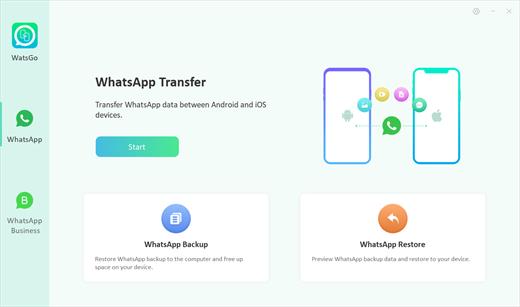
iToolab WatsGo 9.1.1

Description: WhatsApp/WhatsApp Business Transfer Cross Multiple Devices. Whenever you want to upgrade to or switch to a new device, you can enjoy iToolab WatsGo to transfer WhatsApp between Android and iOS like never before. It assures a secure and effective way to move data. So, you will never say Goodbye to your old stuff!

Features:
One-click to Transfer WhatsApp/WA Business between Android and iOS.
Transfer GBWhatsApp to WhatsApp or GBWhatsApp in a simple way.
A wide range of data type including WhatsApp messages, images, videos, contacts, etc.
Restore WhatsApp Backup from Google Drive to iPhone & Android.
Backup WhatsApp on Android & iOS to computer without Google Drive, iTunes or iCloud.
Preview and Restore WhatsApp backup or iTunes backup anytime.
Fully compatible with Android 15 and iOS 18.

Android to iPhone
If you switch to a new iPhone from an old Android phone, then this helps you to quickly transfer WhatsApp from Android to iPhone with all data kept.

iPhone to Android
No matter what Android brands you are holding, you can always trust WatsGo to transfer WhatsApp from iPhone to Android without limitation.

Android to Android
Couldn't restore your Google Drive backup to new Android phone? You can transfer your WhatsApp backup from Android to Android instead of Google Drive.

iPhone to iPhone
How to transfer WhatsApp from iPhone to iPhone without iCloud? WatsGo perfectly solves the issue and increases the chance or transferring.

Transfer All Data with a Secure Way, Nothing Will be Left Behind
Some Move to iOS users complain about data loss during transfer. However, iToolab WatsGo doesn't allow such a thing to happen. Let's check out what will be transferred in its entirety.

Release Name: iToolab WatsGo 9.1.1
Size: 297 MB
Links: HOMEPAGE – NFO – Torrent Search

Download: RAPiDGATOR

6 Comments
July 17

Wondershare PDFelement Professional 12.1.26.4340

Description: The PDF Experience, Simplified. The easiest way to create, edit, convert and sign PDF documents. Get control over PDFs like never before. The most Powerful and Simple PDF solution that changes the way you work with your important documents forever.

Edit PDF Like Word
Wondershare PDFelement enables you to edit PDF documents just as easily as you would in Word documents.

Edit PDF Text
Add, edit, remove text, link, watermark, header&footer, or bates numbers on your PDF easily. You can also edit the size, font, and color of the added content.
When you need to change the background of the PDF file, you can also add or change the file's background with any color, PDF or image.

Edit PDF Image
Click on an image, then move, rotate, crop (resize), extract, replace, overturn or delete images in PDF. Even you can set the Z-Order of the image.
Export each image in a PDF to a separate image file with "Convert" feature of Batch Process tool.

Move and Align Objects
It is easy to move an item forward or back just one level, or send it to the front or back of the stacking order of elements on the page.
The Align properties options (in the right-hand panel on Windows version, or right-click to call up the Align properties) let you precisely align multiple objects on a side - left, right, top, bottom vertical center, and horizontal center.

Edit PDF Pages
Organizing pages in PDFelement is intuitively simple and fast. It is easy to sort, add, rotate, move, split, crop and delete PDF pages with PDFelement in a second, from anywhere.

Edit PDF Forms
PDFelement can help you create, edit PDF forms easily, also turn PDFs into fillable forms with "Recognize Form" tool or just add, delete, and drag and drop form fields or enable fields for e-signatures.
You can even add calculations and data validation rules to your form. It is simple!

Edit Scanned PDF
When you open a scanned document for editing, you need to perform OCR feature(optical character recognition) on PDFelement.
It can recognize text and characters from PDF scanned documents (including multipage files), photographs or digital camera captured images, so to make the PDF documents editable and searchable.

Edit Password Protected PDF
Unlock the PDF by entering the correct password so to access the file. Then you can edit, print, copy, comment, sign, organize the PDF file.
You can also remove security from a PDF if you have the document password.

Your Complete PDF Convert Solution
Convert PDFs into secure file formats, like Microsoft Office, image, text etc. in high-quality and minimum effort.

PDF to Word
Batch-convert PDF files to Word documents without losing fonts and formats. It supports .docx, .doc.

PDF to Excel
Convert PDFs to Microsoft Excel files: xlsx, xls, XML.

PDF to PPT
Convert PDFs to Microsoft PowerPoint files: .pptx, .ppt.

PDF to Image
Convert PDFs as separate images or into one single image with any image quality you want. It supports JPG, PNG, BMP, GIF, and TIFF.

Release Name: Wondershare PDFelement Professional 12.1.26.4340
Size: 305.5 MB
Links: HOMEPAGE – NFO – Torrent Search

Download: RAPiDGATOR
4 Comments