Please REGISTER or RENEW your account on RAPiDGATOR.net and support us by doing through all RAPiDGATOR working download links on main posts...
June 12

Topaz Photo Pro 1.6.1

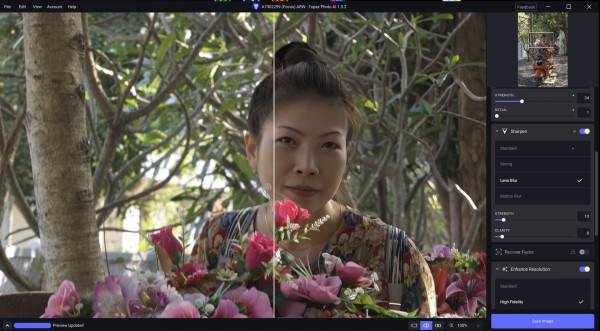
Description: Each tool gets it closer to perfect. The ultimate finishing step for every image. Fix issues. Restore focus. Remove noise. Enhance details. Crop in. Prepare for print. Topaz Photo is the magical last step before "done." All using AI trained on millions of images.

Wildlife & Astro Photography
Zoom in with lossless crop, sharpen details, and denoise high ISO shots captured in unpredictable conditions.

Sports Photography
Sharpen motion blur and denoise indoor shots with poor lighting.

Events & Weddings
Never miss the important moment to low lighting or soft focus. Topaz Photo lets you fix the details without reshooting.

Archival Images
Remove dust and scratches, adjust lighting and color, and restore images to their original sharpness.

System Requirements:
Windows Operating System: Windows 10 or 11
CPU: Intel OR AMD Processor2, with AVX instructions, released after 2016
System Memory (RAM): 16GB
Dedicated Graphics Card (NVIDIA): NVIDIA graphic card - 6GB VRAM4 | AMD graphic card - 6GB VRAM4 | Intel ARC graphic card - 6GB VRAM4
Dedicated Graphics Card (AMD): Intel UHD 600 Graphics5 | Intel Iris Xe5
Disk Space on C:/ 37GB of space6

Release Name: Topaz Photo Pro 1.6.1
Size: 955.7 MB
Links: HOMEPAGE – NFO – Torrent Search

Download: RAPiDGATOR

4 Comments
June 12

PDF-XChange Pro 11.0.1

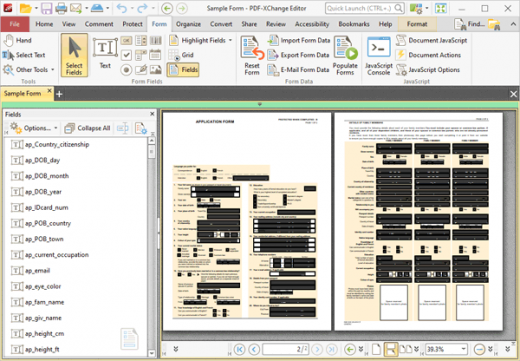
Description: Products Included in the PRO Bundle: PDF-XChange Editor Plus, PDF-Tools, PDF-XChange Standard. PDF-XChange Editor Plus is a hugely dynamic and fully-customizable PDF application. Create, view, edit, annotate, OCR and sign PDF files – and that’s just the beginning. If you work with PDF then this fully-customizable product will optimize your work process to levels that no other product can achieve.

Create PDF files from scanned documents, images, text files, Markdown files and much more. Convert Microsoft Office documents to PDF at the click of a button. Avail of over thirty tools to assist in the creation of document comments, annotations, links and fillable forms. These tools make editing PDFs a finely-tuned, precise process that produces documentation and image files of the highest quality. Our user-friendly functionality is diverse enough to meet the needs of all practitioners from novice users to professionals.

PDF-Tools
PDF-Tools is a worldwide leader in the creation and manipulation of PDF and image files. Highly user-friendly, it can be used to convert files of almost any format to/from PDF. Avail of eighty-one built-in default tools, as well as functionality to clone and edit these tools and their variables as you desire. Use the Actions Library to fully customize your tools and the Tool Actions Sequence to determine the order in which they perform operations. Combine eighty-six available actions to create your own tools - out of billions of possibilities. PDF-Tools is compatible with large PDF files and can also handle a huge number of files simultaneously – batch conversion is its strength.

PDF-XChange Standard
PDF-XChange Printer Standard is Tracker Software’s best-selling virtual printer - the ultimate application for the updating and conversion of documents to industry-standard PDF files. It’s compatible with files from almost all Windows applications, such as Word, Excel and AutoCAD, and features an optimized, hybrid conversion engine that prints to both GDI and XPS. The files it creates are surprisingly small, given their quality – allowing for faster uploads/downloads, a reduction in storage space and increased data retention - even at high levels of compression. PDF-XChange Printer Standard also features MS Office integration, which provides extra functionality such as adding clickable tables of contents and embedded URL support that facilitates the creation of external links.

Release Name: PDF-XChange Pro 11.0.1
Size: 756.2 MB
Links: HOMEPAGE – NFO – Torrent Search

Download: RAPiDGATOR

4 Comments
June 12

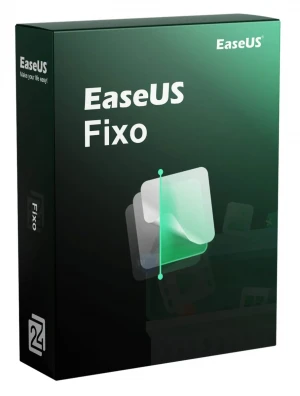
EaseUS Fixo Pro 4.3.1 Build 20260609

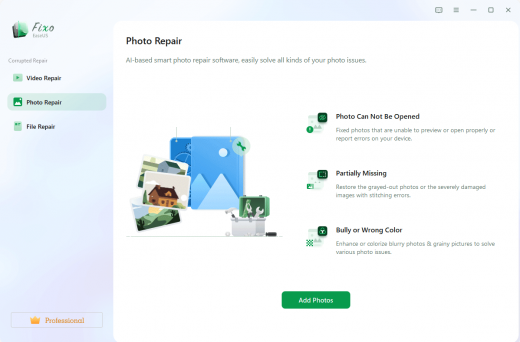
Description: Repair Corrupted or Unopenable Videos, Photos and Files. Videos, photos or files get corrupted or fail to open? EaseUS one-stop solution will help you repair corrupted videos, photos and files regardless of the level of damage.

Repair Any Corrupted or Unplayable Video
Videos become corrupted or inaccessible after sudden power surges and failures, complete system crashes, updating errors, file mishandling or some other reasons? The video repair software - EaseUS Fixo enables you to repair a wide variety of video file formats including MOV, MP4, M2TS, MKV, MTS, 3GP, and more easily, no matter how it is damaged.

Repair Corrupted Photos from Any Device
Photos with precious memories or essential information become corrupted and unopenable? The photo repair software - EaseUS Fixo can intelligently and smartly repair your corrupted and damaged photos from your computer or other external storage devices like USB flash drives, memory sticks, SD cards, digital camera and phones regardless of their level of damage.

Repair Corrupted Word, Excel, PPT, and PDF Files
Office files and pdf files become corrupted, inaccessible or unreadable unexpectedly for unknown reasons? EaseUS Fixo which has an intuitive interface is the best file repair software for novices to fix the corrupted office documents, including PDF, Word, Excel, and PowerPoint files.

Release Name: EaseUS Fixo Pro 4.3.1 Build 20260609
Size: 194.2 MB
Links: HOMEPAGE – NFO – Torrent Search

Download: RAPiDGATOR

5 Comments
June 12

XML Blueprint 22.20260611

Description: The smart XML Editor in XMLBlueprint has full support for DTD, Relax NG, Schematron, XSD, XSLT (1.0, 2.0, 3.0) and XPath (1.0, 2.0, 3.1). Its unique combination of just the right features and an affordable price for both professionals as well as home users makes it the smart choice for all your XML-related work.
With XMLBlueprint you can edit and validate very large XML files (1GByte and larger). With its intuitive user interface, XMLBlueprint makes XML editing fast and easy. XMLBlueprint is the best choice for professional XML developers and home users alike.

XML Validator
The XML Editor automatically validates XML files against XSD, DTD, Relax NG Schema, and Schematron. All files are automatically validated as-you-type. XMLBlueprint provides wizards to associate your XML Document with a DTD, Relax NG schema or XSD. Supported Processors: Xerces, MSXML and Jing.

XML Catalogs
XML Catalogs lets you redirect schemas on the Internet to your local computer, which makes validating your XML files much faster and more reliable.

XML Tag Completion
Context-Sensitive XML Helpers, or IntelliSense, based on XSD, DTD, and Relax NG Schema, for element names, attribute names and attribute values. Closing tags are automatically added. Annotations are read from the XML Schema and presented as tooltips, to provide context sensitive help.

XML Refactoring
XMLBlueprint has an extensive range of XML editing features, such as: XML Refactoring helps you change the structure of your xml documents. Sometimes a simple find/replace of text is not powerful enough to make subtle changes in your XML Document. For instance, if want to change all <p> elements into <div> elements you cannot globally replace "p" into "div" because this would also change text such as "simple" into "simdivle". Nor could you change <p> into <div> because then the </p> would still remain. It's much faster to use the XML editor's refactoring functions for this type of changes.

XML Formatter
The XML Formatter lets you indent text, split long lines, remove whitespace, handle empty elements, format attributes. You can specify how XMLBlueprint should format your xml file. For instance, what to do with empty elements and where to place attributes and text. XMLBlueprint correctly handles whitespace (the xml:space attribute), and you can override this behavior for specific elements.

XML Generator
XML Generator to generate sample XML based on XSD, DTD, or Relax NG Schema. You can specify if you want XMLBlueprint to generate optional elements, optional attributes, attribute values, etc. XSD Generator to generate XSD, DTD, or Relax NG Schema from multiple sample XML files. Convert CSV to XML and Convert Excel to XML. Once you have created your scenario you can run it from the command line. To run conversions on a regular basis, you can use Windows' Task Scheduler. Schema Viewer.

XML Folding
To simplify working with large XML Documents, XMLBlueprint provides XML Folding.

Non-English Languages
XMLBlueprint supports languages such as French, Russian, Japanese, and Chinese.

FTPS, SFTP, and WebDAV
With XMLBlueprint you can edit files stored on a remote FTPS server, SFTP server or WebDAV server.

Large Files
XMLBlueprint is optimized for large files, up to 1GByte and larger. Even large files are open quickly without losing any of the XML features.

Outline View
The Outline View shows all XML elements and attributes. The outline is updated in real time as you type. Selecting an XML element in the outline automatically selects the corresponding XML in the editor.

Jump to element definition in XML Schema
While editing your XML file you can jump directly to the corresponding element definition in the associated XML Schema.

Breadcrumbs
The breadcrumbs tool displays the path from the root of your xml file to the current xml node.

Release Name: XML Blueprint 22.20260611
Size: 81.9 MB
Links: HOMEPAGE – NFO – Torrent Search

Download: RAPiDGATOR

4 Comments
June 12

Red Gate SmartAssembly 8.4.7.7096

Description: Redgate's .NET obfuscator. SmartAssembly is an obfuscator that helps protect your application against reverse-engineering or modification, by making it difficult for a third-party to access your source code.

If your entire business rests on the IP embodied in your software or you don't want your C# or VB.NET code exposed internationally, then obfuscating your code becomes a necessity, not a luxury.

With SmartAssembly, you get a comprehensive set of obfuscation features, including name mangling, control flow obfuscation, strings encoding, reference dynamic proxy, and declarative obfuscation.

Protect your .NET code and IP with SmartAssembly
Protect intellectual property through obfuscation and encryption
Secure .NET Framework, .NET Core, and .NET Standard assemblies
Automatically report usage and exceptions

Key features

Name mangling
Changes the names of methods and fields to make it hard to understand their purpose.

Control flow obfuscation
Converts the code inside methods to 'spaghetti code' to make it difficult to see how the application works.

References dynamic proxy
Creates a proxy for calls to methods outside of your assembly to make it hard to find external calls.

Strings encoding
Encodes the strings used in your software to hide such information as passwords and SQL queries.

Resources compression and encryption
Compresses and encrypts managed resources to make them hard to understand, and to reduce the size of the assembly.

Pruning
Removes non-useful metadata to make the code harder to reverse-engineer, reduce the size of the assembly, and improve loading time.

Dependencies merging
Takes all the DLLs and merges dependencies into the main assembly, so you don't have to load lots of DLL files, and so that they can also be obfuscated.

Dependencies compression and embedding
Compresses and embeds your dependencies into your main assembly, simplifying the deployment of your software and reducing the size of your program.

Method parent obfuscation
Moves methods in your code by changing the class they are in, making it harder to understand how methods and classes relate to each other.

Strong name signing with tamper protection
Signs your assembly and helps to protect it against modification (the additional tamper protection is not available in the Standard edition).

Declarative obfuscation
Excludes a member from obfuscation using custom attributes directly in your code.

Release Name: Red Gate SmartAssembly 8.4.7.7096
Size: 15 MB
Links: HOMEPAGE – NFO – Torrent Search

Download: RAPiDGATOR

4 Comments
June 12

JixiPix Fold Defy 1.7

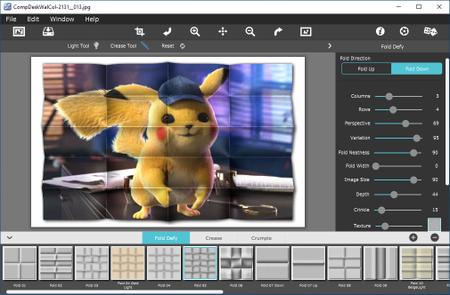
Description: Fold Defy renders 3D popping folds with their perspective distortions and a realistic shadow for an amazing high-end result!

Get Photo - Load a photo from your hard drive
Save Photo - Save your image to your hard drive
Crop - Cut out an area of your image hiding the rest
Undo - Undo the last edit
Zoom In - Zoom in to examine small details
Move: Move your image within the app and pan through the presets, grains and tints
Zoom Out - Zoom Out to view a larger proportion of your image
Redo - Redo the last edit that was undone
Original Button - Hold down to view the original image for a quick comparison.
Info Button - Opens up this page
Website - Takes you to our website
Randomize - Randomizes the effect on the image.

Release Name: JixiPix Fold Defy 1.7
Size: 132.3 MB
Links: HOMEPAGE – NFO – Torrent Search

Download: RAPiDGATOR

5 Comments
June 12

AI Audio To Text Pro 1.0.4

Description: Transform your audio and video files into highly accurate text and subtitles using the power of advanced AI—all running 100% locally on your PC. AI Audio To Text Generator Pro utilizes state-of-the-art AI models (including OpenAI’s Whisper and Distil-Whisper) to deliver professional-grade speech recognition without the need for expensive cloud subscriptions or internet connectivity. Because everything processes on your own hardware, your audio files remain completely private and secure.

Absolute Privacy
100% offline processing. Your files never leave your computer.

High Accuracy AI
Powered by the industry-leading Whisper AI architecture.

Multiple Export Formats
Save transcripts as Plain Text, JSON, TSV, or Subtitles (SRT & VTT).

Multilingual
Supports transcription for over 99 languages.

Translation
Automatically detect foreign languages and translate them to English.

Hardware Accelerated
Automatically utilizes your NVIDIA GPU (CUDA) for lightning-fast speeds, or falls back to optimized CPU processing.

System Requirements
- OS: Windows 10 version 17763.0 or higher
- Memory: 4 GB (Minimum), 16 GB (Recommended)

Release Name: AI Audio To Text Pro 1.0.4
Size: 1.9 GB
Links: HOMEPAGE – NFO – Torrent Search

Download: RAPiDGATOR
3 Comments
June 12

MainConcept Codec Plugin 1.7.3 for DaVinci Resolve

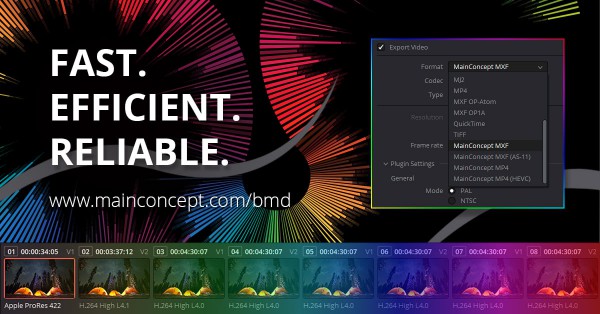
Description: Now, creators can easily render project timelines from DaVinci Resolve Studio 19 and newer into professional camera formats from Sony, Panasonic and others. The latest version of the plugin comes with additional render profiles for HEVC/H.265 12K resolution, so you can output content from the Blackmagic URSA Cine 12K camera in its native resolution directly from the DaVinci Resolve Studio timeline.


Product Highlights


HEVC encoding up to 12K


  • Encode HEVC/H.265 Main and Main 10 in up to 12K in MP4 file format which is widely used in OTT workflows and environments
  • GPU-accelerated encoding modes for NVIDIA RTX boards for significantly increased performance without sacrificing quality
  • New render presets for HEVC/H.265 12K resolution for outputting content from the new Blackmagic URSA Cine 12K camera in its native resolution
AS-11 UK DPP Rendering

  • Supports AS-11 UK DPP SD (MPEG-2) and HD (AVC/H.264) project rendering with ready-to-use SD and HD presets, including metadata handling, direct from the DaVinci Resolve Studio timeline
  • The included XML metadata template file can be modified to set all descriptive metadata required to create AS-11 UK DPP compliant content
 Pro camera formats and preset groups
Supports a wide range of professional camera formats and preset groups including:


  • Sony XDCAM EX, HD & IMX and XAVC & XAVC-S
  • Panasonic P2 DVCPRO and AVC-ULTRA (Intra and LongG)
  • MP4 H.264 (8-bit or 10-bit) with AAC audio
  • MP4 HEVC (8-bit or 10-bit) with AAC audio
  • MXF (AS-11 UK DPP SD or HD & RP2027 AVC-Intra)
  • DVD (MPEG-2)
  • Blu-ray Disc
  • Blu-ray Disc UHD

Release Name: MainConcept Codec Plugin 1.7.3 for DaVinci Resolve
Size: 13.1 MB
Links: HOMEPAGE – NFO – Torrent Search

Download: RAPiDGATOR

5 Comments
June 12

Rhinoceros 8.32.26160.13001

Description: Who Uses Rhino? Rhino is the most versatile of all 3D modelers, a jack-of-all-trades used in many industries… …just to name a few. No matter the scale, whenever a model needs to get from your screen to a real, built object, you will find Rhino.

New in Rhino 8
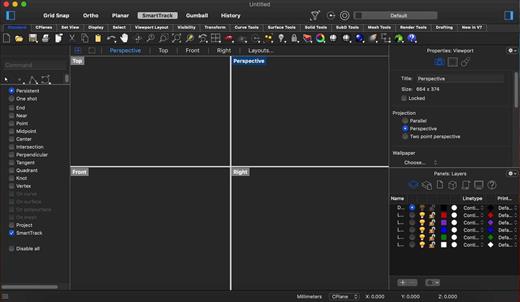
Rhino 8 brings new modeling tools like ShrinkWrap, a huge speed boost for Mac users, SubD Creases, PushPull workflows, better drafting tools, a more customizable User Interface, a faster Render engine, new Grasshopper data types, and much more.

ShrinkWrap: Turn Garbage To Gold
ShrinkWrap creates a watertight mesh around open or closed meshes, NURBS geometry, SubD, and point clouds: ideal for creating meshes for 3D printing.

SubD Creases
SubD Creases create a feature between a smooth and a sharp edge, without adding complexity to the SubD control net, great for making fillet-like features.

Modeling: Simplified
Rhino 8 unlocks new modeling workflows — like PushPull — and adds intuitive new features to the Gumball, Automatic CPlanes, and more…

Clipping and Sectioning
Rhino 8 introduces a number of clipping and sectioning enhancements to help support various drafting and fabrication workflows…

Presentation
In Rhino 8, we’ve updated the Cycles Render engine, smoothed out the UV Workflow, improved our procedural textures, added a display mode, and more…

Grasshopper: Rhino Data Types
Rhino Data Types allow you to bake geometry with custom attributes, import more file formats, control blocks, use native materials in the display pipeline, create hatches and annotations, and many other expanded workflows…

Rhino Refined
We’ve fixed hundreds of bugs, but we’ve also added new Linetypes, improved Mesh Booleans, enhanced our surface editing tools, and more…

Development Platform
Rhino 8 brings a new code editor, support for CPython and .NET 7, major improvements to our free SDKs, with API refinements, and some major new features that broaden and deepen the foundations of the geometry development platform…

And More
Looking for a complete list of new commands? If you’re not seeing what you’re looking for above, please check out the documentation’s New in Rhino 8 for a complete list…as well as new command options.

Release Name: Rhinoceros 8.32.26160.13001
Size: 635.2 MB
Links: HOMEPAGE – NFO – Torrent Search

Download: RAPiDGATOR
5 Comments
June 12

HyperSnap 10.0.1

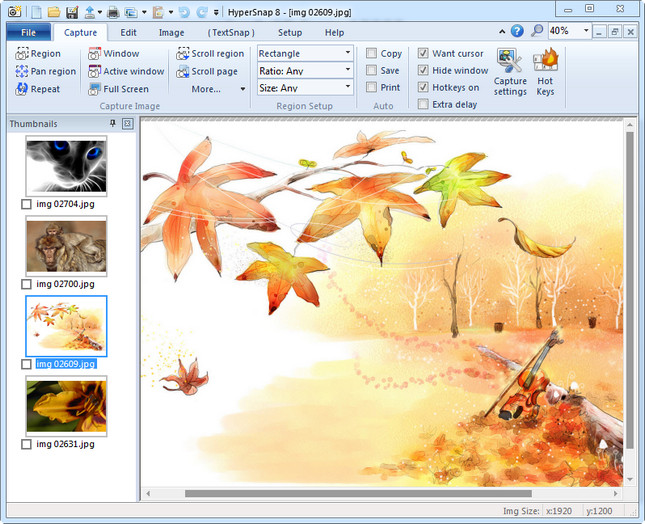
Description: HyperSnap 10 is the fastest and easiest way to take screenshots from Windows. HyperSnap combines the power of a first-class screen capture application with an advanced image editing utility, and editable text capture through OCR - wrapped into one easy-to-use tool. Windows 10 and 11 only.

HyperSnap is perfect for capturing images and texts that you want to include in your Help system, online tutorials, manuals, training handouts, presentations, marketing materials, Web pages, emails and more. Use HyperSnap to quickly share a picture-perfect representation of anything on your screen.

HyperSnap is versatile and extremely easy-to-use. You can switch between modern "ribbon" interface shown on the image above, or tranditional menu and toolbars.

Top Features
Image captures from any where on the screen or multiple monitors, in any shape or size.
New & powerful image capture, editing, annotation and  manipulation tools. Objects drawn over images can now be selected, edited, shown and hidden, moved, deleted any time. A new native file format saves the objects drawn for further editing later, or save a standard image and have the object "imprinted" permanently on them.
Unlimited undo/redo.
Capture dropdown menus and lists with hotkey feature or delayed capture.
Image stamps, frames, drop shadow, free-hand capture, FTP server uploads, more.
Automatic color substitution.
Non-rectangular window capture.
Button Capture  - perfect for professional technical writers who need to snap and document dozens of buttons!
Auto-scrolls and concurrently captures long web pages and other. documents, enabling it to grab more than is visible on the screen.
Tightly integrates with the MS Windows clipboard to automate repetitive tasks - will even automatically PASTE capture images where needed!
Automatically saves your captures to graphics files.
Doubles as effective image viewer, format converter (over 20 image formats supported).
Fully customizable user interface. Rearrange menus and toolbars any way you want, assign any keyboard shortcuts you like, tear off menus to create instant toolbars, even control HyperSnap with voice commands!

Release Name: HyperSnap 10.0.1
Size: 25.4 MB
Links: HOMEPAGE – NFO – Torrent Search

Download: RAPiDGATOR
4 Comments