Please REGISTER or RENEW your account on RAPiDGATOR.net and support us by doing through all RAPiDGATOR working download links on main posts...
Aug 10

Microsoft Word 16.111.3
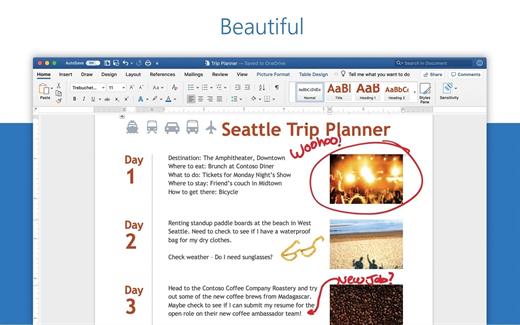
Microsoft Word app lets you create, edit, view and share your files with others quickly and easily. It also lets you view and edit Office docs attached to emails. With Word, your Office moves with you. Whether you are a blogger, writer, journalist, columnist, student or a project manager working on documentation, it’s as handy as you want it to be
Highlights:


  • Unmistakably Office, designed for Mac – MacBook Pro Touch Bar is fully supported by Microsoft Word. Get the most relevant Word features at your fingertips. Need to focus on your writing and help eliminate distractions? Microsoft Word also supports macOS Mojave Dark Mode
  •  Create with confidence – jump-start your project, assignments, letter, blog, script, notes, write-ups or CV with beautifully designed modern templates. Use rich formatting and layout options to note down your ideas and express them in writing. Document format and layout stays pristine and looks great – whatever device you use
  •  Put your best words forward – write with confidence, knowing that intelligent technology can help with spelling, grammar and even stylistic writing suggestions. With tools at your fingertips, easily go from pen and paper to digital inking and edit intuitively
  •  Stay in the flow – get all of the information you need as you write without leaving Word, whether it’s cited research or information from LinkedIn to help you craft a compelling CV
  •  Work better together – wherever you are, collaborate in real time. Share your documents with the click of a button to invite others to edit in real time or add comments. Plus, regardless of your preferred full language or accessibility options, everyone can work together to do more
  •  Sharing is simplified – share your files with a few taps to quickly invite others to edit or view your documents. Easily manage permissions and see who’s working in a document. Copy the content of your Word files directly into the body of an email message with its format intact or attach your docs to an email and make sharing easier
What’s New

Version 16.111.3:


  • Bug fixes
Compatibility

macOS 14.0 or later.


Release Name: Microsoft Word 16.111.3
Size: 1.3 GB
Links: HOMEPAGE – NFO – Torrent Search

Download: RAPiDGATOR
3 Comments
Aug 10

Microsoft Outlook 16.107

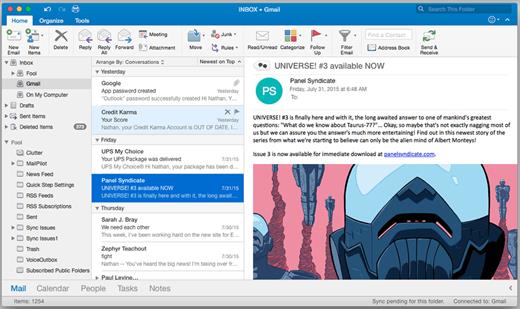
Microsoft Outlook brings your email, calendar, contacts together in one place so you can work efficiently. Office integration lets you share attachments from OneDrive, access contacts and view LinkedIn profiles

Highlights:


  • Unmistakably Office, designed for Mac – MacBook Pro Touch Bar is fully supported by Microsoft Outlook. Switch between Mail and Calendar with just a tap of the Touch Bar. Another tap and you can open a new meeting invite. Go easy on your eyes with Dark Mode. Outlook makes it focus on your inbox and calendar in low-light environments by supporting Dark Mode for macOS Mojave
  •  Quickly connect and share – keep key contacts front and centre to stay connected. Know organisation hierarchies and who people work with to help get things done. @mention people in your company for quicker collaboration.
  •  Security you can trust – get peace of mind with enterprise-grade security trusted by many of the world’s largest organisations. Outlook works around the clock to protect your confidential information without getting in your way
  •  Intelligence that works for you – Outlook anticipates your needs. Travel and bill payments are automatically added to your calendar, and intelligent reminders help keep you on track. Search helps you find information quickly
  •  Works with your email provider – Outlook for Mac works with Microsoft Exchange, Office 365, Outlook.com (including Hotmail and MSN), Gmail, Yahoo Mail and iCloud
What’s New

Version 16.107:


  • Bug fixes
Compatibility

macOS 14.0 or later.


Release Name: Microsoft Outlook 16.107
Size: 1.2 GB
Links: HOMEPAGE – NFO – Torrent Search

Download: RAPiDGATOR
3 Comments
Aug 10

Pastebot 2.4.8

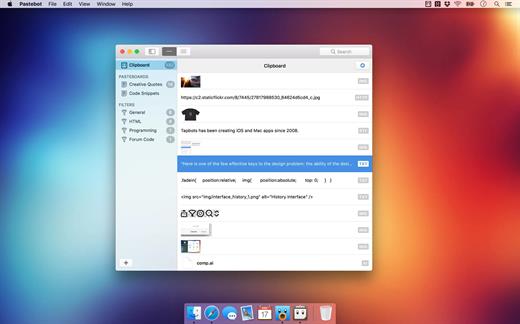
Pastebot saves everything you copy so that you can quickly recall them in the future. Save and organize frequently-used clippings into custom pasteboards and create keyboard shortcuts to access pasteboards and paste specific clippings. Build filters with a live preview and apply them as you paste. Create keyboard shortcuts to quickly paste using your filters and export your filters to share with other Pastebot users. Pastebot is there when you need it and invisible when you don’t. Quickly access your clippings from any app and search, preview, or filter clippings before pasting. You can even set the order of clippings to paste in sequence.

With iCloud enabled, your main clipboard, custom pasteboards and filters sync across all of your computers running Pastebot. Your clipboard and filters will be on every mac you work on. Create custom pasteboard groups to organize important clippings you want to save and re-use. Assign keyboard shortcuts to clippings you use most often. macOS Sierra’s Universal Clipboard works alongside Pastebot. Copy a clipping in Pastebot and paste it on your iOS device via Universal Clipboard.

Features

  • Pastebot works in full-screen and split-screen mode. Running in split-screen mode allows you to use Pastebot as a scratch pad.
  • Choose from various quick paste window styles to suit your preferences, always paste in plain text, enable release-to-paste and more.
  • There are apps you copy from that you never want stored in Pastebot. Just add that application to the blacklist and Pastebot will ignore it.
  • Find a clipping quickly with Pastebot’s powerful search capabilities. Search based on content or metadata. You can search by application, date, data type and more.
  • Pastebot features many keyboard shortcuts to satisfy any copy-and-paste maestro. Paste the previous item on the clipboard or paste the current clipping while applying the last used filter.

*** You need to disable the System Integrity Protection (SIP) to perform the selected Application.

What’s New

Version 2.4.8:


  • Fixed startup crasher after receipt expiration
Compatibility

macOS 10.14 or later
Apple Silicon or Intel Core processor


Release Name: Pastebot 2.4.8
Size: 11.3 MB
Links: HOMEPAGE – NFO – Torrent Search

Download: RAPiDGATOR

4 Comments
Aug 10

Mp3tag 1.13.5

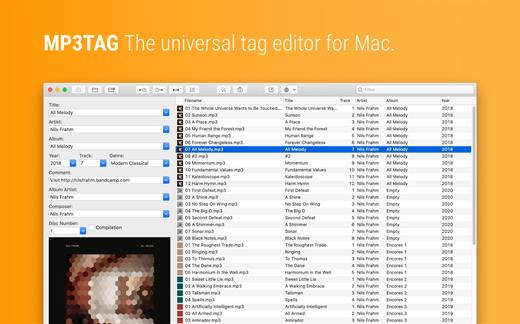
Mp3tag is a powerful and easy-to-use tool to edit metadata of audio files. Musicians, DJs, podcasters, and audio-enthusiasts use it for many different aspects of handling audio files.

It supports batch tag-editing for multiple files at once, covering many audio formats from MP3, over MP4, and M4V (yes, that’s video!) to FLAC, OGG, OPUS, AIF, DSF, MPC, and WAV.

Furthermore, it supports online database lookups from Discogs and MusicBrainz, allowing to gather proper tags and download cover art for music libraries.

It offers renaming files based on the tag information, replacing characters or words in tags and filenames, importing tag information, and adjusting the size and image format of embedded cover art.

Since some of the tasks in managing a digital library are repetitive, Mp3tag allows for combining tasks into action groups, which serve as workflows for keeping consistency and order. Examples are formatting tag fields, performing case conversion, removing unwanted fields, or adjusting embedded cover art to match required sizes.

Key Features

  • Bulk-Editing of Tags for multiple files at once.
  • Editing of cover-art.
  • Renaming files based on tags.
  • Importing metadata from filenames.
  • Assign track and disc numbers via the auto-numbering wizard.
  • Importing metadata from online Tag Sources.
  • Support for Flexible Tagging, allowing for user-defined tag fields in a standardized way.
  • Applying action groups with many tasks combined into reusable workflows.
  • Support for many file types under a universal user interface.
Supported File Formats

  • MP3 (ID3v1, ID3v2.3, ID3v2.4 with UTF-8)
  • MP4/M4A/M4B/M4V (iTunes and Nero)
  • FLAC (Vorbis Comments)
  • OGG (Vorbis Comments)
  • OPUS (Vorbis Comments)
  • AIF (RIFF INFO and RIFF ID3)
  • DSF (ID3v2)
  • MPC (APEv2)
  • WAV (RIFF INFO and RIFF ID3
What’s New

Version 1.13.5:


  • Release notes were unavailable when this listing was updated.
Compatibility

macOS 10.14 or later.


Release Name: Mp3tag 1.13.5
Size: 13.1 MB
Links: HOMEPAGE – NFO – Torrent Search

Download: RAPiDGATOR
4 Comments
Aug 10

Traktor Pro 4.5.1.21

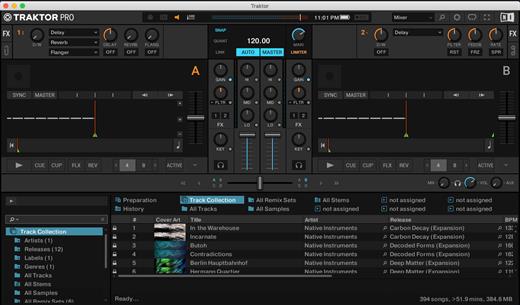
TRAKTOR PRO 4 builds upon almost two decades of performance in the booth, while maintaining the workflows that brought it to the stage in the first place. From making sure you always sound your best on club systems, to developing high-impact effects you can use in an instant, TRAKTOR PRO 3 is designed more than ever for unique, dancefloor-filling mixing.

TRAKTOR PRO Plus is an add-on subscription for existing TRAKTOR PRO users. Through this subscription, we will release an ever-growing stream of exciting new features outside of the usual major releases. These features will not be mandatory for base functionality but are intended to improve sound and performance by utilizing certain innovative technologies found across the entities of Soundwide (the umbrella brand that includes iZotope, Plugin Alliance, and Brainworx). Our hope is that this will enable you to enjoy more immediate access to our ongoing developments at TRAKTOR, thereby providing new instances for creative inspiration on a regular basis.

TRAKTOR PATTERN PLAYER
Use built-in sound packs to create custom percussion loops to complement your sets, all mappable to your existing setup and hardware.

INTEGRATED iZOTOPE MAXIMIZER
We’ve integrated the Ozone Maximizer with TRAKTOR’s master output, allowing you to take your sounds and sets to new heights.

A LAYOUT FOR THE CLUB
We redesigned TRAKTOR’s interface so that it’s clearer, flatter, more streamlined, and easier to see through the club haze. New metering and fader designs let you gain your mix more accurately. Instantly access clock, quantization, and master output controls on a redesigned master panel. TRAKTOR PRO 3 maintains the workflows of its predecessors, so switching is a breeze.

A NEW KIND OF SOUND
From small systems to festival big-rigs – we’ve made changes that will help you sound great, wherever you play. Every signal-processing step in TRAKTOR has been refined with high-fidelity sound in mind. Stay confident with heavy tempo shifting that uses new Elastique 3 time-stretching. Run your tracks out through the classic warm and punchy TRAKTOR limiter, or a newly-designed, truly transparent master limiter that won’t duck your sound, even when layering multiple tracks and samples.

NEW MIXER FX
Experimentation should be easy, which is why we developed new Mixer FX on each channel to give you one-touch control over huge club-grade effects. These are great tools for fail-safe sonic exploration – drench vocals in reverb for washed-out transitions, make industrial music-mayhem with bitcrushing, or step things up and away with different delays, plus more. Choose from eight new Mixer FX and three filters and assign them to a dedicated slot for quick modulation.

HOP, SKIP, AND LAND ON-BEAT
It’s not just effects that can power up your performance. Hold in the new Reverse button to play a deck backwards – because it works with Flux Mode, letting go will mean you jump to where you would have been had you done nothing at all, in perfect sync with the other decks. Create shifted percussion parts, or hidden-message vocals, and team it up with effects for sounds from another dimension. Flux Mode also works with Hotcues, loops, and scratching, for moments where you need a super-tight beat, but can’t help chopping things up.

MADE FOR DVS
For the DVS enthusiasts out there, TRAKTOR PRO 3 sees TRAKTOR SCRATCH capability included as standard. Scratch DJs can now use our timecode vinyl with any sound card they like – just hook up your turntables or CD players to your sound card and spin away. So as well as playing your crate-digging finds, you can cut, scratch, and backspin your beats without wrecking your wax.

What’s New

Version 4.5.1.21:


  • Release notes were unavailable when this listing was updated.
Compatibility

macOS 10.15 or later
Apple Silicon or Intel Core processor


Release Name: Traktor Pro 4.5.1.21
Size: 384.2 MB
Links: HOMEPAGE – NFO – Torrent Search

Download: RAPiDGATOR
4 Comments
Aug 10

Disk Drill Enterprise 6.3.2326

Disk Drill is a Mac data recovery software designed natively for Mac OS: easily protect your files from accidental deletion with Recovery Vault and recover lost data from Mac disks. Most storage devices, file types, and file systems are supported. You can recover deleted files from iPhone and Android devices! Disk Drill offers helpful and free tools for disk management like duplicate file finder, byte-to-byte backups, disk cleanup, and space visualization, bootable data recovery drive, disk health monitoring, etc.

When something is deleted Recovery Vault makes it possible to recover not only the file itself but also its properties, such as original file name, location, etc. So you will always be able to recover data from the Mac files system (HFS/HFS+) and FAT32 partitions. Disk Drill also includes powerful S.M.A.R.T. disk monitoring right out of the box; you can monitor your disks’ hardware status and get automatic notifications of potential failures or other issues. If a disk or partition is failing, you can easily backup it into a disk image (DMG) which can later be mounted for recovery.

Disk Drill PRO also features a number of advanced scanning modes for data recovery of FAT, NTFS, HFS/HFS+, other file systems, and formatted (initialized) drives. Using Quick Scan you can locate deleted items on FAT and NTFS disks, this scanning method is fast and accurate but is unlikely to find data deleted long ago. With Deep Scan you can try to recover data from any disk or memory card regardless of their file system. This recovery method is long and thorough, it scans your disk in a binary mode and is capable of finding deleted files even after formatting.

You need to disable the System Integrity Protection (SIP) to perform the selected Application.

What’s New

Version 6.3.2326:


  • Release notes were unavailable when this listing was updated.
Compatibility

macOS 10.15 or later
Apple Silicon or Intel Core processor

Release Name: Disk Drill Enterprise 6.3.2326
Size: 73.9 MB
Links: HOMEPAGE – NFO – Torrent Search

Download: RAPiDGATOR
6 Comments
Aug 10

RAR Extractor Max – Unzip File 13.9.6

“RAR Extractor Max” inherited the advantages of “RAR Extractor Pro”, we redesigned the UI and added more powerful functionalities.


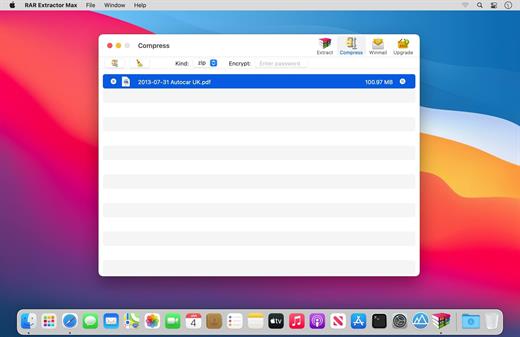
  • Support unarchive RAR, winmail.dat, ZIP, 7z, tbz, sti, tar, xar, lha, lzh, hqx, bin, bz2, bzip2, bz, xz, iso, cid, nrg, mdf, taz, lzma, exe, msi, cpio, lzx, jar, swf, xip, ace, arj, pak, pkg, apk, lbr, lqr, cab, rpm, cpt, sea, pdf, nsa, dcs, now, spk…
  • Support archive files and folder to encrypted zip&7z
  • Quicklook files in archive before extraction.
MAIN FEATURES

  • Extract extract compressed files in all most formats(over 50 formats).
  • Unzip, unrar encrypted archives.
  • Preview and open the file in winmail.dat sent from Microsoft Outlook
  • Easy view of an archive’s file list.
  • Quicklook files in archive before extraction.
  • Unarchive & unrar the selected individual file or folder in the archive.
  • Double click to display or extract directly after setting this APP as default archiver.
  • Drag archives to the dock icon to extract or display directly.
  • Batch decompress many archives
  • Create password-protected ZIP & 7Z archives.
  • AES256 encryption algorithm to create ZIP & 7Z archives.
  • Drag the file in archive to the desktop to extract directly
What’s New

Version 13.9.6:


  • Release notes were unavailable when this listing was updated.
Compatibility

macOS 11.5 or later


Release Name: RAR Extractor Max – Unzip File 13.9.6
Size: 14.4 MB
Links: HOMEPAGE – NFO – Torrent Search

Download: RAPiDGATOR

4 Comments
Aug 10

iNet Network Scanner 4.0.3

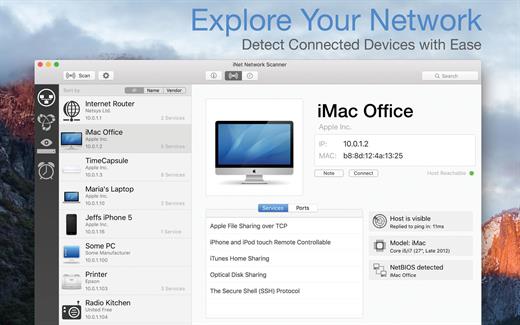
iNet Network Scanner provides you with information about networks your Mac is connected to. Its very easy and user friendly design allows even the unexperienced user to get a profound and understandable overview of a network and the running services. iNet is also available as iPhone and iPad app via the iTunes Store.

What’s New

Version 4.0.3:


  • [Improved] Icon copy handling and image checks
  • [Added] Display of SSID (WiFi name) in network info
  • [Updated] Vendor and Services Databases
  • [Fixed] Possible crash on startup
Compatibility

macOS 11.0 or later

Release Name: iNet Network Scanner 4.0.3
Size: 327.4 MB
Links: HOMEPAGE – NFO – Torrent Search

Download: RAPiDGATOR
3 Comments
Aug 10

Microsoft Excel 16.111.3

Microsoft Excel spreadsheet app lets you create, view, edit and share your files with others quickly and easily. It also lets you view and edit workbooks attached to email messages. Work in accounting, auditing, finance or other fields, with anyone, anywhere, with confidence. With Excel, your Office moves with you and can implement the most complex formulas, with amazing features

Highlights:


  • Unmistakably Office, designed for Mac – MacBook Pro Touch Bar is fully supported by Microsoft Excel. If you type an equals sign into a cell, Excel will immediately pull up the most recently used functions in the Touch Bar. Go easy on your eyes with Dark Mode. Excel makes it easier to view your spreadsheets in low-light environments by supporting Dark Mode for macOS Mojave
  •  Create, calculate and analyse with confidence – jump-start your budget, task list, accounting or financial analysis with Excel’s modern templates. Use familiar formulas to run calculations and analyse your data. Rich features and formatting options make your workbook easier to read and use. All spreadsheet features, formats and formulas operate the same way – whatever device you use.
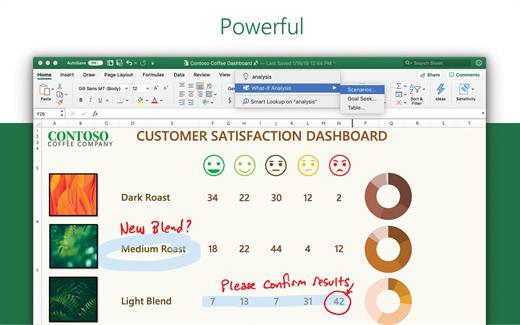
  •  Get a better picture of your data – new charts and graphs help you present your data in compelling ways, with formatting, sparklines and tables to better understand your data. Easily create forecasts with just a click to predict trends
  •  Turn data into insights – enhanced by intelligence, Excel learns your patterns, organising your data to save you time. Create spreadsheets with ease from templates or on your own and perform calculations with modern formulas
  •  Work better together – share your workbook with others and always work on the latest version for real-time collaboration to help get work done faster. With Office 365, work within an Excel file from mobile, desktop and web
What’s New

Version 16.111.3:


  • Bug fixes
Compatibility

macOS 14.0 or later.

Release Name: Microsoft Excel 16.111.3
Size: 1.1 GB
Links: HOMEPAGE – NFO – Torrent Search

Download: RAPiDGATOR

4 Comments
Aug 10

Audirvāna Studio 3.3.3

Audirvana Studio is a high-end audio playback platform designed for listeners who prioritize sound quality above all else. It combines local music libraries, high-resolution streaming services, internet radio, and podcasts into a single, unified interface.

At its core is Audirvana’s proprietary playback engine, engineered to deliver bit-perfect sound by minimizing system interference and using the shortest possible path from file to audio output.

Whether you’re listening through a DAC, a wireless audio system, or a network streamer, Audirvana Studio ensures your music is reproduced with maximum fidelity and precision.

What’s New

Version 3.3.3:


  • Release notes were unavailable when this listing was updated.
Compatibility

macOS 10.13 or later
Apple Silicon or Intel Core processor

Release Name: Audirvāna Studio 3.3.3
Size: 35.4 MB
Links: HOMEPAGE – NFO – Torrent Search

Download: RAPiDGATOR
4 Comments