Please REGISTER or RENEW your account on RAPiDGATOR.net and support us by doing through all RAPiDGATOR working download links on main posts...
June 6

FX Science Tools Manifest 26.06.04

Description: Efofex's science publication toolkit relies on three main pillars: FX Draw - our flagship scientific drawing tool, FX Equation - our high speed equation editor that produces chemical equations as well, and FX Manifest, which makes managing assessments and using our regeneratable question technology as simple as possible.

Create Assessments - FX Manifest
FX ManifestFX Manifest is designed to make the creation and management of assessments as simple, fast and as powerful as possible. There is nothing else quite like it!

Draw Physics and Chemistry - FX Draw
FX DrawFX Draw is the ultimate tool for drawing physical science graphics. Just about any graphic that a science teacher will ever need can be drawn using FX Draw's highly specialized tools. FX Draw is incredibly efficient and versatile. Best of all, it is supported by people who have been in the classroom and know exactly what you need.

Type Science - FX Equation
FX EquationNo one uses equation editors more than teachers. What they need is high efficiency but most equation editors provide every conceivable feature in an incredibly slow package. FX Equation is different. You just type and FX Equation does all the hard work. No other equation editor comes close to the speed of FX Equation.

Release Name: FX Science Tools Manifest 26.06.04
Size: 90.3 MB
Links: HOMEPAGE – NFO – Torrent Search

Download: RAPiDGATOR

5 Comments
June 6

Allround Automations Plyxon 2.0.0.910

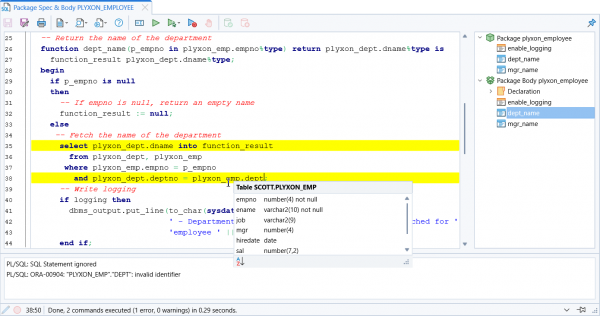
Description: Plyxon is a brand new, lightweight, easy-to-use, multi-threaded, high-performance Oracle PL/SQL Development tool for Windows, macOS and Linux. It is a native Oracle Client tool that is easy to install and that does not require any additional third-party software. Plyxon is designed from the ground up with our 30+ years of Oracle experience.

Powerful PL/SQL Editor
With its Syntax Highlighting, Object Descriptions, Code Assistant, Code Contents, Hyperlink Navigation, Macro Library and many other sophisticated features, the PL/SQL editor will even appeal to the most demanding user.

Integrated Debugger
The integrated debugger offers all features you could wish for: Step In, Step Over, Step Out, Run Until Exception, Breakpoints, View Variables, View Call Stack, and so on. You can debug any program unit without making any modification to it, including triggers and object types.

AI Assistant
The AI Assistant allows you to leverage the power of the most popular AI Systems to create, modify or analyze your SQL and PL/SQL code at minimal costs. All you need to do is supply an authorization key for your AI account, after which you can immediately make use of te predefined AI Functions in PL/SQL Developer. You can also create your own AI Functions for specific tasks.

With the predefined AI Functions you can create, modify, finish, fix or optimize SQL or PL/SQL code. You can also let the AI System comment, review or explain code, or you can ask general questions about code.

PL/SQL Beautifier
The PL/SQL Beautifier allows you to format your SQL and PL/SQL code through a user-defined set of rules. Your code can automatically be beautified when you compile, save, or open a file. This feature will increase your coding productivity and will improve the readability of your PL/SQL code if you are working in large project teams.

Release Name: Allround Automations Plyxon 2.0.0.910
Size: 80 MB
Links: HOMEPAGE – NFO – Torrent Search

Download: RAPiDGATOR

6 Comments
June 6

Antidote 12 v4.0.3

Description: Meet The New Antidote: Smarter and Savvier Than Ever. Powered by artificial intelligence and built on our linguists’ expertise, Antidote 12, Antidote Web and Antidote Mobile come loaded with features that are second to none. They’ll redefine your writing experience.

All the tools you need to improve your writing. Antidote is an intelligent multi-resource writing assistant that integrates with your favourite software.

Remedy Your Writing
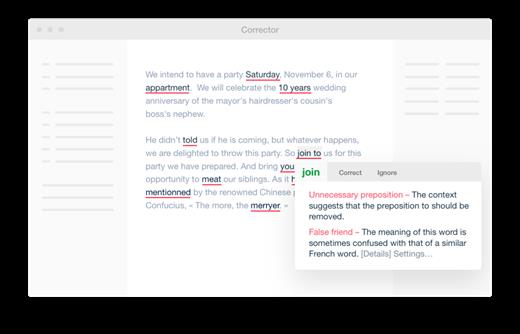
The corrector analyzes your text and flags any detections in a click. It doesn’t just correct your mistakes, it also helps you improve your style. Hover the mouse over a highlighted word to display a tooltip providing a correction with detailed explanation or options for replacement. Click to confirm, and Antidote applies the changes automatically.
Besides fixing spelling and grammar mistakes, its smart filters help you touch up your typography, root out repetition and make your message more inclusive. Never before has a tool been so effective at helping you refine your writing.

Transform Your Texts
In Reformulation mode, the corrector comes up with smart solutions for reshaping your writing that stay true to your ideas. See your text transformed through different views that Rewrite, Retouch, Soften or Shorten it to suit your needs. Reformulate entire passages or only certain segments. Whatever approach you choose, you’re always in control.
Powered by generative artificial intelligence trained by our linguists, Reformulation will redefine your writing experience.

Find the Right Word
Antidote lets you look up a definition, then jump from one word or reference to another to find the perfect term in just a few clicks. Browse through synonyms, antonyms, expressions, related words or words in the same family. Find combinations that resonate through their strong associations. Check your conjugation, listen to audio pronunciation*, take note of any linguistic difficulties and see numerous hand-picked examples. Antidote’s uniquely comprehensive content and high-powered search tools push the limits of what dictionaries can do.

Learn From Your Mistakes
The corrector’s explanatory tooltips take you straight to the answers you need with quick links to the article in the language guides that clearly and concisely explains the rules and exceptions for the case in question. Helpful tips and practical examples make everything easy to understand. Explore related topics with ease and browse 572 articles that cover every aspect of writing, from grammar and style to spelling and punctuation.

Make Your Emails Mistakeâ -â Proof
Anti-Oops! technology vets your emails to ensure you didn’t forget to carefully review them and to add all the attachments you meant to include. It even flags parts of your message that risk being ill received by the recipient. It springs into action as soon as you click Send to make sure you remember to run what you’ve written through Antidote for one last once-over.

System Requirements
- Windows 64 bits : (32 bits systems are not compatible)
- Windows 10 (21H2, 22H2)
- Windows 11 (22H2, 23H2, 24H2)
- Windows Server (2022)
- RAM : 4 GB Memory
- Processor : x86–64/AMD64, 1 GHz
- Disk space : 6 GB (1 language); 7.5 GB (2 languages); SSD Drive

Release Name: Antidote 12 v4.0.3
Size: 3.3 GB
Links: HOMEPAGE – NFO – Torrent Search

Download: RAPiDGATOR

3 Comments
June 6

FX Math Tools Manifest 26.06.04

Description: Efofex's mathematical publication toolkit relies on three main pillars: FX Draw - our flagship mathematical drawing tool, FX Equation - our high speed equation editor, and FX Manifest, which makes managing assessments and using our regeneratable question technology as simple as possible.

Create Assessments - FX Manifest
FX ManifestFX Manifest is designed to make the creation and management of assessments as simple, fast and as powerful as possible. There is nothing else quite like it!

Draw Mathematics - FX Draw
FX DrawFX Draw is the ultimate tool for drawing mathematics. Just about any graphic that a mathematics teacher will ever need can be drawn using FX Draw's highly specialized tools. FX Draw is incredibly efficient and versatile. Best of all, it is supported by people who have been in the classroom and know exactly what you need.

Type Mathematics - FX Equation
FX EquationNo one uses equation editors more than mathematics teachers. What they need is high efficiency but most equation editors provide every conceivable feature in an incredibly slow package. FX Equation is different. You just type and FX Equation does all the hard work. No other equation editor comes close to the speed of FX Equation.

Release Name: FX Math Tools Manifest 26.06.04
Size: 94 MB
Links: HOMEPAGE – NFO – Torrent Search

Download: RAPiDGATOR

6 Comments
June 6

Goversoft Privazer 4.0.123

Description: PrivaZer cleans and removes filth traces from the system. Intensive cleaning of unwanted traces of what you've done, viewed, downloaded, deleted, etc. Take ownership of your security and freedom - Free up disk space. Keep your PC snug and secure.

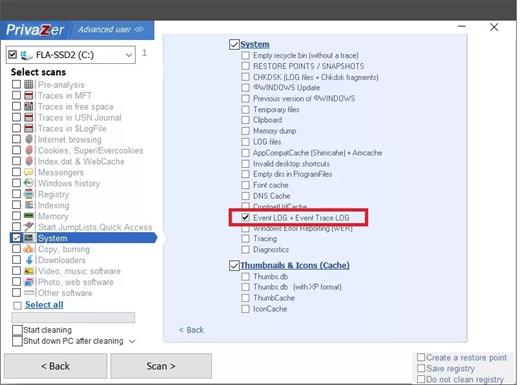
With one click, PrivaZer can safely clean: Internet browsers, Index.dat, Cookies, Tor Cookies, Flash Cookies, Silverlight Cookies, DOM Storing, IndexedD, BAppCache Registry, RAM, Pagefile.sys and Hiberfil.sys files. PrivaZer can permanently erase all traces using secure erase methods and also reset free disk sectors to 0 to remove all traces from previous deletion operations.

Features:
Traces remaining in empty space detected
Smart free space cleaning
Notes file table Overwrite
Prefetch's Smart Clean
Clear USB history
Scan and clean Pagefile.sys / Hiberfil.sys
Scanning thumbnails
Scans the remaining traces of the Indexing service

More info of PrivaZer
The program has a unique ability to clean Windows computers of unnecessary files. Integrated scanning is truly a complete analysis of the entire system, including secondary memory, external drives, and storage devices attached to computers of any kind. .
Application has a special module, permanent file deletion, and reverse function - deleted file recovery. Advanced mode displays a list of scanned items. Some directories may be excluded from treatment.
The application deletes the following files from the main file system table, logs calls to the file system of Cookies, from the file register Index.dat, system history, history of IM, manager download manager and many more. The application can perform complete deletion of files from the drive without rest and restore.

Release Name: Goversoft Privazer 4.0.123
Size: 27.6 MB
Links: HOMEPAGE – NFO – Torrent Search

Download: RAPiDGATOR

6 Comments
June 6

Global Mapper Pro 27.0.1 Build 052726

Description: Global Mapper v27 Brings Geodetic Accuracy to Every Workflow. Go beyond analysis. Execute with confidence. Global Mapper v27 integrates GeoCalc, Blue Marble’s industry-standard geodetic library, directly into the platform, so you can move from analysis to real-world execution with greater accuracy, speed, and reliability.

Geodetic Accuracy Without the Complexity
Global Mapper 27 streamlines desktop GIS and advanced geodetics by fully integrating GeoCalc, our industry-standard geodetic library. High-precision transformations that once required multiple systems can now be completed within a single workflow, reducing complexity and delivering more consistent, reliable results.

Validate Aerial Lidar With Confidence
Ensure positional accuracy from the start. Advanced horizontal quality assurance (QA) and positional adjustment tools align flight paths, improve point cloud accuracy, and support rigorous quality control (QC) standards required for UAS and government mapping programs.

Meet Evolving Data Standards Across Every Delivery
Built-in ASPRS density measurement methods help ensure compliance, reduce risk, and streamline validation across every delivery.

Optimize Breakline Creation With Intelligent Automation
Replace manual digitizing with guided automation to enhance breakline creation and improve consistency and accuracy across terrain models.

Reduce Workflow Friction With Broader Format Support
Share point cloud data seamlessly with enhanced E57 export, leverage GPS time offsets with LAS 1.5 support, eliminate conversion steps with direct TFADS-O export, and integrate with GNSS workflows using GGF export.

Release Name: Global Mapper Pro 27.0.1 Build 052726
Size: 705 MB
Links: HOMEPAGE – NFO – Torrent Search

Download: RAPiDGATOR

6 Comments
June 6

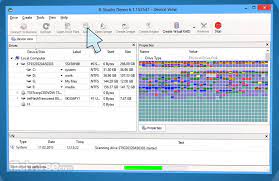
R-Studio 9.5 Build 191802 + WinPE

Description: Disk Recovery Software and Hard Drive Recovery tool. Empowered by the new unique data recovery technologies, R-STUDIO is the most comprehensive data recovery solution for recovery files from NTFS, NTFS5, ReFS, FAT12/16/32, exFAT, HFS/HFS+ and APFS (Macintosh), XFS, Little and Big Endian variants of UFS1/UFS2 (FreeBSD/OpenBSD/NetBSD/Solaris) and Ext2/Ext3/Ext4 FS (Linux) partitions.

It also uses raw file recovery (scan for known file types) for heavily damaged or unknown file systems. It functions on local and network disks, even if such partitions are formatted, damaged or deleted. Flexible parameter settings give you absolute control over data recovery.

R-Studio utilities recover files:
Deleted without Recycle Bin, or when Recycle Bin has been emptied;
Removed by virus attack or power failure;
After the partition with the files was reformatted, even for different file system;
Recovering data if: VIRUS has invaded; FAT is damaged; MBR is destroyed; FDISK or other disk utilities have been run;
When the partition structure on a hard disk was changed or damaged;
Data recovery on damaged or deleted partitions;
From hard disk with bad sectors;
When necessary R-Studio can also wipe data on hard drives to prevent accidental data leaks when the drives are to be sold, given away, or disposed off in any other way.

Support for:
Basic(MBR), GPT, BSD(UNIX), APM(Apple partition map) partitions layout schemes;
Support for Bitlocker Drive Encryption, both for BitLocker Drive Encryption and BitLocker ToGo volumes;
Dynamic volumes, Windows Storage Spaces (Windows 2000-2022/8.1/10/11);
Apple software RAIDs, CoreStorage, File Vault, and Fusion Drive;
Linux Logical Volume Manager (LVM/LVM2) and mdadm RAIDs;
Intel Software RAIDs;
R-Studio can automatically recognize and assemble the components of these disk managers even if their databases are slightly damaged. Their components with severe corrupted databases can be added manually.
Support for VMDK/VHD/VHDX/VDI file formats. Read-only for all versions, creation for Technician/T80+ versions.
Read-only support for dmg files (Apple Disk Image: all versions ), E01/(EWF) files (Expert Witness File Format: R-Studio Technician/T80+), and AFF files (Advanced Forensic Format: R-Studio Technician/T80+).

Advanced data recovery algorithm:
to increase the quality of file recovery when the file system is not damaged;
to recover files that are not recognized in file system metadata and not found during a disk scanning procedure;
to fast search for lost partitions;
to recover files from devices with unknown file systems, including HD, CD, DVD, floppy disk, Compact-Flash Card, USB drive, ZIP drive, Memory Sticks and other removable media.

Support for specific file system features:
Recognitions of localized names;
NTFS encrypted files, NTFS alternative data streams, NTFS data deduplication, NTFS LogFile, NTFS Symbolic Links & Directory Junctions;
ReFS: symbolic links, directory junctions, deduplication;
HFS+ journal processing, HFS+ extended attributes, HFS+ compressed files;
Advanced APFS recovery: support for encryption;
Ext2/Ext3/Ext4 FS/UFS journal processing and extended attributes;
XFS extended attributes;
Recovery of names and paths for files deleted to Recycle Bin and Trash.

Release Name: R-Studio 9.5 Build 191802 + WinPE
Size: 619.9 MB
Links: HOMEPAGE – NFO – Torrent Search

Download: RAPiDGATOR

7 Comments
June 6

IDimager Photo Supreme 2026.3.0.9251

Description: Photo Supreme v2026 is a thoughtful and forward-looking release. This update has focused on smarter discovery, faster performance, and modern workflow expectations, especially around large catalogs, mobile integration, searches, and team environments.
Import and Select
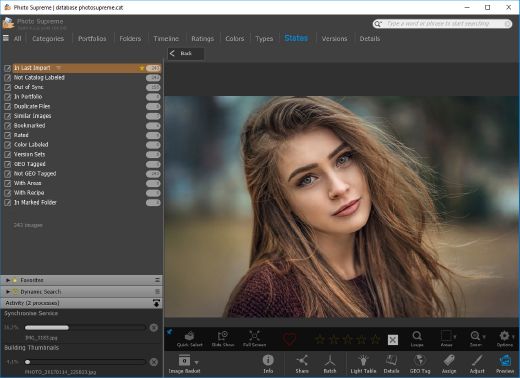
One of the standout additions in Photo Supreme v2026 is the new multi-pass Import and Select workflow. This allows users to review and refine image selections in multiple stages instead of making all decisions in one pass. It’s especially useful for large shoots, letting photographers cull images more deliberately and with less pressure. In addition, the Import and Select feature now loads images faster than ever. Mac users will also appreciate direct iOS device importing, which makes it possible to bring photos straight from an iPhone or iPad into the catalog without relying on intermediary software. This significantly streamlines mobile-first workflows.

Powerful Searches
Photo Supreme now supports natural language searching, allowing users to find images using plain, conversational phrases rather than rigid metadata queries. This feature is powered by AI services such as OpenAI, Google Gemini, or local models with Ollama. This gives users flexibility in how advanced features are enabled. In addition, a new classification system enhances search accuracy by grouping images into meaningful categories upon import, making it easier to surface relevant results in large or complex catalogs.

Video & Media Handling
For users working with video, Photo Supreme v2026 introduces hover-based video previews. Simply hovering over a video thumbnail now reveals a short animated preview, making it much faster to identify clips without opening them individually. Support for modern formats has also been expanded, ensuring the software keeps pace with current media standards.

Sharing with ZIP
Exporting images is more flexible in v2026 thanks to ZIP output support in transfer profiles. This makes it easy to bundle images into a single archive for delivery, backup, or client sharing, all directly from within Photo Supreme. These enhancements simplify distribution workflows and reduce the need for external tools.

GEO Maps
GEOgraphic-Mapping features can now generate maps using not only Google Maps, but also OpenFreeMap with OpenStreetMaps. This removes the need for API keys while still delivering rich, interactive map displays. This update makes location-based browsing easier to configure and more accessible for all users.

Performance and Refinements
Photo Supreme v2026 delivers notable performance enhancements, resulting in faster browsing and a more responsive overall experience. Response times are improved by up to 10%, with especially noticeable gains for large libraries containing many catalog labels.
Catalogs with numerous stacks also see significant performance improvements, particularly when displayed in stacked views.
v2026 includes a wide range of refinements, such as: "Visually similar" stack detection, numerous stability fixes and workflow enhancements, polished UI behavior in collections, searches, and metadata handling

Wait, there's more, a lot more…
New "RAW Files" and "Video Files" catalog states
Added support for Google Gemini as an AI service
Added support for OpenAI GPT-5.2 as an AI Service
Added support for Ministral3 model with Ollama
Added file management support for ACR sidecar files
Update HTTP Server with Photo Supreme Online (Server Edition)
Faster face recognition
Added "AI-Estimated GEO Location" to the AI Panel
Faster result display in the Collection Viewer
"Cascade Metadata" from image to Stack or Version Set is now a background process
A highlighted stroke has been added to the active tabs, improving navigation
Now you can display metadata charts and graphs across multiple tabs
Added support for Ctrl/Cmd+Z functionality in text and memo fields
Defined the new Affinity v3 .AF and .AVIF file format as a supported "other file format"
Switching the collection viewer's view style is faster (eg from Basic to Grid to Clean to Custom Thumb Info)
Advanced Search now has an option to search by "File Size" and "File Size MB"
Finetuned the check for "need to compact" on PostgreSQL (Server Edition)
Bookmark keyboard shortcuts are now a "toggle", similar to ratings and color labels
Expanding nodes in the Catalog Tree is ~25% faster
When using the "Dump Full to Catalog File" feature, there's now the option to create either a "catalog dump" file, or a "catalog with thumbs" dump files
Added a XMP Storage Location for "original file AND non-standard sidecar file"
In "Stacked View", you can now select a specific item from the stack to show
Support for PostgreSQL 18.
And more…

Highlights for v2026
Multi-Pass "Import and Select": Seamlessly transition through passes with a fast-culling system that optimizes your workflow.
Direct iOS Image Import on macOS: Import images directly from your iOS devices with ease.
Video Thumbnail Preview: Hover over a video thumbnail or open the Quick View to view a live video preview.
Natural Language Search Powered by AI: Search your content using plain language, with smart integration through OpenAI, Google Gemini, or Ollama models.
Transfer Profiles can now create ZIP output files: Copy or send sets of images as a single ZIP file for easier sharing.
Maps with OpenFreeMap: Display images on interactive maps using OpenFreeMap/OpenStreetMaps with no API key needed.
Server Edition Thumbnail Caching: Enjoy faster performance with local thumbnail caching, automatic cleanup, and customizable settings for retention and cache size.
Classifications: Enhance search accuracy with an automatic image classification mechanism on import.

Release Name: IDimager Photo Supreme 2026.3.0.9251
Size: 162.4 MB
Links: HOMEPAGE – NFO – Torrent Search

Download: RAPiDGATOR

6 Comments
June 6

Total Commander 11.58 RC2

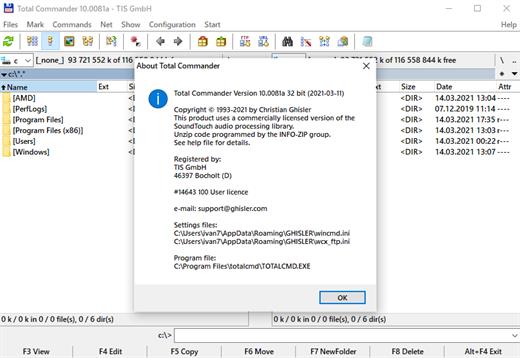
Description: Total Commander (former Wincmd) is a file manager for Windows similar to the Windows Explorer. But Total Commander uses a different approach: it has two fixed windows side by side like a well-known file manager for DOS.

Features
Two file windows side by side
Multiple language and Unicode support
Enhanced search function
Compare files (now with editor) / synchronize directories
Quick View panel with image and video display
ZIP, 7ZIP, ARJ, LZH, RAR, UC2, TAR, GZ, CAB, ACE archive handling + plugins
Built-in FTP client with FTPS (encrypted FTP) and HTTP proxy support
Multi-rename tool
Tabbed interface, regular expressions, history+favorites buttons
Thumbnails view, custom columns
Compare editor, cursor in lister, separate trees, logging, enhanced overwrite dialog etc.
Unicode names almost everywhere, long names (>259 characters), password manager for ftp and plugins, synchronize empty dirs, 64 bit context menu, quick file filter (Ctrl+S)
USB port connection via special direct transfer cable, partial branch view (Ctrl+Shift+B), and many improvements to ftp, synchronizing and other functions
And many more!

Release Name: Total Commander 11.58 RC2
Size: 11.2 MB
Links: HOMEPAGE – NFO – Torrent Search

Download: RAPiDGATOR

5 Comments
June 6

Lucen Timeline Expert 14.18.00.00

Description: Office Timeline is now called Lucen Timeline, part of Lucen Software! The #1 PowerPoint Timeline Maker for Windows and Office. Create PowerPoint timelines or roadmaps as fast as clients and executives need them. Simple but powerful PowerPoint add-in that anyone can use to quickly make and manage impressive timelines.

Beauty trumps complexity.
Build stunning PowerPoint timelines without the effort and cost.

Free yourself from manually building and managing visual project plans.
Office Timeline helps you make timelines, Gantt charts and Swimlanes in PowerPoint almost instantly. Customize them with just a few clicks to create clear, elegant high-level presentations that everyone will understand.

User-friendly PowerPoint timeline generator. Works the way clients and colleagues do.
Office Timeline works with all versions of PowerPoint. Give them stunning PowerPoint slides that can be viewed, edited and shared by anyone who has Microsoft Office.

Manage and change data with ease.
The plugin’s powerful Data wizard and drag & drop Visual Editor make timeline management agile and intuitive. Updating timelines when projects and plans change is quick and easy.

PowerPoint timelines made easy.
No complex steps. No learning curve. No hassle!

Start from scratch or pick a template.
The timeline wizard was designed to make it simple. It all starts by selecting the type of timeline you want to make.

Enter your data and click Create.
Once you’ve selected a timeline template, enter or import your key milestones and tasks. Set their dates, click the Create button, and voilà ! Timeline created.

Arrange and style to impress.
Use Drag & Drop to instantly rearrange or update your visual. Then customize it your way â colors, shapes, date formats, task duration, percent complete⦠change any detail, anyway you want.

Enjoy more freedom with Plus Edition.
While the Free edition is fully functional, Office Timeline Plus brings more! Plus Edition unlocks predesigned templates and gives you the freedom to add as much data as needed, so you can create detailed, unique PowerPoint timelines and Gantt charts.

See the power of Pro Edition.
Office Timeline Pro gives you everything you get with the Plus add-in, but adds powerful extra features. Pro Edition creates impressive Swimlanes and roadmaps, so you can manage complex projects with big-picture visuals that anyone can understand.

System Requirements
- Microsoft Windows 10 (64-bit version; LTSB, CBB and CB), Windows 11
- The following 64-bit versions of Microsoft Office are supported: Microsoft 365, Office 2021, Office 2019
- .NET Framework 4.8.

Release Name: Lucen Timeline Expert 14.18.00.00
Size: 148.6 MB
Links: HOMEPAGE – NFO – Torrent Search

Download: RAPiDGATOR

7 Comments