Please REGISTER or RENEW your account on RAPiDGATOR.net and support us by doing through all RAPiDGATOR working download links on main posts...
May 19

QueueExplorer Professional 5.0.80

Description: Explorer-like management for queues. Works with multiple queuing systems. QueueExplorer supports multiple systems from the same installation, without need for additional licensing: MSMQ, Azure Service Bus, RabbitMQ, and ActiveMQ. With QueueExplorer you can do much more than with built-in management console - copy, move or delete messages, save and load, stress test, view and edit full message bodies (with support for XML, JSON, .Net objects...), and much more. QueueExplorer is a fast, native Windows application.

The indispensable tool for working with queues and messages:
understand and manage your system
figure out what went wrong
fix it

Find out all about your messages
With QueueExplorer you can dig into your queues and see which message went where, whether they were correctly formatted, with correct headers and settings, etc. Multiple viewers are at your disposal: JSON, XML, WCF, Hex, text with different encodings...

Develop and test producers and consumers separately
With QueueExplorer you can test individual pieces of your solution, or even simulate third party messages going in or out. You can create and edit test messages, send one by one or bunch of them together.

Test performance and load handling of your app
Send thousands of messages for performance testing to see how system handles that load.

Troubleshoot, fix, and resend problematic messages
If something is wrong, QueueExplorer is the fastest and easiest way to investigate and fix incorrect, poison, or failed/deadletter messages.

See status of your system at glance
Check if some of queues are growing too large, if there are messages in deadletter queues, etc. With autorefresh functionality see how entire system works in near real time.

Filter and sort messages to quickly find important data
QueueExplorer allows you to quickly find messages you're interested in. Professional edition allows you to even extract your business data from within messages using XPath, JSON, or Regex, and to immediately see e.g. invoice totals, etc.

Backup and restore messages
Backup messages to files, or move/copy them to another queue.

Copy, compare and sync queues, topics and other schema (metadata) objects
This can be used to migrate queues (and other objects) to another server, e.g. to propagate from development to production. Or just to compare and see which changes were made. Or to backup schema before changes are made. You can also duplicate queues with all their settings on the same server (Professional).

Release Name: QueueExplorer Professional 5.0.80
Size: 36 MB
Links: HOMEPAGE – NFO – Torrent Search

Download: RAPiDGATOR

4 Comments
May 19

Apowersoft Screen Capture Pro 1.5.6

Description: Capture Anything on Screen. Thanks to the user-friendly interface, you are able to quickly access the features included in this program. Be it quick snapshot or easy screen recording, Apowersoft Screen Capture Pro allows you to utilize all of these through the stunning and reliable interface.

Multiple capture modes
From fixed region to window, full-screen, there's a wide range of capture modes that you can take full advantage of. The captured images can be saved in various formats such as PNG, JPG, BMP, PDF, etc. While, videos can be saved in MP4, WMV, AVI, FLV and many other formats.

Different scenarios
There are different situations in which you want to take screenshots or make video recording. For example, you may want to capture a single window, web pages, webcams, or select the capture area on your own. This screen capture software provides you with the unique opportunity to do all of these and much more.

Simple and Advanced Image Editors
Upon creating a snapshot, this professional screenshot tool will help you do everything no matter you need to perform multiple modifications, add annotations or just bring some effects. Thanks to the instant editing sidebars and advanced editing panel, all edits can be done quickly without any hassle.

Annotate screenshot instantly
By using the quick editor of this screenshot software, you can annotate the snapshot with editing options on the horizontal toolbar. It can help you quickly add lines, text, arrows, highlight, blur and others to the captured image.

Professional image editor
This application is also equipped with a professional image editor with which users can do all the annotations that simple editor provides, and make other advanced edits such as cropping, resizing, rotating, or even adding effects like shadow, torn edge, etc.

Create schedule tasks
The screenshot scheduler gives you the best option in this regard. Just take a short while to configure the time for activating the snapshot, and then you can rest assured and leave the other things for the program. It can also be used to surveil your computer in the background.

Flexible settings for scheduler
Users won't find it hard to create scheduled screenshots as it provides flexible settings for customizing the specific time, internal, region and the output folder for taking snapshots automatically.

Schedule screenshots daily/weekly
For those who need to make scheduled snapshots on daily/weekly basis, you can also make use of this screenshot tool to do this trick. You can access this feature simply by enabling the daily trigger for making screenshots.

Upload and share images
Apowersoft Screen Capture Pro also comes with an integrated image uploading and social sharing function, so if you want to upload images to cloud space or share the images with friends, you will be able to work it out within a few clicks. The whole uploading and sharing process comes seamlessly in this screen capture software.

Release Name: Apowersoft Screen Capture Pro 1.5.6
Size: 33.8 MB
Links: HOMEPAGE – NFO – Torrent Search

Download: RAPiDGATOR

3 Comments
May 19

Adobe XD 61.0.12

REPACK by monkrus

Description: With the help of Adobe XD CC anyone can create frames, high fidelity interactive prototypes and design applications and web sites. Once you will have a prototype, you can import visuals into Visual Studio or IDE of your choice to start creating the final application.

Interactive prototypes
Go to Prototyping with a click of Design. Combine drawing surfaces with each other to visualize navigation within large apps. Link design elements across the drawing area, B. Cells from repetition screens. Add interactions using visual controls to test and validate the experience.

Publish prototypes and get feedback
Generate weblinks to your designs that you can share with others to get feedback. Or embed it into a web page, For example on Behance. Comments can be attached directly to the prototype or to specific components of your design. You will be notified as soon as a comment has been added. To see your changes, checkers simply need to reload the link in the browser.

Liquid working with drawing surfaces
Whether you work with one or hundreds of workspaces, it does not matter: You can rely on the performance of XD. Create any number of designs for different screens and devices within a project. Pan and zoom without jerking or stuttering. Choose a template or define your own drawing area. Copy design elements between drawing faces while the layout is preserved.

repeating grid
Select an item in your design, Such as a contact list or a photo gallery, and duplicate it as often in the horizontal or vertical direction. All styles and distances are preserved. When you edit the item, the changes are applied to the entire design.
Platform-wide support

Control panel "Elements"
Colors and character formats are handy and reusable when you add them to the "Elements" panel (formerly "Symbols"). This panel also contains the icons. When you edit a color or format in the panel, the change is automatically performed throughout the document.

Next generation symbols
Work with time-saving symbols. The ready-to-use design components make it unnecessary to search for and edit each instance of an item in a document. When you edit an instance, all other instances are automatically updated. Overwriting certain entities is also possible. The symbols can be vector graphics, raster images or text objects, which you can also use as objects within repeating screens.

Creative Cloud libraries
With integration with Creative Cloud libraries, Adobe XD CC lets you access colors and character formats created in Photoshop CC, Illustrator CC, or any other Creative Cloud application, and use them in your design.

Release Name: Adobe XD 61.0.12
Size: 622.9 MB
Links: HOMEPAGE – NFO – Torrent Search

Download: RAPiDGATOR

3 Comments
May 19

IDimager Photo Supreme 2026.3.0.9093

Description: Photo Supreme v2026 is a thoughtful and forward-looking release. This update has focused on smarter discovery, faster performance, and modern workflow expectations, especially around large catalogs, mobile integration, searches, and team environments.
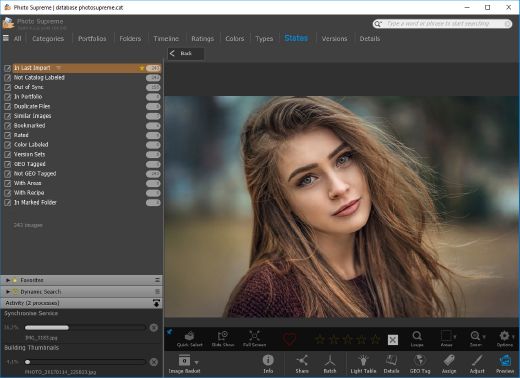
Import and Select
One of the standout additions in Photo Supreme v2026 is the new multi-pass Import and Select workflow. This allows users to review and refine image selections in multiple stages instead of making all decisions in one pass. It’s especially useful for large shoots, letting photographers cull images more deliberately and with less pressure. In addition, the Import and Select feature now loads images faster than ever. Mac users will also appreciate direct iOS device importing, which makes it possible to bring photos straight from an iPhone or iPad into the catalog without relying on intermediary software. This significantly streamlines mobile-first workflows.

Powerful Searches
Photo Supreme now supports natural language searching, allowing users to find images using plain, conversational phrases rather than rigid metadata queries. This feature is powered by AI services such as OpenAI, Google Gemini, or local models with Ollama. This gives users flexibility in how advanced features are enabled. In addition, a new classification system enhances search accuracy by grouping images into meaningful categories upon import, making it easier to surface relevant results in large or complex catalogs.

Video & Media Handling
For users working with video, Photo Supreme v2026 introduces hover-based video previews. Simply hovering over a video thumbnail now reveals a short animated preview, making it much faster to identify clips without opening them individually. Support for modern formats has also been expanded, ensuring the software keeps pace with current media standards.

Sharing with ZIP
Exporting images is more flexible in v2026 thanks to ZIP output support in transfer profiles. This makes it easy to bundle images into a single archive for delivery, backup, or client sharing, all directly from within Photo Supreme. These enhancements simplify distribution workflows and reduce the need for external tools.

GEO Maps
GEOgraphic-Mapping features can now generate maps using not only Google Maps, but also OpenFreeMap with OpenStreetMaps. This removes the need for API keys while still delivering rich, interactive map displays. This update makes location-based browsing easier to configure and more accessible for all users.

Performance and Refinements
Photo Supreme v2026 delivers notable performance enhancements, resulting in faster browsing and a more responsive overall experience. Response times are improved by up to 10%, with especially noticeable gains for large libraries containing many catalog labels.
Catalogs with numerous stacks also see significant performance improvements, particularly when displayed in stacked views.
v2026 includes a wide range of refinements, such as: "Visually similar" stack detection, numerous stability fixes and workflow enhancements, polished UI behavior in collections, searches, and metadata handling

Wait, there's more, a lot more…
New "RAW Files" and "Video Files" catalog states
Added support for Google Gemini as an AI service
Added support for OpenAI GPT-5.2 as an AI Service
Added support for Ministral3 model with Ollama
Added file management support for ACR sidecar files
Update HTTP Server with Photo Supreme Online (Server Edition)
Faster face recognition
Added "AI-Estimated GEO Location" to the AI Panel
Faster result display in the Collection Viewer
"Cascade Metadata" from image to Stack or Version Set is now a background process
A highlighted stroke has been added to the active tabs, improving navigation
Now you can display metadata charts and graphs across multiple tabs
Added support for Ctrl/Cmd+Z functionality in text and memo fields
Defined the new Affinity v3 .AF and .AVIF file format as a supported "other file format"
Switching the collection viewer's view style is faster (eg from Basic to Grid to Clean to Custom Thumb Info)
Advanced Search now has an option to search by "File Size" and "File Size MB"
Finetuned the check for "need to compact" on PostgreSQL (Server Edition)
Bookmark keyboard shortcuts are now a "toggle", similar to ratings and color labels
Expanding nodes in the Catalog Tree is ~25% faster
When using the "Dump Full to Catalog File" feature, there's now the option to create either a "catalog dump" file, or a "catalog with thumbs" dump files
Added a XMP Storage Location for "original file AND non-standard sidecar file"
In "Stacked View", you can now select a specific item from the stack to show
Support for PostgreSQL 18.
And more…

Highlights for v2026
Multi-Pass "Import and Select": Seamlessly transition through passes with a fast-culling system that optimizes your workflow.
Direct iOS Image Import on macOS: Import images directly from your iOS devices with ease.
Video Thumbnail Preview: Hover over a video thumbnail or open the Quick View to view a live video preview.
Natural Language Search Powered by AI: Search your content using plain language, with smart integration through OpenAI, Google Gemini, or Ollama models.
Transfer Profiles can now create ZIP output files: Copy or send sets of images as a single ZIP file for easier sharing.
Maps with OpenFreeMap: Display images on interactive maps using OpenFreeMap/OpenStreetMaps with no API key needed.
Server Edition Thumbnail Caching: Enjoy faster performance with local thumbnail caching, automatic cleanup, and customizable settings for retention and cache size.
Classifications: Enhance search accuracy with an automatic image classification mechanism on import.

Release Name: IDimager Photo Supreme 2026.3.0.9093
Size: 162.1 MB
Links: HOMEPAGE – NFO – Torrent Search

Download: RAPiDGATOR

5 Comments
May 19

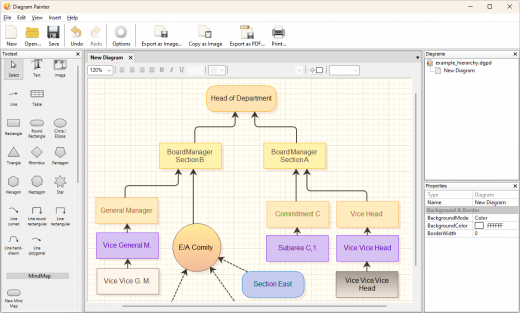
Ambiera Diagram Painter Professional 2.1

Description: Diagram Painter is an app which lets you quickly draw flowchart diagrams, mind maps, organization charts, and more. With a few clicks, you can then integrate the diagram in your favourite program, by copying it to the clipboard as image, or saving it as file. It exports diagrams as .png, .jpg, and .bmp image files, and even has an integrated fast .pdf exporter supporting shadows and transparencies.

Built-In Mind Maps
DiagramPainter has a built-in Mind Map editor. Automaticly layouted, customizable, style them however you want.

Lots of advanced features
The editor supports multiple diagrams per document, includes several intelligent line docking algorithms with free attaching to any point on any item, seemless and fast diagram zooming, lots of nice and different line modes (direct, polygon, round, hand-drawn), compressed undo management for a huge amount of undo steps, support for tables, and lots of predefined selectable styles.

Rich text everywhere
Diagram Painter supports instant full rich text editing in the diagram, everywhere. That means you can directly type your text into the diagram, and format it as you like, on all elements: Be it different font faces, sizes, alighment, text colors and more.

Release Name: Ambiera Diagram Painter Professional 2.1
Size: 11.9 MB
Links: HOMEPAGE – NFO – Torrent Search

Download: RAPiDGATOR

5 Comments
May 19

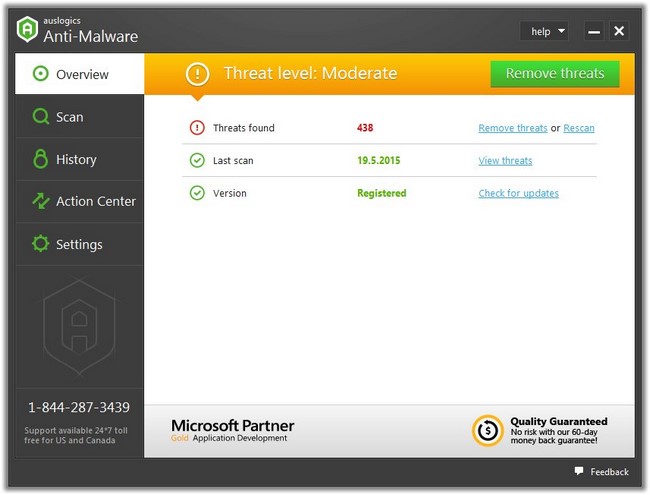
Auslogics Anti-Malware 1.23.0.4

Description: Auslogics Anti-Malware complements your main antivirus and detects and deletes malware, spyware, and viruses, providing extra computer and network security.

What Can Auslogics Anti-Malware Do for My PC?
Auslogics Anti-Malware detects and removes viruses and malware that your primary antivirus might miss. It performs thorough scans, spots malicious items, and adds an extra layer of real-time protection for your computer.

Boost Windows Security
Anti-Malware is reliable computer protection software that is designed to work alongside your primary antivirus. It checks system memory for malicious programs that could be running, detects cookies that track your activity and collect your personal data, checks system and temporary folders for security issues, analyzes suspicious entries in the registry, and checks the safety of programs set to auto-start in Task Scheduler to ensure your computer security.

Scan for Malware and Viruses
With our anti-malware software, you can choose to run a quick scan to analyze the most important areas where threats can be found, a deep scan to scan your entire system for items that may pose a threat, or a custom scan, where you can select specific folders and files to be analyzed.

Give You Full Control
With Auslogics Anti-Malware, you can quarantine suspicious files so you can restore any of them later if needed and easily add files or folders to the ignore list so they will be excluded from future scans and cleanups.

Automate Malware Check
Auslogics Anti-Malware allows you to schedule automatic scans that will be running in the background at specified periods of time for continuous Windows protection.

Configure Malware Detection Engine
Our computer security software lets you adjust the heuristic level for the engine, which helps detect previously unknown viruses and malware. You can select to disable it to exclude false positives while risking missing zero-day threats or set it anywhere from low to high levels to increase computer and network security.

Release Name: Auslogics Anti-Malware 1.23.0.4
Size: 16.5 MB
Links: HOMEPAGE – NFO – Torrent Search

Download: RAPiDGATOR

4 Comments
May 19

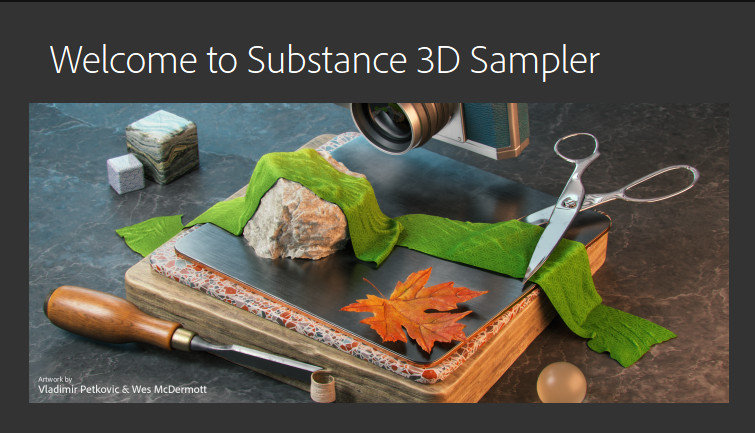
Adobe Substance 3D Sampler 6.0

Description: Substance 3D Sampler allows you to create and iterate on material collections by tweaking and mixing existing materials, or by extracting new materials from scans (single or multiple images).

A new set of powerful tools combining different technologies and creation methods (procedural-based, capture-based, AI-based and manual) will help you manage entire material libraries, and export them to other applications.

Digitize and enrich assets for 3D.
Substance 3D Sampler is at the heart of your 3D workflow. Easily transform a real-life picture into a photorealistic surface or HDR environment.

Transform real-world pictures into 3D materials.
Easily import a reference photo and transform it into a high-quality 3D material with features powered by Adobe Sensei. Closely match the original real-life surface and create seamless tileable materials from your captures.

Combine and mix materials.
Combine multiple materials and parametric filters to create more advanced surfaces. Access thousands of materials on Substance 3D Assets and Substance 3D Community Assets. The possibilities are endless.

An extensive content library to get you started.
Drag and drop your image, add a couple of prebuilt filters, and voila — a library of one-click generators, filters, and effects lets you quickly experiment and get results in just a few clicks. Send your assets directly to Substance 3D Painter and Stager.

The heart of your 3D workflow.
Use generators and filters from Designer, composite light environments for Stager, or send materials and lights to Painter. You can even edit your 2D inputs directly in Adobe Photoshop. Choose from a variety of export presets for all major 3D apps.

The features in Substance 3D Sampler give you a complete material digitizer toolbox.

AI-powered scan processing
The Image to Material feature removes shadows and generates albedo, roughness, normal, and displacement maps with unparalleled accuracy.

open ecosystem
Use your content anywhere. Send your assets directly to Painter and Stager, or use them in your favorite 3D applications.

IBL creation
Create HDR environment lights in real time from 360° images. Enrich and edit them with parametric effects or even other lights.

Edit in Photoshop
Send any input image to Photoshop and take advantage of its extensive image editing toolset, with direct feedback in Sampler.

Atlas Splatter
Scatter leaves, pebbles, and more on your material. Choose from a vast library of atlases made by our team of 3D experts or use your own scanned content.

Parametric effects
Add filters. Combine weathering and natural effects such as moss, snow, water, or dirt with any existing material.

Release Name: Adobe Substance 3D Sampler 6.0
Size: 1.1 GB
Links: HOMEPAGE – NFO – Torrent Search

Download: RAPiDGATOR
7 Comments
May 19

WindowTop Pro 5.32.1

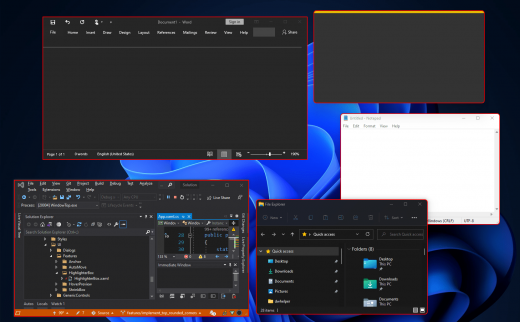
Description: Optimize your productivity by making windows Always-On-Top. By switching windows super fast using Anchors. By using & watching multiple windows at the same time using Picture-In-Picture (PiP) mode and enabling night mode (dark-mode) for any window.

WindowTop is far more than just a one-feature app. It is an advanced utility app with one goal - to make you much more productive during your work!

Always on Top
Easily set window on top and even highlight top-most window with a red frame! You can configure this behavior in settings (frame color, etc).

Anchors
The reason why you may put a window on top is to get back to it faster. If this is your case, then Anchors is for you! Instead of using Always-on-Top, just use Anchors! They will help you to access the window with a single click! Faster than ALT+TAB, great for touch screens! And don't worry, the anchors will not disturb you because they automatically move away from any text/image.

PiP & Crop any window!
Want to watch some videos while working? No problem! Enable Picture in Picture mode for it! It will enable PiP mode. In addition, you can even interact with the window while it is in PiP mode and even crop a region.

PiP Auto-Move!
PiP also come with auto-move option! It will stay away from text/images for you!

Opacity
Working on something like building a website and want to see your work behind? No problem! Use opacity.

Opacity + Click Through
Opacity also includes a feature that allows you to click through a transparent window. This can be useful for designers and graphic artists.

Dark Mode
Working at night? Tired of all the light coming out of the screen and unfortunately, the software does not support dark mode? No problem now! Note: Unstable in Windows 10 (Stable in Windows 11)

Glass Mode
Smart transparency mode enables you to take opacity to the next level! Unlike regular transparency, you can set different opacity levels for the background around the text/controls and the images. And you can even set the blur level. Note that this may work slowly on 4K and will work better for NVIDIA GPUs (make use of CUDA feature)

Release Name: WindowTop Pro 5.32.1
Size: 26.7 MB
Links: HOMEPAGE – NFO – Torrent Search

Download: RAPiDGATOR
5 Comments
May 19

Screenpresso Pro 2.2.11

Description: Screenpresso captures your desktop (screenshots and HD videos) for your training documents, collaborative design work, IT bug reports, and more… Screenpresso is a NEW Light-weight screen grab tool with built-in image editor, user guide generator and sharing options.

Capture in Videos or Images
Capture what you see on your screen with just a few clicks. Manage your capture history by workspaces.

Create great looking images and documents
Edit and highlight what matter in your screenshots with our built-in image editor. Create PDF documents with our document generator.

Share your screen captures
Drag & drop your captures to your emails to create attachments in 1 second. Share videos and images with Screenpresso Cloud without registration. Publish to Google Drive, Twitter, OneDrive, Dropbox and more…

Capture screenshots including scrolling parts
Press the Print Screen button, and you will see how Screenpresso magically assists you in screen capture:
The mouse cursor will turn into a crosshair, and moving it around the screen will automatically highlight the area that can be captured in red. It does some pretty cool edge snapping to the screen, so you can choose to grab part of a window, or the entire window, or even the whole screen.
Capture full screen, part of the screen or a specific window with the same shortcut/hotkey
Make sure to capture what you need. Click and drag anywhere on your screen to select a region with pixel-perfect accuracy thanks to the zoom lens at the right bottom of the screen
Capture scrolling windows: Can’t fit it on the screen? Make a unique image of scrolling windows thanks to the stitching mechanism
Capture your mouse cursor and the context of the capture
Delay capture for capturing context menu

Capture your screen in HD videos
A small video is a key to reduce misunderstanding in documentation.
Screenpresso records your screen in a video and produces lightweight MP4 video files for easy sharing.
Capture in MP4 format for lightweight files
Capture sounds and webcam
Export frames/images
Crop the video
Mute, change video speed, or change the format

Smooth workflow It has a 3-step process:
Press [PrintScreen] key to start a Capture. You don’t need to bother on filename
Edit your capture with built-in editor
Publish your capture (PDF, email attachment, drag anywhere or post online)

Powerful built-in image editor
Screenpresso provides a built-in vector image editor to mark up your screen captures.
Double-click on an image in the Screenpresso’s workspace to open the editor or click on the Edit button
Add arrows, spotlight an area, colorful speech bubbles, rectangles, ellipses, text boxes, callouts and more
Crop, add drop-shadow, rounded corners, reflection, torn edges and more fancy border effects
Step Tool: quickly highlight a series of steps: each click gets the next number in the series

Release Name: Screenpresso Pro 2.2.11
Size: 46.3 MB
Links: HOMEPAGE – NFO – Torrent Search

Download: RAPiDGATOR

4 Comments
May 19

Gillmeister Automatic PDF Processor 2.2

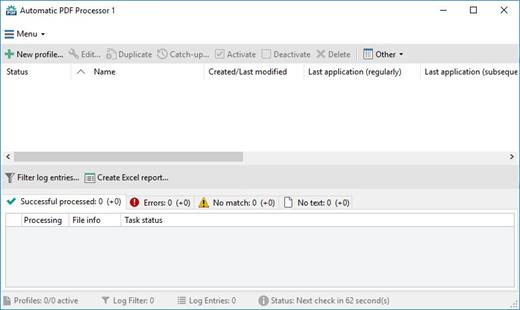
Description: With Automatic PDF Processor, PDF files can be processed automatically. Any number of folders can be monitored in order to automatically print, rename or move incoming PDF files to dynamically named folders.

Numerous metadata of the PDF document can be used in addition to the content, for example to include invoice information in the file path. The PDF files to be processed can be narrowed down with various profile-specific filters - the document text, PDF metadata and general file information are available as filters.

Extraction of data from the text of PDF files is optional. An unlimited number of extraction rules can be created within a profile. The extracted data can be used (after optional validation and formatting) for naming folders or the file name, and can be saved as an extract in a CSV file. Another task that can be automated with the Automatic PDF Processor is the extraction of attachments from PDF files, for example to save ZUGFeRD XML files, XRechnung attachments or similar as part of a PDF invoice in the same folder.

Features:
Print, rename, move, or copy PDF files automatically
Store embedded PDF attachments in any folder for archiving
Extract textual data from PDF documents automatically and save them as CSV file
Monitor any number of folders (hot folder monitoring)
Create individual rules for different tasks
Filter by document text, file date, attachment name or count, title …
Create the storage location (storage folder) dynamically from PDF document properties or based on content
Get informed about different processing statuses by email
Limit the automatic processing of PDF files to certain days and times, for example to print only during office hours
Combine a scan and OCR process with subsequent automatic naming by the Automatic Email Processor in order to be able to file older PDF documents in a structured way as well
Perform subsequent actions e.g., start a program with the path of the saved PDF file or PDF attachment as parameter
Process all already existing PDF files of a folder (with user-defined criteria)
Sort PDF — files automatically or have them moved to another folder and subfolder created dynamically from file properties
Send an Excel report with overview and detailed information on a regular basis

System requirements:
Microsoft Windows 11, 10, 8, 7 or Server (32-bit or 64-bit version)

Release Name: Gillmeister Automatic PDF Processor 2.2
Size: 226.5 MB
Links: HOMEPAGE – NFO – Torrent Search

Download: RAPiDGATOR

6 Comments