Please REGISTER or RENEW your account on RAPiDGATOR.net and support us by doing through all RAPiDGATOR working download links on main posts...
Apr 23

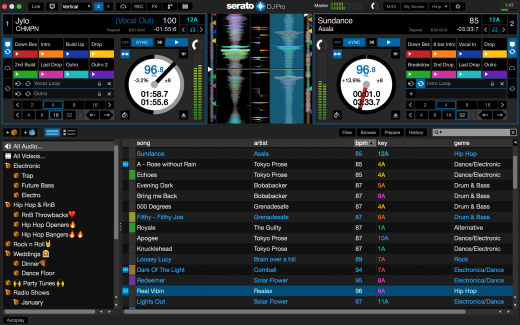
Serato DJ Pro Suite 4.0.7

Description: Professional DJ software. From the unknown to the greatest, Serato DJ Pro is the most popular DJ software globally. When you’re talking about Hip-Hop, Dance, and everything in between, you’re looking at the standard.

Serato Stems
This mind-blowing new feature will set you apart from the rest. Create acapellas or instrumentals at the click of a button or deliver smooth transitions and mashups on the fly by isolating the Vocals, Melody, Bass or Drums. Use Stems Pad FX like Echos and Brakers to add even more creativity.

Rock solid reliability
Serato DJ Pro is renowned for its reliability and trusted by DJs to deliver incredible performances. That’s why it powers the world’s top artists on some of the biggest stages.

The best hardware
Serato DJ Pro officially supports over 90 pieces of hardware by industry leaders. Every piece is tightly integrated to ensure the best experience possible.

Access millions of tracks
Finding new music is no longer an issue. You can now stream everything from the freshest underground sounds to certified classics directly in Serato DJ Pro.

Live stream your DJ sets
We’re here to help take your live stream productions to the next level. Follow our tips and grab everything you need to make your at-home productions look like a million bucks.

Release Name: Serato DJ Pro Suite 4.0.7
Size: 1.7 GB
Links: HOMEPAGE – NFO – Torrent Search

Download: RAPiDGATOR

4 Comments
Apr 23

EaseUS Fixo 4.3.0 Build 20260421

Description: Videos, photos or files get corrupted or fail to open? EaseUS one-stop solution will help you repair corrupted videos, photos and files regardless of the level of damage.

All-in-one File Repair Software

Video Repair

Repair Any Corrupted or Unplayable Video
Videos become corrupted or inaccessible after sudden power surges and failures, complete system crashes, updating errors, file mishandling or some other reasons? The video repair software - EaseUS Fixo enables you to repair a wide variety of video file formats including MOV, MP4, M2TS, MKV, MTS, 3GP, and more easily, no matter how it is damaged.

- Repair video formats including MP4, MOV, M2TS, MKV, MTS, 3GP, AVI, FLV, M4V, etc.
- Repair videos corrupted during shooting, recording, transferring, editing, converting or processing.
- Repair videos from cameras, Drones, CCTV DRV, dash cams, smartphones, NAS servers or any other monitor, etc.

Photo Repair

Repair Corrupted Photos from Any Device
Photos with precious memories or essential information become corrupted and unopenable? The photo repair software - EaseUS Fixo can intelligently and smartly repair your corrupted and damaged photos from your computer or other external storage devices like USB flash drives, memory sticks, SD cards, digital camera and phones regardless of their level of damage.

- Restore corrupted, blurry, overexposed, Underexposed or pixelated photos.
- Repair photo formats including JPEG, PNG, JPG, CR3, CR2, NEF, NRW, RAF, etc.
- Repair photos from PCs, USB flash drives, memory sticks, SD cards, digital cameras and phones.
- Repair photos in batch and preview repaired photos.

File Repair

Repair Corrupted Word, Excel, PPT, and PDF Files
Office files and pdf files become corrupted, inaccessible or unreadable unexpectedly for unknown reasons? EaseUS Fixo which has anintuitive interface is the best file repair software for novices to fix the corrupted office documents, including PDF, Word, Excel, and PowerPoint files.

- Repair the corrupted PDF, Word, Excel, and PowerPoint files.
- Fix unreadable files, garbled files and files not opening.
- Repair files in batch and preview repaired files.

Release Name: EaseUS Fixo 4.3.0 Build 20260421
Size: 194.2 MB
Links: HOMEPAGE – NFO – Torrent Search

Download: RAPiDGATOR

7 Comments
Apr 23

Adobe After Effects 2026 v26.2.1

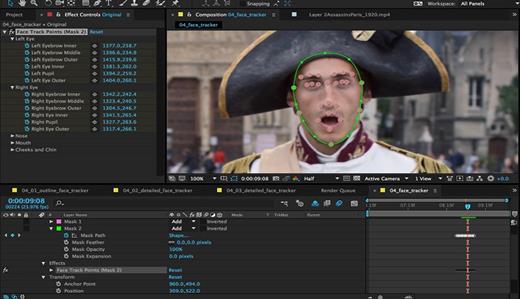
Description: Make a big scene bigger. Create cinematic movie titles, intros, and transitions. Remove an object from a clip. Start a fire or make it rain. Animate a logo or character. With After Effects, the industry-standard motion graphics and visual effects software, you can take any idea and make it move.

There.s nothing you can.t create with After Effects.
Animators, designers, and compositors use After Effects to create motion graphics and visual effects for film, TV, video, and the web.

Roll credits. Spin words. Twirl titles.
Create animated titles, credits, and lower thirds. Start from scratch or with one of the animation presets available right inside the app. From spin to swipe to slide .?there are countless ways to make your text move with After Effects.

Explosive effects. Mind-blowing results.
Combine videos and images to send a UFO across the sky or create an explosion . the possibilities are endless. Remove objects like booms, wires, or even people. Apply hundreds of effects to do anything from adding fog to making it snow. And create VR videos to drop your audience right into the center of the action.

Get animated.
Set anything in motion.from logos to shapes to cartoons.with keyframes or expressions. Or use presets to kick-off your designs and get unique results.

Plays well with others.
After Effects works seamlessly with other Adobe apps. Create comps and immediately see how they look in Premiere Pro with Adobe Dynamic Link. Import work from Photoshop, Illustrator, Character Animator, Adobe XD, and Animate. Use Team Projects to collaborate with editors no matter where they.re located. And After Effects is integrated with 300+ software and hardware partners.

Remove objects from video clips fast and easy
Want an object or person gone from your footage? With Content-Aware Fill, remove unwanted items quickly . no need to mask or cut out frame by frame.

Get depth passes from native 3D elements
Apply depth effects such as Depth of Field, Fog 3D, and Depth Matte so elements look natural . or use depth data to simulate 3D looks.

Release Name: Adobe After Effects 2026 v26.2.1
Size: 4.5 GB
Links: HOMEPAGE – NFO – Torrent Search

Download: RAPiDGATOR

4 Comments
Apr 23

Red Gate SmartAssembly 8.4.5.6931

Description: Redgate's .NET obfuscator. SmartAssembly is an obfuscator that helps protect your application against reverse-engineering or modification, by making it difficult for a third-party to access your source code.

If your entire business rests on the IP embodied in your software or you don't want your C# or VB.NET code exposed internationally, then obfuscating your code becomes a necessity, not a luxury.

With SmartAssembly, you get a comprehensive set of obfuscation features, including name mangling, control flow obfuscation, strings encoding, reference dynamic proxy, and declarative obfuscation.

Protect your .NET code and IP with SmartAssembly
Protect intellectual property through obfuscation and encryption
Secure .NET Framework, .NET Core, and .NET Standard assemblies
Automatically report usage and exceptions

Key features

Name mangling
Changes the names of methods and fields to make it hard to understand their purpose.

Control flow obfuscation
Converts the code inside methods to 'spaghetti code' to make it difficult to see how the application works.

References dynamic proxy
Creates a proxy for calls to methods outside of your assembly to make it hard to find external calls.

Strings encoding
Encodes the strings used in your software to hide such information as passwords and SQL queries.

Resources compression and encryption
Compresses and encrypts managed resources to make them hard to understand, and to reduce the size of the assembly.

Pruning
Removes non-useful metadata to make the code harder to reverse-engineer, reduce the size of the assembly, and improve loading time.

Dependencies merging
Takes all the DLLs and merges dependencies into the main assembly, so you don't have to load lots of DLL files, and so that they can also be obfuscated.

Dependencies compression and embedding
Compresses and embeds your dependencies into your main assembly, simplifying the deployment of your software and reducing the size of your program.

Method parent obfuscation
Moves methods in your code by changing the class they are in, making it harder to understand how methods and classes relate to each other.

Strong name signing with tamper protection
Signs your assembly and helps to protect it against modification (the additional tamper protection is not available in the Standard edition).

Declarative obfuscation
Excludes a member from obfuscation using custom attributes directly in your code.

Release Name: Red Gate SmartAssembly 8.4.5.6931
Size: 15 MB
Links: HOMEPAGE – NFO – Torrent Search

Download: RAPiDGATOR

6 Comments
Apr 23

BeerSmith 4.0.18

Description: Find out how to design world class beers at home, improve your brewing experience and simplify your brewing day. Make mead, wine and cider as well with BeerSmith. As you gain in experience, BeerSmith grows with you.

Design Great Beer at Home
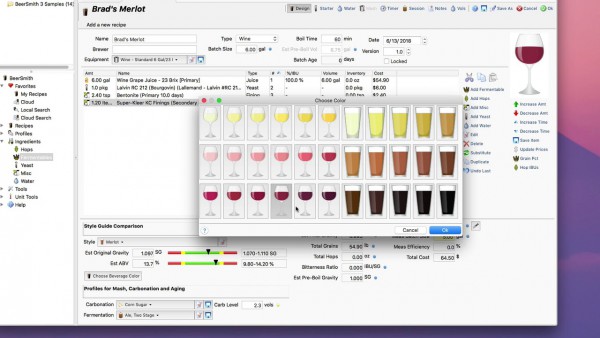
Design award winning beers with BeerSmith by matching the style and color of classic beers from around the world. Instantly search and access 10's of thousands of recipes on BeerSmithRecipes.com within BeerSmith.

Watch BeerSmith In Action!
Watch our BeerSmith 3 Video Tutorials - The world's most advanced beer brewing software used by hundreds of breweries worldwide.

Fun Fast and Easy to Use
Years in the Making - BeerSmith 3 has been redesigned from the ground up to give it a modern look and feel with ribbons, themes and tabbed browsing. Its designed to make your brewing as easy to use as possible.

Mead, Wine and Cider Support
BeerSmith 3 now includes support for mead, wine and cider recipe types as well as new native support for fruit, juice and honey to make it easier than ever to build and track your favorite beverages in one tool.

New BeerSmith 3 Water Profile and Mash pH Calcs in the Recipe
BeerSmith 3 is the only software with integrated water profile builder and mash pH estimation and adjustment built right in the recipe builder for all grain brewers. This lets you see the direct impact of a bit of gypsum on your water profile. The mash pH tool takes into account your mash water additions, grain bill and also acid adjustments. Eliminates the need for a separate water tool or spreadsheet.

Build Recipes Quickly
Building a recipe in BeerSmith is as easy as picking ingredients off a list. Hundreds of preloaded ingredients are available including grains, hops, yeasts, misc ingredients and waters. As you add ingredients, the color, gravity and bitterness are updated automatically.

Release Name: BeerSmith 4.0.18
Size: 21.2 MB
Links: HOMEPAGE – NFO – Torrent Search

Download: RAPiDGATOR

5 Comments
Apr 23

Drive SnapShot 1.51.0.125 WinPE

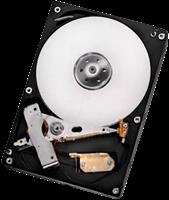
Description: Drive Snapshot creates an exact Disk Image of your system into a file, including the operating system, installed programs, your data and all security attributes - while windows is running and you continue to work.

Create Disk Image Backups, While Running Windows
The Backup process will back up all your data into a single file, containing all data, including system data and registry, for total security, should your computer ever crash. There is no restart (to DOS) necessary. Ever.

Continue your work, while the Backup is in progress
The new Snapshot technology ensures that all data are consistent, and reflect the PC's data at the start of backup.
There are no difficulties with opened files. Ever. This enables a very fast and easy way to back up servers and other computers, that must run 24 hours a day.

Easy Use and Restore of single Files or directories
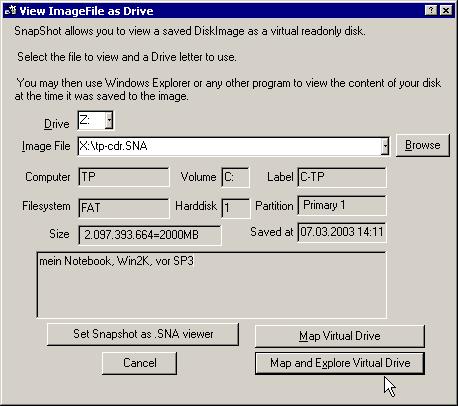
Drive Snapshot creates a virtual drive, containing all your drive's data.
You may use, compare, or restore these files directly from the Disk Image file.
This works with any program of your choice, including (of course) the Windows Explorer

Complete Restore of a disk in case of Disaster
If a disk is restored to its original state, it will be exactly the same as at the time of Backup - byte for byte.
Restoring a system partition will require DOS; other drives can be restored using Windows

Compatible with all Windows file systems (FAT16, FAT32, NTFS,ReFS)
Supports Linux EXT2/3/4/Reiser/XFS

Compatible with all Windows RAID Methods

Very easy and comprehensive command line interface
This makes automation of regular tasks a breeze.

System requirements:
Windows 2000,  XP,  Vista, 7, 8, 8.1, 10, 11, 2003 Server, 2008, 2008 R2, 2012, 2016, 2019,  2022, PE, Windows-X64
3 MB disk space + space to save the disk images.
32MB RAM if active, 0 MB if not active.
You need administrative rights to execute Drive Snapshot

Release Name: Drive SnapShot 1.51.0.125 WinPE
Size: 368.2 MB
Links: HOMEPAGE – NFO – Torrent Search

Download: RAPiDGATOR

6 Comments
Apr 23

Abelssoft YouTube Song Downloader 2026 v26.11

Description: With just a few clicks of your mouse, you can download your favorite tracks from YouTube and Vevo - completely free of charge and legally, of course. This way you can enjoy your favorite music and videos offline or send them to your cell phone. Due to its ease of use and many features, YouTube Song Downloader has been gathering a large community behind it for over 10 years. Will you be a part of it soon?

Overview of all functions

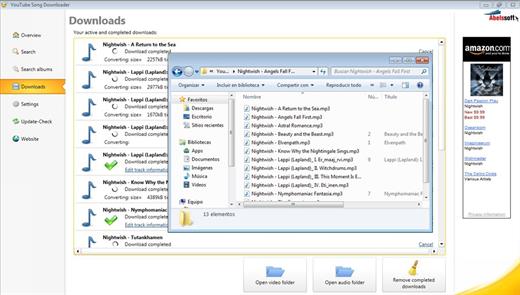
Integrated search
Enter title, YouTube link or artist in the search box and download music or videos with a single click.

Audio and Video
Everything you find on YouTube and Vevo can be saved as an audio file or a video. The choice is yours!

Download complete albums
Instead of having to search and download each song of an album individually, YouTube Song Downloader does the job for you. You can sit back and relax!

YouTube Playlist download
Whether movie songs, hits of the year or Let's Plays. You don't have to download content from playlists individually, just download them completely.

Modern YouTube Converter
Thanks to our coding artists, you can convert videos and audio to many current formats at the touch of a button.

High quality media player
Is that the right video? Play titles with the integrated player. Fast forward or different playback tempos are of course included.

YouTube Shorts
Find and download funny short videos from the YouTube Shorts category. Send them to friends or choose to save just the sound.

Multi-award-winning
Due to its ingenious features and great usability, YouTube Song Downloader gathers a large community behind it and is regularly showered with awards.

Release Name: Abelssoft YouTube Song Downloader 2026 v26.11
Size: 147.2 MB
Links: HOMEPAGE – NFO – Torrent Search

Download: RAPiDGATOR

6 Comments
Apr 23

O&O DiskImage Premium 22.6.1231 + WinPE

Incl. WinPE

Description: O&O DiskImage 22 lets you back up an entire computer or single files whenever you want – even while the computer is being used. In the event you should lose your personal data it can be quickly restored with just a few mouse clicks – even when Windows is no longer able to start.
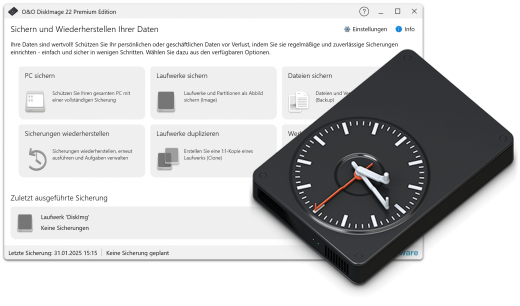
It also supports SSD drives and the latest UEFI System. O&O DiskImage lets you carry out a system restore and to duplicate or clone an entire PC or hard drive. You can even restore this backup onto a computer whose hardware is different from the original machine, for instance, where you have changed a motherboard on the target machine or have bought a brand new PC and want to restore an old backup onto it.

A regular backup is still something that many users prefer to avoid. At least that is until they suffer their first loss of important files as a result of software, hardware or user error: that’s when it becomes crystal clear just how valuable a reliable and up-to-date backup really is!

Comprehensive VHD / VHDX functionality
With the new version 21 it’s possible to convert image files made with O&O DiskImage into Microsoft Virtual Hard Disc (VHDX as well as VHD) image files. This can be especially useful if someone wants to first “rehearse” migrating from Windows 10 to Windows 11 because it can be done using a virtual machine created on the current system.

The new O&O DiskImage 21 can also create incremental and differential images of virtual drives. Combining or mounting these images is also possible. Whenever there’s a backup available, it only takes a few seconds to access any files that are needed. Work on the computer can then be continued without any loss of time or important data.

O&O DiskImage 21 with its own recovery partition
Normally with a backup or imaging program you need to create a boot medium (USB) to boot up your system if something goes awry. This you have to either carry around or store somewhere safe in case disaster strikes.

Thanks to the integration into the system, the O&O DiskImage RecoveryPartition can be accessed immediately so that the last system image can be restored directly. If the Windows operating system does not start or if faulty drivers have to be uninstalled – with the integrated recovery environment, all O&O tools are available to make the system operational again as easily as possible. Not only is this much more comfortable and quicker for the user, it also provides them with an extra level of security as this medium cannot get lost or damaged as easily as a “portable”, external one.

O&O DiskImage To Go
Previously, in addition to regularly backing up your machine, you also had to separately create an O&O DiskImage boot media to restore that backup. Everything is easier now! The new O&O DiskImage To Go function automatically turns an external hard drive (or USB flash drive with enough storage space) into an O&O DiskImage boot medium and marks this disk as the preferred storage medium for future system backups. As soon as you then connect this external USB hard disk to your computer, O&O DiskImage 21 automatically creates a backup. This makes it easy to create a recent backup. And if something really happens to your computer or you want to transfer your system and all your data to a new computer, then with the O&O DiskImage boot medium you can restore the backup stored on it with just one touch of a button. Without the hassle of searching for the boot medium and the external hard drive with the backup.

It has never been so easy to ensure the security of your data!

Further functions of O&O DiskImage

All default and advanced features are combined in one single product
This backup software is the safest and easiest way to avoid losing important personal files! Options are available for both auto backup and manual settings. Thanks to a unique recovery system that includes additional system recovery tools combined with O&O DiskImage you’ll quickly be able to restore all your important data – even if the backup you’re using was created with an older O&O DiskImage version.

Backup entire PCs, hard drives or files with the push of a button
When you back up a PC, O&O DiskImage saves all personal files as well as hard drive information and individual settings. This not only protects irreplaceable files but, in a worst case scenario, also saves you the trouble of having to carry out a time-consuming new setup of programs and the Windows operating system. O&O DiskImage lets you back up an entire computer, system and hard drives or just individual files and folders. To make sure your backups are always up to date, we recommend creating them at short intervals from one another.

Quick and easy system restore – even onto different hardware
Restoring a backup with O&O DiskImage is as easy as pie: all you have to do is start the program, select the backup you want to restore, and you’re off. Included with the software is our machine independent restoration which means your old backup can be transferred 1:1 onto a new machine. Hardware of a different make will be automatically recognized and Windows settings will be carried out by themselves.

Plug-and-play function
Anyone wanting to save data on an external hard disk has it even easier with the new O&O DiskImage 21. Thanks to the integrated plug-and -play option, selected files and folders can be backed up automatically as soon as, for example, an external hard disk is connected to the computer. This is ideal for users who forget to carry out regular backups or who don’t want to go through the trouble. Once configured, the auto backup function runs by itself.

Create a boot medium directly from within the program
O&O DiskImage can bring a system back to life immediately and with no installation required. It does so by way of a Boot Medium (USB Stick) which is based on the currently installed Windows system and which contains all the standard drivers required.

Made in Germany. Made in Berlin.
All O&O products are developed and serviced in Berlin. We at O&O are proud of our German heritage, and proud to represent the quality, security and satisfaction long associated with products “Made in Germany”. We take the concerns of our customers very seriously because we know just how important their data is for them.

Product features
- Backup an entire computer with the push of a button
- Backup system and hard drives, clone drives and entire disks
- Brand new file-based backup: now twice as fast as ever before – backup and restore individual files and/or folders
- Direct creation of VHD/VHDX
- Monitoring and warning of security risks
- Incremental/differential backup: back up only the changes
- Easily restore files, folders, drives and disks
- System restore onto different hardware (M.I.R.)
- Create a Windows Boot system directly from within the program with driver integration
- Plug-and-play: Selected files and folders are automatically backed up and synchronized
- Variable pixel density settings: adjusts to the selected DPI setting of the connected monitor
- New and enhanced functions Control via Command Lines
- Supports Windows 11 and Windows 10

* Backups that were created on older Windows versions 8.1, 8 and 7 with earlier versions of O&O DiskImage can still be restored.

System Requirements
The O&O DiskImage Premium is compatible with 11 and 10 (64-bit)

Release Name: O&O DiskImage Premium 22.6.1231 + WinPE
Size: 854.3 MB
Links: HOMEPAGE – NFO – Torrent Search

Download: RAPiDGATOR

6 Comments
Apr 23

Drive SnapShot 1.51.0.124

Description: Drive Snapshot creates an exact Disk Image of your system into a file, including the operating system, installed programs, your data and all security attributes - while windows is running and you continue to work.

Create Disk Image Backups, While Running Windows
The Backup process will back up all your data into a single file, containing all data, including system data and registry, for total security, should your computer ever crash. There is no restart (to DOS) necessary. Ever.

Continue your work, while the Backup is in progress
The new Snapshot technology ensures that all data are consistent, and reflect the PC's data at the start of backup.
There are no difficulties with opened files. Ever. This enables a very fast and easy way to back up servers and other computers, that must run 24 hours a day.

Easy Use and Restore of single Files or directories
Drive Snapshot creates a virtual drive, containing all your drive's data.
You may use, compare, or restore these files directly from the Disk Image file.
This works with any program of your choice, including (of course) the Windows Explorer

Complete Restore of a disk in case of Disaster
If a disk is restored to its original state, it will be exactly the same as at the time of Backup - byte for byte.
Restoring a system partition will require DOS; other drives can be restored using Windows

Compatible with all Windows file systems (FAT16, FAT32, NTFS,ReFS)
Supports Linux EXT2/3/4/Reiser/XFS

Compatible with all Windows RAID Methods

Very easy and comprehensive command line interface
This makes automation of regular tasks a breeze.

System requirements:
Windows 2000,  XP,  Vista, 7, 8, 8.1, 10, 11, 2003 Server, 2008, 2008 R2, 2012, 2016, 2019,  2022, PE, Windows-X64
3 MB disk space + space to save the disk images.
32MB RAM if active, 0 MB if not active.
You need administrative rights to execute Drive Snapshot

Release Name: Drive SnapShot 1.51.0.124
Size: 11.6 MB
Links: HOMEPAGE – NFO – Torrent Search

Download: RAPiDGATOR

5 Comments
Apr 22

Windows 11 Education/Pro Education 25H2 Build 26200.8246 TPM Bypassed & Pre-Activated April 2026

Description: Windows 11, version 25H2 is an enablement update that builds on the features of 24H2 by enabling new, “continuous innovation” features, rather than introducing entirely new features itself. Key updates include a Braille Viewer for the Narrator, improvements to Click-to-Do (including a new “Convert to Table” feature), support for plug-in credential managers for passkeys, and enhancements to the mobile device companion experience. Microsoft is also implementing IT admin-focused features like the ability to remove pre-installed Store apps and a new Quick Machine Recovery system to reduce downtime.

Features


  1. Accessibility
    The Narrator now includes a Braille Viewer, allowing users to see the braille equivalent of on-screen text on a refreshable braille display.
  2. Passkeys
    Users can now utilize plug-in credential managers for setting up and using passkeys, offering improved security and management.
  3. Time & Language
    Ported settings from the Control Panel to the Settings app, including configuring additional clocks and changing the NTP time server.
  4. Mobile Experience
    The mobile device companion has a new, more accessible layout to view calls, messages, photos, and more from your phone.
  5. Click-to-Do
    New AI features for Click-to-Do are included, such as a new “Convert to Table” capability for converting text to an Excel table and more flexible selection methods.
  6. Quick Machine Recovery
    This new feature in the recovery system aims to reduce downtime and simplifies the process for recovering a system, according to PCMag.
  7. Removable Apps
    IT admins can now remove certain pre-installed Microsoft Store apps via Group Policy or MDM CSP on Enterprise/EDU devices.
  8. Feature Removals
    25H2 removes older components like PowerShell 2.0 and WMIC for greater security and efficiency.

Release Name: Windows 11 Education/Pro Education 25H2 Build 26200.8246 TPM Bypassed & Pre-Activated April 2026
Size: 6.7 GB
Links: HOMEPAGE – NFO – Torrent Search

Download: RAPiDGATOR
2 Comments