Please REGISTER or RENEW your account on RAPiDGATOR.net and support us by doing through all RAPiDGATOR working download links on main posts...
June 12

VMware InstallBuilder Enterprise 26.5.1

VMware InstallBuilder is a development tool for building cross-platform installers for desktop and server software. With InstallBuilder, you can quickly create dynamic, professional installers for Linux, Windows, Mac OS X, Solaris and other platforms from a single project file and build environment. In addition to installers, InstallBuilder will generate RPM and Debian packages and multiplatform CDs/DVDs. Automatic update functionality makes it easy to deliver updates directly to users once they have your software installed.
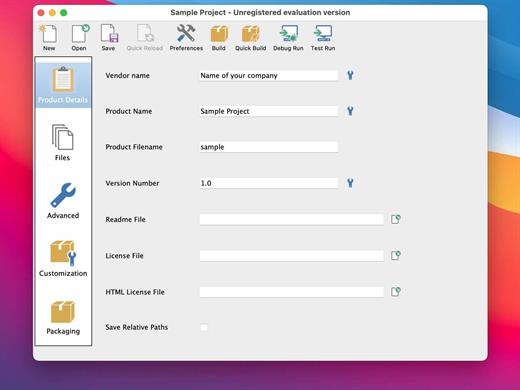
Powerful UI for Installer Development

Develop installers using the intuitive GUI or by editing XML-based installer project files.
Built-in actions automate adding commonly required functionality to installers.
Make platform-specific customizations while maintaining one project file for all platforms.

Installers for Any Desktop or Server Environment

Create installers for Linux, Windows, Mac OS X, Solaris, HP-UX, AIX, IRIX, FreeBSD and more.
Generate RPMs, Debian packages and multi-platform DVDs or CD-ROMs.
Installers run in GUI, text and unattended modes.

Developer-Friendly

Included debugger allows you test installers as you develop and pinpoint areas to troubleshoot.
Command line interface allows for integration with build and test systems.
“Human friendly” XML-based project files support source control integration and customizing installers using external scripts

Dynamic Parameter Support

Enhanced parameter support makes it possible to create dynamic pages that will be automatically reconfigured based on user’s input. This allows you to create a more customized and streamlined installation experience for users.

Enhanced Component Functionality

InstallBuilder provides support for downloadable components and component groups, including support for subcomponents. Downloadable components will be downloaded at runtime only if the user chooses to install them, reducing the size of installer downloads. The InstallBuilder component system allows you to group individual components and build feature sets that will be displayed in a tree structure (“subcomponents”.) It also allows users to add and remove specific components from existing installations.

Expanded Documentation

Over 350 pages of documentation are now available for InstallBuilder. The documentation not only explains every feature of InstallBuilder, but also provides sample code for a wide variety of installer functions, such as bundling a Java runtime, detecting pre-requisites on the system, offering basic and advanced installation modes and more.

What’s New

Version 26.5.1:


  • Release notes were unavailable when this listing was updated.
Compatibility

macOS 10.12 or later


Release Name: VMware InstallBuilder Enterprise 26.5.1
Size: 305.1 MB
Links: HOMEPAGE – NFO – Torrent Search

Download: RAPiDGATOR

4 Comments
June 10

CrossOver 26.2.0

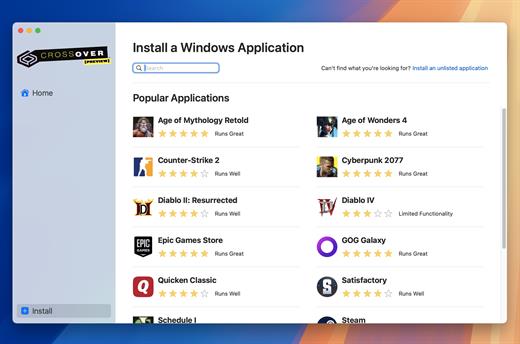
CrossOver allows you to install many popular Windows applications on your Mac. Your applications integrate seamlessly in OS X; just click and run. No rebooting, no switching to a virtual machine, and no Windows Operating System license required.

CrossOver is capable of running a wide range of Windows software. To see if your favorite application works with CrossOver, please check What Runs, or search for it using the search box at the top of this page.

Easy Installs! Many Windows titles can be installed using our CrossTie technology. If you have CrossOver installed, and have the installer for your Windows software, simply click the button in our Compatibility Database, and CrossOver will automatically install your application for you!

What’s New

Version 26.2.0:


  • Release notes were unavailable when this listing was updated.
Compatibility

macOS 10.15 and later


Release Name: CrossOver 26.2.0
Size: 385.4 MB
Links: HOMEPAGE – NFO – Torrent Search

Download: RAPiDGATOR
7 Comments
June 10

Final Draft 13.3.2

Final Draft allows you to use your creative energy to focus on the content; let Final Draft take care of the style. Final Draft is the number-one selling application specifically designed for writing movie scripts, television episodics, and stage plays. It combines powerful word processing with professional script formatting in one self-contained, easy-to-use package. There is no need to learn about script formatting rules – Final Draft automatically paginates and formats your script to industry standards as you write.

What’s New

Version 13.3.2:


  • Release notes were unavailable when this listing was updated.
Compatibility

macOS 10.14.0 or later


Release Name: Final Draft 13.3.2
Size: 114.7 MB
Links: HOMEPAGE – NFO – Torrent Search

Download: RAPiDGATOR

6 Comments
June 10

coconutBattery Plus 4.3.2

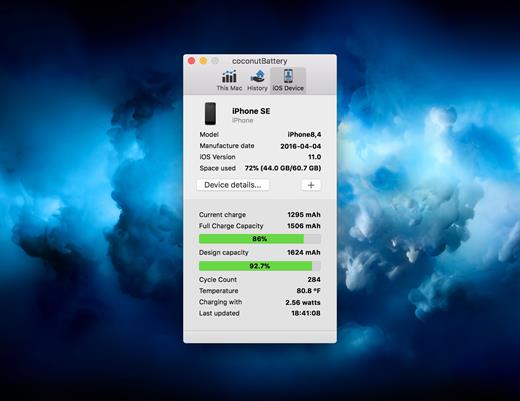
With coconutBattery you’re always aware of your current battery health. It shows you live information about your battery such as how often it was charged and how is the current maximum capacity in relation to the original capacity your battery had when it left the factory.

Of course, you are able to save the current maximum capacity of your battery. So you can see the changes in your battery health over time.

What’s New

Version 4.3.2:


  • Added support for macOS Tahoe and iOS/iPadOS 26
  • New: USB device connection details are now shown in Advanced Details
  • Fixed: Battery manufacturer information is now displayed correctly on Mac
Compatibility

macOS 10.12 or later.
Apple Silicon or Intel Core processor


Release Name: coconutBattery Plus 4.3.2
Size: 6.6 MB
Links: HOMEPAGE – NFO – Torrent Search

Download: RAPiDGATOR

6 Comments
June 10

Timing 2026.3.1

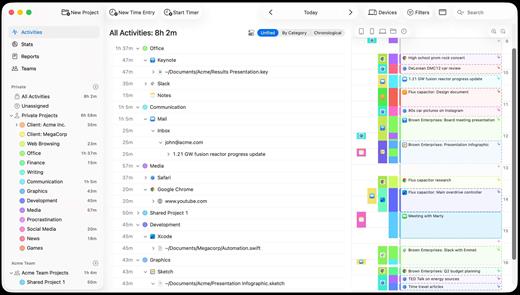
Timing is a native macOS application designed for freelancers, lawyers, and remote teams who want to stay on top of their time without the hassle of starting and stopping manual timers. Unlike traditional time trackers, Timing works automatically in the background, recording your work as you do it.

Key Features


  • Automated Tracking: Automatically logs every app, document, and website you use, including specific URLs and full file paths, eliminating the need for manual start/stop buttons.
  • AI-Powered Summaries: Instantly groups related activities and surfaces key patterns, giving you a clear, organized view of your day at a glance.
  • Privacy-First Design: All tracked data is stored locally and stays private on your Mac, with built-in options to exclude incognito tabs or specific private applications.
  • Comprehensive Reports: Easily review your timeline and export detailed timesheets to PDF, XLSX, CSV, or HTML—perfect for creating accurate client invoices.
  • Cross-Device Integration: Features a companion web app to track time on the go and can even import mobile usage data directly from Screen Time.
What’s New

Version 2026.3.1:


  • Release notes were unavailable when this listing was updated.
Compatibility

macOS 14.0 or later
Apple Silicon or Intel Core processor


Release Name: Timing 2026.3.1
Size: 31.8 MB
Links: HOMEPAGE – NFO – Torrent Search

Download: RAPiDGATOR

7 Comments
June 10

Path Finder 26.1.4

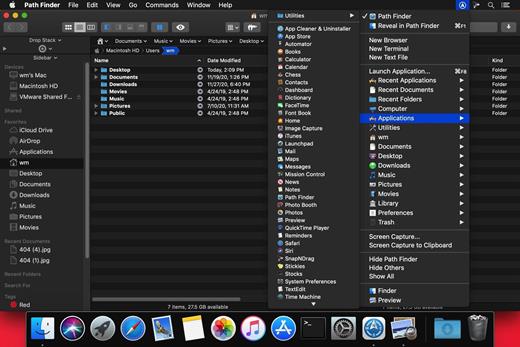
Path Finder makes you a master of file management. Take full control over your file system. Save your time: compare and synchronize folders, view hidden files, use Dual Pane and full keyboard navigation to browse your file system. Work how you want: extreme customization allows you to access most tools in many different ways to suit your workflow. Work seamlessly with other platforms: don’t leave any hidden .DS_Store files on non-Mac volumes, delete files securely and completely with the powerful delete feature from any volume type, search any network volume.

Features


  • View and manipulate hidden files
  • Dual Pane View
  • Full keyboard navigation
  • Folder comparison and synchronization
  • Folder merging
  • Batch renaming
  • Powerful file filtering
  • One-click dual-pane copy
  • Bookmarks and Tab Presets
  • ACL editor
  • File tagging
  • Editable Path Navigator
  • Powerful low-level search
  • Smart sorting
  • Advanced selection
  • Integrated terminal
  • Integrated text and image editors
What’s New

Version 26.1.4:


  • Release notes were unavailable when this listing was updated.
Compatibility

macOS 10.12 or later
Apple Silicon or Intel Core processor


Release Name: Path Finder 26.1.4
Size: 26.9 MB
Links: HOMEPAGE – NFO – Torrent Search

Download: RAPiDGATOR

7 Comments
June 10

Expenses 4.0.11

Expenses is a clean, intuitive spending tracker designed for speed, clarity, and control. It allows you to effortlessly monitor your money across the entire Apple ecosystem, including Mac, iPhone, iPad, and Apple Vision.

Key Features


  • Quick Input: Easily log your transactions on the go with just a few taps.
  • Complete Privacy: No registration required. The app prioritizes your data privacy and does not collect personal information.
  • Multi-Currency Support: Track your spending in any major currency with customizable exchange rates for seamless international transactions.
  • Stats & Trends: Visualize your spending patterns with actionable insights to help you build better financial habits.
  • Apple Ecosystem Integration: Full support for system features like Widgets and Siri Shortcuts to streamline your tracking.
  • Accessibility Built-In: Features an accessible design crafted to accommodate users with special needs.
What’s New

Version 4.0.11:


  • Release notes were unavailable when this listing was updated.
Compatibility

macOS 13.0 or later


Release Name: Expenses 4.0.11
Size: 10.1 MB
Links: HOMEPAGE – NFO – Torrent Search

Download: RAPiDGATOR
6 Comments
June 10

Looq 1.5.1

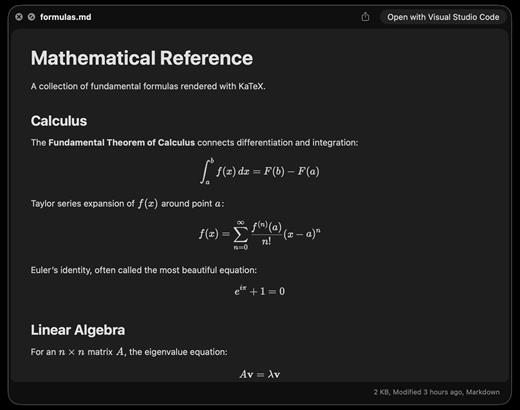
A better look at your files. Preview Markdown with KaTeX and Mermaid, highlight 190+ languages, view CSV and SQLite tables, browse archives and folders. All from Quick Look.

macOS 14 (Sonoma) or later

Markdown
Full GFM rendering with rich formatting support.


  • Live rendering on file save
  • KaTeX math (inline and block)
  • BeautifulMermaid diagrams
  • Syntax-highlighted code blocks
  • GitHub Alerts and emoji shortcodes
  • Auto table of contents sidebar
  • Remote image caching
  • Scroll position memory

Source Code
Syntax highlighting for 190+ languages.


  • Progressive rendering
  • Auto-format JSON, CSS, XML, SVG, plist
  • Configurable line numbers
  • Custom fonts, size, and weight
  • Tab width and word wrap
  • Independent light and dark themes
  • Shebang detection

Data Files
Native table views for structured data.


  • Resizable CSV and TSV columns
  • Alternating row colors
  • SQLite multi-table preview
  • Column type and constraint tooltips
  • Color-coded diff/patch
  • Multi-file tab switching
  • Large file truncation

Archives and Folders
Browse compressed files and directories.


  • ZIP and TAR directory tree
  • Pure Swift binary parsing
  • File size, date, and type columns
  • Sortable column headers
  • Folder preview with Spotlight metadata
  • Configurable display columns
  • Finder tag support
What’s New

Version 1.5.1:


  • Release notes were unavailable when this listing was updated.
Compatibility

macOS 14 (Sonoma) or later


Release Name: Looq 1.5.1
Size: 17.6 MB
Links: HOMEPAGE – NFO – Torrent Search

Download: RAPiDGATOR

7 Comments
June 10

WhyFi 1.4.2

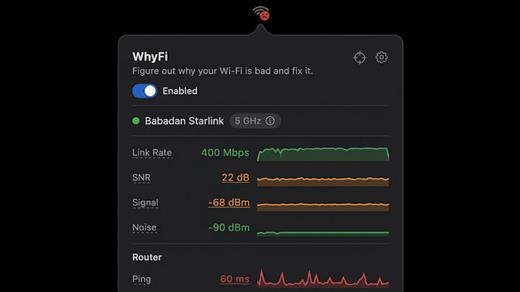
WhyFi is a lightweight macOS utility designed to diagnose and explain Wi-Fi performance issues in real time. Instead of guessing why your connection is slow, WhyFi continuously monitors your network and breaks down problems into clear categories such as Wi-Fi signal, router performance, ISP issues, and DNS delays.

By analyzing each layer of your connection, WhyFi helps you identify the exact cause of slow speeds, high latency, or unstable connections — and provides actionable insights to resolve them quickly.

Built as a menu bar app, it runs quietly in the background and gives you instant visibility into your network health without interrupting your workflow.

What’s New

Version 1.4.2:


  • Release notes were unavailable when this listing was updated.
Compatibility

macOS 13.0 or later


Release Name: WhyFi 1.4.2
Size: 6 MB
Links: HOMEPAGE – NFO – Torrent Search

Download: RAPiDGATOR
7 Comments
June 10

Compresto 1.28.1

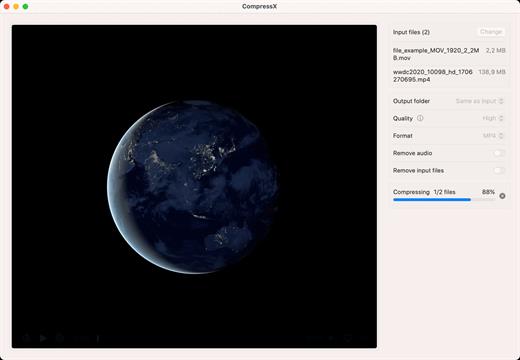
Compress your videos and images with up to 90% file size reduction without significant loss of quality.

Features:


  • Automatically compress new files in monitored folders
  • Gif conversion. Just drop a video, select quality, FPS, and voilà.
  • CompressX is designed to be compatible with video files that have a transparent background.
  • Raycast extension. Speed up your workflow by sending your file to Raycast.
  • and many more

Note:
– You must allow app through firewall initially, then enter any license to activate
– App may work on newer versions (with firewall)

What’s New

Version 1.28.1:


  • Release notes were unavailable when this listing was updated.
Compatibility

macOS 13.0 or later

Apple Silicon or Intel Core processor


Release Name: Compresto 1.28.1
Size: 9.8 MB
Links: HOMEPAGE – NFO – Torrent Search

Download: RAPiDGATOR

6 Comments