Please REGISTER or RENEW your account on RAPiDGATOR.net and support us by doing through all RAPiDGATOR working download links on main posts...
June 13

SiteSucker 6.1.8

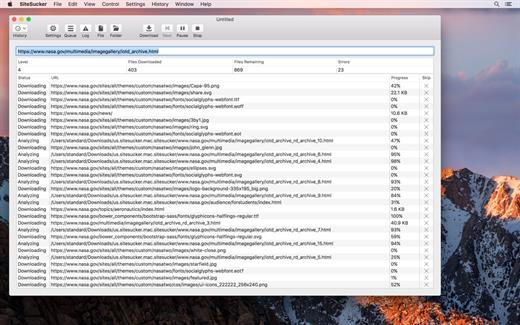
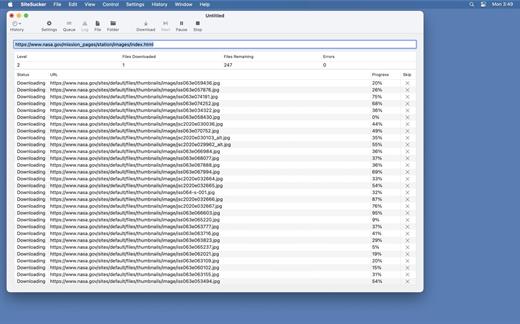
SiteSucker is an application that automatically downloads Web sites from the Internet. It does this by copying the site’s HTML documents, images, backgrounds, movies, and other files to your local hard drive. Just enter a URL and click a button and SiteSucker can download the entire site.

SiteSucker can be used to make local copies of your Web sites for easy maintenance. SiteSucker can download files unmodified, or it can “localize” the files it downloads, allowing you to browse a site off-line.

What’s New

Version 6.1.8:


  • Release notes were unavailable when this listing was updated.
Compatibility

macOS 11.0 or later


Release Name: SiteSucker 6.1.8
Size: 7 MB
Links: HOMEPAGE – NFO – Torrent Search

Download: RAPiDGATOR

5 Comments
June 13

Permute 4.0.3

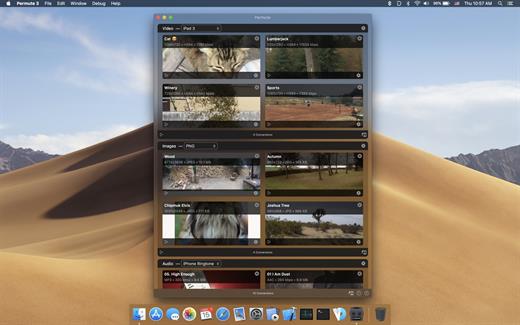
Permute offers easy-to-use drag-and-drop video conversion.

Features:


  • Easy to Use – built from the ground up, Permute is a perfect example of what a Mac app should be. With a gorgeous interface and drag & drop simplicity no need for complicated options.
  • Insanely Fast – Permute was engineered to be incredibly fast. Let us take care of the hard stuff. Just select the video format you want and it’ll be done faster than you can say “hardware acceleration” – MP4 and HEVC presets now take advantage of your machine’s hardware acceleration capabitlities, speeding up HEVC conversions more than 3 times over previous versions of Permute!
  • PDF Support – Permute 3 now includes support for stitching multiple images into a single PDF.
  • Everything Included – It doesn’t matter if you’re converting home movies or processing images. Permute can do it all. We support nearly every format and have plenty of device presets to choose from.
  • Looks Amazing – Whether you use dark mode or not, Permute will look amazing. Taking advantage of the modern technologies, Permute will even change its icon in dark mode.
  • Keep the Schedule – Video re-encoding is quite demanding on computer resources. This is why you can now schedule Permute to convert videos e.g. at night when you’re not using your computer.
  • And so much more! – There are so many other great features in Permute – adjust volume of an audio file or an audio track in a video. Batch-resize, rotate and flip images and videos. And more!
What’s New

Version 4.0.3:


  • Release notes were unavailable when this listing was updated.
Compatibility

macOS 10.12.0 or later


Release Name: Permute 4.0.3
Size: 51.1 MB
Links: HOMEPAGE – NFO – Torrent Search

Download: RAPiDGATOR

6 Comments
June 13

Manet Music 1.0.10

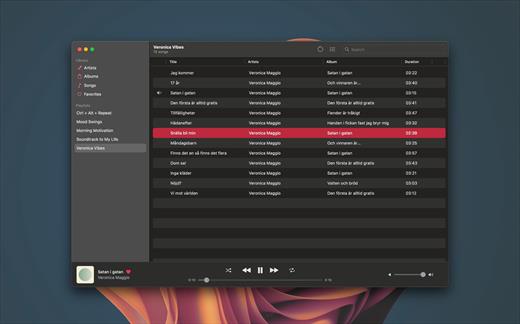
Experience seamless music streaming from Jellyfin for free with Manet, your go-to music app for iOS.

Offline Playback


  • Download your favorite music for offline listening, perfect for when you’re on the go or conserving data.

Siri Support


  • Command your music effortlessly using Siri. Simply ask Siri to play artists, playlists, albums, or tracks.

CarPlay Integration


  • Safely control playback while driving with our intuitive CarPlay interface, keeping your focus on the road.

Native iOS Experience


  • Built with native iOS technologies, Manet seamlessly integrates with your device for optimal performance.

Sleek Design


  • Purpose-built for iOS, Manet blends seamlessly with the platform’s aesthetics, offering a familiar and intuitive user experience.

Shortcuts Integration


  • Easily start playback as part of larger automations using Shortcuts.
What’s New

Version 1.0.10:


  • Release notes were unavailable when this listing was updated.
Compatibility

macOS 14.0 or later.


Release Name: Manet Music 1.0.10
Size: 12.1 MB
Links: HOMEPAGE – NFO – Torrent Search

Download: RAPiDGATOR

5 Comments
June 13

UPDF 2.5.4

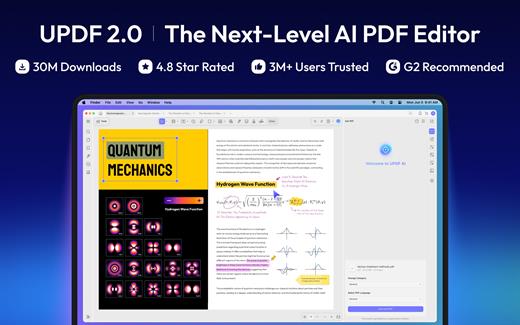
UPDF is an all-in-one AI-integrated PDF editor software that you can use to AI chat with PDF, edit, annotate, convert PDFs, and more. One UPDF license allows you to use it across all platforms, including macOS/iOS/iPadOS (universal purchase).

FEATURES

AI Assistant


  • Powered by GPT-5 and Full DeepSeek (R1).
  • AI chat with your PDF to summarize, translate full PDFs without losing format, and get answers related to the PDFs.
  • Convert PDFs to mind maps.
  • Chat with images and ask any questions about the images.
  • Ask any prompts and get answers from AI.
Edit PDFs

  • Edit text in PDF to change the properties of the text, such as the color, font, size, etc.
  • Edit images in PDF to change the size, crop, rotate, extract, replace, delete, etc.
  • Add or remove links to the web or a page.
Annotate PDFs

  • Highlight, underline, strikethrough, or squiggly the text in PDFs.
  • Add sticky notes, text boxes, text comments, text callouts, or shapes to PDFs.
  • Free-hand drawing within a PDF.
  • Add stamps, stickers, and signatures to PDFs.
  • Measure PDF.
UPDF Cloud

  • Sync files across different devices and platforms.
OCR (This feature is NOT AVAILABLE on the Mac App Store. To use OCR, you can download from https://updf.com.)

  • Convert scanned PDFs or images into searchable and editable PDFs or vice versa.
  • Can recognize text in 38 languages.
Convert PDFs

  • Convert PDFs to: DOCX, XLSX, and PPTX.
  • Convert PDFs to image: PNG, JPEG, BMP, TIFF, and GIF.
  • Convert PDFs to TXT, RTF, CSV, HTML, and XML.
Organize PDF Pages

  • Insert, replace, extract, split, rotate, remove, and reorder the pages in PDFs
  • Crop or extend page margins.
  • Split a long single page into multiple pages.
Protect PDFs

  • Add an open or permission password to protect PDFs from opening, copying, editing, and printing.
Prepare Form

  • Create fillable PDF forms by adding interactive form fields.
  • Fill PDF forms and add an e-signature.
  • Add digital signatures to prove the sender’s identity.
Batch Process PDFs

  • Support batch process to convert, merge, OCR, compress, print, create, insert, and encrypt PDFS
  • Support batch process to add or remove backgrounds, watermarks, header & footer, and Bates numbering in multiple PDFs
  • Batch Remove text markup, measurements, stamps, form fields, and signatures.
Read and Print PDFs

  • View PDF single page or two-page view/scrolling.
  • Text-to-speech.
  • Search and find text.
  • Slideshow PDF.
  • Support light and dark mode.
  • Add and manage bookmarks.
  • Print PDFs.
Create PDFs

  • Create a blank PDF with different backgrounds or from Word/Excel/PPT/image/CAJ/Paperwork/selection capture/window capture/screen capture/clipboard/scanner.
MORE

  • Share PDF via link, QR code, or email.
  • Compare PDFs.
  • Redact sensitive information in PDF.
  • Add, edit, or remove watermarks from PDFs.
  • Edit the background for PDFs.
  • Edit the header and footer from PDFs.
  • Save as PDF/A.
  • Flatten PDFs.

Note: AI features won’t work

What’s New

Version 2.5.4:


  • Release notes were unavailable when this listing was updated.
Compatibility

macOS 11.0 or later.


Release Name: UPDF 2.5.4
Size: 129.7 MB
Links: HOMEPAGE – NFO – Torrent Search

Download: RAPiDGATOR

5 Comments
June 13

Zipic 1.9.9

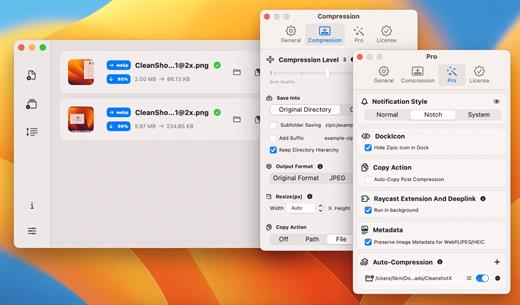
Zipic is a native macOS application designed for efficient, high-quality image compression. It lets users shrink image files locally, with no uploads or dependency on the cloud. All processing happens on your own device—so your privacy and speed stay intact.

Key Features and Highlights:


  • High Compression, Near-Lossless Quality: Zipic utilizes powerful compression algorithms to achieve a high compression ratio with minimal perceived quality loss, making the compressed image virtually indistinguishable from the original.
  • Fast & Local Processing: Being a native macOS application, all image processing occurs locally on your device. This ensures lightning-fast performance, efficient handling of massive batches, and high data privacy with no cloud uploads or network dependence.
  • Comprehensive Format Support: The tool supports a wide range of formats, including basic ones like JPEG, PNG, WebP, HEIC, and GIF, and Pro formats like AVIF, JXL, TIFF, and ICNS.
  • Effortless Workflow: It offers multiple simple compression methods, including drag-and-drop, folder monitoring, and Finder integration (right-click).
  • Custom Control: Users can create custom presets for different quality levels and scenarios, allowing for precise control over the compression outcome.
  • Pro Features for Automation: Advanced features include Clipboard auto-compress, Folder Watch for automated compression in specific directories, and integration options like Raycast Extension and Apple Shortcuts.

Zipic aims to be the seamless solution for developers, designers, bloggers, and photographers who need to optimize and compress images efficiently.

What’s New

Version 1.9.9:


  • Release notes were unavailable when this listing was updated.
Compatibility

macOS 13.0 or later


Release Name: Zipic 1.9.9
Size: 21.6 MB
Links: HOMEPAGE – NFO – Torrent Search

Download: RAPiDGATOR

5 Comments
June 13

SiteSucker Pro 6.1.8

SiteSucker Pro is an application that automatically downloads Web sites from the Internet. It does this by copying the site’s HTML documents, images, backgrounds, movies, and other files to your local hard drive. Just enter a URL and click a button and SiteSucker can download the entire site.

SiteSucker can be used to make local copies of your Web sites for easy maintenance. SiteSucker can download files unmodified, or it can “localize” the files it downloads, allowing you to browse a site off-line.

What’s New

Version 6.1.8:


  • Release notes were unavailable when this listing was updated.
Compatibility

macOS 11.0 or later.


Release Name: SiteSucker Pro 6.1.8
Size: 7.7 MB
Links: HOMEPAGE – NFO – Torrent Search

Download: RAPiDGATOR

5 Comments
June 13

OmniPlan Pro 4.10.3

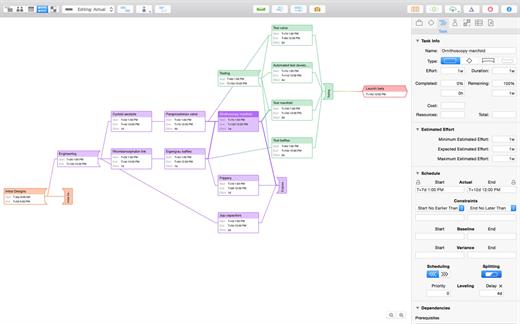
With OmniPlan Pro, you can create logical, manageable project plans with Gantt charts, schedules, summaries, milestones, and critical paths. Break down the tasks needed to make your project a success, optimize resources, and streamline budgets. It’s project management made painless.

How to get your project done on time and under budget:


  • Translate strategy into tactics everyone can understand
  • Create summaries of work broken into lists of activities
  • Distribute workloads fairly and efficiently
  • Manage costs as you go

OmniPlan Pro adds the following features to OmniPlan’s robust management abilities:


  • Publish and subscribe
  • Change tracking
  • Monte Carlo simulation
  • AppleScript support
  • Earned-value analysis
  • Multi-project dashboard
  • Beautiful reports
  • Microsoft Project support
  • Auto-effort estimation
What’s New

Version 4.10.3:


  • Release notes were unavailable when this listing was updated.
Compatibility

macOS 11.0 or later.
Apple Silicon or Intel Core processor


Release Name: OmniPlan Pro 4.10.3
Size: 99.7 MB
Links: HOMEPAGE – NFO – Torrent Search

Download: RAPiDGATOR

6 Comments
June 13

Picmal 1.6.7

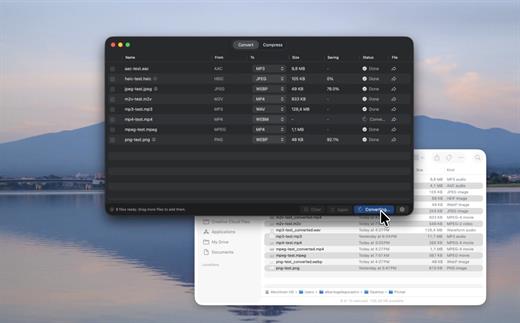
Picmal is an all-in-one offline macOS media converter and compressor for images, video, and audio, built around fast batch processing and a native Mac workflow. It supports 100+ formats, Finder integration, presets, detailed codec and bitrate controls, resizing, color space options, folder monitoring, Shortcuts automation, and privacy-friendly local processing.
What Picmal actually does
Convert, compress, and resize media files. Everything runs on your Mac, nothing touches a server.

Convert between multiple formats
Turn a PSD into a PNG, an AI file into SVG, a MOV into MP4. Pick the output format and go.

Batch processing
Drop hundreds of files at once. Drag them in, use File > Open, or right-click in Finder. No need to feed them one by one.

Presets for the usual stuff. Full control for the rest.
Built-in presets for web, social media, archival. If you want to get specific, tweak color space, resize, codecs, bitrates.

Shrink file sizes without visible quality loss
Same format, smaller file. Shrink photos before uploading or get a video under the email attachment limit

Designed for Mac
Lightweight, plays nice with Finder, Quick Actions, and Shortcuts.

Works offline
Works on a plane, at a café with terrible Wi-Fi, or when your connection just dies.

Privacy first
Your files stay on your Mac. Nothing gets uploaded anywhere.

What’s New

Version 1.6.7:


  • Release notes were unavailable when this listing was updated.
Compatibility

macOS 14 or later.


Release Name: Picmal 1.6.7
Size: 91.2 MB
Links: HOMEPAGE – NFO – Torrent Search

Download: RAPiDGATOR

5 Comments
June 13

Downie 4.12.7

A simple download manager that offers you the possibility to quickly save videos from different websites to your own disk drive.

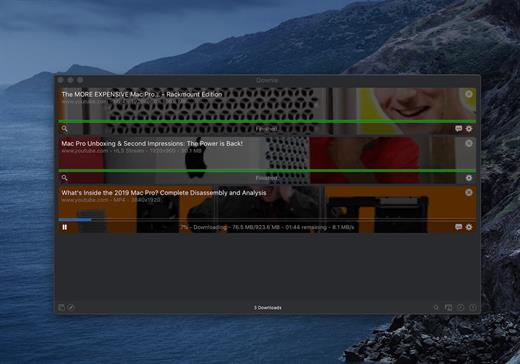
If you are using a poor internet connection, trying to visualize videos streamlined online might not work properly since the content is loaded too slowly. Downie is a simple Mac app that can help you download those videos to your computer, and then watch them by using your default media player.

User friendly video downloader featuring support for drag and drop actions

Working with Downie is extremely straightforward: simply drop the video URL on top of the app’s main window or on the Dock icon. Downie adds the video to your downloads list, so all you have to do next is start the process by pressing the appropriate button. Of course, you can also remove items from the list.

By default, Downie downloads MP4 files and places them in your default Downloads folder, but you can easily change this via the Preferences window. The same area allows you to setup notifications, or post processing actions (convert to MP4 if necessary, or extract audio only).

Effortlessly download videos from a wide collection of hosting websites

Downie provides support for more than 400 different websites that host video content, among which there are the most popular choices, such as YouTube, Apple, LiveLeak, Vimeo, BBC, and so on. If a certain website is not included, within the app you can send a request email to the Downie developers.
Moreover, Downie also provides matching extensions for various popular web browsers, such as Firefox, Safari, Google Chrome or Chromium. The add-ons are not installed by default: open the Preferences window and install only the ones you plan to use.

Straightforward solution for downloading video content hosted online

Downie is a great tool for saving videos posted on various websites to your Mac for offline playback. The application is extremely useful especially if you have a slow internet connection.

What’s New

Downie 4.12.7:


  • New: You can now schedule start of recording for live streams.
  • New: You can now specify a custom title when using the automation URL.
  • Improved: bbc.co.uk, instagram.com, orf.at, radiofrance.fr, sbs.com.au, soundcloud.com, today.com, youtube.com.
Compatibility

macOS 10.12 or later
Apple Silicon or Intel Core processor


Release Name: Downie 4.12.7
Size: 42.5 MB
Links: HOMEPAGE – NFO – Torrent Search

Download: RAPiDGATOR

5 Comments
June 13

Octavo 1.1

Ever tried to print a booklet but don’t know what order to put the pages in? Or spent an afternoon fighting with your printer only to waste half a ream of paper? We’ve been there. That’s why we built Octavo.

Octavo: Imposition & Booklet Printing for Mac

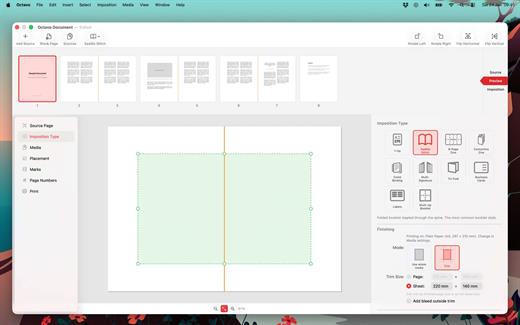
Octavo takes your PDF and arranges the pages so they come out right when you fold, staple, or bind them. It handles the fiddly maths so you don’t have to.

What Can Octavo Do?

Drop in a PDF or some images and Octavo gives you a complete workflow:


  • Print booklets: Octavo calculates the page order for duplex printing, adds fold and staple marks, and exports printer-ready sheets.
  • Clean up messy PDFs: Rotate, flip, straighten, adjust perspective, and crop — all with visual on-canvas editors.
  • Manage your margins: Position content with inside/outside margins so nothing gets clipped by binding. Multiple scaling modes with per-page fine-tuning.

Imposition Styles


  • Saddle-Stitch Booklet: The classic folded-and-stapled booklet.
  • Multi-Signature: For thicker books — divide pages into folded, gathered signatures.
  • Comb / Hole Punch Binding: Hole patterns, binding edge, and margins for punched or bound documents.
  • Tri-Fold Brochure: C-fold and Z-fold layouts for leaflets and pamphlets.
  • 1-Up: Single or double-sided output with full placement control.
  • Business Cards and Labels: Grid layout with configurable rows, columns, and gaps.
  • 8-Page Mini Zine: Fold and cut a single sheet into an eight-page booklet. Great for zine fairs or just for fun.
  • Concertina Zine: An accordion-fold strip from a single sheet.

Clean Up Your Source PDF


  • Rotate in 90° increments, flip horizontal or vertical.
  • Straighten crooked scans with the angle slider.
  • Correct perspective distortion with draggable corner handles.
  • Set your crop margins with a visual editor.
  • Adjust image filters: threshold, levels, and more.
  • Set bleed on source pages for edge-to-edge printing.

Placement & Margins


  • Set top, bottom, inside, and outside margins with draggable handles.
  • Scale to fit (per page or consistent), or set a manual scale.
  • Position content towards an edge or corner, accounting for facing pages.
  • Per-page overrides — link or unlink pages for individual adjustments.
  • Bleed settings for content extending beyond the margins.
  • Preview in both reader spreads and imposed sheets.

Marks & Page Numbers


  • Fold marks, staple guides, crop marks, and cut lines.
  • Hole punch guides for comb binding.
  • Customise mark weight, colour, and style.
  • Page numbers: Arabic, Roman, or alphabetic, with prefix/suffix, font, colour, and background shape.
  • Skip covers and blanks, or exclude individual pages.

Media & Paper Management


  • Create named media types with paper size, weight, and stock type.
  • Assign a printer and tray to each media type.
  • Assign media to individual pages — card stock for covers, lightweight paper for interiors.
  • Automatic blank sheet insertion to keep media aligned.

Print & Export


  • Export to PDF: a reader preview, or the fully imposed output.
  • Print directly with per-media printer and tray selection.
  • Automatic duplex detection and enforcement.
  • Manual duplex workflow for printers without auto-duplex.
  • Full access to printer-specific options.

Built for Mac


  • Full undo/redo. Save projects as documents, no ‘cloud lock-in’.
  • Drag-and-drop page reordering. Import PDFs and images.
  • Supports Dark Mode.
  • Makes Liquid Glass look good.

Ready to make something? Download Octavo and start folding.

What’s New

Version 1.1:


  • Release notes were unavailable when this listing was updated.
Compatibility

macOS 15.6 or later.


Release Name: Octavo 1.1
Size: 10.5 MB
Links: HOMEPAGE – NFO – Torrent Search

Download: RAPiDGATOR

5 Comments