Please REGISTER or RENEW your account on RAPiDGATOR.net and support us by doing through all RAPiDGATOR working download links on main posts...
June 19

4K Video Downloader Plus Pro 26.1.5

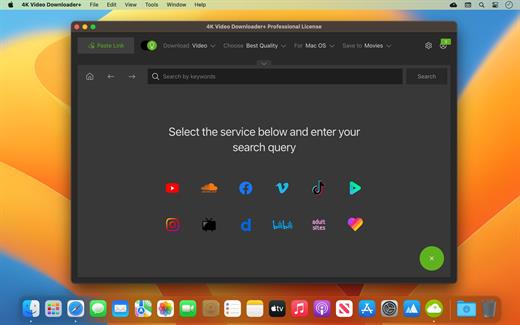
4K Video Downloader allows to download video, audio and subtitles from YouTube in high-quality and as fast as your computer and connection will allow. If you want that video on your iPad, iPhone or other device we’ve got you covered. Downloading is simple and straightforward: just copy the video link from your browser and click ‘Paste Url’. Done!
Proxy Connection for Unrestricted Access


  • Bypass restrictions set by your Internet service provider and get around your school or workplace firewall. Connect through an in-app proxy to access and download from YouTube and other sites.

All Popular Sites Support


  • Save video and audio from YouTube, Vimeo, TikTok, SoundCloud, Bilibili, Niconico, Flickr, Facebook, Instagram, DailyMotion, Naver TV, Likee and Tumblr. Download recorded streams from Twitch and YouTube Gaming.

New YouTube Video Auto-Download


  • Subscribe to the download of your favorite YouTube playlists and creators. Save whole channels and playlists in one go. Get new videos downloaded automatically as soon as they are uploaded to YouTube.

3D Video Download


  • Get a one of a kind experience by watching stereoscopic 3D videos on your computer or TV. Download 3D Youtube videos in MP4, MKV, FLV, 3GP and other formats

360° Video Download


  • Feel the action all around you with virtual reality videos. Download 360° videos to relive the mind-blowing VR experience as many times as you want.

Easy Downloads Management


  • Sort and filter downloads by type, name and date. Import and export all files as a single JSON file. Easily track and control the progress of both individual downloads and entire groups of downloading files.
What’s New

Version 26.1.5:


  • Release notes were unavailable when this listing was updated.
Compatibility

macOS 10.13 or later


Release Name: 4K Video Downloader Plus Pro 26.1.5
Size: 275.4 MB
Links: HOMEPAGE – NFO – Torrent Search

Download: RAPiDGATOR

5 Comments
June 19

4K YouTube to MP3 Pro 26.1.5

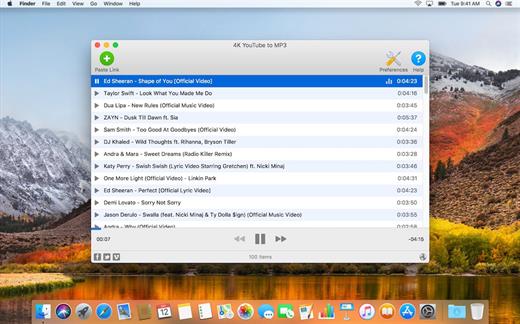
4K YouTube to MP3 was specifically created to extract audio from YouTube, Vimeo or Facebook and save it in MP3, M4A, OGG. No annoying and complicated settings to deal with, just a clean, friendly and functional interface. Downloading is simple and straightforward: just copy the link from your browser and click ‘Paste Url’. Done!

Features


  • Extract audio from YouTube videos and save it in MP3, M4A or OGG in high quality.
  • Download full YouTube playlists or channels and generate m3u files.
  • Transfer downloaded tracks automatically into iTunes and upload them on your iPhone or iPod.
  • Listen music via native built-in music player.
  • Download and extract audio tracks from SoundCloud, Vimeo, Flickr and DailyMotion videos.
  • Download audio books from YouTube.
  • Extract audio tracks even from embedded in HTML page videos.
  • Use 4K YouTube to MP3 on your PC, Mac or Linux, doesn’t matter what OS you prefer.
What’s New

Version 26.1.5:


  • Release notes were unavailable when this listing was updated.
Compatibility

macOS 10.10 or later


Release Name: 4K YouTube to MP3 Pro 26.1.5
Size: 245.8 MB
Links: HOMEPAGE – NFO – Torrent Search

Download: RAPiDGATOR
6 Comments
June 19

CloudMounter 4.18

CloudMounter is a cloud manager for easy work with data stored on multiple cloud services.

CloudMounter makes working with multiple cloud storage services easy by letting you access and manage your data through your Mac’s Finder. CloudMounter works with all popular services such as OneDrive, Google Drive, OpenStack Swift, Amazon S3 and Dropbox. Not only that – the app also allows you to connect to remote FTP, SFTP, FTPS and WebDAV servers the way you would connect to any shared location in your local network.

You can also increase cloud security with data encryption. Encrypted files cannot be read without a decryption key, so even if someone gets ahold of your data, they won’t be able to get into its contents. With CloudMounter your login data is protected as well, credentials you enter are stored in Mac OS Keychain and sent directly to the servers and storage accounts.

What’s New

Version 4.18:


  • Release notes were unavailable when this listing was updated.
Compatibility

macOS 10.14 or later


Release Name: CloudMounter 4.18
Size: 98.7 MB
Links: HOMEPAGE – NFO – Torrent Search

Download: RAPiDGATOR

5 Comments
June 19

ChatGPT for macOS 1.2026.153

This is the official OpenAI ChatGPT app for macOS.

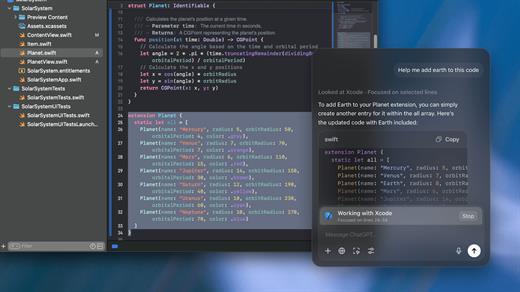
Whether you’re writing emails, exploring ideas, learning something new, or just curious about the world, ChatGPT is here to help. Designed with a clean, native experience for Mac users, the app makes it easier than ever to start a conversation with advanced AI.

Get answers. Find inspiration. Be more productive.

Free to use. Easy to try. Just ask and ChatGPT can assist with writing, learning, brainstorming, coding, and more. It’s like having an intelligent assistant, tutor, or creative partner always within reach—right from your menu bar.

Includes access to GPT-5 (for pro users), memory features, and voice input. Works seamlessly on macOS, optimized for speed and simplicity.

Key Features:

  • Instant AI-powered responses on your desktop
  • Natural language understanding and generation
  • Voice conversations with the built-in Whisper model
  • Synced across devices with your OpenAI account
  • Support for both GPT-5 (free) and GPT-5.4 (with Plus subscription)

Get started in seconds—no complex setup required. Just launch the app, l

What’s New

Version 1.2026.153:


  • Release notes were unavailable when this listing was updated.
Compatibility

macOS 14.0 and Apple Silicon (M1 or better)

Release Name: ChatGPT for macOS 1.2026.153
Size: 68 MB
Links: HOMEPAGE – NFO – Torrent Search

Download: RAPiDGATOR

5 Comments
June 19

Scrutiny 12.12.3

Scrutiny is a suite of web optimization tools. Native cocoa app (i.e., not Java) fast and efficient. 30-days free trial. This is a major update from v5. This is a completely free upgrade for v5 users and there is an upgrade path from v4.

Features


  • Link checker
  • SEO analysis
  • XML Sitemap generation, optionally include images / pdf pages
  • Page load speed test
  • Spelling and grammar checking
  • Scans sites requiring authentication
  • Search your site (source or visible text) obtain a list of pages containing a search term or not containing a search term
  • Website monitoring of as many URL’s as you like with a choice of alerts and logging
  • Scheduling made easy with a few easy clicks (the old method using iCal will still work)
  • On finish, send an email, save a report, open a file or applescript, FTP the sitemap XML, and other actions
  • Opens and scans a list of links in HTML, CSV, plain text format, or XML sitemap
What’s New

Version 12.12.3:


  • Release notes were unavailable when this listing was updated.
Compatibility

macOS 10.14 or later


Release Name: Scrutiny 12.12.3
Size: 6.2 MB
Links: HOMEPAGE – NFO – Torrent Search

Download: RAPiDGATOR

5 Comments
June 19

Invisible 3.2.2

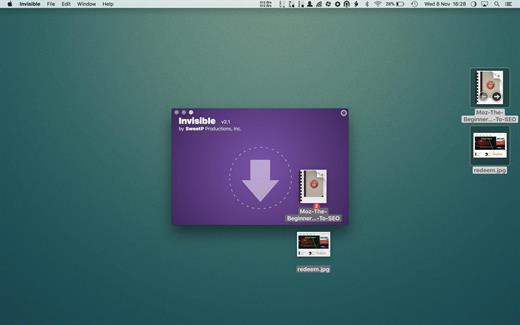
Invisible is the quickest way to keep personal documents away from unwanted eyes. Drop files onto Invisible to instantly hide them from view, and make them visible again just as easily with the click of a button. All your private files are kept safely out of view, and password-protected for even greater peace-of-mind.

Keeping your files private couldn’t be any easier.

What’s New

Version 3.2.2:


  • Release notes were unavailable when this listing was updated.
Compatibility

macOS 10.11 or later


Release Name: Invisible 3.2.2
Size: 5.5 MB
Links: HOMEPAGE – NFO – Torrent Search

Download: RAPiDGATOR
5 Comments
June 19

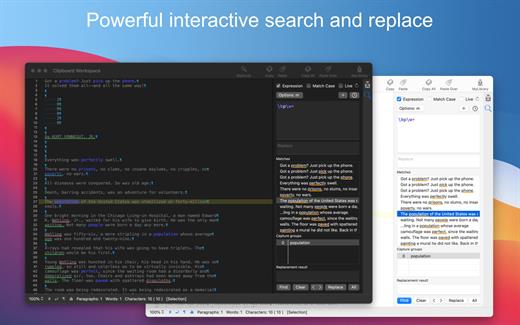
TextSoap 9.7.4

TextSoap can automatically remove unwanted characters, fix up messed up carriage returns, and do pretty much anything else that we can think of to text. Save time and effort. Be more productive.

Stop manually fixing text documents and emails. Let TextSoap help you automate away all that tediousness. And do it all from within your favorite app using TextSoap Menu. Enable it in preferences and access TextSoap in most apps that support standard copy and paste.

Easy to learn for casual users, TextSoap offers the flexibility that expert users need.

What’s New

Version 9.7.4:


  • Release notes were unavailable when this listing was updated.
Compatibility

macOS 11.0 or later


Release Name: TextSoap 9.7.4
Size: 27.2 MB
Links: HOMEPAGE – NFO – Torrent Search

Download: RAPiDGATOR

5 Comments
June 19

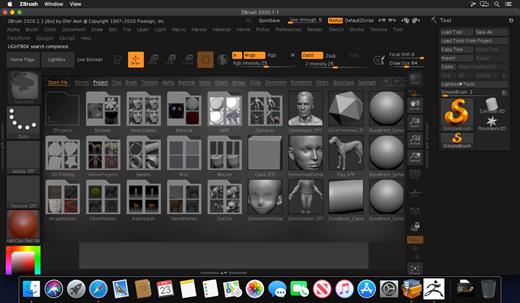
ZBrush 2026.2.1

ZBrush sets the industry standard for digital sculpture. Its features allow you to use customizable brush for shaping, texturing and painting virtual clay in a real time environment. When using ZBrush, work with the same tools used by movie studios, game developers, manufacturers of toys / collectibles, jewelry designers, car designers / aviation, illustrators and artists from around the world.

ZBrush 2026 continues in the way of creativity and productivity with new important features that allow artists to work even faster, especially focusing on creating forms of hard and mechanical surface more easily. As you work, or end during creation, you can produce an unrealistic amazing representation instant response. ZBrush 2026 also helps you be more efficient with your new folder organization system, the automatic retopología rewritten and a new camera system. Your art will change forever.

What’s New

Version 2026.2.1:


  • Release notes were unavailable when this listing was updated.
Compatibility

macOS 10.12 or later


Release Name: ZBrush 2026.2.1
Size: 3.1 GB
Links: HOMEPAGE – NFO – Torrent Search

Download: RAPiDGATOR

2 Comments
June 19

Infuse Pro 8.4.7

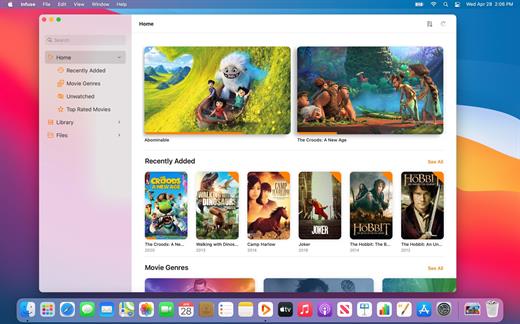
Ignite your video content with Infuse – the beautiful way to watch almost any video format on your iPhone, iPad, Apple TV, and Mac. No need to convert files! Infuse is optimized for macOS 12, with powerful streaming options, Trakt sync, and unmatched AirPlay & subtitle support. Gorgeous interface. Precise controls. And silky-smooth playback.

Play more video types

A powerful video player that plays just about anything, including the standard MP4, M4V and MOV – plus MKV, AVI, WMV, MTS, ISO, VIDEO_TS, FLV, OGM, OGV, ASF, 3GP, DVR-MS, WebM, and WTV. Includes fully certified Dolby® Digital Plus (AC3/E-AC3), DTS® and DTS-HD® audio.

Stream from other devices

Browse and play videos stored on your Mac, PC, NAS, Wi-Fi hard drive, apps like Plex, Emby, and Jellyfin, or from cloud services like Dropbox, Google Drive, OneDrive, Box, pCloud, Yandex.Disk, and Mega.nz – no syncing required!

Trakt 2-way sync

Connect with Trakt to sync watched history, submit ratings and post comments.

Optimized subtitles powered by opensubtitles

Bring your own subtitles, or download them on the fly (for free) in virtually any language.

The basics:

  • Silky-smooth video player (plays full 4K w/ HDR & Dolby Vision)
  • Stream from a Mac, PC, NAS or Wi-Fi enabled hard drive
  • Connect with Plex, Emby, Jellyfin, Kodi (XBMC), WMC and other media servers
  • Beautiful layout with quick access to video info
  • Artwork and metadata added automatically
  • Picture-in-Picture
  • Spatial audio
Supported formats:

  • Video: 3GP, AVI, ASF, BDMV, DIVX, DVDMEDIA, DVR-MS, FLV, ISO, M4V, MKV, MOV, MP4, M2TS, MTS, OGM, OGV, TP, TS, VIDEO_TS, WEBM, WMV, WTV
  • Audio: AAC, AC3/E-AC3, DOLBY TRUEHD, DTS, DTS-HD MA, FLAC, MP3, OGG, PCM, WMA
  • Subtitles: DVB, DVDSUB, MICRODVD, MPL2, PGS, SMI, SSA/ASS, SRT, SUB, TIMED TEXT, TMP, TXT, VOBSUB, VTT, XSUB
Player features:

  • Multiple audio tracks
  • Chapters
  • Gesture controls
  • 8 video zoom options
  • Continuous playback
  • Deinterlacing
Extras:

  • Library organization
  • Folders
  • One-click subtitle downloads from OpenSubtitles
  • Scrobble plays to Trakt
  • Download videos from networked devices
  • Drag and drop uploads via web browser
  • Get extra onboard storage by adding USB drives
Get more with infuse pro!

  • Play even more video formats
  • Enjoy Dolby® Digital Plus (AC3/E-AC3), DTS® and DTS-HD® mobile surround sound
  • Stream a wide variety of video types over AirPlay and Google Cast
  • Access videos stored in cloud services like Dropbox, Google Drive, Box, OneDrive, pCloud, Yandex.Disk, and Mega.nz
  • Sync libraries, settings, watched history, and playback progress between devices
What’s New

Version 8.4.7:


  • Release notes were unavailable when this listing was updated.
Compatibility

macOS 11.0 or later.
Apple Silicon or Intel Core processor


Release Name: Infuse Pro 8.4.7
Size: 101.7 MB
Links: HOMEPAGE – NFO – Torrent Search

Download: RAPiDGATOR

5 Comments
June 19

PullTube 1.8.6.31

Sharing videos via online hosting services, such as YouTube or Vimeo is a common practice, yet streaming the content might not work as expected if you have a slow internet connection.

PullTube offers you the possibility to download videos from both sources (YouTube and Vimeo), while other platforms might be added at a later time. The app can handle playlists, allows you to select the output quality, and can even extract only the audio.

Video downloader that can import links with drag and drop and can detect playlists

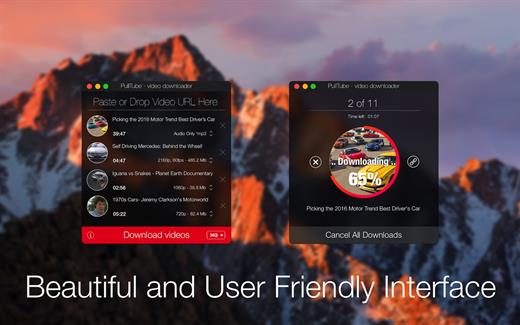
The PullTube user interface is represented by a small window where you get to quickly paste the video URL. Note that you can also add a video by dropping the link on top of the PullTube window.

Worth mentioning is that, if PullTube detects that the video is part of a playlist, will offer to download the entire collection: will fetch the data for each entry and handle the downloads consecutively.

Download videos hosted on YouTube or Vimeo to different output sizes and formats

PullTube will start fetching the video data right away so you can see the video name, duration, and a small thumbnail. When configuring a download, you get to select the output quality (highest, 4K, HD or regular with different resolutions) or choose to export only the audio to an M4A or MP3 file.

Via the PullTube Settings panel, you can change the default download location and the default MP3 bitrate (320Kbps, 256Kbps, 128Kbps, 64Kbps). You can also add the quality info to the video’s name and choose to quit the app when all downloads are completed.

Get offline access to videos hosted online in just a few steps

PullTube proposes a streamlined workflow for quickly downloading videos from YouTube or Vimeo, provides control over the output quality, and enables you to extract the audio to MP3 or M4A files.

However, during our tests, we have noticed that PullTube has trouble completing the download when handling videos that are longer that 2 minutes. The process stops without any explanation, and you can eventually complete the task, but you need to add the link to download tool multiple times.

What’s New

Version 1.8.6.31:


  • Release notes were unavailable when this listing was updated.
Compatibility

macOS 10.12 or later


Release Name: PullTube 1.8.6.31
Size: 251 MB
Links: HOMEPAGE – NFO – Torrent Search

Download: RAPiDGATOR
5 Comments