Please REGISTER or RENEW your account on RAPiDGATOR.net and support us by doing through all RAPiDGATOR working download links on main posts...
June 22

Downie 4.12.8

A simple download manager that offers you the possibility to quickly save videos from different websites to your own disk drive.
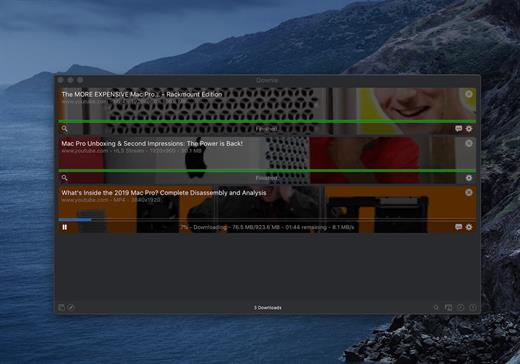
If you are using a poor internet connection, trying to visualize videos streamlined online might not work properly since the content is loaded too slowly. Downie is a simple Mac app that can help you download those videos to your computer, and then watch them by using your default media player.

User friendly video downloader featuring support for drag and drop actions

Working with Downie is extremely straightforward: simply drop the video URL on top of the app’s main window or on the Dock icon. Downie adds the video to your downloads list, so all you have to do next is start the process by pressing the appropriate button. Of course, you can also remove items from the list.

By default, Downie downloads MP4 files and places them in your default Downloads folder, but you can easily change this via the Preferences window. The same area allows you to setup notifications, or post processing actions (convert to MP4 if necessary, or extract audio only).

Effortlessly download videos from a wide collection of hosting websites

Downie provides support for more than 400 different websites that host video content, among which there are the most popular choices, such as YouTube, Apple, LiveLeak, Vimeo, BBC, and so on. If a certain website is not included, within the app you can send a request email to the Downie developers.
Moreover, Downie also provides matching extensions for various popular web browsers, such as Firefox, Safari, Google Chrome or Chromium. The add-ons are not installed by default: open the Preferences window and install only the ones you plan to use.

Straightforward solution for downloading video content hosted online

Downie is a great tool for saving videos posted on various websites to your Mac for offline playback. The application is extremely useful especially if you have a slow internet connection.

What’s New

Downie 4.12.8:


  • New: You can now schedule start of recording for live streams.
  • New: You can now specify a custom title when using the automation URL.
  • Improved: bbc.co.uk, instagram.com, orf.at, radiofrance.fr, sbs.com.au, soundcloud.com, today.com, youtube.com.
Compatibility

macOS 10.12 or later
Apple Silicon or Intel Core processor


Release Name: Downie 4.12.8
Size: 42.5 MB
Links: HOMEPAGE – NFO – Torrent Search

Download: RAPiDGATOR

4 Comments
June 22

Overloud TH-U Premium 2.0.16

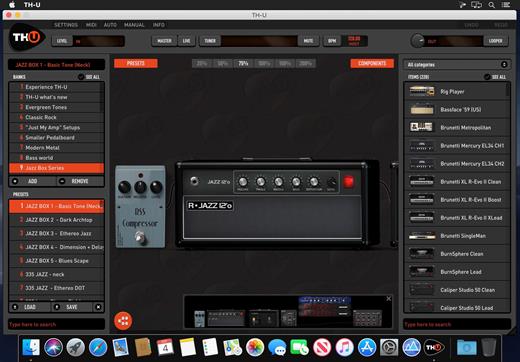
TH-U is able to load rig models created from real setups. The Overloud proprietary technology allows our engineers to sample and capture the response of an entire rig, including the nonlinear and dynamic response of the amplifier, the cabinet, the microphones, the mic preamplifier and the room sound. Rig To Model technology allows you to capture both analog and digital setups. The Rig Player, integrated into TH-U, allows you to reproduce any nuance of the sampled rigs.

3D CABINET SIMULATION
TH-U offers a matrix of 4 microphones which can be placed anywhere in the 3D space in front and even behind the cabinet. Just drag a microphone and place it where you want.
Change the relative distance between microphones to obtain creative phasing effects, just like you would do in a real cabinet room.

6 different room types can be selected.
The ReSPiRe 2 technology allows you to choose between the real response of the cabinet and a processed version optimized to fit into a mix and avoid frequency overlap with the other instruments.
On the bass cabinets you have a separate control over the woofer and the tweeter levels.

CREATIVE EFFECTS
TH-U is not just an amplifier replacement. It is a creative tool which allows you to craft your personal tone and explore the boundaries of your instrument. Transform your electric guitar into an acoustic guitar, create synth-like tones with the ring modulator. Turn the guitar into an organ with the organ-tone-maker. Import any Impulse Response from third part libraries to extend the TH-U tones without limits.

What’s New

Version 2.0.16:


  • Release notes were unavailable when this listing was updated.
Compatibility

macOS 10.14 or later


Release Name: Overloud TH-U Premium 2.0.16
Size: 1.4 GB
Links: HOMEPAGE – NFO – Torrent Search

Download: RAPiDGATOR
3 Comments
June 21

Metadatics 1.7.2

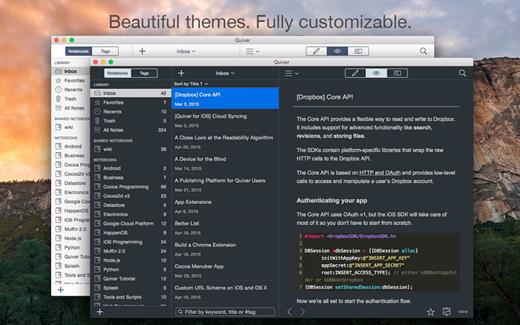
Metadatics is a powerful and advanced audio metadata editor. It supports batch editing of most common audio file types including MP3, M4A, AIFF, WAV, FLAC, APE, OGG, WMA, and more. Lookup metadata from online sources, rename files based on metadata, or manipulate metadata using one of the many built in functions. Metadatics provides all you need to edit metadata with ease and flexibility.

Features


  • Batch Editing – Edit multiple files at once quickly and easily.
  • Functions – Metadatics has a number of built in function to quickly manipulate data. Replace text, remove characters from the beginning or end of a tag, generate number sequences, copy from tag-to-tag, and much more!
  • Online Sources – Search for album artwork and tags from sources including Amazon and MusicBrainz.
  • Album Artwork – Metadatics supports reading and writing multiple images per file. Artwork can be extracted from files and saved as a separate image file. You can also search for artwork from online sources including Amazon.
  • File Rename – Generate directory structures and rename files based on metadata.
  • Support For Many Metadata Formats – Metadatics supports reading and writing ID3v1, ID3v2, MP4, Vorbis, APE, and ASF tags all from a variety of audio file types.
What’s New

Version 1.7.2:


  • Release notes were unavailable when this listing was updated.
Compatibility

macOS 10.13.0 or later

Apple Silicon or Intel Core processor


Release Name: Metadatics 1.7.2
Size: 17.8 MB
Links: HOMEPAGE – NFO – Torrent Search

Download: RAPiDGATOR

4 Comments
June 21

Quiver 3.3

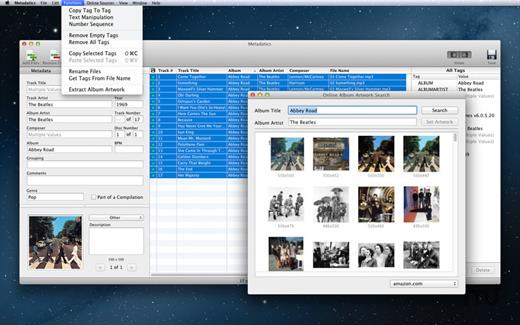
Quiver is a note-taking app built for programmers. Its unique cell-based design lets you easily mix text and code within one note, edit code with an awesome code editor, and find any note instantly via the full-text search.

Features


  • Mix Text With Code – A note in Quiver is comprised of cells — snippets of text or code. You can freely mix text cells with code cells, even setting different language modes for different code cells, all inside one note.
  • Edit In Place – Whether you are writing code or changing text styles, edits are always made in-place. There is no mode switching in Quiver. You just click where you want to edit and start typing.
  • An Awesome Code Editor – The programmer’s notebook should make code editing effortless. Quiver packs the awesome ACE code editor in code cells, which supports syntax highlighting for most languages, over 20 themes, automatic indent and outdent, and much more.
  • Lightning-Fast Full-Text Search – Notes are only useful if you can find them quickly. Quiver’s full-text search is based on Search Kit, the same technology used to power Spotlight on your mac. That’s how Quiver can search through thousands of notes in a blink of an eye.
  • Tags – If organizing notes into notebooks isn’t enough for you, Quiver also lets you assign tags to each note, so you can manage your notes any way you like.
  • Autosave – Quiver automatically saves all your changes as you work, so you never need to worry about losing changes.
  • Plain JSON – Quiver saves your notes in the plain JSON format, so you have full control over your content. You can export a note in the JSON or HTML format, or print it to PDF.
What’s New

Version 3.3:


  • Release notes were unavailable when this listing was updated.
Compatibility

macOS 10.14 or later


Release Name: Quiver 3.3
Size: 10.9 MB
Links: HOMEPAGE – NFO – Torrent Search

Download: RAPiDGATOR
4 Comments
June 21

Oka Unarchiver Pro 2.1.12

Oka Unarchiver is upgraded to version 2.0. New interface, optimized operation experience.

Compression formats supported:


  • ZIP
Extraction formats supported:

  • 7Z, ZIP, RAR, TAR, GZIP, BZIP2, XZ, LZIP, ACE, ISO, CAB, PAX, JAR, AR, CPIO, and more

The Oka Unarchiver is a small and easy-to-use program that can archive or unarchive many different kinds of archive files.
With Oka Unarchiver you can compress as many files as you want. Also, you can protect them with a password.

Also, Oka Unarchiver can extract lots of compressed files, from ZIP to 7Z archives, even parted ones. Just drop files in the icon, or into the main window, and they will be extracted using Oka Unarchiver

You can add any file into the list to archive or extract. If you click the archive button, Oka Unarchiver can archive all the files in the list at one time. If you click the extract button, Oka Unarchiver will automatically detect which files can be extracted.

The latest support for Finder extension, right-click on the file directly in the Finder, you can compress/uncompress or preview the file through the menu, greatly simplifying the operation steps.

So easy to use:

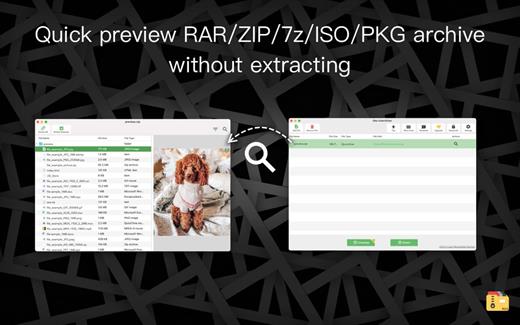
  • Support Finder extension, right-click the file in Finder to compress or extract files directly, even preview files inside the archive
  • Support Quick look preview zip files
  • Batch decompression of archives
  • Supports password-protected archives
  • Click one button to extract & archive;
  • Drag archives and drop to extract;
  • Open in finder to extract;
  • Support archive into multi-part zip files.
  • Supports new Mac computers with Apple M1 chip.
What’s New

Version 2.1.12:


  • Fixed issue
Compatibility

macOS 10.13 or later.


Release Name: Oka Unarchiver Pro 2.1.12
Size: 27.7 MB
Links: HOMEPAGE – NFO – Torrent Search

Download: RAPiDGATOR

4 Comments
June 21

Mp3tag 1.13.0

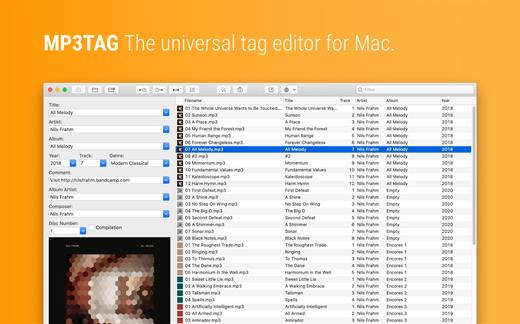
Mp3tag is a powerful and easy-to-use tool to edit metadata of audio files. Musicians, DJs, podcasters, and audio-enthusiasts use it for many different aspects of handling audio files.

It supports batch tag-editing for multiple files at once, covering many audio formats from MP3, over MP4, and M4V (yes, that’s video!) to FLAC, OGG, OPUS, AIF, DSF, MPC, and WAV.

Furthermore, it supports online database lookups from Discogs and MusicBrainz, allowing to gather proper tags and download cover art for music libraries.

It offers renaming files based on the tag information, replacing characters or words in tags and filenames, importing tag information, and adjusting the size and image format of embedded cover art.

Since some of the tasks in managing a digital library are repetitive, Mp3tag allows for combining tasks into action groups, which serve as workflows for keeping consistency and order. Examples are formatting tag fields, performing case conversion, removing unwanted fields, or adjusting embedded cover art to match required sizes.

Key Features

  • Bulk-Editing of Tags for multiple files at once.
  • Editing of cover-art.
  • Renaming files based on tags.
  • Importing metadata from filenames.
  • Assign track and disc numbers via the auto-numbering wizard.
  • Importing metadata from online Tag Sources.
  • Support for Flexible Tagging, allowing for user-defined tag fields in a standardized way.
  • Applying action groups with many tasks combined into reusable workflows.
  • Support for many file types under a universal user interface.
Supported File Formats

  • MP3 (ID3v1, ID3v2.3, ID3v2.4 with UTF-8)
  • MP4/M4A/M4B/M4V (iTunes and Nero)
  • FLAC (Vorbis Comments)
  • OGG (Vorbis Comments)
  • OPUS (Vorbis Comments)
  • AIF (RIFF INFO and RIFF ID3)
  • DSF (ID3v2)
  • MPC (APEv2)
  • WAV (RIFF INFO and RIFF ID3
What’s New

Version 1.13.0:


  • Release notes were unavailable when this listing was updated.
Compatibility

macOS 10.14 or later.


Release Name: Mp3tag 1.13.0
Size: 13.4 MB
Links: HOMEPAGE – NFO – Torrent Search

Download: RAPiDGATOR
4 Comments
June 21

Fork 2.68.0

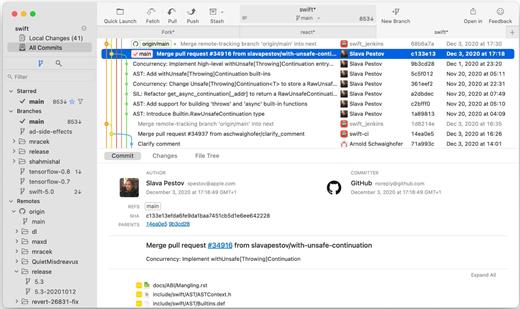
Fast and friendly git client. Fork is getting better and better day after day and we are happy to share our results with you. Commit List – Working Directory Changes – Side by Side Diff – Repository Manager Summary and Statistics

Basic features: Fetch, pull, push | Commit, amend | Create and delete branches and tags | Create and delete remote repos | Checkout branch or revision | Cherry-pick, revert | Merge, rebase | Stashes | Submodules

Work with repository: Create, clone or add existing repos | Open recent repository quickly

Commit view: Stage / unstage changes line-by-line | Access to recent commit messages

More features: Browse the repository file tree at any commit | Intuitive merge conflict resolving | See your stashes right in the commit list

What’s New

Version 2.68.0:


  • Release notes were unavailable when this listing was updated.
Compatibility

macOS 10.13 or later


Release Name: Fork 2.68.0
Size: 44.8 MB
Links: HOMEPAGE – NFO – Torrent Search

Download: RAPiDGATOR
4 Comments
June 21

OmniPlayer Pro 2.1.22

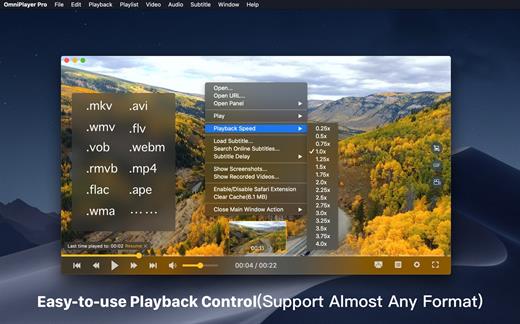
OmniPlayer is a comprehensive media player for almost any video and audio format on macOS. It has powerful features with modern and clean design. You can use it to play various 4K/1080P/720P HD videos and normal/lossless audios easily with hardware decoding. You can also control and adjust the playback/playlist/video image/audio track/subtitles/screenshot etc. conveniently with the rich features.

Features


  • Support Multiple Media Types Play almost any format of the local and remote server(samba/FTP protocol) videos and audios. Support online videos and audios with Http/https protocol. Play Youtube and Vimeo videos with webpage URL directly without online ads.
  • Playlist Control Record media files to playlist automatically, and support clear all when exiting player automatically. Play/Search/Delete/Change repeat mode of media items in the playlist.
  • Playback Control Pause/Resume/Fast forward/Rewind/Jump to specified progress time. Record last progress time of playback when stopping automatically. Show preview images on progress bar when playing a local video. Hide controls automatically to display pure video view without any occlusion. Adjustment playback speed from 0.25x-4x
  • Video Image Adjustment Adjust window size and video image aspect ratio quickly. Adjust video image rotation in all directions. Adjust video image equalizer including brightness, contrast, and saturation.
  • Audio Control Change audio delay time to make audio and video synchronization. Choose different audio tracks in the video. Choose audio mode such as Stereo, Dolby Surround, Headphones, etc. Customize audio equalizer or choosing predefined equalizer such as Classic, Rock, Pop, etc.
  • Subtitle Control Load different formats of local subtitles in real-time. Search and load subtitles online with video name or hash, support most languages. Change subtitle color, size in real-time. Change the encoding of subtitles in different languages to fix the garbled problem.
  • Screenshot Take a screenshot with different formats. Generating gif image up to 60s. One-click exporting movie thumbnail
  • Wireless display DLNA protocol Chromecast protocol Roku channel
What’s New

Version 2.1.22:


  • Release notes were unavailable when this listing was updated.
Compatibility

macOS 10.13 or later.


Release Name: OmniPlayer Pro 2.1.22
Size: 78.8 MB
Links: HOMEPAGE – NFO – Torrent Search

Download: RAPiDGATOR
4 Comments
June 21

File List Export 2.9.6

File List Export (was File list to Excel) is an easy to use application that will help you create list of files for any need. List all your photos, all your videos or all your files. If you need to create list of files this app is for you.

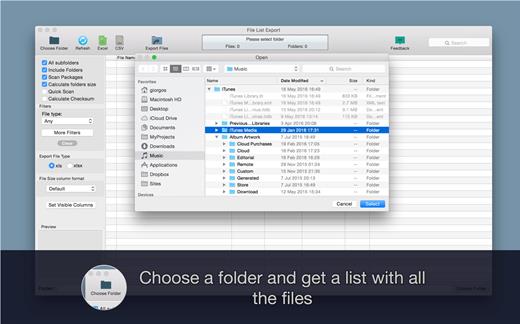
Just select a folder and get a list with all files and folders to Excel or to a CVS file. You can choose if you want to include the files from all subfolders. Preview and edit the list before export to file. Easily search and filter the file list records.

For every file you can get this info:


  • File name
  • Date modified
  • Date created
  • Kind
  • Size
  • Path (the location of the file)
  • Comments
  • Tags
  • Version
  • Pages
  • Authors/Artist
  • Title
  • Album
  • Track Number
  • Genre
  • Year
  • Duration
  • Audio BitRate
  • Audio Encoding Application
  • Audio Sample Rate
  • Audio Channels
  • Dimensions
  • Pixel Width
  • Pixel Height
  • Total Pixels
  • Height DPI
  • Width DPI
  • Color Space
  • Color Profile
  • Alpha Channel:
  • Creator
  • Video Bit Rate
  • Total Bit Rate
  • Codecs
  • Parent folder
  • Location (parent-folder path)
What’s New

Version 2.9.6:


  • You can now add filters based on image pixel width or height.
Compatibility

macOS 10.9 or later


Release Name: File List Export 2.9.6
Size: 24.5 MB
Links: HOMEPAGE – NFO – Torrent Search

Download: RAPiDGATOR

4 Comments
June 21

KONTAKT 8.11.0

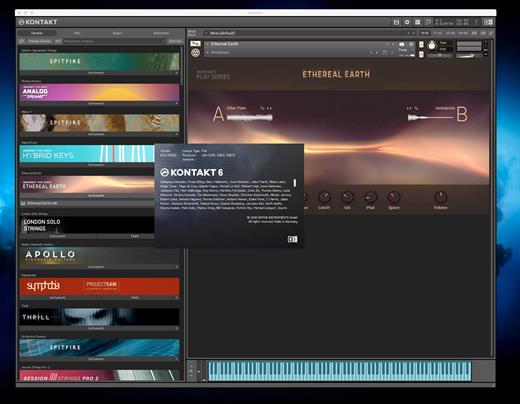
KONTAKT 8 The virtual instrument platform reinvented.
Imagine any sound – Kontakt lets you find it, create it, and transform it. The latest edition of our revolutionary sampling platform combines a brand-new set of intelligent tools with countless sound design options, redefining how you generate ideas and make music. A huge choice of sound. Kontakt hosts the world’s largest range of virtual instruments. With thousands of libraries, it’s the gateway to quality sound from Native Instruments, our official partners, and scores of indie developers. Plus, everything is completely tweakable, so you can make any sound your own.

A huge choice of sound

Kontakt hosts the world’s largest range of virtual instruments. With thousands of libraries, it’s the gateway to quality sound from Native Instruments, our official partners, and scores of indie developers. Plus, everything is completely tweakable, so you can make any sound your own.

What’s new in Kontakt 8?

Our most feature-packed release yet is here to transform the way you generate, modulate, and playback sound. Plus, it’s packed with performance updates so you can work faster than ever.

Smash writer’s block

Tools add a completely new layer of creative features to get the ideas flowing. And they work with any Kontakt instrument, old and new. For our first drop, we’re launching MIDI content and randomization features with Chords and Phrases, designed to spark new ideas and get you in the zone fast.

Fast and fun loop control

Leap is an ultra-fast and playful way to play and manipulate loops. Spark fresh ideas, sprinkle in expressive performance effects, or just jam. Breathe new life into your sample collection or try something totally fresh with our new Leap Expansions series, starting with 12 curated packs for specific genres and styles.

Get going with hundreds of included instruments

Kontakt’s Factory Library comes packed with over hundreds of meticulously sampled instruments. Get started with a huge playable and tweakable selection of acoustic and electronic options, including the renowned collection from Orchestral Tools, plus Hybrid Keys.

Dream it, build it

All your favorite Kontakt instruments are built right here. The powerful feature set makes Kontakt the first choice for instrument developers worldwide, and it just got even bigger with enhanced synth capabilities, including real-time wavetable, frequency modulation, and ring modulation oscillators.

What’s New

Version 8.11.0:


  • Release notes were unavailable when this listing was updated.
Compatibility

macOS 13.0 or later


Release Name: KONTAKT 8.11.0
Size: 1.7 GB
Links: HOMEPAGE – NFO – Torrent Search

Download: RAPiDGATOR
3 Comments