Please REGISTER or RENEW your account on RAPiDGATOR.net and support us by doing through all RAPiDGATOR working download links on main posts...
June 20

WhatCable Pro 1.1.0

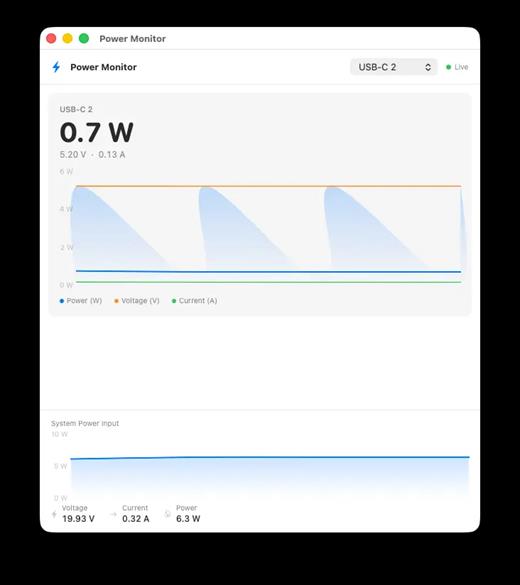
WhatCable Pro is a deep USB-C diagnostics tool designed specifically for Apple Silicon Macs running macOS 14+. While the free version identifies basic cable capabilities, the Pro tier offers advanced, real-time troubleshooting directly from IOKit data—requiring no extra software or root access.
Key Features


  • Negotiation Diagnostics: Easily spot bottlenecks by comparing what your Mac port, cable, and connected device support side-by-side.
  • Live Power Metering: Displays real-time wattage, voltage, and amperage per port, updating every 2 seconds.
  • Hardware & Port Health: Tracks lifetime port errors, resets, and monitors liquid detection (LDCM) sensors.
  • Advanced Insights: Offers Power Delivery (PD) contract inspection, cable resistance estimation, and DisplayPort Alt Mode lane mapping.
  • Developer Friendly: Includes a CLI monitor mode (whatcable –monitor) and desktop widgets for quick tracking.
What’s New

Version 1.1.0:


  • Release notes were unavailable when this listing was updated.
Compatibility

macOS 14.0 or later


Release Name: WhatCable Pro 1.1.0
Size: 12.5 MB
Links: HOMEPAGE – NFO – Torrent Search

Download: RAPiDGATOR

5 Comments
June 20

Unite Pro 1.5

Unite for macOS lets you turn any website into a fully native Mac app with deep customization, fast performance, and macOS integration. Instead of opening sites in a browser with many tabs, Unite creates standalone apps that live in your Dock, support native window controls, and behave like real macOS software.

With Unite you can create an app in seconds by entering a URL, choosing an icon, and tailoring appearance and behavior to your preferences. Each app runs in its own isolated, lightweight WebKit‑based environment that feels more integrated and efficient than browser web apps or Electron alternatives. 

Unite apps offer extensive customization. You can hide or show title bars, adjust colors to match site branding, control window appearance, manage multiple tabs with advanced options like pinning and locking, and choose how links open within or outside the app. Notifications and macOS Focus Modes work per app, helping reduce distractions. 

Unite also includes flexible app modes, such as standard Mac windows, sidebar views, floating windows, compact views, and menu bar utilities. A built‑in ad blocker and customizable keyboard shortcuts streamline everyday use and navigation. 

What’s New

Version 1.5:


  • Release notes were unavailable when this listing was updated.
Compatibility

macOS 15 or later


Release Name: Unite Pro 1.5
Size: 29.1 MB
Links: HOMEPAGE – NFO – Torrent Search

Download: RAPiDGATOR

5 Comments
June 20

Hype 4 Pro 4.1.21

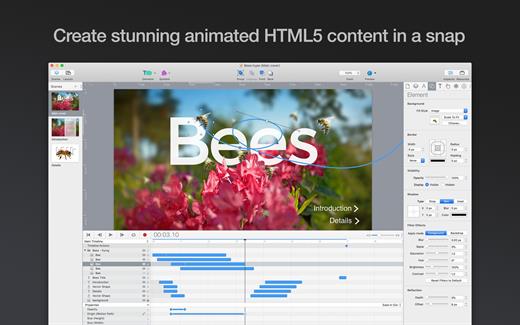
Create stunning animated and interactive web content with Hype. Hype’s HTML5 output works on all modern browsers and mobile devices like iPhones and iPads. No coding required.

Hype’s free download includes 14-day fully functional trial and document viewer mode. In-App Purchases are available for Hype Standard and Professional editions, with discounts for previous owners.

Hype is an award-winning tool used by leading designers. Create animations which add a “wow” factor to web pages, infographics, presentations, digital magazines, ads, iBooks, educational content, app prototypes, portfolios, animated GIFs, videos, entire websites, and much more. From prototype to production, anyone can create rich interactive media with Hype.

Quickly Animate:


  • Easy to use keyframe-based animation system
  • Record mode watches your every move, automatically creating keyframes as needed
  • Create natural motion curves with bézier paths
  • Morph between vector shapes with no effort (even with different number of path points)
  • Make scenes for organization and flow
  • Use the power of multiple simultaneous timelines to run animations

Add Interactivity:


  • Action handlers kick off and control timelines, transition between scenes, or run custom JavaScript
  • Visually build action handlers to respond to taps, clicks, and animation events

Create Stunning Content:


  • WebKit-based WYSYWIG “what you see is what you get” scene editing
  • Intelligent guidelines, arrangement, and sizing tools
  • Easily integrate video and audio for stunning multimedia documents
  • Cutting-edge effects: blur, image filters, backdrop filters, scale, skew, reflection, and 3D transforms
  • Add Google Fonts or use your own web fonts
  • Setup accessibility alt text, roles, and tab index
  • Retina image support

Perfect for Mobile:


  • Hype’s HTML5 output works great on mobile devices
  • A flexible layout system resizes your content to fit any screen
  • Easily add swipe, touch, and page turn actions
  • Bind drag events to timeline positions for rich interactivity
  • Preview your projects on iPhones and iPads with the free Hype Reflect companion iOS app
  • Hype Reflect’s Mirror Mode shows edits live as you make them

Extend with Code:


  • Edit the Inner HTML of any element
  • Integrated JavaScript editor for writing functions triggered by user actions
  • API to control scenes, timelines, and more

Export to HTML:


  • Outputs state-of-the-art HTML5, CSS3 styles, and JavaScript
  • Content works across all browsers from IE 6 up to the latest Chrome
  • Self-contained directory holds all resources and code for your document
  • Integrate into existing pages by copying and pasting 3 lines of HTML

Great for Ads:


  • A minimal document is only 24 KB (self-hosted, compressed) or only 1.5 KB overhead when using the official CDN
  • Export Script plugins extend Hype to support common ad systems
  • Advanced Export fine-tunes deliverables

Hype also Exports:


  • iBooks Author widgets
  • Videos
  • Animated GIFs and PNGs

Because We Love the Mac:


  • Written in Cocoa exclusively as an macOS app (supports 10.10 through 10.14)
  • Adopts new macOS features and is gorgeous in Light and Dark modes

The Hype Professional In-App Purchase and adds powerful features to Hype 4:


  • Responsive Layouts
  • Symbols for creating reusable elements
  • Persistent Symbols for master content
  • Sprite Sheet/Image Sequence Import
  • Waypoints
  • Physics
  • Editable Timing Functions
  • Customizable Interface
  • Grid System
  • Advanced Export
  • CDN for JS Runtime
  • Ad System Plugins
  • Fallback Images
  • External Editors
  • Behaviors
  • Templates
  • HTML Data Attributes
  • OAM Export
  • APNG Export
  • Video Bitrate/Codec Options
  • And More!
What’s New

Version 4.1.21:


  • Bug Fixes
Compatibility

macOS 10.10 or later
Apple Silicon or Intel Core processor


Release Name: Hype 4 Pro 4.1.21
Size: 19.2 MB
Links: HOMEPAGE – NFO – Torrent Search

Download: RAPiDGATOR

5 Comments
June 20

Metadatics 1.7.1

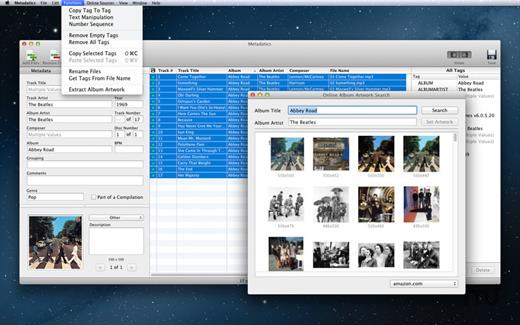
Metadatics is a powerful and advanced audio metadata editor. It supports batch editing of most common audio file types including MP3, M4A, AIFF, WAV, FLAC, APE, OGG, WMA, and more. Lookup metadata from online sources, rename files based on metadata, or manipulate metadata using one of the many built in functions. Metadatics provides all you need to edit metadata with ease and flexibility.

Features


  • Batch Editing – Edit multiple files at once quickly and easily.
  • Functions – Metadatics has a number of built in function to quickly manipulate data. Replace text, remove characters from the beginning or end of a tag, generate number sequences, copy from tag-to-tag, and much more!
  • Online Sources – Search for album artwork and tags from sources including Amazon and MusicBrainz.
  • Album Artwork – Metadatics supports reading and writing multiple images per file. Artwork can be extracted from files and saved as a separate image file. You can also search for artwork from online sources including Amazon.
  • File Rename – Generate directory structures and rename files based on metadata.
  • Support For Many Metadata Formats – Metadatics supports reading and writing ID3v1, ID3v2, MP4, Vorbis, APE, and ASF tags all from a variety of audio file types.
What’s New

Version 1.7.1:


  • Release notes were unavailable when this listing was updated.
Compatibility

macOS 10.13.0 or later

Apple Silicon or Intel Core processor


Release Name: Metadatics 1.7.1
Size: 18.7 MB
Links: HOMEPAGE – NFO – Torrent Search

Download: RAPiDGATOR
5 Comments
June 20

iA Writer 8.0.1

iA Writer (was iA Writer Pro) is a professional writing suite that gives you full control over your notes, drafts and edits.


  • Workflow: Note – Write – Edit – Read. Each stage has a task-specific typeface and color.
  • Syntax Control scans the syntax of English, French, German, Italian, and Spanish text and highlights your adjectives, nouns, verbs, adverbs, prepositions or conjunctions.
  • Precision Writing Tools:

    • Auto Markdown formats text on-screen — your hands stay on the keyboard
    • Syntax Control introduces syntactic markup for natural language text. It covers English, French, German, Italian, and Spanish. Patent pending.
    • Convert Markdown to Microsoft Word 2007 .docx, and back again
Features

  • Workflow states
  • Custom typefaces, carefully set for optimal readability
  • In-app preview
  • Reading time, plus sentence, word, and character count
  • Real-time iCloud sync
  • Ready for Retina displays
  • Full-screen
What’s New

Version 8.0.1:


  • Release notes were unavailable when this listing was updated.
Compatibility

macOS 10.15 or later


Release Name: iA Writer 8.0.1
Size: 26.3 MB
Links: HOMEPAGE – NFO – Torrent Search

Download: RAPiDGATOR

5 Comments
June 20

Araxis Merge Pro 2026.0

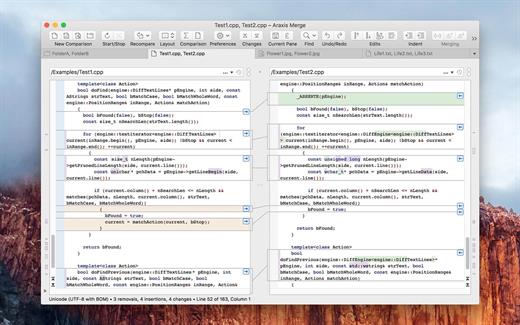
Araxis Merge is the two- and three-way visual file comparison/merging and folder synchronization application. Use it to compare, understand and combine different versions of source code, Web pages and other text files, or even text copied and pasted from another application (e.g., Pages or Microsoft Word). Merge integrates with Time Machine, so you can compare older versions of files.

Merge is a compelling choice for software developers, lawyers, product release managers, Web designers and other professionals who work with multiple revisions of text files, including ASCII, MBCS and Unicode files. Merge integrates with many version control (VC) and software configuration management (SCM) systems (e.g. Subversion and Perforce) that allow a third-party comparison/merging tool to be specified.

For legal professionals: instantly identify every change by copying text from different contract drafts being edited in another application (such as Microsoft Word) and pasting it directly into a file comparison window. Many more features.

What’s New

Version 2026.0:


  • Release notes were unavailable when this listing was updated.
Compatibility

macOS 12.0 or later


Release Name: Araxis Merge Pro 2026.0
Size: 86.7 MB
Links: HOMEPAGE – NFO – Torrent Search

Download: RAPiDGATOR
5 Comments
June 20

Cotypist 2026.2

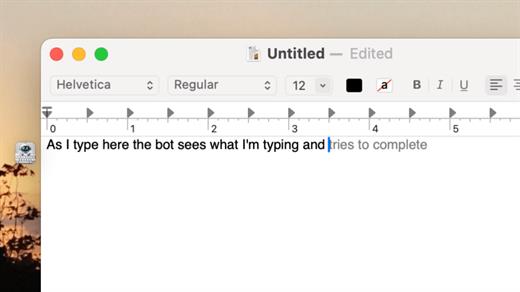
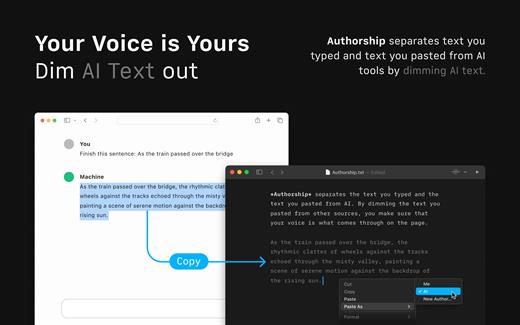
Cotypist is an innovative, AI-powered writing assistant designed to speed up your typing and enhance your writing flow across all your favorite macOS applications. Unlike traditional AI tools that force you to copy-paste prompts into a separate chatbot, Cotypist works seamlessly in the background, predicting your next words inline as fast as you can think them.

Key Features


  • Works Everywhere: It integrates perfectly into Apple Mail, Slack, Notion, Obsidian, Safari, Chrome, and most other Mac text fields with zero per-app configuration required.
  • Learns Your Voice: Rather than replacing your creativity with a robotic wall of text, Cotypist learns your unique vocabulary, phrasing style, and names over time.
  • Inline Typo & Emoji Fixes: It automatically spots typos as you write and offers instant corrections. You can also type a colon (:) to get smart emoji suggestions without opening a separate picker.
  • Highly Inclusive: It is an excellent accessibility tool for non-native English speakers, dyslexic typists, and anyone looking to reduce wrist strain or carpal tunnel risks.
What’s New

Version 2026.2:


  • Release notes were unavailable when this listing was updated.
Compatibility

macOS 14.0 or later


Release Name: Cotypist 2026.2
Size: 12.8 MB
Links: HOMEPAGE – NFO – Torrent Search

Download: RAPiDGATOR

5 Comments
June 19

Gemini 2.10.1

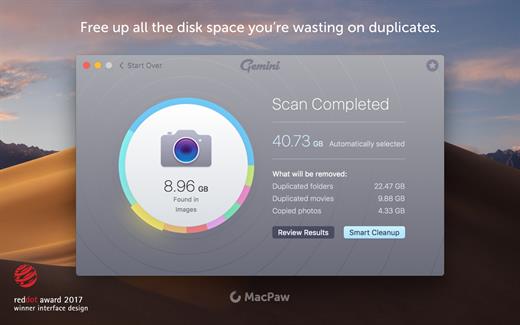
Gemini helps you find duplicate files and wipe them away. It’s smart, laser-accurate, and recovers tons of space on your Mac.

Features


  • Detect and delete duplicates. Locate and remove duplicate files, even if they’re in remote corners of your system. Gemini 2 scans your whole disk speed-of-light fast, no matter how massive it is. Dig through scan results and hand-pick the files to erase, or better – let Smart Select do all the work.
  • Spot and shred similars. Just like duplicates, similars are space wasters. Now, Gemini 2 is after them. Spot files that look alike, see how they differ, and delete those you don’t need. Because you have better use for all the space they occupy.
  • Your photos matter. Their copies don’t. Do you really need 10 retakes of the Golden Gate? Probably not. Don’t let copies invade your Photos: find duplicate pictures, look at them closely, and zap the extras.
  • You only enjoy one tune at a time. Even if you play the same tune on repeat, one copy is enough. Delete duplicates in iTunes: Gemini scans it to find those five copies of “Space Oddity” you’ve stored up.
  • It’s smart, and getting smarter. Gemini is smart. It easily tells copies from originals. It knows which files to keep intact. But the best thing is that it learns to select duplicates the way you do. Gemini’s algorithm remembers what you delete and what you choose to keep. It’s like an apprentice you are training.
  • Simple is stellar. Gemini’s carefully crafted to be super simple. Whatever you need to do – view duplicates in detail or quickly destroy them – it takes a few clicks. Because that’s what a good duplicate finder does: makes things simpler.
  • Nothing’s deleted for good — until you say so. Never worry about losing the wrong file by mistake. Gemini moves duplicates to the Trash and lets you bring them back in a click. If you do want the copies off your Mac, delete them for good. If you just want them out of your way, stash them in a faraway folder. It’s always your call.
What’s New

Version 2.10.1:


  • Release notes were unavailable when this listing was updated.
Compatibility

macOS 10.13 or later.


Release Name: Gemini 2.10.1
Size: 48.3 MB
Links: HOMEPAGE – NFO – Torrent Search

Download: RAPiDGATOR
5 Comments
June 19

Aiarty Image Enhancer 3.12

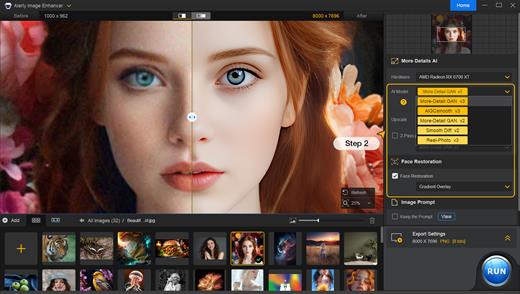
A generative AI-powered image enhancement software that deblurs, denoises, restores, and upscales images, generating realistic details for superior clarity and sharpness using new and advanced AI models. Enhance Your Images for Better Perceptual Quality

Deblur
- Make Blurry Images Clearer
Enhance blurry, grainy, pixelated, or soft images intelligently, while AI works its magic to generate crisp and lifelike details – idea for restoring clarity to AI-generated images and heavily compressed photos.

Denoise – Remove Noise from Photos
Employ deep learning algorithms to denoise and reconstruct photos. Tackle various noise types obtained during acquisition or post production. Effectively improve clarity, sharpness, and overall visual quality

Upscale – Enlarge Images to 4K/8K/32K without Losing Quality
Upscale AI-generated images and real photos by 2x, 4x, or 8x to achieve stunning 4K, 8K, or 32K resolution

More Details – 
Not Only Preserve But Also Generate
A specially trained AI model for preserving and generating image details. Adept at generating details for skin, hair, textures, lines, and the like. The lower the quality of the image is, the greater the potential for improvement.

Supported Input & Output Formats
Supported Input Formats
.jpg, .jpeg .jp2, .j2k, .jpf, .jpm, .jpg2, .j2c, .jpc, .jpx, .mj2, .png, .tif, .tiff, .webp, .bmp, .avif, and RAW formats (.dng, .cr3, .cr2, .crw, .nef, .nrw, .arq, .arw, .sr2, .srf, .raf, .rw2, .orf, .ori, .pef, .ptx, .3fr, .fff, .iiq, .cap, .eip, .rwl, .srw, .erf, .mos, .mef, .mrw, .mdc, .dcr, .kdc, .dcs, .drf, .k25, .bay, .pxn, .r3d, and .rwz)

Supported Output Formats
.jpg, .png (8-bit, 16-bit)

Supported Output DPIs

What’s New

Version 3.12:


  • Release notes were unavailable when this listing was updated.
Compatibility

macOS 10.15 or later


Release Name: Aiarty Image Enhancer 3.12
Size: 129.2 MB
Links: HOMEPAGE – NFO – Torrent Search

Download: RAPiDGATOR

6 Comments
June 19

SideNotes 1.6.2

Have you ever had a thought that came to your mind and all you wanted was to write it down quickly? Meet SideNotes! It’s an app for note-taking where you put all your buzzing thoughts in a neat, quick and organized way. Enjoy its non-distractive workflow. With SideNotes you can save your ideas, pictures, task lists and many more.

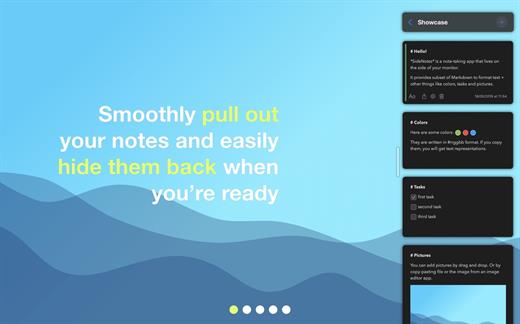
SideNotes keeps you from juggling with windows when searching for notes. The app always appears on top of other windows – you can easily hide it or pull it out from the side of your monitor with one click or with a keyboard shortcut. You can even use just your keyboard to work with your notes. Everything is in its place and you still have place for everything.

With SideNotes you can:

  • Smoothly pull out your notes from outside your monitor and easily hide them back
  • Mark notes with colors and group them into folders
  • Drag and drop pictures directly from your web browser
  • Save links, code snippets or even colors
  • Create task lists and mark items done
  • Create notes directly from the pasteboard
  • Drop text files or folders
  • Use 3 text formatting modes: Markdown, Plain Text and Code.

*** You need to disable the System Integrity Protection (SIP) to perform the selected Application.

What’s New

Version 1.6.2:


  • Release notes were unavailable when this listing was updated.
Compatibility

macOS 10.14 or later, 64-bit processor


Release Name: SideNotes 1.6.2
Size: 22 MB
Links: HOMEPAGE – NFO – Torrent Search

Download: RAPiDGATOR
5 Comments