Please REGISTER or RENEW your account on RAPiDGATOR.net and support us by doing through all RAPiDGATOR working download links on main posts...
June 26

Peakto 2.7.10 – AI Media Organizer

Peakto gathers and organizes all your photos and videos with AI, freeing you to focus on what matters most: unleashing your creativity.
YOUR ASSETS IN ONE-PLACE, ORGANIZED LIKE MAGIC

Your photos and videos are spread across different devices, folders, and apps, making it hard to find the ones you want to see right away? That’s why Peakto unifies your thousands of files. By bringing everything together in one interface, Peakto offers unique centralized photo organization features, enhanced with AI, and unique perspectives on your work.

FIND YOUR BEST IMAGES AND VIDEOS INSTANTLY

AI-powered tagging, search by description, search by similar images, search for faces: Peakto is the perfect tool to help you find the right content for the right project, whether in your archives or your most recent shots. In this version 2, prompt-based search also applies to videos, enabling the retrieval of a specific scene in a film.

NEVER MISS THE BEST ASPECTS OF YOUR WORK AGAIN

Gain new views on your images to fuel creativity, guide edits, and stand out in the photography market. Peakto offers unique perspectives: automatically sorted views of all images by category; map views of all photos. Version 2.0 introduces a new Timeline view, allowing navigation through a chronological timeline and sorting images by dates.

CENTRALIZE YOUR PHOTOS AND VIDEOS FOR SUPER EASY ORGANIZATION!

Peakto’s centralized viewpoint makes it easy to choose photos to delete and free up memory. It allows you to identify individuals in images from multiple sources within the same interface. Peakto enables the creation of selections from content coming from multiple sources. It serves as the control tower from which you manage all your images and edit a photo in your favorite editing software with a single click. Always synchronized, Peakto reflects the latest changes made to your creation.

EFFICIENT SHARING AND EXPORT

Browse your images and videos with full-resolution previews and seamlessly craft albums from various sources such as different folders, catalogs, sessions, and libraries. Easily export images in batches at full resolution. Choose low-resolution for digital sharing. Manage your pictures without creating copies. Peakto provides you with powerful tools to manage and explore your digital assets.

CONFIGURATION
Optimized for Apple Silicon (M1, M2, M3…) but runs on Mac Intel with a powerful GPU too. Peakto requires macOS 12 (Monterey) and is fully compatible with macOS 15 (Sequoia).

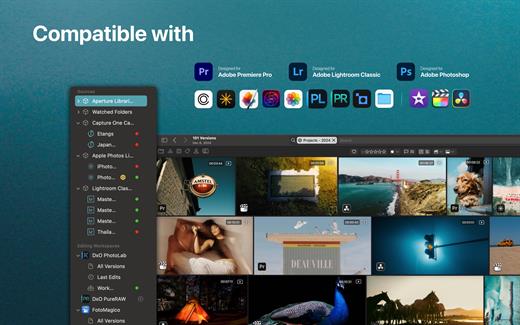
Peakto is compatible with:


  • Aperture catalogs from version 3.1
  • Lightroom Classic catalogs from version 5
  • Lightroom Creative Cloud (current version)
  • Luminar Neo catalogs from version 1.0
  • Capture One catalogs from version 20 (v13.x)
  • Apple Photos catalogs from version 6 (Big Sur)
  • iView Media Pro catalogs from version 3
  • Pixelmator Pro documents from version 3
  • DXO PhotoLab v5-8 & PureRAW 2-3
  • ON1 Photo RAW 2023 and 2022
  • TOPAZ Photo AI version 3
    All Video formats natively supported by MacOS (mov, mp4….)
What’s New

Version 2.7.10:


  • Release notes were unavailable when this listing was updated.
Compatibility

macOS 12.4 or later.


Release Name: Peakto 2.7.10 – AI Media Organizer
Size: 361 MB
Links: HOMEPAGE – NFO – Torrent Search

Download: RAPiDGATOR

4 Comments
June 26

Acorn 8.6.0

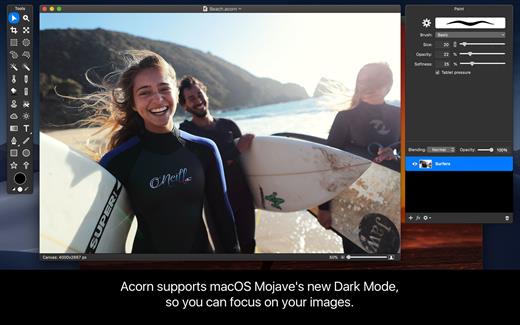
Acorn is a new image editor built with one goal in mind – simplicity. Fast, easy, and fluid, Acorn provides the options you’ll need without any overhead. Acorn feels right, and won’t drain your bank account.


  • Take screenshots using Acorn and edit them right away.
  • Chain together image filters to create stunning effects.
  • Layer based image editing, an industry standard.
  • Make new images and layers using your built-in iSight.
  • Easy image and canvas resizing, just by changing the size of your window.
  • Take advantage of every pixel of your monitor with full screen image editing.
  • Tablet sensitive for pressure strokes and using the tablet’s eraser.
  • Vector shape and text layers.
  • Freeform, elliptical, rectangular, and magic wand selections.
  • Gradients.
  • Create and apply custom text styles.
  • Control opacity and blending modes for each layer.
  • Write plugins using the Python scripting language, as well as in Objective-C.
  • GPU powered. The same graphics card that makes your gaming experience smooth, helps Acorn fly through the toughest of graphics operations.
What’s New

Version 8.6.0:


  • Release notes were unavailable when this listing was updated.
Compatibility

macOS 10.14.0 or later
Apple Silicon or Intel Core processor


Release Name: Acorn 8.6.0
Size: 29.5 MB
Links: HOMEPAGE – NFO – Torrent Search

Download: RAPiDGATOR
3 Comments
June 26

Keep It 2.8.8

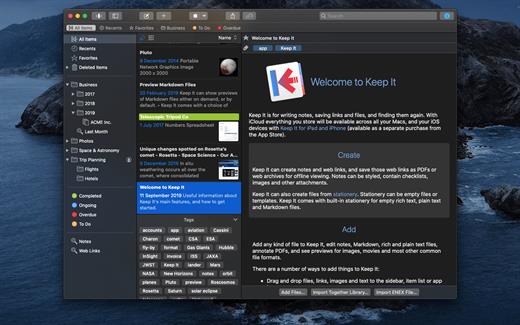
Keep It is for writing notes, saving web links, storing documents, and finding them again. Available on Mac, and as a separate app for iPhone and iPad, changes are automatically made available to all your devices with iCloud. Keep It is the destination for all those things you want to put somewhere, confident you will find them again later.

Features


  • Create, edit, view and save:

    • Notes with styles, checklists and attachments that look good and read well on all your devices
    • Web links with live previews, or saved as PDFs for offline viewing
    • Rich and plain text files, and Markdown documents
    • Add any other kind of file, and see previews for most images, documents, web pages, and more
    • See summaries and thumbnails in the list for most files
    • Use the Recents list to see things you’ve added or viewed lately
    • Share items with iCloud
  • Organize:

    • Folders let you organise things hierarchically – select a folder to see everything it and its subfolders contain
    • Use bundles to gather items into one place – items can be in more than one bundle at a time
    • Use labels to color-code items for quick visual recognition
    • Add searchable tags and comments
    • Make items favorites and drag lists to the Favorites Bar for quick access
  • Search and Filter:

    • Search everything in Keep It: names, tags, file contents, dates, kinds and more
    • Choose suggestions as you search to create complex searches with ease
    • Use keywords and natural language for dates while searching
    • Save searches for later reuse
    • Use the Tag Filter to see all items with a tag and any other relevant tags; choose another tag to drill down further
  • Use Keep It with other apps:

    • Compact Mode reduces the app to a single column, ideal for using alongside other apps
    • Drag pretty much anything to Keep It
    • Copy clickable links to items in Keep It
    • Share extension can add links, text, images and other files, and append text to notes from within other apps
    • Save files to Keep It’s folders to automatically add them to the library
    • Use a bookmarklet to add links from web browsers that don’t use Share extensions

*** You need to disable the System Integrity Protection (SIP) to perform the selected Application.

What’s New

Version 2.8.8:


  • Release notes were unavailable when this listing was updated.
Compatibility

macOS 11.3.0 or later


Release Name: Keep It 2.8.8
Size: 36.8 MB
Links: HOMEPAGE – NFO – Torrent Search

Download: RAPiDGATOR

4 Comments
June 26

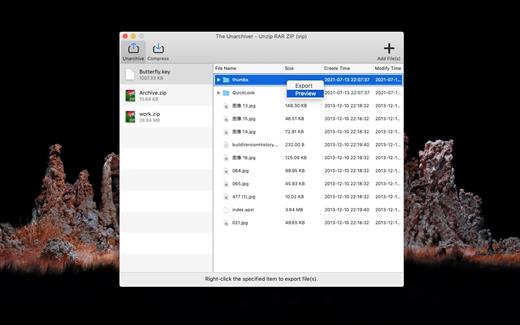
RAR Unarchiver – Unzip RAR ZIP 3.5.3

The Unarchiver – Unzip RAR ZIP is a very easy-to-use app that allows you to decompress dozens of archive formats. such as: Rar, Zip, 7z, Tar, Xz, Iso, Lha, bz2, Lzh, cab, cpio, jar, exe, pkg, dms, tbz, swf, Gzip, Bzip2… and it can also compress and encrypt any files to make private files more secure.

Key Features


  • Support preview and decompress dozens of archive formats.
  • archive files quickly.
  • Encrypt the archive file.
What’s New

Version 3.5.3:


  • Release notes were unavailable when this listing was updated.
Compatibility

macOS 10.12 or later


Release Name: RAR Unarchiver – Unzip RAR ZIP 3.5.3
Size: 14.1 MB
Links: HOMEPAGE – NFO – Torrent Search

Download: RAPiDGATOR
3 Comments
June 26

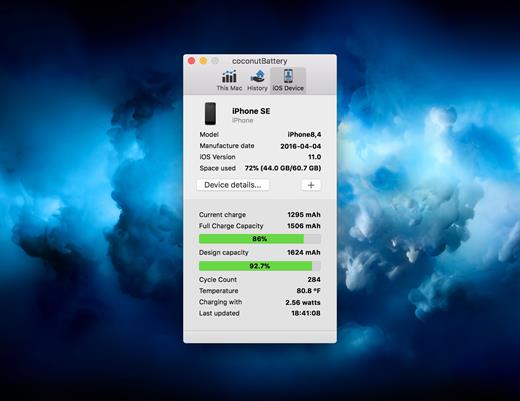
coconutBattery Plus 4.3.3

With coconutBattery you’re always aware of your current battery health. It shows you live information about your battery such as how often it was charged and how is the current maximum capacity in relation to the original capacity your battery had when it left the factory.

Of course, you are able to save the current maximum capacity of your battery. So you can see the changes in your battery health over time.

What’s New

Version 4.3.3:


  • Added support for macOS Tahoe and iOS/iPadOS 26
  • New: USB device connection details are now shown in Advanced Details
  • Fixed: Battery manufacturer information is now displayed correctly on Mac
Compatibility

macOS 10.12 or later.
Apple Silicon or Intel Core processor


Release Name: coconutBattery Plus 4.3.3
Size: 6.6 MB
Links: HOMEPAGE – NFO – Torrent Search

Download: RAPiDGATOR

3 Comments
June 26

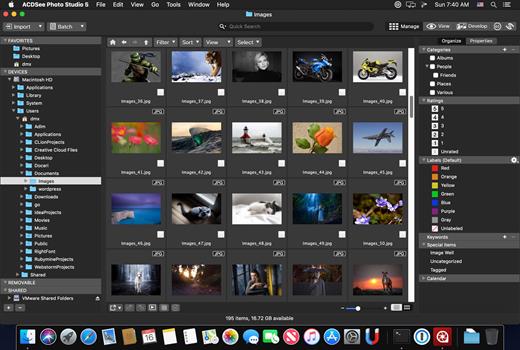
ACDSee Photo Studio 26.0.3

Known for best-in-class digital asset management and RAW processing power, ACDSee Photo Studio for Mac 5 gives you instant, import-free access to your photos. Flexible organizational tools to satisfy any workflow, lightning fast non-destructive adjustments, drag and drop searching, sleek customizable batch presets, and RAW support for over 450 camera models are just a few of the elements that make ACDSee Photo Studio for Mac 5 the must-have image editing software on the macOS.

Image Basket

Gather and hold images from different locations or folders in the Image Basket. Once you have your desired assortment, you can use any of the tools or features in ACDSee to view or edit these files.

Filter By

Quickly single out and display files by their metadata, such as ratings, color labels, tags, and categories. This essential component of digital asset management will also identify images by the metadata they don’t have, such as “no keywords”, “untagged”, and “uncategorized”.

Compare Images

Highlight the similarities and the differences in up to four images at once with the Compare Images tool. Use zooming and panning to identify which images to keep.

Auto Advance

Manage entire folders without ever moving your hands from the keyboard. With Auto Advance, adding metadata will move the focus to the next image in the File List pane, allowing you to seamlessly organize.

External Editors

Easily configure ACDSee to work with a variety of other image editors. Specify a default editor, and then promptly open images in other applications right from inside Manage or View mode.

Multiple Databases

Create as many ACDSee databases as you like, and swiftly and smoothly switch between them.

Batch Add Watermark

Claim your work by adding watermarks to your images. Adjust size, position, and opacity for the perfect signature, and save your settings as a preset. Apply it to one, many, or all.

Batch Add Border

Frame your favorite photos in batches with the Batch Add Border tool. Customize the color, texture, and thickness of your border, and choose from nearly 100 unique edges to complement your shots.

Import Database

Don’t lose hours of cataloging just because you want the latest software. Import your database from version 3 or 4 of ACDSee Photo Studio Mac and keep right on working.

What’s New

Version 26.0.3:


  • Release notes were unavailable when this listing was updated.
Compatibility

macOS 11.0 or later


Release Name: ACDSee Photo Studio 26.0.3
Size: 441.3 MB
Links: HOMEPAGE – NFO – Torrent Search

Download: RAPiDGATOR
3 Comments
June 26

FotoMagico 6.9.3

FotoMagico lets you create professional slideshows from your photos and music with just a few, simple mouse clicks. It sports a very clean and intuitive yet powerful user interface. High image quality, fast performance, and user flexibility were some of the design goals for this application.

Features:


  • Create the most spectacular slideshows

    • Scale, move, rotate, zoom or pan around your images to highlight that part that matters the most.
    • Your slides fit together perfectly with the new, gorgeous transitions.
    • Provide more meaning with subtle titles here and there.
  • Present a breathtaking show

    • Your slideshow uses the best possible resolution of your presentation device.
    • Use large displays, HDTV screens and other high resolution devices.
    • Even on a VGA projector, your photos will look better with FotoMagico.
  • Your audience will want to take it home

    • Burn DVDs of your slideshow with iDVD or Roxio Toast.
    • Put your slideshow on the new iPod.
    • Export in almost any QuickTime format.
What’s New

Version 6.9.3:


  • Release notes were unavailable when this listing was updated.
Compatibility

macOS 10.15.2 or later


Release Name: FotoMagico 6.9.3
Size: 75.9 MB
Links: HOMEPAGE – NFO – Torrent Search

Download: RAPiDGATOR

4 Comments
June 26

ON1 Resize AI 2026.4 v20.4.1.18862

ON1 Resize (was Perfect Resize) is the industry standard for photo enlargements. Use Genuine Fractals powered algorithms for optimizing clarity and detail for different image types. Get the best quality enlargements for your photos, whether taken with a DSLR or your mobile device.

Features


  • Easily enlarge and create a high quality print of a great shot you captured on your phone or tablet.
  • Increase image size over 1000% without the loss of sharpness or detail that you would normally expect.
  • Built-in presets and manual controls make it easy to create high quality enlargements tailored to your photos, including print size, type of material, and type of output–including gallery wraps.
  • The gallery wrap feature creates extended margins for wrapping your photo around wooden stretcher bars when printing to canvas. You have the option to either stretch or reflect the areas near the edge of your photo. Create a perfect gallery wrap and not lose any part of the photo.
  • Using the Sharpening controls can save you the workflow step of adding additional Sharpening before printing and can help compensate for loss of sharpness due to dot gain from your printer.
  • The tiling feature in Perfect Resize will divide an enlargement into smaller pieces that can be printed on a smaller printer.
  • Print. Select the printer settings and paper size as well as control how the image will fit on the paper along with color management options.
What’s New

Version 2026.4:


  • Release notes were unavailable when this listing was updated.
Compatibility

macOS 10.15 or later
Apple Silicon or Intel Core processor


Release Name: ON1 Resize AI 2026.4 v20.4.1.18862
Size: 575.9 MB
Links: HOMEPAGE – NFO – Torrent Search

Download: RAPiDGATOR
4 Comments
June 26

DockDoor Pro 0.0.138

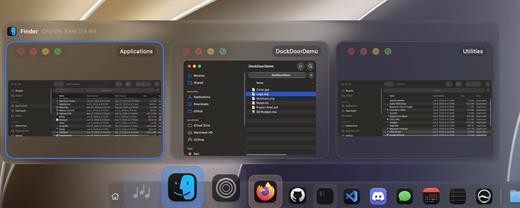
DockDoor Pro is a complete, native dock replacement for macOS built entirely with SwiftUI and AppKit. Designed to deliver a fluid, lightning-fast “Liquid Glass” experience, it breaks past the limitations of the default Mac dock. It introduces live window previews, built-in widgets, multi-display profiles, and advanced window staging—all while maintaining a microscopic memory footprint.

Key Features


  • Live Window Previews: Hover over any running app to instantly see live thumbnails of its open windows. You can act on them right from the preview—close, minimize, tile to quarters/halves, or force quit—without ever bringing the app to the foreground.
  • Fluid Magnification & ProMotion Smoothness: Icons swell under your pointer on a real, spring-driven wave. It runs at the full refresh rate of your display, offering a level of tactile responsiveness that feels entirely native to the OS.
  • Smart Folder Fan-Out & File Tray: Tap pinned folders to watch them bloom into a clean, customizable list or grid panel. Need to juggle files? Scroll up on the dock to reveal a staging shelf where you can temporarily drop files, pin frequent folders, or access an instant AirDrop zone.
  • Per-Display Docks & AppSense Profiles: Perfect for power users with multi-monitor setups. You can assign entirely different docks, layouts, and app profiles to different screens, or have the dock automatically morph based on the application you are currently focusing on.
  • Rich Widgets & Media Integration: Embed widget stacks (clock, weather, battery) directly into the dock. It also features a “Now Playing” bar complete with album artwork, scrubbing controls, and time-synced lyrics from Apple Music or Spotify.
What’s New

Version 0.0.138:


  • Release notes were unavailable when this listing was updated.
Compatibility

macOS 14.0 or later


Release Name: DockDoor Pro 0.0.138
Size: 16.7 MB
Links: HOMEPAGE – NFO – Torrent Search

Download: RAPiDGATOR

4 Comments
June 26

djay Pro AI 5.6.6

Welcome to djay Pro AI! Algoriddim’s acclaimed DJ software and winner of multiple Apple Design Awards has been rebuilt from the ground up using groundbreaking AI technology – NEURAL MIX™.

NEURAL MIX™ allows you to isolate instrumentals and acappellas of your favorite tracks in real-time and redefines the boundaries of creative mixing. You can crossfade drums, bass lines, and melodies of two songs independently, apply audio effects to individual components of music, and even loop the beat while the melody of the same track continues playing.

djay Pro’s all-new, modern interface is built around a sophisticated integration with your music library, giving you instant access to millions of tracks. Pristine sound quality and a powerful set of features including live production tools, four decks, high-definition waveforms, video mixing and hardware integration give you endless creative flexibility to reinvent your DJ sets.

NEURAL MIX™

  • Isolate vocals, drums, bass lines, and instrumentals in real-time
  • FX routing: apply audio effects to individual components of music (Vocal Echo, Harmonic Filter, Drum Reverb, and more)
  • Loop routing: Loop the beat while the melody of the same song continues playing, and vice versa
  • AI crossfades: seamlessly blend and swap drums, bass lines, or vocals of two tracks
  • AI waveforms: see vocals, drums, and harmonic waveforms per track side by side
MUSIC PRODUCTION TOOLS

  • Sequencer: create instant beats on top of music
  • Looper: remix music with up to 48 loops per track
  • Beat-matched sequencing of drums and samples
  • Extensive content library with 1000+ loops and samples
STREAMING INTEGRATIONS

  • TIDAL: Millions of tracks, music videos, high quality sound /TIDAL Premium or HiFi)
  • SoundCloud: Millions of underground and premium tracks SoundCloud Go+)
  • Beatport: Millions of electronic music tracks (Beatport LINK)
  • Beatsource: Millions of open-format music tracks (Beatport LINK)
AWARD-WINNING USER INTERFACE

  • 2- and 4-Deck views
  • Single Deck preparation view
  • Video and Automix views
ADVANCED LIBRARY MANAGEMENT

  • Create your own custom and smart playlists
  • Powerful track filtering
  • Finder Integration
AUTOMIX

  • Automatic, beat-matched mixes based on artificial intelligence
  • Queue and Playlist automation
VIDEOS, VISUALS, and PHOTOS

  • Mix videos, visuals, and photos
  • Music video streaming through TIDAL
  • Beat-matched photo slideshows
POWERFUL AUDIO ENGINE

  • Revolutionary AI audio engine
  • Real-time music source separation
  • High-quality mixer, filter, EQ, isolator, and limiter
  • Advanced time-stretching and pitch shifting
  • Over 40 built-in audio effects
  • Master output effects through Audio Unit plug-ins
  • Live recording
  • Ableton Link integration
ADVANCED AUDIO ANALYSIS

  • BPM and beat detection
  • Key detection
  • Multi color waveformsBPM
  • Auto-Gain
HARDWARE INTEGRATION

  • Native support for over 100 MIDI controllers
  • Pioneer DJ CDJ Integration
  • RANE Twelve integration
  • Advanced MIDI Learn
  • External Mixer Mode
  • Support for multi-channel USB audio interfaces
  • Support for external audio input and microphones

*** You need to disable the System Integrity Protection (SIP) to perform the selected Application.

What’s New

Version 5.6.6:


  • Release notes were unavailable when this listing was updated.
Compatibility

macOS 10.14 or later, 64-bit processor


Release Name: djay Pro AI 5.6.6
Size: 290.5 MB
Links: HOMEPAGE – NFO – Torrent Search

Download: RAPiDGATOR
5 Comments