Please REGISTER or RENEW your account on RAPiDGATOR.net and support us by doing through all RAPiDGATOR working download links on main posts...
Mar 3

Mosaic Pro 1.5.0

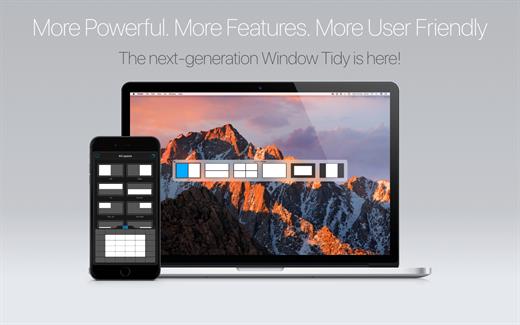
Mosaic Pro is a powerful window manager that allows easy repositioning and resizing of macOS apps, transforming multi-window chaos into a productive suite of tools.
Features:


  • Seamless macOS Integration – Mosaic has been meticulously designed to feel like an integrated component of macOS – and not like a standalone app. The result is a seamless and intuitive experience that feels as good to use as it looks.
  • Fully Customizable Layouts – Rather than limit you to a list of simple preset layouts, Mosaic lets you create any layout you like with a powerful suite of layout creation tools. You can simply paint a layout on a grid or achieve absolute control with numerical constraints.
  • Streamline Your Workflow – As there is no limit to the number of layouts you can create in Mosaic, you can find yourself with dozens of layouts – many of which you only need for specific scenarios. With Layout Groups, you can organise your layouts to suit specific workflows and by switching between them, filter out those you don’t need.
  • Layout Extras:

    • Window Capture – If you need to capture the current window as an image, you can easily copy it to the clipboard or save it to your hard disk.
    • Quick Positions – Take the current window and just move it into any of the screen corners or centrally onto a screen edge.
    • Quick Layout – When you find that you don’t have the layout you need, use Quick Layout to define one on the spot.
  • Touch Bar Support – With a Touch Bar enabled MacBook Pro, all your layouts are right at your fingertips. If you are a keyboard junky but have too many layouts to realistically assign keyboard shortcuts to all of them, Touch Bar is exactly what you need.
  • Mosaic Remote Control for iOS – Don’t have a new Touch Bar enabled MacBook Pro? Don’t worry – just download the free Mosaic Remote app and turn your iPhone or iPad into the ultimate workstation accessory.
What’s New

Version 1.5.0:


  • Release notes were unavailable when this listing was updated.
Compatibility

macOS 10.13 or later.
Apple Silicon or Intel Core processor


Release Name: Mosaic Pro 1.5.0
Size: 119.9 MB
Links: HOMEPAGE – NFO – Torrent Search

Download: RAPiDGATOR

4 Comments
Mar 3

Sensei 2.0.1

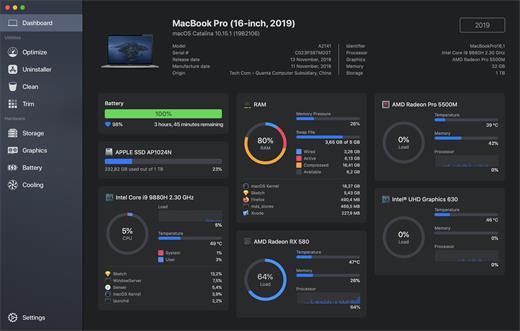
Sensei is an application for any Mac running macOS Catalina or later. Designed to help you optimize, monitor and clean your Mac in order to maximize its performance. Sensei offers several features related to Hardware and Software, such as a super-easy-to-use App Uninstaller, blazing fast Disk Cleaner, Health info for your battery and storage drives, and much more.

The Next Generation Mac performance tool


  • Performance Dashboard
  • Detailed Battery Reporter
  • Disk Cleaner
  • Thermal Dashboard
  • Theme Support
  • App Uninstaller
  • Detailed Hardware Information
  • Temperature Monitor
  • GPU Monitor
  • Performance Optimized
  • CPU Monitor
  • Bespoke Design
  • RAM Monitor
  • Detailed Display Reporter
  • HDD/SSD S.M.A.R.T Reporter
  • 100% Native Code
  • Fan Control
  • Detailed GPU/eGPU Reporter
  • SSD Trim Enabler
  • Accent Color Support
  • Disk Health Analyzer
  • Disk Benchmark
  • Battery Health Analyzer
  • Multiple Localizations
  • Disk Monitor
  • Dark Mode
  • Startup Speed Optimizer
  • Partition Map Explorer
What’s New

Version 2.0.1:


  • Release notes were unavailable when this listing was updated.
Compatibility

macOS 10.15.0 or later
Apple Silicon or Intel Core processor


Release Name: Sensei 2.0.1
Size: 29.8 MB
Links: HOMEPAGE – NFO – Torrent Search

Download: RAPiDGATOR
2 Comments
Mar 3

XMind Pro 26.02.04171

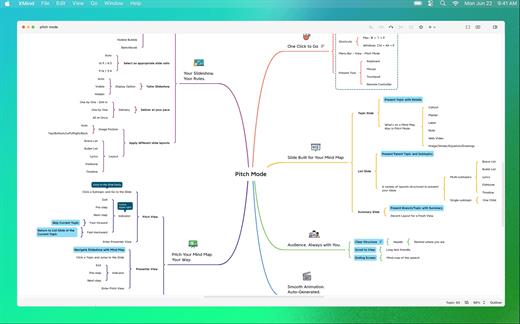
XMind Pro claims to be the most popular mind-mapping tool on the planet. You can use it to work through an individual brainstorming session and it will record and collect inspirations as you go. It can display as a mind-map or in a Gantt chart, and it works well with Office and can export in a number of ways to facilitate making reports. Version 8 has a refreshed look and a new slide-based presentation mode and the popular Walk Through presentation mode is still available.

XMind is an open source project, which means it’s free to download and free to use forever as a version that allows you to make all kinds of diagrams. The price shown here is for Xmind Pro which includes all of the following features:


  • Customizable Theme
  • Export to PDF/SVG
  • Export to Word/Excel/PPT
  • Clip Art
  • Brainstorming Mode
  • Presentation Mode*
  • Gantt Chart
  • Audio Notes
  • Encrypt with Password
  • 60,000+ Icons
If the error is “The application is damaged,” then enter in the terminal (the application must be in the program folder):

What’s New

Version 26.02.04171 :


  • Release notes were unavailable when this listing was updated.
Compatibility

macOS 10.13 or later
Apple Silicon or Intel Core processor


Release Name: XMind Pro 26.02.04171
Size: 250.6 MB
Links: HOMEPAGE – NFO – Torrent Search

Download: RAPiDGATOR

2 Comments
Mar 3

EdgeView 5.7.6

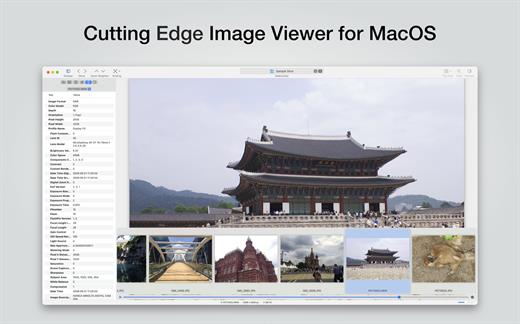
EdgeView 5 is fast image viewer has elegant user interface. EdgeView 5 is developed and designed for modern MacOS. It can open various image files such as JPEG, PNG, TIFF, BMP, and RAW file of DSLR, EPS and PDF, AI(Adobe Illustrator). Can open image files in archive directly without extraction.

User can open files, rename files, delete files from EdgeView’s file browser. Also can access to SMB/AFP/FTP network volume.

User can navigate images quickly by using keyboard shorcut, mouse wheel, trackpad gesture. EdgeVew show EXIF information, play animation GIF/PNG/WebP smoothly. Save last status to history, and restore when reopen file.

EdgeView 5 will be the best choice when viewing and managing image files.

What’s New

Version 5.7.6:


  • Release notes were unavailable when this listing was updated.
Compatibility

macOS 11.1 or later
Apple Silicon or Intel Core processor


Release Name: EdgeView 5.7.6
Size: 142.1 MB
Links: HOMEPAGE – NFO – Torrent Search

Download: RAPiDGATOR
4 Comments
Mar 3

BBEdit 15.5.5

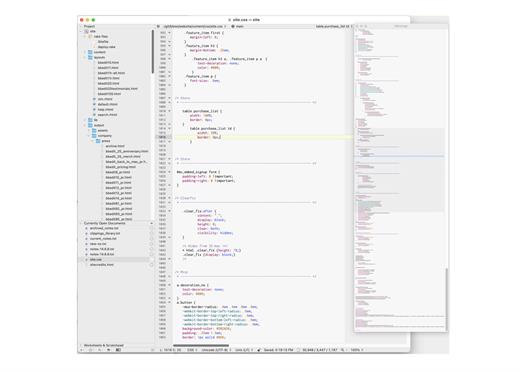
BBEdit is the leading professional HTML and text editor for the Mac. Specifically crafted in response to the needs of Web authors and software developers, this award-winning product provides a plethora of features for editing, searching, and manipulation of text. BBEdit transforms text with high performance.

An intelligent interface provides easy access to BBEdit’s best of class features including grep pattern matching, search and replace across multiple files, function navigation and syntax coloring for numerous source code languages, FTP and SFTP open and save, AppleScript, Perl, and OS X Unix scripting support, glossary support, and a complete set of HTML tools.

What’s New

Version 15.5.5:


  • Release notes were unavailable when this listing was updated.
Compatibility

macOS 11.0 or later.


Release Name: BBEdit 15.5.5
Size: 26.8 MB
Links: HOMEPAGE – NFO – Torrent Search

Download: RAPiDGATOR

5 Comments
Mar 1

OmniGraffle Pro 7.25.2

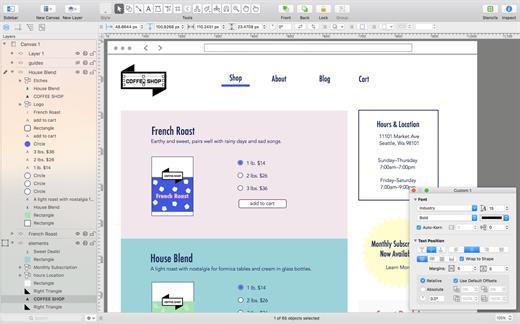
OmniGraffle Pro helps you draw beautiful diagrams, family trees, flow charts, org charts, layouts, and (mathematically speaking) any other directed or non-directed graphs. We’ve had people use Graffle to plan plotlines for a story, make an overview of an operating system, show the evolution of computers, and even show how diseases can spread in a closed population. If you want to organize your thoughts, your projects, or even your friends graphically, using boxes and lines, OmniGraffle is your tool.

OmiGraffle Professional has all of the great features in the standard version, plus a powerful toolset for advanced document creation and editing options. For the pro user who’s looking for an in-depth diagramming application that’s still priced below the competition, you’ve come to the right place.

What’s New

Version 7.25.2:


  • Release notes were unavailable when this listing was updated.
Compatibility

macOS 11.0.0 or later
Apple Silicon or Intel Core processor


Release Name: OmniGraffle Pro 7.25.2
Size: 73 MB
Links: HOMEPAGE – NFO – Torrent Search

Download: RAPiDGATOR
10 Comments
Mar 1

System Dashboard 5.1.0

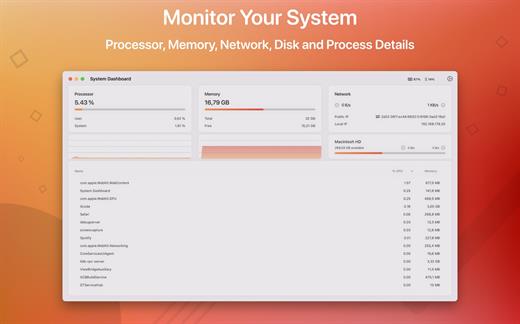
System Dashboard shows the processor, memory, network and disk usages in a small and lightweight window.

The System Dashboard shows all the important characteristics of your system on a single page.

Features:

System Overview

The main window of this app will show the most important and interesting parameters of your system on a single window.

Processor

This category shows the total, user and system CPU usage. The number of threads and tasks is also shown.

Memory

This category shows the used, wired, compressed and free memory of your system.

Network

The network category shows the current download- and upload speed but also the number of open connections and your internet IP address.

Batteries

The app also checks the battery status of connected Bluetooth devices. All Apple peripherals are supported.

What’s New

Version 5.1.0:


  • General code improvements.
Compatibility

macOS 11.5 or later
Apple Silicon or Intel Core processor


Release Name: System Dashboard 5.1.0
Size: 7.5 MB
Links: HOMEPAGE – NFO – Torrent Search

Download: RAPiDGATOR

10 Comments
Mar 1

Boxy SVG 4.102

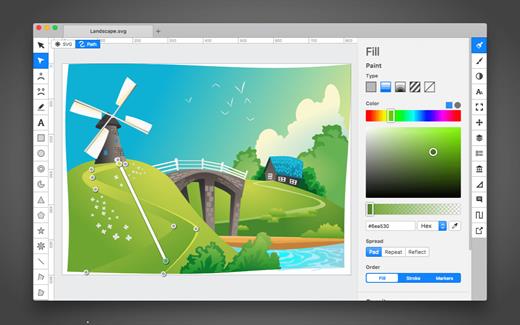
SVG is the standard format for storing vector graphics such as icons, banners, charts and illustrations.

Boxy SVG project goal is to create the best SVG editor for non-technical users as well as for professional designers and developers.

CORE FEATURES

• Clean and intuitive UI heavily inspired by Inkscape, Sketch and Adobe Illustrator
• Extensive support for on-canvas editing of object geometry, transform, paint and other properties
• Save to SVG and SVGZ formats, export to PNG, JPG, WebP, PDF and HTML5
• Open Clip Art Library integration with thousands of free stock vector arts
• Google Fonts integration with hundreds of free fonts
• Configurable keyboard shortcuts for over 100 commands
• Manual guides, smart guides and grid
• Path operations (unite, intersect, subtract, exclude, close, reverse, etc.)
• Arrangement operations (align to, rotate, flip, order, group, etc.)

FOR WEB DEVELOPERS

• Chromium-based rendering engine
• SVG and CSS code inspector similar to Chrome Dev Tools
• Clean SVG output that preserves IDs, classes, titles and other metadata
• SVG sprites editing support

What’s New

Version 4.102:


  • Release notes were unavailable when this listing was updated.
Compatibility

macOS 10.15 or later


Release Name: Boxy SVG 4.102
Size: 213.1 MB
Links: HOMEPAGE – NFO – Torrent Search

Download: RAPiDGATOR
10 Comments
Mar 1

Slidepad 1.6.2

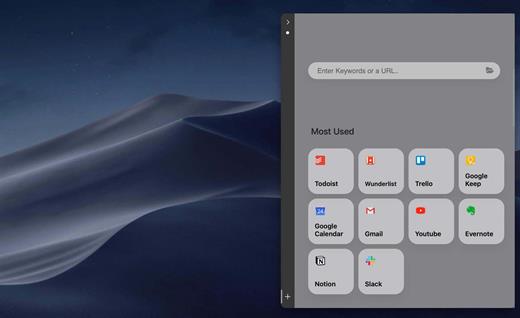
An iPad style slide over window for your web apps. No more hassle of window switching. Unlike other similar apps, there is no limit on what can be placed on Slidepad. You can type any keywords, URLs like what you do in common browsers!

An iPad slide over window

By slide in and slide out, Slidepad brings iPad style multitasking to your Mac. Using Slidepad is as easy as using your dock.

A simple sidebar to switch between apps

Slidepad borrowed the concept of sidebar from Franz and Station. It is much smoother than tabs, and it helps you quickly switch between different web apps.

An omnibox lets you open any websites, tutorials or PDFs

Unlike other similar apps, there is no limit on what can be placed on Slidepad. You can type any keywords, URLs like what you do in common browsers!

More Features


  • Minimal-style sidebar
  • Corner snapping
  • Developer tool enabled
  • Customizable sound setting
  • Mobile/Desktop user-agent switching
  • Display badge when receive new notifications
  • On/Off live notifications
  • Multi-screen support
  • Drag/drop support
  • Picture in Picture support
  • Quicklook icon support
  • Dark theme support (MacOS 10.14+)
  • Global keyboard shortcut support
What’s New

Version 1.6.2:


  • Minor bug fixes
Compatibility

macOS 10.13 or later
Apple Silicon or Intel Core processor


Release Name: Slidepad 1.6.2
Size: 10.9 MB
Links: HOMEPAGE – NFO – Torrent Search

Download: RAPiDGATOR

7 Comments
Mar 1

Alcove 1.6.10

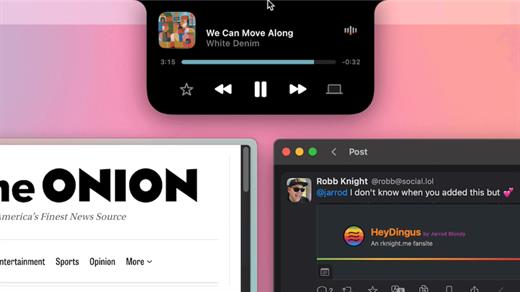
Alcove brings the elegant Dynamic Island experience to your Mac, transforming how you interact with notifications, live activities, and system events. Designed to feel native, it’s a polished way to stay informed without being interrupted.

Key Features


  • Fluid Transitions — Smooth animations and transitions that make alerts and interactions feel natural and integrated.
  • Instant Notifications — Alerts appear quickly and gracefully so you never miss important updates.
  • Live Activities Support — Keep track of ongoing tasks directly from the Dynamic Island interface.
  • Swipe Gestures — Use intuitive gestures to clear, interact with, or dismiss alerts.
  • Customizable HUDs — Tailor the look and feel of the heads-up displays to fit your style or workflow.
  • Lock Screen Presence — Alcove can show notifications or status even when your Mac is locked, ensuring you stay informed at a glance.
  • Lightweight, Native App — Built to run smoothly, Alcove is fast and performs well without draining resources.
What’s New

Version 1.6.10:


  • Release notes were unavailable when this listing was updated.
Compatibility

macOS 12.0 or later


Release Name: Alcove 1.6.10
Size: 11.2 MB
Links: HOMEPAGE – NFO – Torrent Search

Download: RAPiDGATOR
9 Comments