Please REGISTER or RENEW your account on RAPiDGATOR.net and support us by doing through all RAPiDGATOR working download links on main posts...
July 13

LookAway 2.2.6

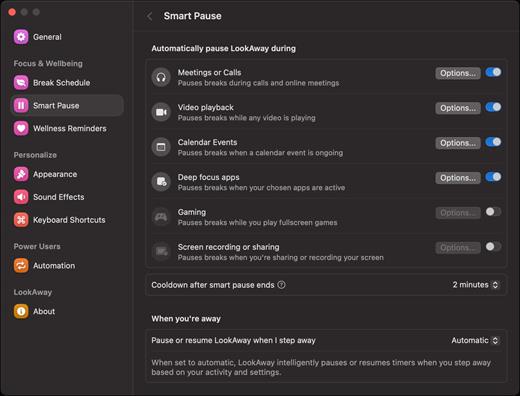
LookAway puts your mac in rest mode at regular intervals to help you rest your eyes. It’s gentle, smart, and fully customizable.

Features:


  • Regular eye breaks
  • Pre-Break Alert
  • At your fingertips
  • Fully customizable
  • Intelligent Pausing
  • Delightful Design
What’s New

Version 2.2.6:


  • Release notes were unavailable when this listing was updated.
Compatibility

macOS 12 or later


Release Name: LookAway 2.2.6
Size: 27.4 MB
Links: HOMEPAGE – NFO – Torrent Search

Download: RAPiDGATOR

4 Comments
July 13

Bloom 1.5.36

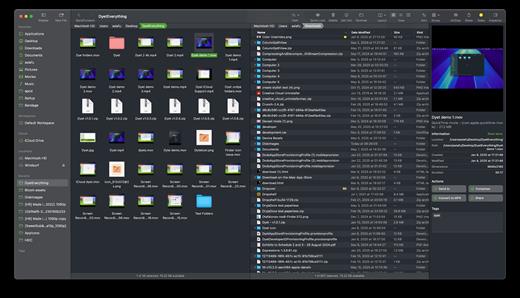
Bloom is a refined file management tool designed to enhance your search and navigation experience on macOS, offering a more intuitive and feature-rich alternative to Finder. With Bloom, you can instantly navigate to any location system-wide using the shortcut ⌘⇧⏎, making file access seamless and efficient .

Key Features


  • Enhanced Search Capabilities: Bloom allows you to search files by keyword within predefined locations, scanning tens of thousands of files in seconds for lightning-fast results. You can also search directly in any folder with ⌘F and refresh results with ⌘R .
  • Portal Mode: A compact window without sidebar or preview, Portal retains core functionalities and can be pinned on top of other windows or collapsed into the screen edge for convenience .
  • Archive Viewing: Browse contents of compressed files without extraction and preview text, images, or PDFs under 10MB by pressing Space or double-clicking .
  • Advanced File Management: Features like auto-resizing columns, advanced rename with regex support, workspace customization, iCloud Drive integration, and tag management elevate your file-browsing experience .
  • Media and Productivity Tools: Convert and optimize images, create various file types easily, paste images from the web, and organize files by kind or date. Additionally, Bloom records every operation for easy reversion and supports starting a terminal directly from a folder .
  • Disk Analysis and Task Management: Use Folder Scan to visualize disk usage through a treemap and manage file operations with a Task Scheduler to track progress .
What’s New

Version 1.5.36:


  • Release notes were unavailable when this listing was updated.
Compatibility

macOS 14.0 or later
Apple Silicon or Intel Core processor


Release Name: Bloom 1.5.36
Size: 14.9 MB
Links: HOMEPAGE – NFO – Torrent Search

Download: RAPiDGATOR

4 Comments
July 10

Amadine 1.8.3

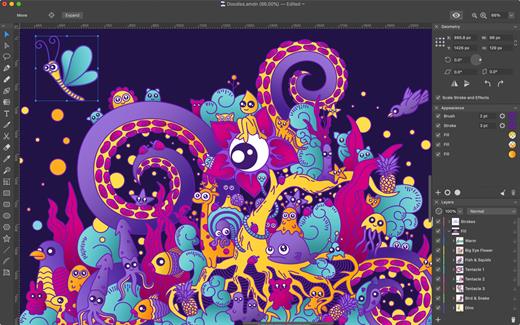
Amadine is a vector drawing software with perfectly balanced UI that guarantees smooth workflow and quick learning.

The app is perfect for illustrations, designing websites, user interface, laying out flyers and brochures, creating logos and icons.

Developed with precision and attention to what users need, Amadine offers everything you may require to bring the craziest illustration ideas to life.

Tools:

  • Use more that 30 tools for selecting, drawing, editing, slicing and typing.
  • Select and modify objects: Move, Selection, Lasso, Eyedropper, Scissors, Eraser, Zoom.
  • Draw and edit paths: Pen, Convert, Draw (combines Pencil and Brush), Width, Gradient, Rectangle, Rounded Rectangle, Ellipse, Polygon, Star, Line, Arc.
  • Transform shapes: Free Transform, Symmetrical Distortion, Free Distortion.
  • Organize artboards: Sheets.
  • Type and edit text: Text (combines text in place and text in box), Text on Path, Text in Shape.
What’s New

Version 1.8.3:


  • Release notes were unavailable when this listing was updated.
Compatibility

macOS 10.12 or later, 64-bit processor


Release Name: Amadine 1.8.3
Size: 56.1 MB
Links: HOMEPAGE – NFO – Torrent Search

Download: RAPiDGATOR

4 Comments
July 10

Lyn 2.4.10

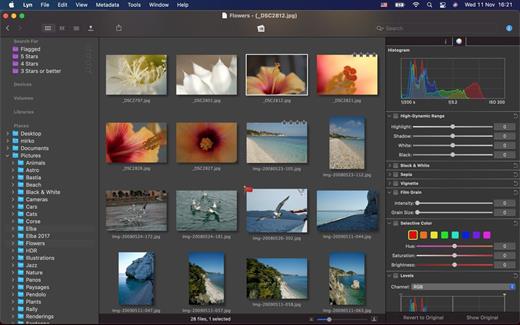
Lyn for macOS is a lightweight, and fast media browser and viewer for designed for Photographers, Graphic Artists and Web Designers.

Featuring an extremely versatile and aesthetically pleasing interface, Lyn delivers an easy to use geotagging technology, image editing and a complete solution for sharing your photographs.

Lyn natively supports all popular image formats from standard formats to HDR and RAW plus any other image format supported by macOS. It also integrates a movie player to watch camera recordings and a simple PDF viewer.

The new editing inspector gives you everything to turn your shots into great photos. Adjust exposure, color temperature, brightness, contrast or reveal image details with highlight and shadow. You change the individual curves and levels, or you can alter colors selectively. You can experiment and convert your color photos to black and white, try a classic sepia tone or add a vignette border or film grain.

Features:


  • Progressive display, on single- or multiple-monitor configurations, of images of virtually any size.
  • Multi-threading to take advantage of multicore CPUs.
  • Display color-corrected images and soft-proofing function.
  • Compatible with High Dynamic-Range images like TIFF float as well as Radiance and OpenEXR.
  • Common metadata parser: EXIF, Camera’s makernote, GPS, GeoTIFF, IPCT.
  • Image navigation with Apple Remote Control or Magic Trackpad.
  • User-switchable thumbnails cache.
  • Filtering by tags and metadata.
  • Fullscreen and slideshow with music.
  • Full IPTC editing with user-defined presets.
  • Batch operations: convert and rename.
  • User-defined places.
  • Non-destructive editing.
  • Editing inspector with filters and effects: temperature and tint, exposure, brightness, contrast, highlight, and shadow. Black and white, sepia tone, and vignette.
  • Easily browse your iPhoto, Aperture, and Lightroom libraries!
  • Facebook, Flickr, Dropbox, SmugMug, 500px, and Picasa Web Albums sharing!
  • Maps layout: geotag your photographs and edit locations with a simple drag and drop.
  • Integrated QuickTime video player
What’s New

Version 2.4.10:


  • Release notes were unavailable when this listing was updated.
Compatibility

macOS 10.11 or later


Release Name: Lyn 2.4.10
Size: 38.8 MB
Links: HOMEPAGE – NFO – Torrent Search

Download: RAPiDGATOR

4 Comments
July 10

iNet Network Scanner 4.0

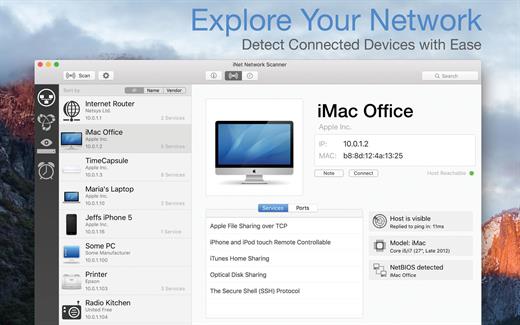
iNet Network Scanner provides you with information about networks your Mac is connected to. Its very easy and user friendly design allows even the unexperienced user to get a profound and understandable overview of a network and the running services. iNet is also available as iPhone and iPad app via the iTunes Store.

What’s New

Version 4.0:


  • [Improved] Icon copy handling and image checks
  • [Added] Display of SSID (WiFi name) in network info
  • [Updated] Vendor and Services Databases
  • [Fixed] Possible crash on startup
Compatibility

macOS 11.0 or later


Release Name: iNet Network Scanner 4.0
Size: 327.3 MB
Links: HOMEPAGE – NFO – Torrent Search

Download: RAPiDGATOR

5 Comments
July 10

Whisper Transcription 14.0

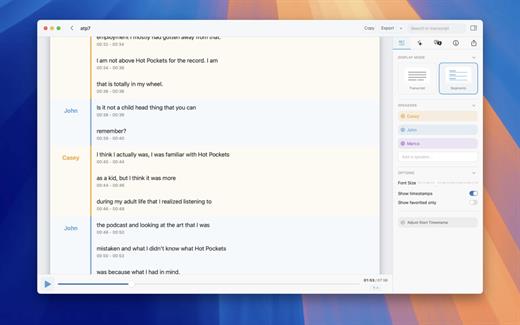
Whisper Transcription converts audio files into text using the Whisper machine learning model for speech recognition and transcription — making it easy to transcribe meetings, lectures, and other recordings.

Key Features


  • Easy Transcription: Drag and drop audio files for instant conversion.
  • On-Device Processing: 100% local transcription—no data leaves your machine.
  • Fast & Accurate: Get text multiple times faster than real-time with Metal & GPU acceleration (depending on the system).
  • Search & Edit: Highlight, edit, and delete transcript sections.
  • Audio Playback: Sync playback with the transcript for easy review.
  • Multi-Language Support: Transcribes in 100+ languages (fastest in English).
  • Subtitle Export: Save transcripts as .srt & .vtt files.
  • Batch Processing & System Audio Capture: Transcribe multiple files simultaneously and capture system audio (Zoom calls, podcasts, etc.).
  • Flexible Output: Export transcripts to Word, PDF, HTML, and subtitles.
  • Speaker Separation: Detect and split transcripts by speaker.
  • Reader Mode: Focused reading experience.
  • Advanced Model Support: Choose from various models for different accuracy and speed levels.
  • Supported Formats: Works with mp3, wav, m4a, mp4, mov, ogg, opus and more.
  • Pro Unlock: Upgrade for industry-leading transcription quality with Medium & Large models, batch processing, system audio recording, podcast transcription, and more.
What’s New

Version 14.0:


  • Release notes were unavailable when this listing was updated.
Compatibility

macOS 14.0 or later.


Release Name: Whisper Transcription 14.0
Size: 46.8 MB
Links: HOMEPAGE – NFO – Torrent Search

Download: RAPiDGATOR

4 Comments
July 10

ProFind 1.39

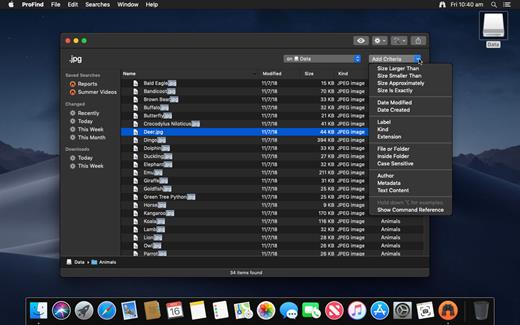
ProFind is advanced file search app for macOS.

With powerful features and great performance, ProFind delivers advanced file search for macOS. And with support for natural language queries, application launching, hidden location searches, scripting and more.
Search inside invisible folders and packages. Searches any disk type.
Uses kernel based searching (searchfs) when available. Uses metadata indexes (as used by Spotlight) when available to improve performance. Autocompletion for application names. Large icon view for one or two search results.
Under it’s elegant user interface, ProFind combines the power of macOS’s different search capabilities to make sure it finds all the files your looking for. And it’s been carefully tuned for performance and responsiveness.

What’s New

Version 1.39:


  • Release notes were unavailable when this listing was updated.
Compatibility

macOS 10.13.0 or later
Apple Silicon or Intel Core processor


Release Name: ProFind 1.39
Size: 13.7 MB
Links: HOMEPAGE – NFO – Torrent Search

Download: RAPiDGATOR

4 Comments
July 9

Dropshare 6.14

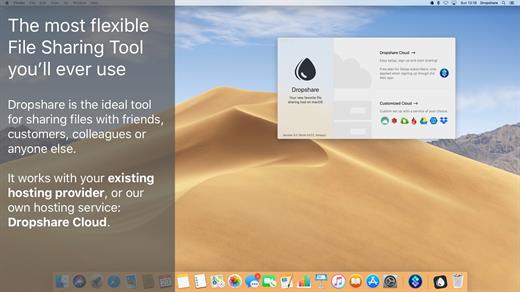
Dropshare is a menu bar application for drag & drop upload files, screenshots and even directories to your own server, Amazon S3, Backblaze B2 Cloud Files, Rackspace Cloud Files, Microsoft Azure Blob Storage, Google Drive or Dropbox. Additionally, Dropshare offers a file sharing provider called Dropshare Cloud, which is perfectly suitable to start uploading in just minutes. Sharing files with friends, customers, colleagues or anyone else has never been so easy an professional! Dropshare supports Multiple Connections: You can set up different upload destinations at the same time and switch between them using user-defined keyboard shortcuts, or by holding ⌘ while dragging & dropping a file No matter if files, folders, text or screenshots – Dropshare uploads every file and data to your selected destination – also from clipboard or other applications like Safari. Share Extension included Set up your own keyboard shortcuts for fullscreen or selection-based screenshots that’ll be uploaded automatically with Dropshare. Set up a custom keyboard shortcut for taking a screenshot and annotating it afterwards with Dropshare itself, or an app you already like: Preview.app, Skitch.app, Napkin.app or Annotate.app Take & upload Screen Recordings directly with Dropshare, both fullscreen and selection-based recordings are available, as well as GIF conversion Choose from a number of free designs or craft an individual design on your own using HTML, CSS and JavaScript, including upload previews Synchronize your upload history across all your devices, supports both iOS and macOS. Your upload history will automatically be synchronized across all your Apple devices with iCloud Dropshare supports URL shorteners as well, e.g. dsh.re or Rebrandly, or configure your very own URL shortener service like bit.ly or YOURLS.
Technical requirements:


  • A working SSH user account is required on the server. A password or SSH key pair is also required. To have the uploaded file displayed in a web browser, a web server needs to be installed and configured on the server
  • Dropshare supports services like OpenStack Swift. Check User Guide for more information
  • A regular Google account is required in order to use Google Drive
  • A regular Dropbox account is required in order to use Dropbox
  • Microsoft Azure Blob Storage, Backblaze B2 Cloud Files, Amazon Simple Storage Service (S3), Rackspace Cloud Files. A subscription may be neccessary in order to use Dropshare with one of these providers. Please check out the terms of use and payment information at the website of the selected provider
What’s New

Version 6.14:


  • Release notes were unavailable when this listing was updated.
Compatibility

macOS 12.3 or newer
Apple Silicon or Intel Core processor


Release Name: Dropshare 6.14
Size: 46.4 MB
Links: HOMEPAGE – NFO – Torrent Search

Download: RAPiDGATOR

4 Comments
July 9

iA Writer 8.0.3

iA Writer (was iA Writer Pro) is a professional writing suite that gives you full control over your notes, drafts and edits.


  • Workflow: Note – Write – Edit – Read. Each stage has a task-specific typeface and color.
  • Syntax Control scans the syntax of English, French, German, Italian, and Spanish text and highlights your adjectives, nouns, verbs, adverbs, prepositions or conjunctions.
  • Precision Writing Tools:

    • Auto Markdown formats text on-screen — your hands stay on the keyboard
    • Syntax Control introduces syntactic markup for natural language text. It covers English, French, German, Italian, and Spanish. Patent pending.
    • Convert Markdown to Microsoft Word 2007 .docx, and back again
Features

  • Workflow states
  • Custom typefaces, carefully set for optimal readability
  • In-app preview
  • Reading time, plus sentence, word, and character count
  • Real-time iCloud sync
  • Ready for Retina displays
  • Full-screen
What’s New

Version 8.0.3:


  • Release notes were unavailable when this listing was updated.
Compatibility

macOS 10.15 or later


Release Name: iA Writer 8.0.3
Size: 26.4 MB
Links: HOMEPAGE – NFO – Torrent Search

Download: RAPiDGATOR

5 Comments
July 9

FotoMagico 6.9.4

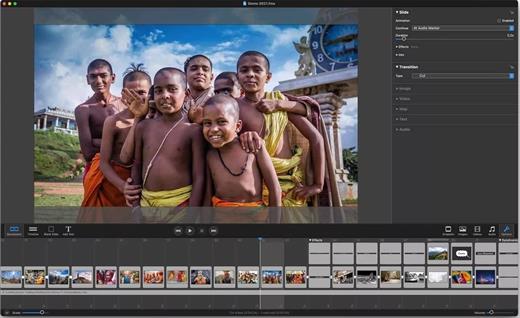
FotoMagico lets you create professional slideshows from your photos and music with just a few, simple mouse clicks. It sports a very clean and intuitive yet powerful user interface. High image quality, fast performance, and user flexibility were some of the design goals for this application.

Features:


  • Create the most spectacular slideshows

    • Scale, move, rotate, zoom or pan around your images to highlight that part that matters the most.
    • Your slides fit together perfectly with the new, gorgeous transitions.
    • Provide more meaning with subtle titles here and there.
  • Present a breathtaking show

    • Your slideshow uses the best possible resolution of your presentation device.
    • Use large displays, HDTV screens and other high resolution devices.
    • Even on a VGA projector, your photos will look better with FotoMagico.
  • Your audience will want to take it home

    • Burn DVDs of your slideshow with iDVD or Roxio Toast.
    • Put your slideshow on the new iPod.
    • Export in almost any QuickTime format.
What’s New

Version 6.9.4:


  • Release notes were unavailable when this listing was updated.
Compatibility

macOS 10.15.2 or later


Release Name: FotoMagico 6.9.4
Size: 82.3 MB
Links: HOMEPAGE – NFO – Torrent Search

Download: RAPiDGATOR

4 Comments