Please REGISTER or RENEW your account on RAPiDGATOR.net and support us by doing through all RAPiDGATOR working download links on main posts...
May 24

Bartender 6.5.2

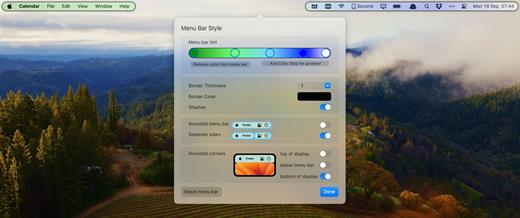
Bartender lets you organize your menu bar apps.
Features


  • Take control of your menu bar – With Bartender you can choose which apps stay in the menu bar, are displayed in the Bartender Bar or are hidden completely.
  • The Bartender Bar – The Bartender Bar can be displayed and hidden as you want, by clicking on the Bartender Icon or via a hot key.
  • Menu bar apps still work the same – Apps still work the same when they are in the Bartender Bar allowing you quick access to them when needed, but keeping them out of sight when not.
  • Show an app in the menu bar when it updates – Set up your apps to be displayed in the menu bar for a period of time when they update.
  • Order your menu bar items – With Bartender you can set the order of the menu bar items, both in the menu bar and in the Bartender Bar, simply by ⌘+dragging the items. The order you set is maintained after restarts. So your menu bar items are always in the order you want.
  • Minimalism – If you want a really clean look and privacy, Bartender can also be hidden.
  • The Bartender Bar can be placed where you want – The Bartender Bar can be moved at any time to any horizontal position immediately under the menu bar. Or it can open under the Bartender icon.
  • Keyboard Navigate your menu bar items – Keyboard navigate all menu items both in the menu bar and the Bartender Bar; simply arrow through them and press return to select.
  • Search menu bar items – You can search the Bartender Bar for menu items, allowing you quick access to a menu item without looking for it. Simply display the Bartender Bar and start typing, then press enter to select the menu item.

Bartender lets you organize your menu bar apps by hiding them, rearranging them, or moving them to Bartender’s Bar. You can display the full menu bar, set options to have menu bar items show in the menu bar when they have updated, or have them always visible in Bartender’s Bar.

What’s New

Version 6.5.2:


  • Release notes were unavailable when this listing was updated.
Compatibility

macOS 14.0 or later


Release Name: Bartender 6.5.2
Size: 55.1 MB
Links: HOMEPAGE – NFO – Torrent Search

Download: RAPiDGATOR

5 Comments
May 24

MouseBoost Pro 5.0.1

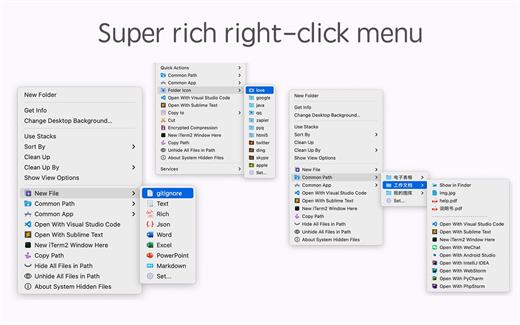
MouseBoost Pro integrates more than 30 kinds of small tools, and the operation way is very simple, as long as you click the right mouse button, you can activate all kinds of functions you want, so that your work efficiency is greatly improved.

You can create any file type you want, open any APP you want, self-sorting, fully customized!

*** Main Features ***
– All menus support custom sorting.
– Quickly create all kinds of commonly used files, and supports custom creation of various file types you want.
– Quickly open your terminal, iTerm2, and go to the directory you want.
– Quickly open VSCode, Sublime Text and Emacs, and customize the various apps you want to open.
– Quickly copy the current path power.
– Complete files deletion is supported.
– Supports files moving, copying and cutting.
– Supports files encrypted compression.
– Quickly open your favorite directory.
– Quickly get file MD5,SHA1,SHA256 and other information.
– Supports hiding and displaying of specified files.
– Supports modify folder icon.

What’s New

Version 5.0.1:


  • Release notes were unavailable when this listing was updated.
Compatibility

macOS 10.11 or later


Release Name: MouseBoost Pro 5.0.1
Size: 20.9 MB
Links: HOMEPAGE – NFO – Torrent Search

Download: RAPiDGATOR
5 Comments
May 24

Tagr 5.14.1

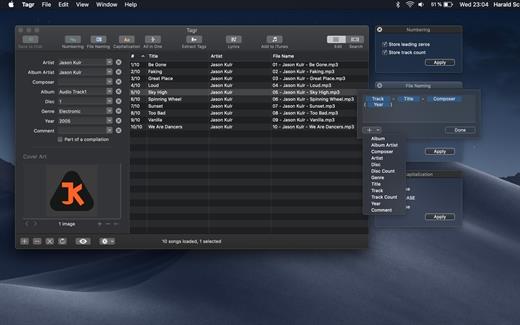
Tagr is an application that helps you organize your music collection.

With Tagr you can easily edit information such as a song’s artist, title, or album cover. Tagr also allows you to control the way your files are named, numbered, and capitalized. There is no more need for having other tools dictate that for you!

Features:

  • Edit meta data of individual MP3, M4A/M4B, FLAC, and AIFF files, or
  • Edit a list of files in bulk
  • Supported tags: track number/count, title, artist, album artist, composer, album, disc number/count, genre, year, comment, compilation, lyrics
  • MP3 ID3 versions: v1, v2.3, and v2.4
  • Embed cover art into your songs
  • Apply uppercase, lowercase, and title case capitalization schemes
  • Automatically generate track numbers
  • Choose from predefined file naming schemes or define your own
  • Extract tags from the file name or title using predefined or custom patterns
  • Search discogs.com for album information and copy it to your songs
  • Listen to songs through QuickLook
  • Customize Tagr to your needs
What’s New

Version 5.14.1:


  • Release notes were unavailable when this listing was updated.
Compatibility

macOS 10.10 or later


Release Name: Tagr 5.14.1
Size: 10.3 MB
Links: HOMEPAGE – NFO – Torrent Search

Download: RAPiDGATOR

5 Comments
May 24

QR Wizard 3.0.2

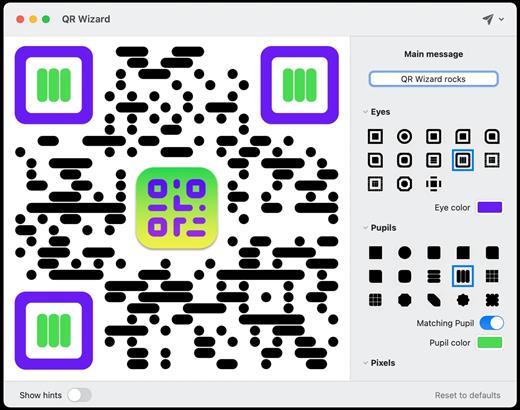
Generate & style beautiful QRCode images directly from your Mac

Features


  • Easy to use: Simple, practical and ultra-easy to use: Set your data/text and you’re pretty much ready to go@ Tons of options: Lots and lots of options (colors, shapes, and more!) so that you can create a QRCode that stands out! Lightning fast: Work elegantly and lightning-fast: PNG, JPG, SVG, even ASCII art export supported!
What’s New

Version 3.0.2:


  • Release notes were unavailable when this listing was updated.
Compatibility

macOS 10.13 or later


Release Name: QR Wizard 3.0.2
Size: 6.6 MB
Links: HOMEPAGE – NFO – Torrent Search

Download: RAPiDGATOR
6 Comments
May 24

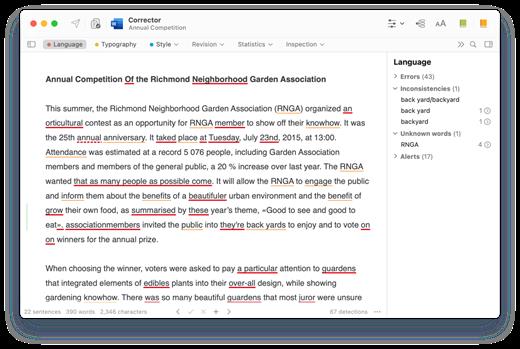
Antidote 12.4

Antidote Français is a complete set of software reference tools for writing French. Tools include an advanced grammar checker which corrects all the text at once, an important collection of twelve dictionaries, and an interactive compendium of grammar rules. Seamlessly integrated with major word processors, email programs and web browsers, Antidote’s tools are as near as your text. With the addition of the English module, you can also make correction of text in English.

Antidote English is a complete set of software reference tools for writing English. Tools include an advanced grammar checker which corrects all the text at once, an important collection of twelve dictionaries, and an interactive compendium of grammar rules. Seamlessly integrated with major word processors, email programs and web browsers, Antidote’s tools are as near as your text. With the addition of the French module, you can also make correction of text in French.

What’s New

Version 12.4:


  • Release notes were unavailable when this listing was updated.
Compatibility

macOS 10.12 or later


Release Name: Antidote 12.4
Size: 1.4 GB
Links: HOMEPAGE – NFO – Torrent Search

Download: RAPiDGATOR

4 Comments
May 24

List Validator Pro 1.0.45

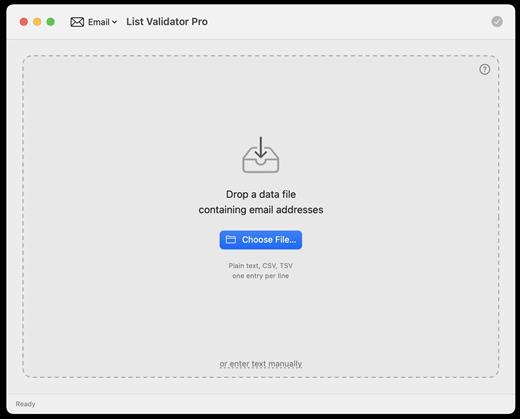
List Validator Pro is a powerful, privacy-first desktop application designed for macOS that allows users to bulk-check and clean large lists of data in seconds. Whether you are dealing with thousands of email addresses, web URLs, or financial codes, this utility processes your data locally on your Mac with blazing speed.

Key Features


  • Effortless Data Input: Simply drag and drop your files straight into the window, select a file via Finder, or paste your text directly into the built-in editor featuring live line numbers.
  • 100% Privacy & Security: Your data never leaves your machine. Because the application runs entirely locally, there are no server uploads, no data logging, and no external rate limits.
  • Smart Filtering: Quickly isolate your results. The app splits data into valid and invalid entries so you can easily spot exactly which lines need fixing.
  • Flexible Export Options: Cleaned-up results can be exported instantly to multiple formats, including CSV, TSV, JSON, plain text, or PDF—making it ready for your spreadsheets, databases, or reports.
What’s New

Version 1.0.45:


  • Release notes were unavailable when this listing was updated.
Compatibility

macOS 13.0 or later


Release Name: List Validator Pro 1.0.45
Size: 6.4 MB
Links: HOMEPAGE – NFO – Torrent Search

Download: RAPiDGATOR
6 Comments
May 24

BBEdit 16.0

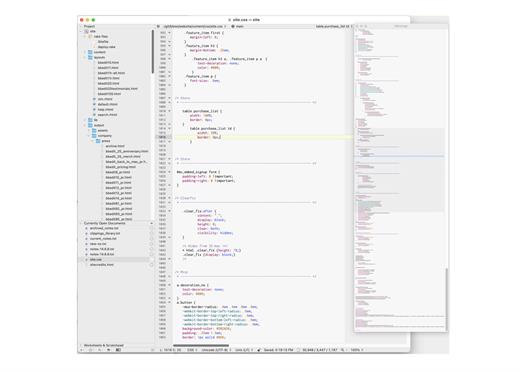
BBEdit is the leading professional HTML and text editor for the Mac. Specifically crafted in response to the needs of Web authors and software developers, this award-winning product provides a plethora of features for editing, searching, and manipulation of text. BBEdit transforms text with high performance.

An intelligent interface provides easy access to BBEdit’s best of class features including grep pattern matching, search and replace across multiple files, function navigation and syntax coloring for numerous source code languages, FTP and SFTP open and save, AppleScript, Perl, and OS X Unix scripting support, glossary support, and a complete set of HTML tools.

What’s New

Version 16.0:


  • Release notes were unavailable when this listing was updated.
Compatibility

macOS 11.0 or later.


Release Name: BBEdit 16.0
Size: 29.3 MB
Links: HOMEPAGE – NFO – Torrent Search

Download: RAPiDGATOR

5 Comments
May 23

OmniFocus Pro 4.8.11

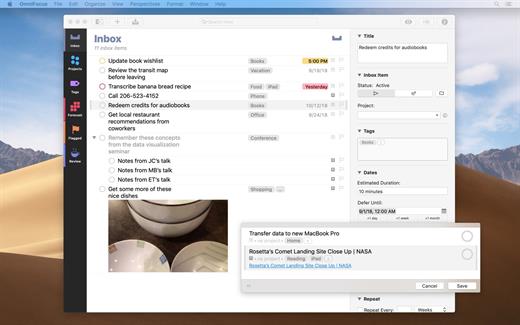
OmniFocus is an organizer app. It uses projects to organize tasks naturally, and then add tags to organize across projects. Easily enter tasks when you’re on the go, and process them when you have time. Tap the Forecast view – which shows both tasks and calendar events – to get a handle on your day. Use the Review perspective to keep your projects and tasks on track.

Use OmniFocus to accomplish more every day. Create projects and tasks, organize them with tags, focus on what you can do right now – and get stuff done. Then let our free syncing system make sure you data is the same on every Mac. (And on OmniFocus for iOS, available separately.) Because your data is encrypted, it’s safe in the cloud.

What’s New

Version 4.8.11:


  • Release notes were unavailable when this listing was updated.
Compatibility

macOS 11.0.0 or later
Apple Silicon or Intel Core processor


Release Name: OmniFocus Pro 4.8.11
Size: 49.6 MB
Links: HOMEPAGE – NFO – Torrent Search

Download: RAPiDGATOR
6 Comments
May 23

Vibe Island 1.0.34

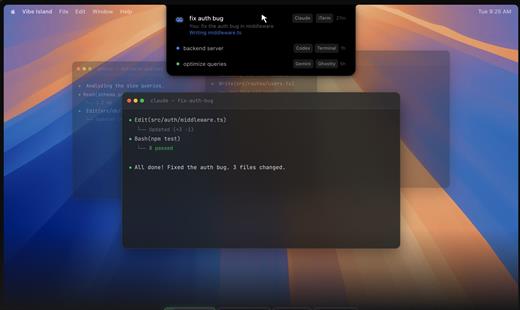
Vibe Island is a specialized productivity tool designed for developers who use terminal-based AI coding agents. It transforms your MacBook’s notch area into an interactive control center, allowing you to monitor, approve, and interact with various AI agents without ever leaving your IDE or breaking your focus. Whether you are using Claude Code, Cursor, or Gemini CLI, Vibe Island ensures you stay in the “flow” by bringing terminal activities to the forefront of your screen in a beautiful, non-intrusive overlay.

Key Features


  • Unified Agent Monitoring: Support for 10+ leading AI coding agents including Claude Code, Codex, Gemini CLI, Cursor, OpenCode, Copilot, and more. All your active sessions appear in one unified, sleek panel.
  • Two-Way Interaction: Go beyond simple monitoring. Approve or deny permission requests, answer “AskUser” questions, and review suggested plans with full Markdown rendering directly from the notch.
  • Precise Terminal Jump: Instantly jump back to the exact terminal tab, split pane, or tmux session where an agent is running with a single click. Compatible with iTerm2, Ghostty, Warp, and native Terminal.app.
  • Zero-Config Setup: On first launch, Vibe Island automatically configures hooks for your CLI tools. No manual editing of config files or API keys required.
  • Privacy-First & Local: Your data never leaves your machine. All communication between Vibe Island and your CLI tools happens locally on your Mac.
  • Native & Lightweight: Built with Pure Swift for Apple Silicon. It is incredibly fast, using under 50MB of RAM and near-zero CPU when idle.
  • Smart Feedback: Enjoy 8-bit synthesized sound alerts for event notifications and visual cues that keep you informed without being distracting.
What’s New

Version 1.0.34:


  • Release notes were unavailable when this listing was updated.
Compatibility

macOS 14.0 or later

Release Name: Vibe Island 1.0.34
Size: 19.1 MB
Links: HOMEPAGE – NFO – Torrent Search

Download: RAPiDGATOR
4 Comments
May 23

OmniGraffle Pro 7.25.3

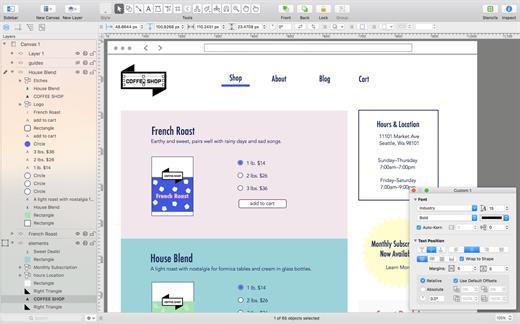
OmniGraffle Pro helps you draw beautiful diagrams, family trees, flow charts, org charts, layouts, and (mathematically speaking) any other directed or non-directed graphs. We’ve had people use Graffle to plan plotlines for a story, make an overview of an operating system, show the evolution of computers, and even show how diseases can spread in a closed population. If you want to organize your thoughts, your projects, or even your friends graphically, using boxes and lines, OmniGraffle is your tool.

OmiGraffle Professional has all of the great features in the standard version, plus a powerful toolset for advanced document creation and editing options. For the pro user who’s looking for an in-depth diagramming application that’s still priced below the competition, you’ve come to the right place.

What’s New

Version 7.25.3:


  • Release notes were unavailable when this listing was updated.
Compatibility

macOS 11.0.0 or later
Apple Silicon or Intel Core processor


Release Name: OmniGraffle Pro 7.25.3
Size: 73.4 MB
Links: HOMEPAGE – NFO – Torrent Search

Download: RAPiDGATOR
6 Comments