Please REGISTER or RENEW your account on RAPiDGATOR.net and support us by doing through all RAPiDGATOR working download links on main posts...
May 19

EdgeView 5.8.5

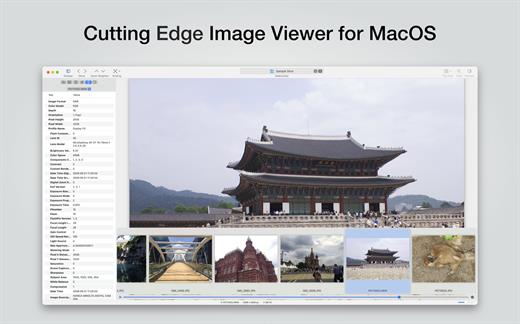
EdgeView 5 is fast image viewer has elegant user interface. EdgeView 5 is developed and designed for modern MacOS. It can open various image files such as JPEG, PNG, TIFF, BMP, and RAW file of DSLR, EPS and PDF, AI(Adobe Illustrator). Can open image files in archive directly without extraction.

User can open files, rename files, delete files from EdgeView’s file browser. Also can access to SMB/AFP/FTP network volume.

User can navigate images quickly by using keyboard shorcut, mouse wheel, trackpad gesture. EdgeVew show EXIF information, play animation GIF/PNG/WebP smoothly. Save last status to history, and restore when reopen file.

EdgeView 5 will be the best choice when viewing and managing image files.

What’s New

Version 5.8.5:


  • Release notes were unavailable when this listing was updated.
Compatibility

macOS 11.1 or later
Apple Silicon or Intel Core processor


Release Name: EdgeView 5.8.5
Size: 145.6 MB
Links: HOMEPAGE – NFO – Torrent Search

Download: RAPiDGATOR

3 Comments
May 19

Folder-Factory 7.13.0

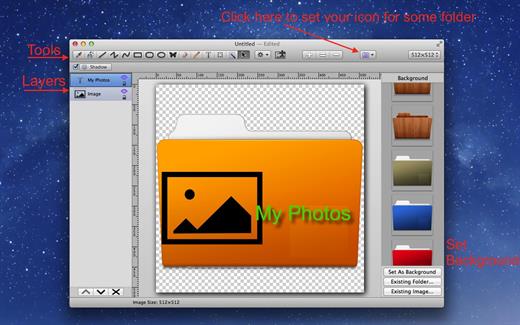
Folder-Factory is a basic icon tool for OS X which help you to customize, design and enhance your folder icons. With it you can combine folder icon with images, text, sketch, and shape. This will improve your system’s appearance, keep your Mac organized and improve your working productivity. You’ll no longer need to read folder names as you can now easily identify them. And at last, it has a friendly and clean UI and it’s really easy to use.

Key features:


  • Support retina display.
  • Customize, design and enhance your folder icons.
  • Support all kinds of tools. For example eyedropper, fill, line, rectangle, ellipse, pen, eraser, text, image, round rectangle and so on.
  • Config line width, pen color and fill color and so on.
  • Full support for transparency.
  • Add text on image.
  • Full support for undo/redo, cut/copy/paste.
  • Support drag and drop any files and folders.
What’s New

Version 7.13.0:


  • Release notes were unavailable when this listing was updated.
Compatibility

macOS 10.10 or later


Release Name: Folder-Factory 7.13.0
Size: 17.6 MB
Links: HOMEPAGE – NFO – Torrent Search

Download: RAPiDGATOR

4 Comments
May 19

NetShred X 6.1.0

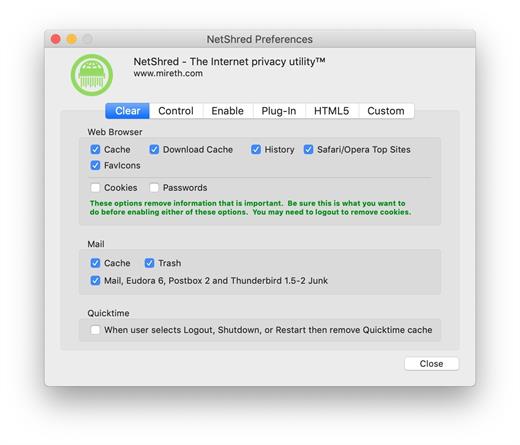
NetShred X is the easy-to-use Internet cache eraser for Mac that securely erases cache files your browser and email programs leave behind. NetShred X is the Internet privacy software that is easy, fast, and cleaner. Easy because it runs automatically – you don’t have to remember to use it. Fast because it runs in the background – you don’t have to wait for it. Cleaner because it will erase, not just delete all Internet tracks for almost every browser and email program on Mac.

Your Web browser stores copies of the images and text that you see when on the internet. This information can be recovered by anyone with access to your computer. These Internet tracks – browser cache, history, download cache, quicktime cache, favicons, cookies and email cache, trash, spam and junk mail – not only potentially compromise your privacy, they also take up a lot of disk space. Clearing your cache, throwing these files in the trash, or deleting them will not remove the file contents from the hard drive – it just removes the file name from the directory, leaving the data intact and recoverable. To dispose of these Internet tracks, you need an Internet eraser to erase them so they can’t be recovered.

What’s New

Version 6.1.0:


  • Release notes were unavailable when this listing was updated.
Compatibility

macOS 10.14 or later, 64-bit processor


Release Name: NetShred X 6.1.0
Size: 5.4 MB
Links: HOMEPAGE – NFO – Torrent Search

Download: RAPiDGATOR

4 Comments
May 19

Lyn 2.4.8

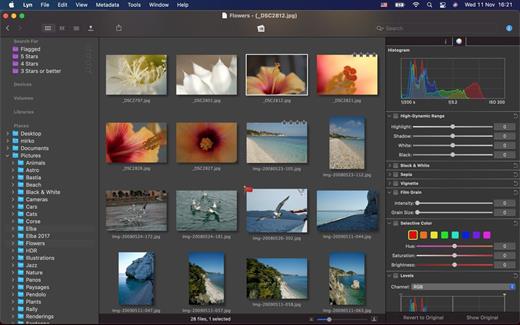
Lyn for macOS is a lightweight, and fast media browser and viewer for designed for Photographers, Graphic Artists and Web Designers.

Featuring an extremely versatile and aesthetically pleasing interface, Lyn delivers an easy to use geotagging technology, image editing and a complete solution for sharing your photographs.

Lyn natively supports all popular image formats from standard formats to HDR and RAW plus any other image format supported by macOS. It also integrates a movie player to watch camera recordings and a simple PDF viewer.

The new editing inspector gives you everything to turn your shots into great photos. Adjust exposure, color temperature, brightness, contrast or reveal image details with highlight and shadow. You change the individual curves and levels, or you can alter colors selectively. You can experiment and convert your color photos to black and white, try a classic sepia tone or add a vignette border or film grain.

Features:


  • Progressive display, on single- or multiple-monitor configurations, of images of virtually any size.
  • Multi-threading to take advantage of multicore CPUs.
  • Display color-corrected images and soft-proofing function.
  • Compatible with High Dynamic-Range images like TIFF float as well as Radiance and OpenEXR.
  • Common metadata parser: EXIF, Camera’s makernote, GPS, GeoTIFF, IPCT.
  • Image navigation with Apple Remote Control or Magic Trackpad.
  • User-switchable thumbnails cache.
  • Filtering by tags and metadata.
  • Fullscreen and slideshow with music.
  • Full IPTC editing with user-defined presets.
  • Batch operations: convert and rename.
  • User-defined places.
  • Non-destructive editing.
  • Editing inspector with filters and effects: temperature and tint, exposure, brightness, contrast, highlight, and shadow. Black and white, sepia tone, and vignette.
  • Easily browse your iPhoto, Aperture, and Lightroom libraries!
  • Facebook, Flickr, Dropbox, SmugMug, 500px, and Picasa Web Albums sharing!
  • Maps layout: geotag your photographs and edit locations with a simple drag and drop.
  • Integrated QuickTime video player
What’s New

Version 2.4.8:


  • Release notes were unavailable when this listing was updated.
Compatibility

macOS 10.11 or later


Release Name: Lyn 2.4.8
Size: 38.7 MB
Links: HOMEPAGE – NFO – Torrent Search

Download: RAPiDGATOR

4 Comments
May 19

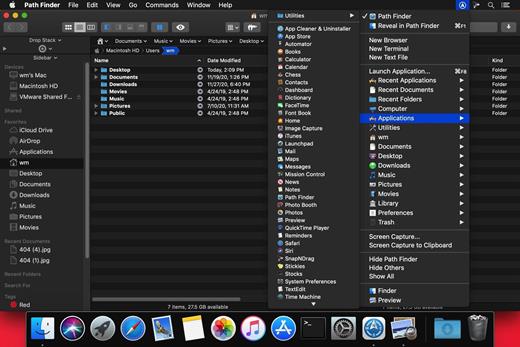
Path Finder 26.1.1

Path Finder makes you a master of file management. Take full control over your file system. Save your time: compare and synchronize folders, view hidden files, use Dual Pane and full keyboard navigation to browse your file system. Work how you want: extreme customization allows you to access most tools in many different ways to suit your workflow. Work seamlessly with other platforms: don’t leave any hidden .DS_Store files on non-Mac volumes, delete files securely and completely with the powerful delete feature from any volume type, search any network volume.

Features


  • View and manipulate hidden files
  • Dual Pane View
  • Full keyboard navigation
  • Folder comparison and synchronization
  • Folder merging
  • Batch renaming
  • Powerful file filtering
  • One-click dual-pane copy
  • Bookmarks and Tab Presets
  • ACL editor
  • File tagging
  • Editable Path Navigator
  • Powerful low-level search
  • Smart sorting
  • Advanced selection
  • Integrated terminal
  • Integrated text and image editors
What’s New

Version 26.1.1:


  • Release notes were unavailable when this listing was updated.
Compatibility

macOS 10.12 or later
Apple Silicon or Intel Core processor


Release Name: Path Finder 26.1.1
Size: 27.3 MB
Links: HOMEPAGE – NFO – Torrent Search

Download: RAPiDGATOR

4 Comments
May 19

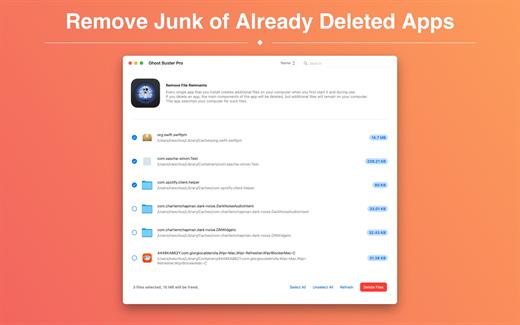
Ghost Buster Pro 5.0.2

Ghost Buster Pro finds and deletes files from apps you’ve already uninstalled. The app is lightning fast and frees memory in no time.

Many apps are installed on a computer, but they usually only stay on your computer for a short time. Each app creates files, but deleting the app does not remove them.
This leads to a large number of files accumulating over time, which take up valuable storage space.
Ghost Buster Pro searches your computer for exactly such files and can also delete them directly if you wish.

Ghost Buster Pro offers the following features:

Fast Search

Ghost Buster Pro quickly scans your computer for data from previously deleted apps. You can have them deleted with one click.

Extremely easy handling

Ghost Buster Pro couldn’t be simpler. The search is started immediately after the app is started. You can now delete files with just one click.

No automatic deletion

Ghost Buster Pro does not delete any data without your consent. Choose for yourself which data is deleted and which you want to keep.

What’s New

Version 5.0.2:


  • Release notes were unavailable when this listing was updated.
Compatibility

macOS 11.5 or later
Apple Silicon or Intel Core processor


Release Name: Ghost Buster Pro 5.0.2
Size: 7.8 MB
Links: HOMEPAGE – NFO – Torrent Search

Download: RAPiDGATOR

3 Comments
May 17

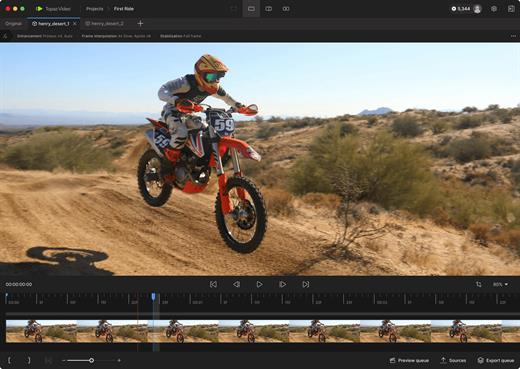
Topaz Video 1.6.0

Topaz Video is a professional AI-powered video enhancement application that transforms noisy, low-resolution, or shaky footage into cinematic-quality video. It combines advanced upscaling, denoising, restoration, stabilization, and frame interpolation models in a single, easy-to-use desktop app designed for modern Mac systems.

Key Features


  • AI Upscaling: Intelligently upscale SD to HD, or HD to 4K/8K with crisp details and reduced artifacts.
  • Motion Interpolation: Convert frame rates (e.g., 24fps to 60fps) for smoother playback or generate silky slow-motion effects.
  • Stabilization: Reduce camera shake and correct motion blur caused by fast movement without the “warping” effects of traditional stabilizers.
  • Deinterlacing: Transform classic interlaced footage into modern progressive formats while preserving image integrity.
What’s New

Version 1.6.0:


  • Release notes were unavailable when this listing was updated.
Compatibility

macOS 10.15 or later


Release Name: Topaz Video 1.6.0
Size: 1.5 GB
Links: HOMEPAGE – NFO – Torrent Search

Download: RAPiDGATOR

5 Comments
May 17

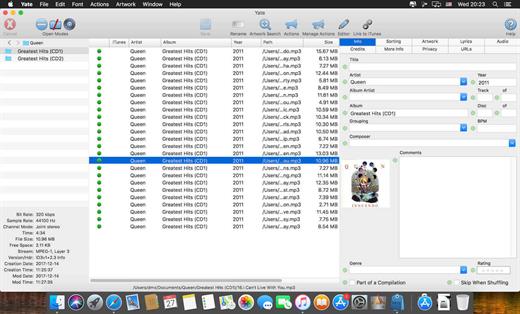
Yate 9.2.0.1

Yate was developed for people who want complete control over their tagging experience. Supports audio in AIFF, APE, DFF, DSF, FLAC, OGG OPUS, OGG VORBIS, M4A, M4B, MP3, MP2, MP4, STEM.MP4, WAV and WV files. Supports video in M4V and MP4.

Yate has a long list of features; most importantly, an innovative scripting system called actions. Actions can be used to update all of an album’s tags with a single operation. Yate also supports integration with AcouticBrainz, AcoustID, Beatport, Discogs, iTunes, MusicBrainz and TMDb. All changes can be easily reverted and individual changes can be undone in any order. Whether you want to automatically or manually tag your files, Yate can do it all!

What’s New

Version 9.2.0.1:


  • Release notes were unavailable when this listing was updated.
Compatibility

macOS 10.10 or later


Release Name: Yate 9.2.0.1
Size: 17.3 MB
Links: HOMEPAGE – NFO – Torrent Search

Download: RAPiDGATOR

6 Comments
May 17

Wondershare PDFelement Pro 12.1.15 (OCR)

Wondershare PDFelement is a self-explanatory OS X application that makes it easier for your to preview, edit, join, split and convert PDF documents using a Mac.
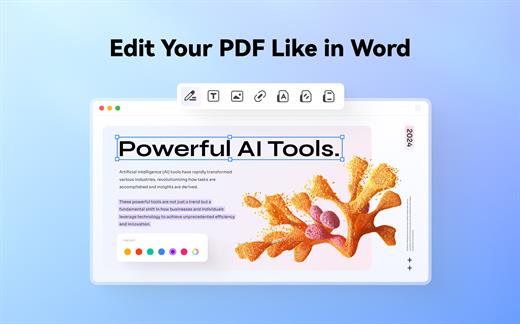
The Wondershare PDFelement also features a simple, clean and intuitive interface that provide instantaneous access to all the tools and features you might need to complete your daily tasks.

Powerful and user-friendly PDF editor for everyday use

Moreover, with Wondershare PDFelement’s help, you can effortlessly edit PDF documents created using text files, web pages or scanned documents.

Consequently, you can add, remove or edit text, move and rearrange pages, insert or remove images and more.

Wondershare PDFelement’s top toolbar helps you hide, show and customize the sidebar in order to display the items and information you are interested in. In addition, you can browse through the loaded document, zoom in or out, print it or email it with just a couple of mouse clicks.

Advanced OCR capabilities make text editing a breeze

Furthermore, you can choose between the “Hand”, “Select” and “Edit” tool, use the advanced OCR feature and convert your source file into plain text or RTF document, ePUB, HTML, as well as file formats compatible with Microsoft Word, Excel, and PowerPoint.

The context menu also helps you switch between the “Move”, “Select” and “Touchup” tool, change the display mode and open the Inspector window to view detailed information about the loaded document.

As an added bonus, by accessing the Document menu, you have the option to add, update or remove an watermark, extract, insert and delete pages, split, merge or convert your document and crop or rotate a page with ease.

Full-featured tool designed to help you stamp, watermark, encrypt and decrypt PDF documents on a Mac

The complete list of all available editing tools, bookmark features, annotation tools and stamp options can be found under the Tools menu.

From here you can easily insert text boxes, add sticky notes, highlight, strike-through and underline text, insert various shapes and use the handy pencil or erase.

On the whole, Wondershare PDFelement comes with the right set of features to help you edit and annotate PDF documents using a Mac, as well as effortlessly add password protect and convert them other formats for easier sharing with your friends and colleagues.

What’s New

Version 12.1.15:


  • Release notes were unavailable when this listing was updated.
Compatibility

macOS 11.0 or later
Apple Silicon or Intel Core processor


Release Name: Wondershare PDFelement Pro 12.1.15 (OCR)
Size: 918.1 MB
Links: HOMEPAGE – NFO – Torrent Search

Download: RAPiDGATOR

6 Comments
May 17

Fork 2.67.0

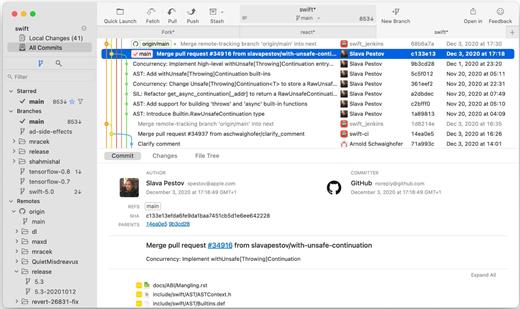
Fast and friendly git client. Fork is getting better and better day after day and we are happy to share our results with you. Commit List – Working Directory Changes – Side by Side Diff – Repository Manager Summary and Statistics

Basic features: Fetch, pull, push | Commit, amend | Create and delete branches and tags | Create and delete remote repos | Checkout branch or revision | Cherry-pick, revert | Merge, rebase | Stashes | Submodules

Work with repository: Create, clone or add existing repos | Open recent repository quickly

Commit view: Stage / unstage changes line-by-line | Access to recent commit messages

More features: Browse the repository file tree at any commit | Intuitive merge conflict resolving | See your stashes right in the commit list

What’s New

Version 2.67.0:


  • Release notes were unavailable when this listing was updated.
Compatibility

macOS 10.13 or later


Release Name: Fork 2.67.0
Size: 44.8 MB
Links: HOMEPAGE – NFO – Torrent Search

Download: RAPiDGATOR

4 Comments