Please REGISTER or RENEW your account on RAPiDGATOR.net and support us by doing through all RAPiDGATOR working download links on main posts...
May 15

Affinity 3.2.1

An app that adapts to you, not the other way around. Affinity comes with built-in Vector, Pixel, and Layout studios, but you’re not locked in. Rearrange panels and mix and match your favorite tools to build custom studios. You can save multiple setups, switch between them in a click, and even share with others or download theirs.
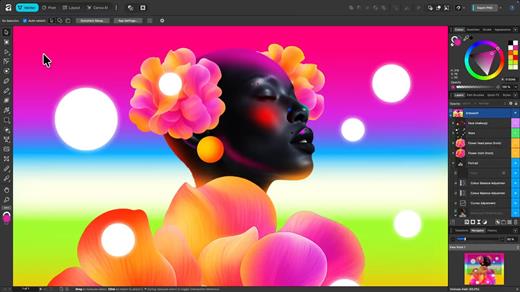
It’s customization that flexes to your workflow.

Powerful tools. Easy to learn.

Learn by doing with step-by-step lessons, templates, and real-world examples.

Enrich your designs with tailored content

Make your designs stand out with world-class photos, graphics, videos, audio, fonts, charts, and more. Explore our vast content libraries featuring top brands like Disney, Artlist, and pocstock.

Design with others

Canva makes collaboration easy. Tag teammates in comments and assign tasks on Docs, Presentations, Whiteboards, and more. Canva empowers businesses of all sizes to stay organized and reach your goals faster.

Design and print in one place

Turn your memories into photo albums, your designs into T-shirts, and your branding into business cards, flyers or invites. Get all your printing done right here with free delivery to your doorstep.

Plans that get down to business

Empower your whole team or business to design together with one of our workplace plans

AI-powered efficiency

Leverage AI to create on-brand copy, templates and video-editing.

Bring your brand in house

Set up Brand Kits and templates for your team to design with.

Beautiful approval flows

Easily control individual permissions, assign tasks and share your work.

What’s New

Version 3.2.1:


  • Release notes were unavailable when this listing was updated.
Compatibility

macOS 10.15 or later


Release Name: Affinity 3.2.1
Size: 974.8 MB
Links: HOMEPAGE – NFO – Torrent Search

Download: RAPiDGATOR

6 Comments
May 15

SiteSucker Pro 6.1.7

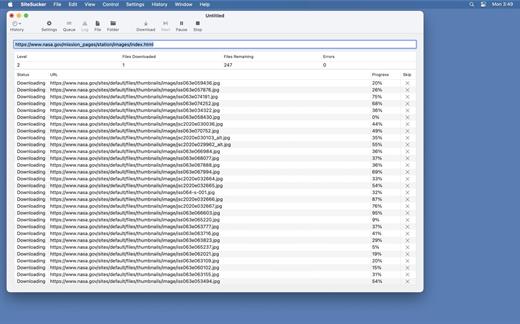
SiteSucker Pro is an application that automatically downloads Web sites from the Internet. It does this by copying the site’s HTML documents, images, backgrounds, movies, and other files to your local hard drive. Just enter a URL and click a button and SiteSucker can download the entire site.

SiteSucker can be used to make local copies of your Web sites for easy maintenance. SiteSucker can download files unmodified, or it can “localize” the files it downloads, allowing you to browse a site off-line.

What’s New

Version 6.1.7:


  • Release notes were unavailable when this listing was updated.
Compatibility

macOS 11.0 or later.


Release Name: SiteSucker Pro 6.1.7
Size: 7.7 MB
Links: HOMEPAGE – NFO – Torrent Search

Download: RAPiDGATOR
5 Comments
May 15

Path Finder 26.1.0

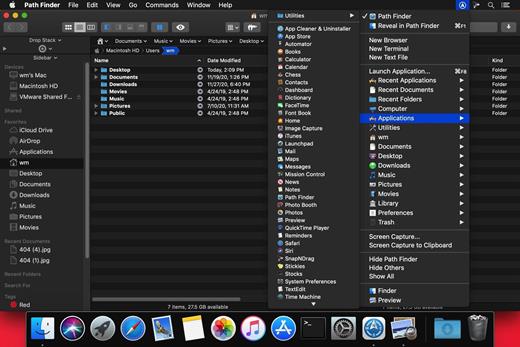
Path Finder makes you a master of file management. Take full control over your file system. Save your time: compare and synchronize folders, view hidden files, use Dual Pane and full keyboard navigation to browse your file system. Work how you want: extreme customization allows you to access most tools in many different ways to suit your workflow. Work seamlessly with other platforms: don’t leave any hidden .DS_Store files on non-Mac volumes, delete files securely and completely with the powerful delete feature from any volume type, search any network volume.

Features


  • View and manipulate hidden files
  • Dual Pane View
  • Full keyboard navigation
  • Folder comparison and synchronization
  • Folder merging
  • Batch renaming
  • Powerful file filtering
  • One-click dual-pane copy
  • Bookmarks and Tab Presets
  • ACL editor
  • File tagging
  • Editable Path Navigator
  • Powerful low-level search
  • Smart sorting
  • Advanced selection
  • Integrated terminal
  • Integrated text and image editors
What’s New

Version 26.1.0:


  • Release notes were unavailable when this listing was updated.
Compatibility

macOS 10.12 or later
Apple Silicon or Intel Core processor


Release Name: Path Finder 26.1.0
Size: 27.4 MB
Links: HOMEPAGE – NFO – Torrent Search

Download: RAPiDGATOR

6 Comments
May 15

macOS Tahoe 26.5.0 (25F71)

macOS Tahoe 26 is the next major version of the macOS operating system, unveiled by Apple on June 9, 2025 at WWDC.

Named after Lake Tahoe, located on the California-Nevada border, it continues the tradition of naming macOS after iconic California locations.

The focus of macOS Tahoe is on a new design, improved integration with other Apple devices, and enhanced Apple Intelligence capabilities.

Key features of macOS Tahoe:

Liquid Glass design:


  • A completely redesigned interface using the new Liquid Glass visual language inspired by visionOS (Apple’s Vision Pro operating system). Interface elements such as menus, toolbars, and the dock have become translucent, creating the effect of glass reflecting and refracting light.
  • Fully transparent menu bar that visually expands the workspace.
  • Updated app icons unified with iOS and iPadOS, with support for light, dark, and color options, as well as a new transparent style.
Apple Intelligence:

  • Advanced artificial intelligence features, including Live Translation to automatically translate messages and subtitles in FaceTime.
  • Genmoji and Image Playground updates: Users can create new emoji by combining existing ones, and generate images in styles such as oil painting or vector graphics.
  • Improved reminders: Apple Intelligence analyzes emails, notes, and web pages, automatically categorizing tasks.
Improved Continuity integration:

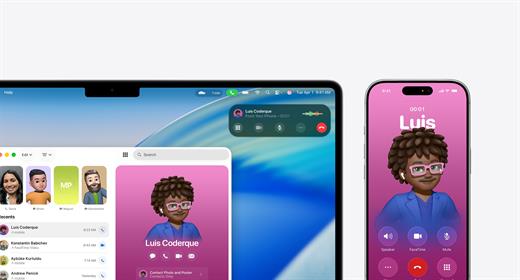
  • The Phone app is now available on Mac, allowing you to take calls, view contacts, view voicemail, and use features like Call Screening and Hold Assist.
  • Live Activities support with iPhone: notifications such as shipping or travel status are displayed in the Mac menu bar.
    iPhone Mirroring lets you launch iPhone apps directly on your Mac via Spotlight.
Updated Spotlight:

  • Significantly improved search engine that now not only searches for files and apps, but also performs actions such as creating events, starting podcasts, or sending messages.
  • Support for customizable quick commands (like “sm” to send a message or “ar” to add a reminder).
    Integration with cloud services and the ability to search PDFs and other documents.
New apps and features:

  • Games app with a catalog of installed games, support for chat, invitations, and an overlay for settings while playing.
  • The Journal app is now available on Mac.
  • Safari improvements: updated tab design and song lyrics translation in Apple Music.
  • Removal of Launchpad, replaced by an “Apps” feature integrated into Spotlight, similar to App Library in iOS.
Accessibility:

  • New features such as Magnifier (using the iPhone camera to zoom in), Braille support, and Vehicle Motion Cues to reduce motion sickness.
  • Accessibility Nutrition Labels in the App Store that display information about supported accessibility features.
New numbering:

  • Apple switched to a unified numbering system where all operating systems (iOS, iPadOS, macOS, etc.) got version 26, which corresponds to the year after the announcement (2025-2026). macOS still retains its unique name, Tahoe.
What’s New

Version 26.4.1:


  • Release notes were unavailable when this listing was updated.
Compatibility

macOS 14.0 or later


Release Name: macOS Tahoe 26.5.0 (25F71)
Size: 17.1 GB
Links: HOMEPAGE – NFO – Torrent Search

Download: RAPiDGATOR
2 Comments
May 15

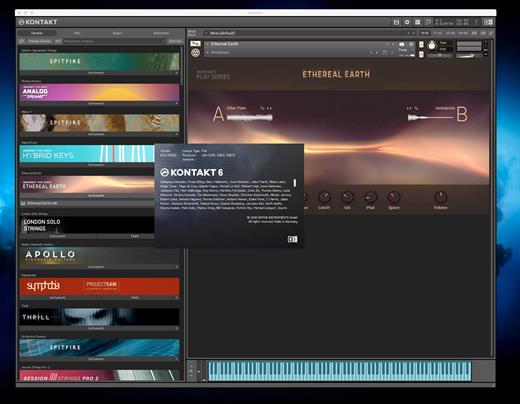
KONTAKT 8.10.2

KONTAKT 8 The virtual instrument platform reinvented.
Imagine any sound – Kontakt lets you find it, create it, and transform it. The latest edition of our revolutionary sampling platform combines a brand-new set of intelligent tools with countless sound design options, redefining how you generate ideas and make music. A huge choice of sound. Kontakt hosts the world’s largest range of virtual instruments. With thousands of libraries, it’s the gateway to quality sound from Native Instruments, our official partners, and scores of indie developers. Plus, everything is completely tweakable, so you can make any sound your own.

A huge choice of sound

Kontakt hosts the world’s largest range of virtual instruments. With thousands of libraries, it’s the gateway to quality sound from Native Instruments, our official partners, and scores of indie developers. Plus, everything is completely tweakable, so you can make any sound your own.

What’s new in Kontakt 8?

Our most feature-packed release yet is here to transform the way you generate, modulate, and playback sound. Plus, it’s packed with performance updates so you can work faster than ever.

Smash writer’s block

Tools add a completely new layer of creative features to get the ideas flowing. And they work with any Kontakt instrument, old and new. For our first drop, we’re launching MIDI content and randomization features with Chords and Phrases, designed to spark new ideas and get you in the zone fast.

Fast and fun loop control

Leap is an ultra-fast and playful way to play and manipulate loops. Spark fresh ideas, sprinkle in expressive performance effects, or just jam. Breathe new life into your sample collection or try something totally fresh with our new Leap Expansions series, starting with 12 curated packs for specific genres and styles.

Get going with hundreds of included instruments

Kontakt’s Factory Library comes packed with over hundreds of meticulously sampled instruments. Get started with a huge playable and tweakable selection of acoustic and electronic options, including the renowned collection from Orchestral Tools, plus Hybrid Keys.

Dream it, build it

All your favorite Kontakt instruments are built right here. The powerful feature set makes Kontakt the first choice for instrument developers worldwide, and it just got even bigger with enhanced synth capabilities, including real-time wavetable, frequency modulation, and ring modulation oscillators.

What’s New

Version 8.10.2:


  • Release notes were unavailable when this listing was updated.
Compatibility

macOS 13.0 or later


Release Name: KONTAKT 8.10.2
Size: 1.7 GB
Links: HOMEPAGE – NFO – Torrent Search

Download: RAPiDGATOR

4 Comments
May 15

File Cabinet Pro 8.8.3

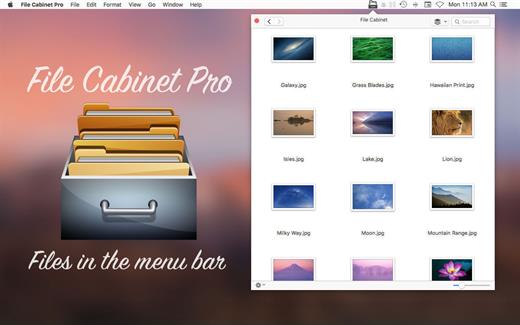
File Cabinet Pro is the file manager for the macOS menu bar. Quickly navigate to files without cluttering your desktop. Open, move, rename, compress, tag, trash, copy and paste files, all from the menu bar. You can open many file types natively in File Cabinet Pro or open files by launching other applications. It’s easy to click into directories in icon view, drill through directories in list view, or navigate the file tree in column view.

File Cabinet Pro is also a document-based application that ships with a built-in text editor, image viewer, pdf viewer, and media player. Some of the file types File Cabinet Pro can open for editing/viewing include::


  • Text documents: Plain text files (.txt), Rich Text Format (.rtf), Rich Text Format Directory (.rtfd), Portable Document Format (.pdf), Markdown (.md)
  • Image documents: Portable Network Graphics (.png), Joint Photographic Experts Group (.jpeg), Tagged Image File Format (.tiff, .tif), Bitmap image file (.bmp), Photoshop File Format (.psd) Import only., Scalable Vector Graphics (.svg) Import only
  • Video and audio documents: MOV, MP4, M4A, M4V, AVI, MP3, WAV, CAF, AIF
Features

  • Create subdirectories
  • Click into subdirectories and open documents
  • Set a “Primary” and “Secondary” directory button for the bottom bar to get an innovative drag and drop experience; drag files to these buttons in the bottom bar to bring up a popover window
  • Tag files easily. Select files in File Cabinet Pro, right click, and then simply add or remove file tags from the control in the context menu
  • Show selected files in Finder
  • Rename files
  • Copy and paste files
  • Compress files
  • Trash files
  • View items as icons, in a list, in columns, or in cover flow view
  • Launch the application at login. You can have File Cabinet Pro automatically launch when you login to your Mac (optional feature, disabled by default)
  • Create a list of all your favorite directories in the sidebar
  • Create and edit txt, rtf, and rtfd files using the built in lightweight text editor
  • Rotate images, crop images, and apply filters to images using the built in lightweight image editor
  • Watch video and play audio files using the built in media player
  • View PDF files using the built in PDF viewer
  • Revert document versions for supported editable document types
  • Set a Global Hotkey for showing and closing the File Cabinet Pro window (optional feature, disabled by default)
  • Preview selected files in Quicklook by pressing the spacebar
  • Share files in apps that support Sharing extensions like Mail and Messages
  • Create text documents from Finder using File Cabinet Pro’s Document Creator Finder extension (Note: To use this feature, you have to enable the Finder extension in System Preferences under the “Extensions” tab)
What’s New

Version 8.8.3:


  • Release notes were unavailable when this listing was updated.
Compatibility

macOS 10.13 or later


Release Name: File Cabinet Pro 8.8.3
Size: 21.1 MB
Links: HOMEPAGE – NFO – Torrent Search

Download: RAPiDGATOR
6 Comments
May 15

App Cleaner & Uninstaller Pro 9.2.0

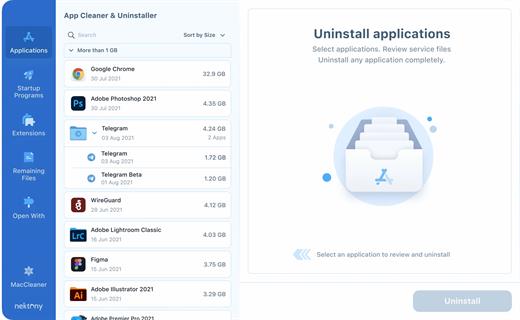
App Cleaner & Uninstaller (was App Cleaner) can remove applications and their service files on macOS. Make sure they aren’t eating up precious space on your drive with this helpful app that does the legwork for you.

Features


  • Scan the system and preview installed applications
  • Remove all types of service files
  • Remove remains of previously uninstalled apps
  • Reset application to a first-launch state
  • Easy-to-use shortcuts
  • Any file or app quick preview
  • Specific app-associated file formats preview
  • In-app help assistance
  • Show unused applications
  • Skip list option
What’s New

Version 9.2.0:


  • Release notes were unavailable when this listing was updated.
Compatibility

macOS 10.13 or later


Release Name: App Cleaner & Uninstaller Pro 9.2.0
Size: 42.2 MB
Links: HOMEPAGE – NFO – Torrent Search

Download: RAPiDGATOR

7 Comments
May 15

Microsoft Office 2024 v16.109

Office LTSC 2024 offers a locked-in-time version of familiar productivity tools, updated with a subset of the features that have been added to Microsoft 365 Apps for enterprise over the last three years. New features for this release include Dynamic Charts and more than a dozen new text and array functions in Excel, enhanced search and meeting creation options in Outlook, and improvements to performance, security, and accessibility.

That same Office, especially for Mac

The new, modern versions of Word, Excel, PowerPoint, Outlook, OneNote, and OneDrive for Mac feature a familiar interface and the unique, beloved features of a Mac, so you can get started quickly.

Microsoft Word

Word is a robust application that lets you create, edit, view, and share text documents (even email attachments). It’s ideal for anyone who works with documents: bloggers, writers, journalists, reviewers, students, or project managers.

Microsoft Excel

The powerful Excel application makes it quick and easy to create, view, edit, and share spreadsheet files. New charts and Ideas provide visualization of data and trends. No matter where you are, you can confidently use this application to collaborate in accounting, auditing, or finance.

Microsoft PowerPoint

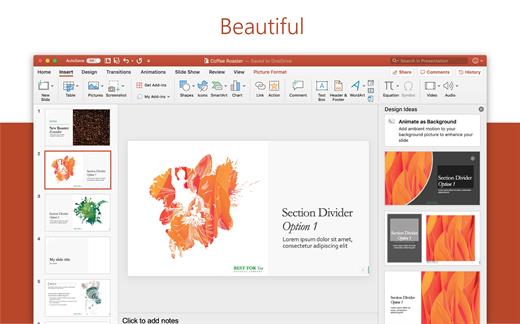
PowerPoint is the smart app you know and love that helps you communicate your ideas vividly and visually with beautiful layouts, animations, moving camera effects, 3D models, and icons. Save time and create engaging presentations that are up-to-date with the latest trends.

Microsoft Outlook

With Outlook, you have all your email accounts and calendars at your fingertips. Manage your messages and plan in detail—it has everything you need to organize your workflow efficiently.

Microsoft OneNote

Whether you need to streamline the tedious planning process or quickly jot down a brilliant idea, OneNote, your digital notebook, is your go-to. It’s indispensable when you need to prepare for a big event or when you need to make sure you don’t miss any important tasks that you can’t trust to someone else.

Microsoft OneDrive

OneDrive keeps all your Microsoft 365 files at your fingertips. Share and collaborate in real time across Word, Excel, and PowerPoint on your desktop, web, and mobile — all conveniently and securely

Note: If it doesn’t work, uninstall the old version of Office completely and reinstall it. For uninstallation method, please use Google search.

What’s New

Version 16.109:


  • Release notes were unavailable when this listing was updated.
Compatibility

macOS 12.0 or later


Release Name: Microsoft Office 2024 v16.109
Size: 3.1 GB
Links: HOMEPAGE – NFO – Torrent Search

Download: RAPiDGATOR
3 Comments
May 15

Paste 6.5.1

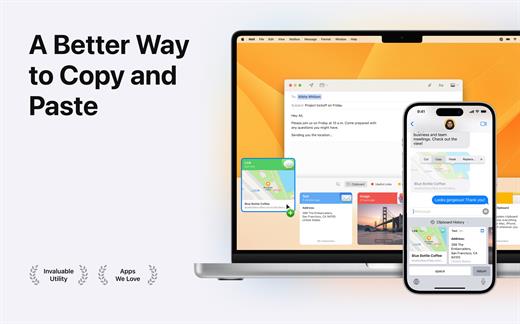
Paste is a new way to copy and paste. It keeps everything you’ve ever copied, and lets you use your clipboard history anytime you need it across all your devices. It recognizes and stores text, images, links, files, and any other type of content, and generates informative previews for easy browsing.

Paste works in the background and tightly integrates into your system and your workflow. An intuitive user interface and improved user experience allows you to focus on your core tasks and not on the application itself.

Features


  • Extends your clipboard history capacity up to unlimited
  • Pinboards and favorite snippets
  • iCloud sync across all your devices running Paste
  • History management, rules and exceptions
  • Intelligent search with flexible filters
  • Select and paste multiple items simultaneously
  • Drag-and-drop multiple items to any application
  • Paste plain or rich text
  • Send clipboard history to other devices via AirDrop or share with your friends
Note:

iCloud not available, It might ask for subscription on the first launch, just ignore and close the window.

xattr -cr /Applications/Paste.app

What’s New

Version 6.5.1:


  • Release notes were unavailable when this listing was updated.
Compatibility

macOS 13.0 or later.


Release Name: Paste 6.5.1
Size: 21.2 MB
Links: HOMEPAGE – NFO – Torrent Search

Download: RAPiDGATOR
7 Comments
May 15

Color Folder Pro 5.3

Color Folder can help you to change the icon of folder quickly, and to manage folders more efficiently

「Main Features」


  • quickly change folder icon color
  • Select any picture to set as folder icon
  • support changing multiple folder icons at the same time
  • save as Icon
  • provide a variety of icon templates (over 700+)
  • support any color to modify folder icons
What’s New

Version 5.3:


  • Release notes were unavailable when this listing was updated.
Compatibility

macOS 10.10 or later


Release Name: Color Folder Pro 5.3
Size: 23.1 MB
Links: HOMEPAGE – NFO – Torrent Search

Download: RAPiDGATOR
5 Comments