Please REGISTER or RENEW your account on RAPiDGATOR.net and support us by doing through all RAPiDGATOR working download links on main posts...
Aug 29

Ableton Live Suite 12.4.5

Description: Live is fast, fluid and flexible software for music creation and performance. It comes with effects, instruments, sounds and all kinds of creative features—everything you need to make any kind of music.

Create in a traditional linear arrangement, or improvise without the constraints of a timeline in Live’s Session View. Move freely between musical elements and play with ideas, without stopping the music and without breaking your flow.

New features and updates in Live 12
Play freely with ideas
MIDI Transformations
Create a variety of simple or complex variations to your MIDI clips: add ornaments and articulations, draw acceleration and deceleration curves, connect successive notes and chords, or simulate the strum of a guitar.

MIDI Generators
Conjure up melodies, chords and rhythms with new MIDI Generators. Give your chosen Generator custom constraints, watch it create playful and original patterns, and then turn the ideas it produces into your own.

Max for Live MIDI Tools
Max now facilitates even greater experimentation, letting you create new MIDI Transformations and Generators – either based on existing ones, or your own creations.

MIDI Editing Improvements
Arrange the order of a selection of notes by pitch, velocity or duration. Stretch, split, chop or join notes in new ways; shape the velocity of notes; transpose them into a scale; or add intervals chromatically or in key.

Keys and Scales
Set the selected clip’s scale in Live’s Control Bar to see its notes in any clip you create. Then edit the clip using scale highlighting as a guide, use the clip scale to transform and generate musical ideas, or sync the scale of MIDI devices and instruments to the clip being played. Any changes in Live will be reflected in Push, and vice versa.

Expanded probability
Assign a single probability rule to a group of notes so that the entire group of notes is played whenever the trigger is fired. Or select a chord and tell Live to randomly play one note from it whenever the probability trigger is fired.

Embrace and explore tunings
Follow your preferred tuning systems or try different ones more easily. Work outside the 12-tone equal temperament system, and access tunings with Live’s devices as well as any MPE-capable plugin.

Surprise yourself with the sounds you create
Meld
A bi-timbral, MPE-capable instrument designed for deep sound shaping that lets you create a wide array of textural and experimental tones with its two easy-to-use macro oscillators.

Granulator III
The latest iteration of Robert Henke’s granular instrument now has MPE capability, giving you expressive control over parameters like note bend, vibrato and glissando. Plus, you can now capture audio in real time and start manipulating it immediately.

Roar
Create everything from subtle and precise mastering-grade warmth to wild and unpredictable sound degradation with Live’s new coloring and saturation effect. Roar’s three saturation stages can be used in series, parallel, or even in mid/side and multiband configurations – and it comes equipped with a feedback generator and an extensive modulation matrix.

New Modulation Behavior
Modulation destinations are no longer taken over by the modulation source. This means you can still adjust the parameter being modulated, even after assigning an LFO or other modulation source to it, opening up faster workflows, more possibilities for performance and continuous real-time control of parameters.

New Packs
Lost and Found – A collection of sounds fashioned from unusual materials, percussive trinkets, unique foley recordings and expressive objects to infuse your productions with character and authenticity. Dig deep and create layers of decorative, expressive instruments, playful Drum Racks and rich sound effects.

Performance Pack – A set of innovative devices from Iftah that push the boundaries of performing with Live. Capture snapshots of your sets and deploy them later, control multiple parameters with layered macros and curves, extend performances with looping in Arrangement View and pre-arrange the structure of a performance before you have even recorded it.

Work more intuitively
Stacked Detail Views
View your devices and the Clip Editor, or automation and device parameters, at the same time – so you can work without the distraction of switching between views.

View styling
Live 12’s cleaner, more minimal look removes visual complexity and keeps the focus on your music.

Mixer in Arrangement
Live’s Mixer, previously available only in Session View, can now be used in Arrangement View. Toggle it on or off with Mixer View Control located in the bottom right corner or via the View menu, and configure it independently of the Arrangement Mixer.

Mixer improvements
Live’s Mixer also comes with visual improvements that make it more accurate for detailed mixing decisions, and easier to read and control.

Browser Tagging and Filtered Searches
Search for your sounds in the Browser without the constraints of Live's built-in categorization. That means when you search for bass sounds, you'll see all the bass sounds in your Ableton library, whether they're samples or instrument presets.

Live 12's sound content is also tagged using a new system that acts as a more flexible alternative or addition to Collections in the sidebar. Sounds now come with sensible labels to make them easier to find – but if you need more detail, or just want to use your own method of labeling, you can also add your own.

Aside from Live 12's built-in tags, you can create your own custom categories in the sidebar for easy access to all your favorite sounds and devices in the way that makes the most sense to your workflow.

Sound Similarity Search
Start with a sample and tell Live’s browser to find comparable sounds and instrument presets, with the help of a neural network.

Or swap all the samples in your Drum Rack for similar ones to quickly try out new percussive textures – like a drum machine with seemingly-infinite kits.

Browser History
Retrace your steps, and see and hear the sounds or categories you've previously searched for: Live's Browser now lets you backtrack through your search history as you would with a web browser.

Accessibility and navigation improvements
Control core workflows in Live 12 using assistive technologies like screen readers, and use new keyboard shortcuts to navigate to nearly every part of Live.

New Themes
Choose new themes and adjust them with cool, neutral or warm tones and even a high contrast mode.

Release Name: Ableton Live Suite 12.4.5
Size: 6.5 GB
Links: HOMEPAGE – NFO – Torrent Search

Download: RAPiDGATOR

1 Comments
Aug 29

Adobe InCopy 2026 21.5.1

Description: Collaborate with copywriters and editors. InCopy lets copywriters and editors style text, track changes, and make simple layout modifications to a document while designers work on the same document simultaneously in Adobe InDesign - all without overwriting each other’s contributions.

Features:
- Endnote support
- Add paragraph borders
- Find similar fonts
- Advanced font filtering
- Footnotes that span columns
- Open Type enhancements
- Modern user interface
- Work with glyphs easily
- Place images into tables
- Simple application of shading to text; includes controls for offsets and more
- Place Gun for adding borders to tables
- New Find Previous command
- Shortcuts and preferences memory
- Footnote enhancements that respect text wrap
- Color swatch folders for swatch management
- Drag-and-drop table editing
- HiDPI and Retina display support in Windows
- Adobe Typekit integration
- Typekit font syncing
- Quick font searching
- Convenient hyperlink creation
- Different page views when editing
- Enhanced copyfitting
- Save to Cloud command lets you access files on any device
- View recently used fonts
- Middle Eastern language support

Release Name: Adobe InCopy 2026 21.5.1
Size: 1.5 GB
Links: HOMEPAGE – NFO – Torrent Search

Download: RAPiDGATOR
2 Comments
Aug 29

Adobe Lightroom Classic 2026 v15.5.1 (x64) + Fix

Description: Edit and organize your photos with the app that’s optimized for desktop. Lightroom Classic gives you powerful one-click tools and advanced controls to make your photos look amazing. Easily organize all your photos on your desktop, and share in a variety of ways.

Your best shots. Made even better.
Your photos don’t always reflect the scene the way you remember it. But with Lightroom Classic, you have all the desktop editing tools you need to bring out the best in your photographs. Punch up colors, make dull-looking shots vibrant, remove distracting objects, and straighten skewed shots. Plus, the latest release offers improved performance so you can work faster than ever.

- With better performance under the hood, Lightroom Classic lets you import photos, generate previews, and move from Library to Develop Module in record time.
- Use range masking tools to easily select the areas or objects you want to edit based on their color, luminance, or depth.
- Create HDR panos faster now that you can merge multiple bracketed exposures into multiple HDR photos and then stitch them into a panorama — all in one step.

The future of photography. Here today. Get to know Lightroom.
Go beyond the desktop and edit, organize, store, and share from anywhere with the cloud-based Lightroom photo service

- Store and access your full-resolution photos in the cloud
- Find photos on any device fast with auto tagging
- Edit from any device using an intuitive, streamlined interface

Accelerate image-editing with GPU support
Use the GPU of your system to enhance image-editing experience.

Organize your collections with color labels
Color labels can be added for collections, collections sets, and smart collections.

Support for new cameras and lenses
Adds support for new cameras and lens profiles.

Other enhancements
Find information about PNG export, batch merge for HDR and panoramas, and other new enhancements in this release.

Release Name: Adobe Lightroom Classic 2026 v15.5.1 (x64) + Fix
Size: 3 GB
Links: HOMEPAGE – NFO – Torrent Search

Download: RAPiDGATOR

2 Comments
Aug 29

Adobe Lightroom v9.5.1 (x64) + Fix

Description: Photo editing made for everyone. Lightroom makes it easy to get your images just right. Edit from anywhere you are and take your photography to new places.

Make your images match the moment.
Easy ways to adjust exposure, color, and more let you create photos that capture your vision.

Editing made easy.
Wherever you are, Lightroom lets you make basic edits to brightness, contrast, and more — so you’ve got the perfect shots to share with friends and family.

Preset it and perfect it.
For a consistent look and feel, let Lightroom do the work with presets. Apply filters in a click with premium presets for every style — and add presets to specific areas of your photo for more focused edits.

Edit from anywhere.
Pick up where you left off with Lightroom on mobile, desktop, or web — your projects will sync automatically so you’re always looking at your latest edits.

Level up your skills.
Experience informative step-by-step tutorials right inside Lightroom, and find even more inspiration from the community in Lightroom Discover.

Get down to the last detail.
Fine-tune your photos with maximum control and precision when you edit with Lightroom for desktop.

Instant removal of unwanted objects
New Content-Aware Remove lets you erase anything in seconds. Select an object or blemish and Lightroom will automatically blend it away.

Editing while comparing views
Now you can edit one photo while reviewing another to match edits or compare the two.

More precise ways to edit people
Select People instantly detects the people in your image so you can quickly make edits to facial features, clothing, and more.

Video editing in Lightroom
Trim and edit video clips using your favorite sliders and presets — and give your work a cohesive look and feel.

Ways to remix and share
Put a new spin on images from fellow photographers and inspire others with your edits.

Release Name: Adobe Lightroom v9.5.1 (x64) + Fix
Size: 2.4 GB
Links: HOMEPAGE – NFO – Torrent Search

Download: RAPiDGATOR

3 Comments
Aug 29

AI Video to SRT v1.1.5 Pre-Cracked

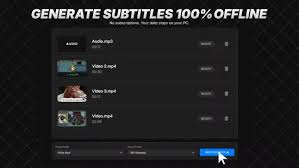
Description: Generate accurate subtitles instantly and offline. VideoToSRT uses advanced local AI to convert video and audio files into SRT, VTT, and TXT formats. No cloud uploads, no subscriptions, and total privacy for your content.

Features
- Offline AI Transcription using AI technology.
- Batch Queue for processing multiple files sequentially.
- NVIDIA GPU Acceleration for lightning-fast speeds.
- Supports MP4, MOV, MKV, MP3, WAV, and M4A inputs.
- Export to standard .SRT, .VTT, and .TXT formats.
- "TikTok Style" preset for word-by-word dynamic captions.
- Profanity Filter to automatically censor transcriptions.
- Light and Dark Mode UI.

System Requirements
- OS: Windows 10 version 14316.0 or higher
- Memory: 4 GB (Minimum), 16 GB (Recommended)
- Processor: Intel Core i5 or AMD Ryzen 5 (Minimum), Intel Core i7 or AMD Ryzen 7 (Recommended)
- Graphics Processor: Integrated (Minimum), NVIDIA GTX 1060 (Recommended)

Microsoft Store - Full Version

Release Name: AI Video to SRT v1.1.5 Pre-Cracked
Size: 1.5 GB
Links: HOMEPAGE – NFO – Torrent Search

Download: RAPiDGATOR

2 Comments
Aug 29

Lucion FileCenter Suite 12.5.39

Description: FileCenter turns your Windows desktop into a document editing and management machine. Convert paper documents into searchable PDFs, edit them, and store them in a consistent folder structure for later. Best of all, you can retrieve any document with a simple find & search.

Easy Document Management, Scanning and PDF Software
Now all of your files, digital and paper, come together. Introducing FileCenter – your fastest path to file productivity. Priced for home users and businesses alike. Invoices or receipts, contracts or quality control documents, financial statements or medical records and estate plans … FileCenter fills the void with a fully-featured solution.

Save Time & Money with the
#1 Desktop Productivity Tool
The tasks you struggle with are about to become a pleasure. FileCenter is the productivity solution that's so friendly and approachable, it feels like it drives itself.

An intuitive filing system
Introducing electronic filing cabinets. No complex databases, just regular Window

One-click scanning and OCR
Automatically scan and name documents in just a couple of mouse clicks. Scanning doesn't get any easier.

Easy to install, learn & use
Get set up and running in a few minutes. Or reach our installation experts anytime.

PDF editor
Create PDFs from any file, edit and annotate your PDFs, cut them apart or splice them together.

Seamless integration
No need to abandon the programs you love. FileCenter plays nice.

Optional Cloud access
SharePoint, OneDrive, Google Drive, DropBox, and more.

Smart 'e-filing' system
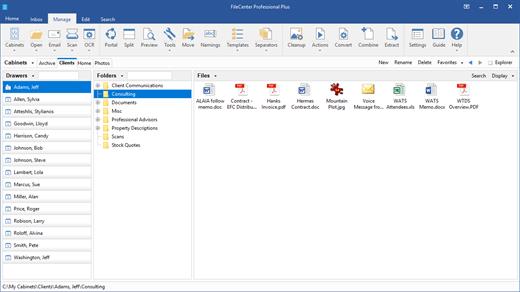
FileCenter's e-file cabinets "overlay" regular Windows directories, so you can view your existing files without importing them. Organize your files, scan your paper documents, edit your PDFs, and search your archives from one clean, simple interface.

Works with any file
Save files directly into your file cabinets from most of your programs, as part of your usual workflow – no importing necessary. Then open them again from FileCenter in your favorite applications. This integration can be enabled/disabled on a program-by-program basis.

Find documents easily
Type a query, search everything, or limit your search to a specific cabinet, drawer or folder. Find the documents you need fast, no matter how deeply they're buried in your cabinets.

Release Name: Lucion FileCenter Suite 12.5.39
Size: 351.3 MB
Links: HOMEPAGE – NFO – Torrent Search

Download: RAPiDGATOR
4 Comments
Aug 29

Microsoft Office Professional Plus 2021-2024 VL v2608 Build 20326.20112

Description: Microsoft has officially announced the availability of the final version of its Office 2024 release for Windows and Mac users. Following the release of the preview version in the first half of this year, the product has been refined and is now available to users. Office 2024 includes updated versions of apps from the suite, Word, Excel, PowerPoint, Outlook, Access, and Publisher.

Office 2024 includes virtually every change that has been added to the suite of programs in Office 365 over the past 3 years, although some features remain exclusive to subscribers. In addition to the main programs Word, Excel, PowerPoint, and Outlook, which are available for both Windows and macOS, the Access and Publisher versions are only available for Windows and are included, as usual, only in premiums. Visio and Project for Windows are also available, although they are not part of the ongoing release of Office.

Microsoft Office 2021-2024 includes
Microsoft Office 2021-2024 Professional Plus
Microsoft Access 2021-2024
Microsoft Excel 2021-2024
Microsoft Lync 2021-2024
Microsoft OneNote 2021-2024
Microsoft Outlook 2021-2024
Microsoft PowerPoint 2021-2024
Microsoft Publisher 2021-2024
Microsoft Visio Viewer 2021-2024
Microsoft Word 2021-2024
Microsoft Visio pro 2021-2024
Microsoft Project 2021-2024
Skype for business 2021-2024
OneDrive for Business 2021-2024
Office Shared Features
Profing Tools Only 2021-2024
And many more

Release Name: Microsoft Office Professional Plus 2021-2024 VL v2608 Build 20326.20112
Size: 7 GB
Links: HOMEPAGE – NFO – Torrent Search

Download: RAPiDGATOR

5 Comments
Aug 29

Boxy SVG 4.112.0

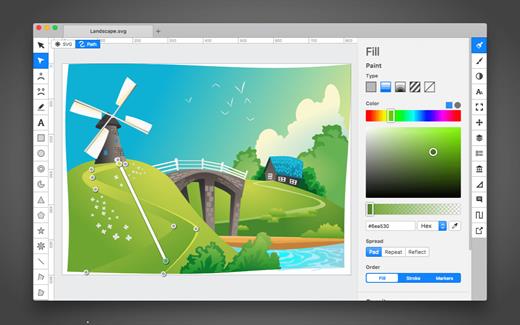
SVG is the standard format for storing vector graphics such as icons, banners, charts and illustrations.

Boxy SVG project goal is to create the best SVG editor for non-technical users as well as for professional designers and developers.

CORE FEATURES

• Clean and intuitive UI heavily inspired by Inkscape, Sketch and Adobe Illustrator
• Extensive support for on-canvas editing of object geometry, transform, paint and other properties
• Save to SVG and SVGZ formats, export to PNG, JPG, WebP, PDF and HTML5
• Open Clip Art Library integration with thousands of free stock vector arts
• Google Fonts integration with hundreds of free fonts
• Configurable keyboard shortcuts for over 100 commands
• Manual guides, smart guides and grid
• Path operations (unite, intersect, subtract, exclude, close, reverse, etc.)
• Arrangement operations (align to, rotate, flip, order, group, etc.)

FOR WEB DEVELOPERS

• Chromium-based rendering engine
• SVG and CSS code inspector similar to Chrome Dev Tools
• Clean SVG output that preserves IDs, classes, titles and other metadata
• SVG sprites editing support

What’s New

Version 4.112.0:


  • Release notes were unavailable when this listing was updated.
Compatibility

macOS 10.15 or later


Release Name: Boxy SVG 4.112.0
Size: 231.3 MB
Links: HOMEPAGE – NFO – Torrent Search

Download: RAPiDGATOR
5 Comments
Aug 29

PDF Merge & PDF Splitter + 6.4.6

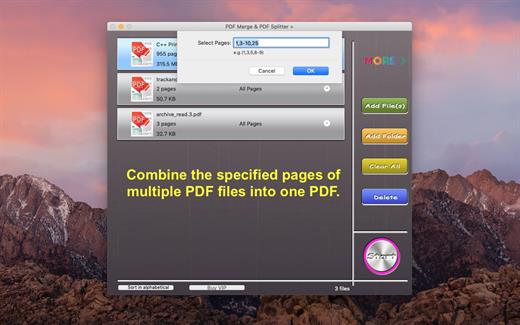
PDF Merge and PDF Splitter + is a very easy-to-use app that allows you to quickly merge multiple PDFs into one PDF or split specified pages into a new PDF.

Key Features:


  • Merge multiple PDF files into one PDF.
  • Merge password-protected PDF files, but you must know the password.
  • Support drag and drop.
  • Support drag item to sort.
  • Sort in alphabetical.
What’s New

Version 6.4.6:


  • Release notes were unavailable when this listing was updated.
Compatibility

macOS 10.12 or later


Release Name: PDF Merge & PDF Splitter + 6.4.6
Size: 6.1 MB
Links: HOMEPAGE – NFO – Torrent Search

Download: RAPiDGATOR
4 Comments
Aug 29

Xliff Editor 4.1

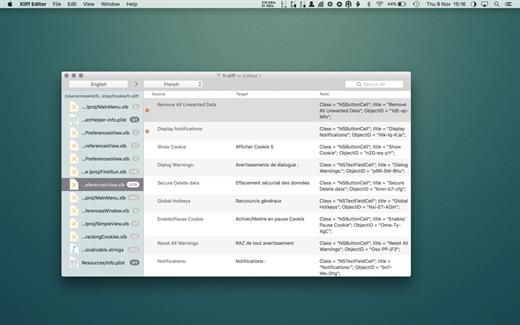
Xliff Editor provides the easiest way of editing your XLIFF files. No more messing around with the XML format, or worrying about file corruption. Xliff Editor includes full search support, handy keyboard shortcuts, and even basic read support for SDLXliff files!

XLIFF files are based on the standard XML format, and are used specifically to exchange localisation data. Xcode 6 introduced the ability to export/import all your localisation data, taking away the need for sending various file formats to your localisers for translating. The XLIFF format makes translating a cinch, as it removes all the layout and formatting, and just provides a simple text-to-text translation mechanism for your translators. (Currently only XLIFF v1.2 files are supported.)

Features

  • Highlighted search
  • Spell checker
  • Easy recognition of un-translated strings
  • XLIFF, XLF file support
  • SDLXIFF read support with export to XLIFF
  • Support for alt-trans and seg-source nodes
What’s New

Version 4.1:


  • interim release to migrate update manifest
Compatibility

macOS 10.13 or later
Apple Silicon or Intel Core processor


Release Name: Xliff Editor 4.1
Size: 7.3 MB
Links: HOMEPAGE – NFO – Torrent Search

Download: RAPiDGATOR
4 Comments