Please REGISTER or RENEW your account on RAPiDGATOR.net and support us by doing through all RAPiDGATOR working download links on main posts...
Aug 30

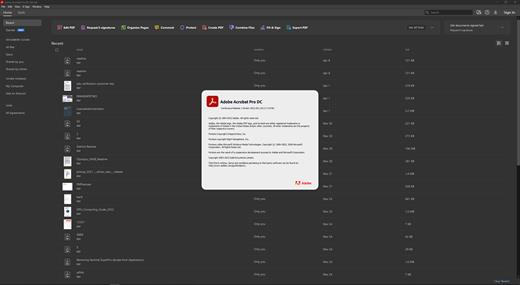
Adobe Acrobat Pro DC 2026 26.2.21869

Description: Adobe Acrobat Pro DC is the leading PDF converter and much more. Adobe Acrobat Pro DC software lets you deliver professional PDF communications. It's packed with smart tools that give you even more power to communicate. Create and edit PDF files with rich media included, share information more securely, and gather feedback more efficiently.
Adobe Acrobat Pro DC software is the advanced way for business professionals to create, combine, control, and deliver more secure, high-quality Adobe PDF documents for easy, more secure distribution, collaboration, and data collection.

Assemble electronic or paper files into reliable PDF documents that are easy to share with others using free Adobe Reader. You can assemble even Web sites, engineering drawings, and e-mail.

With Adobe Acrobat Pro DC you can manage document reviews, synthesizing feedback from multiple reviewers while preserving document format and integrity. Extend commenting capabilities to anyone using Adobe Reader. Windows users can design intelligent Adobe PDF forms that include business logic, such as calculations and data validations, to help increase the accuracy of data collection while reducing the costs of manual data entry.

Use Adobe Acrobat Pro DC to create high-impact PDF communications, collaborate more easily, and streamline reviews. Adobe Acrobat Dynamic PDF helps you get more done - easier, faster, better.

Edit PDF files
With Adobe Acrobat Pro DC, you can make minor edits to text and images right in your PDF file without requiring the original document or graphic. Edit text in a PDF. Fix a typo, change a font, or add a paragraph to your PDF as easily as you do in other applications using a new point-and-click interface. Edit images in a PDF. Resize, replace, and adjust images in your PDF with no need to track down the original file or graphic.

Export from PDF files
Reduce the time you spend retyping information stuck in PDF files. Convert PDF files to editable Microsoft Office documents. And save fonts, formatting, and effort.
Convert PDF files to Word. Save your PDF as a Microsoft Word document and take your fonts, formatting, and layouts with you. Convert PDF files to Excel. Turn your PDF or just part of it into an editable Excel spreadsheet you can use for data analysis right away. Convert PDF files to PowerPoint. Get a head start on new projects by saving a PDF file as a fully editable PowerPoint presentation.

Create PDF files
Stop worrying about whether the files you send will look right on other people's screens. Turn documents into PDF files anyone can reliably view with free Adobe Reader.
Convert Word, Excel, or PowerPoint to PDF. Right from your Office application in Windows, you can create PDFs, start a shared review, restrict PDF edits, and more. Print to PDF. Convert files to PDF from virtually any application that prints simply by selecting Adobe PDF as your printer. Scan to PDF. When you need to turn a paper document or form into a digital file, just scan it to create a searchable PDF file you can edit. Convert HTML pages to PDF. Save web pages as PDF files to archive web content, review the pages offline, or print them more reliably.

Create and analyze forms
Cut the time you spend creating forms, rekeying data, and correcting errors. Distribute forms online, and then collect responses and analyze results in real time.
Create new PDF and web forms. Customize professional templates or design from scratch with the Adobe FormsCentral desktop app included in Adobe Acrobat Pro DC. Collect form responses with FormsCentral. Easily collect responses by moving your PDF or web forms online with the Adobe FormsCentral online service. Convert existing forms to fillable PDFs. Type less, gather more. Quickly convert your paper, Word, or Excel forms to fillable PDF forms. Collect form responses using Adobe Acrobat tools. Compile returned forms into one PDF, or host forms using a network folder or Microsoft SharePoint server.

System Requirements:
Intel® or AMD processor; 1.5GHz or faster processor
Windows 11 (64 bit), Windows 10 (64 bit) version 1809 or later, Windows Server 2016 (64 bit), or Windows Server 2019 (64 bit)
2GB of RAM
4.5GB of available hard-disk space.
1024x768 screen resolution
Video hardware acceleration (optional)

Release Name: Adobe Acrobat Pro DC 2026 26.2.21869
Size: 1.6 GB
Links: HOMEPAGE – NFO – Torrent Search

Download: RAPiDGATOR
1 Comments
Aug 30

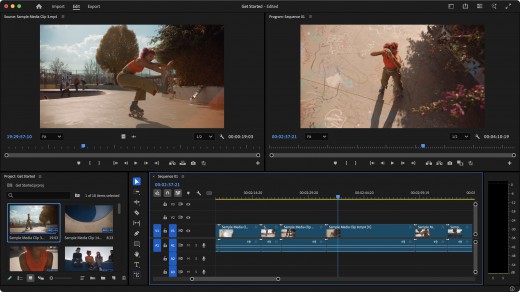
Adobe Premiere Pro 2026 v26.3.2 (x64) Pre-Cracked

Description: Video editing that’s always a cut above. Premiere Pro is the leading video editing software for film, TV, and the web. Creative tools, integration with other Adobe apps and services, and the power of Adobe Sensei help you craft footage into polished films and videos in one seamless workflow. And Premiere Rush, our new app, is included with your subscription so you can capture footage and start editing on all your devices, anywhere. Edit footage in any modern format, from 8K to virtual reality. Broad native file support and simple proxy workflows make it easy to work with your media, even on mobile workstations. Delivering content that’s optimized for any screen or platform is faster than ever.

Features :


  • Smart tools. Better storytelling.
    Premiere Pro is used by Hollywood filmmakers, TV editors, YouTubers, videographers — anyone with a story to tell, including you.
  • Stay in your creative flow.
    Premiere Pro is the industry leader for editing everything from fast-turn TV series to feature films. Integrated, efficient workflows let you polish your work without leaving your timeline. And automated tools powered by Adobe Sensei speed up time-consuming tasks, so you can focus on your story.
  • Any camera. Any format. Any platform.
    Edit footage in any modern format, from 8K to virtual reality. Broad native file support and simple proxy workflows make it easy to work with your media, even on mobile workstations. Delivering content that’s optimized for any screen or platform is faster than ever.
  • Everything you need. Right where you need it.
    Along with tools for color, audio, and graphics, Premiere Pro works seamlessly with other apps and services, including After Effects, Adobe Audition, and Adobe Stock. Open a Motion Graphics template from After Effects or download one from Adobe Stock and customize it — all without leaving the app. And Premiere Pro integrates with hundreds of partner technologies.
  • Precise and simple color grading
    Take the guesswork out of curve adjustments with innovative Lumetri Color tools. Each curve has two axes with paired values, making selective color grading easy and accurate.
  • Improve audio instantly
    New sliders in the Essential Sound panel let you dial down or remove background noise and reverb for incredible results.
  • Infographics with Motion Graphics templates
    Drag and drop spreadsheets into new infographics Motion Graphics templates to quickly generate visualizations of your data. Any updates to your spreadsheets are automatically updated in your infographic.
Release Name: Adobe Premiere Pro 2026 v26.3.2 (x64) Pre-Cracked
Size: 4.5 GB
Links: HOMEPAGE – NFO – Torrent Search

Download: RAPiDGATOR
3 Comments
Aug 30

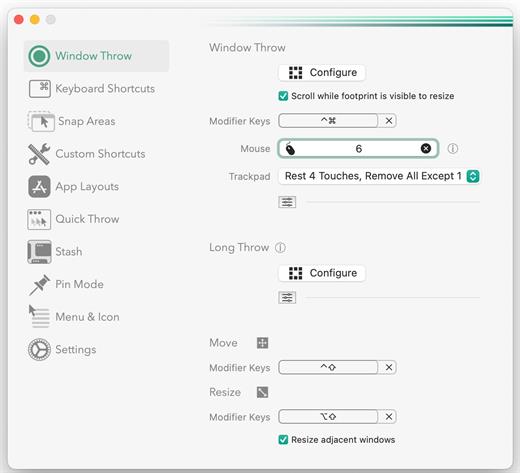
Rectangle Pro 3.89

Snap windows faster in this featureful Rectangle superset. Toss windows in the right places with cursor movement, move multiple windows with one command, create custom shortcuts, and more.

One simple key combo
• 16 window sizes & positions
• No need to remember a ton of keyboard shortcuts, but those are all here, too

A Supercharged Rectangle Superset
• Keyboard shortcuts
• Drag windows to screen edges to snap

PRO
• Move and resize by holding a key and moving your cursor
• Snap windows under your cursor, even if not in focus
• Custom shortcuts for any size & position
• Sync your settings over iCloud

The Lightweight Gesture Champ
• Unlike touch gesture based window managers, Rectangle Pro only consumes CPU when configured modifier keys are pressed. Even then it’s minimal
• Rectangle Pro is a breeze to learn, and doesn’t conflict with any built-in macOS behavior
• Use it with any device that moves the cursor

Unmatched Customization and Actions
• Create keyboard shortcuts with any window size and location, and specify what happens on each repeated execution
• Fill left and right actions make it simple to maximize screen usage without overlap
• Match the keyboard shortcut window management of that other OS

Multiple Windows at Once
• Cascade windows
• Move all windows for an app to another display or screen half
• Tile top windows in a 2×2 or 2×3 grid

Additional Efficiency and Speed
• Each window action can be configured with a quick, simple cursor movement and modifier key combination
• Just press and release modifier keys while you move your cursor over the window you want to snap

What’s New

Version 3.89:


  • Release notes were unavailable when this listing was updated.
Compatibility

macOS 10.12 or later
Apple Silicon or Intel Core processor


Release Name: Rectangle Pro 3.89
Size: 11.3 MB
Links: HOMEPAGE – NFO – Torrent Search

Download: RAPiDGATOR

4 Comments
Aug 30

ChatGPT for macOS 26.825.41651

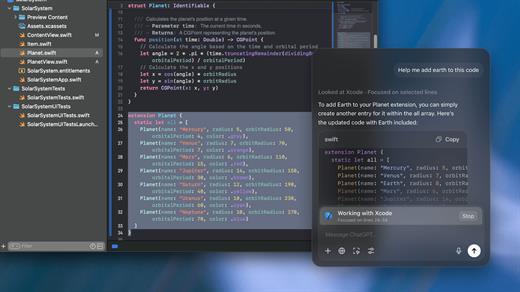
ChatGPT for Mac is OpenAI’s latest desktop AI application, bringing ChatGPT, Work, and Codex together in one powerful workspace. It is designed to help you write, research, create, analyze information, and build software—all directly from your Mac.

Chat: Fast and Intelligent Assistance

Use ChatGPT for everyday questions, brainstorming, writing, translation, research, file analysis, and problem-solving. With quick access from your desktop, you can get AI assistance without constantly switching between applications.

Work: Get More Done

Work is designed for longer, multi-step tasks. It can research topics, analyze information, and create finished deliverables such as documents, spreadsheets, presentations, reports, and websites. It can also work with local files and supported desktop applications when you grant permission.

Codex: Your AI Coding Agent

Codex is the dedicated software-development experience inside the ChatGPT desktop app.

It can help developers write and debug code, run tests and commands, review changes, and work with local folders, repositories, terminals, and developer tools. The latest Codex experience also supports inline editing, pull request review, faster computer use, and multiple repositories in a single project.

Codex is especially useful for developers who want an AI agent that can handle complex, long-running coding tasks rather than simply generate code snippets.

Voice on Your Desktop

ChatGPT Voice lets you interact naturally with ChatGPT using your microphone. In Work and Codex, you can also use voice to start tasks, check progress, and coordinate ongoing work.

Quick Desktop Access

The Mac app is designed to fit naturally into your workflow, giving you fast access to ChatGPT without needing to open a browser. You can keep ChatGPT available while working in other applications.

Built for Modern Mac Users

The latest ChatGPT desktop app requires macOS 14 or later and supports both Apple Silicon (M1 or newer) and Intel Macs.

One App, Three Powerful Experiences

With the latest version, ChatGPT for Mac brings together:


  • Chat — Everyday AI assistance and conversations
  • Work — Research, analysis, and finished deliverables
  • Codex — Advanced software development and coding

The result is a more complete AI workspace that can help with everything from quick questions and creative work to complex research and software engineering.

What’s New

Version 26.825.41651:


  • Release notes were unavailable when this listing was updated.
Compatibility

macOS 14.0 and Apple Silicon (M1 or better)


Release Name: ChatGPT for macOS 26.825.41651
Size: 688.7 MB
Links: HOMEPAGE – NFO – Torrent Search

Download: RAPiDGATOR
4 Comments
Aug 30

RAR Unarchiver – Unzip RAR ZIP 3.5.5

The Unarchiver – Unzip RAR ZIP is a very easy-to-use app that allows you to decompress dozens of archive formats. such as: Rar, Zip, 7z, Tar, Xz, Iso, Lha, bz2, Lzh, cab, cpio, jar, exe, pkg, dms, tbz, swf, Gzip, Bzip2… and it can also compress and encrypt any files to make private files more secure.

Key Features


  • Support preview and decompress dozens of archive formats.
  • archive files quickly.
  • Encrypt the archive file.
What’s New

Version 3.5.5:


  • Release notes were unavailable when this listing was updated.
Compatibility

macOS 10.12 or later


Release Name: RAR Unarchiver – Unzip RAR ZIP 3.5.5
Size: 14.2 MB
Links: HOMEPAGE – NFO – Torrent Search

Download: RAPiDGATOR

3 Comments
Aug 30

PDF to Word & Document Converter 6.3.2

PDF to Word&Document Converter is an app that enables you to quickly convert PDF documents into other format files.​

The app comes with batch processing capabilities. user can easily choose to convert only certain pages for each document.

Key Features:

  • Batch convert PDF to Word files
  • Batch convert PDF to PowerPoint files
  • Batch convert PDF to EPUB files
  • Batch convert PDF to txt files
  • Batch convert PDF to image files
  • Batch convert PDF to html files
  • Batch convert PDF to xml files
  • Batch convert PDF to rtf files
  • Extract Image
  • Offers support for selective conversion
  • Comes with drag and drop support
What’s New

Version 6.3.2:


  • Release notes were unavailable when this listing was updated.
Compatibility

macOS 10.12 or later


Release Name: PDF to Word&Document Converter 6.3.2
Size: 7 MB
Links: HOMEPAGE – NFO – Torrent Search

Download: RAPiDGATOR
3 Comments
Aug 30

CleanMyMac 5.6.0

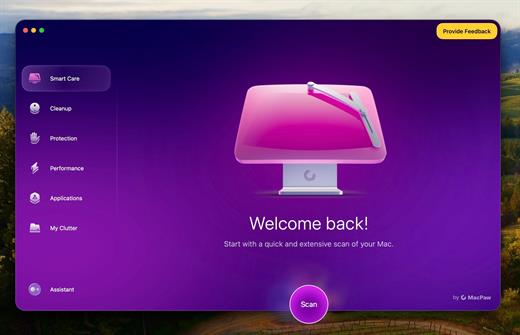
CleanMyMac is all-in-one package to awesomize your Mac. It cleans megatons of junk and makes your computer run faster. Just like it did on day one.

CleanMyMac makes space for the things you love. Sporting a range of ingenious new features, CleanMyMac lets you safely and intelligently scan and clean your entire system, delete large, unused files, reduce the size of your iPhoto library, uninstall unneeded apps or fix the ones that started to work improperly, manage all your extensions from one place and do much more – all from one newly designed and beautifully simple interface.

Note:

wait a second to let it activate itself

What’s New

Version 5.6.0:


  • Release notes were unavailable when this listing was updated.
Compatibility

macOS 14.0 or later


Release Name: CleanMyMac 5.6.0
Size: 159.8 MB
Links: HOMEPAGE – NFO – Torrent Search

Download: RAPiDGATOR

3 Comments
Aug 30

PDF Compressor & PDF Toolbox 6.3.7

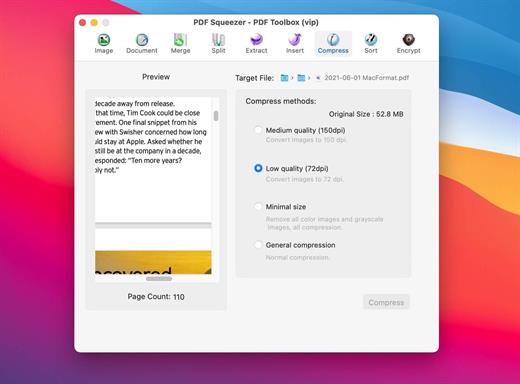
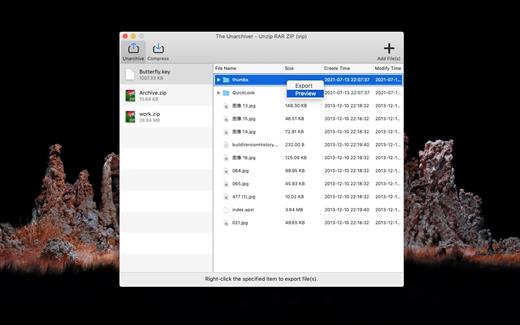
PDF Squeezer – PDF Toolbox is designed for operating PDF files and contains almost all operations you can imagine, such as: compress, merge, split, extract, insert, extract image, convert image, extract text, sequence, encrypt, etc. If you are worried about operating PDF files, download it, it’s so fantastic!

FEATURES:


  • Merge
    You can easily merge various PDF files that you like into one which is convinent for managing and reading;
  • Split
    You can arbitrarily split a PDF file at your convenience;
  • Extract
    You can arbitrarily extract page number from one or more PDF files and merger into a new PDF file;
  • Insert
    You can insert one PDF file into another;
  • Extract image
    You can specify the page number of PDF file, and then extract the images or convert the whole page into any other image files in specified format(png,jpeg,bmp,tiff,gif);
  • Document
    You can extract text in PDF and save as txt or rtfd format;
  • Compress
    You can compress PDF files making files smaller to save your valuable disk space;
  • Sort
    You can randomly sequence the page number of PDF file;
  • Encrypt
    You can encrypt PDF files;
What’s New

Version 6.3.7:


  • Performance improvements.
Compatibility

macOS 10.12 or later


Release Name: PDF Compressor & PDF Toolbox 6.3.7
Size: 10 MB
Links: HOMEPAGE – NFO – Torrent Search

Download: RAPiDGATOR
3 Comments
Aug 30

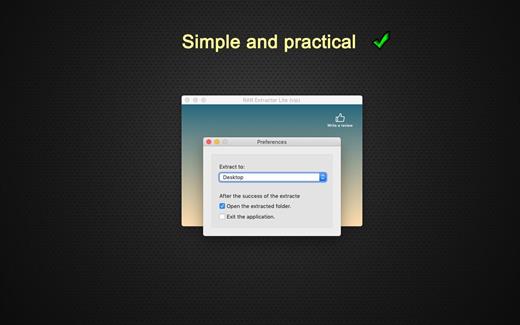
RAR Extractor – The Unarchiver Pro 6.6.3

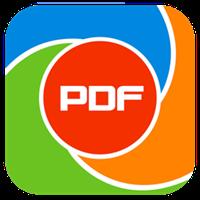
WinRAR & Unzip & Open any file. RAR Extractor – The Unarchiver is a specialized application program which aims at Rar,Zip,Tar,7-zip,Gzip,Bzip2,XZ,Tar.gz,bz2,iso,pkg,swf,exe,jar,xip,dms… and dozens of other compressed files, you can use it to extract archive files conveniently, double click to decompress, fast and safely.

Key Features:


  • Rar,Zip,Tar,7-zip,Gzip,Bzip2,XZ,Tar.gz,bz2,iso,pkg,swf,exe,jar,xip,dms… and dozens of other compressed files.
  • Support extracting password-protected archive files,but you must know the password.
  • Batch extracting.
  • Double click to extract archive files to extract archive.
  • Drag and drop archive files to the dock icon to extract archive.
What’s New

Version 6.6.3:


  • Release notes were unavailable when this listing was updated.
Compatibility

macOS 10.12 or later 64-bit


Release Name: RAR Extractor – The Unarchiver Pro 6.6.3
Size: 10.3 MB
Links: HOMEPAGE – NFO – Torrent Search

Download: RAPiDGATOR
3 Comments
Aug 30

Clip Studio Paint EX 5.1.2

Description: CLIP STUDIO PAINT is the world’s leading comic and manga creation software and delivers powerful art tools for every manga and comic artist. It is designed both for artists wishing to enhance and perfect their pen-and-paper illustrations and for artists wishing to complete the entire process of creating manga and comics digitally. Sketching, inking and coloring your Comics and Manga has never been easier.

Features


  • Cel animation support (frame-by-frame animation)
    Also known as frame-by-frame or traditional animation, this technique makes an object or character appear to move on its own. The artist can draw individual cels (frames), which act as transparent sheets that can be layered, and create the illusion of movement when the series of cels is played as a continuous sequence.
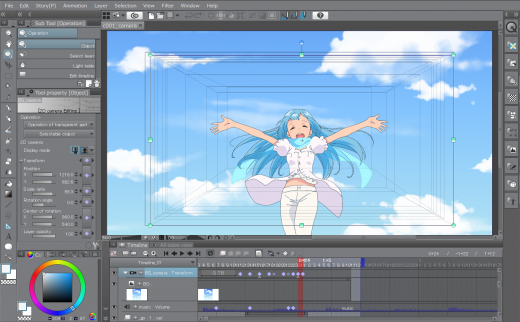
  • Animation timeline
    The timeline provides granular control over timing and display adjustments to create fluid movement of the animations.
  • Light table function
    The light table illuminates pages, rendering them semi-transparent and making it easier to use multiple layers for reference, which is ideal for creating in-betweens (transitions between cels), and clean-line art for cels and illustrations.
  • Onion skin display
    Onion skinning is a technique used in creating animated cartoons and editing movies to see several cels at once, allowing the animator or editor to determine how to create or adjust an image based on the previous image in the sequence.
  • Multiple export options
    Drawings and animations can be exported as sequential images, GIFs, and movie formats.
  • CLIP STUDIO PAINT EX Features
    Formerly Manga Studio. CLIP STUDIO PAINT EX has all of the features of CLIP STUDIO PAINT PRO, professional story creation tools, as well as other special features, that make it the ultimate illustration tool for serious comic, manga and graphic artists.
  • Coloring
    Powerful coloring tool make CLIP STUDIO PAINT your all-in-one manga and comic creation solution. Choose from an abundance of preset colors, create custom color sets or blend colors naturally as if you were mixing them with your own fingers using the color blend options.
  • Pens, Pencils, Brushes & Tools
    Create original sketches using your mouse or draw naturally with a pen tablet. Draw using a suite of familiar tools including pens, pencils, brushes and selection tools. With vector mapping technology and smart pen pressure sensing, CLIP STUDIO PAINT gives you incredible sensation of drawing on paper.
  • Panels
    Save time by easily adding and customizing panels for your pages or create panels of all shapes and sizes using Bezier curves.
  • Advanced Brush Effects
    Simulate real work brushes with the new dedicated air brush which allows multiple air brush effects. Use the tone brush to create and share a wider array of visual effect.
  • Vector Tools
    Vector Toolkit allows maximum flexibility, speeds up production and gives you the ability to view the centerline of vectors makes spotting trouble areas in need of smoothing a breeze. Coupled with the vector snapping tools, artists are now able to achieve exactly the lines they want.
  • New Advancements
    Speed up your workflow with amazing advancements that include new layer effects like screen, overlay and multiply, even brushes can now have effects of their own.
  • Templates
    Design with attention to detail and save time on tedious projects with tons of ready-to-use page template options.
  • Importing & Exporting
    CLIP STUDIO PAINT imports and exports to common file formats including layered PSD files. Resize with no loss in quality.
  • 3D Options
    CLIP STUDIO PAINT EX now offers support for 3D objects and figures allows for reference and background materials. Manipulate 3D objects directly on the screen or use preset poses. Drag and Drop other 3D objects on the canvas.
  • Compatibility
    Backwards compatibility allows you to import all of your Manga Studio 4 EX and 4 Debut files including your .CPG page files and your .CST story (project) files into CLIP STUDIO PAINT PRO or CLIP STUDIO PAINT EX.
  • Text
    Advanced text allows adjustments to letter and word spacing, mixing of fonts, anti-aliasing, italics and underline options, line spacing and many more.
  • Faster Than Ever
    64-Bit Architecture & Multi-Core CPU Support makes Manga Studio faster than ever with the capability to handle high definition and multiple layer art projects even more smoothly.
  • CLIP STUDIO PAINT Is Perfect for Comic Illustration
    Adobe Photoshop has become the standard drawing and illustration tool, used in many industries, but it will not only cost you more, it’s primarily a photo editing tool. Photoshop just doesn’t have the tools and features that are ideal for comic illustration, CLIP STUDIO PAINT does.
  • Multiple-Page Story Layout
    Create your whole story with the Multiple-Page Story Layout. This allows manga and comic artists to streamline their creative process and easily access their story files in one convenient area (EX only).
Release Name: Clip Studio Paint EX 5.1.2
Size: 480 MB
Links: HOMEPAGE – NFO – Torrent Search

Download: RAPiDGATOR
2 Comments